---
published: true
layout: post
title: Using Monaco Editor To Govern (Guide) API Artifact Changes
tags:
- Editor
- Tools
- IDE
- Artifacts
image: >-
https://kinlane-productions2.s3.amazonaws.com/algorotoscope-master/green-circuit-nyc-57th-1.jpeg
---
[The Monaco Editor from Microsoft](https://github.com/microsoft/monaco-editor) is a great base for building any custom editor for managing API artifacts like OpenAPI, JSON Schema, Spectral Rules, and APIs.json. Monaco is the same editor used in VSCode, and is dead simple to embed on any web page and used to edit your YAML or JSON artifacts. I am customizing my editors for each of these API artifacts in my new API Evangelist platform, and I am able to quickly wire the editor up to the underlying GitHub repository storing artifacts, and host HTML UI with editor on GitHub pages—making for a robust API editor with just a few lines of code.
```
```
Any YAML artifact I load up in Monaco via a GitHub repository immediately becomes editable and saves on a change event. I’ve built a separate local save option that will accumulate until you choose to commit back to the repository and provide a more detailed message about what was changed. [I can also power intellisense in the API artifact editor based upon adding more properties to the underlying JSON Schema behind each artifact](https://code.visualstudio.com/docs/languages/json), adding further guidance for teams editing their APIs. The editor easily allows me to highlight and link to specific line numbers, which are returned when I lint any artifact on the side using Spectral rules.
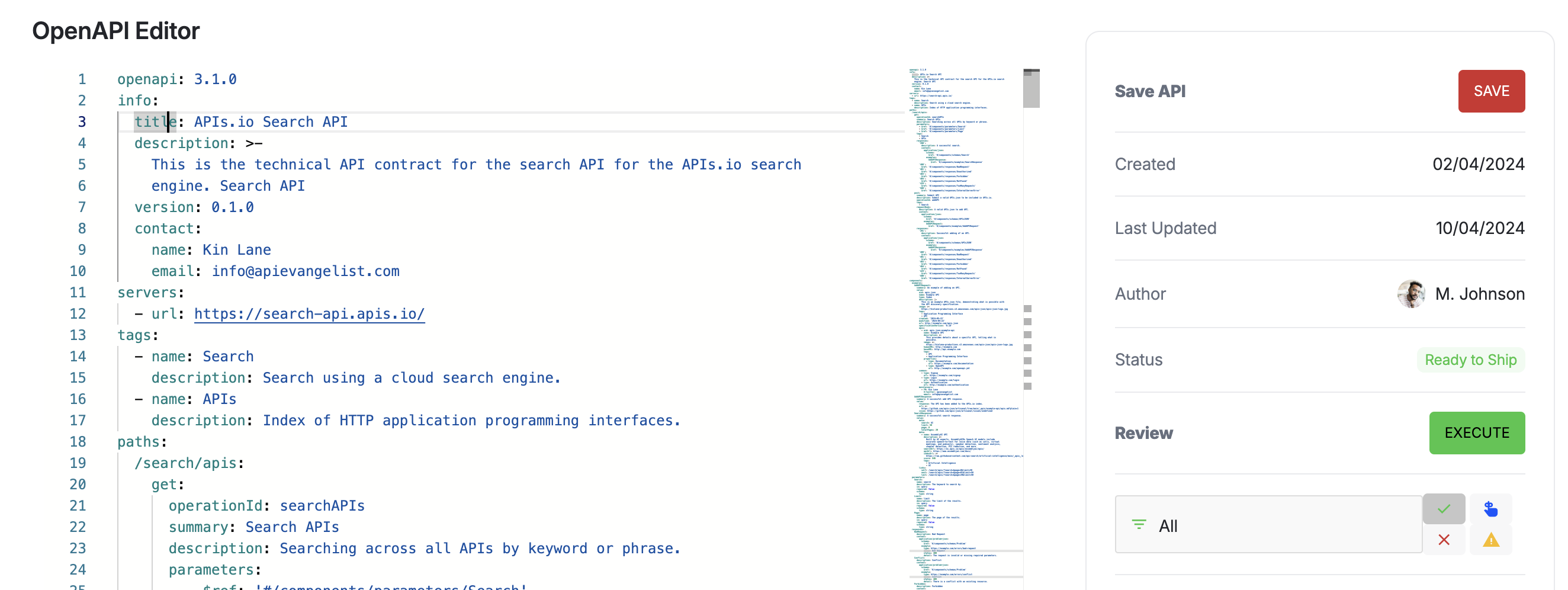 I am considering other ways I can embed small little Monaco Editors for editing policies and rules, but also individual API components like schema, parameters, responses, and other building blocks of APIs. It really works well for editing any YAML or JSON artifact while providing rules based guidance using Spectral, and intellisense powered guidance using JSON Schema—something that translates from the API governance dashboard I am building, but also to VSCode locally. Win Win! This is an ideal intersection for API governance (guidance).
As I build the next generation of my API Evangelist platform I am working to get more organized, standardized, and deliberate regarding the packages and tooling I use. I am putting a lot of thought into each component and how it works with my underlying specs and GitOps approach. Monaco Editor excels in this environment, and it is a natural fit for helping me augment API operations with what I hope is a new take on API discovery and governance, and one that will meet developers where they are already at-—in VSCode.
I am considering other ways I can embed small little Monaco Editors for editing policies and rules, but also individual API components like schema, parameters, responses, and other building blocks of APIs. It really works well for editing any YAML or JSON artifact while providing rules based guidance using Spectral, and intellisense powered guidance using JSON Schema—something that translates from the API governance dashboard I am building, but also to VSCode locally. Win Win! This is an ideal intersection for API governance (guidance).
As I build the next generation of my API Evangelist platform I am working to get more organized, standardized, and deliberate regarding the packages and tooling I use. I am putting a lot of thought into each component and how it works with my underlying specs and GitOps approach. Monaco Editor excels in this environment, and it is a natural fit for helping me augment API operations with what I hope is a new take on API discovery and governance, and one that will meet developers where they are already at-—in VSCode.