# Sinch Developer Documentation
> LLMs.txt containing a map of all the documentation files for Sinch.
## Numbers API
The Numbers API enables you to search for, view, and activate numbers. It's considered a precursor to other APIs in the Sinch product family. The numbers API can be used in tandem with any of our APIs that perform messaging or calling.
- [Numbers API AI Best Practices | Numbers API | Sinch](https://developers.sinch.com/docs/numbers/ai-support.md): How to use various AI tools with Numbers API
- [Helpful links | Numbers API | Sinch](https://developers.sinch.com/docs/numbers/helpful-links.md): A list of links to common terms and highlighted FAQ for the Numbers API.
- [Number orders | Numbers API | Sinch](https://developers.sinch.com/docs/numbers/kyc-numbers-order.md): AA guide on how to make multiple API calls in order to complete a numbers order using Numbers API.
- [Imported and Hosted Numbers Overview | Numbers API | Sinch](https://developers.sinch.com/docs/numbers/api-reference/imported-numbers-overview.md): API for importing, hosting, and qualifying numbers to enable them for use with Sinch SMS text messaging services.
- [Getting started | Numbers API | Sinch](https://developers.sinch.com/docs/numbers/getting-started.md): Your first steps to get started with the Sinch Numbers API.
- [Sinch SDKs | Numbers API | Sinch](https://developers.sinch.com/docs/numbers/sdk.md): Learn about how to use the Sinch SDKs with the Numbers API.
- [Basic authentication | Numbers API | Sinch](https://developers.sinch.com/docs/numbers/api-reference/authentication/basic.md): How to perform basic authentication for the Sinch Numbers API.
- [OAuth 2.0 authentication | Numbers API | Sinch](https://developers.sinch.com/docs/numbers/api-reference/authentication/oauth.md): How to perform authentication using OAuth 2.0 for the Numbers API.
- [Provisioning statuses | Numbers API | Sinch](https://developers.sinch.com/docs/numbers/api-reference/error-codes/provisioning-errors.md): A list of possible statuses for provisioning a number.
- [HTTP status codes | Numbers API | Sinch](https://developers.sinch.com/docs/numbers/api-reference/error-codes/status-codes.md): A summary of status codes for the Numbers API.
- [.NET SDK Reference | Numbers API | Sinch](https://developers.sinch.com/docs/numbers/sdk/dotnet/syntax-reference.md): Learn the syntax of the Sinch .NET SDK for Numbers API.
- [Node.js SDK Reference | Numbers API | Sinch](https://developers.sinch.com/docs/numbers/sdk/node/syntax-reference.md): Learn the syntax of the Sinch Node.js SDK for Numbers API.
- [Java SDK Reference | Numbers API | Sinch](https://developers.sinch.com/docs/numbers/sdk/java/1.0/syntax-reference.md): Learn the syntax of the Sinch Java SDK for Numbers API.
- [Java SDK Reference | Numbers API | Sinch](https://developers.sinch.com/docs/numbers/sdk/java/syntax-reference.md): Learn the syntax of the Sinch Java SDK for Numbers API.
- [Python SDK Reference | Numbers API | Sinch](https://developers.sinch.com/docs/numbers/sdk/py/1.0/syntax-reference.md): Learn the syntax of the Sinch Python SDK for Numbers API.
- [Python SDK Reference | Numbers API | Sinch](https://developers.sinch.com/docs/numbers/sdk/py/syntax-reference.md): Learn the syntax of the Sinch Python SDK for Numbers API.
- [Migrating from un-versioned Java SDK to versioned Java SDK | Numbers API | Sinch](https://developers.sinch.com/docs/numbers/sdk/java/1.0/migration-guides/migration-to-versioned.md): A guide on how to migrate from the un-versioned Java SDK to the versioned Java SDK
- [Imported Numbers and Hosting Orders](https://developers.sinch.com/docs/numbers/api-reference/imported-hosting.md): API for importing, hosting, and qualifying numbers to enable them for use with Sinch SMS text messaging services.
- [Numbers | Sinch](https://developers.sinch.com/docs/numbers/api-reference/numbers.md): # Overview The Numbers API enables you to search for, buy, view, and manage numbers. It's considered a precursor to other APIs in the Sinch product family. The numbers API can be used in tandem with any of our APIs that perform messaging or calling. Once you have bought your numbers, you can then use the various other APIs, such as [SMS](https://developers.sinch.com/docs/sms/) or [Voice](https://developers.sinch.com/docs/voice/), to assign and use those numbers. ## Choosing how to buy a number Use the [Number Order](https://developers.sinch.com/docs/numbers/api-reference/numbers/number-order) API to buy numbers. It supports numbers from all regions and of all number types, and it collects any registration (KYC) information and supporting documents a region requires: 1. Check what the region and number type require ("Lookup number requirements"). 2. Find a number to buy ("Search for available phone numbers" in the [Available Numbers](https://developers.sinch.com/docs/numbers/api-reference/numbers/available-number) API), or skip this step and order by criteria instead. 3. Create the order, provide any required registration information and documents, and submit it. For a step-by-step walkthrough, see [Ordering numbers that meet specific requirements](https://developers.sinch.com/docs/numbers/kyc-numbers-order). **Deprecated:** The Available Numbers activation endpoints, "Activate a new phone number" (`availableNumbers/{phoneNumber}:rent`) and "Rent any number that matches the criteria" (`availableNumbers:rentAny`), are deprecated and only support US `LOCAL` numbers. They remain available for existing integrations, but new integrations should use the Number Order API. The Available Numbers search endpoints aren't deprecated and work for all regions and number types. ## Numbers REST formats and conventions Let's take a brief look at some of the formats used in the REST API. ### JSON JSON (`application/json`) is the content type of both requests and responses if not otherwise specified. Requests with invalid JSON will be rejected. ### Null values Null values can be omitted in requests and will be omitted in responses. In some cases, explicitly setting `null` will overwrite a previously set value with `null`. ### Phone numbers Only phone numbers in [E.164](https://community.sinch.com/t5/Glossary/E-164/ta-p/7537) standard format are accepted by the API. #### Examples: - **US phone number:** `+13059394139` - **UK phone number:** `+447478727259` - **SE phone number:** `+46113232516` ## Status codes A summary of status codes can be found on the [HTTP status codes page](https://developers.sinch.com/docs/numbers/api-reference/error-codes/status-codes). ## IP addresses for callbacks To successfully use callbacks with Numbers, add the following IP addresses to your allowlist: - 54.76.19.159 - 54.78.194.39 - 54.155.83.128 ## New features New features might result in additional request and response parameters. New request parameters will either have a default value or be considered optional to retain backwards compatibility. It's highly recommended to ignore any unexpected parameters when reading JSON in API responses and in callback handlers.
- [Porting API](https://developers.sinch.com/docs/numbers/api-reference/porting.md): Automated processing of port-in phone number operations
## Conversation API
Send and receive messages globally on many popular channels with ease and confidence when using Sinch's Conversation API. Conversation API is the preferred API for sending mobile messages on SMS and other social channels with Sinch. It is a simple API with unified error messages, consistent request payloads, and common webhook payloads that are channel-agnostic.
- [Conversation API AI Best Practices | Conversation API | Sinch](https://developers.sinch.com/docs/conversation/ai-support.md): How to use various AI tools with Conversation API
- [Capability Query | Conversation API | Sinch](https://developers.sinch.com/docs/conversation/capability.md): Requesting a Capability Query for a contact
- [Callbacks | Conversation API | Sinch](https://developers.sinch.com/docs/conversation/callbacks.md): Registering webhooks and listening to callbacks from the Sinch Conversation API.
- [Supported channels | Conversation API | Sinch](https://developers.sinch.com/docs/conversation/channel-support.md): Sinch Conversation API supported channels.
- [Consent Management | Sinch](https://developers.sinch.com/docs/conversation/consent-management.md): Consent-management available in Conversation API
- [Contact management | Conversation API | Sinch](https://developers.sinch.com/docs/conversation/contact-management.md): Contact management processing when message is send by channel identity
- [Contacts | Conversation API | Sinch](https://developers.sinch.com/docs/conversation/conversation-contacts.md): Understanding Conversation API contacts
- [Key concepts and terms | Conversation API | Sinch](https://developers.sinch.com/docs/conversation/keyconcepts.md): Key concepts and terms for the Sinch Conversation API
- [Types of Conversation API metadata](https://developers.sinch.com/docs/conversation/metadata.md): Learn about the different metadata types, propagation rules, and callback behaviors in Sinch Conversation API.
- [Overview | Conversation API | Sinch](https://developers.sinch.com/docs/conversation/overview.md): An overview of Sinch's Conversation API
- [Postman collection | Conversation API | Sinch](https://developers.sinch.com/docs/conversation/postman-collection.md): The Postman collection for Conversation API
- [Processing Modes | Conversation API | Sinch](https://developers.sinch.com/docs/conversation/processing-modes.md): Processing Modes available in Conversation API
- [Release notes | Conversation API | Sinch](https://developers.sinch.com/docs/conversation/release-notes.md): See how the Sinch Conversation API is evolving and find out about new features and bug fixes.
- [Unified contact ID | Conversation API | Sinch](https://developers.sinch.com/docs/conversation/unified-contact-id.md): Using the Unified Contact ID feature
- [Zapier Integration | Conversation API | Sinch](https://developers.sinch.com/docs/conversation/zapier-int.md): Conversation API Actions and Triggers for Zapier
- [Managing templates | Conversation API | Sinch](https://developers.sinch.com/docs/conversation/templates.md): Managing and send templates messages with the Sinch Conversation API.
- [Webhook routing](https://developers.sinch.com/docs/conversation/callbacks/webhook-routing.md)
- [Sinch Chat | Conversation API | Sinch](https://developers.sinch.com/docs/conversation/channel-support/chat.md): Sinch Conversation API Sinch Chat specific configurations and message conversions.
- [Facebook Messenger | Conversation API | Sinch](https://developers.sinch.com/docs/conversation/channel-support/facebook-messenger.md): Sinch Conversation API Facebook Messenger specific configurations and message transcoding.
- [Instagram | Conversation API | Sinch](https://developers.sinch.com/docs/conversation/channel-support/instagram.md): Sinch Conversation API Instagram specific configurations and message transcoding are described below.
- [KakaoTalk | Conversation API | Sinch](https://developers.sinch.com/docs/conversation/channel-support/kakaotalk.md): Sinch Conversation API KakaoTalk specific configurations and message transcoding.
- [LINE | Conversation API | Sinch](https://developers.sinch.com/docs/conversation/channel-support/line.md): Sinch Conversation API LINE specific configurations and message transcoding.
- [MMS | Conversation API | Sinch](https://developers.sinch.com/docs/conversation/channel-support/mms.md): Sinch Conversation API MMS specific configurations and message transcoding.
- [Prioritizing Channels | Conversation API | Sinch](https://developers.sinch.com/docs/conversation/channel-support/prioritize-channels.md): Sinch Conversation API channel prioritization
- [Channel properties | Conversation API | Sinch](https://developers.sinch.com/docs/conversation/channel-support/properties.md): Sinch Conversation API channel specific properties.
- [Sinch Push | Conversation API | Sinch](https://developers.sinch.com/docs/conversation/channel-support/push.md): Sinch Conversation API Sinch Push specific configurations and message conversions.
- [RCS | Conversation API | Sinch](https://developers.sinch.com/docs/conversation/channel-support/rcs.md): Sinch Conversation API RCS specific configurations and message conversions.
- [SMS | Conversation API | Sinch](https://developers.sinch.com/docs/conversation/channel-support/sms.md): Sinch Conversation API SMS specific configurations and message conversions.
- [Telegram Bot | Conversation API | Sinch](https://developers.sinch.com/docs/conversation/channel-support/telegram.md): Sinch Conversation API Telegram Bot specific configurations and message transcoding.
- [Viber Business Messages | Conversation API | Sinch](https://developers.sinch.com/docs/conversation/channel-support/viber-business.md): Sinch Conversation API Viber Business Messages specific configurations and message transcoding are described below.
- [WeChat | Conversation API | Sinch](https://developers.sinch.com/docs/conversation/channel-support/wechat.md): Sinch Conversation API WeChat specific configurations and message transcoding in WeChat.
- [WhatsApp | Conversation API | Sinch](https://developers.sinch.com/docs/conversation/channel-support/whatsapp.md): Sinch Conversation API WhatsApp specific configurations and message conversions.
- [Getting started | Conversation API | Sinch](https://developers.sinch.com/docs/conversation/getting-started.md): Get started with Conversation API.
- [Conversation API Message types](https://developers.sinch.com/docs/conversation/message-types.md)
- [Front integration sample | Sinch](https://developers.sinch.com/docs/conversation/sample-code/conversation-sample-code-front.md): Front is a cloud-based customer communication platform that allows you to collaborate, comment, assign and respond to your customer's support needs -- all from the convenience of one inbox regardless of which mobile messaging channels your customers are using.
- [Card Message | Conversation API | Sinch](https://developers.sinch.com/docs/conversation/message-types/card-message.md): The card message format.
- [Carousel Message | Conversation API | Sinch](https://developers.sinch.com/docs/conversation/message-types/carousel-message.md): The carousel message format.
- [Choice Message | Conversation API | Sinch](https://developers.sinch.com/docs/conversation/message-types/choice-message.md): The choice message format.
- [List Message | Conversation API | Sinch](https://developers.sinch.com/docs/conversation/message-types/list-message.md): The list message format.
- [Location Message | Conversation API | Sinch](https://developers.sinch.com/docs/conversation/message-types/location-message.md): The location message format.
- [Media Message | Conversation API | Sinch](https://developers.sinch.com/docs/conversation/message-types/media-message.md): The media message format.
- [Text Message | Conversation API | Sinch](https://developers.sinch.com/docs/conversation/message-types/text-message.md): The text message format.
- [API Reference | Conversation API - Batch | Sinch](https://developers.sinch.com/docs/conversation/api-reference/batch-api.md): Perform batch operations on select Conversation API Resources.
- [Sinch Chat Message Support | Conversation API | Sinch](https://developers.sinch.com/docs/conversation/channel-support/chat/message-support.md): Learn which messages are supported natively, which must be converted, and view examples of received messages in Sinch Chat.
- [Sinch Chat Set Up | Conversation API | Sinch](https://developers.sinch.com/docs/conversation/channel-support/chat/set-up.md): Learn how to set up a Sinch Chat channel for Conversation API.
- [Facebook Messenger Management | Conversation API | Sinch](https://developers.sinch.com/docs/conversation/channel-support/facebook-messenger/best-practices.md): Learn how to test and manage your Facebook Messenger channel.
- [Facebook Messenger Support | Conversation API | Sinch](https://developers.sinch.com/docs/conversation/channel-support/facebook-messenger/message-support.md): Learn which messages are supported natively, which must be converted, and view examples of received messages in Facebook Messenger.
- [Facebook Messenger Properties | Conversation API | Sinch](https://developers.sinch.com/docs/conversation/channel-support/facebook-messenger/properties.md): Channel-specific properties for Facebook Messenger.
- [Facebook Messenger Set Up | Conversation API | Sinch](https://developers.sinch.com/docs/conversation/channel-support/facebook-messenger/set-up.md): Learn how to set up the Facebook Messenger channel for use with the Conversation API.
- [Instagram Channel Management | Conversation API | Sinch](https://developers.sinch.com/docs/conversation/channel-support/instagram/best-practices.md): Learn how to test and manage your Instagram channel.
- [Instagram Message Support | Conversation API | Sinch](https://developers.sinch.com/docs/conversation/channel-support/instagram/message-support.md): Learn which messages are supported natively, which must be converted, and view examples of received messages.
- [Instagram Channel Properties | Conversation API | Sinch](https://developers.sinch.com/docs/conversation/channel-support/instagram/properties.md): Channel-specific properties for Instagram.
- [Instagram Set Up | Conversation API | Sinch](https://developers.sinch.com/docs/conversation/channel-support/instagram/set-up.md): Learn how to set up the Instagram channel for use with the Conversation API.
- [KakaoTalk Commerce Messages | Conversation API | Sinch](https://developers.sinch.com/docs/conversation/channel-support/kakaotalk/commerce-messages.md): Learn how to use KakaoTalk Commerce Messages using Conversation API.
- [LINE Channel Properties | Conversation API | Sinch](https://developers.sinch.com/docs/conversation/channel-support/line/properties.md): Channel-specific properties for LINE.
- [MMS Channel Properties | Conversation API | Sinch](https://developers.sinch.com/docs/conversation/channel-support/mms/properties.md): Channel-specific properties for MMS.
- [Sinch Push Message Support | Conversation API | Sinch](https://developers.sinch.com/docs/conversation/channel-support/push/message-support.md): Learn which messages are supported natively, which must be converted, and view examples of received messages in Sinch Push.
- [Sinch Push Set Up | Conversation API | Sinch](https://developers.sinch.com/docs/conversation/channel-support/push/set-up.md): Learn how to set up a Sinch Push channel for Conversation API.
- [RCS Channel AI Support | Conversation API | Sinch](https://developers.sinch.com/docs/conversation/channel-support/rcs/ai-support.md): How to use various AI tools with Sinch's RCS service
- [RCS Message Support | Conversation API | Sinch](https://developers.sinch.com/docs/conversation/channel-support/rcs/message-support.md): Learn which messages are supported natively, which must be converted, and view examples of received messages in RCS.
- [RCS Channel Properties | Conversation API | Sinch](https://developers.sinch.com/docs/conversation/channel-support/rcs/properties.md): Channel-specific properties for RCS.
- [RCS set up | Conversation API | Sinch](https://developers.sinch.com/docs/conversation/channel-support/rcs/set-up.md): Sinch Conversation API RCS specific configurations.
- [SMS Channel Best Practices | Conversation API | Sinch](https://developers.sinch.com/docs/conversation/channel-support/sms/best-practices.md): Learn the best practices associated with the SMS channel of the Conversation API.
- [SMS Message Support | Conversation API | Sinch](https://developers.sinch.com/docs/conversation/channel-support/sms/message-support.md): Learn which messages are supported natively, which must be converted, and view examples of received messages in SMS.
- [SMS Channel Properties | Conversation API | Sinch](https://developers.sinch.com/docs/conversation/channel-support/sms/properties.md): Channel-specific properties for SMS.
- [SMS Set Up | Conversation API | Sinch](https://developers.sinch.com/docs/conversation/channel-support/sms/set-up.md): Learn how to set up the SMS channel for Conversation API.
- [Telegram Bot channel Markdown | Conversation API | Sinch](https://developers.sinch.com/docs/conversation/channel-support/telegram/markdown.md): Supported Markdown Syntax for Telegram Bot Channel.
- [Telegram Bot Channel Properties | Conversation API | Sinch](https://developers.sinch.com/docs/conversation/channel-support/telegram/properties.md): Channel-specific properties for Telegram.
- [Viber Business Messages Message Support | Conversation API | Sinch](https://developers.sinch.com/docs/conversation/channel-support/viberbm/message-support.md): Sinch Conversation API Viber Business Messages specific configurations and message transcoding.
- [Viber Business Messages Channel Properties | Conversation API | Sinch](https://developers.sinch.com/docs/conversation/channel-support/viberbm/properties.md): Channel-specific properties for Viber Business Messages.
- [Viber Business Messages Set Up | Conversation API | Sinch](https://developers.sinch.com/docs/conversation/channel-support/viberbm/set-up.md): Learn how to set up the Viber Business Messages channel for Conversation API.
- [Viber Business Template Messages | Conversation API | Sinch](https://developers.sinch.com/docs/conversation/channel-support/viberbm/template-support.md): Learn about template messages on the the Viber Business Messages channel of the Conversation API.
- [WeChat Message Support | Conversation API | Sinch](https://developers.sinch.com/docs/conversation/channel-support/wechat/message-support.md): Learn which messages are supported natively, which must be converted, and view examples of received messages in WeChat.
- [WeChat Set Up | Conversation API | Sinch](https://developers.sinch.com/docs/conversation/channel-support/wechat/set-up.md): Sinch Conversation API WeChat specific configurations and message transcoding.
- [Testing the WeChat channel | Conversation API | Sinch](https://developers.sinch.com/docs/conversation/channel-support/wechat/testing.md): Sinch Conversation API WeChat testing.
- [WhatsApp ASP Guide | Conversation API | Sinch](https://developers.sinch.com/docs/conversation/channel-support/whatsapp/asp-tutorial.md): Learn how to onboard to the WhatsApp channel as an ASP.
- [WhatsApp Direct API Support | Conversation API | Sinch](https://developers.sinch.com/docs/conversation/channel-support/whatsapp/direct-api.md): Learn how to use WhatsApp Direct Send API to start conversations with non-template messages.
- [WhatsApp Max Price | Conversation API | Sinch](https://developers.sinch.com/docs/conversation/channel-support/whatsapp/max-price.md): Learn about new pricing features on the Marketing Messages API for WhatsApp to enable businesses to control and optimize spend for their marketing messaging campaigns.
- [WhatsApp Message Support | Conversation API | Sinch](https://developers.sinch.com/docs/conversation/channel-support/whatsapp/message-support.md): Learn which messages are supported natively, which must be converted, and view examples of received messages.
- [WhatsApp Channel Properties | Conversation API | Sinch](https://developers.sinch.com/docs/conversation/channel-support/whatsapp/properties.md): Channel-specific properties for WhatsApp.
- [WhatsApp Set Up | Conversation API | Sinch](https://developers.sinch.com/docs/conversation/channel-support/whatsapp/set-up.md): Learn how to set up the WhatsApp channel for Conversation API.
- [Template Messages | Conversation API | Sinch](https://developers.sinch.com/docs/conversation/channel-support/whatsapp/template-support.md): Learn the best practices associated with the WhatsApp channel of the Conversation API.
- [WhatsApp Flows Support | Sinch](https://developers.sinch.com/docs/conversation/channel-support/whatsapp/whatsapp-flows.md): Learn how to use WhatsApp Flows to build structured interactions for business messaging.
- [User ID support | Conversation API | Sinch](https://developers.sinch.com/docs/conversation/channel-support/whatsapp/user-id.md): Learn about using business-scoped user IDs with Conversation API's WhatsApp channel
- [WhatsApp Payments Support | Conversation API | Sinch](https://developers.sinch.com/docs/conversation/channel-support/whatsapp/whatsapp-payments.md): Learn how to use WhatsApp payments to facilitate transactions and provide order status updates.
- [WhatsApp Voice Calling Support | Sinch](https://developers.sinch.com/docs/conversation/channel-support/whatsapp/whatsapp-voice-calling.md): Learn how to send WhatsApp voice calling permission requests and call buttons with the Conversation API.
- [Omnichannel Connector Connections| Conversation API | Sinch](https://developers.sinch.com/docs/conversation/integrations/omnichannel-connector/connecting-accounts.md): Connecting accounts for Omnichannel Connector for Salesforce
- [Omnichannel Connector Entry Source | Conversation API | Sinch](https://developers.sinch.com/docs/conversation/integrations/omnichannel-connector/entry-source.md): Omnichannel Connector for Salesforce Entry Source
- [Omnichannel Connector FAQs | Conversation API | Sinch](https://developers.sinch.com/docs/conversation/integrations/omnichannel-connector/faq.md): Omnichannel Connector for Salesforce FAQs
- [Omnichannel Connector Flow Control | Conversation API | Sinch](https://developers.sinch.com/docs/conversation/integrations/omnichannel-connector/flow-control.md): Omnichannel Connector for Salesforce Flow Control
- [Omnichannel Connector Installation| Conversation API | Sinch](https://developers.sinch.com/docs/conversation/integrations/omnichannel-connector/installation.md): Omnichannel Connector for Salesforce Installation
- [Omnichannel Connector Message Activity | Conversation API | Sinch](https://developers.sinch.com/docs/conversation/integrations/omnichannel-connector/message-activity.md): Omnichannel Connector for Salesforce Message Activity
- [Omnichannel Connector | Conversation API | Sinch](https://developers.sinch.com/docs/conversation/integrations/omnichannel-connector/omnichannel-connector.md): Omnichannel Connector for Salesforce
- [Omnichannel Connector Prerequisites| Conversation API | Sinch](https://developers.sinch.com/docs/conversation/integrations/omnichannel-connector/prerequisites.md): Omnichannel Connector for Salesforce Prerequisites
- [Omnichannel Connector Troubleshooting| Conversation API | Sinch](https://developers.sinch.com/docs/conversation/integrations/omnichannel-connector/troubleshooting.md): Troubleshooting the Omnichannel Connector for Salesforce
- [.NET SDK Reference | Conversation API | Sinch](https://developers.sinch.com/docs/conversation/sdk/dotnet/syntax-reference.md): Learn the syntax of the Sinch .NET SDK for Conversation API.
- [Node.js SDK Reference | Conversation API | Sinch](https://developers.sinch.com/docs/conversation/sdk/node/syntax-reference.md): Learn the syntax of the Sinch Node.js SDK for Conversation API.
- [KakaoTalk Templates | Conversation API | Sinch](https://developers.sinch.com/docs/conversation/templates/channel-specific/kakaotalk.md): Specification for KakaoTalk channel-specific templates for use with the Conversation API
- [Python SDK Reference | Conversation API | Sinch](https://developers.sinch.com/docs/conversation/sdk/python/1.0/syntax-reference.md): Learn the syntax of the Sinch Python SDK for Conversation API.
- [Python SDK Reference | Conversation API | Sinch](https://developers.sinch.com/docs/conversation/sdk/python/syntax-reference.md): Learn the syntax of the Sinch Python SDK for Conversation API.
- [Java SDK Reference | Conversation API | Sinch](https://developers.sinch.com/docs/conversation/sdk/java/1.0/syntax-reference.md): Learn the syntax of the Sinch Java SDK for Conversation API.
- [Java SDK Reference | Conversation API | Sinch](https://developers.sinch.com/docs/conversation/sdk/java/syntax-reference.md): Learn the syntax of the Sinch Java SDK for Conversation API.
- [Conversation API | Sinch](https://developers.sinch.com/docs/conversation/api-reference/conversation.md): # Overview Send and receive messages globally over SMS, RCS, WhatsApp, Viber Business, Facebook messenger and other [popular channels](https://developers.sinch.com/docs/conversation/channel-support/) using the Sinch Conversation API. {% admonition type="info" name="Note:" %} If you would like help setting up your Conversation API solution, and want to quickly get started sending and receiving messages, review our [Getting Started guide](https://developers.sinch.com/docs/conversation/getting-started/). {% /admonition %} The Conversation API endpoint uses built-in transcoding to give you the power of conversation across all supported channels and, if required, full control over channel specific features. ## Authentication ## OAuth2.0 authentication {% partial file="/partials/authentication/oauth/_intro.md"/ %} {% partial file="/partials/authentication/oauth/_instructions.md"/ %} ## Basic authentication {% partial file="/partials/authentication/basic/_intro.md"/ %} {% partial file="/partials/authentication/basic/_instructions.md"/ %} ## Base URL The following URLs can be used when making calls to the Conversation API: |Server|URL| |------|---| |Conversation API (US Production)|`https://us.conversation.api.sinch.com`| |Conversation API (EU Production)|`https://eu.conversation.api.sinch.com`| |Conversation API (BR Production)|`https://br.conversation.api.sinch.com`| Note that, when making a call to the Conversation API or Template Management API, you must target the regional server that corresponds to the region in which you created your Conversation API app. ## Postman collection Sinch offers a Postman collection for easy setup and testing during development. Our [Postman collection page](https://developers.sinch.com/docs/conversation/postman-collection) has a link to the JSON format of the collection. After importing the collection into Postman, fill in the following variables: | Variable | Value | | -------- | ----- | | PROJECT | Your PROJECT ID | | APP | Your app ID | | CLIENT_ID | Your CLIENT_ID | | CLIENT_SECRET | Your client secret | For testing purposes, fill the WEBHOOK_URL by visiting and use the generated link - the one under the **Your unique URL** label. {% admonition type="warning" name="Caution:" %} The URL given above should only be used for testing purposes. Using the Conversation API can generate high volumes of callbacks, which can easily exceed the TPS limits of certain webhook services. Additionally, sensitive information may be included in the callback, including message content and contact information. Ensure that you use a scalable and secure callback/webhook processor after your initial testing is complete. {% /admonition %} Values for other variables can be obtained by calling corresponding requests: - CONTACT - ID of contact created by calling **Create contact** request. - WEBHOOK_ID - ID of webhook created by calling **Create webhook** request. - CONVERSATION - In Conversation mode, a Conversation is created automatically when sending a new message. For example, with a Text Message request, send a message, then call [List conversations](https://developers.sinch.com/reference#conversation_listconversations) to get the ID of the conversation for this variable. ## Errors When requests are erroneous, the Sinch Conversation API will respond with standard HTTP status codes, such as 4xx for client errors. All responses include a JSON body of the form: ```json { "error": { "code": 401, "message": "Request had invalid credentials.", "status": "UNAUTHENTICATED", "details": [{ "@type": "type.googleapis.com/google.rpc.RetryInfo", ... }] } } ``` The table below describes the fields of the error object: | Name | Description | JSON Type | | ------- | ----------------------------------- | ---------------- | | Code | HTTP status code | Number | | Message | A developer-facing error message | String | | Status | Response status name | String | | Details | List of detailed error descriptions | Array of objects | ### Common error responses | Status | Description | | ------ | ----------------------------------------------------------------------- | | 400 | Malformed request. For example, the message body of a request made to the `message/send` endpoint does not contain the `app_id` field, which is required. Alternatively, this error may be triggered if required fields **are** included, but populated incorrectly. For example, the `app_id` field is included in a `message/send` request, but the value is not a ULID (and, therefore, fails a basic form check).| | 401 | Incorrect credentials. For example, you may get this error if you provide incorrect `client_id` and `client_secret` values when using basic authentication. You may also get this error if you provide a bearer token generated using incorrect basic authentication credentials or if you provide an expired token (generated using the OAuth2.0 client credentials flow).| | 403 | Correct credentials but you don't have access to the requested resource. This typically occurs paired with an `UNAUTHORIZED` message when the provided `client_id` and `client_secret` are not associated with the `project_id` required for most Conversation API calls. Starting February 19, 2025, this error may also be paired with a `BILLING_CREDIT_LIMIT_BREACHED` message. If paired with `BILLING_CREDIT_LIMIT_BREACHED` message, the project is blocked due to credit reasons. In this case, check your project's billing configuration and balance. | | 404 | The resources provided for the call are insufficient to complete the call, or the server cannot locate the required resources. For example, if the `app_id` provided in the call doesn't match a Conversation API app contained within the corresponding project, or the region in which the app was created does not match the regional server targeted by the call. Additionally, this error occurs if you provide a designated Conversation API endpoint that doesn't actually exist.| | 429 | See [Rate Limits](https://developers.sinch.com/docs/conversation/api-reference/conversation/section/overview/rate-limits). | | 500 | Something went wrong on our end, try again with exponential back-off | | 501 | Something went wrong on our end, try again with exponential back-off | | 503 | Something went wrong on our end, try again with exponential back-off | ## Rate Limits The Conversation API has two kinds of rate limits that may result in status `429 Too Many Requests`: - Conversation API apps have a maximum MT ingress queue size of 500000 messages, which are drained towards the channel at a rate of 20 messages per second by default (this rate may be higher if the channel has been purchased with a higher capacity). - Projects are limited to 800 requests per second across all apps and most endpoints. Making over 800 requests per second over an extended period of time may saturate the app-specific ingress queue, resulting in rate limiting. In addition to project and app level limitations, each channel also has rate limitations that can affect performance, and may return a `429 Too Many Requests` error. In some cases (for example, the SMS channel), these rate limits can be adjusted. In others (for example, the Instagram channel), they can't be adjusted. For more information about raising project, app, or channel rate limits, contact your Sinch account manager.
- [Template Management API](https://developers.sinch.com/docs/conversation/api-reference/template.md): # Overview The Template Management API offers a way to manage templates that can be used together with the Conversation API. Note that you may also use the Message Composer tool on the [Sinch Customer Dashboard](https://dashboard.sinch.com/convapi/message-composer) to [manage templates](https://community.sinch.com/t5/Conversation-API/How-do-I-use-Message-Composer-to-create-omni-channel-message/ta-p/9890). One can view a template as a pre-defined message that can optionally contain some parameters to facilitate some customization of the pre-defined message. This feature can, for instance, be used to construct a generic customer welcome message where the customer's name can be injected via a parameter. It's also possible to provide translations to different languages when creating a template to make it possible to reuse one template for different languages. ## Base URL The following URLs can be used when making calls to the Template Management API. |Server|URL| |------|---| |Template Management API (US Production)|`https://us.template.api.sinch.com`| |Template Management API (EU Production)|`https://eu.template.api.sinch.com`| |Template Management API (BR Production)|`https://br.template.api.sinch.com`| ## Template Management API Version 2 {% admonition type="info" name="Note:" %} As of January 31, 2026, Version 1 endpoints for managing message templates have been deprecated and are no longer accessible. Version 2 is recommended and is the only version currently accessible. {% /admonition %} Version 2 of the Template Management API was released on September 4, 2023. We recommend using this version of the Template Management API for all template management activities via API calls. In addition to the feature set included with Version 1, Version 2 also includes: - Strongly typed `translations` field content, allowing the user to define the message using the same JSON structure used to define messages in a [send message request](https://developers.sinch.com/docs/conversation/api-reference/conversation/messages/messages_sendmessage#messages/messages_sendmessage/t=request&path=correlation_id) - Improved validation - The option to override the omni-channel template configuration with a channel-specific template (for channels on which channel-specific templates can be created) using the `channel_template_overrides` field ## Accessing the Template Management API The first step towards interacting with the Template Management API is to create an account on the [Sinch Customer Dashboard](https://dashboard.sinch.com). The next step is to create an Access Key under the Settings tab and note down the provided Key ID and Key Secret in a secure location. Also make sure to remember the Project ID since your template will be placed under the provided Project ID. The Key ID and the Key Secret are then used in the following way to obtain a valid OAuth2 Access Token that will be used to authenticate towards the Template Management API. ```console curl https://us.auth.sinch.com/oauth2/token -d grant_type=client_credentials --user : ``` The obtained Access Token is then used in the following way to interact with the Template Management API: ```console curl https://us.template.api.sinch.com/v1/projects//templates -H "Authorization: Bearer " ``` Note that the obtained token above is only valid when interacting with the Template Management API in the US region. Another Access Token must be obtained from the FQDN eu.auth.sinch.com to interact with the Template Management API in the EU region(FQDN eu.template.api.sinch.com).
- [Conversation API - Batch API | Sinch](https://developers.sinch.com/docs/conversation/api-reference/batch-api/batch.md): Perform batch operations on select Conversation API resources.
## Voice API
The Voice API works as a big telephony switch. The Voice API handles incoming phone calls (also known as incoming call “legs”), sets up outgoing phone calls (or outgoing call “legs”), and bridges the two. The incoming call leg may come in over a data connection (from a smartphone or web application using the Sinch SDKs) or through a local phone number (from the PSTN network). Similarly, the outgoing call leg can be over data (to another smartphone or web application using the Sinch SDKs) or the PSTN network.
- [Voice API AI Best Practices | Voice API | Sinch](https://developers.sinch.com/docs/voice/ai-support.md): How to use various AI tools with Voice API
- [Release Notes | Voice API | Sinch](https://developers.sinch.com/docs/voice/release-notes.md): See how the Sinch Calling API is evolving and find out about new features and bug fixes.
- [Answering Machine Detection - AMD](https://developers.sinch.com/docs/voice/api-reference/amd.md)
- [Answering Machine Detection | Voice API | Sinch](https://developers.sinch.com/docs/voice/api-reference/amd_v2.md): This document provides a overview of Sinch AMD Feature, usage and limitations.
- [Call Headers | Voice API | Sinch](https://developers.sinch.com/docs/voice/api-reference/call-headers.md): Learn about how to use call headers to pass custom data from a Sinch SDK client.
- [Callbacks | Voice API | Sinch](https://developers.sinch.com/docs/voice/api-reference/callbacks.md): Learn about how to use callbacks with the Voice API.
- [Call Detail Records | Voice API | Sinch](https://developers.sinch.com/docs/voice/api-reference/cdr.md): Call Detail Records (CDRs) can be downloaded from the Sinch Build dashboard. A CDR is a semicolon-delimited file that contains... Read more.
- [Using DTMF in conferences | Voice API | Sinch](https://developers.sinch.com/docs/voice/api-reference/conference-dtmf.md): Learn about how to use DTMF in conferences with the Voice API.
- [Glossary | Voice API | Sinch](https://developers.sinch.com/docs/voice/api-reference/misc.md): Voice REST API Glossary
- [Recording calls | Voice API | Sinch](https://developers.sinch.com/docs/voice/api-reference/recording.md): Control recording of calls with the Sinch platform, with callbacks or the Calling API.
- [SIP Trunking | Voice API | Sinch](https://developers.sinch.com/docs/voice/api-reference/sip-trunking.md): This document provides a overview of Sinch SIP trunking service.
- [Supported audio formats | Voice API | Sinch](https://developers.sinch.com/docs/voice/api-reference/supported-audio-formats.md): The Sinch platform supports playing audio recordings during a call.
- [Transcription locales | Voice API | Sinch](https://developers.sinch.com/docs/voice/api-reference/transcription-locales.md): Transcription locales
- [Text to Speech Voices | Voice API | Sinch](https://developers.sinch.com/docs/voice/api-reference/voice-locales.md): Learn about how to use different supported voices and languages with text to speech actions in the Voice API.
- [Getting started | Voice API | Sinch](https://developers.sinch.com/docs/voice/getting-started.md): Get started with Voice API.
- [Sinch SDKs | Voice API | Sinch](https://developers.sinch.com/docs/voice/sdk.md): Learn about how to use the Sinch SDKs with the Voice API.
- [Build your own conference calling system in C# | Voice API | Sinch](https://developers.sinch.com/docs/voice/tutorials/build-your-own-conference-calling-system-in-c.md): In this tutorial, we'll show how easy it's to build a regular conference calling solution with both Dial in & Dial out functionality. Continue reading.
- [Get a second number and test Sinch Webhooks with ngrok | Voice API | Sinch](https://developers.sinch.com/docs/voice/tutorials/getting-a-second-number-and-testing-sinch-callbackswebhooks-with-ngrok.md): Learn how you can redirect a Sinch number to your own mobile number.
- [Tutorials | Voice API | Sinch](https://developers.sinch.com/docs/voice/tutorials.md): Learn more about the Voice REST API by following these tutorials.
- [Error and troubleshooting reference | Voice API | Sinch](https://developers.sinch.com/docs/voice/api-reference/errors.md): Read about the different errors you may encounter when using the Voice API and learn some troubleshooting steps.
- [Make a phone call and play a basic IVR menu | Voice API | Sinch](https://developers.sinch.com/docs/voice/tutorials/callout-callback-node.md): Learn how to make a text-to-speech phone call with the Sinch Voice API and play a basic IVR menu.
- [Mask a number on an incoming call | Voice API | Sinch](https://developers.sinch.com/docs/voice/tutorials/number-masking.md): Learn how to mask the phone number of an incoming call.
- [Callback request signing | Voice API | Sinch](https://developers.sinch.com/docs/voice/api-reference/authentication/callback-signed-request.md): How to sign callback requests with the Voice API.
- [Authentication | Voice API | Sinch](https://developers.sinch.com/docs/voice/api-reference/authentication.md): Learn about how the Voice API authenticates.
- [Request signing | Voice API | Sinch](https://developers.sinch.com/docs/voice/api-reference/authentication/signed-request.md): How to sign requests with the Voice API.
- [SVAML Actions | Voice API | Sinch](https://developers.sinch.com/docs/voice/api-reference/svaml/actions.md): SVAML Actions allow your Sinch application to control individual calls.
- [SVAML Instructions | Voice API | Sinch](https://developers.sinch.com/docs/voice/api-reference/svaml/instructions.md): SVAML Instructions allow your Sinch application to perform various tasks in on-going calls.
- [Sinch Voice Application Markup Language | Voice API | Sinch](https://developers.sinch.com/docs/voice/api-reference/svaml.md): SVAML is a call control markup language developed by Sinch.
- [.NET SDK Reference | Voice API | Sinch](https://developers.sinch.com/docs/voice/sdk/dotnet/syntax-reference.md): Learn the syntax of the Sinch .NET SDK for Voice API.
- [Node.js SDK Reference | Voice API | Sinch](https://developers.sinch.com/docs/voice/sdk/node/syntax-reference.md): Learn the syntax of the Sinch Node.js SDK for Voice API.
- [Python SDK Reference | Voice API | Sinch](https://developers.sinch.com/docs/voice/sdk/py/syntax-reference.md): Learn the syntax of the Sinch Python SDK for Voice API.
- [Qualify leads using custom callouts, AMD, and IVR | Voice API | Sinch](https://developers.sinch.com/docs/voice/tutorials/qualify-leads.md): Learn how to build a solution to qualify and capture leads using custom callouts, answering machine detection, and interactive voice response.
- [connectStream action](https://developers.sinch.com/docs/voice/api-reference/svaml/streams.md): Details about the connectStream SVAML action.
- [Handle an incoming call with .NET SDK | Voice API | Sinch](https://developers.sinch.com/docs/voice/getting-started/dotnet_sdk/incoming-call.md): Learn how to handle an incoming phone call with the Sinch Voice API using the .NET SDK
- [Make a TTS phone call with .NET SDK | Voice API | Sinch](https://developers.sinch.com/docs/voice/getting-started/dotnet_sdk/make-phone-call.md): Learn how to make a Text-to-speech phone call with the Sinch Voice API using the .NET SDK.
- [Handle an incoming call with Java SDK | Voice API | Sinch](https://developers.sinch.com/docs/voice/getting-started/java-sdk/incoming-call.md): Learn how to handle an incoming phone call with the Voice API using the Java SDK.
- [Make a call with Java SDK | Voice API | Sinch](https://developers.sinch.com/docs/voice/getting-started/java-sdk/make-call.md): Learn how to make a text-to-speech phone call with the Sinch Voice API using the Java SDK
- [Handle an incoming call with Node.js SDK | Voice API | Sinch](https://developers.sinch.com/docs/voice/getting-started/node-sdk/incoming-call.md): Learn how to handle an incoming phone call with the Sinch Voice API using the Node.js SDK.
- [Make a TTS phone call with Node.js SDK | Voice API | Sinch](https://developers.sinch.com/docs/voice/getting-started/node-sdk/make-call.md): Learn how to make a text-to-speech phone call with the Sinch Voice API using the Node.js SDK.
- [Handle an incoming call with PHP and Laravel | Voice API | Sinch](https://developers.sinch.com/docs/voice/getting-started/php/incoming-call.md): Learn how to handle an incoming phone call with the Sinch Voice API in PHP
- [Make a call with PHP | Voice API | Sinch](https://developers.sinch.com/docs/voice/getting-started/php/make-call.md): Learn how to make a text-to-speech phone call with the Sinch Voice API in PHP
- [Handle an incoming call with Python SDK | Voice API | Sinch](https://developers.sinch.com/docs/voice/getting-started/python-sdk/incoming-call.md): Learn how to handle an incoming phone call with the Voice API using the Python SDK.
- [Make a call with Python SDK | Voice API | Sinch](https://developers.sinch.com/docs/voice/getting-started/python-sdk/make-call.md): Learn how to make a text-to-speech phone call with the Sinch Voice API in Python using the SDK.
- [Java SDK Reference | Voice API | Sinch](https://developers.sinch.com/docs/voice/sdk/java/1.0/syntax-reference.md): Learn the syntax of the Sinch Java SDK for Voice API.
- [Java SDK Reference | Voice API | Sinch](https://developers.sinch.com/docs/voice/sdk/java/syntax-reference.md): Learn the syntax of the Sinch Java SDK for Voice API.
- [Qualify leads using custom callouts, AMD, and IVR using the Java SDK | Voice API | Sinch](https://developers.sinch.com/docs/voice/tutorials/qualify-leads/java.md): Learn how to build a solution using the Java SDK to qualify and capture leads using custom callouts, answering machine detection, and interactive voice response.
- [Clone the repo and set up the application | Voice API | Sinch](https://developers.sinch.com/docs/voice/tutorials/qualify-leads/java/set-up.md): Learn how to clone the Java SDK quickstart repository and set up the application.
- [Testing the application | Voice API | Sinch](https://developers.sinch.com/docs/voice/tutorials/qualify-leads/java/test-the-app.md): Test the application and go through the process of qualifying a lead.
- [Custom callouts and Answering Machine Detection | Voice API | Sinch](https://developers.sinch.com/docs/voice/tutorials/qualify-leads/java/amd-callout.md): Learn how to clone the Java SDK quickstart repository and set up the application.
- [Interactive Voice Response system | Voice API | Sinch](https://developers.sinch.com/docs/voice/tutorials/qualify-leads/java/ivr-system.md): Learn about Interactive Voice Response.
- [Migrating from un-versioned Java SDK to versioned Java SDK | Voice API | Sinch](https://developers.sinch.com/docs/voice/sdk/java/1.0/migration-guides/migration-to-versioned.md): A guide on how to migrate from the un-versioned Java SDK to the versioned Java SDK
- [Voice API | Sinch](https://developers.sinch.com/docs/voice/api-reference/voice.md): This document provides a detailed user guide and reference documentation on the Sinch Voice REST API. For information on how to authenticate API requests, please check the [Authentication](https://developers.sinch.com/docs/voice/api-reference/authentication) page. ## Calling API When using Sinch for voice calling, the Sinch dashboard works as a big telephony switch. The dashboard handles incoming phone calls (also known as _incoming call “legs”_), sets up outgoing phone calls (or _outgoing call “legs”_), and bridges the two. The incoming call leg may come in over a data connection (from a smartphone or web application using the Sinch SDKs) or through a local phone number (from the PSTN network). Similarly, the outgoing call leg can be over data (to another smartphone or web application using the Sinch SDKs) or the PSTN network. For most calls, you can use the [Sinch In-app Voice & Video SDKs](https://developers.sinch.com/docs/in-app-calling/index.md) on a smartphone or web client to establish calls without the need of additional integration. For more control or flexibility of the calls, you can use the Sinch REST APIs to manage the calls. Controlling a call from your application is done by responding to callbacks from the Sinch platform and/or by calling REST APIs in the Sinch platform from your application. For more details on the callbacks triggered from the Sinch platform see the [Callback API](https://developers.sinch.com/docs/voice/api-reference/voice/callbacks). ### Example callout request for text-to-speech call ```javascript const fetch = require("node-fetch"); const resp = await fetch(`https://calling-use1.api.sinch.com/calling/v1/callouts/`, { method: "POST", headers: { "Content-Type": "application/json", Authorization: "Basic " + Buffer.from(":").toString("base64"), }, body: JSON.stringify({ method: "ttsCallout", ttsCallout: { cli: "14155552223333", destination: { type: "number", number: "+14045555000", }, domain: "pstn", custom: "customData", locale: "en-US", prompts: "This is a phone call from Sinch", }, }), }); const data = await resp.json(); console.log(data); ``` These are the typical call scenarios that you can control with the Sinch Callback and Calling APIs: - [Phone to phone calls](https://developers.sinch.com/docs/voice/api-reference/voice/section/api-overview/callback-api#section/api-overview/Phone-to-phone-calls) - [Text-to-speech calls](https://developers.sinch.com/docs/voice/api-reference/voice/section/api-overview/text-to-speech-calls) - [App to phone calls](https://developers.sinch.com/docs/voice/api-reference/voice/section/api-overview/text-to-speech-calls#section/api-overview/App-to-phone-calls) - [App to app calls](https://developers.sinch.com/docs/voice/api-reference/voice/section/api-overview/app-to-app-calls) - [Conference calls](https://developers.sinch.com/docs/voice/api-reference/voice/section/api-overview/app-to-app-calls#section/api-overview/Conference-calls) - [SIP trunking calls](https://developers.sinch.com/docs/voice/api-reference/sip-trunking) ## API Quick Reference The following sections give a brief overview of the Voice REST API methods. ### Endpoints The Calling API uses a variety of endpoints depending on where in the world you are located. When using API methods concerning individual calls, you can define what regional endpoint you want to use for the call. The following regional endpoints are available: | Endpoint | Description | | ------------------------------------------------ | -------------------------------------------------- | | `https://calling.api.sinch.com/calling/v1` | Global - redirected by Sinch to the closest region | | `https://calling-euc1.api.sinch.com/calling/v1` | Europe | | `https://calling-use1.api.sinch.com/calling/v1` | North America | | `https://calling-sae1.api.sinch.com/calling/v1` | South America | | `https://calling-apse1.api.sinch.com/calling/v1` | South East Asia 1 | | `https://calling-apse2.api.sinch.com/calling/v1` | South East Asia 2 | For cases where the call is the result of an incoming PSTN, SIP or data call, the endpoint to use for managing that call is supplied in the ICE event. ICE callbacks will also provide region-specific URLs in the `callResourceUrl` property. When using API methods for configuring or managing applications, where region doesn't matter, use the following global endpoint: | Endpoint | Description | | ----------------------------------------- | --------------- | | `https://callingapi.sinch.com/calling/v1` | Global endpoint | ### Methods The API is developed using the following REST style operations: ```text [GET] - Fetch / Query [POST] - Create / New / Start [PUT] - 'Full' Update / Alter / Modify [PATCH] - 'Partially' Update / Alter / Modify [DELETE] - Remove / Stop / Cancel ``` ### Errors The API uses the HTTP status code to indicate failure and the body contains more information. ```text [Error] int - errorCode string - message ``` _Example_ ```text HTTP Status Code: 401 (Unauthorized) { "errorCode":40102, "message":"Invalid Signature" } ``` ### Error Codes An error code contains five digits. The first three digits are the same as the HTTP Status Code. ```text [BadRequest - 400] 40001 - Parameter Validation [Unauthorized - 401] 40100 - Authorization Header 40101 - Timestamp Header 40102 - Invalid Signature [InternalServerError - 500] 50000 - Internal Server Error [ServiceUnavailable - 503] 50300 - Temporary Down ``` ### Callback API To use callback events you need to assign a callback URL in the Sinch portal under your app settings. | Event | HTTP Verb | Functionality | | ------ | --------- | ------------------------------------------------------------------------------------------------------------------- | | ICE | POST | [Incoming Call Event callback](https://developers.sinch.com/docs/voice/api-reference/voice/callbacks/ice) | | ACE | POST | [Answered Call Event callback](https://developers.sinch.com/docs/voice/api-reference/voice/callbacks/ace) | | DiCE | POST | [Disconnect Call Event callback](https://developers.sinch.com/docs/voice/api-reference/voice/callbacks/dice) | | PIE | POST | [Prompt Input Event callback](https://developers.sinch.com/docs/voice/api-reference/voice/callbacks/pie) | | Notify | POST | [Notify Event callback](https://developers.sinch.com/docs/voice/api-reference/voice/callbacks/notify) | ## Phone to phone calls Voice numbers can call phone numbers on the fixed or mobile phone network. You can rent and configure voice numbers from the Sinch [dashboard](https://dashboard.sinch.com/numbers/overview) by following these steps: 1. Rent a Voice number from the Sinch [Dashboard](https://dashboard.sinch.com/numbers/overview), under the _Numbers_ tab. 2. Assign the number to your application. Under the _Apps_ tab, select your app and assign the number under the app Voice settings. 3. Configure a callback URL under your app's Voice settings, where Sinch will send call-related events. When a user calls your configured voice number, the Sinch platform will trigger an _Incoming Call Event_ callback towards your callback URL. The destination number - where the call will be connected to - has to be specified in your response to the _Incoming Call Event_ callback. Similarly to app to phone calls, the Sinch platform will trigger additional events for call control. For more information please check the [Callback API](https://developers.sinch.com/docs/voice/api-reference/voice/callbacks). The callback events that are used in phone to phone calls are the _Incoming Call Event_ callback, the _Answer Call Event_ callback and the _Disconnect Call Event_ callback. ## Text to speech calls With the text-to-speech REST API, you can trigger a call to be placed to a fixed or mobile phone number and play a synthesized text message. For more information please check the [Callouts](https://developers.sinch.com/docs/voice/api-reference/voice/callouts) operation. ## App to phone calls Apps using the iOS, Android or Javascript SDK can call phone numbers on the fixed or mobile phone network. For additional call control, you can configure a callback URL under your app's voice settings in the Sinch dashboard, where Sinch will send call-related events. By capturing and responding to these events from your app, you can allow or deny calls to go through. Events will also be triggered when the calls are answered or disconnected. For more information please check the [Callback API](https://developers.sinch.com/docs/voice/api-reference/voice/callbacks). The callback events that are used in app to phone calls are the _Incoming Call Event_ callback, the _Answer Call Event_ callback, and the _Disconnect Call Event_ callback. ## App to App calls Apps can call other apps using the iOS, Android or Javascript SDK. Both call legs are established over the data connection of the smartphone or computer (VoIP). For additional call control, you can specify a callback URL where Sinch will send call-related events. By capturing and responding to these events from your app you can allow, deny, and control the calls. You can configure the callback URL under your app's voice settings in the Sinch [dashboard](https://dashboard.sinch.com/voice/apps). For more information please check the [Callback API](https://developers.sinch.com/docs/voice/api-reference/voice/callbacks/). The callback event that's used in app to app calls is the _Incoming Call Event_ callback. ## Conference calls The Sinch dashboard supports a variety of different ways of initiating a conference call and connecting participants. By using the Sinch Voice SDKs, you can allow your users to call in a conference from a mobile or web app. For more information please check the Voice SDKs documentation. If you haven't specified a callback URL under your app settings for voice, the participants will be directly added to the conference that's uniquely identified by the conference ID specified in the SDK client method. If you have specified a callback URL under your app settings for voice, an _Incoming Call Event_ callback will be triggered towards your URL, containing information on the conference ID that the caller wants to connect to. By responding to this event you can allow or deny the connection to the conference, or even specify a different conference ID. You can also allow users to dial in a conference by calling a fixed phone number. To do this, first follow the steps mentioned in [Phone to phone calls](https://developers.sinch.com/docs/voice/api-reference/voice/section/api-overview/callback-api#section/api-overview/Phone-to-phone-calls) to configure a number in your app and set a callback URL. Every time a user calls your configured number, an _Incoming Call Event_ callback will be triggered towards your URL. By responding to this event with the `ConnectConf` action, you can connect the call to a conference. For more information check the [Incoming Call Event](https://developers.sinch.com/docs/voice/api-reference/voice/callbacks/ice) callback and the [ConnectConf](https://developers.sinch.com/docs/voice/api-reference/svaml/actions#connectconf) action. By using the conference callout endpoint, you can trigger calls to fixed or mobile phones and connect them all to the same conference room. The Voice API allows you to control an ongoing conference. There are several conference-control options available, such as muting/unmuting participants or kicking out a participant or all participants from the conference when the conference ends. The Voice API also allows recording of conference calls. For more information on how to record a conference, please check the `ConnectConf` action in the [SVAML Actions](https://developers.sinch.com/docs/voice/api-reference/svaml/actions#connectconf) page. {% admonition type="warning" name="Important!" %} Conference rooms have regional scope. If you want to connect multiple participants from different regions (Continents) on the same conference, you must “force” all members to be on the same region. This can be done by selecting the same Sinch [Voice API regional endpoints](https://developers.sinch.com/docs/voice/api-reference/voice/section/api-overview/endpoints) for Callout requests and/or the Sinch [In-App regional endpoint/hostname](https://developers.sinch.com/docs/in-app-calling/overview/#sinch-in-app-global--regional-hostnamesendpoints) to be used on your Mobile or Web Apps. {% /admonition %}
## Voice API v2
The Voice API works as a big telephony switch. The Voice API handles incoming phone calls (also known as incoming call “legs”), sets up outgoing phone calls (or outgoing call “legs”), and bridges the two. The incoming call leg may come in over a data connection (from a smartphone or web application using the Sinch SDKs) or through a local phone number (from the PSTN network). Similarly, the outgoing call leg can be over data (to another smartphone or web application using the Sinch SDKs) or the PSTN network.
- [Voice API v2 API Knowing your Sinch account with Programmable Voice | Voice API v2 | Sinch](https://developers.sinch.com/docs/voice-2.0/accounts.md): Understand the different types of accounts, resources and limitations.
- [Voice API AI Best Practices | Voice API | Sinch](https://developers.sinch.com/docs/voice-2.0/ai-support.md): How to use various AI tools with Voice API
- [Why migrate to Voice API v2?](https://developers.sinch.com/docs/voice-2.0/migration.md): Read about why should you migrate to Voice API v2.
- [Voice API v2 API Overview | Voice API v2 API | Sinch](https://developers.sinch.com/docs/voice-2.0/overview.md): Read an overview of how the Voice API v2 API functions.
- [Recording & Transcription](https://developers.sinch.com/docs/voice-2.0/rec-transc.md)
- [What’s new in Voice API v2?](https://developers.sinch.com/docs/voice-2.0/whatsnew.md): Read about the reason to use voice v2 instead of Voice v1
- [External media support](https://developers.sinch.com/docs/voice-2.0/api-reference/external-media.md)
- [Online Transcription languages | Voice API v2 | Sinch](https://developers.sinch.com/docs/voice-2.0/api-reference/stt-languages.md): Read about the languages available for Realtime Transcription.
- [Text to Speech Voices](https://developers.sinch.com/docs/voice-2.0/api-reference/text-to-speech-voices.md)
- [Offline transcription locales | Voice API v2 | Sinch](https://developers.sinch.com/docs/voice-2.0/api-reference/transcription-locales.md): Read about the offline transcription locales in Voice API v2.
- [Webhook request signing | Voice API v2 | Sinch](https://developers.sinch.com/docs/voice-2.0/api-reference/webhook-signature.md): How to sign Webhook requests with the Voice API.
- [Getting started | Voice API v2 | Sinch](https://developers.sinch.com/docs/voice-2.0/getting-started.md): Get started with Voice API v2.
- [Sinch SDKs | Voice v2 API | Sinch](https://developers.sinch.com/docs/voice-2.0/sdk.md): Learn about how to use the Sinch SDKs with the Voice v2 API.
- [Sinch Voice API Markup Language | Voice API v2 API | Sinch](https://developers.sinch.com/docs/voice-2.0/api-reference/svaml.md): Read about how SVAML commands work in the the Voice API v2 API.
- [Basic authentication | Voice API | Sinch](https://developers.sinch.com/docs/voice-2.0/api-reference/authentication/basic.md): How to perform basic authentication for the Sinch Voice API v2 API.
- [OAuth 2.0 authentication | Voice API | Sinch](https://developers.sinch.com/docs/voice-2.0/api-reference/authentication/oauth.md): How to perform authentication using OAuth 2.0 for the Voice API.
- [SIP Trunking | Voice API v2 | Sinch](https://developers.sinch.com/docs/voice-2.0/api-reference/phone/inbound.md): This document provides a overview of Sinch SIP trunking service.
- [SIP Interface | Voice API v2 | Sinch](https://developers.sinch.com/docs/voice-2.0/api-reference/phone.md): This document provides a overview of Sinch SIP trunking service.
- [SIP Trunking | Voice API v2 | Sinch](https://developers.sinch.com/docs/voice-2.0/api-reference/phone/outbound.md): This document provides a overview of Sinch SIP trunking service.
- [SIP Interface | Voice API v2 | Sinch](https://developers.sinch.com/docs/voice-2.0/api-reference/sip/inbound.md): This document provides a overview of Sinch SIP Interface service.
- [SIP Interface | Voice API v2 | Sinch](https://developers.sinch.com/docs/voice-2.0/api-reference/sip.md): This document provides a overview of Sinch SIP calling service.
- [SIP Interface | Voice API v2 | Sinch](https://developers.sinch.com/docs/voice-2.0/api-reference/sip/outbound.md): This document provides a overview of Sinch SIP Interface service.
- [Voice Relay](https://developers.sinch.com/docs/voice-2.0/api-reference/x-voice-relay.md)
- [Voice Relay Stream Control](https://developers.sinch.com/docs/voice-2.0/api-reference/x-voice-relay/vr_connection_flow.md)
- [Voice Stream](https://developers.sinch.com/docs/voice-2.0/api-reference/x-voice-stream.md)
- [Voice Stream Control](https://developers.sinch.com/docs/voice-2.0/api-reference/x-voice-stream/str_connection_flow.md)
- [Node.js SDK Reference | Voice API v2 | Sinch](https://developers.sinch.com/docs/voice-2.0/sdk/node/syntax-reference.md): Learn the syntax of the Sinch Node.js SDK for Voice API v2.
- [Python SDK Reference | Voice API v2 | Sinch](https://developers.sinch.com/docs/voice-2.0/sdk/python/syntax-reference.md): Learn the syntax of the Sinch Python SDK for Voice API v2.
- [Build an AI IVR (Voice Relay + call patching)](https://developers.sinch.com/docs/voice-2.0/tutorials/ai-ivr.md)
- [Detect Voicemail & Beeps (AMD)](https://developers.sinch.com/docs/voice-2.0/tutorials/amd.md)
- [Call Forwarding](https://developers.sinch.com/docs/voice-2.0/tutorials/call-forwarding.md)
- [Call Hunting](https://developers.sinch.com/docs/voice-2.0/tutorials/call-hunting.md)
- [Call Pacing (Batch Calls)](https://developers.sinch.com/docs/voice-2.0/tutorials/call-pacing.md)
- [Integrate an AI Agent with a Bridge (ElevenLabs)](https://developers.sinch.com/docs/voice-2.0/tutorials/elevenlabs.md)
- [Integrate an ElevenLabs AI Agent via SIP](https://developers.sinch.com/docs/voice-2.0/tutorials/elevenlabs-sip.md)
- [Handle Inbound PSTN Calls](https://developers.sinch.com/docs/voice-2.0/tutorials/inbound-pstn.md)
- [Mask a Phone Call (Number Masking)](https://developers.sinch.com/docs/voice-2.0/tutorials/number-masking.md)
- [Make an Outbound Call](https://developers.sinch.com/docs/voice-2.0/tutorials/outbound-tts.md)
- [Record Calls & Transcribe Audio](https://developers.sinch.com/docs/voice-2.0/tutorials/recording-and-transcription.md)
- [Stream Call Audio in Real-Time](https://developers.sinch.com/docs/voice-2.0/tutorials/stream-audio.md)
- [Track Call Status](https://developers.sinch.com/docs/voice-2.0/tutorials/track-call-status.md)
- [Text-to-Speech & Available Voices](https://developers.sinch.com/docs/voice-2.0/tutorials/tts-voices.md)
- [Connect an AI Chatbot (Voice Relay)](https://developers.sinch.com/docs/voice-2.0/tutorials/voice-relay.md)
- [WebSocket Server](https://developers.sinch.com/docs/voice-2.0/tutorials/websocket-agent.md)
- [AnswerResponse](https://developers.sinch.com/docs/voice-2.0/api-reference/x-voice-relay/messages/answer-response.md)
- [ConnectRequest](https://developers.sinch.com/docs/voice-2.0/api-reference/x-voice-relay/messages/connect-request.md)
- [DtmfReceive](https://developers.sinch.com/docs/voice-2.0/api-reference/x-voice-relay/messages/dtmf-receive.md)
- [DtmfSend](https://developers.sinch.com/docs/voice-2.0/api-reference/x-voice-relay/messages/dtmf-send.md)
- [InterruptDetect](https://developers.sinch.com/docs/voice-2.0/api-reference/x-voice-relay/messages/interrupt-detect.md)
- [Interrupt](https://developers.sinch.com/docs/voice-2.0/api-reference/x-voice-relay/messages/interrupt.md)
- [PlaybackEvent](https://developers.sinch.com/docs/voice-2.0/api-reference/x-voice-relay/messages/playback-event.md)
- [TextMessage](https://developers.sinch.com/docs/voice-2.0/api-reference/x-voice-relay/messages/text-message.md)
- [TextResponseMessage](https://developers.sinch.com/docs/voice-2.0/api-reference/x-voice-relay/messages/text-response-message.md)
- [Audio frame (binary)](https://developers.sinch.com/docs/voice-2.0/api-reference/x-voice-stream/messages/audio-frame.md)
- [ConnectRequest](https://developers.sinch.com/docs/voice-2.0/api-reference/x-voice-stream/messages/connect-request.md)
- [ConnectResponse](https://developers.sinch.com/docs/voice-2.0/api-reference/x-voice-stream/messages/connect-response.md)
- [StreamControl](https://developers.sinch.com/docs/voice-2.0/api-reference/x-voice-stream/messages/stream-control.md)
- [Voice API v2](https://developers.sinch.com/docs/voice-2.0/api-reference/voice.md): # Core Concepts The Voice API enables embedding voice calling into applications for virtually limitless use cases. From **number masking** for privacy, automated **appointment reminders**, and **outreach campaigns** with answering machine detection, to **bridging calls** between PSTN and SIP endpoints, the API offers the flexibility and control needed for modern communications. ## Call Model {% table %} - Concept - Description --- - **Session** - A session initiates as soon as the first call is created. It serves as a container for all related calls and their connections, maintaining context and state throughout the interaction. The session persists until all associated calls are terminated. --- - **Call** - A single participant's connection in a session (e.g., caller or callee). - **Inbound Call:** A call initiated from an external source (PSTN, SIP, etc.) into the service. - **Outbound Call:** A call initiated by the service to an external destination. --- - **Bridge** - A mechanism to connect one or more calls, so that participants can communicate with each other.  {% /table %} ### Initiating Calls There are a few ways to create a call: 1. **Inbound Calls:** Triggered by incoming traffic from PSTN, SIP, or other sources. 2. **Outbound Calls (via Dial):** Initiated from within an existing call session using the `dial` command. 3. **Outbound Calls (via API):** Created directly by sending an API request to the Voice API. 4. **Call Queuing:** Calls can be queued and processed based on parameters such as priority, time, or custom logic. ### Call Pacing (Batch) The new Voice API v2 supports Call pacing via batch calling to efficiently manage high volumes of outbound calls. This is especially useful for scenarios like appointment reminders, notifications, or campaigns where customers need to reach multiple recipients in a controlled and scalable way. #### How To Initiate Batch Calls To initiate several calls in a batch, send a POST request to the `/v2/projects/{projectId}/calls` endpoint. The request body contains a SVAML payload describing the call flow and a list of parameters for each call in the batch. The API queues and triggers calls according to the provided configuration, such as maximum calls per second (`maxCps`) and time-to-live (`ttlSeconds`). ```json { "commands": [ { "command": "dial", "callName": "batch-notification", "from": { "type": "PHONE", "phone": { "number": "@from" } }, "to": { "type": "PHONE", "phone": { "number": "@to" } }, "events": { "onAnswer": [ { "command": "messages", "messages": [ { "type": "SAY", "say": { "text": "Hello @name, you have an appointment tomorrow at 10 AM.", "voiceName": "Emma" } } ] } ] } } ], "parameters": [ { "from": "+46712345678", "to": "+46787654321", "name": "Alice" }, { "from": "+46712345678", "to": "+46781234567", "name": "Bob" } ], "batchOptions": { "maxCps": 10, "ttlSeconds": 60 } } ``` - **commands:** SVAML commands describing the call flow for each call in the batch. Parameter placeholders start with `@` and can be used as variables for each call. They can be used alone as in `@from` or in combination with text in a say message (e.g., `Hello @name, your appointment is at @time`). - **parameters:** An array of objects, each specifying the values for the placeholders in the commands. Each object represents a call to be queued and triggered. - **batchOptions:** Controls how the batch is processed: - `maxCps`: Maximum number of calls per second to be initiated. - `ttlSeconds`: Time-to-live for the batch in seconds; calls not initiated within this time window will be skipped. The API responds with metadata for the queued calls: - **sessionIds:** Each call in the batch is assigned a unique sessionId, which can be used to track the state and progress of individual calls. - **batchId:** The batchId identifies the entire batch operation, allowing batch state and summaries to be queried, or the batch to be managed as a whole (e.g., cancel unprocessed calls). - **Other properties:** The response may also include other Ids, timestamps, and state related information. #### How Calls Are Triggered When a batch request is submitted: 1. The API validates the SVAML commands and parameters. 2. Calls are queued and triggered according to `maxCps` and `ttlSeconds` settings. 3. Each call is processed independently, using the provided parameters to personalize the call flow. 4. The API tracks the state of each call (e.g., `QUEUED`, `INITIATED`, `IN_PROGRESS`, `COMPLETED`). 5. Batch progress can be monitored and summaries can be retrieved via the [GET] `/v2/projects/{projectId}/batches/{batchId}` endpoint. ## Call Lifecycle A call progresses through several states from creation to completion. **Call States** {% table %} - State - Description --- - `QUEUED` - Call is waiting to be processed. --- - `INITIATED` - Call setup is in progress (ringing). --- - `IN_PROGRESS` - Call is answered and active. --- - `COMPLETED` - Call ended normally. --- - `REJECTED` - Recipient rejected the call. --- - `NO_ANSWER` - Recipient did not answer. --- - `CANCEL` - Call was cancelled before being answered. --- - `BUSY` - Recipient was busy. --- - `FAILED` - Call could not be set up. {% /table %} **Call Transitions**  This diagram shows how a call moves between states. Typically, most calls start at `QUEUED`, progress to `INITIATED`, and either get answered (`IN_PROGRESS`) or end in a final state (`COMPLETED`, `NO_ANSWER`, etc.). ## Handling Events with Webhooks When a specific event occurs (for example, a call is answered), the Voice API v2 sends an HTTP request (usually POST) to the webhook URL configured in service settings. The request contains details about the event, such as call identifiers and timestamps. The application can then respond with [SVAML commands](/docs/voice-2.0/api-reference/svaml) to control the ongoing call or perform other actions. ### Typical Request-Response Cycle 1. An event (e.g., call.answered) occurs in the Voice API. 2. The API sends a POST request to the configured webhook endpoint with event details. 3. The server processes the event and responds with SVAML commands (e.g., play a message, gather input). 4. The API executes the commands and updates the call state. ```mermaid sequenceDiagram participant VoiceAPI as Voice API participant Backend as Application Backend VoiceAPI ->> Backend: POST webhook (event details) Backend ->> VoiceAPI: SVAML commands (response) VoiceAPI ->> Backend: Further webhooks (if needed) Backend ->> VoiceAPI: Additional SVAML commands ``` Webhook endpoints must respond within 5 seconds. If the endpoint fails or times out and a `fallbackUrl` is configured, the request is re-sent to the fallback URL. See *Timeouts and failover* in the **Webhooks** section for the algorithm and its effect on delivery guarantees. ### Webhooks vs. Events - **Webhooks:** External HTTP notifications sent to the application when specific events occur. - **Events:** Internal API notifications about call state changes; can be exposed via webhooks for external handling or internally by predefining event handlers in SVAML commands. ### Event Naming Convention Events are named using the pattern `resource.command.event`. For example: - `call.answered`: Indicates that a call was answered. - `call.amd.machine`: Indicates that the Answering Machine Detection (AMD) on a call detected a machine. This convention helps clearly identify the resource, the command involved, and the specific event that occurred. #### Common Webhook Events - `call.incoming`: Triggered when a call is received from PSTN, SIP, etc. - `call.answered`: Triggered when a call is answered. - `call.hangup`: Triggered when a call is hung up. ### Precedence Rules When handling events in call flows, the Voice API applies the following precedence rules to determine which SVAML commands are executed: - **Command-Level Event Handlers:** If an event handler (e.g., `on_answer`, `on_machine`) is defined directly within a SVAML command, the commands specified in that handler are executed first for that event. - **Service Configuration Fallback:** If the event handler is not defined in the SVAML command, the API falls back to the event handler defined in the service configuration. This allows default behaviors for events to be set at the service level. - **Execution Order:** - Command-level event handlers always take priority over service-level handlers. - If neither is defined, the event is ignored and no commands are executed for that event. **Best Practice:** Define event handlers in SVAML commands for custom, per-call logic. Use service configuration event handlers for default or global behaviors across all calls. ### Webhook Request Example When a call is answered, the API sends a POST request to the configured webhook endpoint that includes the event type and the current call details. The webhook endpoint should return a valid SVAML payload specifying which commands to execute on the call. For example, the response below synthesizes a welcome message and then ends the call. ```json { "commands": [ { "command": "messages", "messages": [ { "type": "SAY", "say": { "text": "Welcome to our service!", "voiceName": "Emma" } } ], "events": { "onFinish": [ { "command": "hangup" } ] } } ] } ``` ### Regions The following table displays the servers available for each region. | Region | Server | | ------ | ------ | | Global endpoint - Redirected by Sinch to the closest region. | `https://voice.api.sinch.com` | | North America 1 - East | `https://us1.voice.api.sinch.com` | | South America 1 - East | `https://br1.voice.api.sinch.com` | | Europe 1 - Central | `https://eu1.voice.api.sinch.com` | | Asia Pacific 1 - Southeast | `https://sg1.voice.api.sinch.com` | | Australia & Oceania 1 - Southeast | `https://au1.voice.api.sinch.com` | ### Best Practices - **Respond Quickly:** Webhook requests should be processed and responded to as quickly as possible to avoid call delays. - **Idempotency:** A failed request is re-sent to the fallback URL, so the same event can arrive more than once. Make the handler idempotent and deduplicate on the `ce-id` and `ce-source` headers — see *Timeouts and failover* in the **Webhooks** section. - **Logging:** Log incoming webhook requests and responses for troubleshooting and auditing. - **Validation:** Validate incoming requests to ensure they are from the Voice API (see Security below). ### Security To safeguard a webhook endpoint, verify that incoming requests are genuinely sent by the Voice API and have not been altered in transit. This prevents unauthorized access and mitigates risks such as man-in-the-middle attacks. 1. Each service has an identifier and a secret. 2. When a webhook arrives, use the secret to compute a signature over the canonical request string. 3. Compare the computed signature to the one in the request authorization header. 4. Only process the webhook if the signatures match. For the exact `Authorization` header format, the canonical string that is signed, the signature algorithm and a worked example, see *Request signing* on the **Call webhook** operation in the **Webhooks** section. Access to the webhook endpoint may also be restricted by IP address, and HTTPS can be used to encrypt traffic.
## Verification API
The Verification API is a platform for phone number verification. It consists of the API and different software development kits (the Sinch SDKs) that you integrate with your smartphone or web application and cloud based back-end services. Together they enable SMS, Flashcall, Phone Call and Data verification in your application.
- [Verification API AI Best Practices | Verification API | Sinch](https://developers.sinch.com/docs/verification/ai-support.md): How to use various AI tools with Verification API
- [Verification for Android | Verification API | Sinch](https://developers.sinch.com/docs/verification/android.md): Verify phone numbers and users in Android. The Verification SDK supports the verification of phone numbers via SMS or flash calls. The SDK is also available for iOS.
- [Overview | Verification API | Sinch](https://developers.sinch.com/docs/verification/introduction.md): Verify phone numbers with the Sinch Verification SDKs. These are available for iOS, Android and JavaScript. We also offer a Verification REST API that can be combined with the SDKs for full control of the verification process.
- [Verification for iOS | Verification API | Sinch](https://developers.sinch.com/docs/verification/ios.md): Verify phone numbers and users in iOS.
- [Use verification-all module to configure multiple methods | Verification API | Sinch](https://developers.sinch.com/docs/verification/android/android-all.md): Using common verification configuration parameters for different verification methods.
- [Android phone number verification set up | Verification API | Sinch](https://developers.sinch.com/docs/verification/android/android-first-time-setup.md): Set up phone number verification in Android for the first time with the Sinch Verification SDK.
- [Improving verification performance with a great UI | Verification API | Sinch](https://developers.sinch.com/docs/verification/android/android-improving-verification-performance-with-a-great-ui.md): For better verification performance, it should be straightforward and easy for users to enter their phone phone numbers.
- [The migration process | Verification API | Sinch](https://developers.sinch.com/docs/verification/android/android-migration.md): How to migrate from version 1 to version 2 of the Android Verification SDK.
- [Android Miscellaneous Verification SDK | Verification API | Sinch](https://developers.sinch.com/docs/verification/android/android-miscellaneous.md): Find minimum requirements and information about ProGuard and encryption export regulations.
- [Phone numbers | Verification API | Sinch](https://developers.sinch.com/docs/verification/android/android-phone-numbers.md): How should a phone number (MSISDN) be formatted in E.164? Sinch provides utility tools that help with correct formatting.
- [The verification process | Verification API | Sinch](https://developers.sinch.com/docs/verification/android/android-the-verification-process.md): An overview of the verification process in the Android Verification SDK. We cover seamlessly requesting a verification code and verifying the received code for SMS, flashcall, and callout.
- [Charge Detail Records | Verification API | Sinch](https://developers.sinch.com/docs/verification/api-reference/call-detail-records.md): Charge Detail Records (CDRs) can be downloaded from the Sinch Build dashboard.
- [Common configuration for multiple methods | Verification API | Sinch](https://developers.sinch.com/docs/verification/ios/ios-commonmodule.md): Using verification parameters (number, reference etc.) for different verification methods.
- [Sinch iOS Verification SDK first time set up | Verification API | Sinch](https://developers.sinch.com/docs/verification/ios/ios-first-time-setup.md): Information about how to set up the Sinch iOS Verification SDK for the first time.
- [Improving verification performance with a great UI | Verification API | Sinch](https://developers.sinch.com/docs/verification/ios/ios-improving-verification-performance-with-a-great-ui.md): Improve verification performance with great UI. Here is a UI that will capture correct input from the user.
- [iOS Miscellaneous Verification SDK | Verification API | Sinch](https://developers.sinch.com/docs/verification/ios/ios-miscellaneous.md): Find minimum requirements and information about Grand Central Dispatch (GCD) Queues.
- [Phone number formatting | Verification API | Sinch](https://developers.sinch.com/docs/verification/ios/ios-phone-numbers.md): Learn about the utility tools provided by Sinch that help with correct phone number formatting.
- [iOS Verification SDK process | Verification API | Sinch](https://developers.sinch.com/docs/verification/ios/ios-process.md): The verification process in the iOS Verification SDK is performed in two steps, requesting a verification code and verifying the received code. This can be done through SMS, flash calls, callouts and seamless.
- [Swift SDK | Verification API | Sinch](https://developers.sinch.com/docs/verification/ios/ios-swift-sdk.md): Verify users with Swift.
- [Sinch SDKs | Verification API | Sinch](https://developers.sinch.com/docs/verification/sdk.md): Learn about how to use the Sinch SDKs with the Verification API.
- [Error and troubleshooting reference | Verification API | Sinch](https://developers.sinch.com/docs/verification/api-reference/errors.md): Read about the different errors you may encounter when using the Verification API and learn some troubleshooting steps.
- [Getting started | Verification API | Sinch](https://developers.sinch.com/docs/verification/getting-started.md): Get started with Verification API.
- [Application Signed Request | Verification API | Sinch](https://developers.sinch.com/docs/verification/api-reference/authentication/application-signed-request.md): How to sign requests with the Verification API.
- [Basic Authentication | Verification API | Sinch](https://developers.sinch.com/docs/verification/api-reference/authentication/basic-authentication.md): How to implement Basic Authentication with the Verification API.
- [Callback request signing | Verification API | Sinch](https://developers.sinch.com/docs/verification/api-reference/authentication/callback-signed-request.md): How to sign callback requests with the Verification API.
- [Authentication | Verification API | Sinch](https://developers.sinch.com/docs/verification/api-reference/authentication.md): Learn how the Verification API handles authentication.
- [Public Authentication | Verification API | Sinch](https://developers.sinch.com/docs/verification/api-reference/authentication/public-authentication.md): How to implement Public Authentication with the Verification API.
- [Auth0 integration guide](https://developers.sinch.com/docs/verification/integrations/auth0.md)
- [ForgeRock integration guide](https://developers.sinch.com/docs/verification/integrations/forgerock.md)
- [Okta integration guide](https://developers.sinch.com/docs/verification/integrations/okta.md)
- [SAP integration guide](https://developers.sinch.com/docs/verification/integrations/sap.md)
- [.NET SDK Reference | Verification API | Sinch](https://developers.sinch.com/docs/verification/sdk/dotnet/syntax-reference.md): Learn the syntax of the Sinch .NET SDK for Verification API.
- [Node.js SDK Reference | Verification API | Sinch](https://developers.sinch.com/docs/verification/sdk/node/syntax-reference.md): Learn the syntax of the Sinch Node.js SDK for Verification API.
- [Python SDK Reference | Verification API | Sinch](https://developers.sinch.com/docs/verification/sdk/py/syntax-reference.md): Learn the syntax of the Sinch Python SDK for Verification API.
- [Verify a user using SMS PIN with .NET SDK | Verification API | Sinch](https://developers.sinch.com/docs/verification/getting-started/dotnet-sdk/sms-verification.md): Learn how to make an SMS PIN verification with the Sinch Verification API using the .NET SDK.
- [Verify a user using SMS PIN with Java SDK | Verification API | Sinch](https://developers.sinch.com/docs/verification/getting-started/java-sdk/sms-verification.md): Learn how to make an SMS PIN verification with the Sinch Verification API using the Java SDK.
- [Verify a user using SMS PIN with Node.js SDK | Verification API | Sinch](https://developers.sinch.com/docs/verification/getting-started/node-sdk/sms-verification.md): Learn how to make an SMS PIN verification with the Sinch Verification API using the Node.js SDK.
- [Verify a user using SMS PIN with Python SDK | Verification API | Sinch](https://developers.sinch.com/docs/verification/getting-started/python-sdk/sms-verification.md): Learn how to make an SMS PIN verification with the Sinch Verification API using the Python SDK.
- [Add Flashcall Verification SDK to Android application | Verification API | Sinch](https://developers.sinch.com/docs/verification/getting-started/android/flashcall-verify/add-verification-sdk.md): Learn how to add a verification SDK to an existing or new Android application.
- [Verify a user using Flashcall verification with Android SDK | Verification API | Sinch](https://developers.sinch.com/docs/verification/getting-started/android/flashcall-verify.md): Learn how to verify a user using Flashcall verification with Android SDK.
- [Verify a user using Phone Call verification with PHP | Verification API | Sinch](https://developers.sinch.com/docs/verification/getting-started/php/phone-call-verify.md): Learn how to verify a user using Phone Call verification with PHP.
- [Report a Phone Call verification with PHP | Verification API | Sinch](https://developers.sinch.com/docs/verification/getting-started/php/phone-call-verify/report-verification.md): Learn how to report a Phone Call verification with the Sinch Verification API in PHP.
- [Verify a user using SMS PIN with PHP | Verification API | Sinch](https://developers.sinch.com/docs/verification/getting-started/php/sms-pin-verify.md): Learn how to verify a user using SMS PIN verification with PHP.
- [Java SDK Reference | Verification API | Sinch](https://developers.sinch.com/docs/verification/sdk/java/1.0/syntax-reference.md): Learn the syntax of the Sinch Java SDK for Verification API.
- [Java SDK Reference | Verification API | Sinch](https://developers.sinch.com/docs/verification/sdk/java/syntax-reference.md): Learn the syntax of the Sinch Java SDK for Verification API.
- [Initiate a Flashcall verification with Android SDK | Verification API | Sinch](https://developers.sinch.com/docs/verification/getting-started/android/flashcall-verify/initiate-verification.md): Learn how to initiate a Flashcall verification with the Sinch Verification SDK in Kotlin.
- [Setup the Android Application | Verification API | Sinch](https://developers.sinch.com/docs/verification/getting-started/android/flashcall-verify/setup-application.md): Learn how to setup the SDK to allow the SDK to intercept the incoming call and automatically verify given phone number.
- [Initiate a Phone Call verification with PHP | Verification API | Sinch](https://developers.sinch.com/docs/verification/getting-started/php/phone-call-verify/initiate-verification.md): Learn how to initiate a Phone Call verification with the Sinch Verification API in PHP
- [Initiate an SMS PIN verification with PHP | Verification API | Sinch](https://developers.sinch.com/docs/verification/getting-started/php/sms-pin-verify/initiate-verification.md): Learn how to initiate an SMS PIN verification with the Sinch Verification API in PHP
- [Report an SMS PIN verification with PHP | Verification API | Sinch](https://developers.sinch.com/docs/verification/getting-started/php/sms-pin-verify/report-verification.md): Learn how to report an SMS PIN verification with the Sinch Verification API in PHP.
- [Migrating from un-versioned Java SDK to versioned Java SDK | Verification API | Sinch](https://developers.sinch.com/docs/verification/sdk/java/1.0/migration-guides/migration-to-versioned.md): A guide on how to migrate from the un-versioned Java SDK to the versioned Java SDK
- [Verification | Sinch](https://developers.sinch.com/docs/verification/api-reference/verification.md): Sinch offers a platform for phone number verification. It consists of different software development kits (the Sinch SDKs) that you integrate with your smartphone or web application and cloud based back-end services as well as a REST API. Together, they enable SMS, Flashcall, Phone Call, and Data verification in your application. Verify users with SMS, flash calls (missed calls), a regular call, or data verification. This document serves as a user guide and documentation on how to use the Sinch Verification REST APIs. The Sinch Verification API is used to verify mobile phone numbers. It's consumed by the Sinch Verification SDK, but it can also be used by any backend or client directly. The Sinch service uses four different verification methods: - [SMS](https://developers.sinch.com/docs/verification/api-reference/verification/section/sms-verification): Sending an SMS message with an OTP code - [FlashCall](https://developers.sinch.com/docs/verification/api-reference/verification/section/flashcall-verification): Placing a flashcall (missed call) and detecting the incoming calling number (CLI) - [Phone Call](https://developers.sinch.com/docs/verification/api-reference/verification/section/phone-call-verification): Placing a PSTN call to the user's phone and playing a message containing the code - [Data](https://developers.sinch.com/docs/verification/api-reference/verification/section/data-verification): By accessing internal infrastructure of mobile carriers to verify if given verification attempt was originated from device with matching phone number {% admonition type="info" name="Note:" %} If you want to use data verification, please contact your account manager. {% /admonition %} ## Authentication For general information on how to use the Sinch APIs including methods, types, errors and authorization, please visit the [Authentication](https://developers.sinch.com/docs/verification/api-reference/authentication/) page. Available authentication methods are: - [Application Signed Request](https://developers.sinch.com/docs/verification/api-reference/authentication/application-signed-request): Strongest method, recommended for production use - [Basic Authentication](https://developers.sinch.com/docs/verification/api-reference/authentication/basic-authentication): Strong and easy, recommended for prototyping - [Public Authentication](https://developers.sinch.com/docs/verification/api-reference/authentication/public-authentication): Weak method, suitable only for specific scenarios ### Authorization You can set the minimum required authentication level in the Dashboard. Verification API rejects requests using weaker authentication methods than configured. Some endpoints may require stronger authentication than the set minimum. # FlashCall verification With the flashCall verification method, a user's phone number is verified by triggering a "missed call" towards this number. The call is automatically intercepted by the Android SDK in the mobile app and blocked automatically. iOS and JavaScript use cases require manual interaction where user has to enter incoming phone call number in the application. To initiate a flashCall verification, visit [Android SDK documentation](https://developers.sinch.com/docs/verification/android/android-the-verification-process). For additional security, it's recommended that you control which verification requests should proceed and which ones not, by listening in your backend for the [Verification Request Event](https://developers.sinch.com/docs/verification/api-reference/verification/verification-callbacks/verificationrequestevent) and respond accordingly. Your backend will be notified on the result of the verification with the [Verification Result Event](https://developers.sinch.com/docs/verification/api-reference/verification/verification-callbacks/verificationresultevent). # SMS verification With the SMS verification method, a user's phone number is verified by sending an SMS containing an OTP code to this number. In the case of iOS or JavaScript, the user needs to enter the OTP manually or semi-manually in the application, while for Android there is an option of intercepting the SMS message delivery and capturing the OTP code automatically. To initiate an SMS verification, check the [iOS](https://developers.sinch.com/docs/verification/ios.md) or [Android](https://developers.sinch.com/docs/verification/android.md) documentation. For additional security, it's recommended that you control which verification requests should proceed and which ones not, by listening in your backend for the [Verification Request Event](https://developers.sinch.com/docs/verification/api-reference/verification/verification-callbacks/verificationrequestevent) and respond accordingly. Your backend will be notified on the result of the verification with the [Verification Result Event](https://developers.sinch.com/docs/verification/api-reference/verification/verification-callbacks/verificationresultevent). ## Set SMS language It's possible to specify the content language for SMS verification. The desired language is set in the initiate verification request 'Accept-Language' header. Setting this header is optional. If not included the application's default SMS content language is used, which by default is en-US. If an SMS template for the desired language is not found it's defaulted to 'en-US' unless a different default language has been defined for the requesting application. More information on the 'Accept-Language' header can be found from [IETF](https://tools.ietf.org/html/rfc3282) and the [HTTP/1.1 documentation](https://www.w3.org/Protocols/rfc2616/rfc2616-sec14.html#sec14.4). {% admonition type="info" name="Note:" %} The content language specified in the API request or in the callback can be overridden by carrier provider specific templates, due to compliance and legal requirements, such as [US shortcode requirements](https://community.sinch.com/t5/SMS/Sinch-US-Short-Code-Onboarding-Overview/ta-p/7085). {% /admonition %} _Example_ - SMS verification specifying content language ```html Headers: ... Accept-Language: es-ES ... [POST] https://verification.api.sinch.com/verification/v1/verifications ``` ```json { "identity": { "type": "number", "endpoint": "+46700000001" }, "method": "sms" } ``` The actual language that was selected is returned in the `Content-Language` HTTP content header. As outlined above, this may differ from the requested language due to either that language not having SMS content defined, or it being overridden by provider requirements. _Example_ - SMS verification response with selected content language #### Response ```html Headers: ... Content-Length: 103 Content-Language: es-ES Content-Type: application/json; charset=utf-8 Expires: -1 ... ``` ```json { "id": "1087388", "sms": { "template": "Tu código de verificación es {{CODE}}.", "interceptionTimeout": 120 } } ``` # Phone Call verification With the Phone Call verification method, a user's phone number is verified by receiving a phone call and hearing a pre-recorded or text-to-speech message containing OTP code. The user is then expected to enter this code in the application. To initiate a Phone Call verification, check the [Start Verification](https://developers.sinch.com/docs/verification/api-reference/verification/verifications-start/startverification) documentation. For additional security, it's recommended that you control which verification requests should proceed and which ones not, by listening in your backend for the [Verification Request Event](https://developers.sinch.com/docs/verification/api-reference/verification/verification-callbacks/verificationrequestevent) and respond accordingly. Your backend will be notified on the result of the verification with the [Verification Result Event](https://developers.sinch.com/docs/verification/api-reference/verification/verification-callbacks/verificationresultevent). # Data verification With the data verification method, a user's phone number is verified by mobile carrier's infrastructure itself. This method requires cellular data usage on end-user's device and is currently limited in its coverage. {% admonition type="info" name="Note:" %} If you want to use data verification, please contact your account manager. {% /admonition %} # How to use the Verification APIs In combination with the Mobile or Web SDK (recommended) The following diagram shows how to use the Verification APIs when using the iOS, Android or JavaScript SDKs to initiate a verification. 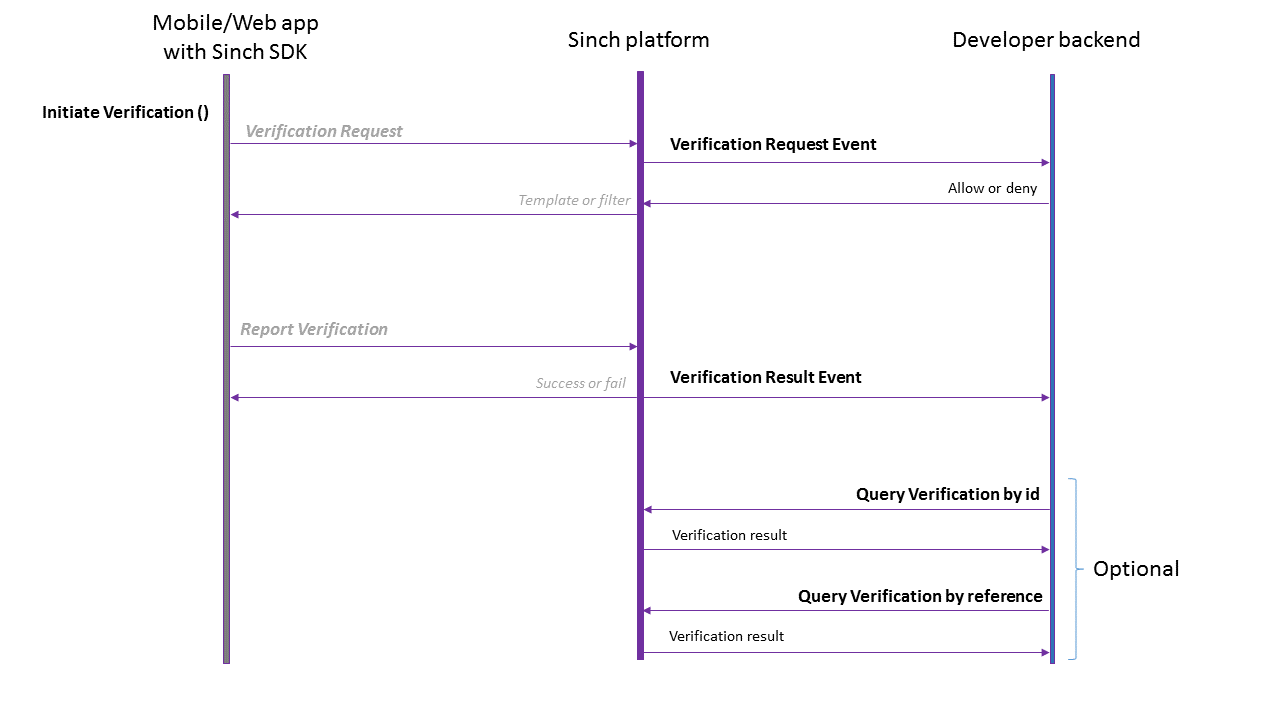 {% admonition type="warning" name="Important!" %} In this scenario, the _Verification Request_ and _Report Verification_ APIs don't need to be called explicitly by the app, since the SDK is handling that for you. {% /admonition %} If you have configured a verification callback URL in the Sinch Portal (recommended), with every verification that's initiated by the app, Sinch will send a [Verification Request Event](https://developers.sinch.com/docs/verification/api-reference/verification/verification-callbacks/verificationrequestevent) to your backend, to get permission to perform the verification. If your backend allows the verification request to proceed, Sinch will trigger a flashcall, SMS or call towards the phone to be verified. Once the phone receives the flash-call, SMS or voice call, the SDK will report back the CLI or OTP respectively so that the Sinch dashboard can compare its validity. The Sinch backend responds with the result of the verification to the client and sends a [Verification Result Event](https://developers.sinch.com/docs/verification/api-reference/verification/verification-callbacks/verificationresultevent) to your backend. The status of a verification can also be queried ad-hoc by using the "Query Verification" APIs. ## Without the mobile or web SDK If you are not using the mobile or web Verification SDKs, then you need to implement all the client logic for intercepting calls (in case of flashcalls) and reporting the CLI or OTP (in case of SMS or Phone Call verification) inside your app. The following diagram shows how to use Sinch Verification in this scenario. 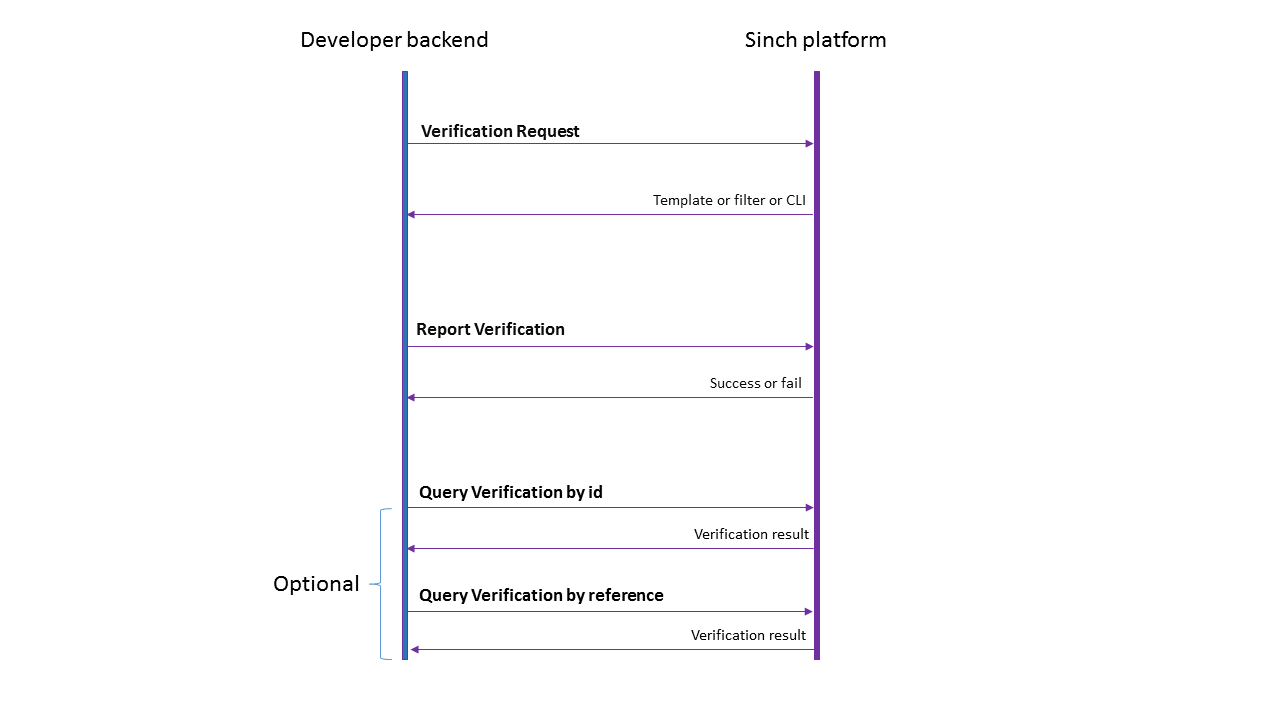 The verification requests will be triggered from your backend towards Sinch with the [Verification Request API](https://developers.sinch.com/docs/verification/api-reference/verification/verifications-start/startverification), by doing a [signed request](https://developers.sinch.com/docs/verification/api-reference/authentication/callback-signed-request). Sinch dashboard will respond with the CLI filter (for flashcalls) or the template (in case of an SMS), or the polling intervals (in case of a Phone Call). As soon as the flashcall or SMS is received by your app, your backend will need to report back to Sinch the CLI or OTP that was reported through the [Report Verification API](https://developers.sinch.com/docs/verification/api-reference/verification/verifications-report/reportverificationbyidentity). Sinch will respond with the result of the verification.
## Provisioning API
Provisioning API allows you to programmatically set up your senders, accounts and templates on your favorite messaging platforms on the Conversation API. For now, you can create your first WhatsApp channel through Meta's Embedded sign up, you can configure your first SMS App and configure your webhooks. As development continues, we will be adding the most commonly used channels.
- [Provisioning API AI Best Practices | Provisioning API | Sinch](https://developers.sinch.com/docs/provisioning-api/ai-support.md): How to use various AI tools with Provisioning API
- [Release notes | Provisioning API | Sinch](https://developers.sinch.com/docs/provisioning-api/release-notes.md): See how the Sinch Provisioning API is evolving and find out about new features and bug fixes.
- [Introduction | Provisioning API | Sinch](https://developers.sinch.com/docs/provisioning-api/api-reference.md): This document provides a detailed user guide and reference documentation on the Sinch Provisioning REST API.
- [Getting started | Provisioning API | Sinch](https://developers.sinch.com/docs/provisioning-api/getting-started.md): Get started with .
- [Creating Conversation Applications using Provisioning API Bundles | Provisioning API | Sinch](https://developers.sinch.com/docs/provisioning-api/getting-started/bundles/conversation-apps.md): Learn how to create Conversation Applications using Provisioning API Bundles.
- [Getting started with Bundles | Provisioning API | Sinch](https://developers.sinch.com/docs/provisioning-api/getting-started/bundles.md): Learn how to get started with using Bundles.
- [Creating SMS Applications using Provisioning API Bundles | Provisioning API | Sinch](https://developers.sinch.com/docs/provisioning-api/getting-started/bundles/sms-apps.md): Learn how to create SMS Applications using Provisioning API Bundles.
- [Creating subprojects using Provisioning API Bundles | Provisioning API | Sinch](https://developers.sinch.com/docs/provisioning-api/getting-started/bundles/subprojects.md): Learn how to create subprojects using Provisioning API Bundles.
- [Getting started with KakaoTalk provisioning | Provisioning API | Sinch](https://developers.sinch.com/docs/provisioning-api/getting-started/kakaotalk.md): Learn how to get started with provisioning accounts for KakaoTalk.
- [Creating KakaoTalk senders using Provisioning API | Provisioning API | Sinch](https://developers.sinch.com/docs/provisioning-api/getting-started/kakaotalk/senders.md): Learn how to create senders for KakaoTalk using Provisioning API.
- [Creating KakaoTalk templates using Provisioning API | Provisioning API | Sinch](https://developers.sinch.com/docs/provisioning-api/getting-started/kakaotalk/templates.md): Learn how to create templates for KakaoTalk using Provisioning API.
- [Getting started with RCS provisioning | Provisioning API | Sinch](https://developers.sinch.com/docs/provisioning-api/getting-started/rcs.md): Learn how to get started with provisioning accounts for RCS.
- [RCS sender](https://developers.sinch.com/docs/provisioning-api/getting-started/rcs/senders.md)
- [Getting started with SMS provisioning | Provisioning API | Sinch](https://developers.sinch.com/docs/provisioning-api/getting-started/sms.md): Learn how to get started with provisioning SMS applications.
- [Managing SMS Apps using Provisioning API | Provisioning API | Sinch](https://developers.sinch.com/docs/provisioning-api/getting-started/sms/sms-apps.md): Learn how to create, list, update, and delete SMS Apps using Provisioning API.
- [Embedded Signup WhatsApp sender provisioning | Provisioning API | Sinch](https://developers.sinch.com/docs/provisioning-api/getting-started/whatsapp/embedded.md): Learn how to set up an embedded signup sender for WhatsApp.
- [Getting started with WhatsApp provisioning | Provisioning API | Sinch](https://developers.sinch.com/docs/provisioning-api/getting-started/whatsapp.md): Learn how to get started with provisioning accounts for WhatsApp.
- [Multi-Partner Solution creation | Provisioning API | Sinch](https://developers.sinch.com/docs/provisioning-api/getting-started/whatsapp/multi-partner-solution.md): Learn how to set up a Multi-Partner Solution for WhatsApp.
- [WhatsApp partner-initiated WABA | Provisioning API | Sinch](https://developers.sinch.com/docs/provisioning-api/getting-started/whatsapp/partner-initiated.md): Learn how to create partner-initiated WhatsApp accounts.
- [WhatsApp templates | Provisioning API | Sinch](https://developers.sinch.com/docs/provisioning-api/getting-started/whatsapp/templates.md): Learn how using templates works with provisioning WhatsApp accounts.
- [Provisioning API](https://developers.sinch.com/docs/provisioning-api/api-reference/provisioning-api-1.md)
## Elastic SIP Trunking API
With Elastic SIP Trunking you can create and manage your SIP trunks and phone numbers programmatically.
- [Elastic SIP Trunking AI Best Practices | Elastic SIP Trunking | Sinch](https://developers.sinch.com/docs/est/ai-support.md): How to use various AI tools with Elastic SIP Trunking
- [Release notes | Elastic SIP Trunking | Sinch](https://developers.sinch.com/docs/est/release-notes.md): See how the Sinch Elastic SIP Trunking API is evolving and find out about new features and bug fixes.
- [Elastic SIP Trunking Test Plan](https://developers.sinch.com/docs/est/test-plan.md): Use this test plan to verify your Elastic SIP Trunking solution works as intended.
- [API Overview | Elastic SIP Trunking API | Sinch](https://developers.sinch.com/docs/est/api-reference.md): This document provides a detailed user guide and reference documentation on the Sinch Elastic SIP Trunk API.
- [Getting started | Elastic SIP Trunking API | Sinch](https://developers.sinch.com/docs/est/getting-started.md): Your first steps to get started with the Sinch Elastic SIP Trunk API.
- [3CX integration guide | Elastic SIP Trunking API | Sinch](https://developers.sinch.com/docs/est/integration-guides/3cx.md): Learn how to integrate your Elastic SIP Trunks with 3CX.
- [Contact Pro integration guide | Elastic SIP Trunking API | Sinch](https://developers.sinch.com/docs/est/integration-guides/contact-pro.md): Learn how to integrate your Elastic SIP Trunks with Contact Pro.
- [Error and troubleshooting reference | Elastic SIP Trunking API | Sinch](https://developers.sinch.com/docs/est/api-reference/errors.md): Read about the different errors you may encounter when using the Elastic SIP Trunking API and learn some troubleshooting steps.
- [FusionPBX integration guide | Elastic SIP Trunking API | Sinch](https://developers.sinch.com/docs/est/integration-guides/fusion-pbx.md): Learn how to integrate your Elastic SIP Trunks with FusionPBX.
- [Genesys Purecloud integration guide | Elastic SIP Trunking API | Sinch](https://developers.sinch.com/docs/est/integration-guides/genesys.md): Learn how to integrate your Elastic SIP Trunks with Genesys Purecloud Platform.
- [Integration guides | Elastic SIP Trunking API | Sinch](https://developers.sinch.com/docs/est/integration-guides.md): Learn how to integrate your Elastic SIP Trunks with IP-PBXs and SBCs.
- [LiveKit integration guide | Elastic SIP Trunking API | Sinch](https://developers.sinch.com/docs/est/integration-guides/livekit.md): Learn how to integrate your Elastic SIP Trunks with LiveKit.
- [Ribbon SBC configuration guide | Elastic SIP Trunking API | Sinch](https://developers.sinch.com/docs/est/integration-guides/ribbon-sbc.md): Learn how to configured your Elastic SIP Trunks for use with Ribbon SBC.
- [Configuring Elastic SIP Trunking as a Twilio BYOC Trunk | Elastic SIP Trunking API | Sinch](https://developers.sinch.com/docs/est/integration-guides/twilio-byoc.md): Learn how to configure Elastic SIP Trunking as a Twilio BYOC Trunk.
- [VitalPBX integration guide | Elastic SIP Trunking API | Sinch](https://developers.sinch.com/docs/est/integration-guides/vital-pbx.md): Learn how to integrate your Elastic SIP Trunks with VitalPBX.
- [Vodia PBX integration guide | Elastic SIP Trunking API | Sinch](https://developers.sinch.com/docs/est/integration-guides/vodia-pbx.md): Learn how to integrate your Elastic SIP Trunks with Vodia PBX.
- [Elastic SIP Trunk API](https://developers.sinch.com/docs/est/api-reference/est.md): This document provides a detailed user guide and reference documentation on the Sinch Elastic SIP Trunk API. For information on how to authenticate API requests, please check the Authentication section. ## Authentication Elastic SIP Trunk API supports both [basic](https://developers.sinch.com/docs/est/api-reference/est/section/authentication#basic) and [OAuth2](https://developers.sinch.com/docs/est/api-reference/est/section/authentication#oauth2) authentication types. ### Basic {% partial file="/partials/authentication/basic/_intro.md"/ %} {% partial file="/partials/authentication/basic/_instructions.md"/ %} ### OAuth2 {% partial file="/partials/authentication/oauth/_intro.md"/ %} {% partial file="/partials/authentication/oauth/_instructions.md"/ %} ## Servers Elastic SIP Trunk API serves all endpoints from the following server: ```https://elastic-trunking.api.sinch.com/v1/projects/{projectId}``` {% admonition type="info" name="Note:" %} The `projectId` is a required parameter you must include when making any API calls. You can find your project ID on your [dashboard](https://dashboard.sinch.com). {% /admonition %}
## Fax API
Send and receive HIPAA compliant faxes on our modern fax platform using our developer-friendly API.
- [Fax API AI Best Practices | Fax API | Sinch](https://developers.sinch.com/docs/fax/ai-support.md): How to use various AI tools with Fax API
- [HIPAA Compliance | Fax API | Sinch](https://developers.sinch.com/docs/fax/hipaa.md): How to ensure that your faxes are HIPAA compliant.
- [Overview | Fax API | Sinch](https://developers.sinch.com/docs/fax/overview.md): An overview of the Fax API
- [Migrating from Phaxio v2.1 to Sinch Fax API | Fax API | Sinch](https://developers.sinch.com/docs/fax/v2-v3migration.md): Learn how to migrate from Phaxio v2.1 to Sinch Fax API
- [Supported file types | Fax API | Sinch](https://developers.sinch.com/docs/fax/api-reference/filetypes.md): How to get started sending faxes with Fax V3 API
- [Projects and Services | Fax API | Sinch](https://developers.sinch.com/docs/fax/api-reference/projects-and-services.md): How and when to use projects and services.
- [Getting started | Fax API | Sinch](https://developers.sinch.com/docs/fax/getting-started.md): Learn how to get started with the Fax API.
- [Zapier Integration | Fax API | Sinch](https://developers.sinch.com/docs/fax/integrations/zapier.md): Fax API Actions and Triggers for Zapier
- [Basic authentication | Fax API | Sinch](https://developers.sinch.com/docs/fax/api-reference/authentication/basic.md): How to perform basic authentication for the Sinch Fax API.
- [OAuth 2.0 authentication | Fax API | Sinch](https://developers.sinch.com/docs/fax/api-reference/authentication/oauth.md): How to perform authentication using OAuth 2.0 for the Fax API.
- [Fax API](https://developers.sinch.com/docs/fax/api-reference/fax.md): This document provides a detailed user guide and reference documentation on the Fax REST API. If you have questions please contact us via our [support portal](https://support.sinch.com) and a team member will be happy to assist. {% admonition type="info" name="Note:" %} You must create an account on our support portal if you do not have one. {% /admonition %} ## Authentication For information on how to authenticate API requests we support two methods [Basic](https://developers.sinch.com/docs/fax/api-reference/authentication/basic) or [Oauth2](https://developers.sinch.com/docs/fax/api-reference/authentication/oauth) ## Global URL Sinch has a global server that will route your call to the appropriate geography region automatically: ```shell https://fax.api.sinch.com/ ``` ## Formats By default, all API calls return a JSON response unless otherwise specified. ### Date time fields All date and time fields are in UTC format unless otherwise specified. ## Deletion and data retention If you have enabled storage, we retain fax logs and media for 13 months which you can access via the API. After 13 months, media and logs are deleted. ## Errors & statuses Find error codes and explanations [here](https://developers.sinch.com/docs/fax/api-reference/fax/error-messages). ## Webhooks You can configure your service to use webhooks to send a request to you when faxes arrive or complete on your account. **Note:** When webhooks with Basic authentication credentials are shown in GET requests, the credentials are masked with `***`` symbols. It is not possible to retrieve previously-set credentials through the API.
## In-app Voice and Video SDK
The In-app Voice and Video SDK enables you to add voice and video calling capabilities directly into your mobile or web application using the Sinch SDKs.
- [Voice and Video for Android | In-app Calling | Sinch](https://developers.sinch.com/docs/in-app-calling/android-cloud.md): The Sinch SDK is a product that makes adding voice and video calling to mobile apps easy in Android. Continue reading this step-by-step guide now.
- [Voice and Video for iOS | In-app Calling | Sinch](https://developers.sinch.com/docs/in-app-calling/ios-cloud.md): The Sinch SDK is a product that makes adding voice and video calling to mobile apps easy in iOS. Continue reading this step-by-step guide now.
- [Voice and Video for Browsers | In-app Calling | Sinch](https://developers.sinch.com/docs/in-app-calling/js-cloud.md): The Sinch SDK is a product that makes adding voice and video calling to mobile apps easy in JavaScript.
- [Overview | Sinch](https://developers.sinch.com/docs/in-app-calling/overview.md): Sinch offers a platform for real-time communication over the Internet.
- [Sinch SDK Downloads | Sinch](https://developers.sinch.com/docs/in-app-calling/sdk-downloads.md): Download our SDK or helper libraries and let the integration begin.
- [Authentication & Authorization | In-app Calling | Sinch](https://developers.sinch.com/docs/in-app-calling/android/application-authentication.md): Secure your application and authorize Sinch client (user) registrations in Android.
- [Call quality | In-app Calling | Sinch](https://developers.sinch.com/docs/in-app-calling/android/call-quality.md): Learn how to receive live events concerning the quality of your on-going call.
- [Voice Calling | In-app Calling | Sinch](https://developers.sinch.com/docs/in-app-calling/android/calling.md): Voice calling with Android Voice and Video SDK. Set up calling between applications, from application to phone, app to SIP and conference calls.
- [First Time Setup | Sinch](https://developers.sinch.com/docs/in-app-calling/android/first-time-setup.md): Set up the Sinch Voice and Video SDK for Android.
- [Miscellaneous | Sinch](https://developers.sinch.com/docs/in-app-calling/android/miscellaneous.md): Miscellaneous information about the Sinch Android In-app Calling SDK.
- [Push Notifications | In-app Calling | Sinch](https://developers.sinch.com/docs/in-app-calling/android/push-notifications.md): Using push notifications with Sinch Android In-app Calling SDK.
- [Android Release Notes | In-app Calling | Sinch](https://developers.sinch.com/docs/in-app-calling/android/release-notes.md): See how the Sinch In-app Voice and Video SDK for Android is evolving and find out about new features and bug fixes.
- [Sinch Client | In-app Calling | Sinch](https://developers.sinch.com/docs/in-app-calling/android/sinch-client.md): Sinch Client, the entry point of the SDK.
- [Video Calling | In-app Calling | Sinch](https://developers.sinch.com/docs/in-app-calling/android/video-calling.md): Set up video calls with the Sinch Android Voice with Video SDK.
- [Authentication & Authorization | In-app Calling | Sinch](https://developers.sinch.com/docs/in-app-calling/ios/auth.md): Secure your application and authorize Sinch client (user) registrations in iOS.
- [Call quality | In-app Calling | Sinch](https://developers.sinch.com/docs/in-app-calling/ios/call-quality.md): Learn how to receive live events concerning the quality of your on-going call.
- [Voice Calling | In-app Calling | Sinch](https://developers.sinch.com/docs/in-app-calling/ios/calling.md): Set up voice calling with the Sinch Voice & Video SDK. The SDK supports four types of calls: App-to-App (audio or video), App-to-PSTN, App-to-SIP and App-to-Conference calls.
- [First Time Setup | In-app Calling | Sinch](https://developers.sinch.com/docs/in-app-calling/ios/first-time-setup.md): Follow this step-by-step guide to set up the Sinch Voice and Video SDK for iOS.
- [Glossary | In-app Calling | Sinch](https://developers.sinch.com/docs/in-app-calling/ios/glossary.md): Glossary of terms relevant to Voice for iOS.
- [Miscellaneous | In-app Calling | Sinch](https://developers.sinch.com/docs/in-app-calling/ios/miscellaneous.md): Miscellaneous information about Voice for iOS.
- [Push notifications](https://developers.sinch.com/docs/in-app-calling/ios/push-notifications.md)
- [Release Notes | Sinch](https://developers.sinch.com/docs/in-app-calling/ios/release-notes.md): See how the Sinch In-app Voice and Video SDK for IOS is evolving and find out about new features and bug fixes.
- [Sinch Client | In-app Calling | Sinch](https://developers.sinch.com/docs/in-app-calling/ios/sinch-client.md): Information about the Client in the Sinch iOS In-app Calling SDK.
- [Video Calling | In-app Calling | Sinch](https://developers.sinch.com/docs/in-app-calling/ios/video-calling.md): Set up video calls with the Sinch iOS In-app Calling SDK.
- [Authentication & Authorization | In-app Calling | Sinch](https://developers.sinch.com/docs/in-app-calling/js/application-authentication.md): Secure your application and authorize Sinch client (user) registrations in JavaScript.
- [Call quality | In-app Calling | Sinch](https://developers.sinch.com/docs/in-app-calling/js/call-quality.md): Learn how to receive live events concerning the quality of your on-going call.
- [Getting started | In-app Calling SDKs | Sinch](https://developers.sinch.com/docs/in-app-calling/getting-started.md): Get started with the Sinch In-app Calling SDKs.
- [Voice Calling | In-app Calling | Sinch](https://developers.sinch.com/docs/in-app-calling/js/calling.md): Voice calling with javascript Voice and Video SDK. Set up calling between applications, from application to phone, app to SIP and conference calls. Get more information here.
- [First Time Setup | Sinch](https://developers.sinch.com/docs/in-app-calling/js/first-time-setup.md): Follow this step-by-step guide to set up the Sinch Voice and Video SDK for JavaScript.
- [Sinch Client | In-app Calling | Sinch](https://developers.sinch.com/docs/in-app-calling/js/js-cloud-sinch-client.md): The entry point of the SDK.
- [Miscellaneous](https://developers.sinch.com/docs/in-app-calling/js/miscellaneous.md)
- [Push Notifications | In-app Calling | Sinch](https://developers.sinch.com/docs/in-app-calling/js/push-notifications.md): Using push notifications with Sinch Javascript In-app Calling SDK.
- [Release Notes | Sinch](https://developers.sinch.com/docs/in-app-calling/js/release-notes.md): See how the Sinch In-app Voice and Video JavaScript SDK for browsers is evolving and find out about new features and bug fixes.
- [Video Calling | In-app Calling | Sinch](https://developers.sinch.com/docs/in-app-calling/js/video-calling.md): Set up video calls with the Sinch Javascript Voice with Video SDK. Get more information here.
- [Public endpoints | In-App Calling | Sinch](https://developers.sinch.com/docs/in-app-calling/misc/endpoints.md): Public endpoints for the In-App Calling SDKs.
- [Networking | In-App Calling | Sinch](https://developers.sinch.com/docs/in-app-calling/misc/networking.md): Networking information connected with Sinch platform and the SDK.
- [Recording In-app voice calls | In-App Calling | Sinch](https://developers.sinch.com/docs/in-app-calling/misc/voice-recording.md): Control recording of calls with the Sinch platform, with callbacks API.
- [Create an Android app with the Sinch Android SDK | Sinch](https://developers.sinch.com/docs/in-app-calling/getting-started/android/create-app.md): This guide explains how to get started integrating your Android application with Voice and Video SDK.
- [Make a call with the Sinch Android SDK | Sinch](https://developers.sinch.com/docs/in-app-calling/getting-started/android/make-call.md): This guide explains how to make an audio call with your Android application using the Sinch Android SDK.
- [Handle incoming calls with the Sinch Android SDK | Sinch](https://developers.sinch.com/docs/in-app-calling/getting-started/android/receive-call.md): This guide explains how to handle incoming calls in Android.
- [Create an iOS app with the Sinch iOS SDK | Sinch](https://developers.sinch.com/docs/in-app-calling/getting-started/ios/create-app.md): This guide explains how to get started integrating your iOS application with the In-app Calling iOS SDK.
- [Make and receive an audio call with CallKit](https://developers.sinch.com/docs/in-app-calling/getting-started/ios/make-call-ck.md)
- [Make and receive an audio call with LiveCommunicationKit and Sinch iOS SDK | In-app Calling | Sinch](https://developers.sinch.com/docs/in-app-calling/getting-started/ios/make-call-lck.md): This guide explains how to make and receive an audio call with your iOS application using LiveCommunicationKit and Sinch iOS SDK.
- [Create an app | Sinch](https://developers.sinch.com/docs/in-app-calling/getting-started/javascript/create-app.md): This guide explains how to get started integrating your JavaScript application with Voice and Video SDK.
- [Make a audio call | Sinch](https://developers.sinch.com/docs/in-app-calling/getting-started/javascript/make-call.md): This guide explains how to make a phone call with your JavaScript application using the Sinch JavaScript SDK.
- [Handle incoming call | Sinch](https://developers.sinch.com/docs/in-app-calling/getting-started/javascript/receive-call.md): This guide explains how to handle incoming calls in JavaScript.
## Number Lookup API
The Number Lookup API is designed to provide in-depth information about phone numbers, helping enterprises enhance their communication strategies and prevent fraud. By identifying the type of phone line (for example, mobile, landline, VoIP) and the associated carrier, the API allows businesses to optimize routing, reduce unnecessary costs, and improve customer engagement.
- [Number Lookup API AI Best Practices | Number Lookup API | Sinch](https://developers.sinch.com/docs/number-lookup-api-v2/ai-support.md): How to use various AI tools with Number Lookup API
- [Combined Number Lookup and Verification | Number Lookup API | Sinch](https://developers.sinch.com/docs/number-lookup-api-v2/combined-lookup-verification.md): Learn about the Combined Number Lookup and Verification.
- [Overview | Number Lookup API | Sinch](https://developers.sinch.com/docs/number-lookup-api-v2/overview.md): Learn about the Number Lookup API.
- [Release Notes | Number Lookup API | Sinch](https://developers.sinch.com/docs/number-lookup-api-v2/release-notes.md): See how the Sinch Number Lookup API is evolving and find out about new features and bug fixes.
- [Terms and Conditions | Number Lookup API | Sinch](https://developers.sinch.com/docs/number-lookup-api-v2/terms-and-conditions.md): Read the Terms and Conditions for the Number Lookup API.
- [Number Lookup API errors reference](https://developers.sinch.com/docs/number-lookup-api-v2/api-reference/errors.md): Review the different possible error codes and messages provided by the Number Lookup API.
- [Introduction](https://developers.sinch.com/docs/number-lookup-api-v2/api-reference.md): This document provides a detailed user guide and reference documentation on the Sinch Number Lookup REST API.
- [Getting started | Number Lookup API | Sinch](https://developers.sinch.com/docs/number-lookup-api-v2/getting-started.md): Get started with Number Lookup API.
- [Sinch SDKs | Number Lookup API | Sinch](https://developers.sinch.com/docs/number-lookup-api-v2/sdk.md): Learn about how to use the Sinch SDKs with the Number Lookup API.
- [Basic authentication | Number Lookup API | Sinch](https://developers.sinch.com/docs/number-lookup-api-v2/api-reference/authentication/basic.md): How to perform basic authentication for the Sinch Number Lookup API.
- [Authentication | Number Lookup API | Sinch](https://developers.sinch.com/docs/number-lookup-api-v2/api-reference/authentication.md): Learn about how the Number Lookup API authenticates.
- [OAuth 2.0 authentication | Number Lookup API | Sinch](https://developers.sinch.com/docs/number-lookup-api-v2/api-reference/authentication/oauth.md): How to perform authentication using OAuth 2.0 for the Number Lookup API.
- [Java SDK Reference | Number Lookup API | Sinch](https://developers.sinch.com/docs/number-lookup-api-v2/sdk/java/syntax-reference.md): Learn the syntax of the Sinch Java SDK for Number Lookup API.
- [Node.js SDK Reference | Number Lookup API | Sinch](https://developers.sinch.com/docs/number-lookup-api-v2/sdk/node/syntax-reference.md): Learn the syntax of the Sinch Node.js SDK for Number Lookup API.
- [Python SDK Reference | Number Lookup API | Sinch](https://developers.sinch.com/docs/number-lookup-api-v2/sdk/python/syntax-reference.md): Learn the syntax of the Sinch Python SDK for Number Lookup API.
- [Look up a number with .NET | Number Lookup API | Sinch](https://developers.sinch.com/docs/number-lookup-api-v2/getting-started/dotnet/lookup-number.md): Learn how to look up a phone number with the Sinch Number Lookup API in .NET.
- [Look up a number with Java | Number Lookup API | Sinch](https://developers.sinch.com/docs/number-lookup-api-v2/getting-started/java/lookup-number.md): Learn how to look up a phone number with the Sinch Number Lookup API in Java.
- [Look up a number with Node.js | Number Lookup API | Sinch](https://developers.sinch.com/docs/number-lookup-api-v2/getting-started/node/lookup-number.md): Learn how to look up a number with the Sinch Number Lookup API in Node.
- [Look up a number with Python | Number Lookup API | Sinch](https://developers.sinch.com/docs/number-lookup-api-v2/getting-started/python/lookup-number.md): Learn how to look up a phone number with the Sinch Number Lookup API in Python.
- [Look up numbers in bulk with Node.js | Number Lookup API | Sinch](https://developers.sinch.com/docs/number-lookup-api-v2/tutorials/node/bulk-lookup.md): Learn how to look numbers in bulk with the Sinch Number Lookup API in Node.js.
- [Look up numbers in bulk with Python | Number Lookup API | Sinch](https://developers.sinch.com/docs/number-lookup-api-v2/tutorials/python/bulk-lookup.md): Learn how to look numbers in bulk with the Sinch Number Lookup API in Python.
- [Number Lookup Api v2](https://developers.sinch.com/docs/number-lookup-api-v2/api-reference/number-lookup-v2.md): With quick and easy access to Number Lookup, you can enhance your communications and keep your database as clean as a whistle. Number Lookup checks against first-party numbering sources and provides real-time feedback. Improve communication by validating and verifying numbers, boosting delivery conversion rates, and saving money on marketing campaigns. Test numbers to ensure your recipients are ready and waiting to receive your messages!
## Functions
Serverless compute for voice and messaging. Deploy your code and Sinch routes live calls and messages to it — no infrastructure to run.
- [architecture.md](https://developers.sinch.com/docs/functions/concepts/architecture.md)
- [glossary.md](https://developers.sinch.com/docs/functions/concepts/glossary.md)
- [overview.md](https://developers.sinch.com/docs/functions/concepts/overview.md)
- [local-development.md](https://developers.sinch.com/docs/functions/functions/local-development.md)
- [monitoring.md](https://developers.sinch.com/docs/functions/functions/monitoring.md)
- [quickstart.md](https://developers.sinch.com/docs/functions/functions/quickstart.md)
- [templates.md](https://developers.sinch.com/docs/functions/functions/templates.md)
- [your-first-function.md](https://developers.sinch.com/docs/functions/functions/your-first-function.md)
- [function-context.md](https://developers.sinch.com/docs/functions/reference/function-context.md)
- [limits.md](https://developers.sinch.com/docs/functions/reference/limits.md)
- [sdk-env-vars.md](https://developers.sinch.com/docs/functions/reference/sdk-env-vars.md)
- [svaml-cheatsheet.md](https://developers.sinch.com/docs/functions/reference/svaml-cheatsheet.md)
- [configuration-secrets.md](https://developers.sinch.com/docs/functions/functions/concepts/configuration-secrets.md)
- [context-object.md](https://developers.sinch.com/docs/functions/functions/concepts/context-object.md)
- [deployment.md](https://developers.sinch.com/docs/functions/functions/concepts/deployment.md)
- [handlers.md](https://developers.sinch.com/docs/functions/functions/concepts/handlers.md)
- [local-vs-prod.md](https://developers.sinch.com/docs/functions/functions/concepts/local-vs-prod.md)
- [svaml.md](https://developers.sinch.com/docs/functions/functions/concepts/svaml.md)
- [voice-callbacks.md](https://developers.sinch.com/docs/functions/functions/concepts/voice-callbacks.md)
- [add-a-custom-endpoint.md](https://developers.sinch.com/docs/functions/functions/guides/add-a-custom-endpoint.md)
- [build-an-ai-voice-agent.md](https://developers.sinch.com/docs/functions/functions/guides/build-an-ai-voice-agent.md)
- [build-an-ivr.md](https://developers.sinch.com/docs/functions/functions/guides/build-an-ivr.md)
- [build-an-sms-responder.md](https://developers.sinch.com/docs/functions/functions/guides/build-an-sms-responder.md)
- [integrate-operations-api.md](https://developers.sinch.com/docs/functions/functions/guides/integrate-operations-api.md)
- [protect-your-function.md](https://developers.sinch.com/docs/functions/functions/guides/protect-your-function.md)
- [route-calls.md](https://developers.sinch.com/docs/functions/functions/guides/route-calls.md)
- [use-the-cache.md](https://developers.sinch.com/docs/functions/functions/guides/use-the-cache.md)
- [csharp.md](https://developers.sinch.com/docs/functions/functions/runtimes/csharp.md)
- [nodejs.md](https://developers.sinch.com/docs/functions/functions/runtimes/nodejs.md)
## CLI
One command line for every Sinch API and the full Functions lifecycle — scaffold, run locally, deploy, and manage.
- [configuration.md](https://developers.sinch.com/docs/functions/cli/configuration.md)
- [installation.md](https://developers.sinch.com/docs/functions/cli/installation.md)
- [quickstart.md](https://developers.sinch.com/docs/functions/cli/quickstart.md)
- [auth.md](https://developers.sinch.com/docs/functions/cli/commands/auth.md)
- [config.md](https://developers.sinch.com/docs/functions/cli/commands/config.md)
- [conversation.md](https://developers.sinch.com/docs/functions/cli/commands/conversation.md)
- [env.md](https://developers.sinch.com/docs/functions/cli/commands/env.md)
- [fax.md](https://developers.sinch.com/docs/functions/cli/commands/fax.md)
- [function-utilities.md](https://developers.sinch.com/docs/functions/cli/commands/function-utilities.md)
- [functions.md](https://developers.sinch.com/docs/functions/cli/commands/functions.md)
- [numbers.md](https://developers.sinch.com/docs/functions/cli/commands/numbers.md)
- [porting.md](https://developers.sinch.com/docs/functions/cli/commands/porting.md)
- [secrets.md](https://developers.sinch.com/docs/functions/cli/commands/secrets.md)
- [sip-trunking.md](https://developers.sinch.com/docs/functions/cli/commands/sip-trunking.md)
- [templates.md](https://developers.sinch.com/docs/functions/cli/commands/templates.md)
- [voice.md](https://developers.sinch.com/docs/functions/cli/commands/voice.md)