
GUI Inspector tool for all kinds of apps, powered by Appium.
Documentation | Get Started | Discussion Forum | Help with Translations
--- Appium Inspector is a GUI assistant tool for Appium, providing visual inspection of the application under test. It can show the application page screenshot along with its page source, and includes various features for interacting with the app. When inspecting a mobile app, the Inspector looks like this: 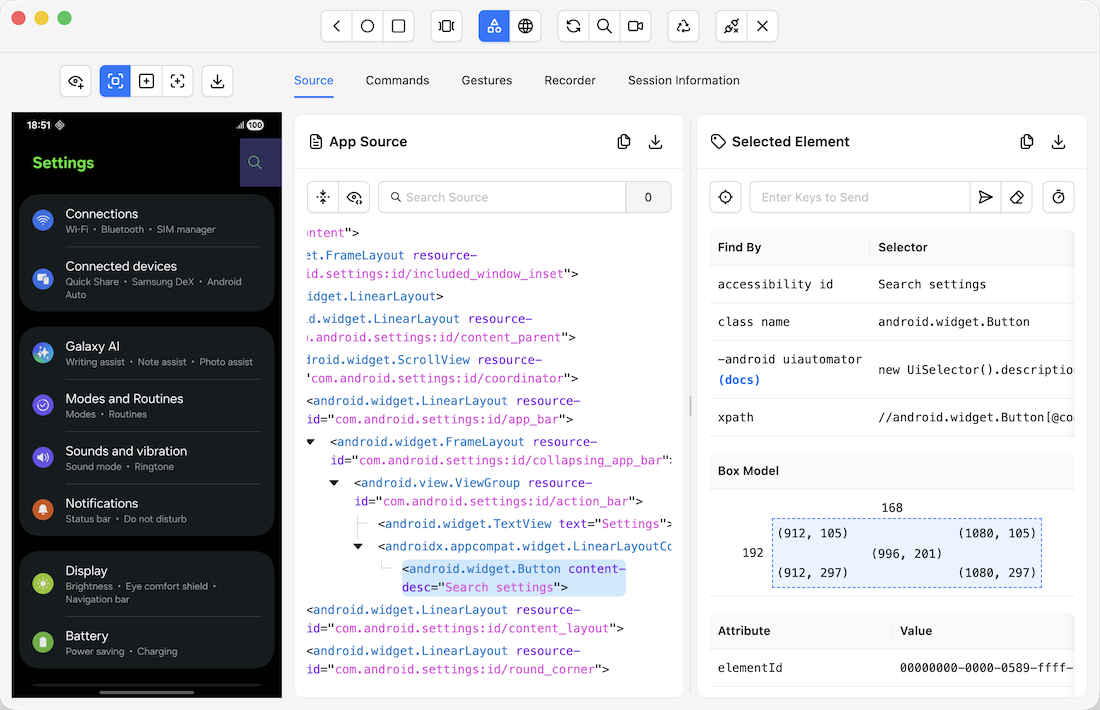 ## Installation Appium Inspector is released in two formats: 1. Standalone desktop application for macOS, Windows, and Linux - download it from the [**Releases**](https://github.com/appium/appium-inspector/releases) section 2. Appium server plugin - see the [**plugin README**](./plugins/README.md) for details Check the [System Requirements](https://appium.github.io/appium-inspector/latest/quickstart/requirements/) and [Installation](https://appium.github.io/appium-inspector/latest/quickstart/installation/) documentation for more details. > [!NOTE] > > The Inspector was also formerly released as a web application hosted at `https://inspector.appiumpro.com`, however, the site is no longer related to the Appium team. Please use the standalone app or the plugin version. > The Appium team is exploring the idea of hosting an up-to-date version of the web app in the future. ## Features The Inspector has many features in addition to its app inspection abilities: - Specify the Appium server details - Interact with the app screenshot - Search for elements and interact with them - Run Appium driver commands - and more... Check the [Features documentation](https://appium.github.io/appium-inspector/latest/overview/#features-overview) for a more comprehensive list! ### Cloud Platforms The Inspector has built-in integrations with various cloud service provider platforms:|
|

|
|
|
|
|

|
|

|

|
|

|
|

|
|
|
|
|
|
|
|
|