# Unlock
UiAutomator2 driver allows dealing with the Android lock screen using various APIs.
This article describes available APIs and their options.
## Unlock On Session Startup
UiAutomator2 provides the following [capabilities](../../README.md#device-locking) to deal
with the system lock screen:
- appium:unlockStrategy
- appium:unlockSuccessTimeout
- appium:skipUnlock
- appium:unlockType
- appium:unlockKey
These capabilities could be used to unlock the device under test during the driver session initialization
as well as deal with different lock screen types.
### appium:unlockStrategy
Either `locksettings` (default since Android 8/API level 26) or `uiautomator` (legacy).
The `locksettings` strategy uses `adb shell locksettings` CLI to deal with different
types of device lock screens. It is fast, reliable, but has one downside: the actual
pin, pattern or password must be temporarily removed in order to unlock the device and restored afterwards.
Setting the strategy to `uiautomator` will enforce the driver to use UiAutomator framework in order
to interact with the device's lock screen for various unlock types. It might be slower and less stable in comparison
to the `locksettings` strategy, although there is no other alternative if tests are being executed on an older Android version
or the application under test requires the device to constantly maintain display lock settings.
### appium:unlockSuccessTimeout
Maximum number of milliseconds to wait until the device is unlocked. `2000` ms by default
### appium:skipUnlock
The `appium:skipUnlock` capability is enabled by default and makes the driver to detect and handle the lock screen
upon session startup _if it is present_. If the lock screen cannot be detected upon session startup then nothing will be
done. By default, it is assumed the device has a "simple" lock screen, which could be removed by waking up the device.
In case the device has a different type of the lock screen configured in its settings then the information about it
must be provided in the below capability values.
### appium:unlockType and appium:unlockKey
This capability supports the following possible values:
#### pin
Assumes the device is protected with a PIN code. Expects the `appium:unlockKey` to contain a valid pin consisting
of digits in range 0-9, for example `1111`.
#### pinWithKeyEvent
Same as [pin](#pin), but uses ADB instead of UiAutomator framework to enter the actual pin value.
#### password
Assumes the device is protected with a password. Expects the `appium:unlockKey` to contain a valid password consisting
of latin characters, for example `abcd1234`.
#### pattern
Assumes the device is protected with a secret pattern. Check the example below for more details on the `appium:unlockKey`
value for this particular unlock type.
##### Example
Let say you have a device that is locked with a pattern similar to the one on the image below,
and you want to run a test over that device.
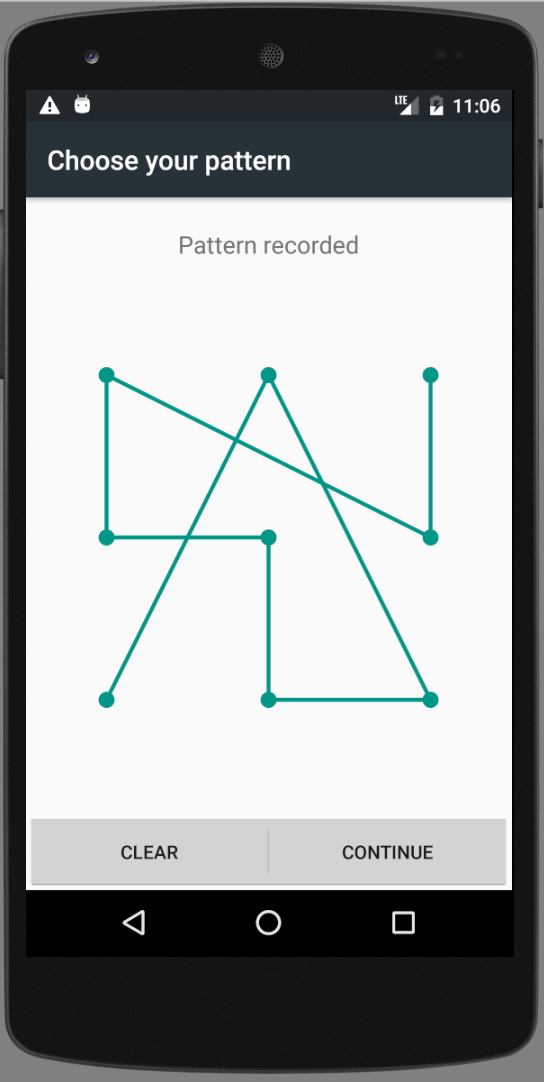 We treat the pattern pins similarly to numbers on a digital phone dial. So, in this case the *unlockKey* is `729854163`
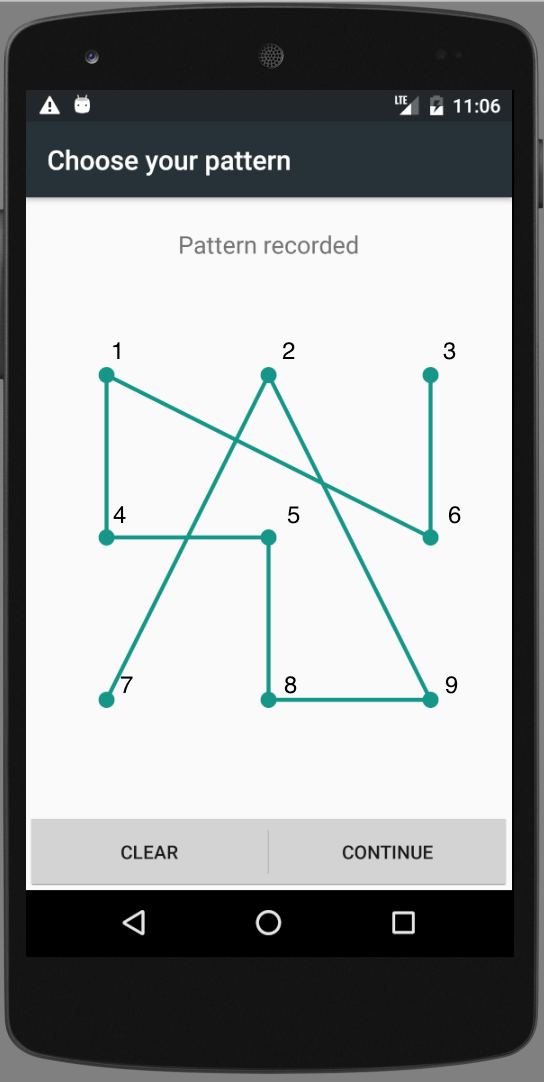 and capabilities are:
```json
{
"appium:unlockType": "pattern",
"appium:unlockKey": "729854163"
}
```
## Mid-Session Unlock
There is also a possibility to interact with the device's lock screen while the test session is running.
Use the following mobile extensions for this purpose:
- [mobile: lock](../../README.md#mobile-lock)
- [mobile: unlock](../../README.md#mobile-unlock)
- [mobile: isLocked](../../README.md#mobile-islocked)
and capabilities are:
```json
{
"appium:unlockType": "pattern",
"appium:unlockKey": "729854163"
}
```
## Mid-Session Unlock
There is also a possibility to interact with the device's lock screen while the test session is running.
Use the following mobile extensions for this purpose:
- [mobile: lock](../../README.md#mobile-lock)
- [mobile: unlock](../../README.md#mobile-unlock)
- [mobile: isLocked](../../README.md#mobile-islocked)