 ](http://godban.github.io/browsers-support-badges/)IE11 / Edge | [
 ](http://godban.github.io/browsers-support-badges/)Firefox | [
 ](http://godban.github.io/browsers-support-badges/)Chrome | [
 ](http://godban.github.io/browsers-support-badges/)Safari | [
 ](http://godban.github.io/browsers-support-badges/)iOS Safari |
| --------- | --------- | --------- | --------- | --------- |
## ScreenShot
](http://godban.github.io/browsers-support-badges/)iOS Safari |
| --------- | --------- | --------- | --------- | --------- |
## ScreenShot
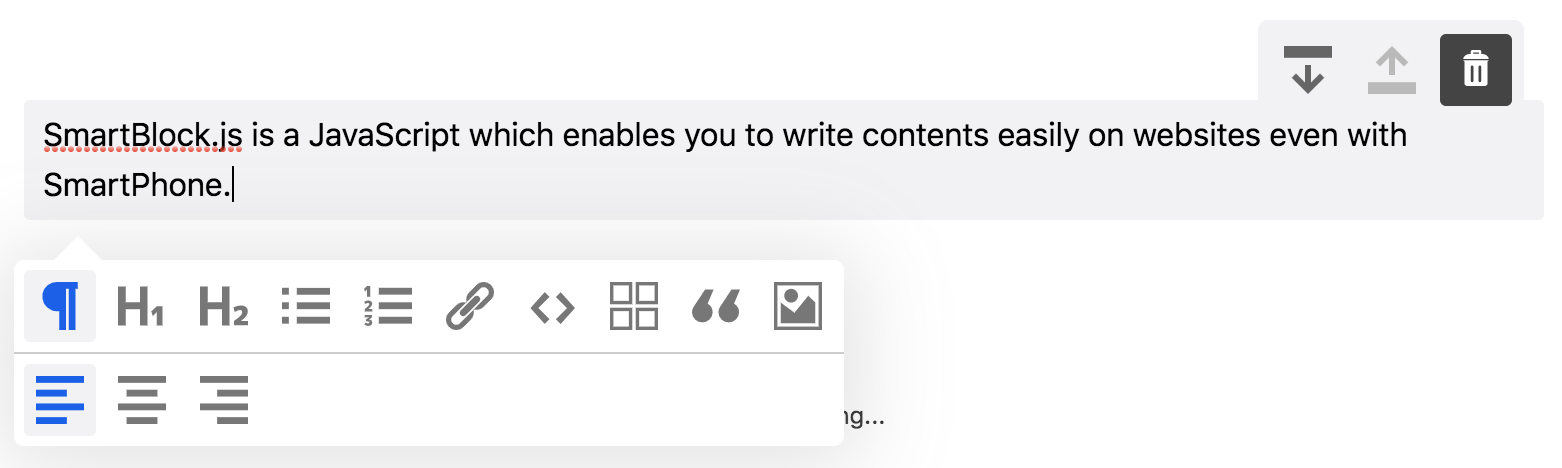 ## Features
* Easy to use with SmartPhone
* Fully customizable
* Block based
* Keep clean HTML and wipe out unnecessary tags
* Get the result as **HTML** or **JSON**
* copy and paste contents
## Install
```sh
$ npm install smartblock --save
```
## Usage
```js
import * as React from 'react';
import { render } from 'react-dom';
import 'smartblock/css/smartblock.css';
import { SmartBlock, Extensions } from 'smartblock';
render(<>
## Features
* Easy to use with SmartPhone
* Fully customizable
* Block based
* Keep clean HTML and wipe out unnecessary tags
* Get the result as **HTML** or **JSON**
* copy and paste contents
## Install
```sh
$ npm install smartblock --save
```
## Usage
```js
import * as React from 'react';
import { render } from 'react-dom';
import 'smartblock/css/smartblock.css';
import { SmartBlock, Extensions } from 'smartblock';
render(<>
hello
'} onChange={({ json, html }) => { console.log(json, html);}} /> , document.getElementById("app")); ``` ## Try it on CodeSandbox [](https://codesandbox.io/s/hardcore-kalam-tghp9?fontsize=14&hidenavigation=1&theme=dark) ## Customize You can add custom block like this ```js import * as React from 'react'; import { Extensions, CustomBlock } from 'smartblock'; Extensions.push(new CustomBlock({ tagName: 'div', className: 'alert', icon:hello
'} onChange={({ json, html }) => { console.log(json, html);}} /> , document.getElementById("app")); ``` You can add custom inline element like this ```js import * as React from 'react'; import { Extensions, CustomMark } from 'smartblock'; import 'smartblock/css/smartblock.css'; Extensions.push(new CustomMark({ tagName: 'span', className: 'small', icon:hello
'} onChange={({ json, html }) => { console.log(json, html);}} /> , document.getElementById("app")); ``` ## Options | Props | description | type | default | | ------------ | ----------------------------------------------------------------------------------------------------------- | ------------------ | ----------------------------------------------------------------------------------------------------------------------------------------------------------------------------------------------------------------------------------------------------------------------------------------------------------------------------------------------------------------------- | | extensions | Array of extensions which extend the feature of SmartBlock | Extension[] | array of extensions | | onChange | Callback function which is called when the content of the editor is changed. You can get both html and json | Function | | | onInit | Callback function which is called when the editor is initialized | Function | | | json | The editor contents will be initialized with the json data | Object | {} | | HTML | The editor contents will be initialized with the HTML | String | '' | | showTitle | Title will be shown | Boolean | false | | showBackBtn | Btn to support history back will be shown | Boolean | false | | autoSave | The HTML will be stored to the localstorage every time the content is changed | Boolean | false | | getEditorRef | Get the editor ref object | Function | | ## Download [Download ZIP](https://github.com/appleple/smartblock/archive/master.zip) ## Github [https://github.com/appleple/smartblock](https://github.com/appleple/smartblock) ## License Code and documentation copyright 2020 by appleple, Inc. Code released under the [MIT License](https://github.com/appleple/smartblock/blob/master/LICENSE).