DEVX
**Ultra-fast, autonomous AI pair-programmer & vibe-coding terminal agent.** Built specifically for **Android Termux**, **Windows**, **macOS**, and **Linux**.
[![npm](https://img.shields.io/npm/v/termux-dev.svg?style=flat-square&labelColor=0a0c11&color=00c2d1&label=npm)](https://www.npmjs.com/package/termux-dev) [![CI](https://img.shields.io/github/actions/workflow/status/apvcode/Termux-Dev/ci.yml?style=flat-square&labelColor=0a0c11&label=CI)](https://github.com/apvcode/Termux-Dev/actions/workflows/ci.yml) [![License: MIT](https://img.shields.io/badge/license-MIT-4f8cff.svg?style=flat-square&labelColor=0a0c11)](LICENSE) [![Node.js](https://img.shields.io/badge/node-%3E%3D20-3fb950.svg?style=flat-square&labelColor=0a0c11)](https://nodejs.org) [![TypeScript](https://img.shields.io/badge/TypeScript-5.4-4f8cff.svg?style=flat-square&labelColor=0a0c11)](https://www.typescriptlang.org) [![Platform](https://img.shields.io/badge/platform-Termux%20%7C%20Windows%20%7C%20macOS%20%7C%20Linux-d97a3a.svg?style=flat-square&labelColor=0a0c11)](#quick-start) [![Android app](https://img.shields.io/badge/Android-app%20%28APK%29-3ddc84.svg?style=flat-square&labelColor=0a0c11)](https://github.com/apvcode/Termux-Dev/releases/tag/android-app)
**English**  •  [Русский](README_ru.md)  •  [Українська](README_uk.md)  •  [Deutsch](README_de.md)  •  [Español](README_es.md)  •  [Français](README_fr.md)  •  [Português](README_pt.md)  •  [Chinese](README_zh.md)  •  [Japanese](README_ja.md)
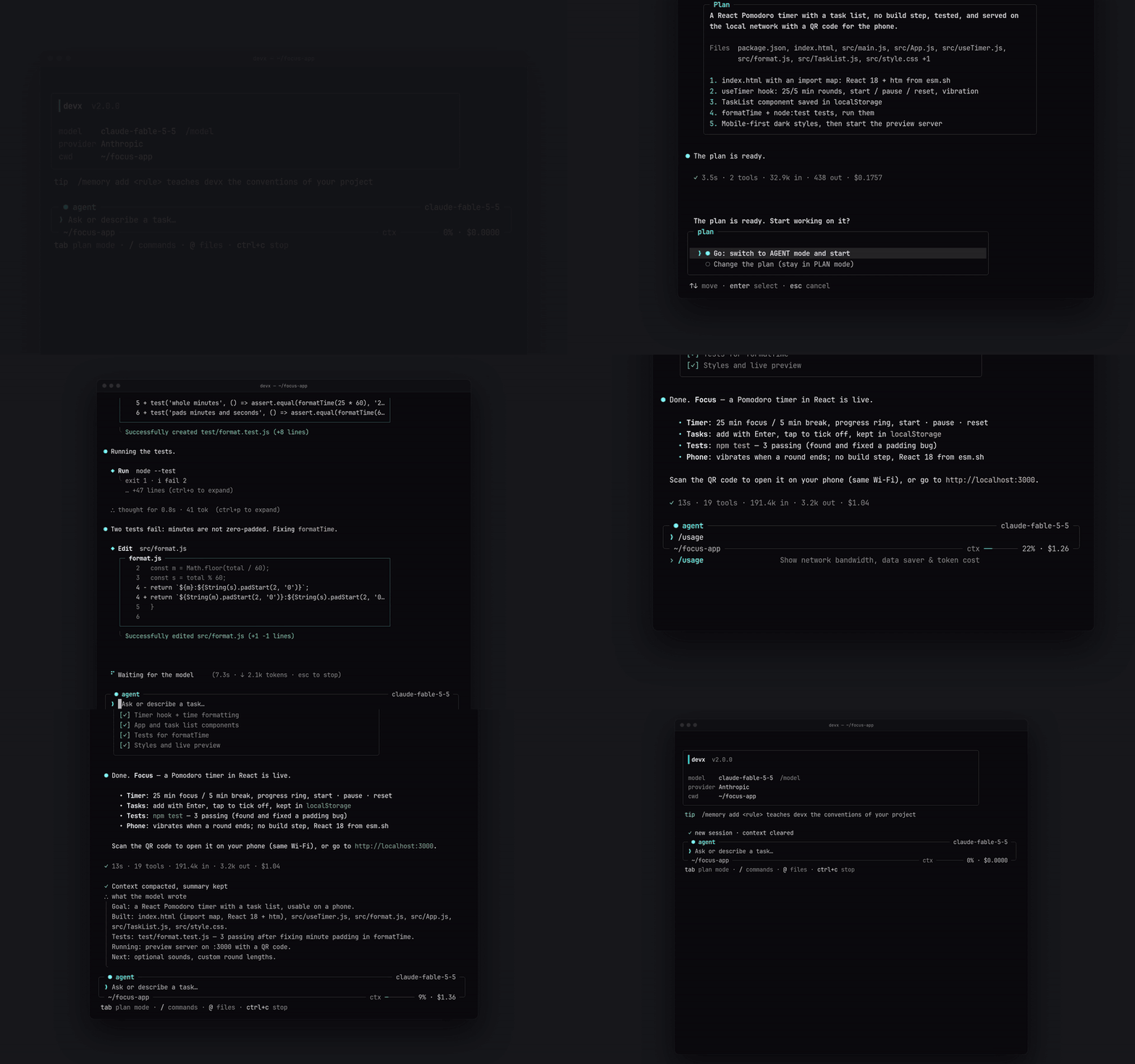
devx demo: plan, build, test, preview with a QR code
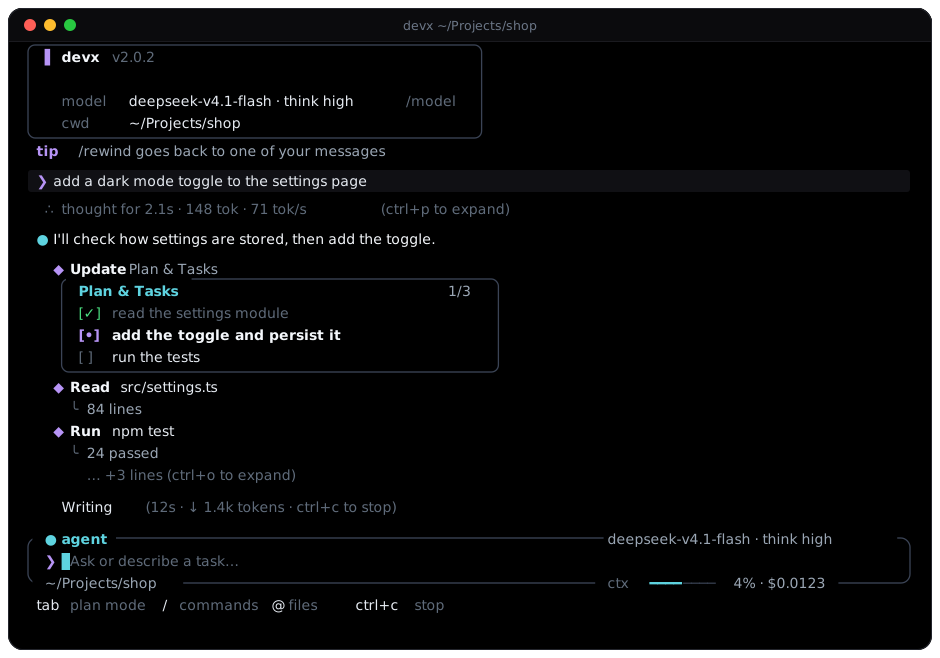
The devx terminal interface
--- ## At a glance
Plan, then act
PLAN and AGENT modes, one-click approval, a plan sized to the task
Safe by default
asks before risky actions, hides secrets in output, undo through git, an optional cost limit
Any model
OpenRouter, Gemini, DeepSeek, Groq, Mistral, OpenAI, Anthropic, Ollama and more
MCP built in
a panel, remote servers over HTTP, and the agent can set servers up itself
Made for the terminal
phone-friendly layouts, 18 themes, reasoning and output you can fold
Costs you can see
live cost per session, reasoning effort per model, a limit when you want one
## Quick start ```bash npm install -g termux-dev devx ``` On Android, first run `pkg install nodejs-lts` in Termux. --- ## Highlights The terminal interface is built around a framed prompt that carries the status in its borders — mode (`agent` / `plan` / `yolo`), model, folder, git branch, context meter and cost — a header card, a shaded echo of your message, a `●` gutter for the assistant, `◆` lines for tool calls with quiet one-line results and diff boxes for edits, and a live working indicator. Every layout has a narrow variant for Termux in portrait and measures emoji and CJK text correctly. Switch to the original ASCII layout in `/settings` → `Interface`. - **Dual-Brain Architecture (PLAN & AGENT Modes):** Instantly toggle between **PLAN** (safe architect, interactive requirements questionnaire, no code dumps) and **AGENT** (autonomous file edits, terminal commands, auto-installer). - **One-Click Plan Approval (`[Go / Go and compact context / Other]`):** When an architectural plan is finalized, review and confirm with `Go` to immediately unleash the coder agent. `Go and compact context` first summarizes the long planning conversation and carries the approved plan out in a short, fresh context (it works the same from the phone). - **Multimodal Vision Attachments:** Paste screenshots straight from the clipboard with `Ctrl+V` or `Alt+V` (also `/image`, or a pasted file path). They appear as badges like `[Image #1 203kb]` and are sent to the model as real images, unless the model is known to read text only. Needs `wl-clipboard` on Wayland, `xclip` on X11, `pngpaste` on macOS. - **The agent can look at images on disk:** Ask it about `screenshot.png` or a mockup in any folder and it opens the file with `read_file`, the same way it sees a picture you attach. PNG, JPEG, WebP and GIF up to 5 MB; the file contents must really be an image. Only the newest pictures are sent in full, older ones stay as a note in the chat (the model can open the file again). A model without vision gets a clear message instead. - **Built-in Live Web Server (`/serve`):** Instantly preview web apps and HTML5 games on port 3000. Seamlessly opens on Android via `termux-open-url`. - **Background tasks (`/tasks`):** The agent can start a dev server, a watcher or a long test run in the background and keep working. It can wait for a line (`ready|error`), read the output later, and is told when a task ends or prints something it asked about; if you are at the prompt then, it picks the news up by itself. A `◈ 2 bg` badge in the prompt frame shows what runs, and `· 1 failed` is added when a task ended badly until devx has told the agent about it; `/tasks` lists tasks, `/tasks ` shows output, `/tasks stop ` ends them. Starting a task asks for approval like `bash`; everything is stopped when devx exits. Set `"backgroundAutoWake": false` to stop the agent from reacting by itself. - **Instant Snapshot Rollback (`/undo`):** Every edit made with the file tools (`write_file`, `edit_file`) is recorded and can be rolled back with a single command. Changes made by shell commands (`bash`) are **not** tracked, and snapshots live in memory for the current session only. - **Self-Healing Diagnostics & Auto-Installer:** Built-in support for TypeScript (`tsc`), JavaScript (`node --check`), Python (`py_compile`), and Rust (`cargo check`). The AI automatically finds and fixes errors before finishing turns. - **Project Memory Bank (`.devx/memory.md`):** Persistent project context across sessions with `/memory add `. - **Notifications when devx waits for you:** When the agent needs an approval or asks you a question (`◆ Clarify`) and the terminal is not in front, you get a notification (kitty's own protocol, `notify-send` on Linux, `osascript` on macOS; on Termux an Android notification with a short vibration). A finished task is announced too, with the start of the answer. The terminal has to report focus changes (most modern ones do); when devx cannot tell whether you are looking, it stays quiet instead of popping up in front of you. - **Past chats (`search_chats`):** When you say "as we decided last time" or "in that chat about the parser", the agent can look through your saved chats by keywords (any language, other word forms match: page / pages) and read the one it needs, a few messages at a time. It is read-only and local, so it asks nothing; the chat that is open is not searched; tool output is not indexed; and what it reads is handed to the model as data, not as instructions. The agent does not use it on a normal task. - **18 Colour Themes on a Pure Black Background (`#0a0a0c`):** Deep OLED black for distraction-free CLI vibe-coding, with full palettes instead of a single accent: Cyan Cyber, Synthwave Purple, Matrix Hacker, Solar Amber, Ruby Crimson, Pure Monochrome, Nord Frost, Dracula, Tokyo Night, Gruvbox, Catppuccin Mocha, Solarized Dark, Rose Pine, Monokai, GitHub Dark, Deep Ocean, Sunset Glow and Forest Moss. See [Themes](#themes). - **Smart Session History (`/resume` & `/session`):** Resume sessions with last 20 messages neatly rendered in full Markdown and track unique session IDs (`#a8f9z`). - **Smart Multi-Line Editor (`edit_file 2.0`):** Collision-safe code editing with line-number error reporting on duplicate matches and `replaceAll` support. - **Comprehensive Test Suite (Vitest):** Full test coverage across core agent loop, file systems, security guard, snapshots, and context history with automated CI. - **Interface in 9 Languages:** English (default), Русский, Українська, Deutsch, Español, Français, Português, 中文 and 日本語. Pick one in `/settings` → `Language`; it applies at once and is remembered. Messages, hints and the settings screen are translated; code, tool names and the model's own answers are not. - **Universal AI Provider Support:** **OpenRouter**, **Google Gemini**, **DeepSeek**, **Groq**, **Mistral**, **OpenAI**, **Anthropic**, **Alibaba**, and local models (**Ollama**, **LM Studio**). - **Local Ollama:** Ollama's default context window (4096 tokens) is smaller than devx's own prompt, so Ollama silently drops the earlier messages and the model "forgets" the conversation. Start it with `OLLAMA_CONTEXT_LENGTH=16384 ollama serve` (8192 if memory is tight). `/doctor` checks the window and warns you. - **Your own providers:** `/provider` → **Add a provider**: give it a name, an address (any OpenAI- or Anthropic-compatible API) and a key. It is saved in `~/.devxrc.json` and shows up in the list next to the known ones; choose it again to use it, change its name, address or key, or delete it. A server on your own machine (LM Studio, a local gateway) can be added without a key. --- ## Installation & Setup ### Prerequisites - **Node.js**: `v20.0.0` or higher - **npm**, **pnpm**, or **yarn** ### Installing Node.js and npm devx needs Node.js 20 or newer (npm comes with it). Pick your system: ```bash # Windows (PowerShell) winget install OpenJS.NodeJS.LTS # macOS (Homebrew) brew install node # Ubuntu / Debian (NodeSource: the version in the distribution's own repository is often older than 20) curl -fsSL https://deb.nodesource.com/setup_lts.x | sudo -E bash - sudo apt-get install -y nodejs # Fedora sudo dnf install -y nodejs # Arch Linux sudo pacman -S nodejs npm # Android (Termux) pkg update && pkg install -y nodejs-lts ``` Reopen the terminal and check: `node -v` (should be `v20` or higher) and `npm -v`. Any system: the installer at [nodejs.org](https://nodejs.org/en/download) or [nvm](https://github.com/nvm-sh/nvm). ### Fast Global Install (Recommended) ```bash npm install -g termux-dev ``` ### Android (Termux) Setup ```bash # 1. Update packages & install NodeJS pkg update && pkg install -y nodejs-lts # 2. Install devx globally via npm npm install -g termux-dev # 3. Launch devx anywhere! devx ``` ### Build from Source (Developers) ```bash git clone https://github.com/apvcode/Termux-Dev.git cd Termux-Dev npm install npm link ``` ### Complete Uninstallation To completely remove `devx` along with all configuration, saved sessions, and data: ```bash # 1. Uninstall the global npm package npm uninstall -g termux-dev # 2. Remove configuration and session history (Linux / macOS / Termux) rm -rf ~/.devx ~/.devxrc.json # (Windows PowerShell) Remove-Item -Recurse -Force "$HOME\.devx", "$HOME\.devxrc.json" -ErrorAction SilentlyContinue ``` --- ## Getting Started Launch `devx` in any project folder: ```bash devx ``` * On first run, `devx` launches an interactive setup wizard to configure your preferred AI provider and API key. * Start directly in **PLAN mode**: ```bash devx --plan ``` * Run in **Headless One-Shot Mode** (scripts, CI/CD, Termux:Widget): ```bash devx -p "review latest git diff and find security bugs" devx -p "fix build errors" --yolo ``` --- ## Remote control from your phone **Get the app:** the Android app has its own page on Termux-Dev: **[Releases → devx for Android](https://github.com/apvcode/Termux-Dev/releases/tag/android-app)**. Every version is a file there, `devx-android-X.Y.Z.apk` (open the newest on the phone and allow installing from this source); new versions are added next to the old ones. The app's source and its own README are in the [`android` branch](https://github.com/apvcode/Termux-Dev/tree/android). In the app, a phone is removed from the computer with `/phones` in devx or `devx remote revoke `. devx 2.0 can be driven from the devx Android app. A small host runs in the background on your computer; the phone connects to it, and sees and controls the same sessions: every chat, live replies and reasoning, approval cards, questions, the plan, plan/agent/YOLO modes, the model and provider, context and cost, `/compact` and the other commands. Files and photos can be sent from the phone, and the agent can send files and pictures back: they show up in the phone chat as cards. Everything works with the terminal closed. The app is also a pocket assistant of its own, with no account and no server of ours: - **Chat** with any provider you add (OpenAI- or Anthropic-compatible): reasoning levels, photos and files, projects, memory, skills and MCP servers. - **Voice**: set it as the phone's assistant and the power button opens it. It sets alarms, timers and reminders, opens apps, finds contacts, prepares calls and messages, and controls brightness, Do Not Disturb, music and volume. A natural voice from your provider can read the answers instead of the phone's robotic one. - **Places and weather** from OpenStreetMap, no keys; it can also look at your photos and notifications when you ask. - **Scheduled tasks**: "every morning send me the news about AI". - **Answers as cards**: tables, charts, maps, weather, timers, checklists, diagrams and app cards from Google Play and F-Droid. - **Notebooks**: a place to learn or collect ideas on one topic, with its own sources (files, photos, web pages; share a link from any app). A study notebook has a goal and a plan of lessons, questions as forms, flashcards with spaced repetition (a screen of their own, a home-screen widget, a reminder), study stats, an audio overview to listen to, and answers that cite their sources as tappable chips. Cards can have pictures and come in from Anki or CSV (and go out as an Anki package); a live concept map (as in Obsidian: concepts can be dragged, searched and edited by hand, in study and ideas notebooks alike) shows how the ideas connect; the assistant can also remove, rename and edit the sources. - **`@` in the message** points at a notebook, a project, a file or a scheduled task; the assistant is given what it holds. One search covers chats, notebooks, files and the text inside them. - **Library, backup and trash**: every file you attached or the assistant made, with a built-in viewer for PDF, Word, slides and spreadsheets; everything (chats, notebooks, memory, settings) in one backup file, with the keys only under a password, shown before it is restored; an automatic weekly copy into a folder you choose or a WebDAV folder (Nextcloud, a NAS); deleted chats and notebooks wait 30 days in the trash. - **Your own look and character**: twelve themes (black, dark gray, light and more) that can follow the time of day, with blur you can turn off; the assistant's manner and name, app lock with the screen lock or biometrics, and locks on single chats. Chats can be pinned, archived and added to the home screen; four widgets and two quick-settings tiles. - **Nine languages**, the same as devx. ``` devx remote start # start the host (keeps running without a terminal) devx remote pair # shows a QR code: scan it in the app, confirm the six digits here devx remote status # who is connected, which sessions are open devx remote devices # paired phones devx remote revoke # remove one devx remote service # start with the computer (systemd / launchd / Startup folder); also in /settings. `service off` turns it off ``` How the phone reaches the computer, without any server of ours: first directly (same Wi-Fi, a VPN such as Tailscale, or a forwarded port 47821), and when that is impossible (mobile internet, carrier NAT) through a free public MQTT relay. The phone tries both at once and keeps trying; the relay only ever sees encrypted packets. The wire format and its security are in [docs/remote-protocol.md](docs/remote-protocol.md). Security: a phone is added only with a one-time code from `devx remote pair` (valid 5 minutes) **and** your confirmation here, where both screens show the same six digits. Keys are P-256 (the phone's never leaves its Keystore), every connection is signed and encrypted (AES-256-GCM) with fresh keys. Remote access is shell access to this computer: by default every command asks the phone for approval, and "Everything" mode is off until you switch it on for a session. If the phone has devx memory switched on, its name goes into the chat and the agent here gets a `phone_memory` tool that asks the phone for its notes: nothing is copied to this computer. ## Slash Commands Type `/` in the prompt to open the autocomplete command palette: | Command | Description | | :--- | :--- | | **`/plan`** | Switch to **PLAN** mode (architect & requirements planner) | | **`/agent`** | Switch to **AGENT** mode (coder & autonomous executor) | | **`/mcp`** | Manage Model Context Protocol (MCP) servers & external tools (`/mcp reload`) | | **`/usage`** | A panel (close with `Esc`): what fills the context window (system prompt, tool schemas, messages, tool results, images), the session cost and how sure it is, what was paid for (input, cached input, cache writes, output: tokens and money), traffic | | **`/export`** | Export session conversation to a clean GitHub-Flavored Markdown transcript | | **`/theme [name]`** | Switch the UI theme: searchable list of 18 palettes with a live preview (see [Themes](#themes)) | | **`/doctor`** | Run environment health diagnostics (Node, Termux, Compilers, API keys) | | **`/image`** | Paste the image from the clipboard (same as `Ctrl+V` / `Alt+V`) | | **`/serve [port]`** | Start local HTTP server for web/game preview (`/serve stop` to halt) | | **`/memory`** | View, add (`/memory add `), or clear project memory bank | | **`/copy`** | Copy the **last answer** of the AI to the clipboard, in full (works over ssh too) | | **`/rename`** | Rename the chat: `/rename `, or without a name the AI names it again (`/title` is the same) | | **`/permissions`** | What is allowed without asking (`Session` / `Always` on an approval card); `/permissions clear` resets it | | **`/phones`** | The phones paired with devx Remote: pick one to remove it, it is disconnected at once and cannot connect again until it is paired anew | | **`/rewind`** | Go back to one of **your messages**: the chat after it is removed (the model forgets it too), the message returns to the input line to be edited; the files can go back as well (with git) | | **`/tasks`** | Background tasks: list, `/tasks ` for output, `/tasks stop `, `/tasks clear` | | **`/undo`** | Revert all file changes from the last AI turn | | **`/diff`** | View colored git diff of modified project files | | **`/commit`** | AI-generated semantic commit message & git commit | | **`/status`** | View git repository status | | **`/session`** | View active session ID, stats, and metadata | | **`/resume`** | Browse and resume saved chat sessions | | **`/session del`** | Selectively or bulk delete saved sessions | | **`/settings`** | Configure theme, interface, YOLO auto-approve, project memory, update checks and the interface language | | **`/update`** | Check for a new version: a card with what is new, then **Update now**, **Later** or (at start-up) **Skip this version**. The install runs on a live screen step by step, checks that npm really has the version, and restarts devx. If it fails you get the reason and the command to run by hand | | **`/model`** | Switch model for the active provider with live search | | **`/effort [level]`** | Set the reasoning effort. Only the levels the current model supports are offered (see [Reasoning effort](#reasoning-effort)) | | **`/provider`** | Switch provider (OpenRouter, Gemini, Groq, DeepSeek, Local) | | **`/compact`** | Compact and summarize chat context tokens (the compacted chat is saved at once, so `/resume` gives the short one) | | **`/clear`** | Clear the context and start a new session (the old one stays saved, see `/resume`) | | **`/init`** | Generate `AGENTS.md` developer guide in project root | | **`/help`** | Display all available commands | | **`/exit`** | Exit devx cleanly | --- ## Keybindings - **`Tab`** — Instantly toggle between **PLAN** and **AGENT** modes without losing your draft text. - **`Ctrl+V`** / **`Alt+V`** — Paste image from clipboard directly into prompt. - **`@filename`** — Fast fuzzy file autocomplete and full file embedding. - **`Backspace`** — Atomically deletes entire badges `[Pasted text #1]` and `[1.png 203kb]` in one press. - **`Ctrl+Backspace`** / **`Alt+Backspace`** — Erase the text word by word (also while the agent works). - **`Ctrl+Enter`** — While typing: start a new line (a new paragraph) instead of sending. `Alt+Enter` and `Shift+Enter` do the same where the terminal reports them; on a terminal that cannot tell them from `Enter` (a phone keyboard, for one) type `\` before `Enter`. devx asks the terminal to tell them apart only where that is known to work (kitty, Ghostty, WezTerm, iTerm2, foot, Alacritty); Termux and other terminals that read that request as a cursor or style code never get it. `DEVX_EXTENDED_KEYS=1` (or `0`) forces it on (or off). - **`Ctrl+P`** / **`Ctrl+O`** — Unfold or fold the reasoning of the model (`Ctrl+P`) and the commands with their output (`Ctrl+O`) in the whole chat, also what is already above. Both are folded by default; works while the agent works and at the prompt. - **`Esc`** — Stop the current answer and whatever it started (a running command); what you typed waits in the next prompt. Esc also closes every list and card. - **`Ctrl+C`** — Stop current generation immediately or exit. --- ## Reasoning effort `/effort` sets how much the model thinks before it answers: `off`, `low`, `normal`, `high`, `xhigh`, `max` or `auto` (the model's own default, nothing is sent). Models differ, so the menu offers **only the levels the current model supports**: ``` ╭─ effort ─────────────────────────────────── claude-sonnet-5-5 ─╮ │ ❯ ● auto model default, nothing is sent │ │ ○ off no reasoning │ │ ○ normal balanced (~6k thinking tokens) │ │ ○ high deep reasoning (~16k thinking tokens) │ │ │ │ Not offered by this model: max. │ ╰─────────────────────────────────────────────────────────────────╯ ``` - `/effort` opens the menu, `/effort high` sets a level directly (`medium`, `none`, `maximum` and similar work as aliases), `/effort auto` goes back to the model default, `/effort refresh` updates the data the menu is built from (see below). - The choice is remembered **per model**. After switching to a model that does not offer a saved level, nothing is sent. The current level is shown next to the model name (`gpt-5.5 · think high`; `think auto` means the model's own default). While the agent works, the status line shows how many tokens the model has written for your request so far (`↓ 364 tokens`), and the line after the turn sums it up (`18.1k in · 59 out`). - `devx -p "task" --effort high` sets a level for one run only (it is never saved). - If an endpoint answers 400 and complains about the reasoning parameter, devx repeats the request once without it, tells you, and stops sending it. **Where the levels come from** (the first source that knows the model wins; the menu says which one it used): 1. **Your own profile** in `~/.devxrc.json` (`reasoningProfiles`, below). 2. **The endpoint itself.** OpenRouter lists reasoning metadata for every model (which efforts it accepts, whether it can be switched off); Ollama reports a "thinking" capability; LiteLLM and many gateways add flags to their model list. A **custom or third-party provider is asked once**: a few small requests to *its own* base URL, with the key you configured (`GET /models`, on a local machine also `POST /api/show`, for LiteLLM `GET /model/info`). The answer is cached for a day in `~/.devx/capabilities.json`. The big vendors (OpenAI, Anthropic, Google...) are not asked, their lists say nothing about reasoning. Turn it off with `"probeEndpoints": false` in `~/.devxrc.json`. 3. **The [models.dev](https://models.dev) catalogue**: reasoning options of about 5700 models of 213 providers (efforts, toggle, token budgets). A snapshot ships with devx, so nothing is downloaded by default. `/effort refresh` fetches the current one into `~/.devx/` and asks the endpoint again; it is the only time devx contacts models.dev, and only because you ran that command. The same download refreshes the prices used for the cost display (see Cost). 4. **Rules by model name**, the fallback for everything the sources do not describe (table below). How a level is written into the request still depends on the API in your base URL, so that part is built into devx. Rules by model name (the fallback): | Model | Levels | Sent as | | :--- | :--- | :--- | | OpenAI o-series, gpt-oss | low, normal, high | `reasoning_effort` (`reasoning.effort` on OpenRouter) | | GPT-5.x, 5.5+ | off (minimal on GPT-5), low, normal, high, plus xhigh from 5.2 | `reasoning_effort` | | Grok 3 mini | low, high | `reasoning_effort` | | Claude 3.7 / 4.x / 5.x (Fable, Opus, Sonnet, Haiku) | off, low, normal, high, xhigh, max (Opus 4 and 4.1 without max) | `thinking.budget_tokens` (Anthropic), `reasoning.max_tokens` (OpenRouter) | | Gemini 3.x (3.1 Pro, 3.6 Flash) | low, high | `reasoning_effort` | | Gemini 2.5 Pro / Flash | low to max (Flash also off) | `thinking_budget` (Google), `reasoning.max_tokens` (OpenRouter) | | Qwen3 | off, low, normal, high, max | `enable_thinking` / `thinking_budget` (DashScope) | | DeepSeek V3.1+, GLM 4.5+ | off, normal | `reasoning.enabled`, `thinking.type` | | DeepSeek-R1, QwQ, Grok 4, Magistral | none: they always reason | nothing | A model that none of the sources describes gets no levels instead of a guess. If you know how it takes a reasoning setting, describe it in `~/.devxrc.json`: ```json { "reasoningProfiles": { "my-model": { "levels": ["off", "normal", "high"], "param": "reasoning_effort", "values": { "off": "none", "normal": "medium", "high": "high" } } } } ``` `param` may be nested (`"reasoning.effort"`). A profile also overrides the built-in table for that model id. --- ## Typing while the agent works The prompt frame stays at the bottom of the terminal during a task (with the live context and cost), and the agent's work scrolls above it. Type into it while the agent reads files, runs commands or thinks, and press Enter: the message is queued and the agent receives it **at its next step**, between two tool calls, so it carries on with its work but takes your remark into account. A message typed while the model writes its final answer gets an answer of its own instead of being dropped. `Ctrl+Enter` starts a new line in your message instead of sending it (`Alt+Enter` and `Shift+Enter` too; a `\` before `Enter` does it on terminals that cannot tell them apart). `Ctrl+Backspace` erases a word. Type `/` there and the list of all commands opens (arrows scroll it, `Tab` completes, `Enter` runs): the ones that only show or change a setting (`/settings`, `/model`, `/theme`, `/usage`, `/mcp`, `/tasks`, `/help` and others) open at once while the agent works and it waits; the ones that change the conversation (`/compact`, `/new`, `/undo`, `/plan` ...) run when the agent is done. The up and down arrows bring back the lines you sent before, in earlier chats too (kept in `~/.devx/history.jsonl`). `↓` takes a waiting message back to the line to edit it; `Enter` on an empty line sends it **now** (the current answer is stopped). The arrows work with Caps Lock and Num Lock on as well. A message that begins with a file path (`/home/me/boot.img flash this`) is a message, not a command. `Esc` (or `Ctrl+C`) stops the agent and puts what you typed back into the next prompt. `@file` mentions work in these messages too. While an approval card or a question is on screen the line steps aside, so your `y` / `n` never ends up in the message. Turn it off with `"ui": { "typeAhead": false }` in `~/.devxrc.json`. --- ## Context window The size of the window is looked up, not made up. In this order: `contextLimits` in `~/.devxrc.json` (your own number per model id), the [models.dev](https://models.dev) catalogue (the maker's own number for about 5000 models; a snapshot ships with devx, `/effort refresh` downloads the current one), the value saved when you chose the model, devx's table of models, a rule by model name, and only then a default of 128k. `/usage` says which of them was used and warns when it is a guess. Old messages are dropped above 85% of the window, so a window that is too small makes devx forget too early, and one that is too large makes the provider refuse the request (devx then shortens the history and tries again). ```json { "contextLimits": { "my-model": 65536 } } ``` --- ## API formats (OpenAI and Anthropic) Two wire formats exist: **OpenAI** (`/v1/chat/completions`) and **Anthropic** (`/v1/messages`). The native Anthropic format carries signed reasoning blocks, prompt caching and exact cache accounting, so Claude models work best through it. devx speaks both and picks the format **per model, by itself, with one key**: - `api.anthropic.com` and base URLs with an `/anthropic/` path (MiniMax, Z.ai and similar) use the Anthropic format. - For any other custom gateway devx asks for the model list twice (a few small `GET {root}/v1/models` requests to your own base URL with your own key): once as an OpenAI client and once as an Anthropic client. Models that only the second list has (typically Claude) are sent through the Anthropic format, everything else through the OpenAI format. `/model` shows both lists in one picker and marks the Anthropic ones. Set the base URL once (`https://gateway.example.com/v1` or without `/v1`); there is nothing to configure per model. - The answer is cached for a day in `~/.devx/formats.json` (model ids only, never the key). `"probeEndpoints": false` turns the probing off, `"apiFormat": "openai"` or `"anthropic"` in `~/.devxrc.json` forces one format for everything. - Reasoning levels (`/effort`) are written the way the Anthropic API expects (`thinking.budget_tokens`) whenever the Anthropic format is used, even behind a gateway. Reasoning blocks are kept and sent back with the next request, so the model does not lose its thread between tool calls. If a gateway rejects them, the cache markers, a too large `max_tokens` or the reasoning setting, devx retries once without the offending part and says so. ## Cost Every request resends the whole conversation, and the number next to the context meter adds up what each of those requests cost (cached input is cheaper, and priced as such). The context meter itself shows 0 for an empty chat and, from the first message on, everything the next request carries: system prompt and tool schemas included. The number next to the context meter is the money spent in this session. It says how sure devx is: | Shown | Meaning | | :--- | :--- | | `$0.0123` | exact: reported by the provider, or priced from the vendor's own price list | | `~$0.0123` | an estimate: priced with the [models.dev](https://models.dev) price of the same model (a gateway may charge differently) | | `$0.0123+` | at least this much: some requests have no known price and are not counted | | `n/a` | no price is known for the model | Prices are looked up in this order, the first that knows the model wins: the cost the provider put into its response (OpenRouter `usage.cost`, LiteLLM) - your own `prices` in `~/.devxrc.json` - the endpoint's own price list (OpenRouter, LiteLLM) - the models.dev catalogue (about 8500 models; a snapshot ships with devx, `/effort refresh` downloads the current one). Cached input tokens, cache writes and long-context tiers are priced separately, as the vendors do. A request that went out but got no answer (cancelled with Ctrl+C, connection lost, a gateway timeout of a slow model) is usually billed by the provider all the same, and a retry sends the whole conversation again: such requests are counted too, as an estimate (`~`). The small side jobs (chat title, `/commit` message, `/compact` summary) run with the lightest reasoning level the model offers and their cost is part of the total. A model that is not found is never shown as free: only `:free` models and local servers cost nothing. `/usage` also lists the cached input and how many requests could not be priced. ```json { "prices": { "my-model": { "input": 0.5, "output": 2.0, "cacheRead": 0.05 } } } ``` Values are USD per one million tokens. --- ## Themes `/theme` opens a list you can filter by typing; the highlighted theme is previewed in its own colours below the list. `/theme nord` (or an alias such as `tokyo`, `mocha`, `gh`, or a number from 1 to 18) switches directly, and the choice is saved. A theme is a complete palette: accent, a second colour for plan mode, success / warning / error colours, a colour for YOLO mode, four steps of grey for text, secondary text, hints and borders, and the background of your echoed message. Every theme is checked in the tests for readable contrast on the dark background. | Theme | Character | | :--- | :--- | | `cyan` Cyan Cyber (default) | electric cyan and obsidian | | `purple` Synthwave Purple | neon magenta, retro violet | | `matrix` Matrix Hacker | phosphor green | | `amber` Solar Amber | warm CRT gold | | `crimson` Ruby Crimson | scarlet red | | `monochrome` Pure Monochrome | white and grey only | | `nord` Nord Frost | arctic blues | | `dracula` Dracula | purple with pink and green | | `tokyonight` Tokyo Night | indigo and blue | | `gruvbox` Gruvbox | retro yellow and orange | | `catppuccin` Catppuccin Mocha | pastel mauve | | `solarized` Solarized Dark | low-glare teal and olive | | `rosepine` Rose Pine | soft rose and gold | | `monokai` Monokai | lime and magenta | | `github` GitHub Dark | clean blue and green | | `ocean` Deep Ocean | deep sea cyan | | `sunset` Sunset Glow | coral and violet | | `forest` Forest Moss | mossy greens | Colours are exact on terminals with truecolor support (`COLORTERM=truecolor`); on 256-colour terminals each colour is mapped to the closest palette entry. Set `DEVX_COLOR=256` or `DEVX_COLOR=truecolor` to force one of the two. --- ## Hooks, limits and permissions - **Cost limit.** `/settings` → `Cost limit` (or `"maxCostPerSession": 5` in `~/.devxrc.json`, USD). At 80% devx warns you; at the limit it stops the task, and before the next message it asks whether to spend more (continuing raises the limit of that session only). - **Allowed without asking.** On an approval card, `Session` allows a command (by program and subcommand, like `npm test`) or an MCP tool until you close devx; `Always` keeps it in `~/.devxrc.json` (`bashAllowlist`, `allowedTools`). Dangerous commands, reads of secrets, chains (`&&`, `;`, `|`) and redirections are never remembered. `/permissions` lists it, `/permissions clear` removes it. - **Hooks.** Commands run around the tools of the agent, set in `~/.devxrc.json`: ```json { "hooks": { "PreToolUse": [{ "matcher": "bash", "command": "./check-command.sh" }], "PostToolUse": [{ "matcher": "write_file|edit_file", "command": "npx prettier --write ." }] } } ``` `matcher` is a regular expression for the tool name (none or `*`: every tool). The command gets the call as JSON on stdin (`event`, `tool_name`, `tool_input`, and for `PostToolUse` `tool_result`) and `DEVX_HOOK_EVENT` / `DEVX_TOOL_NAME` in the environment. Exit code `2` of a `PreToolUse` hook stops the tool and tells the model what the command wrote to stderr; exit code `2` of a `PostToolUse` hook adds that text to the result. Hooks of a project (`.devx.json`) count only in a trusted workspace; a hook has 10 seconds. - **Secrets in output.** Keys and tokens in the output of a tool (`sk-…`, `ghp_…`, `Bearer …`, `"apiKey": "…"`, private keys) are replaced with `[hidden secret]` before the model, the chat and the saved session see them. - **Undo for everything.** With git, `/undo` puts the whole folder back to how it was before the last turn, including what shell commands did (files in `.gitignore` are not touched). - **The approved plan** is saved in `.devx/plan.md` and given to the agent for 24 hours. **Project memory** longer than ~4000 characters is cut to the newest facts for the model. - **MCP.** `/mcp add [args]` or `/mcp add ` (a remote server over HTTP; put a token in `headers` as `"Bearer ${TOKEN}"`), `/mcp remove `, `/mcp import` (from Claude Code). - **MCP tools on demand.** Every MCP tool schema is sent with every request, and a big server (Notion has ~80 tools) can cost 100k tokens before you type anything. So devx sends the tools of small servers at once and keeps the big ones back: the agent sees the list of servers in its `mcp_search` tool, finds and loads only the tools a task needs (`mcp_search` with keywords, tool names, or just a server name), and calls them from its next step. Loaded tools stay for the chat (a resumed chat gets back the ones it used). Which servers wait is decided by size (all tools sent together stay within ~4k tokens); force it per server with `"lazy": true` or `"lazy": false` in `mcp.json`. ## Security Model `devx` runs commands and edits files on your machine on behalf of an AI model, so it is conservative by default: - **Workspace trust.** The first time you open a folder you are asked whether to trust it (default: no). In an untrusted folder, `provider`, `apiKey`, `baseUrl`, `autoApprove` and `bashAllowlist` from the project's `.devx.json` are **ignored**. A cloned repository cannot redirect your API key to its own server or switch on YOLO. - **Project MCP servers need approval.** MCP servers declared by a project (`.mcp.json`, `.devx/mcp.json`, `.claude/mcp.json`, `.devx.json`) are programs that would run on your machine. You review the exact commands once; if they change, you are asked again. In headless mode (`-p`) unapproved project servers are skipped. Servers from `~/.devxrc.json` and `~/.devx/mcp.json` always start. - **Confirmations.** In safe mode `bash`, `install_package`, MCP tools, the preview server and every read or write **outside the project folder** require confirmation. - **YOLO (`--yolo`) is not a sandbox.** It skips routine confirmations, but still asks before dangerous shell commands (recursive deletes outside the project, `find -delete` on broad paths, `curl … | sh`, `sudo`, `git push --force`, …) and before touching credentials (`~/.ssh`, `~/.aws`, `~/.devxrc.json`, `.env`, private keys). The shell check analyses commands token by token, but a deliberately obfuscated command can still slip through, so use YOLO only in folders and environments you can afford to lose. In headless mode those confirmations cannot be shown, so the action is denied. - **Extra (`--extra`, or `/settings` while YOLO is on) asks nothing at all.** Not the dangerous commands, not the credential files, not a new MCP server: the agent may run any command. A warning is shown when you switch it on, the prompt frame says `extra`, and like YOLO it is off again at the next start. Use it only in an environment you can afford to lose. - **`fetch_url`** refuses localhost, private networks and cloud metadata addresses (also after redirects). Set `DEVX_ALLOW_PRIVATE_NETWORK=1` to allow local documentation servers. - **`/serve`** listens on your local network (that is how the phone QR code works). It never serves dotfiles, keys, `node_modules`, or symlinks leaving the project, does not send permissive CORS headers and rejects requests addressed to a public host name. - **Secrets at rest.** `~/.devxrc.json`, `~/.devx/` and saved sessions are created readable by you only (`0600` / `0700`). Session files contain the full conversation, including file contents the agent read. - **Silent connections.** A request that gets no answer and no new data for 300 s is given up on and sent again (a phone can lose the connection without the app noticing). `"requestTimeoutSeconds": 600` in `~/.devxrc.json` changes the time, `0` turns it off. A model that thinks for minutes without sending a byte needs a larger value. - **Pictures in saved chats** are kept in files next to the chat (`~/.devx/sessions/.images/`), not inside its JSON, so saving a chat stays fast and `/resume` opens quickly. They are removed with the chat. - **Limits.** `bash` stops commands after 120 s by default (the model can pass `timeout_seconds`, max 1800) and closes stdin. Long output keeps its beginning and its end. `read_file` returns at most ~60 000 characters per call and supports `startLine` / `endLine`. --- ## Support the Project If you find **devx** useful, please consider giving it a star on [GitHub](https://github.com/apvcode/Termux-Dev) — it helps the project grow and motivates further development! --- ## License This project is licensed under the [MIT License](LICENSE). ---
Made by [ApvCode](https://github.com/ApvCode) for developers, vibe-coders, and Termux hackers.