# Genie 3: Fast and ultra-capable protein design through all-atom SE(3)-equivariance
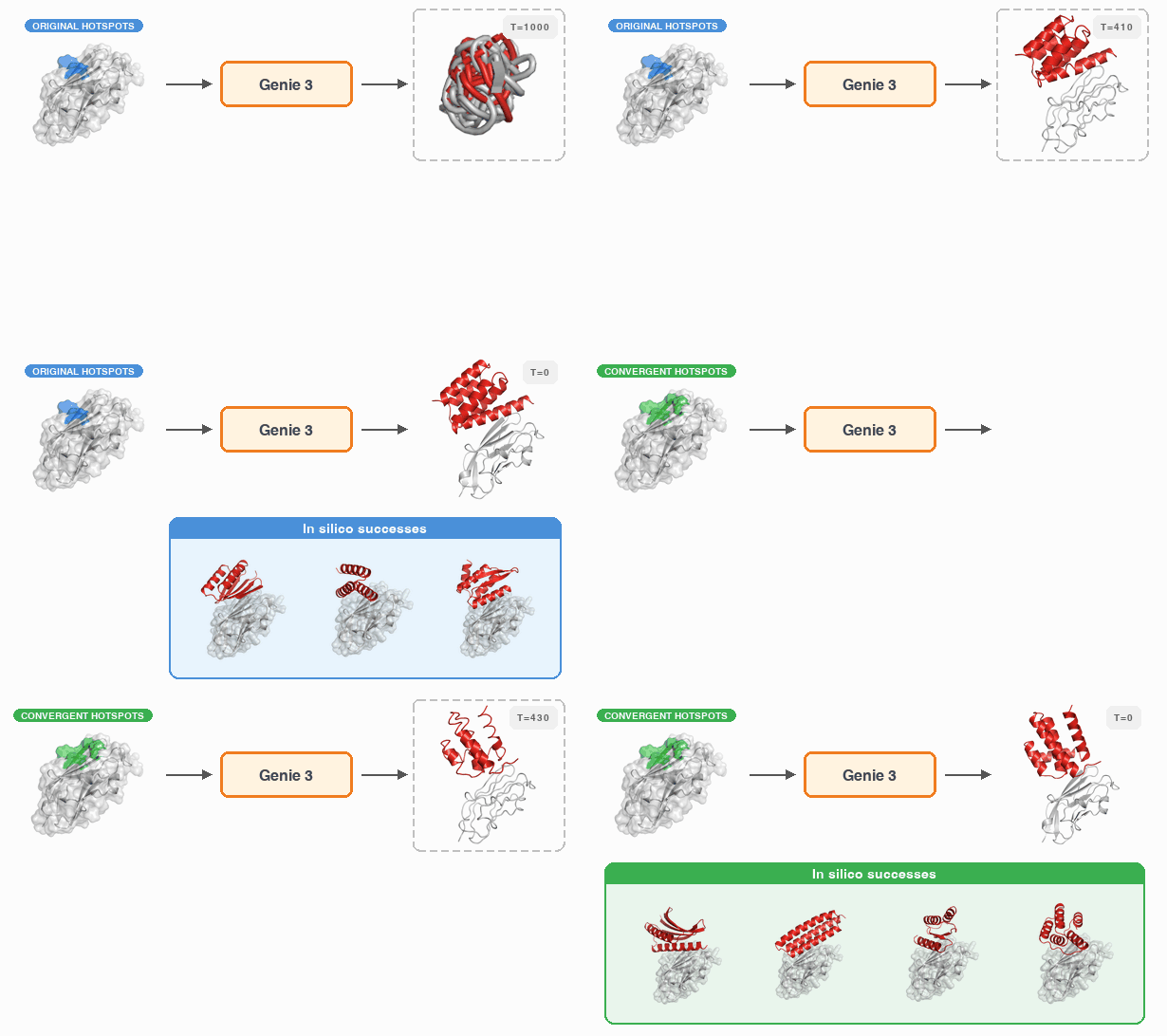
Genie 3 is a fast, all-atom SE(3)-equivariant diffusion model for protein design.
It achieves state-of-the-art performance on unconditional generation, motif
scaffolding, and binder design while retaining the computational efficiency of
equivariant architectures.
> **Preprint:** [Fast and Ultra-Capable Protein Design: Advancing the Frontier Through Atomistic SE(3)-Equivariance with Genie 3](https://www.biorxiv.org/content/10.64898/2026.05.01.722168v1)
## Table of Contents
- [Setup](#setup)
- [Download source code](#download-source-code)
- [Create conda environments](#create-conda-environments)
- [Download model weights and training data](#download-model-weights-and-training-data)
- [CLI Reference](#cli-reference)
- [Subcommands](#subcommands)
- [Shared flags](#shared-flags)
- [Multi-node sharding](#multi-node-sharding)
- [Application 1: Unconditional Generation](#application-1-unconditional-generation)
- [Quick start](#quick-start)
- [Configuration](#configuration)
- [Multi-device (single node)](#multi-device-single-node)
- [Multi-node](#multi-node)
- [Evaluation results](#evaluation-results)
- [Application 2: Motif Scaffolding](#application-2-motif-scaffolding)
- [Quick start](#quick-start-1)
- [Configuration](#configuration-1)
- [Multi-device (single node)](#multi-device-single-node-1)
- [Multi-node](#multi-node-1)
- [Evaluation results](#evaluation-results-1)
- [Construction of motif scaffolding problem set](#construction-of-motif-scaffolding-problem-set)
- [Application 3: Binder Design](#application-3-binder-design)
- [Quick start](#quick-start-2)
- [Configuration](#configuration-2)
- [Multi-device (single node)](#multi-device-single-node-2)
- [Multi-node](#multi-node-2)
- [Beam search](#beam-search)
- [Iterative design](#iterative-design)
- [Evaluation results](#evaluation-results-2)
- [Construction of binder design problem set](#construction-of-binder-design-problem-set)
- [Training](#training)
- [Dataset](#dataset)
- [Codebase Architecture](#codebase-architecture)
- [`src/genie3/cli.py`: Unified CLI](#srcgenie3clipy-unified-cli)
- [`src/genie3/config/`: Configuration](#srcgenie3config-configuration)
- [`src/genie3/runtime/`: Execution Context](#srcgenie3runtime-execution-context)
- [`src/genie3/generation/`: Diffusion Model and Sampling](#srcgenie3generation-diffusion-model-and-sampling)
- [`src/genie3/evaluation/`: Evaluation Pipeline](#srcgenie3evaluation-evaluation-pipeline)
- [Compatibility with Genie 2](#compatibility-with-genie-2)
- [Citation](#citation)
---
## Setup
### Download source code
Download the source code from GitHub by cloning this repo:
```
git clone https://github.com/aqlaboratory/genie3.git
```
### Create conda environments
Install and set up the unified conda environment for all workflows:
```
bash scripts/setup/setup.sh
```
This creates a single default environment named `genie3` with everything needed
for training, unconditional generation, motif scaffolding, and binder design.
ColabFold is installed directly into the `genie3` environment using the
official upstream `conda` + `pip` installation model.
### Download model weights and training data
Pretrained model weights and training datasets are hosted on
[HuggingFace (yeqinglin/genie3)](https://huggingface.co/yeqinglin/genie3).
Use the download script to fetch them:
```bash
# Download both pretrained weights and training data (default)
bash scripts/setup/download.sh
# Pretrained weights only (pretrained/)
bash scripts/setup/download.sh --weights
# Training data only (data/train/)
bash scripts/setup/download.sh --data
```
`huggingface_hub` is installed automatically as part of the `genie3` package.
---
## CLI Reference
All workflows are driven by the `genie3` command-line tool. Make sure the
`genie3` conda environment is active before running any command:
```
conda activate genie3
```
### Subcommands
| Command | Description |
|---------|-------------|
| `genie3 run -c ` | Run generation followed by evaluation (all-in-one) |
| `genie3 generate -c ` | Run generation only |
| `genie3 evaluate -c ` | Run evaluation only |
| `genie3 evaluate --reduce -c ` | Merge shard outputs and produce final results |
| `genie3 status -c ` | Show progress of generation and evaluation shards |
| `genie3 train --config -d ` | Run model training |
### Shared flags
| Flag | Description |
|------|-------------|
| `-c / --config ` | Path to the experiment configuration file (required) |
| `--num-devices ` | Number of GPUs to use |
| `--verbose` | Show detailed runtime output in the terminal |
| `--log-dir ` | Root directory for run logs (default: `logs/runs`) |
### Multi-node sharding
For `generate` and `evaluate`, add `--shard-id` and `--num-shards` to split
work across nodes:
```bash
# On node 0:
genie3 generate -c --shard-id 0 --num-shards
# On node 1:
genie3 generate -c --shard-id 1 --num-shards
# ... (one process per node)
# After all shards complete, run the reduce step once:
genie3 evaluate --reduce -c
```
Use `genie3 status -c ` at any time to check which shards have
completed and which still need to run.
---
## Application 1: Unconditional Generation
### Quick start
```bash
genie3 run -c examples/unconditional/experiment.yaml
```
### Configuration
The experiment configuration file uses the following format:
```yaml
experiment:
name:
paths:
rootdir:
generation:
dataset:
source: unconditional
min_length:
max_length:
length_step:
n_sample:
sampler:
sampler:
direction_scale:
evaluation:
version: unconditional
folding:
model_name: esmfold
```
Parameters:
- ``: Root output directory for generated designs and evaluation results
- `` / ``: Length range of generated proteins (inclusive)
- ``: Increment between sampled lengths
- ``: Number of samples to generate per length
- ``: Controls quality-diversity trade-off. Use `0.8` for short
monomers (length ≤ 300) and `0.0` for long monomers (length > 300)
See `examples/unconditional/experiment.yaml` for a working example.
### Multi-device (single node)
Use `--num-devices` to run generation and evaluation across multiple GPUs on one
node:
```bash
genie3 run -c --num-devices
```
Or run each stage separately:
```bash
genie3 generate -c --num-devices
genie3 evaluate -c --num-devices
genie3 evaluate --reduce -c
```
Pass `--num-devices 4` to use 4 GPUs.
### Multi-node
Distribute generation and evaluation across multiple nodes using sharding:
```bash
# Generation — one process per node:
genie3 generate -c --num-devices --shard-id --num-shards
# Evaluation — one process per node:
genie3 evaluate -c --num-devices --shard-id --num-shards
# Reduce — run once after all evaluation shards complete:
genie3 evaluate --reduce -c
```
### Evaluation results
Results are written to `/results`. The directory contains:
- `info.csv`: Evaluation statistics for each generated design, including
self-consistency RMSD (`scrmsd`), ESMFold average per-residue confidence
(`avg_plddt`), and secondary structure content (`pct_alpha_helix`, `pct_strand`).
- `successful_generation_info.csv`: Statistics for in-silico successful designs.
- `successful_generations_cluster.csv`: FoldSeek clustering results for
successful designs, with cluster IDs at TM-score thresholds of 0.5, 0.6, and 0.8.
- `successful_generations/`: PDB files of in-silico successful designs.
A design is considered an in-silico success if `scrmsd < 2Å`.
---
## Application 2: Motif Scaffolding
### Quick start
```bash
genie3 run -c examples/motif_scaffolding/experiment.yaml
```
### Configuration
```yaml
experiment:
name:
paths:
rootdir:
dataset:
generation:
dataset:
source: motif
selections: # optional: comma-separated problem names
n_sample:
sampler:
sampler:
direction_scale: 0.1
evaluation:
version: scaffold
folding:
model_name: esmfold
```
Parameters:
- ``: Root output directory
- ``: Path to the motif scaffolding problem set directory (see
[Construction of motif scaffolding problem set](#construction-of-motif-scaffolding-problem-set))
- ``: (Optional) Comma-separated list of problem names to sample from.
If omitted, all problems in the dataset are used.
- ``: Number of samples to generate per problem
See `examples/motif_scaffolding/experiment.yaml` for a working example.
### Multi-device (single node)
```bash
genie3 run -c --num-devices
```
Or run each stage separately:
```bash
genie3 generate -c --num-devices
genie3 evaluate -c --num-devices
genie3 evaluate --reduce -c
```
Pass `--num-devices 4` to use 4 GPUs.
### Multi-node
```bash
# Generation — one process per node:
genie3 generate -c --num-devices --shard-id --num-shards
# Evaluation — one process per node:
genie3 evaluate -c --num-devices --shard-id --num-shards
# Reduce — run once after all evaluation shards complete:
genie3 evaluate --reduce -c
```
### Evaluation results
Results are written to `//results` for each problem.
Each `results` directory contains:
- `info.csv`: Evaluation statistics including self-consistency RMSD (`scrmsd`),
ESMFold confidence (`avg_plddt`), secondary structure content, and motif
consistency metrics (`motif_ca_rmsd`, `motif_bb_rmsd`, `motif_aa_rmsd` —
measuring RMSD of the generated motif to the target in terms of Cα atoms,
backbone atoms, and all heavy atoms, respectively). For multi-motif
scaffolding, each metric is reported as the maximum across all motif segments.
- `successful_{backbone/allatom/allatom_strict}_generation_info.csv`: Statistics
for in-silico successful designs under each criterion.
- `successful_{backbone/allatom/allatom_strict}_generations_cluster.csv`:
FoldSeek clustering results at TM-score thresholds of 0.5, 0.6, and 0.8.
- `successful_{backbone/allatom/allatom_strict}_generations/`: PDB files of
in-silico successful designs.
Success criteria:
- **Backbone success**: `scrmsd < 2Å` and `motif_ca_rmsd < 2Å`
- **All-atom success**: `scrmsd < 2Å` and `motif_aa_rmsd < 2Å`
- **All-atom strict success**: `scrmsd < 2Å` and `motif_aa_rmsd < 1Å`
### Construction of motif scaffolding problem set
We provide an example motif scaffolding problem set at
`data/design/motif_scaffolding/motifbench`. It consists of a `problems/`
directory and a `motifs/` directory. Each motif structure file uses the
following header format to define the motif name and segments (chain ID and
residue range). Each `REMARK 999 INPUT` line defines one motif segment; the
line order defines the segment index (starting from 1).
```
REMARK 999 NAME
REMARK 999 INPUT
REMARK 999 INPUT
```
This is followed by ATOM lines describing the motif structure. An example can
be found at `data/design/motif_scaffolding/motifbench/motifs/01_1LDB.pdb`.
The `problems/` directory contains problem definition JSON files:
```json
{
"motif_filepaths": [
""
],
"segment_config_str": ",-,,...",
"maximum_total_length": 125,
"minimum_total_length": 125
}
```
Motifs in `motif_filepaths` are indexed starting from `A` (first), `B`
(second), etc. Each segment ID in `segment_config_str` concatenates the motif
letter with the segment index from that motif's structure file (e.g. `A3` is
the third segment of the first motif). Scaffold ranges (e.g. `8-15`) specify
the min–max length (inclusive) for each flanking scaffold region.
#### Single-motif scaffolding example: MotifBench/22_1BCF
Problem definition (`data/design/motif_scaffolding/motifbench/problems/22_1BCF.json`):
```json
{
"motif_filepaths": [
"data/design/motif_scaffolding/motifbench/motifs/22_1BCF.pdb"
],
"segment_config_str": "8-15,A3,16-30,A4,16-30,A2,16-30,A1,8-15",
"maximum_total_length": 125,
"minimum_total_length": 125
}
```
Motif structure header (`data/design/motif_scaffolding/motifbench/motifs/22_1BCF.pdb`):
```
REMARK 999 NAME 22_1BCF
REMARK 999 PDB 1BCF
REMARK 999 INPUT A 1 8
REMARK 999 INPUT A 29 36
REMARK 999 INPUT A 57 64
REMARK 999 INPUT A 85 92
```
Here `A3` → residues A57–64, `A4` → A85–92, `A2` → A29–36, `A1` → A1–8.
The scaffold lengths (e.g. `8-15`, `16-30`) flank each motif segment in the
order given by `segment_config_str`.
#### Multi-motif scaffolding example: RSVF
Problem definition (`data/design/motif_scaffolding/rsvf/problems/03_425.json`):
```json
{
"motif_filepaths": [
"data/design/motif_scaffolding/rsvf/motifs/site_iv.pdb",
"data/design/motif_scaffolding/rsvf/motifs/site_ii.pdb",
"data/design/motif_scaffolding/rsvf/motifs/site_v.pdb"
],
"segment_config_str": "0-30,A1,0-30,B1,0-30,C1,0-30"
}
```
`A1`, `B1`, `C1` refer to the first motif segment in each respective motif
file. The `0-30` ranges allow flexible scaffold lengths between each segment.
---
## Application 3: Binder Design
### Quick start
```bash
genie3 run -c examples/binder_design/experiment.yaml
```
### Configuration
```yaml
experiment:
name:
paths:
rootdir:
dataset:
generation:
dataset:
source: target
selections: # optional: comma-separated problem names
n_sample:
sampler:
sampler:
direction_scale: 0.0
evaluation:
version: binder
inverse_folding:
num_seq: 1
folding:
model_name: colabfold
mode: template # "template" or "msa"
```
Parameters:
- ``: Root output directory
- ``: Path to the binder design problem set directory (see
[Construction of binder design problem set](#construction-of-binder-design-problem-set))
- ``: (Optional) Comma-separated list of problem names. If omitted,
all problems in the dataset are used.
- ``: Number of binder candidates to generate per problem
- Folding modes:
- `template`: Structure prediction without MSA, target structure passed as
template
- `msa`: Structure prediction using MSA of the target sequence only
See `examples/binder_design/experiment.yaml` for a working example.
### Multi-device (single node)
```bash
genie3 run -c --num-devices
```
Or run each stage separately:
```bash
genie3 generate -c --num-devices
genie3 evaluate -c --num-devices
genie3 evaluate --reduce -c
```
Pass `--num-devices 4` to use 4 GPUs.
### Multi-node
```bash
# Generation — one process per node:
genie3 generate -c --num-devices --shard-id --num-shards
# Evaluation — one process per node:
genie3 evaluate -c --num-devices --shard-id --num-shards
# Reduce — run once after all evaluation shards complete:
genie3 evaluate --reduce -c
```
Use `genie3 status -c ` to track shard progress across nodes.
### Beam search
Beam search improves design quality by branching N parallel diffusion
trajectories, evaluating them via ColabFold at each checkpoint, and keeping
the top N. To enable beam search, add an `inference.search` block:
```yaml
generation:
compile: true # enable torch.compile for the denoiser
dataset:
source: target
n_sample:
inference:
sampler:
sampler:
direction_scale: 0.0
search:
name: beam
reward:
name: colabfold
```
See `examples/binder_design/experiment_beam.yaml` for a working example.
### Iterative design
Iterative design runs multiple rounds of generation and evaluation. Each round
can use the prior rounds' successful complexes to refine the conditioning
interface. Add a `rounds` block to the configuration:
```yaml
rounds:
- id: round_0
cond_strategy: extended # use predefined extended interface
- id: round_1
cond_strategy: iter_common # compute common interface from round_0 successes
```
Available `cond_strategy` values:
- `hotspot`: Use the hotspot interface residues from the problem JSON
- `extended`: Use the extended interface residues from the problem JSON
- `common`: Use a user-provided common interface from the problem JSON
- `iter_common`: Compute the common interface (intersection) from all prior rounds'
`v0_success` complexes; result is cached in `{rootdir}/problems/{problem}.json`
- `iter_common_prob`: Like `iter_common` but uses **probabilistic interface conditioning**:
each trajectory independently samples residues proportional to how often they appeared
in prior successful designs. Hotspot residues are always included.
Re-running `genie3 run -c ` after an interruption automatically resumes
from the last incomplete round.
See `examples/binder_design/experiment_iterative.yaml` for a complete example.
### Evaluation results
Results are written to `//results` for each problem.
Each `results` directory contains:
- `info.csv`: Evaluation statistics for each generated design, including
self-consistency RMSD between the Genie 3 backbone and the ColabFold-predicted
complex (`complex_scrmsd`), predicted TM-score for the binder (`binder_ptm`),
and minimum interaction predicted Aligned Error between binder and target
(`min_interaction_pae`). Lower `min_interaction_pae` indicates higher
confidence in the predicted binding interface.
- `log.txt`: Summary counts for each filter set.
- `v0_success/`: Directory containing in-silico successful designs after
applying Version 0 Filters:
- `success_info.csv`: Statistics for each successful design.
- `successful_incomplex_binders_cluster.csv`: FoldSeek clustering results at
TM-score thresholds of 0.5, 0.6, and 0.8.
- `successful_incomplex_binders/`: PDB files of binders extracted from the
predicted complex.
- `successful_complexes/`: PDB files of the full predicted complex.
**Version 0 Filters:**
- Model agreement: `complex_scrmsd < 2.5Å`
- In-silico binder quality: `binder_ptm > 0.8` and `min_interface_pae < 1.5Å`
- Hotspot coverage: full coverage for ≤ 3 hotspots; ≥ 0.8 coverage otherwise
### Construction of binder design problem set
We provide an example binder design problem set at
`scripts/problem/binder_design/binderbench`. It includes a configuration YAML
and a directory of target PDB structures. The configuration format is:
```yaml
name: binderbench # Problem set name
problem:
01_bhrf1: # Problem key
name: BHRF1 # Problem display name
target:
filepath: scripts/problem/binder_design/binderbench/pdb/01_bhrf1.pdb
hotspot: # Hotspot residues on the target (chain + residue index)
A65
A74
A77
A82
A85
A93
binder:
min_length: 80
max_length: 120
tag: # (Optional) tag for partial problem selection
AlphaProteo
other: # (Optional) extra metadata
pdb_id: 2WH6
```
Once defined, generate the processed problem set:
```bash
python scripts/problem/binder_design/prepare.py \
--config \
--outdir
```
This script:
1. Validates the target PDB file (no alternative positions or insertion codes)
2. Constructs an MSA for the target sequence via the ColabFold MSA server
3. Formats FASTA and PDB files for the target
4. Writes a problem definition JSON compatible with Genie 3
Output layout:
```
/
binderbench/
problems/
01_bhrf1.json
...
targets/
pdb/
01_bhrf1.pdb
fasta/
01_bhrf1.fasta
msa/
01_bhrf1.a3m
```
Set `paths.dataset` in the experiment config to the problem set directory
(`/binderbench` in this example). A pre-processed example is
available at `data/design/binder_design/binderbench`.
An example problem definition JSON:
```json
{
"key": "01_bhrf1",
"name": "BHRF1",
"target_pdb_filepath": "/binderbench/targets/pdb/01_bhrf1.pdb",
"target_fasta_filepath": "/binderbench/targets/fasta/01_bhrf1.fasta",
"target_msa_filepath": "/binderbench/targets/msa/01_bhrf1.a3m",
"target_chain_and_residues": ["A2-158"],
"target_interface_residues": {
"hotspot": ["A65", "A74", "A77", "A82", "A85", "A93"],
"extended": [
"A61", "A62", "A63", "A64", "A65", "A66",
"A67", "A68", "A70", "A71", "A74", "A75",
"A77", "A78", "A80", "A81", "A82", "A84",
"A85", "A86", "A88", "A89", "A92", "A93",
"A94", "A95", "A100", "A103"
]
},
"binder_min_length": 80,
"binder_max_length": 120,
"tag": ["AlphaProteo"],
"pdb_id": "2WH6"
}
```
> **Note:** The first chain in any binder PDB file must be the binder chain.
---
## Training
Model training uses the `genie3 train` command with a training configuration
file:
```bash
genie3 train --config --devices [--num-nodes ]
```
| Flag | Description |
|------|-------------|
| `--config ` | Path to training configuration YAML |
| `-d / --devices ` | Number of GPU devices per node (required) |
| `-n / --num-nodes ` | Number of compute nodes (default: 1) |
| `-t / --test` | Disable remote logging (W&B) for local runs |
| `--mpi-plugin` | Enable the MPI environment plugin for distributed training |
| `--memory-snapshot` | Enable CUDA memory snapshot collection for debugging |
| `--reset-dataloader-state` | Reset dataloader checkpoint state before training |
### Dataset
Training data is hosted on
[HuggingFace (yeqinglin/genie3)](https://huggingface.co/yeqinglin/genie3).
Download it with:
```bash
bash scripts/setup/download.sh --data
```
This places dataset manifests under `data/train/`:
| Dataset | Path |
|---------|------|
| AlphaFold DB representatives (L ≤ 512, pLDDT ≥ 70) | `data/train/afdbreps_l-512_plddt-70/info.csv` |
| PiNDER (2024-02) | `data/train/pinder/2024-02/info.csv` |
---
## Codebase Architecture
The `src/genie3/` package is the unified entry point for all Genie 3 workflows.
### `src/genie3/cli.py`: Unified CLI
The thin command-line dispatcher. Parses subcommands (`run`, `generate`,
`evaluate`, `status`, `train`) and delegates to the workflow modules.
The `run` subcommand orchestrates `generate` + `evaluate` in child processes
so GPU memory is fully released between stages.
### `src/genie3/config/`: Configuration
Loads and validates `experiment.yaml` files. Key components:
- **`models.py`**: Frozen dataclasses for each config section
(`ExperimentConfig`, `PathsConfig`, `GenerationConfig`, `EvaluationConfig`,
`RuntimeConfig`, `RoundConfig`)
- **`loader.py`**: `load_experiment_config` — parses YAML and returns a typed
`ExperimentRunConfig`; `to_generation_config` and `to_evaluation_kwargs` —
convert unified config to the format expected by the generation and evaluation
pipelines
- **`schema.py`**: Validation helpers and `ConfigError`
### `src/genie3/runtime/`: Execution Context
Manages the runtime lifecycle for each CLI invocation:
- **`context.py`**: `RunContext` dataclass + `create_run_context` context
manager — sets up structured logging, creates the run directory, and wires up
progress reporting
- **`logging.py`**: Configures per-run file and terminal log handlers
- **`profile.py`**: `RuntimeProfile` — lightweight stage-level timing
- **`progress.py`**: `ProgressReporter` — terminal status line updates
### `src/genie3/generation/`: Diffusion Model and Sampling
The core protein design model and sampling infrastructure:
- **`workflow.py`**: `run_generation` and `run_training` — CLI-facing entry
points
- **`model/`**: SE(3)-equivariant neural network architecture (transformer
blocks, TriUpdate, backbone update modules, sequence and structure networks)
- **`diffusion/`**: Diffusion processes — noise schedules, DDPM/DDIM samplers,
beam search (`diffusion/search/beam.py`), and ColabFold-based reward models
(`diffusion/reward/`)
- **`data/`**: Dataset loading and preprocessing for AFDB, DDI, Pinder, and
other training corpora; feature pipelines for motif, binder, sidechain, and
unconditional conditioning
- **`config/`**: Dataclass-based configuration for models, samplers, datasets,
and diffusion hyperparameters
- **`utils/`**: Geometric utilities, loss functions (FAPE, MSE), PDB I/O, and
encoding helpers
- **`np/`**: Protein constants and numpy-based residue/atom utilities
### `src/genie3/evaluation/`: Evaluation Pipeline
Orchestrates inverse folding, structure prediction, and metric computation:
- **`workflow.py`**: `run_evaluation` — CLI-facing entry point; handles shard
dispatch and the final reduce step
- **`pipeline.py`**: `Runner` — core per-shard evaluation loop (sanitize →
inverse fold → structure prediction → collect)
- **`mapper.py`**: `Mapper` — applies ProteinMPNN inverse folding to generated
backbones, then runs ColabFold/ESMFold on the resulting sequences
- **`model/fold/`**: Wrappers for ESMFold, ColabFold, and Boltz2
- **`model/inverse_fold/`**: Wrappers for ProteinMPNN and forward-fold models
- **`reducer/`**: Task-specific metric compilation and filtering —
`UnconditionalReducer`, `ScaffoldReducer`, `BinderReducer`
- **`utils/`**: Parsing, clustering (FoldSeek), MSA utilities, interface
detection, and metric computation
---
## Compatibility with Genie 2
Genie 2 is the predecessor backbone-only (Cα-trace) diffusion model.
Genie 3 can load Genie 2 checkpoints directly using the legacy model config.
Example configs are provided for unconditional generation and motif scaffolding:
- `examples/unconditional/experiment_legacy.yaml`
- `examples/motif_scaffolding/experiment_legacy.yaml`
Run them the same way as any other experiment:
```bash
genie3 run -c examples/unconditional/experiment_legacy.yaml
```
---
## Citation
If you use Genie 3 in your work, please cite:
```bibtex
@article{lin2026genie3,
title = {Fast and Ultra-Capable Protein Design: Advancing the Frontier
Through Atomistic SE(3)-Equivariance with Genie 3},
author = {Lin, Yeqing and Lee, Minji and Vermani, Aakarsh and Jiang, Ellena
and {De Cooman}, Sebastiaan and Spetko, Matej and AlQuraishi, Mohammed},
journal = {bioRxiv},
year = {2026},
doi = {10.64898/2026.05.01.722168},
url = {https://www.biorxiv.org/content/10.64898/2026.05.01.722168v1}
}
```