# Pinyon Shift

The Xbox 360 release of Forza Horizon, recompiled to run natively on Windows, Linux, the Steam Deck and Apple silicon Macs, with an Android alpha.
Built on your own PC from your own disc, with internal resolutions up to 4K.
Download the launcher
·
Documentation
·
How to play
·
Roadmap
·
Support development


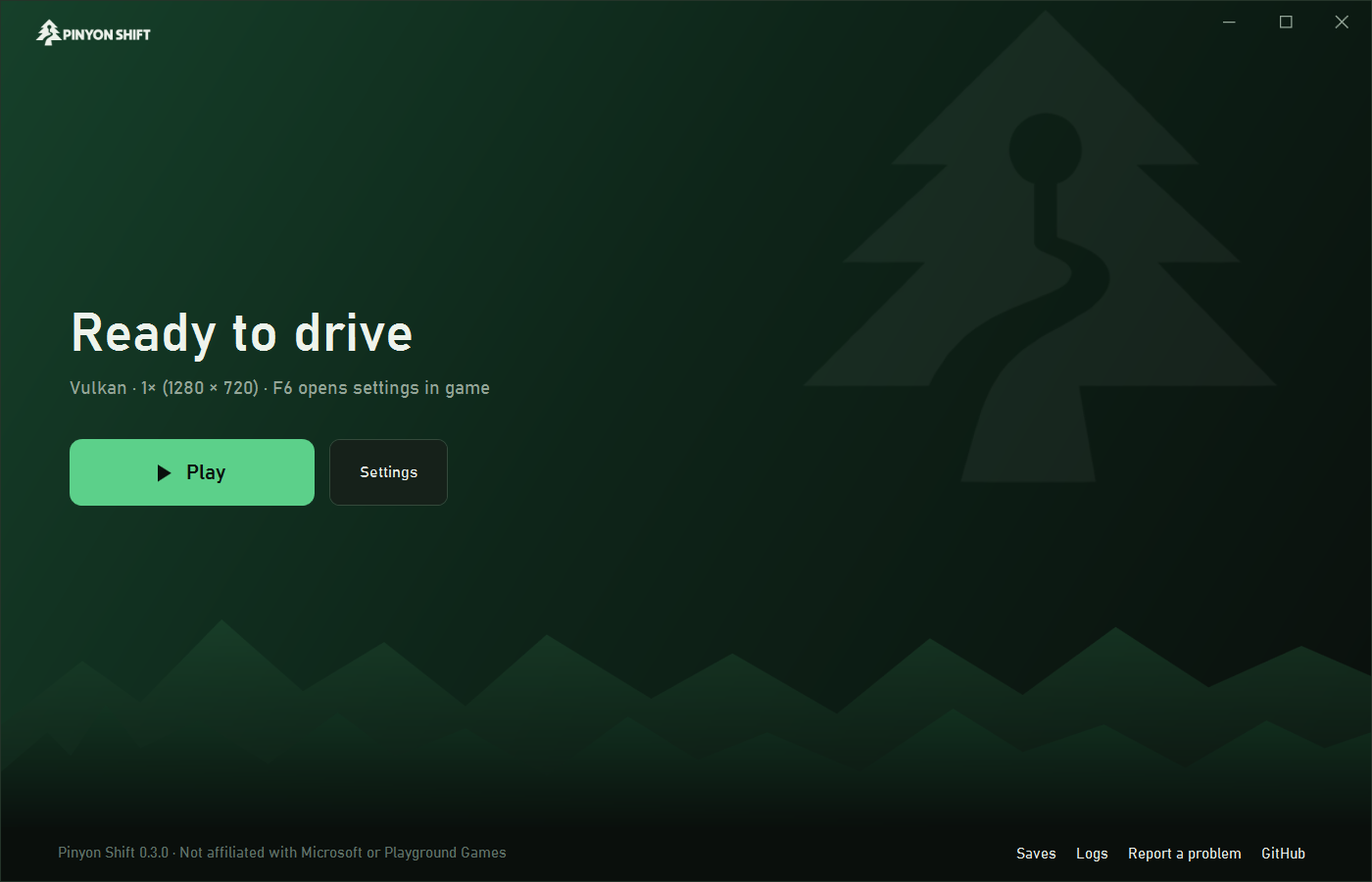
Pinyon Shift is not an emulator. The game's PowerPC code is translated ahead of
time into C++ with [ShiftGlue](https://github.com/arcanite24/shiftglue-sdk), our
fork of ReXGlue, and compiled on your computer. A renderer written for
*Forza Horizon* runs the game's GPU commands on Vulkan.
This repository holds the launcher, build tools, host code and configuration.
It does **not** contain the game, its assets, generated translations or a
prebuilt executable: you build the game from a disc you own.
> **Playable preview.** Expect some rendering bugs and slowdowns. The
> [0.5.1 release notes](docs/releases/0.5.1.md) list what the latest release
> contains and its known limitations.
## Highlights
- **Native code.** The game's executable is recompiled ahead of time; nothing
is interpreted or JIT-compiled while you play.
- **60 and 120 fps** at the right game speed, instead of the console's 30.
- **1x to 4x internal resolution**, FSR 1 output scaling, anisotropic
filtering, FXAA, ultrawide support, and optional bloom, motion blur and
depth of field.
- **In-game settings (F6)** and a trainer (F10: credits, game speed, time of
day, free camera), photo export, save backups and [mods](docs/MODDING.md).
- **HDR, your music and an immersive camera.** HDR output with calibration,
your own music in game or as custom radio stations, and an optional camera
that reacts to the car. See [Settings and controls](https://arcanite24.github.io/pinyon-shift/playing/).
- **Your DLC.** Owned Xbox 360 packages are verified and imported. Car packs
work, and Rally and 1000 Club run on the optional title update v4 build.
- **Linux and Steam Deck.** A native Linux build, no Proton: 60 fps at 1x on
the Deck within its 15 W limit, and **Add to Steam** puts it in Game Mode.
See [Linux and Steam Deck](docs/LINUX.md).
- **macOS on Apple silicon.** Vulkan on Metal through MoltenVK, built into
the game. See [macOS](docs/MACOS.md).
- **Android handhelds (alpha).** 60 fps on Snapdragon 8 Gen 2 handhelds. See
[Android](#android-developer-alpha).
- **The Treasure Map included.** This add-on was sold through a service that
no longer exists. It is on by default and can be turned off in the launcher.
## Performance
On an RTX 4080 the scripted race runs at a median of 119 fps at 1x and 2x
(with the game's 4x MSAA), and 102 fps at 3x (3840×2160). On the console the
game runs at 30 fps. The **Low-spec 60** preset holds 60 fps on 4 CPU cores
in simulated runs and needs about 1.1 GB of graphics memory. Android
handhelds with a Snapdragon 8 Gen 2 hold about 60 fps with the SMOOTH 60
preset.
Methods, the comparison with Xenia, and the full tables are in
[Performance](docs/PERFORMANCE.md).
## Play
1. Download `PinyonShift-Launcher.zip` from the
[latest release](https://github.com/arcanite24/pinyon-shift/releases/latest).
2. Extract it to a folder and run `PinyonShiftLauncher.exe`.
3. Drop the ISO you dumped from your own disc onto the launcher, or choose it
with **Choose ISO**. An unmodified [extracted folder](docs/EXTRACTED_GAME_INPUT.md)
also works.
4. Confirm ownership, then choose **Verify and build**.
5. Leave the launcher open while it installs the build tools and builds the
game. The first build takes 20–60 minutes and needs about 30 GB of free
disk space. Nothing needs installing by hand. If Windows must restart,
setup continues after you sign in.
6. Choose **Play**. Press **F6** in game for settings.
Your disc image and game files stay on your machine; the launcher only
downloads build tools and the ShiftGlue source. The launcher is not
code-signed yet, so Windows may warn about it: download it only from this
repository's releases.
**On Linux or a Steam Deck**, download
`PinyonShift-Launcher-linux-x86_64.tar.gz` instead, extract it and run
`PinyonShiftLauncher`; after the build, **Add to Steam** puts the game in
Game Mode. The steps are in [Linux and Steam Deck](docs/LINUX.md).
**On a Mac**, download `PinyonShift-Launcher-macos-arm64.zip`; see
[macOS](docs/MACOS.md).
To install on another drive, make a portable install, change the language, or
read the launcher's settings, see [Installing and setup](docs/INSTALLING.md).
If something goes wrong, see [Troubleshooting](docs/TROUBLESHOOTING.md).
### Requirements
- The USA retail disc, serial `MS-2505`, title ID `4D5309C9`.
- Windows 10 or 11, x64; x86-64 Linux, including SteamOS on the Steam
Deck; or macOS 13 or newer on Apple silicon.
- A GPU with Vulkan 1.3. NVIDIA is tested; AMD and Intel are not yet
qualified.
- A CPU with 4 cores for Low-spec 60. The Steam Deck holds 60 fps at 1x; other
integrated graphics are not measured yet.
## Android (developer alpha)
The Android build is the same recompiled game, cross-compiled for arm64 on
your PC from your own disc and installed on your own device. It needs Android
13 or later and Vulkan 1.3, and is tuned for Snapdragon 8 Gen 2 or newer with
8 GB of memory.
1. Once the game plays on the PC, choose **Android** in the launcher, then
**Build APK**.
2. Choose **Share on Wi-Fi** and scan the QR code with the device's camera to
install the app.
3. Open Pinyon Shift on the device and enter the six-digit code the launcher
shows. The app copies the game, your DLC and, if you choose, your PC save.
No USB debugging is needed. The bundled Mesa Turnip driver is selected
automatically on Adreno 7xx, and the in-game SMOOTH 60 and QUALITY 30 presets
cover the common setups. USB and command-line installs, drivers and saves are
covered in [docs/ANDROID.md](docs/ANDROID.md).
## Reporting bugs
Keep the launcher open while playing. If the game exits unexpectedly, the
launcher creates a sanitized diagnostic ZIP and opens a prefilled GitHub issue;
attach the ZIP it selects and the shortest steps that reproduce the problem.
For other bugs use **Report a problem** in the launcher. Reports never include
the game, your saves or local paths. Please don't attach game files or
generated code.
## Build from source
From PowerShell in a repository checkout:
```powershell
.\tools\setup-preview.ps1 -IsoPath C:\path\to\your-disc.iso
.\tools\launch-preview.ps1
```
See [Building](docs/BUILDING.md) for details and the `tools/pinyon.py`
command line.
## Roadmap
In progress: crash, stutter and rendering fixes, faster Android rendering on
tiled GPUs, and documenting the game's code. Next: AMD and Intel qualification, and draw distance and world
detail settings. The full list, with what's done, is in the
[roadmap](docs/ROADMAP.md).
## Project boundaries
Only independently authored project files are licensed under the
[BSD 3-Clause License](LICENSE). Microsoft, Xbox, Turn 10 Studios, Playground
Games, *Forza Horizon*, and third-party dependencies remain the property of
their respective owners. Pinyon Shift is not affiliated with or endorsed by
them. See [Legal and distribution](docs/LEGAL.md) and
[Third-party notices](THIRD_PARTY_NOTICES.md).
## Contributing
Start with [CONTRIBUTING.md](CONTRIBUTING.md). Repository checks reject disc
images, executables, generated translations, extracted assets, build products,
and other machine-local material.
## Supporting the project
Pinyon Shift is and will remain free. Every release, feature and setting is
public on the same day for everyone. There are no supporter builds, early
access, paid features or paid mods, and there never will be.
If you would like to support continued development, you can
[sponsor arcanite24 on GitHub] or [buy me a coffee on Ko-fi]. Contributions
pay for development time and test hardware, such as Android devices and
lower-end GPUs. They do not buy builds, game content, priority support or
influence over the roadmap. Support is for the work on this project, not for
*Forza Horizon*, which remains the property of its owners.
Sharing the project, reporting bugs with a diagnostic ZIP and contributing
code help just as much. Come say hi, ask for help or report bugs on the
[Discord server](https://discord.gg/SFQKFrTvww).
[sponsor arcanite24 on GitHub]: https://github.com/sponsors/arcanite24
[buy me a coffee on Ko-fi]: https://ko-fi.com/nerijs