
Gitmux shows git status in your tmux status bar



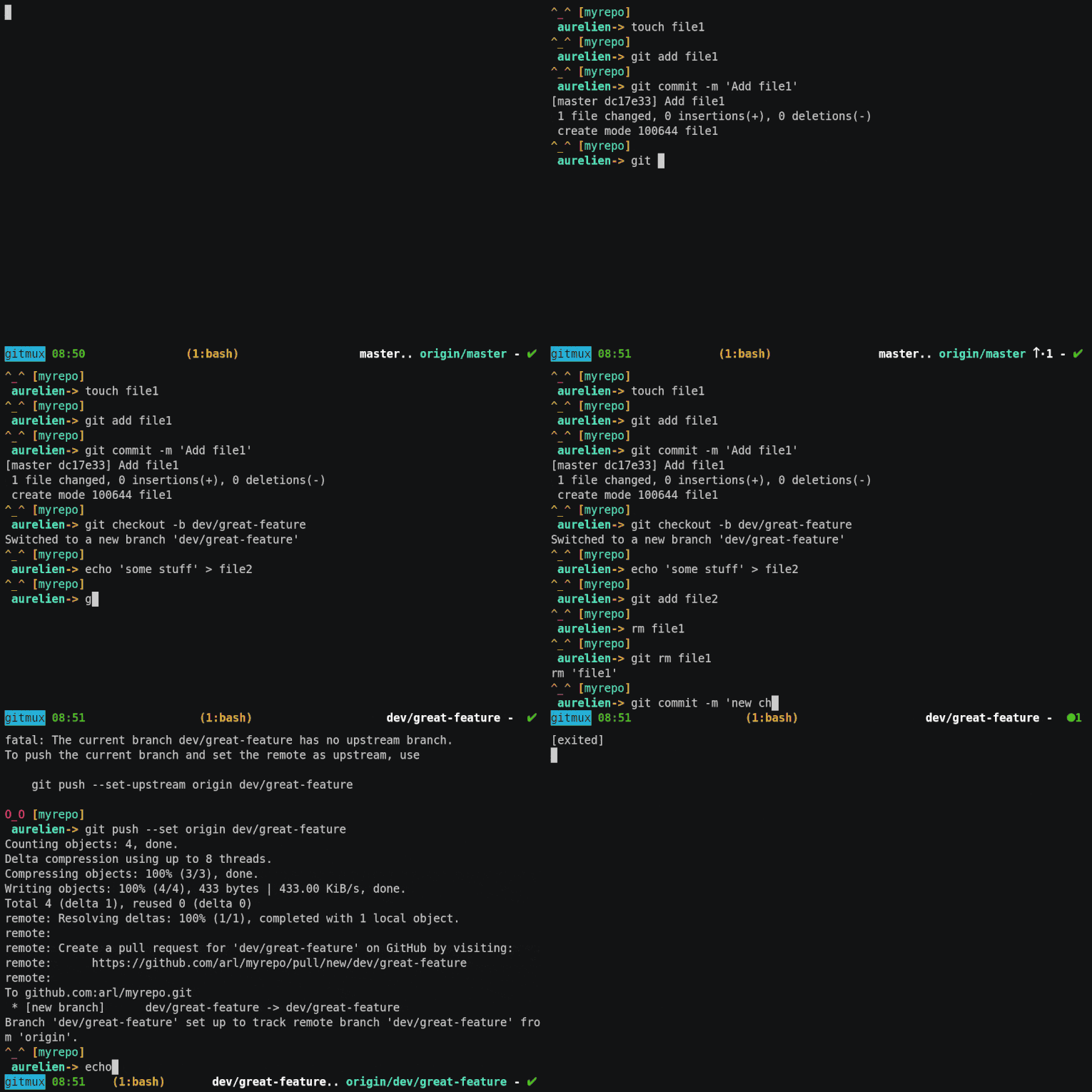
- **easy**: install and forget
- **minimal**: shows what you need, when you need it
- **discrete**: shows nothing when you're not in a git-managed directory
- **shell-agnostic**: doesn't rely on any shell-specific features, so will work with all of them
- **customizable**: colors, symbols and layout are all configurable
---
- [Prerequisites](#prerequisites)
- [Installing](#installing)
- [Binary release](#binary-release)
- [Homebrew (macOS and linux) (amd64 and arm64)](#homebrew-macos-and-linux-amd64-and-arm64)
- [AUR](#aur)
- [From source](#from-source)
- [Getting started](#getting-started)
- [Command line interface](#command-line-interface)
- [Customizing](#customizing)
- [Symbols](#symbols)
- [Styles](#styles)
- [Layout components](#layout-components)
- [Additional options](#additional-options)
- [Troubleshooting](#troubleshooting)
- [Gitmux takes too long to refresh?](#gitmux-takes-too-long-to-refresh)
- [Contributing](#contributing)
- [License: MIT](#license-mit)
## Prerequisites
Works with all reasonably recent [tmux](https://github.com/tmux/tmux) versions (2.1+)
## Installing
### Binary release
[Download the latest](https://github.com/arl/gitmux/releases/latest) binary for your platform/architecture and uncompress it.
### Homebrew (macOS and linux) (amd64 and arm64)
Install the latest version with:
brew install gitmux
### AUR
Arch Linux users can download the [gitmux](https://aur.archlinux.org/packages/gitmux), [gitmux-bin](https://aur.archlinux.org/packages/gitmux-bin) or [gitmux-git](https://aur.archlinux.org/packages/gitmux-git) AUR package.
### From source
[Download and install a Go compiler](https://golang.org/dl/) (Go 1.16 or later).
Run `go install` to build and install `gitmux`:
go install github.com/arl/gitmux@latest
## Getting started
If your `tmux` version supports `pane_current_path` (tmux v2.1+),
just add this line to your `.tmux.conf`:
set -g status-right '#(gitmux "#{pane_current_path}")'
If your `tmux` doesn't support `pane_current_path` then you can use
a [bash-specific solution](https://github.com/arl/gitmux/issues/19#issuecomment-594735939)
to achieve relatively similar behaviour: `gitmux` will refresh after every shell command
you run or when you switch windows, however it won't refresh automatically, nor when switching panes.
Note that `tmux v2.1` was released in 2015 so you're probably better off updating to a more recent version anyway 🙂.
### Command line interface
`gitmux` is not meant to be call directly but it still has a command line interface
that can be used to create the default configuration, troubleshoot your installation or during development:
```
$ gitmux -h
gitmux v0.11.5
Usage: gitmux [options] [dir]
gitmux prints the status of a Git working tree as a tmux format string.
If directory is not given, it default to the working directory.
Options:
-cfg FILE read gitmux config from FILE.
-printcfg prints default configuration file.
-dbg outputs Git status as JSON and print errors.
-timeout DUR exits if still running after given duration (ex: 2s, 500ms).
-V prints gitmux version and exits.
```
## Customizing
`gitmux` output can be customized via a configuration file in YAML format.
This is the default gitmux configuration file, in YAML format:
```yaml
tmux:
symbols:
branch: '⎇ '
hashprefix: ':'
ahead: ↑·
behind: ↓·
staged: '● '
conflict: '✖ '
modified: '✚ '
untracked: '… '
stashed: '⚑ '
clean: ✔
insertions: Σ
deletions: Δ
styles:
clear: '#[fg=default]'
state: '#[fg=red,bold]'
branch: '#[fg=white,bold]'
remote: '#[fg=cyan]'
divergence: '#[fg=default]'
staged: '#[fg=green,bold]'
conflict: '#[fg=red,bold]'
modified: '#[fg=red,bold]'
untracked: '#[fg=magenta,bold]'
stashed: '#[fg=cyan,bold]'
clean: '#[fg=green,bold]'
insertions: '#[fg=green]'
deletions: '#[fg=red]'
layout: [branch, .., remote-branch, divergence, '- ', flags]
options:
branch_max_len: 0
branch_trim: right
ellipsis: …
hide_clean: false
swap_divergence: false
divergence_space: false
```
First, save the default configuration to a new file:
gitmux -printcfg > $HOME/.gitmux.conf
Modify the line you've added to `.tmux.conf`, passing the path of the configuration file as argument to `gitmux` via the `-cfg` flag
set -g status-right '#(gitmux -cfg $HOME/.gitmux.conf "#{pane_current_path}")'
Open `.gitmux.conf` and modify it, replacing symbols, styles and layout to suit your needs.
In `tmux` status bar, `gitmux` output immediately reflects the changes you make to the configuration.
`gitmux` configuration is split into 4 sections:
- `symbols`: they're just strings of unicode characters
- `styles`: tmux format strings
- `layout`: list of `gitmux` layout components, defines the component to show and in their order.
- `options`: additional configuration options
### Symbols
The `symbols` section defines the symbols printed before specific elements
of Git status displayed in `tmux` status string:
```yaml
symbols:
branch: "⎇ " # current branch name.
hashprefix: ":" # Git SHA1 hash (in 'detached' state).
ahead: ↑· # 'ahead count' when local and remote branch diverged.
behind: ↓· # 'behind count' when local and remote branch diverged.
staged: "● " # count of files in the staging area.
conflict: "✖ " # count of files in conflicts.
modified: "✚ " # count of modified files.
untracked: "… " # count of untracked files.
stashed: "⚑ " # count of stash entries.
insertions: Σ # count of inserted lines (stats section).
deletions: Δ # count of deleted lines (stats section).
clean: ✔ # Shown when the working tree is clean.
```
### Styles
Styles are tmux format strings used to specify text colors and attributes of Git
status elements.
See the [`STYLES` section](https://man7.org/linux/man-pages/man1/tmux.1.html#STYLES) of `tmux` man page.
```yaml
styles:
clear: '#[fg=default]' # Clear previous style.
state: '#[fg=red,bold]' # Special tree state strings such as [rebase], [merge], etc.
branch: '#[fg=white,bold]' # Local branch name
remote: '#[fg=cyan]' # Remote branch name
divergence: "#[fg=yellow]" # 'divergence' counts
staged: '#[fg=green,bold]' # 'staged' count
conflict: '#[fg=red,bold]' # 'conflicts' count
modified: '#[fg=red,bold]' # 'modified' count
untracked: '#[fg=magenta,bold]' # 'untracked' count
stashed: '#[fg=cyan,bold]' # 'stash' count
insertions: '#[fg=green]' # 'insertions' count
deletions: '#[fg=red]' # 'deletions' count
clean: '#[fg=green,bold]' # 'clean' symbol
```
### Layout components
The `layout` section defines what components `gitmux` shows and the order in which
they appear on `tmux` status bar.
For example, the default `gitmux` layout shows is:
```yaml
layout: [branch, .., remote-branch, divergence, " - ", flags]
```
It shows, in that order:
- the local branch name,
- 2 dots characters `..`,
- the remote branch name
- the local/remote divergence
- a `-` character
- and finally the flags representing the working tree state
Note that elements only appear when they make sense, for example if local and
remote branch are aligned, the divergence string won't show up. Same thing for
the remote branch, etc.
But you can anyway choose to never show some components if you wish, or to present
them in a different order.
This is the list of the possible keywords for `layout`:
| Layout keywords | Description | Example |
| :--------------: | :------------------------------------------------- | :------------------: |
| `branch` | local branch name | `main` |
| `remote-branch` | remote branch name | `origin/main` |
| `divergence` | divergence local/remote branch, if any | `↓·2↑·1` |
| `remote` | alias for `remote-branch` followed by `divergence` | `origin/main ↓·2↑·1` |
| `flags` | Symbols representing the working tree state | `✚ 1 ⚑ 1 … 2` |
| `stats` | Insertions/deletions (lines). Disabled by default | `Σ56 Δ21` |
| any string `foo` | Non-keywords are shown as-is | `hello gitmux` |
Some example layouts:
- default layout:
```yaml
layout: [branch, .., remote-branch, divergence, " - ", flags]
```
- some examples layouts:
```yaml
layout: [branch, divergence, " - ", flags]
```
```yaml
layout: [flags, " ", branch]
```
```yaml
layout: [branch, "|", flags, "|", stats]
```
### Additional options
This is the list of additional configuration `options`:
| Option | Description | Default |
| :------------------- | :------------------------------------------------------------------------------ | :----------------: |
| `branch_max_len` | Maximum displayed length for local and remote branch names | `0` (no limit) |
| `branch_trim` | Trim left, right or from the center of the branch (`right`, `left` or `center`) | `right` (trailing) |
| `ellipsis` | Character to show branch name has been truncated | `…` |
| `hide_clean` | Hides the clean flag entirely | `false` |
| `swap_divergence` | Swaps order of behind & ahead upstream counts | `false` |
| `divergence_space` | Add a space between behind & ahead upstream counts | `false` |
| `flags_without_count`| Show flags symbols without counts* | `false` |
*When `flags_without_count` is true, shows only symbols (empty symbols show nothing). When false (default), shows symbols with counts (empty symbols show counts only).
## Troubleshooting
Check the opened and closed issues and don't hesitate to report anything by [filing a new one](https://github.com/arl/gitmux/issues/new).
### Gitmux takes too long to refresh?
In case gitmux takes too long to refresh, try to decrease the value of the `status-interval` option.
A reasonable value is 2 seconds, which you can set in `.tmux.conf` with:
set -g status-interval 2
Check out [tmux man page](https://www.man7.org/linux/man-pages/man1/tmux.1.html#OPTIONS) for more details.
## Contributing
Pull requests are welcome.
For major changes, please open an issue first to open a discussion.
## License: [MIT](./LICENSE)