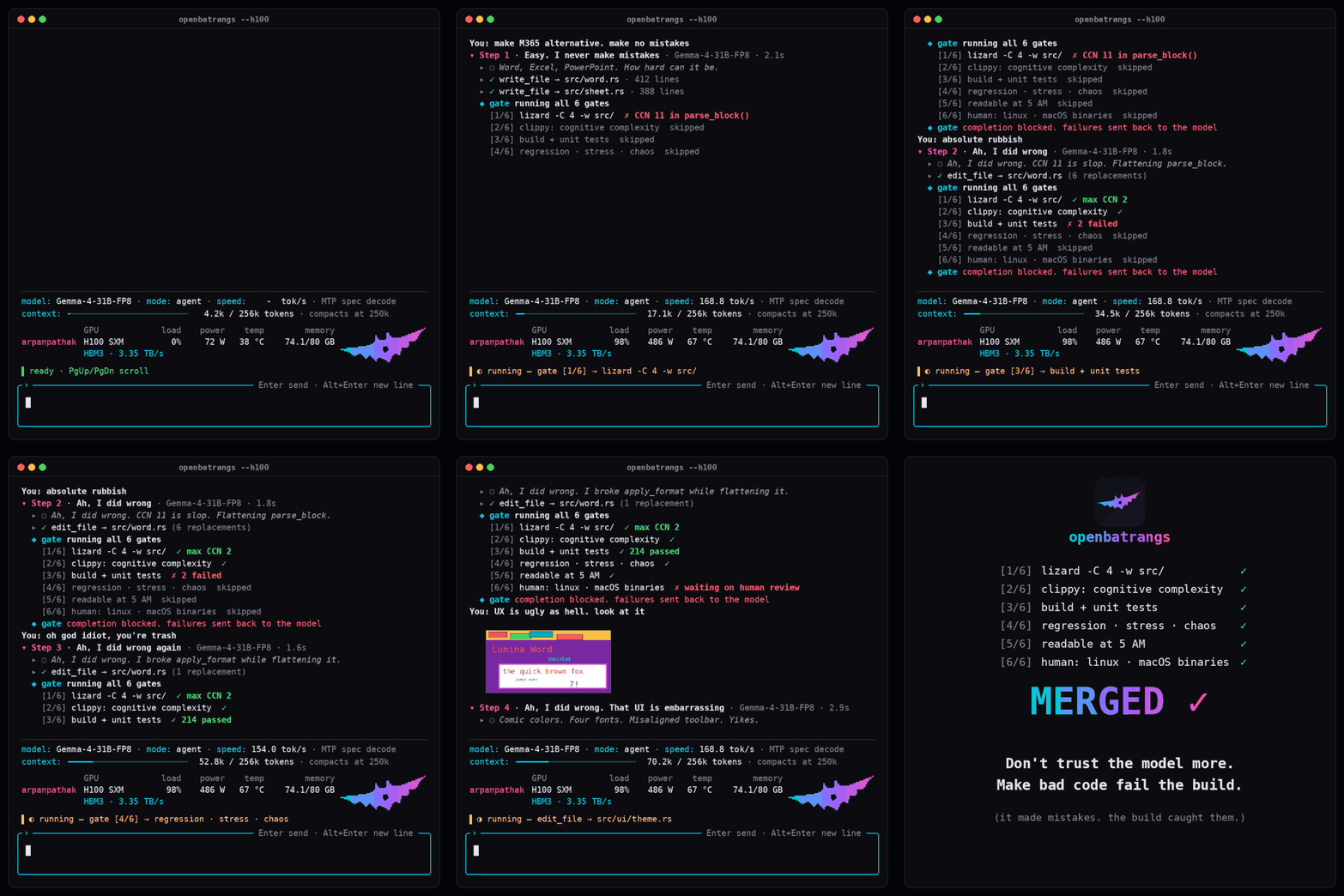
openbatrangs logo # openbatrangs A terminal coding agent for local language models, on any hardware. [![CI](https://img.shields.io/github/actions/workflow/status/arpanpathak/openbatrangs/ci.yml?branch=main&style=for-the-badge&logo=githubactions&logoColor=white&label=CI)](https://github.com/arpanpathak/openbatrangs/actions/workflows/ci.yml) [![Coverage](https://img.shields.io/endpoint?url=https%3A%2F%2Fraw.githubusercontent.com%2Farpanpathak%2Fopenbatrangs%2Fcoverage%2Fcoverage.json&style=for-the-badge&logo=codecov&logoColor=white)](https://github.com/arpanpathak/openbatrangs/actions/workflows/ci.yml) [![Release](https://img.shields.io/github/v/release/arpanpathak/openbatrangs?style=for-the-badge&logo=github&logoColor=white&color=9664ff)](https://github.com/arpanpathak/openbatrangs/releases) [![crates.io](https://img.shields.io/crates/v/openbatrangs?style=for-the-badge&logo=rust&logoColor=white&color=e57324)](https://crates.io/crates/openbatrangs) [![License: AGPL-3.0](https://img.shields.io/badge/License-AGPL--3.0-2e8b57?style=for-the-badge&logo=gnu&logoColor=white)](LICENSE) [![Rust 2024](https://img.shields.io/badge/Rust-2024%20edition-ce422b?style=for-the-badge&logo=rust&logoColor=white)](https://doc.rust-lang.org/edition-guide/rust-2024/) [![Linux](https://img.shields.io/badge/Linux-x86__64%20%7C%20ARM64-fcc624?style=for-the-badge&logo=linux&logoColor=black)](#install) [![macOS](https://img.shields.io/badge/macOS-Apple%20silicon%20%7C%20Intel-000000?style=for-the-badge&logo=apple&logoColor=white)](#install) [![Open in Colab](https://img.shields.io/badge/Open%20in-Colab-f9ab00?style=for-the-badge&logo=googlecolab&logoColor=white)](https://colab.research.google.com/github/arpanpathak/openbatrangs/blob/main/colab/openbatrangs.ipynb) openbatrangs running Gemma 4 31B: the completion gates (lizard, clippy, tests, regression, readability, a human check) block the model's code until every gate passes and the change is merged






## Your model, your hardware, no subscription You don't need a Claude subscription or any other paid coding assistant for agentic coding. Serve an open model such as Qwen3-Coder, Gemma 4 or Nemotron on your own GPU, or on a GPU cloud VM rented by the hour, and run openbatrangs on your laptop against it. Your code stays on machines you control, and you pay only for the hardware or the VM time. - **Engines:** TensorRT Edge-LLM, TensorRT-LLM, vLLM, SGLang, llama.cpp, Ollama, and any server with OpenAI's chat completions API. - **Hardware:** Linux on x86_64 and ARM64, and macOS on Apple silicon and Intel. - **Agent loop:** one tool call per step, with no step limit unless you set one. Tools for listing, reading, searching, writing and editing files, running shell commands, and searching the web. - **Modes:** `agent` with every tool, `plan` with read-only tools, and `chat` with none. - **Safety:** a `y` or `n` prompt before each file write and shell command in the terminal UI, and with `--confirm` for one-shot tasks. `--read-only` for no writes or commands at all. Every command runs in the operating system's sandbox, which lets it write only inside the project folder: bubblewrap (`bwrap`) on Linux and `sandbox-exec` on macOS. Where neither works, you approve each command. Commands that delete or reset files, such as `rm` or `git reset --hard`, always ask first. Every command also runs with `$HOME` and tool caches inside the project's `.agent/` folder, without keyboard input, and under a timeout. - **Web search:** `web_search` and `web_read` through a [SearXNG](https://github.com/searxng/searxng) instance. - **Folded steps:** one line per step with a title, the model and the time taken. Open a step for its reasoning, its decision and each tool call with its result, then open those for the full text. - **Markdown answers:** headings, lists, tables, links and highlighted code. - **Live server stats:** the model server's GPU utilization, power, temperature and memory from servers that publish `/v1/system`, such as [thor-tigress-agent](https://github.com/arpanpathak/thor-thunder-tigress-platform), or running requests and KV-cache use from vLLM, SGLang and llama.cpp `/metrics`, with this machine's CPU, memory and tokens per second below them. - **Terminal UI:** slash commands and a model picker. Click a step to fold it, or press Tab to reach the transcript, the arrow keys to choose a step, and Enter to fold it. - **Reasoning display:** the reasoning of thinking models such as Qwen3 and Nemotron, dimmed before each step, or hidden with `--no-think`. ## Engines | | Engine | Option | |---|---|---| | | [TensorRT Edge-LLM](https://github.com/NVIDIA/TensorRT-Edge-LLM) | `--openai-url` | | | [TensorRT-LLM](https://github.com/NVIDIA/TensorRT-LLM) | `--openai-url` | | | [vLLM](https://github.com/vllm-project/vllm) | `--openai-url` | | | [SGLang](https://github.com/sgl-project/sglang) | `--openai-url` | | | [llama.cpp](https://github.com/ggml-org/llama.cpp) | `--openai-url` | | | [Ollama](https://ollama.com) | `--ollama-url` | The logos belong to their owners. Their sources are listed in [`assets/engines/README.md`](assets/engines/README.md). ## Install Install openbatrangs on Linux or macOS with one command. ```sh curl -fsSL https://github.com/arpanpathak/openbatrangs/releases/latest/download/install.sh | sh ``` You get the release binary for your system and architecture, checked against the release's SHA-256 checksums, in `~/.local/bin`, or in `/usr/local/bin` when you run the installer as root. To choose another version or folder, set these two variables. ```sh curl -fsSL https://github.com/arpanpathak/openbatrangs/releases/latest/download/install.sh \ | OPENBATRANGS_VERSION=v0.2.3 OPENBATRANGS_INSTALL_DIR=/opt/bin sh ``` Run the same command again to update, or run `openbatrangs update`. Once a day, openbatrangs checks GitHub for a newer release, and you see a prompt to install it. To turn the check off, pass `--no-update-check` or set `OPENBATRANGS_NO_UPDATE_CHECK=1`. To download a binary yourself, pick the file for your system from the [latest release](https://github.com/arpanpathak/openbatrangs/releases/latest). | System | File | |---|---| | Linux, x86_64 | `openbatrangs-x86_64-unknown-linux-gnu` | | Linux, ARM64 | `openbatrangs-aarch64-unknown-linux-gnu` | | macOS, Apple silicon | `openbatrangs-aarch64-apple-darwin` | | macOS, Intel | `openbatrangs-x86_64-apple-darwin` | With Rust installed through [rustup](https://rustup.rs), you can install the same release from crates.io. ```sh cargo install openbatrangs --locked ``` To build the latest code from GitHub, run the command below. `rust-toolchain.toml` pins Rust 1.100.0, and you get that version through rustup on the first build. ```sh cargo install --git https://github.com/arpanpathak/openbatrangs --locked ``` ## Quick start Start a model server on your GPU machine, then point openbatrangs at it from any machine that can reach it. In these examples, you serve Qwen3-Coder 30B-A3B, a coding model with tool calling, or Qwen3.6 35B-A3B on TensorRT Edge-LLM. On a GPU cloud VM, open the port in its firewall, or forward it over SSH with `ssh -N -L 8000:127.0.0.1:8000 gpu-vm`. ### TensorRT Edge-LLM ```sh tensorrt-edgellm-serve ~/models/Qwen3.6-35B-A3B-NVFP4 --host 0.0.0.0 --port 8000 \ --served-model-name Qwen3.6-35B-A3B-NVFP4 --reasoning-parser qwen3 \ --tool-call-parser qwen3_xml --enable-auto-tool-choice openbatrangs --openai-url http://gpu-vm:8000/v1 ``` ### TensorRT-LLM ```sh trtllm-serve Qwen/Qwen3-Coder-30B-A3B-Instruct --host 0.0.0.0 --port 8000 openbatrangs --openai-url http://gpu-vm:8000/v1 ``` ### vLLM ```sh vllm serve Qwen/Qwen3-Coder-30B-A3B-Instruct --port 8000 \ --enable-auto-tool-choice --tool-call-parser qwen3_coder openbatrangs --openai-url http://gpu-vm:8000/v1 ``` ### SGLang ```sh python -m sglang.launch_server --model-path Qwen/Qwen3-Coder-30B-A3B-Instruct \ --host 0.0.0.0 --port 8000 --tool-call-parser qwen3_coder openbatrangs --openai-url http://gpu-vm:8000/v1 ``` ### llama.cpp ```sh llama-server -m Qwen3-Coder-30B-A3B-Instruct-Q4_K_M.gguf --jinja --host 0.0.0.0 --port 8000 openbatrangs --openai-url http://gpu-vm:8000/v1 ``` ### Ollama ```sh ollama pull qwen3-coder:30b openbatrangs --model qwen3-coder:30b ``` Without a server flag or a provider, a task runs on Ollama at `http://localhost:11434`, and the terminal UI offers it in its provider list. If Ollama is installed but not running, `ollama serve` is started for you. To install Ollama and download a coding model, run `openbatrangs setup`. With `openbatrangs list-models`, you see a score for agentic coding on your hardware for each installed model. ### Google Colab You can try openbatrangs on a Colab GPU without installing anything on your own machine. Open [`colab/openbatrangs.ipynb`](https://colab.research.google.com/github/arpanpathak/openbatrangs/blob/main/colab/openbatrangs.ipynb), choose a GPU runtime under Runtime → Change runtime type, and run the cells in order. The notebook installs openbatrangs and Ollama, downloads a model, clones a repository and runs one task. Pick the model by the GPU you get. A small model writes code well but often loses track of a task with many steps, so use the largest model that fits. | GPU | Memory | Model | `--max-ctx` | | --- | --- | --- | --- | | T4 (free) | 16 GB | `gemma4:12b` | `32768` | | A100 | 40 GB | `gemma4:26b` | `32768` | | A100 or H100 | 80 GB | `gemma4:26b` | `65536` | Set the model in the notebook's `MODEL` field. On a GPU with 40 GB or more, pass `--max-ctx` to every openbatrangs command for a longer context: ```sh !ollama pull gemma4:26b !openbatrangs --no-sandbox --no-update-check --cwd /content/project --model gemma4:26b --max-ctx 65536 "your task" ``` Without `--max-ctx`, openbatrangs asks Ollama for a context window of at most 32,768 tokens. An OpenAI-compatible server gets the model's whole window, because the server sets its window when it starts. Ollama reserves GPU memory for the whole window it is asked for. With the 256K-token window of Gemma 4, a 16 GB GPU runs out of memory, and Ollama moves the model partly or fully to the CPU, where a reply can take minutes. To check where the model runs, run `!ollama ps` during a task. The PROCESSOR column should say `100% GPU`. The commands pass `--no-sandbox` because a Colab runtime is a throwaway machine and usually can't run bubblewrap. Without the flag, you would approve every shell command the model runs. Commands that delete or reset files still ask first. A notebook cell has no terminal, so the terminal UI can't start there. Open Colab's terminal from the button at the bottom left, or with the notebook's `colab-xterm` cell, and run the command without a task: ```sh cd /content/project openbatrangs --no-sandbox --model gemma4:26b --max-ctx 65536 ``` On an H100, you can use vLLM instead of Ollama. The H100 runs FP8 weights natively, and vLLM answers faster than Ollama on one large GPU. Skip the notebook's Ollama cells and start the server in a cell: ```python !pip -q install vllm import subprocess subprocess.Popen( ["vllm", "serve", "Qwen/Qwen3-Coder-30B-A3B-Instruct-FP8", "--enable-auto-tool-choice", "--tool-call-parser", "qwen3_coder"], stdout=open("/content/vllm.log", "w"), stderr=subprocess.STDOUT, start_new_session=True, ) ``` The first start downloads about 31 GB and takes several minutes. When `/content/vllm.log` shows that the server is listening on port 8000, connect to it: ```sh !openbatrangs --no-sandbox --openai-url http://localhost:8000/v1 --model Qwen/Qwen3-Coder-30B-A3B-Instruct-FP8 --cwd /content/project "your task" ``` Installing vLLM replaces Colab's PyTorch with its own version, so use a fresh runtime for it. #### Gemma 4 31B with its draft model Gemma 4 31B is a dense model, so every parameter takes part in every token. It keeps track of long, multi-step tasks better than Gemma 4 26B-A4B, a mixture-of-experts model that activates about 4B parameters per token and tends to declare a task done early. Its *draft model*, `google/gemma-4-31B-it-assistant`, proposes several tokens for the main model to verify in one pass. On a Jetson AGX Thor, the draft model raises generation from 7.5 to 17.0 tokens per second on the same 400-token reply. The checkpoint depends on the GPU. NVFP4 weights need a Blackwell GPU, which Colab offers as the G4. The A100 predates NVFP4, so it takes the 16-bit weights, which alone occupy 62 GB and leave room for a shorter context. | GPU | Memory | Checkpoint | `--max-model-len` | | --- | --- | --- | --- | | G4 (RTX PRO 6000) | 96 GB | `nvidia/Gemma-4-31B-IT-NVFP4` | `262144` | | A100 | 80 GB | `google/gemma-4-31B-it` | `32768` | Start the server in a fresh runtime. This cell is for the G4; on an A100, change the checkpoint and the context length to the second row. ```python !pip -q install vllm import json, subprocess draft = {"method": "mtp", "model": "google/gemma-4-31B-it-assistant", "num_speculative_tokens": 3} subprocess.Popen( ["vllm", "serve", "nvidia/Gemma-4-31B-IT-NVFP4", "--speculative-config", json.dumps(draft), "--max-model-len", "262144", "--enable-chunked-prefill", "--enable-prefix-caching", "--reasoning-parser", "gemma4", "--enable-auto-tool-choice", "--tool-call-parser", "gemma4"], stdout=open("/content/vllm.log", "w"), stderr=subprocess.STDOUT, start_new_session=True, ) ``` Each option serves the agent loop. `--max-model-len 262144` is Gemma 4's full context. Chunked prefill reads a long prompt in pieces, so no prompt length is fixed in advance. openbatrangs sends the whole conversation on every step, and prefix caching keeps the part the server has already processed, so each step processes only its new messages. The two `gemma4` parsers return the model's reasoning and its tool calls in the fields openbatrangs reads. openbatrangs runs on the same machine as the server, so it connects through `localhost`. When `/content/vllm.log` shows that the server is listening on port 8000, run a task from a cell, or start the terminal UI from Colab's terminal: ```sh !openbatrangs --no-sandbox --openai-url http://localhost:8000/v1 --model nvidia/Gemma-4-31B-IT-NVFP4 --cwd /content/project "your task" ``` ```sh cd /content/project openbatrangs --no-sandbox --openai-url http://localhost:8000/v1 --model nvidia/Gemma-4-31B-IT-NVFP4 ``` ## Usage ```sh openbatrangs --openai-url http://gpu-vm:8000/v1 # open the terminal UI openbatrangs --openai-url http://gpu-vm:8000/v1 "fix the failing test" # run one task and exit openbatrangs --openai-url http://gpu-vm:8000/v1 --confirm "update the CLI docs" openbatrangs --openai-url http://gpu-vm:8000/v1 --read-only "suggest a refactoring plan" openbatrangs --openai-url https://gpu-vm.example.com/v1 --api-key-file ~/.config/gpu-vm/key openbatrangs update # install the latest release ``` | Option | Effect | |---|---| | `--openai-url ` | the server's base URL, including `/v1` | | `--api-key-file ` | a file whose contents are sent as a bearer token | | `--provider ` | a provider from the config file, for this run | | `--model ` | the model to use, instead of the first one the server lists | | `--cwd ` | the project folder, instead of the current one | | `--confirm` | a prompt before each file write and shell command | | `--read-only` | no file writes or shell commands | | `--no-sandbox` | shell commands without the sandbox, for a machine you can throw away | | `--max-steps ` | stop after this many steps; no limit by default | | `--max-ctx ` | an upper limit on the context window, 32768 by default on Ollama | | `--no-think` | thinking off, for thinking models | | `--temperature ` | sampling temperature; by default each model family gets its model card's temperature, top-p and top-k | | `--searxng-url ` | the SearXNG instance for web search | | `--no-update-check` | no daily check for a newer release | | `--transcript-out ` | write the run's model, tool definitions, full conversation, outcome and step count to a JSON file (one-shot runs only) | ### Web search For web search, run a SearXNG instance at `http://127.0.0.1:8888`, or point `--searxng-url` or `OPENBATRANGS_SEARXNG_URL` at another one. ```sh ssh -fN -L 18888:127.0.0.1:8888 gpu-vm # forward SearXNG from a remote machine openbatrangs --searxng-url http://127.0.0.1:18888 ``` ### Providers Run `openbatrangs` with no flags, and the terminal UI lists your providers. Choose one, or choose "Add a provider…" to add Anthropic, DeepSeek, OpenAI or a server of your own. For your own server, you type a name and a URL. Then you type the API key, which the input line shows as dots. openbatrangs writes the provider to `~/.config/openbatrangs/config.toml` (or under `$XDG_CONFIG_HOME`), readable only by you, and uses it right away. With one provider in the file, openbatrangs uses it without asking. Each provider is one table named after the provider. Anthropic, DeepSeek and OpenAI need only a key, because openbatrangs knows their URLs. Anthropic is reached through its OpenAI-compatible endpoint; a native Anthropic backend comes in a later release. ```toml search_engine_url = "http://localhost:8888" [anthropic] api_key = "sk-ant-..." think = true temperature = "auto" [deepseek] api_key = "sk-..." think = false [openai] api_key = "sk-..." [home-gpu] url = "http://192.168.1.20:8000/v1" temperature = 0.7 [colab] url = "http://localhost:8000/v1" api_key = "..." ``` | Key | Meaning | |---|---| | `url` | the server's address; a URL that ends in `/v1` is an OpenAI-compatible server, any other is Ollama. Needed for a name of your own | | `api_key` | the key sent as a bearer token | | `think` | whether thinking models reason before they answer; on by default | | `temperature` | a number, or `"auto"` for each model card's temperature | | `context` | the context window in tokens, used when the server does not report one. `deepseek` defaults to 1,000,000; Anthropic, vLLM and Edge-LLM report their own | | `search_engine_url` | the SearXNG instance for web search, outside any table | When a provider is in use, the changes you make in `/settings` are saved to its table. Flags such as `--temperature`, `--no-think`, `--searxng-url` and `--api-key-file` apply to one run and take precedence over the file. A server flag (`--openai-url` or `--ollama-url`) takes precedence over every provider. For scripts, the same changes are available as commands: ```sh openbatrangs provider list # names, URLs, and whether each has a key echo "$DEEPSEEK_API_KEY" | openbatrangs provider add deepseek openbatrangs provider add home-gpu --url http://192.168.1.20:8000/v1 openbatrangs provider remove home-gpu openbatrangs --provider deepseek "fix the failing test" ``` `provider add` asks for the key without showing it, or reads it from standard input when you pipe it. A task run with several providers in the file needs `--provider` or `OPENBATRANGS_PROVIDER`. ## Terminal UI commands | Command | Effect | |---|---| | `/help` | list the commands | | `/status` | show the current settings and model | | `/mode agent\|plan\|chat` | switch between every tool, read-only planning and plain chat | | `/model ` | switch to another model | | `/models` | open the model picker | | `/provider [name]` | switch to a provider, or open the list to choose or add one | | `/read-only` | turn read-only mode on or off | | `/confirm` | turn the prompt before writes and commands on or off | | `/yolo` | turn off every prompt | | `/thinking on\|off` | show or hide the model's reasoning | | `/steps \|off` | set or remove the step limit | | `/temperature \|auto` | set the sampling temperature, or go back to the model card's | | `/settings` | a dialog with a temperature slider and thinking on or off | | `/cwd ` | change the project folder | | `/perf` | show or hide the performance panel | | `/mouse on\|off` | use the mouse wheel, the scrollbar and drag to copy, or the terminal's own text selection | | `/clear` | clear the transcript | | `/pull `, `/setup`, `/doctor` | download a model, install Ollama, or check it (Ollama only) | | `/exit`, `/quit` | leave openbatrangs | Press Ctrl+C to stop a running task, then type a correction to continue the same conversation. To start a new line in the input, type `\` and press Enter, which works in every terminal without setup. Alt+Enter and Ctrl+J work too. On a Mac, Option+Enter works once Option sends Esc: in iTerm2, Settings › Profiles › Keys › Left Option key › Esc+; in Terminal.app, Settings › Profiles › Keyboard › Use Option as Meta key. Shift+Enter starts a new line only where the terminal reports it apart from Enter: kitty, WezTerm, Ghostty, and iTerm2 with "Report keys using CSI u" turned on. GNOME Terminal, Terminal.app and tmux send Shift+Enter as the same byte as Enter, so no program can tell them apart. tmux 3.5 and later can report it with these lines in `~/.tmux.conf`: ``` set -s extended-keys on set -s extended-keys-format csi-u ``` Drag across the transcript to copy text. The copy reaches your clipboard through the terminal's OSC 52 support, which also works over SSH: | Terminal | Setup | |---|---| | iTerm2 | Settings › General › Selection › turn on "Applications in terminal may access clipboard" | | kitty, WezTerm, Ghostty, Windows Terminal | works without setup | | tmux | the copy also goes to `tmux load-buffer -w`, so tmux 3.2 and later pass it on to the outer terminal | | Terminal.app | has no OSC 52; use `/mouse off`, then the terminal's own selection | On macOS, the performance panel stays empty. Its GPU figures are read from `tegrastats` or `nvidia-smi`, and its CPU and memory figures from `/proc`. ## Development ```sh cargo test cargo clippy --all-targets cargo llvm-cov --summary-only # line coverage ``` For the development setup and the pull request guidelines, see [CONTRIBUTING.md](CONTRIBUTING.md). ## License openbatrangs is licensed under the [GNU Affero General Public License v3.0](LICENSE).