# Git and Git Flow Cheat Sheet
[](https://github.com/sindresorhus/awesome)
---
## đ About
This comprehensive Git cheat sheet helps you master Git commands without memorizing everything. Whether you're a beginner or an experienced developer, this guide provides quick reference to essential Git operations.
**Contributions Welcome!** Feel free to:
- Fix grammar mistakes
- Add new commands
- Translate to your language
- Improve explanations
---
## đ Table of Contents
- [đ§ Setup](#-setup)
- [âī¸ Configuration Files](#ī¸-configuration-files)
- [đ Create Repository](#-create-repository)
- [đ Local Changes](#-local-changes)
- [đ Search](#-search)
- [đ Commit History](#-commit-history)
- [đ Move / Rename](#-move--rename)
- [đŋ Branches & Tags](#-branches--tags)
- [đ Update & Publish](#-update--publish)
- [đ Merge & Rebase](#-merge--rebase)
- [âŠī¸ Undo](#ī¸-undo)
- [đ Git Flow](#-git-flow)
- [đ Other Languages](#-other-languages)
---
## đ§ Setup
### View Configuration
**Show current configuration:**
```bash
git config --list
```
**Show repository configuration:**
```bash
git config --local --list
```
**Show global configuration:**
```bash
git config --global --list
```
**Show system configuration:**
```bash
git config --system --list
```
### User Configuration
**Set your name for version history:**
```bash
git config --global user.name "[firstname lastname]"
```
**Set your email address:**
```bash
git config --global user.email "[valid-email]"
```
### Display & Editor Settings
**Enable automatic command line coloring:**
```bash
git config --global color.ui auto
```
**Set global editor for commits:**
```bash
git config --global core.editor vi
```
---
## âī¸ Configuration Files
| Scope | Location | Command Flag |
|-------|----------|--------------|
| **Repository** | `/.git/config` | `--local` |
| **User** | `~/.gitconfig` | `--global` |
| **System** | `/etc/gitconfig` | `--system` |
---
## đ Create Repository
### Clone Existing Repository
**Via SSH:**
```bash
git clone ssh://user@domain.com/repo.git
```
**Via HTTPS:**
```bash
git clone https://domain.com/user/repo.git
```
### Initialize New Repository
**Create repository in current directory:**
```bash
git init
```
**Create repository in specific directory:**
```bash
git init
```
---
## đ Local Changes
### Check Status & Differences
**View working directory status:**
```bash
git status
```
**Show changes to tracked files:**
```bash
git diff
```
**Show changes in specific file:**
```bash
git diff
```
### Staging Changes
**Add all current changes:**
```bash
git add .
```
**Add specific files:**
```bash
git add
```
**Interactively add parts of a file:**
```bash
git add -p
```
### Committing Changes
**Commit all tracked file changes:**
```bash
git commit -a
```
**Commit staged changes:**
```bash
git commit
```
**Commit with message:**
```bash
git commit -m 'message here'
```
**Skip staging and commit with message:**
```bash
git commit -am 'message here'
```
**Commit with specific date:**
```bash
git commit --date="`date --date='n day ago'`" -am ""
```
### Modify Last Commit
> â ī¸ **Warning:** Don't amend published commits!
**Amend last commit:**
```bash
git commit -a --amend
```
**Amend without changing commit message:**
```bash
git commit --amend --no-edit
```
**Change committer date:**
```bash
GIT_COMMITTER_DATE="date" git commit --amend
```
**Change author date:**
```bash
git commit --amend --date="date"
```
### Stashing Changes
**Save current changes temporarily:**
```bash
git stash
```
**Apply last stashed changes:**
```bash
git stash apply
```
**Apply specific stash:**
```bash
git stash apply stash@{stash_number}
```
> Use `git stash list` to see available stashes
**Remove last stash:**
```bash
git stash drop
```
**Move uncommitted changes to another branch:**
```bash
git stash
git checkout branch2
git stash pop
```
---
## đ Search
### Text Search
**Search for text in all files:**
```bash
git grep "Hello"
```
**Search in specific version:**
```bash
git grep "Hello" v2.5
```
### Commit Search
**Find commits that introduced specific keyword:**
```bash
git log -S 'keyword'
```
**Search with regular expression:**
```bash
git log -S 'keyword' --pickaxe-regex
```
---
## đ Commit History
### Basic History
**Show all commits (detailed):**
```bash
git log
```
**Show commits (one line each):**
```bash
git log --oneline
```
**Show commits by specific author:**
```bash
git log --author="username"
```
**Show changes for specific file:**
```bash
git log -p
```
### Advanced History
**Compare branches:**
```bash
git log --oneline .. --left-right
```
**Show who changed what and when:**
```bash
git blame
```
### Reference Logs
**Show reference log:**
```bash
git reflog show
```
**Delete reference log:**
```bash
git reflog delete
```
---
## đ Move / Rename
**Rename a file:**
```bash
git mv Index.txt Index.html
```
---
## đŋ Branches & Tags
### List Branches
**List local branches:**
```bash
git branch
```
**List all branches (local + remote):**
```bash
git branch -a
```
**List remote branches:**
```bash
git branch -r
```
**List merged branches:**
```bash
git branch --merged
```
### Switch & Create Branches
**Switch to existing branch:**
```bash
git checkout
```
**Create and switch to new branch:**
```bash
git checkout -b
```
**Switch to previous branch:**
```bash
git checkout -
```
**Create branch from existing branch:**
```bash
git checkout -b
```
**Create branch from specific commit:**
```bash
git checkout -b
```
**Create branch without switching:**
```bash
git branch
```
**Create tracking branch:**
```bash
git branch --track
```
### Branch Operations
**Checkout single file from different branch:**
```bash
git checkout --
```
**Apply specific commit from another branch:**
```bash
git cherry-pick
```
**Rename current branch:**
```bash
git branch -m
```
**Delete local branch:**
```bash
git branch -d
```
**Force delete local branch:**
```bash
git branch -D
```
> â ī¸ **Warning:** You will lose unmerged changes!
### Tags
**Create tag at HEAD:**
```bash
git tag
```
**Create annotated tag:**
```bash
git tag -a
```
**Create tag with message:**
```bash
git tag -am 'message here'
```
**List all tags:**
```bash
git tag
```
**List tags with messages:**
```bash
git tag -n
```
---
## đ Update & Publish
### Remote Management
**List configured remotes:**
```bash
git remote -v
```
**Show remote information:**
```bash
git remote show
```
**Add new remote:**
```bash
git remote add
```
**Rename remote:**
```bash
git remote rename
```
**Remove remote:**
```bash
git remote rm
```
> âšī¸ **Note:** This only removes the remote reference locally, not the remote repository itself.
### Fetch & Pull
**Download changes without merging:**
```bash
git fetch
```
**Download and merge changes:**
```bash
git pull
```
**Get changes from main branch:**
```bash
git pull origin master
```
**Pull with rebase:**
```bash
git pull --rebase
```
### Push & Publish
**Publish local changes:**
```bash
git push
```
**Delete remote branch:**
```bash
# Git v1.7.0+
git push --delete
# Git v1.5.0+
git push :
```
**Publish tags:**
```bash
git push --tags
```
---
## đ Merge & Rebase
### Merge Operations
**Merge branch into current HEAD:**
```bash
git merge
```
**Configure merge tool globally:**
```bash
git config --global merge.tool meld
```
**Use configured merge tool:**
```bash
git mergetool
```
### Rebase Operations
> â ī¸ **Warning:** Don't rebase published commits!
**Rebase current HEAD onto branch:**
```bash
git rebase
```
**Abort rebase:**
```bash
git rebase --abort
```
**Continue rebase after resolving conflicts:**
```bash
git rebase --continue
```
### Conflict Resolution
**Mark file as resolved:**
```bash
git add
```
**Remove resolved file:**
```bash
git rm
```
### Squashing Commits
**Interactive rebase for squashing:**
```bash
git rebase -i
```
**Example squash configuration:**
```
# Before
pick
pick
pick
# After (squash commit_id2 and commit_id3 into commit_id)
pick
squash
squash
```
---
## âŠī¸ Undo
### Discard Changes
**Discard all local changes:**
```bash
git reset --hard HEAD
```
**Unstage all files:**
```bash
git reset HEAD
```
**Discard changes in specific file:**
```bash
git checkout HEAD
```
### Reset Operations
**Reset to previous commit (discard all changes):**
```bash
git reset --hard
```
**Reset to remote branch state:**
```bash
git reset --hard
# Example: git reset --hard upstream/master
```
**Reset preserving changes as unstaged:**
```bash
git reset
```
**Reset preserving uncommitted local changes:**
```bash
git reset --keep
```
### Revert Commits
**Revert commit (create new commit with opposite changes):**
```bash
git revert
```
### Clean Ignored Files
**Remove accidentally committed files that should be ignored:**
```bash
git rm -r --cached .
git add .
git commit -m "remove ignored files"
```
---
## đ Git Flow
**Improved Git-flow:** [git-flow-avh](https://github.com/petervanderdoes/gitflow-avh)
### đ Table of Contents
- [đ§ Setup](#setup-1)
- [đ Getting Started](#getting-started)
- [⨠Features](#features)
- [đ Make a Release](#make-a-release)
- [đĨ Hotfixes](#hotfixes)
- [đ Commands Overview](#commands-overview)
---
### đ§ Setup {#setup-1}
> **Prerequisite:** Working Git installation required. Git-flow works on macOS, Linux, and Windows.
**macOS (Homebrew):**
```bash
brew install git-flow-avh
```
**macOS (MacPorts):**
```bash
port install git-flow
```
**Linux (Debian-based):**
```bash
sudo apt-get install git-flow
```
**Windows (Cygwin):**
> Requires wget and util-linux
```bash
wget -q -O - --no-check-certificate https://raw.githubusercontent.com/petervanderdoes/gitflow/develop/contrib/gitflow-installer.sh install | bash
```
---
### đ Getting Started
Git-flow needs initialization to customize your project setup.
**Initialize (interactive):**
```bash
git flow init
```
> You'll answer questions about branch naming conventions. Default values are recommended.
**Initialize (use defaults):**
```bash
git flow init -d
```
---
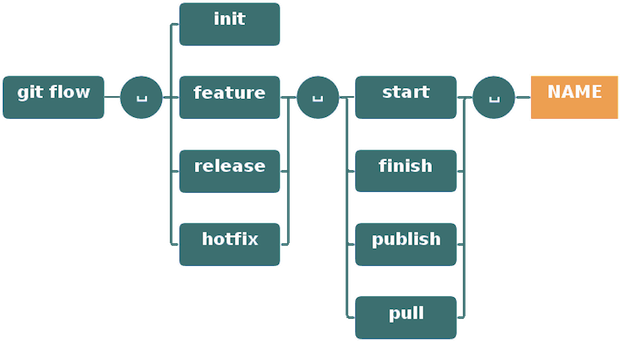
### ⨠Features
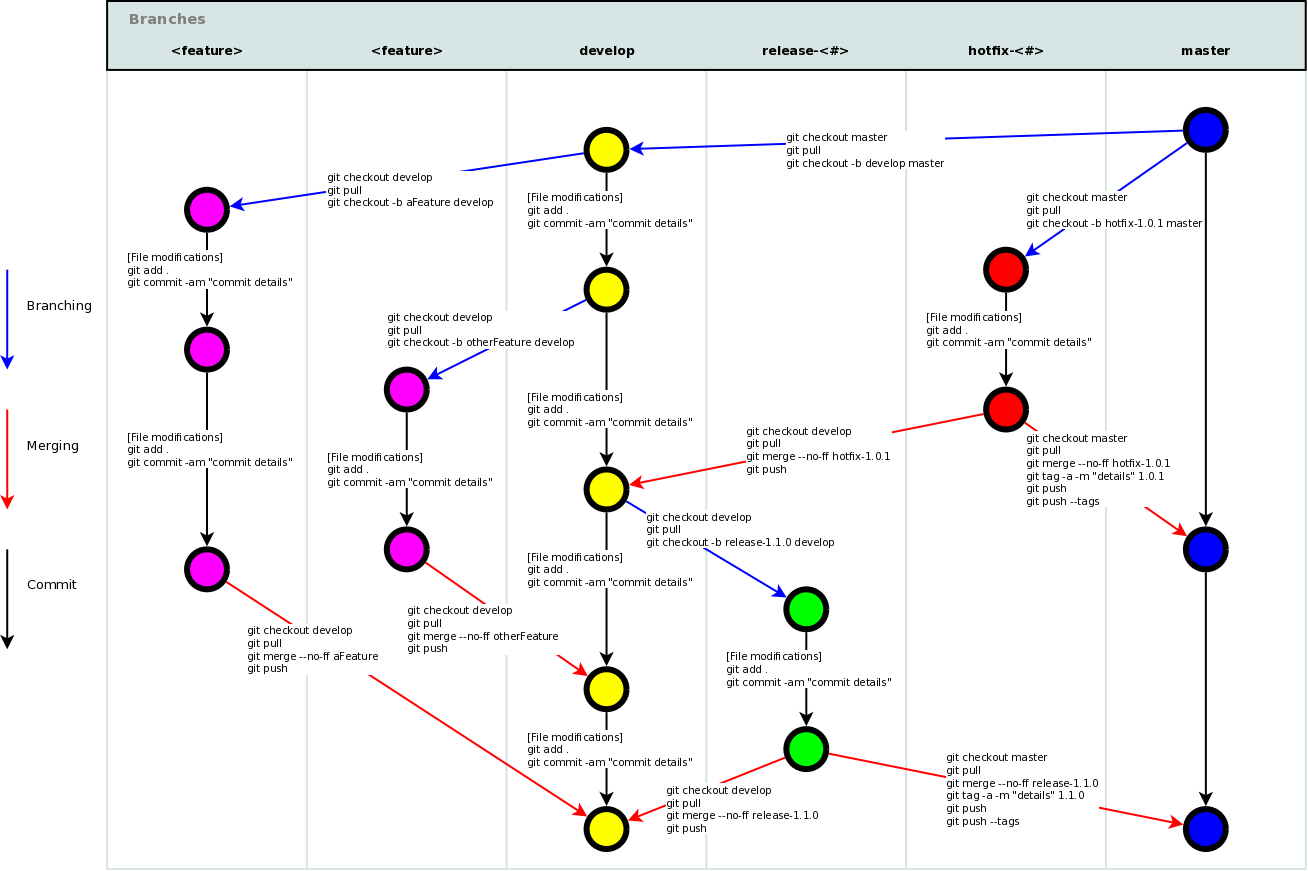
Features are for developing new functionality for upcoming releases. They typically exist only in developer repositories.
**Start new feature:**
```bash
git flow feature start MYFEATURE
```
> Creates feature branch based on 'develop' and switches to it
**Finish feature:**
```bash
git flow feature finish MYFEATURE
```
> This will:
> 1. Merge MYFEATURE into 'develop'
> 2. Remove the feature branch
> 3. Switch back to 'develop'
**Publish feature (for collaboration):**
```bash
git flow feature publish MYFEATURE
```
**Get published feature:**
```bash
git flow feature pull origin MYFEATURE
```
**Track origin feature:**
```bash
git flow feature track MYFEATURE
```
---
### đ Make a Release
Releases support preparation of new production releases, allowing minor bug fixes and preparing meta-data.
**Start release:**
```bash
git flow release start RELEASE [BASE]
```
> Creates release branch from 'develop'. Optionally specify [BASE] commit SHA-1.
**Publish release:**
```bash
git flow release publish RELEASE
```
**Track remote release:**
```bash
git flow release track RELEASE
```
**Finish release:**
```bash
git flow release finish RELEASE
```
> This will:
> 1. Merge release branch into 'master'
> 2. Tag the release
> 3. Back-merge release into 'develop'
> 4. Remove release branch
> đĄ **Don't forget:** Push your tags with `git push --tags`
---
### đĨ Hotfixes
Hotfixes address critical issues in live production versions. They branch off from the corresponding tag on master.
**Start hotfix:**
```bash
git flow hotfix start VERSION [BASENAME]
```
**Finish hotfix:**
```bash
git flow hotfix finish VERSION
```
> Merges back into both 'develop' and 'master', and tags the master merge
---
### đ Commands Overview
### đ Git Flow Schema
---
## đ Other Languages
This cheat sheet is available in multiple languages:
| Language | Link |
|----------|------|
| đ¸đĻ Arabic | [git-cheat-sheet-ar.md](./other-sheets/git-cheat-sheet-ar.md) |
| đ§đŠ Bengali | [git-cheat-sheet-bn.md](./other-sheets/git-cheat-sheet-bn.md) |
| đ§đˇ Brazilian Portuguese | [git-cheat-sheet-pt_BR.md](./other-sheets/git-cheat-sheet-pt_BR.md) |
| đ¨đŗ Chinese | [git-cheat-sheet-zh.md](./other-sheets/git-cheat-sheet-zh.md) |
| đŠđĒ German | [git-cheat-sheet-de.md](./other-sheets/git-cheat-sheet-de.md) |
| đŦđˇ Greek | [git-cheat-sheet-el.md](./other-sheets/git-cheat-sheet-el.md) |
| đŽđŗ Hindi | [git-cheat-sheet-hi.md](./other-sheets/git-cheat-sheet-hi.md) |
| đ°đˇ Korean | [git-cheat-sheet-ko.md](./other-sheets/git-cheat-sheet-ko.md) |
| đĩđą Polish | [git-cheat-sheet-pl.md](./other-sheets/git-cheat-sheet-pl.md) |
| đĒđ¸ Spanish | [git-cheat-sheet-es.md](./other-sheets/git-cheat-sheet-es.md) |
| đšđˇ Turkish | [git-cheat-sheet-tr.md](./other-sheets/git-cheat-sheet-tr.md) |
---
## đ¤ Contributing
We welcome contributions! You can:
- đ Report bugs or typos
- ⨠Add new Git commands
- đ Translate to new languages
- đĄ Improve explanations
- đ Enhance formatting
**How to contribute:**
1. Fork this repository
2. Create your feature branch (`git checkout -b feature/AmazingFeature`)
3. Commit your changes (`git commit -m 'Add some AmazingFeature'`)
4. Push to the branch (`git push origin feature/AmazingFeature`)
5. Open a Pull Request
---
## đ License
This project is open source and available under the [MIT License](LICENSE).
---
â Star this repository if you found it helpful!