# Contributing to Arturo
This project is a lovechild of mine. So, if you want to contribute, I would be extremely greatful. :)
*Contributing* could mean a few different things:
- Reporting a bug
- Discussing the current state of the code
- Submitting a fix
- Adding to the official documentation
- Fixing my - possibly tons of - typos or grammar errors
- Proposing new features
- Becoming a maintainer
- Donations
**In a few words:** all contributions (even if they are just ideas or suggestions) are 100% welcome!
---
* [An overview of the project](#an-overview-of-the-project)
* [Project structure](#project-structure)
* [The compiler](#the-compiler)
* [General schema](#general-schema)
* [Roadmap](#roadmap)
* [Contributing code](#contributing-code)
* [Pull requests](#pull-requests)
* [Licensing](#licensing)
* [Reporting bugs](#reporting-bugs)
* [Notes for great bug reports](#notes-for-great-bug-reports)
* [Editing the documentation](#editing-the-documentation)
* [Library reference](#library-reference)
* [Miscellaneous pages](#miscellaneous-pages)
* [Donations](#donations)
* [How can I donate?](#how-can-i-donate)
---
## An overview of the project
The project is mainly coded in [Nim](https://nim-lang.org/) - it's a very powerful, compiled language that transpiles to pure C. So, we pretty-much get the good parts of C without the associated headaches. There is also a good deal of C/C++ (mainly for external libraries and wrappers).
Mainly, it consists of 8 parts:
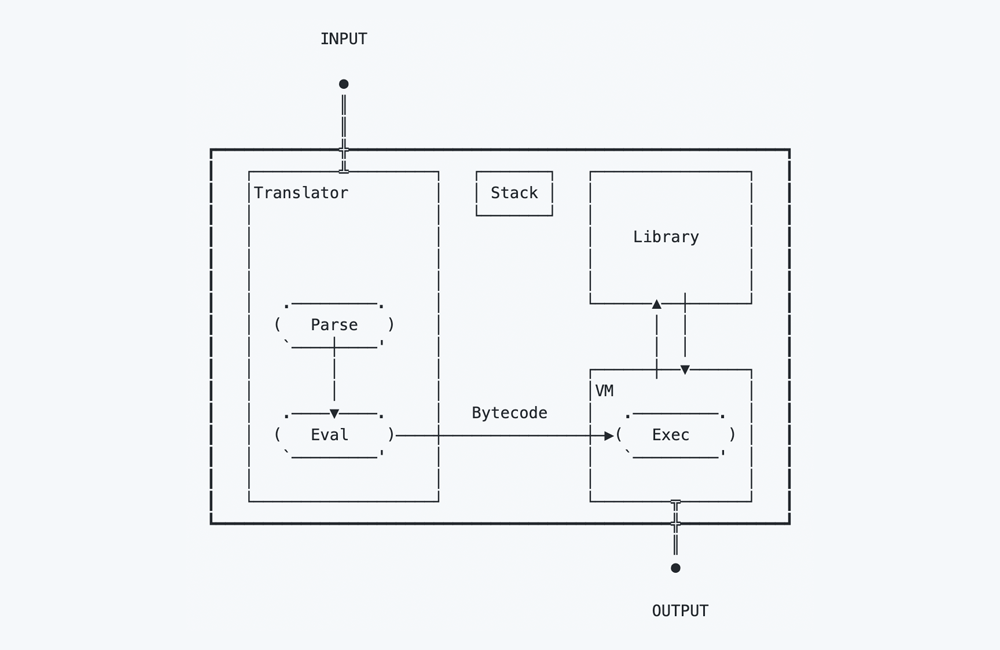
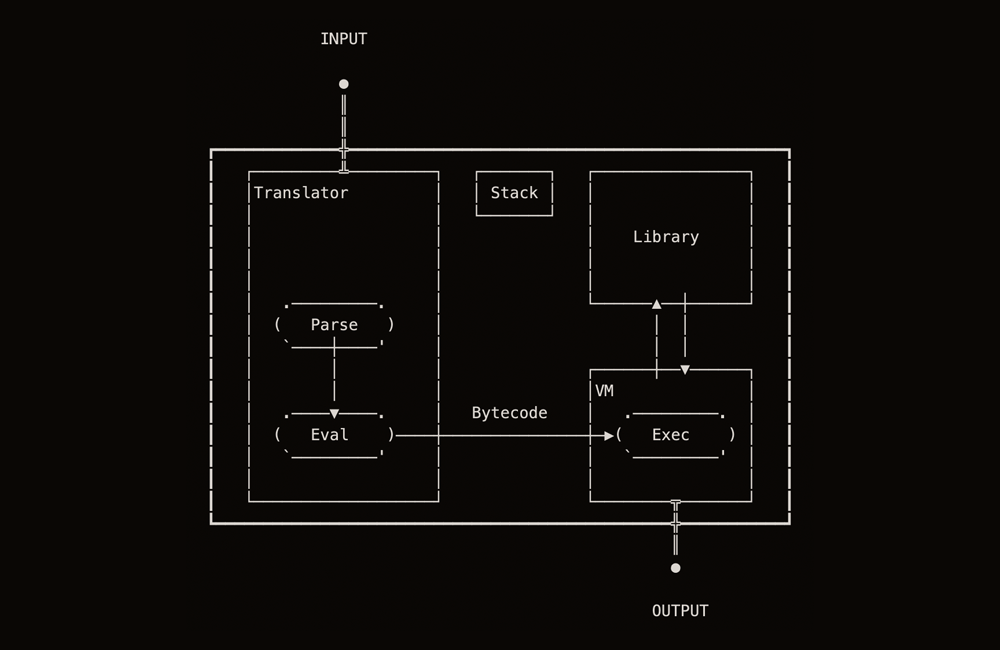
- The **parser**, that takes some source/text and converts it into a list of Arturo values
- The **evaluator**, that takes a parse block (^) and converts into a list of bytecode's
- The **execution** method, that takes some evaluated bytecode and execute it one-by-one
- The **helpers** (generally, useful methods that are to be used in different parts of the codebase)
- The **values** (the very core of Arturo)
- The **standard library**, written mostly in Nim & Arturo
- The **external libraries**, mostly written in Nim & C/C++
- The **main** wrapper that brings it all together and orchestrates the whole action
### Project structure
To get an initial idea of the project, here's a brief guide to where is what:
| Location | Description |
|---|---|
| `bin/` | The destination of the final binary after compilation |
| `examples/` | A list of working examples in Arturo |
| `src/` | The main source folder |
| `src/extras/` | 3rd party open-source code used by Arturo |
| `src/helpers/` | Useful helper methods grouped by category and used mostly by library functions |
| `src/library/` | The Arturo standard library functions, grouped by category |
| `src/system/` | Components of the Arturo binary, written in Arturo (the REPL, the packager, etc) |
| `src/vm/` | The Virtual Machine |
| `src/vm/bytecode.nim` | A list of all the VM bytecodes along with their description |
| `src/vm/env.nim` | VM Environment handling (paths, etc) |
| `src/vm/eval.nim` | The evaluator: where the parse tree turns into bytecode instructions |
| `src/vm/exec.nim` | The most important VM module, where the main loop is triggered |
| `src/vm/parse.nim` | The main lexer/parser: turning the initial input into a parse tree, of words, symbols and values |
| `src/vm/stack.nim` | Manipulation code for the different stacks used by the VM |
| `src/vm/value.nim` | The main Value object for our Virtual Machine along with numerous overloads, from initialization methods to printing and basic arithmetic |
| `src/arturo.nim` | The main entry; where all the magic begins |
| `tests/` | Different unit tests |
| `tools/` | Various tools, documentation generation, etc |
| `version/` | Main version & build numbers |
### The compiler
The main compiler is implemented as a Bytecode interpreter / Stack-based VM and should run in most architectures.
The main goals are: expressiveness, brevity, performance and portability. (With that exact order)
#### General schema
 ### Roadmap
The list of things to fix and/or add could be endless. But here is one, a bit prioritized (even though, inherently, incomplete and messy):
- [X] Add support for big number handling (via GMP)
- [ ] Enrich the system library
- [X] Add built-in support for Databases (Sqlite, etc)
- [X] Implement HTML module
- [ ] Add more Server-related features
- [ ] Implement LaTeX generation module
- [ ] Add custom grammar parser functionality
- [ ] Optimize and refine the bytecode
- [ ] Improve VM performance
- [X] Add the option of saving intermediate bytecode
- [X] Add support for a package manager
- [ ] Add UI support (via libui? via webview? both?)
- [ ] Explore different uses of Arturo's dialecting capabilities (DSLs)
- [ ] Implement a basic Arturo compiler (written in Arturo :blush:)
- [ ] Go full self-hosted (that's an ambitious one, I know...)
## Contributing code
Anybody with an interest in programming languages, compiler design and/or some knowledge of Nim (it's not difficult to get an idea of what it is about once you see some code; trust me!) is more than welcome to contribute! So, how?
Let's have a look!
### Environment Setup
Before contributing to Arturo, you need to make sure you have all needed dependencies to compile it.
Our compiler is written in Nim, which depends on GCC.
Now, for the complete environment setup you may also have a look at the Github action: https://github.com/arturo-lang/setup-arturo/blob/main/action.yml - it's doing practically a complete setup with anything needed for each system.
> [!CAUTION]
>
> Careful not to be confused with the fetch/compile mode: fetch just retrieves a prebuilt binary, so it just sets up the runtime environment, while compile - which is what you're interested in - sets up the environment for building Arturo too 😉
> [!IMPORTANT]
>
> Have in mind this is a quick guide based on Github Actions CI and this may require additional steps or less steps depending on your system.
> This setup is not intended for end-users, but for documenting steps for us, developers, and other contributors, so have it in mind before proceeding.
#### Ubuntu Programmers
**Install Nim**
You need to install Nim in order to compile Arturo.
The easiest way to install it is from the apt-get package manager.
```sh
apt-get install nim
```
But the recommended way is to use *choosenim*:
```sh
curl https://nim-lang.org/choosenim/init.sh -sSf | sh
choosenim 2.2.6
```
**Install dependencies**
```sh
sudo apt-get update
sudo apt-get install libgtk-3-dev libmpfr-dev
```
Now, you need to add Webkit, but we have some little details to it.
If you're on Ubuntu 24.04 or greater, install:
```sh
sudo apt-get install -y libwebkit2gtk-4.1-dev
```
But if you're on an older version:
```sh
sudo apt-get install -y libwebkit2gtk-4.0-dev
```
This happens because 4.0 version of Webkit does not exist for newer versions of Ubuntu.
#### MacOS Programmers
You need to install Nim in order to compile Arturo.
The easiest way is install the latest version of clang, and then install nim from brew.
```sh
xcode-select --install
brew install nim
```
But you can also install nim from *choosenim*, which is the recommended way:
```sh
curl https://nim-lang.org/choosenim/init.sh -sSf | sh
choosenim 2.2.6
```
Normally both work fine and are up-to-date
#### Windows Programmers
**Installing Nim**
You need to install Nim in order to compile Arturo.
You may install it manually via the [official installer](https://nim-lang.org/install.html).
If you prefer, you can install from scoop or choco.
```sh
choco install nim
```
or
```sh
scoop bucket add main
scoop install main/nim
```
If you're using scoop, choosenim won't be needed. Scoop already have version management built-in.
**Installing MSYS2 and GCC**
Nim depends on GCC and Arturo for Windows depends on some libraries for Mingw64.
In order to get this working, [install MSYS2 from their official website](https://www.msys2.org/).
Then open the Mingw64 instance and run:
```sh
pacman -S base-devel p7zip unzip mingw-w64-x86_64-toolchain
```
If you wish, you can also add Mingw64's bin to your `PATH`.
Search for "Environment Variables" and add `/mingw64/bin` to your `PATH`.
**Additional DLLs**
Before compile, make sure you have all needed runtime dependencies at you `bin` folder.
```sh
cp src/extras/webview/deps/dlls/x64/webview.dll bin
cp src/extras/webview/deps/dlls/x64/WebView2Loader.dll bin
curl -L https://arturo-lang.s3.amazonaws.com/libgmp-10.dll -o bin/libgmp-10.dll
curl -L https://arturo-lang.s3.amazonaws.com/libmpfr-6.dll -o bin/libmpfr-6.dll
curl -L https://arturo-lang.s3.amazonaws.com/sqlite3_64.dll -o bin/sqlite3_64.dll
curl -L https://arturo-lang.s3.amazonaws.com/libgcc_s_seh-1.dll -o bin/libgcc_s_seh-1.dll
curl -L https://curl.se/ca/cacert.pem -o bin/cacert.pem
cp /mingw64/bin/libwinpthread-1.dll bin
```
#### FreeBSD Programmers
**Install nim and its dependencies**
For FreeBSD, We're installing Nim with `pkg install nim`. Which will probably fetch the previous Nim release, until all ports are updated, which AFAIK takes some time.
Would choosenim work? Perhaps, but haven't tested it.
```sh
pkg update
pkg install -y wget curl bash ca_root_nss jq
pkg install -y pkgconf openssl
pkg install -y nim git
```
**Install dependencies**
```sh
pkg install -y gtk3 mpfr webkit2-gtk_41
```
### Pull requests
Pull requests are the best way to propose changes to the codebase and are actively encouraged:
1. Fork the repo and create your branch from `master`.
2. If you've added code that should be tested, add tests.
3. If you've changed APIs, update the documentation.
4. Ensure the test suite passes.
5. Make sure your code lints.
6. Issue that pull request!
### Licensing
In short: when you submit code changes, your submissions are understood to be under the same [MIT License](http://choosealicense.com/licenses/mit/) that covers the project. Feel free to contact the maintainers if that's a concern.
## Reporting bugs
We use GitHub issues to track public bugs. Report a bug by [opening a new issue](https://github.com/arturo-lang/arturo/issues); it's that easy!
It's the best way to easily help the project grow: the more issues to solve, the better it will become!
### Notes for great bug reports
What we want in a *great* bug report:
- A quick summary and/or background
- Steps to reproduce
- Be specific!
- Give sample code if you can.
- What you expected would happen
- What actually happens
- Notes (possibly including why you think this might be happening, or stuff you tried that didn't work)
People *love* thorough bug reports. I'm not even kidding.
## Editing the documentation
Arturo's "official" documentation can be found [here](https://arturo-lang.io/documentation/). This doesn't mean you cannot contribute - quite the opposite actually. Feel free to fix any error you spot, correct spelling/grammar mistakes (= non-native project creator disclaimer! lol), add examples or even write whole new sections.
So, where do we start?
The documentation can be divided into 2 parts:
- Library reference
- Miscellaneous pages
### Library reference
Every single one of Arturo's built-in functions resides in one of the modules in the [src/library](../src/library) folder.
In each and every one of the files/modules, you can find a list of all the functions within that module.
One example would `darken` from the [Colors module](../src/library/Colors.nim):
```nim
builtin "darken",
alias = unaliased,
rule = PrefixPrecedence,
description = "darken color by given percentage (0.0-1.0)",
args = {
"color" : {ValueKind.Color},
"percent" : {Floating}
},
attrs = NoAttrs,
returns = {ValueKind.Color},
example = """
darken #red 0.2 ; => #CC0000
darken #red 0.5 ; => #7F0000
darken #9944CC 0.3 ; => #6B308F
""":
##########################################################
if x.kind == Literal:
SetInPlace(newColor(alterColorValue(InPlace.l, y.f * (-1))))
else:
push newColor(alterColorValue(x.l, y.f * (-1)))
```
As you can see, the code includes different pieces of data (`description`, `args`, `example`, etc) along with its implementation. This data is exactly what is is - automatically - included in Arturo's library reference (and the `info` function as well). Once you see a couple of them, it shouldn't be too difficult to figure out how it all works!
### Miscellaneous pages
For all other pages in the official website (e.g. [this one](https://arturo-lang.io/documentation/language/)), all the content comes from templates that are then auto-magically (via Webize) converted to HTML.
So, if you want to edit one of these pages, just edit the corresponding template and your changes will be reflected at the very-next generation of the website (that part is up to me).
Here's where you can find all documentation template - all mostly written in a combination of Arturo itself and Markdown: [Documentation](../docs/website)
## Donations
Given that Arturo is written and maintained by people for free, in their own free time, that also have their daily jobs, any donation would give the project the help it needs to get to the next level. And for that, we'd also need you help.
So...
### How can I donate?
We have different options for you:
- [GitHub Sponsors](https://github.com/sponsors/drkameleon)
- [Patreon](https://patreon.com/arturolang)
- [OpenCollective](https://opencollective.com/arturo-lang)
You may also donate [via Bitcoin](https://blockchain.info/address/bc1qpjlmktrz79muz4yksm8aadz3d3srh0rmnn3hhd):
### Roadmap
The list of things to fix and/or add could be endless. But here is one, a bit prioritized (even though, inherently, incomplete and messy):
- [X] Add support for big number handling (via GMP)
- [ ] Enrich the system library
- [X] Add built-in support for Databases (Sqlite, etc)
- [X] Implement HTML module
- [ ] Add more Server-related features
- [ ] Implement LaTeX generation module
- [ ] Add custom grammar parser functionality
- [ ] Optimize and refine the bytecode
- [ ] Improve VM performance
- [X] Add the option of saving intermediate bytecode
- [X] Add support for a package manager
- [ ] Add UI support (via libui? via webview? both?)
- [ ] Explore different uses of Arturo's dialecting capabilities (DSLs)
- [ ] Implement a basic Arturo compiler (written in Arturo :blush:)
- [ ] Go full self-hosted (that's an ambitious one, I know...)
## Contributing code
Anybody with an interest in programming languages, compiler design and/or some knowledge of Nim (it's not difficult to get an idea of what it is about once you see some code; trust me!) is more than welcome to contribute! So, how?
Let's have a look!
### Environment Setup
Before contributing to Arturo, you need to make sure you have all needed dependencies to compile it.
Our compiler is written in Nim, which depends on GCC.
Now, for the complete environment setup you may also have a look at the Github action: https://github.com/arturo-lang/setup-arturo/blob/main/action.yml - it's doing practically a complete setup with anything needed for each system.
> [!CAUTION]
>
> Careful not to be confused with the fetch/compile mode: fetch just retrieves a prebuilt binary, so it just sets up the runtime environment, while compile - which is what you're interested in - sets up the environment for building Arturo too 😉
> [!IMPORTANT]
>
> Have in mind this is a quick guide based on Github Actions CI and this may require additional steps or less steps depending on your system.
> This setup is not intended for end-users, but for documenting steps for us, developers, and other contributors, so have it in mind before proceeding.
#### Ubuntu Programmers
**Install Nim**
You need to install Nim in order to compile Arturo.
The easiest way to install it is from the apt-get package manager.
```sh
apt-get install nim
```
But the recommended way is to use *choosenim*:
```sh
curl https://nim-lang.org/choosenim/init.sh -sSf | sh
choosenim 2.2.6
```
**Install dependencies**
```sh
sudo apt-get update
sudo apt-get install libgtk-3-dev libmpfr-dev
```
Now, you need to add Webkit, but we have some little details to it.
If you're on Ubuntu 24.04 or greater, install:
```sh
sudo apt-get install -y libwebkit2gtk-4.1-dev
```
But if you're on an older version:
```sh
sudo apt-get install -y libwebkit2gtk-4.0-dev
```
This happens because 4.0 version of Webkit does not exist for newer versions of Ubuntu.
#### MacOS Programmers
You need to install Nim in order to compile Arturo.
The easiest way is install the latest version of clang, and then install nim from brew.
```sh
xcode-select --install
brew install nim
```
But you can also install nim from *choosenim*, which is the recommended way:
```sh
curl https://nim-lang.org/choosenim/init.sh -sSf | sh
choosenim 2.2.6
```
Normally both work fine and are up-to-date
#### Windows Programmers
**Installing Nim**
You need to install Nim in order to compile Arturo.
You may install it manually via the [official installer](https://nim-lang.org/install.html).
If you prefer, you can install from scoop or choco.
```sh
choco install nim
```
or
```sh
scoop bucket add main
scoop install main/nim
```
If you're using scoop, choosenim won't be needed. Scoop already have version management built-in.
**Installing MSYS2 and GCC**
Nim depends on GCC and Arturo for Windows depends on some libraries for Mingw64.
In order to get this working, [install MSYS2 from their official website](https://www.msys2.org/).
Then open the Mingw64 instance and run:
```sh
pacman -S base-devel p7zip unzip mingw-w64-x86_64-toolchain
```
If you wish, you can also add Mingw64's bin to your `PATH`.
Search for "Environment Variables" and add `/mingw64/bin` to your `PATH`.
**Additional DLLs**
Before compile, make sure you have all needed runtime dependencies at you `bin` folder.
```sh
cp src/extras/webview/deps/dlls/x64/webview.dll bin
cp src/extras/webview/deps/dlls/x64/WebView2Loader.dll bin
curl -L https://arturo-lang.s3.amazonaws.com/libgmp-10.dll -o bin/libgmp-10.dll
curl -L https://arturo-lang.s3.amazonaws.com/libmpfr-6.dll -o bin/libmpfr-6.dll
curl -L https://arturo-lang.s3.amazonaws.com/sqlite3_64.dll -o bin/sqlite3_64.dll
curl -L https://arturo-lang.s3.amazonaws.com/libgcc_s_seh-1.dll -o bin/libgcc_s_seh-1.dll
curl -L https://curl.se/ca/cacert.pem -o bin/cacert.pem
cp /mingw64/bin/libwinpthread-1.dll bin
```
#### FreeBSD Programmers
**Install nim and its dependencies**
For FreeBSD, We're installing Nim with `pkg install nim`. Which will probably fetch the previous Nim release, until all ports are updated, which AFAIK takes some time.
Would choosenim work? Perhaps, but haven't tested it.
```sh
pkg update
pkg install -y wget curl bash ca_root_nss jq
pkg install -y pkgconf openssl
pkg install -y nim git
```
**Install dependencies**
```sh
pkg install -y gtk3 mpfr webkit2-gtk_41
```
### Pull requests
Pull requests are the best way to propose changes to the codebase and are actively encouraged:
1. Fork the repo and create your branch from `master`.
2. If you've added code that should be tested, add tests.
3. If you've changed APIs, update the documentation.
4. Ensure the test suite passes.
5. Make sure your code lints.
6. Issue that pull request!
### Licensing
In short: when you submit code changes, your submissions are understood to be under the same [MIT License](http://choosealicense.com/licenses/mit/) that covers the project. Feel free to contact the maintainers if that's a concern.
## Reporting bugs
We use GitHub issues to track public bugs. Report a bug by [opening a new issue](https://github.com/arturo-lang/arturo/issues); it's that easy!
It's the best way to easily help the project grow: the more issues to solve, the better it will become!
### Notes for great bug reports
What we want in a *great* bug report:
- A quick summary and/or background
- Steps to reproduce
- Be specific!
- Give sample code if you can.
- What you expected would happen
- What actually happens
- Notes (possibly including why you think this might be happening, or stuff you tried that didn't work)
People *love* thorough bug reports. I'm not even kidding.
## Editing the documentation
Arturo's "official" documentation can be found [here](https://arturo-lang.io/documentation/). This doesn't mean you cannot contribute - quite the opposite actually. Feel free to fix any error you spot, correct spelling/grammar mistakes (= non-native project creator disclaimer! lol), add examples or even write whole new sections.
So, where do we start?
The documentation can be divided into 2 parts:
- Library reference
- Miscellaneous pages
### Library reference
Every single one of Arturo's built-in functions resides in one of the modules in the [src/library](../src/library) folder.
In each and every one of the files/modules, you can find a list of all the functions within that module.
One example would `darken` from the [Colors module](../src/library/Colors.nim):
```nim
builtin "darken",
alias = unaliased,
rule = PrefixPrecedence,
description = "darken color by given percentage (0.0-1.0)",
args = {
"color" : {ValueKind.Color},
"percent" : {Floating}
},
attrs = NoAttrs,
returns = {ValueKind.Color},
example = """
darken #red 0.2 ; => #CC0000
darken #red 0.5 ; => #7F0000
darken #9944CC 0.3 ; => #6B308F
""":
##########################################################
if x.kind == Literal:
SetInPlace(newColor(alterColorValue(InPlace.l, y.f * (-1))))
else:
push newColor(alterColorValue(x.l, y.f * (-1)))
```
As you can see, the code includes different pieces of data (`description`, `args`, `example`, etc) along with its implementation. This data is exactly what is is - automatically - included in Arturo's library reference (and the `info` function as well). Once you see a couple of them, it shouldn't be too difficult to figure out how it all works!
### Miscellaneous pages
For all other pages in the official website (e.g. [this one](https://arturo-lang.io/documentation/language/)), all the content comes from templates that are then auto-magically (via Webize) converted to HTML.
So, if you want to edit one of these pages, just edit the corresponding template and your changes will be reflected at the very-next generation of the website (that part is up to me).
Here's where you can find all documentation template - all mostly written in a combination of Arturo itself and Markdown: [Documentation](../docs/website)
## Donations
Given that Arturo is written and maintained by people for free, in their own free time, that also have their daily jobs, any donation would give the project the help it needs to get to the next level. And for that, we'd also need you help.
So...
### How can I donate?
We have different options for you:
- [GitHub Sponsors](https://github.com/sponsors/drkameleon)
- [Patreon](https://patreon.com/arturolang)
- [OpenCollective](https://opencollective.com/arturo-lang)
You may also donate [via Bitcoin](https://blockchain.info/address/bc1qpjlmktrz79muz4yksm8aadz3d3srh0rmnn3hhd):