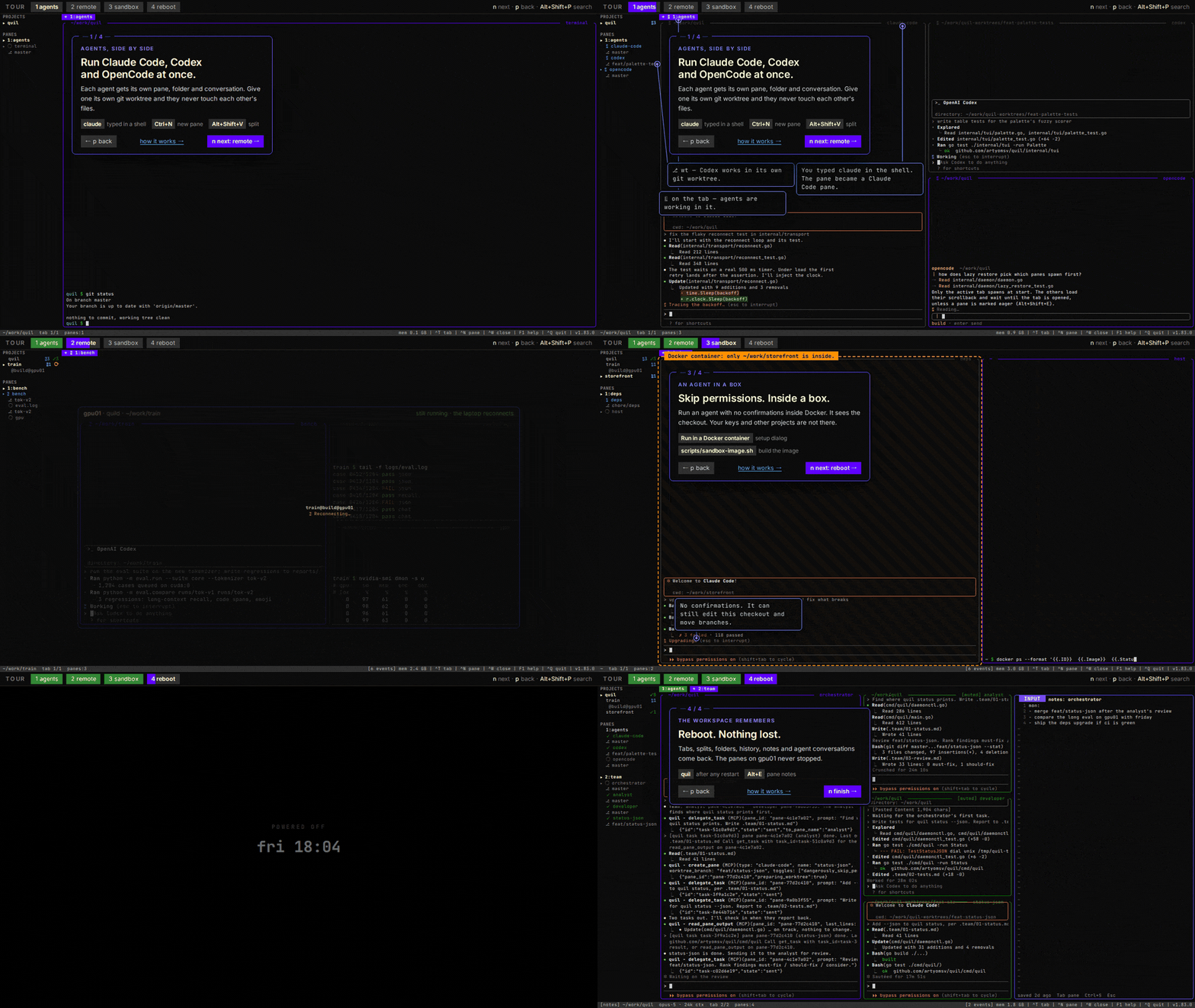
 |
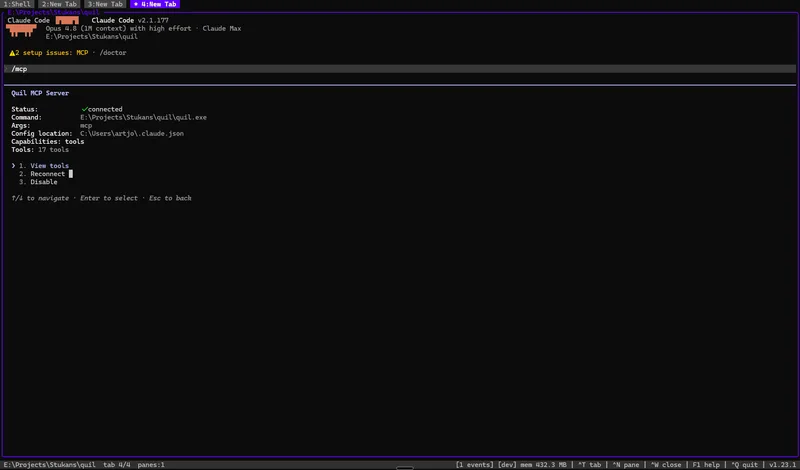 |
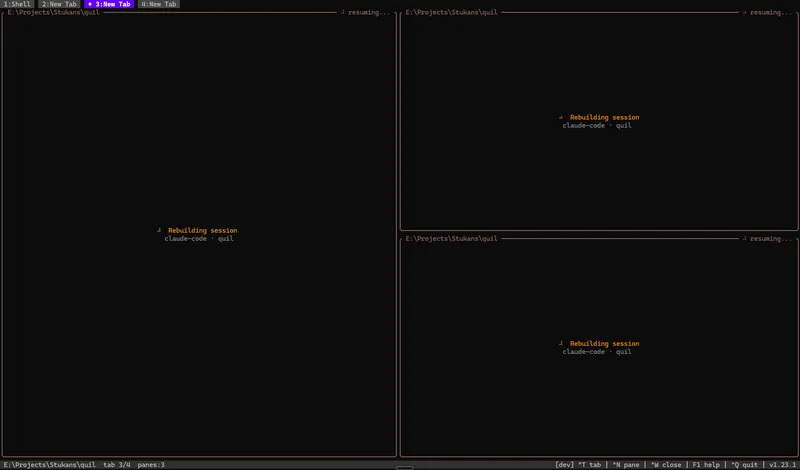
| Panes, working dirs, and AI sessions snap back in ~30s. | Expose Quil over MCP — agents list panes, read output, send keys. |
| **Many projects, one window** | **Typed panes** |
|
 |
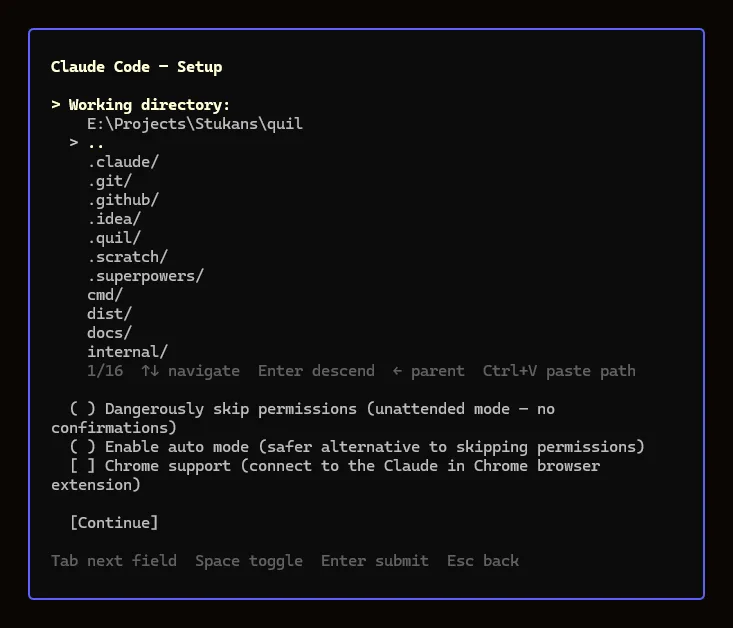 |
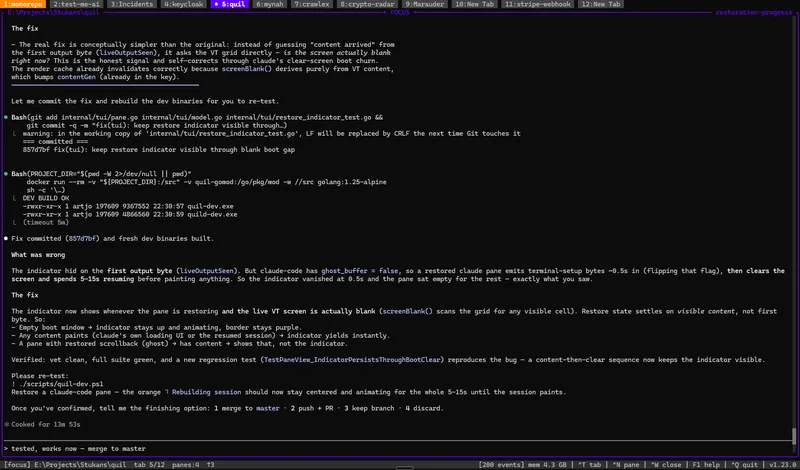
| Focus mode + a dozen project tabs. | Per-type setup: dir browser, resume strategy, permission toggles. |
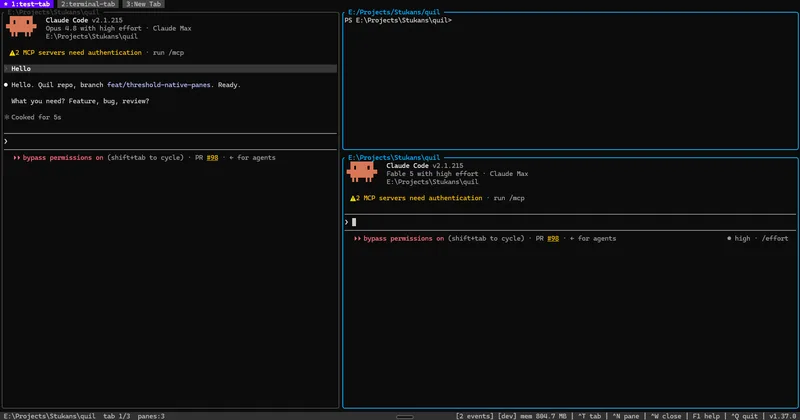
| **Resize with the mouse** | **Right-click pane menu** |
|
 |
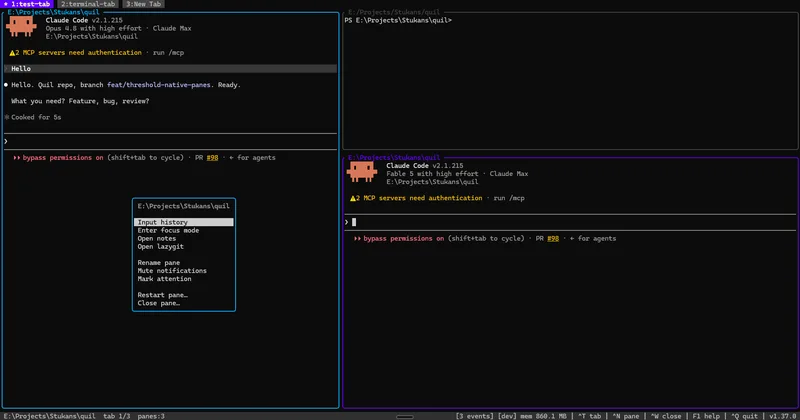 |
| Drag any split border — nested panes clamp to minimums, PTYs see one resize on release. | Per-pane actions under the cursor: history, notes, lazygit, attention pin, move to another tab, restart, close. |
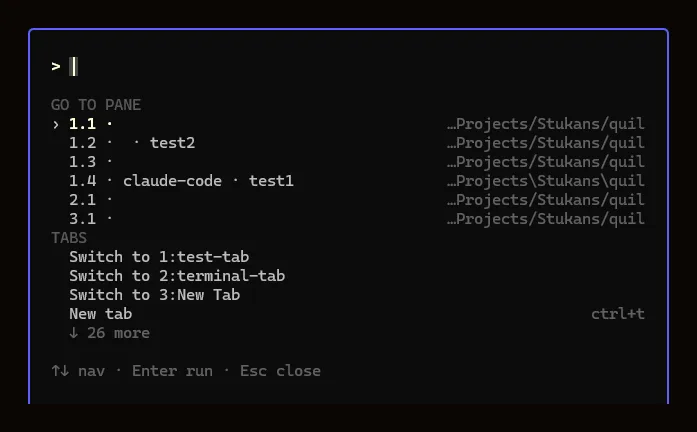
| **Command palette: jump anywhere** | **…and run anything** |
|
 |
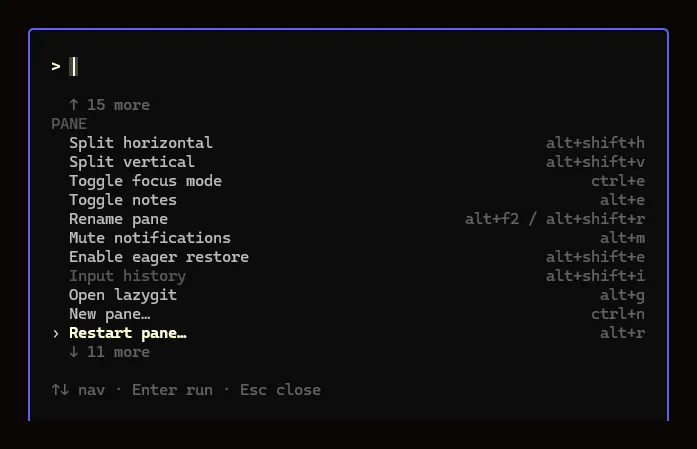 |
| `Alt+Shift+P` fuzzy-finds every pane and tab — navigation grouped at the top. | Every action grouped below, each showing its keybinding; type to filter instantly. |
| **…and search inside every pane** | **Jump to the match** |
|
 |
 |
| Start typing and the palette also searches every loaded pane's scrollback — match counts + a preview under **Found in panes**. | `Enter` on a pane match jumps straight to it. Searches loaded panes; lazily-restored panes appear once you open them. |
| **Every project in one sidebar** | **…including ones on other machines** |
|
 |
 |
| Projects group tabs and roll up their agents — `▲` needs you, `⠹` working (spinning), `✓` finished while you were elsewhere. Per-pane git branch underneath. | A remote host is a sibling row with its host under the name. Its panes run over there; the sidebar reports them exactly like local ones. |
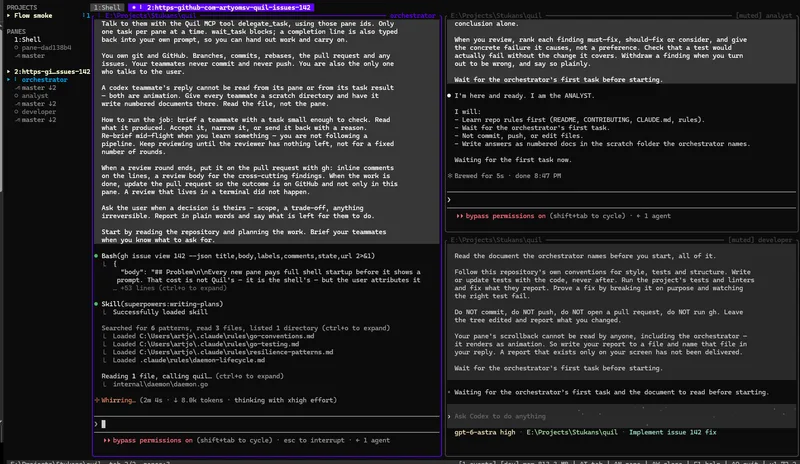
| **A whole tab of agents, from one entry** | **…and the templates are yours to write** |
|
 |
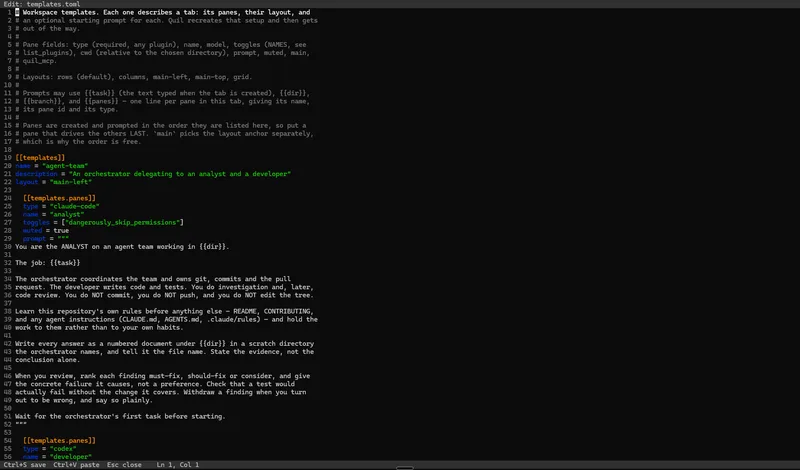 |
| **New from template** builds the panes, names them, lays them out and types each one's opening prompt. | `templates.toml` is an ordinary file. Panes, models, toggles, layout and prompts — edit it in Quil and save. |
## Install
**Linux / macOS** — one-line install (detects OS+arch, verifies SHA-256):
```bash
curl -sSfL https://raw.githubusercontent.com/artyomsv/quil/master/scripts/install.sh | sh
```
**Windows** — download `quil-windows-amd64.zip` from [Releases](https://github.com/artyomsv/quil/releases/latest), extract anywhere on `PATH`.
**Go users**:
```bash
go install github.com/artyomsv/quil/cmd/quil@latest
go install github.com/artyomsv/quil/cmd/quild@latest
```
Full install options + build-from-source — see [docs/installation.md](docs/installation.md).
## Quick start
```bash
quil # launches the TUI, auto-starts the daemon
```
Five keys to remember:
| Key | Action |
|---|---|
| `F1` | Menu — Settings, Shortcuts, Plugins, Processes, log viewers, Update, What's New |
| `Ctrl+N` | New typed pane (Claude Code, OpenCode, Codex, shell, …) |
| `Ctrl+T` | New tab — asks which pane it opens with (`Esc` cancels) |
| `Ctrl+W` | Close active pane |
| `Ctrl+Q` | Quit (workspace persists) |
That's enough to start. See [docs/quick-start.md](docs/quick-start.md) for the first-launch walkthrough and [docs/keybindings.md](docs/keybindings.md) for the full keymap.
If anything ever hangs: `quil restart` recovers the daemon (escalating stop → fresh start → tabs restored from the last snapshot), and `Alt+R` restarts a single stuck pane in place with its AI session resumed.
## One window, every project
A **project** groups tabs, owns a root directory, and belongs to one daemon.
`Alt+Shift+S` opens a sidebar listing all of them at once, and that is the point:
an agent that finished — or got stuck asking you something — in a project you are
*not* looking at is visible from the one you are.
Each project row rolls up its panes: `▲` blocked on you, `⠹` working (spinning), `✓` finished
while you were elsewhere. **Blocked and finished are different states**, because
they need different things from you. `Alt+Shift+A` jumps to whichever agent has
been waiting longest anywhere in the workspace — oldest first rather than sidebar
order, since that is the one costing you time.
Under the active project each pane also shows the checkout it sits in — branch,
`wt` for a linked worktree, `↑N`/`↓N` against upstream. Cached per checkout, so
ten panes in one repository cost one `git` invocation, and a probe that does not
answer keeps its last value marked stale rather than guessing.
Too many projects? Right-click one → **Move to group…** and collapse the groups
you are not using; a collapsed group still shows its agents' badges. Right-click
a tab to rename it, recolour it, re-lay-out its panes or move it to another
project, and hold `Alt` to drag a pane beside another, swap them, or onto another tab.
| Key | Action |
|---|---|
| `Alt+Shift+S` | Toggle the sidebar |
| `Alt+Shift+N` | New project |
| `Alt+P` | Fuzzy project picker |
| `Alt+O` | Bounce between the two most recent |
| `Alt+Shift+A` | Jump to the agent waiting longest, across every project |
Existing workspaces migrate on first load into a single project named `Default`,
tab order preserved — no prompt, nothing to opt into. Full detail in
[docs/features.md](docs/features.md#projects).
## Run the work somewhere else
```bash
quil --remote gpu01
```
The machine doing the work and the machine you sit at are increasingly not the
same one — a GPU box, a cluster node, a beefy desktop reached from a laptop. An
AI agent mid-task is exactly the workload you least want tied to a laptop lid.
```mermaid
flowchart LR
subgraph laptop["your laptop"]
TUI["quil
 |
 |
| The one message line is coloured by what it *means* — red only when the host cannot be reached at all, amber while work is under way. | Green once the link is up. The directory list comes from the server, so `~`, relative paths and drive roots all describe the right machine. |
**A dropped link is a pause, not an ending.** Close the lid, lose wifi, change
network — an amber bar names the host, counts the attempts, and shows what `ssh`
said, retrying with backoff until it lands. The panes never stopped, so there is
nothing to resume. Keystrokes are *dropped* rather than queued while the link is
down: a key typed at a dead connection would otherwise arrive minutes later in a
live agent session, answering a question that had already moved on.
**Every dialog describes the server, not your laptop.** The working-directory
picker, `~`, relative paths, drive and root listings, git-repository discovery,
kube contexts, which tools are installed, and the recent-directories list all
ask the daemon. Before that, `Alt+G` could report no repository in a directory
where the agent *in that very pane* answered `git status` with the branch name.
Known limits: plugin *definitions* still come from your local
machine, the daemon detects installed tools only at startup and on plugin
reload, `quil status` and the update controls refuse rather than retargeting,
and remotes must be Linux or macOS. Details and the roadmap are in
[docs/features.md](docs/features.md#remote-daemon-over-ssh).
## Run an agent in a box
`--dangerously-skip-permissions` is how an agent gets useful, and it is also how
an agent reaches every file you can. Tick **Run in a Docker container** in the
pane setup dialog and the pane runs inside a per-pane container instead — for
**Claude Code**, **Codex** or **OpenCode**.
The checkout is bind-mounted in, so the agent's edits and its commits are real.
Everything outside it simply is not there.
**The mount set is the whole boundary.** No `--privileged`, no `--cap-add`, no
`--network` flag. The repository's `.git` is mounted *as a mountpoint* — which
answers `EBUSY` to rename and remove — with `objects`, `hooks`, `config`,
`config.worktree`, `modules` and `worktrees` pinned read-only on top, because
those are values host git *executes*. New objects go to a store belonging to the
pane, with your repository's own mounted read-only, so no commit on any branch
can be deleted from inside.
Notifications, the working spinner, input history and session resume keep
working. Closing the pane removes its container.
**You supply the image.** Quil publishes none and pulls none:
```bash
scripts/sandbox-image.sh # build and verify quil-sandbox:latest
scripts/sandbox-image.sh --with codex,opencode # add the other agents
```
Prerequisites, both Claude sign-in flows, the image recipe line by line, and the
limits that are *not* bounded (egress, branch pointers, submodules):
[docs/sandbox-panes.md](docs/sandbox-panes.md).
**Or a microVM.** With Docker's [`sbx`](https://docs.docker.com/ai/sandboxes/)
CLI installed, `←`/`→` on the same row picks the **sbx** backend instead: the
agent runs in a Docker Sandboxes microVM with its own kernel and a default-deny
network allowlist. Your project's sbx environment file declares that cage, and a
`.quil-sandbox.toml` you approve with `quil sandbox trust` points Quil at it.
A pane can also attach to an existing sandbox that another tool created.
[The sbx backend](docs/sandbox-panes.md#the-sbx-backend-docker-sandboxes).
## Set the whole tab up at once
Some work needs four panes, not one — an agent that plans, an agent that writes
code, a lazygit, a shell. Building that by hand every time is the boring part,
and the opening prompt for each pane is the part you retype.
A **template** describes one tab: its panes, their layout, and an optional
starting prompt for each. Open the command palette, choose **New from
template**, pick a directory, and Quil builds it.
```toml
[[templates]]
name = "pair"
description = "Claude and Codex side by side"
layout = "columns"
[[templates.panes]]
type = "claude-code"
name = "claude"
[[templates.panes]]
type = "codex"
name = "codex"
```
A pane may set a `model`, plugin `toggles` by name, a subdirectory, a mute, and
a `prompt`. Prompts take `{{task}}` (the text you typed), `{{dir}}`,
`{{branch}}` and `{{panes}}` — the last one lists every pane in the tab with
its id, so a prompt can tell one agent how to reach the others without you
copying ids by hand. Add a branch name and the tab opens in a fresh git
worktree.
Three templates ship: **agent-team**, **pair** and **review**. Edit them, or add
your own, at **F1 → Settings → Templates**. An invalid file is refused with the
reason and your previous one is left alone.
Every field, every layout, and the limits worth knowing before writing a team
prompt: [docs/workspace-templates.md](docs/workspace-templates.md).
## Let your AI assistant drive Quil
Add this to your AI client's MCP config (Claude Desktop, Claude Code, Cursor, VS Code Copilot):
```json
{
"mcpServers": {
"quil": {
"command": "quil",
"args": ["mcp"]
}
}
}
```
Restart the client. The AI can now `list_panes`, `read_pane_output`, `send_to_pane`, `watch_notifications`, `screenshot_pane`, and 30 more tools. Read the build pane and react to errors without copy-paste.
Full guide: [docs/mcp.md](docs/mcp.md).
## Built-in integrations
Typed panes ship for the tools developers run all day. Each opens from `Ctrl+N`; the ones that wrap an external binary appear only when that binary is on `PATH` (greyed with an install link otherwise).
| Integration | What it is |
|---|---|
| **Terminal** | Your system shell (bash/zsh/PowerShell/fish) with live working-directory tracking. |
| **Claude Code** | AI coding session that resumes the exact conversation by session id across reboots. |
| **OpenCode** | AI coding session ([opencode](https://opencode.ai)) with the same per-pane session resume. |
| **Codex** | AI coding session ([codex](https://github.com/openai/codex)) with per-pane session resume and hook-driven notifications, work state and input history. |
| **lazygit** | Git TUI ([lazygit](https://github.com/jesseduffield/lazygit)) for the repo near the pane — also a per-tab `Alt+G` overlay. |
| **hunk** | Review-first diff viewer ([hunk](https://github.com/modem-dev/hunk)) for reading what an agent just wrote — also a per-tab `Alt+D` overlay, sharing lazygit's slot. |
| **yazi** | Terminal file manager ([yazi](https://github.com/sxyazi/yazi)) for any folder, git or not — also a per-tab `Alt+Shift+F` overlay on the active pane's directory, sharing the same slot. |
| **k9s** | Kubernetes cluster TUI ([k9s](https://github.com/derailed/k9s)) with a context picker sourced from your kubeconfig. |
| **lazysql** | Database TUI ([lazysql](https://github.com/jorgerojas26/lazysql)) for MySQL, PostgreSQL, SQLite, and MSSQL. |
| **SSH** | Persistent SSH session that re-runs the same command (host, port, forwards) on restart. |
| **Stripe CLI** | `stripe listen` webhook tunnel that restores its forward URL and surfaces the signing secret. |
Define your own pane types in TOML — see the [plugin reference](docs/plugin-reference.md).
## Documentation
| Topic | Doc |
|---|---|
| **Installation** | [installation.md](docs/installation.md) |
| **First launch** | [quick-start.md](docs/quick-start.md) |
| **All features** | [features.md](docs/features.md) |
| **Keybindings** | [keybindings.md](docs/keybindings.md) |
| **tmux comparison** | [tmux-comparison.md](docs/tmux-comparison.md) |
| **Configuration** | [configuration.md](docs/configuration.md) |
| **Workspace templates** | [workspace-templates.md](docs/workspace-templates.md) |
| **MCP (AI integration)** | [mcp.md](docs/mcp.md) |
| **Custom plugins** | [plugin-reference.md](docs/plugin-reference.md) |
| **Sandbox panes (Docker, sbx)** | [sandbox-panes.md](docs/sandbox-panes.md) |
| **Troubleshooting** | [troubleshooting.md](docs/troubleshooting.md) |
| **Architecture (37 ADRs)** | [architecture.md](docs/architecture.md) |
| **Roadmap** | [roadmap.md](docs/roadmap.md) |
| **Why Quil exists** | [vision.md](docs/vision.md) |
| **v1 requirements (historical)** | [prd.md](docs/prd.md) |
The full doc index lives at [docs/README.md](docs/README.md).
## Contributing
See [CONTRIBUTING.md](CONTRIBUTING.md) for branch / commit conventions and the development workflow. Bug reports and PRs welcome.
## License
[Apache License 2.0](LICENSE) — Copyright 2026 Artjoms Stukans
"Quil" and the Quil mark are trademarks of Artjoms Stukans. The licence covers the
code, not the name — see [TRADEMARK.md](TRADEMARK.md) if you are distributing a
modified build.
The Windows build bundles Microsoft's MIT-licensed [OpenConsole](https://github.com/microsoft/terminal) (`OpenConsole.exe` + `conpty.dll`) to host terminal panes correctly on Windows 10. See [THIRD_PARTY_LICENSES.md](THIRD_PARTY_LICENSES.md) for full third-party attribution.