# StatefulViewController
[](https://travis-ci.org/aschuch/StatefulViewController)



A protocol to enable `UIViewController`s or `UIView`s to present placeholder views based on content, loading, error or empty states.
## Overview
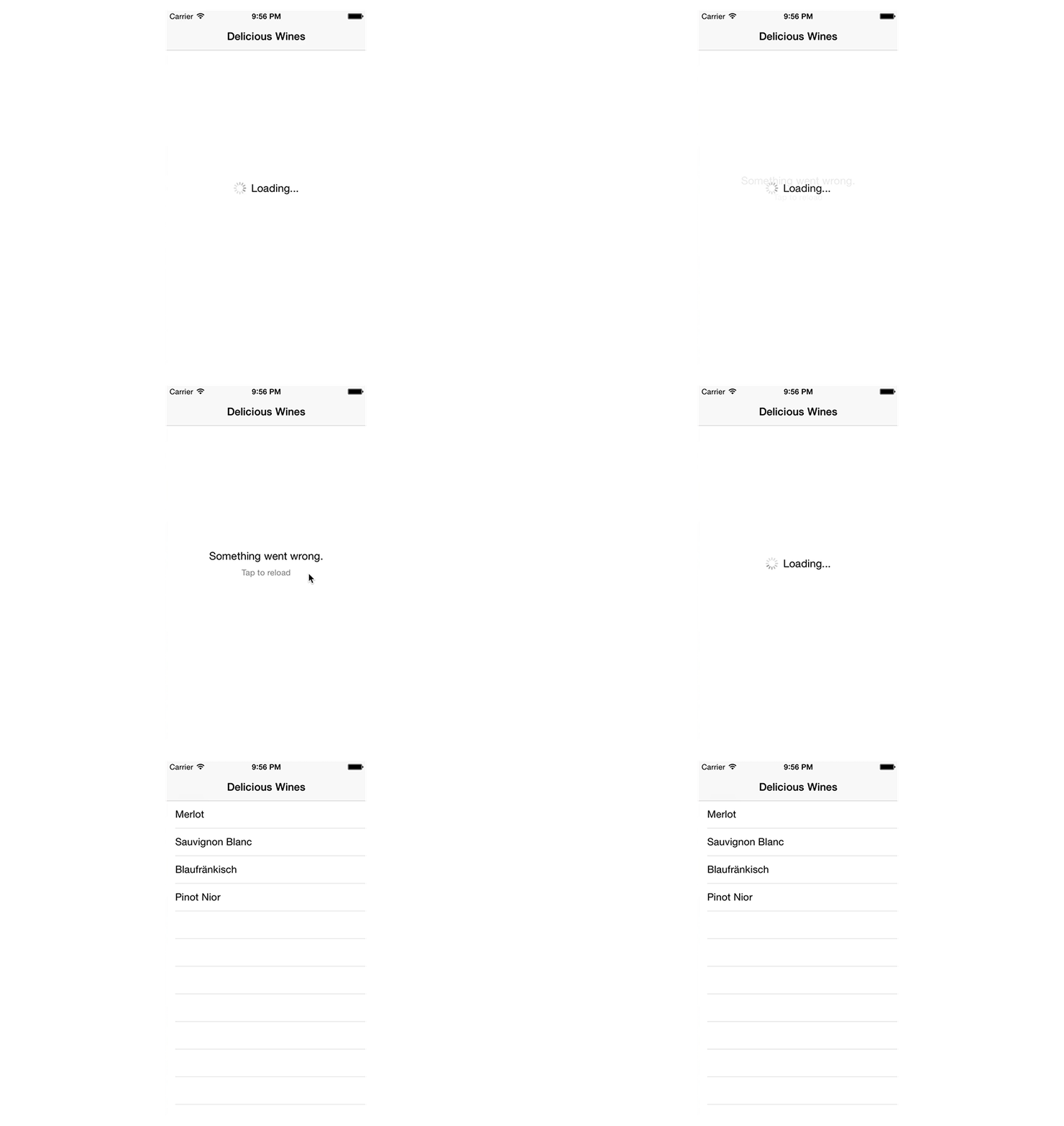
In a networked application a view controller or custom view typically has the following states that need to be communicated to the user:
* **Loading**: The content is currently loaded over the network.
* **Content**: The content is available and presented to the user.
* **Empty**: There is currently no content available to display.
* **Error**: An error occurred whilst downloading content.
As trivial as this flow may sound, there are a lot of cases that result in a rather large decision tree.
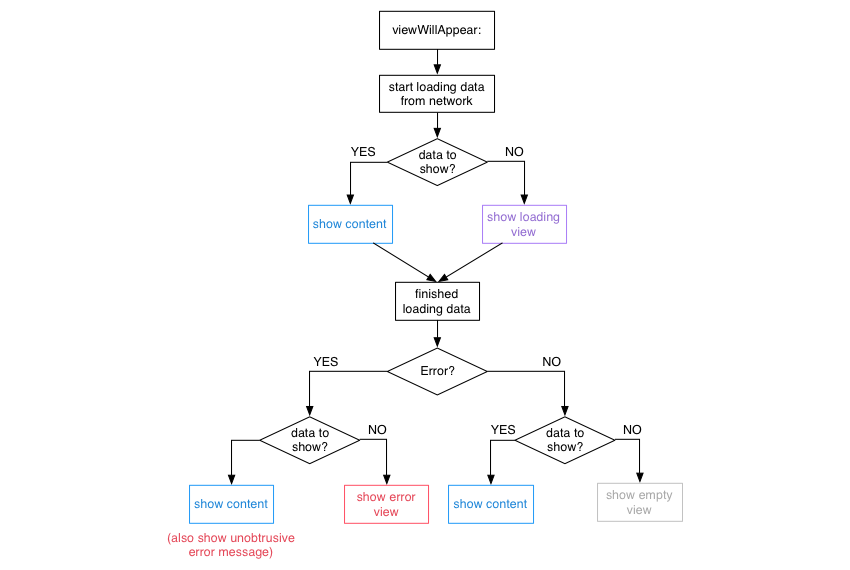
`StatefulViewController` is a concrete implementation of this particular decision tree. (If you want to create your own modified version, you might be interested in the [state machine](#viewstatemachine) that is used to show and hide views.)
## Version Compatibility
Current Swift compatibility breakdown:
| Swift Version | Framework Version |
| ------------- | ----------------- |
| 3.0 | 3.x |
| 2.3 | 2.x |
| 2.2 | 1.x |
[all releases]: https://github.com/aschuch/StatefulViewController/releases
## Usage
> This guide describes the use of the `StatefulViewController` protocol on `UIViewController`. However, you can also adopt the `StatefulViewController` protocol on any `UIViewController` subclass, such as `UITableViewController` or `UICollectionViewController`, as well as your custom `UIView` subclasses.
First, make sure your view controller adopts to the `StatefulViewController` protocol.
```swift
class MyViewController: UIViewController, StatefulViewController {
// ...
}
```
Then, configure the `loadingView`, `emptyView` and `errorView` properties (provided by the `StatefulViewController` protocol) in `viewDidLoad`.
```swift
override func viewDidLoad() {
super.viewDidLoad()
// Setup placeholder views
loadingView = // UIView
emptyView = // UIView
errorView = // UIView
}
```
In addition, call the `setupInitialViewState()` method in `viewWillAppear:` in order to setup the initial state of the controller.
```swift
override func viewWillAppear(animated: Bool) {
super.viewWillAppear(animated)
setupInitialViewState()
}
```
After that, simply tell the view controller whenever content is loading and `StatefulViewController` will take care of showing and hiding the correct loading, error and empty view for you.
```swift
override func viewWillAppear(animated: Bool) {
super.viewWillAppear(animated)
loadDeliciousWines()
}
func loadDeliciousWines() {
startLoading()
let url = NSURL(string: "http://example.com/api")
let session = NSURLSession.sharedSession()
session.dataTaskWithURL(url) { (let data, let response, let error) in
endLoading(error: error)
}.resume()
}
```
### Life cycle
StatefulViewController calls the `hasContent` method to check if there is any content to display. If you do not override this method in your own class, `StatefulViewController` will always assume that there is content to display.
```swift
func hasContent() -> Bool {
return datasourceArray.count > 0
}
```
Optionally, you might also be interested to respond to an error even if content is already shown. `StatefulViewController` will not show its `errorView` in this case, because there is already content that can be shown.
To e.g. show a custom alert or other unobtrusive error message, use `handleErrorWhenContentAvailable:` to manually present the error to the user.
```swift
func handleErrorWhenContentAvailable(error: ErrorType) {
let alertController = UIAlertController(title: "Ooops", message: "Something went wrong.", preferredStyle: .Alert)
alertController.addAction(UIAlertAction(title: "OK", style: .Default, handler: nil))
presentViewController(alertController, animated: true, completion: nil)
}
```
### Custom Placeholder View insets
Per default, StatefulViewController presents all configured placeholder views fullscreen (i.e. with 0 insets from top, bottom, left & right from the superview). In case a placeholder view should have custom insets the configured placeholderview may conform to the `StatefulPlaceholderView` protocol and override the `placeholderViewInsets` method to return custom edge insets.
```swift
class MyPlaceholderView: UIView, StatefulPlaceholderView {
func placeholderViewInsets() -> UIEdgeInsets {
return UIEdgeInsets(top: 20, left: 20, bottom: 20, right: 20)
}
}
```
### View State Machine
> Note: The following section is only intended for those, who want to create a stateful controller that differs from the flow described above.
You can also use the underlying view state machine to create a similar implementation for your custom flow of showing/hiding views.
```swift
let stateMachine = ViewStateMachine(view: view)
// Add states
stateMachine["loading"] = loadingView
stateMachine["other"] = otherView
// Transition to state
stateMachine.transitionToState(.View("loading"), animated: true) {
println("finished switching to loading view")
}
// Hide all views
stateMachine.transitionToState(.None, animated: true) {
println("all views hidden now")
}
```
## Installation
#### Carthage
Add the following line to your [Cartfile](https://github.com/Carthage/Carthage/blob/master/Documentation/Artifacts.md#cartfile).
```
github "aschuch/StatefulViewController" ~> 3.0
```
Then run `carthage update`.
#### CocoaPods
Add the following line to your Podfile.
```
pod "StatefulViewController", "~> 3.0"
```
Then run `pod install` with CocoaPods 0.36 or newer.
#### Manually
Just drag and drop the two `.swift` files in the `StatefulViewController` folder into your project.
## Tests
Open the Xcode project and press `⌘-U` to run the tests.
Alternatively, all tests can be run from the terminal using [xctool](https://github.com/facebook/xctool).
```bash
xctool -scheme StatefulViewControllerTests -sdk iphonesimulator test
```
## Todo
* Default loading, error, empty views
* Protocol on views that notifies them of removal and add
* Views can provide delays in order to tell the state machine to show/remove them only after a specific delay (e.g. for hide and show animations)
## Contributing
* Create something awesome, make the code better, add some functionality,
whatever (this is the hardest part).
* [Fork it](http://help.github.com/forking/)
* Create new branch to make your changes
* Commit all your changes to your branch
* Submit a [pull request](http://help.github.com/pull-requests/)
## Contact
Feel free to get in touch.
* Website:
* Twitter: [@schuchalexander](http://twitter.com/schuchalexander)