A recompilation of Aggressive Inline for the original Xbox, running natively on Windows.




> [!NOTE]
> **Beta.** The game plays from start to finish on the GPU renderer. Expect rough edges, especially in the optional added levels, and please [report problems](https://github.com/AsukaNeo/aggro-royale/issues).
## About
*Aggressive Inline* (2002) is Z-Axis's inline skating game, and one of the best of its era. **Aggro Royale** turns its Xbox code into C and compiles it for a modern PC, so it runs natively, no emulator, with widescreen, higher resolutions and smoother frame rates on top. If you also own *Dave Mirra Freestyle BMX 2* or *BMX XXX*, their levels and music can come along too. Bring your own copies: nothing from any game is included here.
## New levels, for the first time since 2002
For the first time since 2002, you can play **new levels** in *Aggressive Inline*. Give the setup your own disc images of *BMX XXX* and *Dave Mirra Freestyle BMX 2*, and it builds a **plus version** of *Aggressive Inline*: their maps join Free Skate, and their songs join the game's soundtrack, as bonus features.
- **18 bonus levels in Free Skate**: 10 from *Dave Mirra Freestyle BMX 2* (Woodward, Airport, Cloverleaf, Commercial, Devils Peak, Galloon, Greenville, Swamp Trail, Train Yard, Venice Beach) and 8 from *BMX XXX* (Rampage Park, The Dam, Mnco, Mullaly, Launch Pad, Sheep Farm, Syracuse, Root)
- **38 bonus songs**: both games' soundtracks, each as its own soundtrack in the music menu
- Either game on its own works too, and the setup can take its extras out again
> [!WARNING]
> **The bonus features are a beta.** These levels were never designed for *Aggressive Inline*. They work because all three games share Z-Axis's engine, and they are still a lot of fun to skate around, but expect rough spots: grinds feel a little different, a few places let you fall out of the level, and there are no challenges or characters on them.
## Status
- ✅ Career, challenges and Free Skate, menus, audio, controller with rumble, keyboard
- ✅ GPU renderer (Direct3D 11) in widescreen, with the render resolution adjustable while you play
- ✅ Optional frame generation up to your display's refresh rate (120 Hz and up)
- ✅ Everything unlocked from a fresh save (can be turned off), and saves kept next to the game
- ✅ A settings menu laid out like a PC game's own: windowed, borderless or fullscreen at your monitor's resolutions (see [Settings](#settings))
- 🚧 Bonus levels and music from the BMX games (beta, see above)
- 🚧 A couple of effects aren't right yet: the level-up glow, blood from falls
- ⛔ No online play, and none planned
## What you need
- *Aggressive Inline* for the original Xbox, **North American release** (version 1), as a disc image (`.iso`) or its files (`default.xbe` and the `media` folder)
- Optional: *Dave Mirra Freestyle BMX 2* and/or *BMX XXX* for the original Xbox (North American), the same way
- Windows 10 or 11, 64-bit, and a graphics card with Direct3D 11
## Setting it up
Run **`aggro_setup.exe`**. If your games sit next to it, it finds them on its own; if not, point each row at the game's folder or disc image.
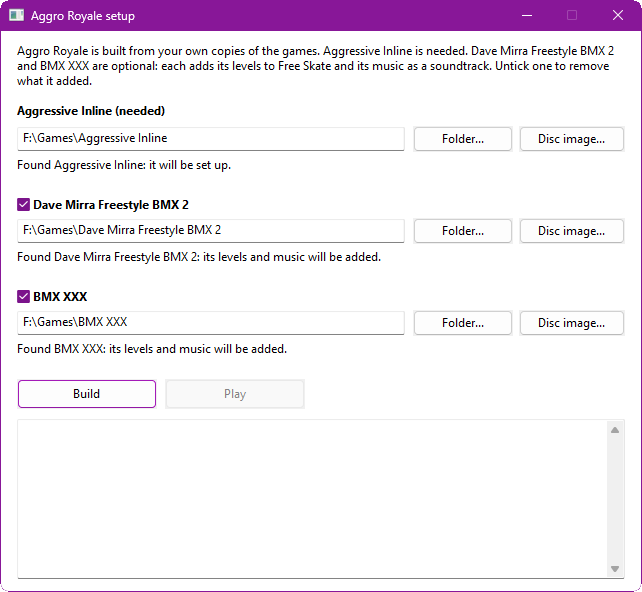
- **Aggressive Inline** is the one you need. The setup checks it's the right release before copying anything. A disc image gets unpacked into a `game` folder; a folder is just used where it is.
- **Dave Mirra Freestyle BMX 2** and **BMX XXX** are optional. Tick one and its levels and music are converted into the `mods` folder. Changed your mind? Untick it and press Build again.
Press **Build**, then **Play**. (If you only want plain *Aggressive Inline*, you can skip the setup: `aggro_royale.exe` asks for your copy the first time.) For scripts: `aggro_setup --build --ai --dm2 --xxx `, with `--no-dm2` or `--no-xxx` to take one out.
## Build it yourself
You need [Build Tools for Visual Studio 2022](https://visualstudio.microsoft.com/downloads/#build-tools-for-visual-studio-2022) with **Desktop development with C++**, [Python 3.8+](https://www.python.org/downloads/) and [Git for Windows](https://git-scm.com/download/win).
1. Clone this repository, and next to it the toolkit at its supported version, with this project's patch:
```bash
git clone --branch v0.16.0 https://github.com/sp00nznet/xboxrecomp.git
cd xboxrecomp && git apply ../aggro-royale/patches/xboxrecomp-local.patch
```
2. Put your game in `aggro-royale/game` (`default.xbe` and its `media` folder).
3. In Git Bash, in `aggro-royale`: `./lift.sh` turns the game's code into C in `src/recomp/gen/`. It is made from your copy and never committed.
4. `cmake -S . -B build -A x64`, then `cmake --build build --config Release`.
5. Run `build/Release/aggro_setup.exe`, then `build/Release/aggro_royale.exe`.
For testing, `./run.sh ` runs the build with its log in `logs/.log` and lists any crashes or missing functions it hit. The other scripts are described in [tools/README.md](tools/README.md).
## Controls
Any Xbox-style controller works and plays as player 1. On the keyboard: **Enter** = Start, **Z X C V** = A B X Y, **WASD** to move, **arrow keys** for the d-pad.
| Key | Action |
|---|---|
| F10, or Back+Start | Settings menu |
| Alt+Enter or F11 | Windowed, or back to Borderless / Fullscreen |
| F12 | Screenshot |
## Settings
Press **F10**, or **Back+Start** on the pad, at any time. The settings sit under four tabs (Q/E, Tab or the bumpers switch them), each with a line explaining what it does, and the mouse works too.
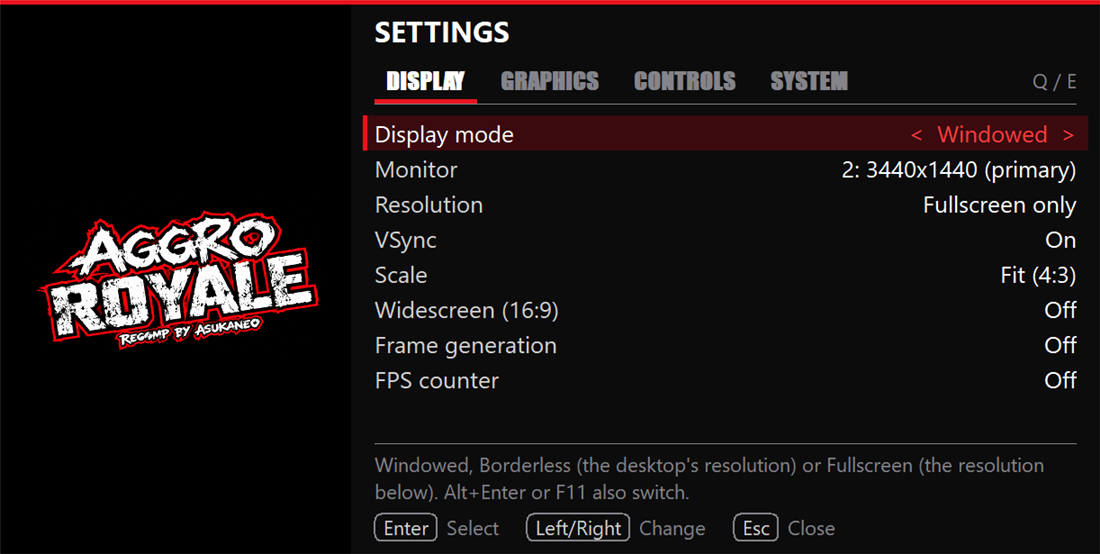
**Display**
- **Display mode**: Windowed, Borderless or Fullscreen. Fullscreen switches your monitor to the resolution you pick. Alt+Tab gives your desktop back, and it switches again when you return.
- **Monitor**: the monitor the game shows on, numbered as Windows numbers them.
- **Resolution**: every resolution your monitor offers, at its highest refresh rate. After a change the game asks whether to keep it, and goes back by itself after 15 seconds.
- **VSync**, **Scale** (fit, integer or stretch), **Widescreen**, **Frame generation** and an **FPS counter**.
**Graphics**: the **renderer** (Direct3D 11 or the console's own way), **render resolution** up to 4x the Xbox's, changed while you play, **anisotropic filtering** up to 16x, **sharpening** (AMD FidelityFX CAS), **FXAA**, a **shader** (RetroArch presets through [librashader](https://github.com/SnowflakePowered/librashader), with three CRT looks and AMD FSR included), and the filter used to scale the picture.
**Controls**: **rumble** and an extra **stick dead zone** for worn sticks.
**System**: **pause in background** (the game and its sound stop while the window is in the background or minimised), **screenshot**, **save settings** and **exit**.
The display changes wait for "Apply display changes", as in Windows' own display settings, and settings that only take effect when the game starts offer a restart. Everything is saved in `aggroroyale.ini` next to the exe:
```ini
[display]
mode=windowed ; windowed, borderless or fullscreen
monitor= ; \\.\DISPLAY2 and so on; empty is the primary monitor
resolution=desktop ; WxH for fullscreen, e.g. 1920x1080, or desktop
pause_on_focus_loss=1 ; 0 keeps the game running in the background
```
## Mods
Anything in a `mods` folder next to the game is laid over the game's own files: put a file at `mods//media/...` and it replaces the game's file at that path. Mods load in name order, and starting a folder's name with `_` switches it off.
A mod can also add music (a `soundtrack.txt` listing its songs) or Free Skate levels (a `levels.txt`). That's how the BMX extras work. If you're curious how their levels were made to run in *Aggressive Inline*, see [docs/porting-levels.md](docs/porting-levels.md).
## Credits
- **[xboxrecomp](https://github.com/sp00nznet/xboxrecomp)** by sp00nz and contributors, the base this project is built on
- **[xemu](https://github.com/xemu-project/xemu)**, the reference for Xbox hardware behaviour (see [NOTICE](NOTICE))
- **[Exonerated](https://github.com/AsukaNeo/Exonerated)**, the *Deathrow* port this one follows
- A professional coder's input throughout
## AI assistance
AI (**Claude Opus 5.5**) was used as a development assistant for the intensely time-consuming recompilation work, to make this project a reality sooner. Human-made decompilation projects are the gold standard. View the use of AI in this project in whatever way feels most appropriate to you.
## Legal
MIT licence (see [LICENSE](LICENSE) and [NOTICE](NOTICE)), covering this project's own code only. Aggro Royale is an independent fan project, not affiliated with the rights holders of *Aggressive Inline*, *Dave Mirra Freestyle BMX 2* or *BMX XXX*, or with Microsoft. Those games, their music, Xbox and related marks belong to their owners. No game code, data, music or assets are included: the program and its setup work only from your own copies.