> **Part of the [Ataraxy Labs](https://ataraxy-labs.com) stack**: agent-native infrastructure for software development. See also: [weave](https://ataraxy-labs.com/weave) (entity-level git merge driver) · [inspect](https://github.com/Ataraxy-Labs/inspect) (semantic code review) · [opensessions](https://github.com/Ataraxy-Labs/opensessions) (tmux sidebar for coding agents).
>
> Read the manifesto: https://ataraxy-labs.com/#thesis · Essays: https://ataraxy-labs.com/blogs · LLMs: https://ataraxy-labs.com/llms.txt


Semantic version control built on Git.
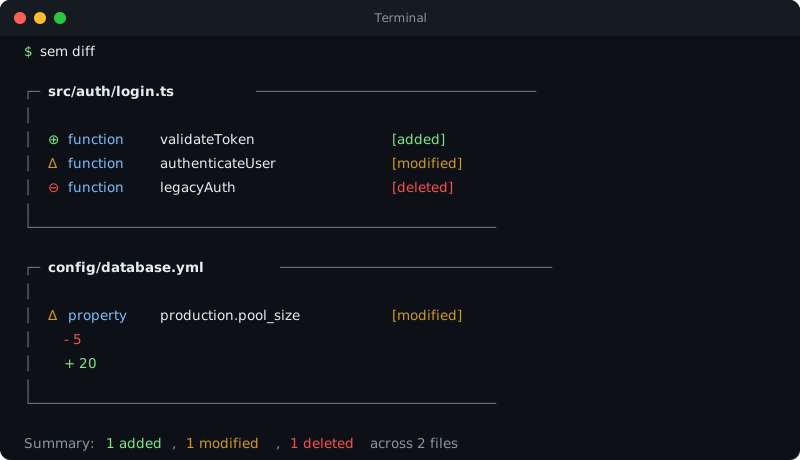
Instead of lines changed, sem tells you what entities changed: functions, methods, classes.
Why sem? ·
Using sem with agents ·
Install ·
Commands ·
Agents (MCP) ·
Cloud consent ·
Releases





sem is a semantic version control tool that works on top of Git. It parses your code with tree-sitter, extracts every function, class, and method as an entity, and diffs at the entity level instead of lines. This means you see "function `blahh` was modified" instead of "lines x-y changed."
It works in any Git repo with no setup.
Cloud-backed queries are opt-in per repo: logging in does not upload a repo or send a query. See the [cloud consent flow](docs/cloud-consent.html) for the public/private repo states, preview screen, local audit log, and forget controls.
## Using sem with agents
Four questions, four verbs. Every verb takes `--json`.
| Question | Verb |
|---|---|
| Where is it? | `sem find`, `sem grep` |
| What does my change touch? | `sem impact` |
| Is it correct? | `sem check` |
| What should a human review? | `sem certify` |
**Where is it?** Find a function, class or method by name:
```bash
sem find parse_config
```
```
function parse_config src/config.py:1
```
Who calls it (`--callers`), what it uses (`--refs`), or its code with its callers and callees (`--context`):
```bash
sem find parse_config --callers
```
```
function parse_config src/config.py:1
function load src/config.py:6
function test_parse_config tests/test_config.py:4
```
Search text, like `rg`:
```bash
sem grep splitlines
```
```
src/config.py:2: pairs = [line.split("=", 1) for line in text.splitlines() if line]
```
**What does my change touch?** Everything that depends on an entity, and the tests to run:
```bash
sem impact parse_config --tests
```
```
⚡ 1 tests affected:
tests/test_config.py
function test_parse_config (L4–5)
```
`sem impact --diff HEAD --tests` answers the same for your whole uncommitted change.
**Is it correct?** Run the project's own compiler, type checker, linter and tests, rechecking only what the change can affect when that gives the same answer. Exit 0 means pass, 1 fail, 2 could not decide:
```bash
sem check
```
```
cmd FAIL full sh (0 rechecked, 279 ms)
`python3 -m pytest -q tests` exited 1:
E AssertionError: assert {'a': '1'} == {'a': '2'}
```
**What should a human review?** A review certificate for a commit range: what changed, which callers the change leaves behind, which tests reach it:
```bash
sem certify main..HEAD
```
```
# sem certificate 94f4bd74e26e..d73d4d092b43
1 files, 2 entities changed (1 added, 1 modified, 0 deleted, 0 renamed, 0 moved).
- modified `parse_config` (src/config.py:1): 2 static caller(s) in 2 file(s) that this change does not modify
```
For agents that speak MCP, `sem mcp` serves the same verbs as tools (see [Use with AI agents](#use-with-ai-agents-mcp)).
## Install
```bash
curl -fsSL https://raw.githubusercontent.com/Ataraxy-Labs/sem/main/install.sh | sh
```
Or via Homebrew:
```bash
brew install sem-cli
```
Or via winget on Windows:
```powershell
winget install AtaraxyLabs.sem
```
Or via Scoop on Windows:
```powershell
scoop install sem
```
Or install the npm wrapper into `node_modules`:
```bash
npm install --save-dev @ataraxy-labs/sem
```
With Bun, trust the package so its `postinstall` script can download the binary:
```bash
bun add -d @ataraxy-labs/sem
bun pm trust @ataraxy-labs/sem
```
Once installed, update to the latest release any time:
```bash
sem config update
```
Or via cargo, from [crates.io](https://crates.io/crates/sem-cli):
```bash
cargo install sem-cli
```
Or build the latest `main` from source (requires Rust):
```bash
cargo install --git https://github.com/Ataraxy-Labs/sem sem-cli
```
Or grab a binary from [GitHub Releases](https://github.com/Ataraxy-Labs/sem/releases).
Or run via Docker:
```bash
docker build -t sem .
docker run --rm -it -u "$(id -u):$(id -g)" -v "$(pwd):/repo" sem diff
```
## Name conflict with GNU Parallel
GNU Parallel ships a `sem` binary (`/usr/bin/sem`) as a symlink to `parallel`. If you have both installed, they'll collide. Run `sem --version` to check which one you're using. ([#77](https://github.com/Ataraxy-Labs/sem/issues/77))
**Quick fixes:**
```bash
# Option 1: alias in your shell profile (~/.bashrc, ~/.zshrc)
alias sem="$HOME/.cargo/bin/sem"
# Option 2: make sure cargo bin comes first in PATH
export PATH="$HOME/.cargo/bin:$PATH"
# Option 3: if installed via Homebrew
export PATH="$(brew --prefix)/bin:$PATH"
```
If you installed via npm/bun, the binary lives in `node_modules/.bin/sem` and is invoked through `npx sem` or `bunx sem`, which avoids the conflict entirely.
## Commands
Works in any Git repo. No setup required. Also works outside Git for arbitrary file comparison.
| Verb | The question it answers |
|---|---|
| `sem find` | Where is it defined? Who calls it, what does it use, what is around it? |
| `sem grep` | Where does this text appear? |
| `sem impact` | What does changing this entity, or this diff, touch? |
| `sem check` | Is my change correct? |
| `sem certify` | What should a human review in this commit range? |
| `sem diff` | Which functions and classes changed? |
| `sem graph` | How is the code connected? |
| `sem history` | How did this entity change over time? Who last changed it? |
| `sem cloud` | Account, cloud reviews, cross-repo queries |
| `sem config` | git diff integration, telemetry, completions, updates, stats |
| `sem mcp` | The same verbs as MCP tools for agents |
`sem --help` shows every flag with an example.
sem stores its SQLite entity cache outside the repository, under the OS cache directory by default. Set `SEM_CACHE_DIR=/path/to/cache` to override the cache root; repo-local overrides are ignored so cache files do not dirty the working tree.
### sem find
Find entity definitions by name, then ask about one: who calls it, what it uses, or its code with the code around it. Answers come from an on-disk query index (`index.sem`, next to the entity cache); the first call in a repo builds it, later calls read it directly, with no daemon.
```bash
sem find "function diff_command" # where it is defined ("type name" narrows by kind)
sem find diff_command load_config # several names in one call
sem find diff_command --callers # who calls it; says when the caller set may be incomplete
sem find diff_command --refs # what it calls and references
sem find diff_command --context # its code plus callers and callees, within a token budget
sem find diff_command --context --budget 4000 --hops 1
sem find --in src/auth.ts # every entity in a file or directory
sem find diff_command --in src/ # only definitions under src/
sem find --text "retry budget" # entity bodies containing a string, named by entity
sem find diff_command --json # JSON on any of the above
```
With `--context`, when the target signature itself does not fit, JSON output reports `target_omitted: true`.
### sem grep
Text search across source files, rg-compatible `file:line:text` output, served from the index's trigram postings when one exists.
```bash
sem grep "TODO"
sem grep -i todo src/ # case-insensitive, under src/
sem grep -e foo -e bar --json # several patterns, hits kept apart
```
### sem impact
What breaks if an entity changes: its dependencies, its dependents (transitively), and the tests that reach it.
```bash
sem impact authenticateUser # full impact
sem impact authenticateUser --deps # direct dependencies only
sem impact authenticateUser --dependents
sem impact authenticateUser --tests # the tests to run
sem impact authenticateUser --file src/auth.ts # disambiguate by file
sem impact --diff HEAD --tests # tests for the uncommitted change
sem impact --diff main..HEAD --json # one impact report per changed entity
```
With `--diff` and `--tests` in a JS/TS workspace, the answer is the module graph's affected-test selection over the changed files (`sem graph --modules affected-tests`); elsewhere it is the entity graph's. `--no-default-excludes` includes generated, fixture, vendor, benchmark and build trees.
### sem check
Runs the project's compiler, type checker, linter and tests on the working tree and prints one verdict: exit 0 pass, 1 fail, 2 could not decide. Each checker gives the verdict the real tool would give on the whole project; it rechecks only what the change can affect when that is provably the same answer, and otherwise runs the tool in full and says why. Nothing to check is 2, never a pass.
```bash
sem check # every checker the project has
sem check --checkers ts,lint,tests # only these
sem check --base origin/main # against origin/main instead of HEAD
sem check --promises # also prove every promise in .sem/promises can fail
sem check --json # one JSON object with a verification certificate
```
Checkers are detected from the project. TypeScript, lint and JS tests (vitest, jest) follow the module graph, Go rechecks affected packages, Python type checking (pyright scoped by imports, or mypy) and pytest rerun only the files a change can reach, and C and C++ recompile only the translation units in `compile_commands.json` that include a changed file. Cargo, Gradle or Maven, dotnet and SwiftPM run their own build, which already rebuilds only what changed, and are skipped outright when no input changed since the base passed (a TypeScript edit never reruns the Rust build).
An edit inside the body of a Python function that declares its return type cannot change what other files see, so only that file is rechecked.
Commands of your own go in `.sem/check.json`, e.g. `{"commands": [{"run": "make lint", "inputs": ["src/**"]}]}`. A command that lists its `inputs` is skipped when none of them changed since it passed; one without runs every time.
### sem certify
A review certificate for a commit range: entities touched, signature changes and the callers they leave behind, callee deltas, promises kept or broken (with witnesses), module reachability deltas (JS/TS), affected tests, and the static reference cone. `--arch` gives the architecture view instead: new or removed data paths, side effects, dependencies, cycles, and what did not change, ranked.
```bash
sem certify main..HEAD # markdown certificate
sem certify main..HEAD --json # the full certificate
sem certify main..HEAD --arch # architecture delta
sem certify main..HEAD --arch --view # at most 10 ranked items
sem certify main..HEAD --html > view.html # one self-contained page
```
`...` uses the merge base; one ref means `[..HEAD`.
### sem diff
Entity-level diff with rename detection, structural hashing, and word-level inline highlights.
```bash
# Semantic diff of working changes
sem diff
# Staged changes only
sem diff --staged
# Specific commit
sem diff --commit abc1234
# Commit range
sem diff --from HEAD~5 --to HEAD
# Verbose mode (word-level inline diffs for each entity)
sem diff -v
# Plain text output (git status style)
sem diff --format plain
# JSON output (for AI agents, CI pipelines)
sem diff --format json
# Markdown output (for PRs, reports)
sem diff --format markdown
# Compare any two files (no git repo needed)
sem diff file1.ts file2.ts
# Read file changes from stdin (no git repo needed)
echo '[{"filePath":"src/main.rs","status":"modified","beforeContent":"...","afterContent":"..."}]' \
| sem diff --stdin --format json
# Only specific file types
sem diff --file-exts .py .rs
```
### sem graph
How the code is connected. With no flag, the entity dependency graph (the graph `sem impact` and `sem find --context` are built on); the flags select other layers.
```bash
sem graph --json # entities and the calls/references between them
sem graph --modules metrics # JS/TS module graph: density, cycles, depth, centrality
sem graph --modules blast-radius pkg-a # who breaks if pkg-a changes
sem graph --modules path src/a.ts src/b.ts
sem graph --dataflow # reads, writes and source -> sink paths
sem graph --dataflow --witness # experimental: witness tasks per static flow
sem graph --system # exact dependency versions from every lockfile
sem graph --system build --out sys/ # the layered whole-system graph
```
### sem history
How an entity changed through git history, logic changes told apart from cosmetic ones.
```bash
sem history authenticateUser
sem history authenticateUser -v # with the content diff of each version
sem history authenticateUser --limit 20
sem history # repo hotspots and co-change pairs
sem history --blame src/auth.ts # who last changed each entity in the file
```
With no entity, `sem history` analyzes recent repo history at the entity level: **hotspots** (most-changed functions/classes, with author counts) and **co-change pairs** (entities that repeatedly change in the same commits: "if you touch one, don't forget the other").
### sem cloud, sem config
```bash
sem cloud login # API key, or GitHub when omitted
sem cloud enable # cloud queries for this public repo (shows what is sent, asks first)
sem cloud disable # stop cloud for this repo
sem cloud review listen # attach an agent to a cloud code review
sem cloud xref --json # cross-repo dependencies
sem cloud repos # where your code is stored
sem config setup # make `git diff` show sem's entity diff
sem config telemetry off
sem config completions zsh # shell completions
sem config update
sem config stats # local diff counters; nothing leaves your machine
```
### Old command names
Every earlier command name and flag still works, with the same output. At a terminal, sem prints a one-line note on stderr with the new spelling; in `--json` mode or when output is piped, it prints nothing extra.
| Old | New |
|---|---|
| `sem callers X` | `sem find X --callers` |
| `sem refs X` | `sem find X --refs` |
| `sem context X` | `sem find X --context` |
| `sem entities PATH` | `sem find --in PATH` |
| `sem log X` | `sem history X` |
| `sem blame FILE` | `sem history --blame FILE` |
| `sem arch-diff RANGE` | `sem certify RANGE --arch` |
| `sem topology OP` | `sem graph --modules OP` |
| `sem dataflow` | `sem graph --dataflow` |
| `sem system OP` | `sem graph --system OP` |
| `sem promises verify` | `sem check --promises` |
| `sem login`, `logout`, `whoami`, `review`, `xref`, `repos` | `sem cloud ...` |
| `sem cloud never` | `sem cloud disable` |
| `sem setup`, `unsetup`, `telemetry`, `completions`, `update`, `stats` | `sem config ...` |
### Promises
A promise is something an agent (or a person) claims about the codebase, written down as a check that either passes or fails. "Done" means the check passes. Promises live in `.sem/promises/*.json`; each law may carry a human `"promise"`. Code-shape laws are tree-sitter queries that work in any language sem parses; every capture whose name does not start with `_` counts as a violation, and nested captures are reported once, at the outermost node. For example, `.sem/promises/jsx-no-logic.json`:
```json
{ "laws": [
{ "id": "jsx-no-logic/conditionals",
"promise": "JSX contains no conditional rendering",
"forbidPattern": { "from": ["**/*.tsx", "**/*.jsx"], "within": ["jsx_expression"],
"query": "(ternary_expression) @conditional" } },
{ "id": "jsx-no-logic/inline-handler-bodies",
"promise": "JSX event handlers are references, not block bodies",
"forbidPattern": { "from": ["**/*.tsx", "**/*.jsx"], "within": ["jsx_attribute"],
"query": "(arrow_function body: (statement_block (_))) @handler_body" } }
] }
```
```bash
sem promises check # KEPT / BROKEN n per promise, then file:line:col capture snippet; exit 1 if any broken
sem promises check --changed src/App.tsx # only violations in these files (what an edit hook runs)
sem promises check --since main # only files changed since a ref, uncommitted and untracked included
sem promises status --json # id, kept, violation count per promise
sem check --promises # prove every promise can fail (each needs a mutation)
```
`sem promises` is not listed in `sem --help`; `sem certify` reports promises kept or broken for a range. The same file also works with `sem graph --modules check --laws `, which adds graph and import laws (`forbid`, `only`, `acyclic`, `layers`, `forbidImport`, `allowImports`) for JS/TS workspaces. With `--changed` or `--since`, those laws still run over the whole graph, but only violations that involve a changed file (or the package containing it) are reported.
To have an agent see a broken promise right after it makes an edit, run [`scripts/promises-hook.sh`](scripts/promises-hook.sh) after each edit. The script exits 2 and prints the violations to stderr when a promise breaks, and stays silent otherwise. In Claude Code, add it to your settings as a `PostToolUse` hook:
```json
{ "hooks": { "PostToolUse": [ { "matcher": "Edit|Write|MultiEdit",
"hooks": [ { "type": "command", "command": "sh /path/to/sem/scripts/promises-hook.sh" } ] } ] } }
```
The script reads `tool_input.file_path` from the hook's stdin. Other harnesses can pass the edited paths as arguments instead. In pi, for example, an extension can do this from its `tool_result` handler for the edit and write tools: run `sh promises-hook.sh ` and append the stderr to the tool result when the script exits 2.
## Use as default Git diff
Replace `git diff` output with entity-level diffs. Agents and humans get sem output automatically without changing any commands.
```bash
sem config setup
```
Now `git diff` shows entity-level changes instead of line-level. No prompts, no agent configuration needed. Everything that calls `git diff` gets sem output automatically. Also installs a pre-commit hook that shows entity-level blast radius of staged changes.
On macOS and Linux, `sem config setup` also registers a Claude Code `UserPromptSubmit` hook (`sem hook prompt-submit`) for prompt-time context injection, and `sem hook tool` around the Edit, Write and MultiEdit tools. After each edit that hook tells the agent which sibling implementations of a changed method it did not touch, which callers still use a signature it just changed, and which tests reach the change, with a command to run them; it stays silent when there is nothing to say. It edits `~/.claude/settings.json` idempotently, backs it up first, and leaves any hooks you already have untouched.
To disable and go back to normal git diff (also removes the session hooks):
```bash
sem config unsetup
```
## Entity-level diffs on every pull request
Add the GitHub Action and every PR gets one sticky comment showing which
functions, classes, and methods changed. It updates in place on each push and
calls out cosmetic-only PRs (formatting/comments) explicitly:
```yaml
# .github/workflows/entity-diff.yml
name: Entity diff
on: pull_request
permissions:
contents: read
pull-requests: write
jobs:
entity-diff:
runs-on: ubuntu-latest
steps:
- uses: actions/checkout@v4
- uses: Ataraxy-Labs/sem/action@v0.23.1
```
No config, no API keys, never fails your build. See [action/](action/) for details.
## Cloud acceleration (for scale and teams)
Local is always free and always fast: the on-disk index answers day-to-day queries in single-digit milliseconds even from a cold process, so there's nothing to keep warm and no login required. You do not pay to make your laptop fast.
Cloud is for what a laptop can't do. On a very large monorepo the first local graph build can take a few seconds; a shared team graph shouldn't be rebuilt per developer; and CI wants the graph without checking anything out. `sem cloud login` connects those cases to sem cloud, which keeps a warm, pre-built graph for your registered repos and serves the heavy queries from it instead of rebuilding locally.
```bash
sem cloud login # GitHub device flow, one time
sem impact myFunc --file src/foo.rs # served from the cloud's warm graph
```
It is fully optional and transparent:
- Not logged in, or the cloud is unreachable? sem computes locally and prints the exact same output. No failures, no difference in results.
- `SEM_LOCAL=1` forces local computation even when logged in.
- Small repos see no change, local is already fast. The win is for large codebases where rebuilding the graph each time is the bottleneck.
Related commands, all cloud-account scoped:
```bash
sem cloud logout # log out
sem cloud whoami # show current cloud identity
sem cloud enable # turn on cloud queries for a public repo (shows what's sent first)
sem cloud disable # stop cloud for this repo
sem cloud xref --json # cross-repo dependencies across your indexed repos
sem cloud repos # where your code is stored: cloud-indexed repos + local caches
sem cloud status # cloud + telemetry state for this repo (offline; sends nothing)
sem cloud share # cloud queries for a private repo, with extra confirmation
sem cloud forget # delete this repo's cloud index and unregister it
```
`status`, `share`, `forget`, `list`, `preview` and `log` are not shown in `sem cloud --help` but work as listed; each one is read-only or requires explicit confirmation before it sends anything.
If your team runs code review through sem cloud, `sem cloud review listen ` execs a coding agent pre-configured to join that review as a live listener that answers reviewer questions anchored to specific lines of the diff.
## What it parses
32 programming languages with full entity extraction via tree-sitter:
| Language | Extensions | Entities |
|----------|-----------|----------|
| TypeScript | `.ts` `.tsx` `.mts` `.cts` | functions, classes, interfaces, types, enums, exports |
| JavaScript | `.js` `.jsx` `.mjs` `.cjs` `.es6` | functions, classes, variables, exports |
| Python | `.py` `.pyi` | functions, classes, decorated definitions |
| Starlark (Bazel, Buck2) | `BUILD` `BUCK` `WORKSPACE` `PACKAGE` `.bzl` `.bazel` `.bxl` `.star` | build targets, functions |
| Go | `.go` | functions, methods, types, vars, consts |
| Rust | `.rs` | functions, structs, enums, impls, traits, mods, consts |
| Java | `.java` | classes, methods, interfaces, enums, fields, constructors |
| C | `.c` `.h` | functions, structs, enums, unions, typedefs |
| C++ | `.cpp` `.cc` `.cxx` `.hpp` `.hh` `.hxx` | functions, classes, structs, enums, namespaces, templates |
| C# | `.cs` | classes, methods, interfaces, enums, structs, properties |
| Ruby | `.rb` | methods, classes, modules |
| PHP | `.php` `.inc` `.phtml` `.module` | functions, classes, methods, interfaces, traits, enums |
| Swift | `.swift` | functions, classes, protocols, structs, enums, properties |
| Elixir | `.ex` `.exs` | modules, functions, macros, guards, protocols |
| Bash | `.sh` | functions |
| Fish | `.fish` | functions |
| Lua | `.lua` | functions (global, local, table, and method forms) |
| HCL/Terraform | `.hcl` `.tf` `.tfvars` | blocks, attributes (qualified names for nested blocks) |
| Kotlin | `.kt` `.kts` | classes, interfaces, objects, functions, properties, companion objects |
| Fortran | `.f90` `.f95` `.f03` `.f08` `.f` `.for` | functions, subroutines, modules, programs |
| Vue | `.vue` | template/script/style blocks + inner TS/JS entities |
| XML | `.xml` `.plist` `.svg` `.csproj` + 9 more MSBuild/resource extensions | elements (nested, tag-name identity) |
| ERB | `.erb` `.html.erb` | blocks, expressions, code tags |
| Svelte | `.svelte` `.svelte.js` `.svelte.ts` (+ `.test`/`.spec` variants) | component blocks + rune JS/TS modules |
| Perl | `.pl` `.pm` `.t` | subroutines, packages |
| Dart | `.dart` | classes, mixins, extensions, enums, type aliases, functions |
| OCaml | `.ml` `.mli` | values, modules, types, classes, externals |
| Scala | `.scala` `.sc` `.sbt` `.kojo` `.mill` | classes, objects, traits, enums, functions, vals, extensions |
| Nix | `.nix` | bindings, inherit declarations |
| Haskell | `.hs` | functions, signatures, data types, newtypes, classes, instances, type synonyms |
| Elm | `.elm` | value declarations, type aliases, type declarations, port annotations, infix declarations |
| Clojure | `.clj` `.cljs` `.cljc` | vars, functions, macros, multimethods, protocols, records, types |
| D | `.d` `.di` | modules, functions, classes, structs, interfaces, unions, enums, templates, aliases, unittests |
| Zig | `.zig` | functions, tests, variables |
| SQL | `.sql` `.psql` `.pgsql` `.ddl` | tables, views, functions, indexes, types, schemas, triggers, sequences |
Plus structured data formats:
| Format | Extensions | Entities |
|--------|-----------|----------|
| JSON | `.json` | properties, objects (RFC 6901 paths) |
| YAML | `.yml` `.yaml` | sections, properties (dot paths) |
| TOML | `.toml` | sections, properties |
| EDN | `.edn` | top-level map entries (keyword keys) |
| CSV | `.csv` `.tsv` | rows (first column as identity) |
| Markdown | `.md` `.mdx` | heading-based sections |
| LaTeX | `.tex` `.latex` `.cls` `.sty` | sections (part/chapter/section/…), plus theorem/lemma/proof/figure/table/algorithm and other tracked environments |
Everything else falls back to chunk-based diffing.
### Custom extensions and extensionless files
For files with non-standard extensions, create a `.semrc` in your project root:
```
.xyz = cpp
.j = json
.mypy = python
```
sem also reads `.gitattributes` patterns (`diff=` and `linguist-language=`) if you already have those set up. `.semrc` takes priority when both define the same extension.
For files with no extension at all, sem detects the language automatically from content (shebang lines, vim modelines, and structural heuristics like `package`/`import`/`use` statements). This covers 30+ languages with no config needed.
## How matching works
Three-phase entity matching:
1. **Exact ID match**: same entity in before/after = modified or unchanged
2. **Structural hash match**: same AST structure, different name = renamed or moved (ignores whitespace/comments)
3. **Fuzzy similarity**: >80% token overlap = probable rename
This means sem detects renames and moves, not just additions and deletions. Structural hashing also distinguishes cosmetic changes (whitespace, formatting) from real logic changes.
## Use with AI agents (MCP)
Need a URL-based client? The [Streamable HTTP preview](docs/mcp-http.md) adds authenticated, local read-only access; stdio remains the default.
On macOS and Linux, clients in the same checkout share a warm repository daemon.
Run `sem mcp --status` to check it. See the [shared runtime contract and reproducible benchmark](docs/shared-mcp.md)
for session isolation, fallback behavior, and current platform limits.
`sem mcp` starts a [Model Context Protocol](https://modelcontextprotocol.io) server over stdin/stdout. It's not a command you run and read yourself: it's a server your coding agent launches in the background so it can ask sem questions while it works. That's the reason `mcp` lives alongside the normal commands. The agent gets the core verbs as tools:
| Tool | Answers |
|---|---|
| `sem_find` | Where is it defined? `mode`: `callers`, `refs` or `context`; `in` lists a file or directory |
| `sem_grep` | Where does this text appear? |
| `sem_impact` | What does changing this entity touch? Dependents, deps, tests |
| `sem_check` | Is my change correct? A verdict: pass, fail, could not decide |
| `sem_certify` | What should a human review in this commit range? |
| `sem_diff` | Which entities changed between two refs? |
| `sem_graph` | The entity, module, data-flow or system graph |
| `sem_history` | How did an entity change? `blame` for a file |
Clients that call the earlier tool names (`sem_entities`, `sem_context`, `sem_callers`, `sem_log`, `sem_blame`) still get answers; those names are just not listed. A review-listener session (`sem mcp --review`, which `sem cloud review listen` sets up) also lists `join_review`, `wait_for_branch`, `reply_to_branch` and `list_open_branches`.
Why an agent wants these: instead of reading whole files and burning tokens, it can ask "what breaks if I change `submitOrder`" (`sem_impact`) or "give me just the context to refactor this function" (`sem_find` with mode `context`, which returns the function's source plus its callers and callees) and get a precise, deterministic answer from the dependency graph instead of a grep result that might miss a caller.
Add it once, then talk to your agent normally. It calls the tools on its own.
**Claude Code:**
```bash
claude mcp add sem -- sem mcp
```
Or one command that also installs the skill, so the agent knows *when* to reach for sem:
```bash
npx @ataraxy-labs/sem-skill
```
**Cursor, Claude Desktop, or any client with an `mcpServers` config:**
```json
{
"mcpServers": {
"sem": {
"command": "sem",
"args": ["mcp"]
}
}
}
```
If `sem` isn't on the agent's PATH, use the absolute path to the binary. No separate install is needed: `sem mcp` ships in the same binary as every other command.
## JSON output
```bash
sem diff --format json
```
Real output, from a one-line logic change to a Python function:
```json
{
"summary": {
"fileCount": 1,
"added": 0,
"modified": 1,
"deleted": 0,
"moved": 0,
"renamed": 0,
"reordered": 0,
"binary": 0,
"orphan": 0,
"total": 1
},
"changes": [
{
"entityId": "auth.py::function::authenticate_user",
"changeType": "modified",
"entityType": "function",
"entityName": "authenticate_user",
"startLine": 1,
"endLine": 6,
"oldStartLine": 1,
"oldEndLine": 4,
"oldEntityName": null,
"filePath": "auth.py",
"oldFilePath": null,
"oldParentId": null,
"beforeContent": "def authenticate_user(username, password):\n if not username or not password:\n return False\n return check_credentials(username, password)",
"afterContent": "def authenticate_user(username, password):\n if not username or not password:\n return False\n if not check_credentials(username, password):\n return False\n return True",
"commitSha": null,
"author": null,
"structuralChange": true
}
],
"binaryChanges": []
}
```
The named change-type buckets (`added`, `modified`, `deleted`, `moved`, `renamed`, `reordered`) always sum to `total`. `orphan` is a cross-cutting metadata count for module-level changes, and those changes are already included in the named change-type buckets. `beforeContent`/`afterContent` carry the entity's full source on either side of the change; `structuralChange` is `false` when the diff is cosmetic only (whitespace, comments).
## As a library
sem-core can be used as a Rust library dependency, from [crates.io](https://crates.io/crates/sem-core):
```toml
[dependencies]
sem-core = "0.23"
```
Used by [weave](https://github.com/Ataraxy-Labs/weave) (semantic merge driver) and [inspect](https://github.com/Ataraxy-Labs/inspect) (entity-level code review).
## Architecture
- **tree-sitter** for code parsing (native Rust, not WASM)
- **git2** for Git operations
- **rayon** for parallel file processing
- **xxhash** for structural hashing
- A per-repo cache directory (SQLite entity cache + an mmap-able query index) backs `find`/`callers`/`refs`/`grep` with cold-process lookups and no background daemon
- Plugin system for adding new languages and formats (see [CONTRIBUTING.md](CONTRIBUTING.md))
## Telemetry
Local by default: sem counts command names (e.g. `diff`, `impact`) on your own machine only, and in that mode nothing is ever uploaded. No code, file paths, repo names, or user identity is recorded, and no network call is made.
```bash
sem config telemetry preview # see current mode and exactly what would be sent
sem config telemetry on # opt in: also upload counts to help improve sem
sem config telemetry off # record nothing at all
```
`SEM_NO_TELEMETRY=1` or `DO_NOT_TRACK=1` force the record-nothing behavior regardless of mode. Development builds (anything run out of a `cargo build` `target/` directory) never record, so working on sem itself doesn't pollute the numbers.
## Contributing
Want to add a new language? See [CONTRIBUTING.md](CONTRIBUTING.md) for a step-by-step guide.
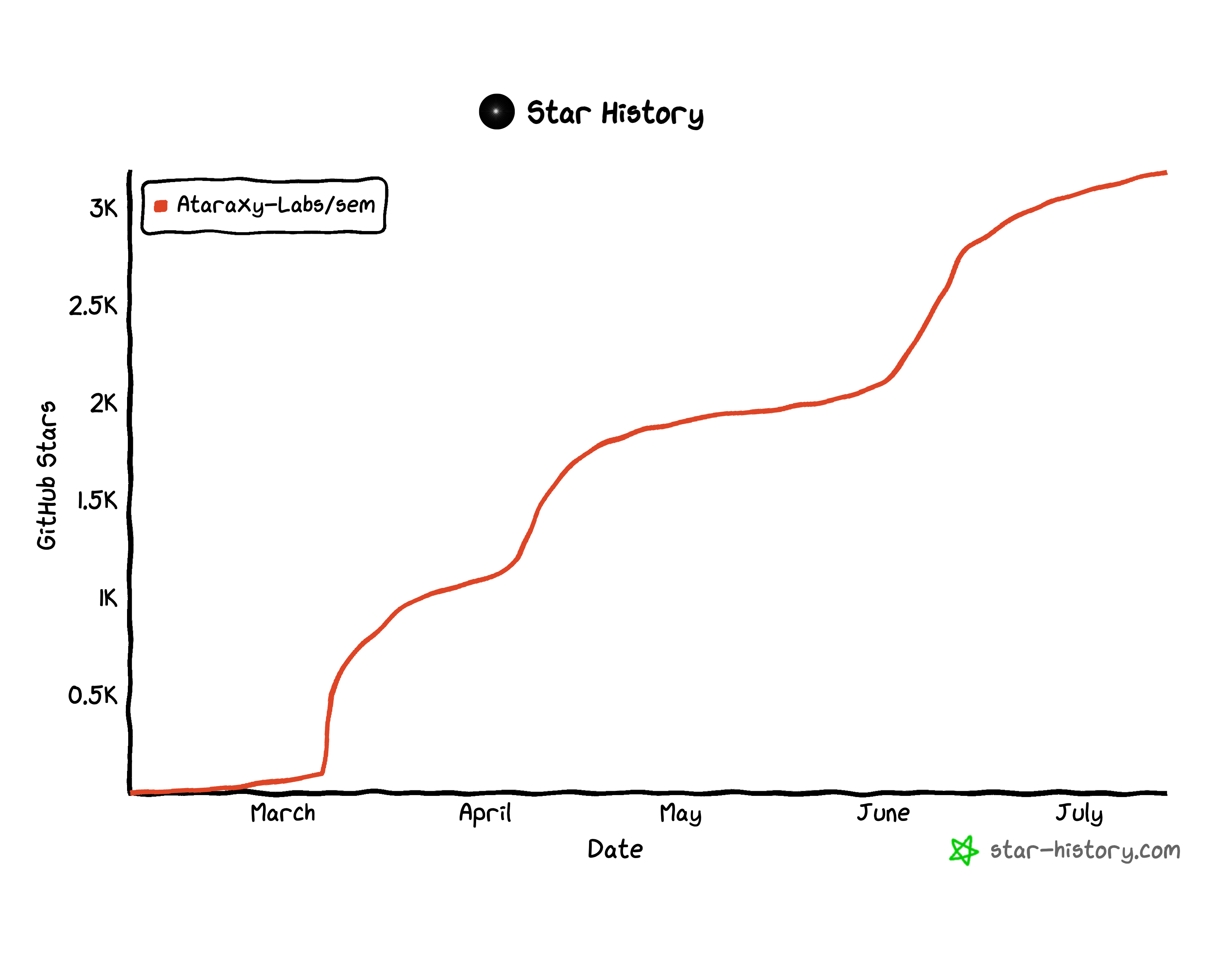
## Star History
[](https://star-history.com/#Ataraxy-Labs/sem&Date)
## License
MIT OR Apache-2.0
]