# autonomOS
**Multi-agent harness for CLI coding agents — orchestrate Claude Code, Codex, and Gemini CLI.**
**[autonomos.terrylu.cloud](https://autonomos.terrylu.cloud)**
[](https://github.com/aterrylu/autonomOS/actions/workflows/test.yml)
[](https://github.com/aterrylu/autonomOS/releases/latest)
[](LICENSE)
[](https://github.com/aterrylu/autonomOS/commits/main)
[](https://github.com/aterrylu/autonomOS/stargazers)
[](CONTRIBUTING.md)

## Why autonomOS
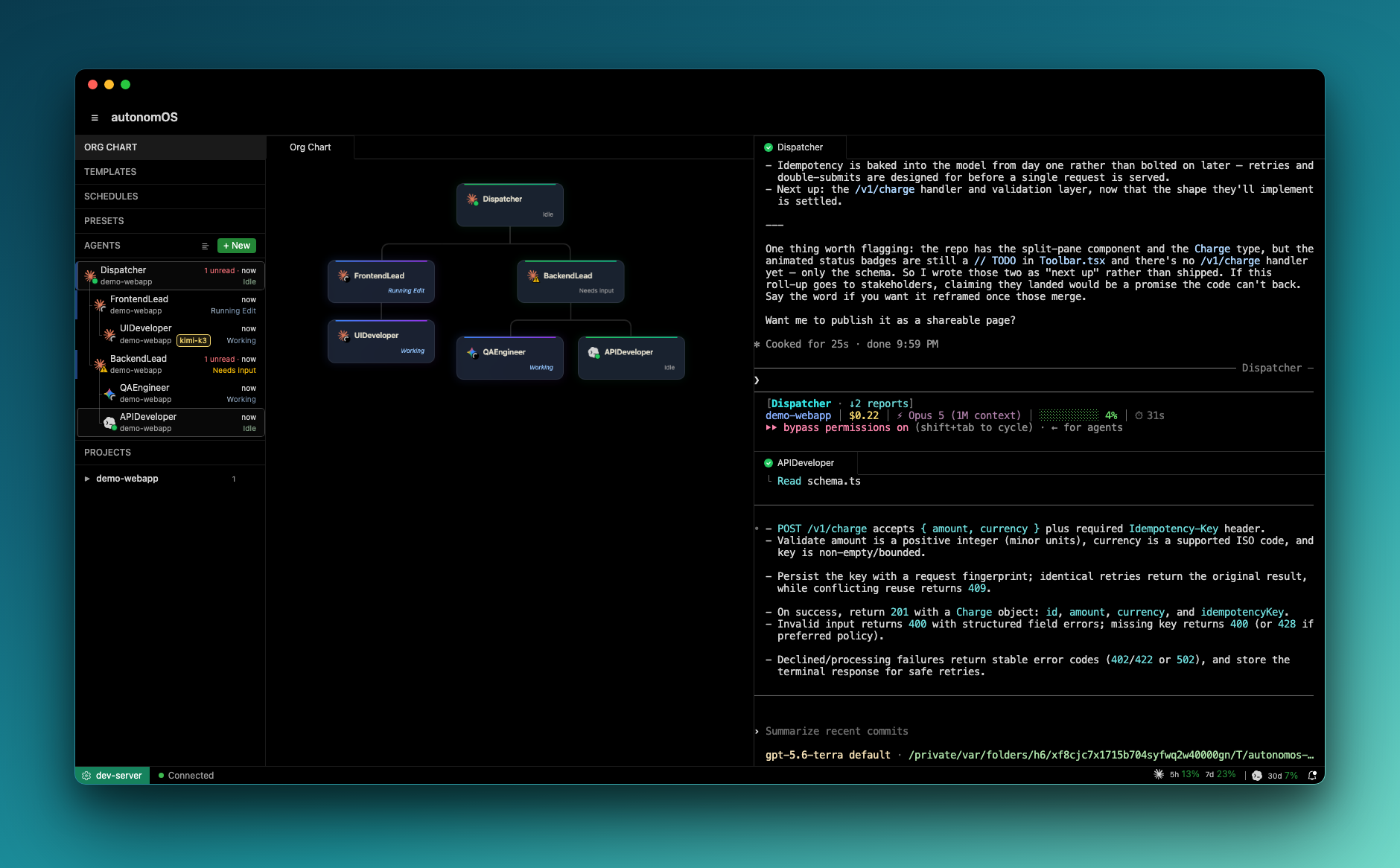
Running several coding-CLI agents today means a grid of terminal tabs you babysit — copy-pasting context between them, relaying every hand-off by hand. autonomOS turns them into a **team**: one shared message bus, one shared MCP toolbelt, and an org chart of who reports to whom, so agents coordinate *directly* across whichever CLI they run.
- **A message bus for coding agents** — a URI gateway (`agent://reviewer`) routes messages between running sessions, and tells the sender whether the message actually landed; a Claude Code agent hands off to a Codex one with no human relay.
- **Cross-CLI by design** — Claude Code, Codex, and Gemini CLI share one MCP toolbelt and one address space, so orchestration is written once and works across every runtime.
- **An org chart, like a company** — agents organize into managers and reports; work delegates *down* the tree and escalates *up* it, on a hierarchy you shape at runtime — not a flat pool of tabs.
- **Coordination you can watch** — normalized hook telemetry streams every agent's live status as they work and message each other.
- **Browser-native and always-on** — it runs as a self-hosted daemon, so the fleet is reachable from any browser or PWA and keeps working after you close your laptop. (The hosting is a byproduct; the orchestration is the point.)
## New here?
If you want to **use** autonomOS rather than build it, the [User Guide](docs/guide/README.md) is written for you: a five-minute [Start here](docs/guide/01-start-here.md), then the form, the screen, teams, and troubleshooting, with the exact words the app uses. It is also the right entry point for an AI assistant helping you (see [`llms.txt`](llms.txt)). Everything below this section is for people changing the code.
## Install
You need **Node 20+** and **Claude Code installed and logged in** (`claude` on PATH; run it once to sign in). Codex and Gemini CLI are optional. Then, one line:
```bash
curl -fsSL https://autonomos.terrylu.cloud/install.sh | bash
```
This detects your OS, checks for Node and Claude Code, drops a pre-built server bundle in `~/.local/share/autonomos/`, registers a launchd (macOS) or systemd-user (Linux) service, runs a smoke test, and prints your dashboard URL and access token. Pin a version with `curl … | VERSION=0.7.0 bash`.
Manage it anytime with the `autonomos` CLI:
```bash
autonomos status # is the daemon healthy?
autonomos logs -f # follow the server log
autonomos upgrade # update to the latest release: verified swap, auto-rollback if the new version won't boot
autonomos rollback # swap back to the version the last upgrade replaced
autonomos restart # bounce the service
autonomos stop # stop it (stays down until `autonomos restart`)
autonomos uninstall-service # remove the service; your data in ~/.autonomos stays
```
**Upgrading.** When a newer release exists, the status bar shows "Update to vY" — the server checks GitHub about daily (Settings → Updates to turn it off, or **Check for updates**). Nothing updates by itself. Click it for one screen with what's new and which agents are mid-task (if any are, the default waits until they've all been idle for 30 seconds), then update in place: autonomOS takes a snapshot, installs the release, restarts, checks the new version starts — restoring the old one on its own if it does not — and confirms every agent reopened. **Restore** in Settings → Updates puts back the previous version together with that snapshot. From a terminal, `autonomos upgrade` and `autonomos rollback` do the same; re-running the install one-liner is the same upgrade by another route. Agents cannot trigger an update, and your token and settings survive it.
> **Deploy to a remote box** you own (a homelab server, a VPS) as a **managed clone** —
> a git checkout pinned to a release tag that the same `autonomos upgrade`/`rollback`
> manage (fetch tags → checkout → rebuild → verified restart), and whose running code
> your agents can read:
>
> ```bash
> bash scripts/install-source.sh # clone to ~/autonomos at the newest release
> bash scripts/install-source.sh --ref v0.7.0 --dir /srv/autonomos # pin + place
> ```
>
> Needs `git` and [bun](https://bun.sh) on that machine as well. (`make deploy DEPLOY_HOST=…`
> still exists as a dev tool, but it rsyncs a working tree with no git history — no
> provenance, no `autonomos upgrade`, no rollback.)
### Using it from other devices
Recommended for a remote server: **Tailscale**, with autonomOS listening on the machine itself and on its tailnet address only:
```bash
autonomos install-service --force --host=127.0.0.1,$(tailscale ip -4)
```
Then open `http://:3000` from any device on your tailnet. Nothing on the local network or the internet can reach it, and restarts are safe (it keeps retrying the tailnet address until Tailscale is up). Without `--host` it listens on **every** network the machine is on, so only use that behind a firewall that allows the Tailscale interface alone. Google Cloud IAP and SSH tunnels work too. Full steps and security notes: [Using it from your other devices](docs/guide/02-install.md#using-it-from-your-other-devices).
## Coding-CLI support
autonomOS is CLI-agnostic by design: every runtime plugs into the same message bus and the same MCP toolbelt, so coordination is written once and works across all of them. **Claude Code and Codex are fully supported.** **Gemini CLI runs as a full agent;** messages sent to it arrive in the **Incoming messages** panel, where you deliver them into the session with a click. Everything else — spawning, status, sending, permissions — works the same.
| Capability | Claude Code | Codex | Gemini CLI |
|---|:---:|:---:|:---:|
| Spawn as a managed agent | ✅ | ✅ *(daemon + remote TUI)* | ✅ *(interactive CLI)* |
| Live status telemetry | ✅ hooks | ✅ event stream | ✅ hooks *(translated)* |
| Shared MCP toolbelt | ✅ | ✅ | ✅ |
| **Send** to other agents | ✅ | ✅ | ✅ |
| **Receive** from other agents | ✅ automatic | ✅ automatic, *inline in the TUI* | via **Incoming messages** — you deliver with a click |
| Permission modes | ✅ all four | ✅ *(no Plan mode)* | ✅ all four |
| Usage bar in the dashboard | ✅ 5h / 7d | ✅ | ❌ |
| Resume across restarts | ✅ | ✅ | ❌ starts a fresh session |
**How it works.** Three pieces make cross-CLI coordination possible. The **message bus** is a URI router: address any agent as `agent://name` and the gateway delivers to the right session, acknowledging the send only once the destination has accepted it — hiding a per-runtime delivery path (Claude Code over a WebSocket channel; Codex injected into its `app-server` daemon so messages render *inline* in the live TUI) behind one uniform address space. **Incoming messages** is the delivery path for Gemini CLI: the message is accepted and queued, the agent's row shows a "✉" badge, and a small panel on its terminal lets you deliver or discard each one; the queue is persisted, capped at ten, and only clears an item once the agent has actually taken it. The **shared MCP** is a single set of tools — `create_agent`, `send`, `set_manager`, `get_org_chart`, schedules, presets — injected into every agent in its provider-native way, so a Claude Code agent and a Codex agent call the *same* `send()` with identical schemas. Adding a runtime is implementing one provider interface, not re-plumbing the bus.
## What's inside
| | |
|---|---|
| **Split-pane terminals** | Multiple agent sessions side by side — drag a tab to split, tabs, instant switching (a keep-alive terminal cache: switching back re-streams nothing). |
| **Live agent status** | Ready / Working / Running *tool* / Idle / Needs input / Error, derived from hook telemetry. Muted status colors with a shimmer on active work, a recency fade on each row's timestamp, and an unread badge that matches the notification bell. |
| **Agent rows you can work** | Right-click any row: Open · Restart · Rename · Kill · Set manager · Delete. Drag rows to reorder, pin the ones you watch. Hierarchy view nests reports under their manager. |
| **Org chart** | A hierarchy view of managers and reports — see who delegated what to whom. |
| **Multi-agent messaging** | URI-based gateway (`agent://name`) with delivery-confirmed sends; **Incoming messages** for delivering queued messages into a Gemini agent with a click; scheduled prompts arrive from a `schedule://` sender so agents know a timer, not a peer, spoke. |
| **Cron scheduler** | Native timer-based scheduling — agents create their own recurring or one-time jobs; the dashboard monitors them. |
| **Session management** | Create, resume, restart-all, kill, auto-reconnect, output replay, and auto-persist across server restarts and upgrades. |
| **Usage** | Your Claude 5-hour and 7-day limits and your Codex usage in the status bar, read from the logins already on the machine; a per-terminal queue that presses Enter for you when a limit resets. |
| **Permission modes** | Ask · Accept edits · Plan · Bypass per agent, mapped to each runtime's native flags. |
| **Model-override presets** | Run an agent on another model backend (for example Kimi) through the same Claude Code binary: agents configure the preset, you paste the key. |
| **Keyboard** | ⌘K agent switcher, ⌘1–9 and ⌘↑/↓ to move between agents, ⌘B sidebar, ⌘/ for the list. |
| **PWA + themes** | Installable as a standalone app with notifications. Midnight, Daylight, and Void themes. |
## Develop from source
```bash
git clone https://github.com/aterrylu/autonomOS && cd autonomOS
cp -n .env.example .env # optional config
bun install
make dev # API on :3101 + Vite HMR on :5173
make prod # build + install the daemon on :3100
make check # lint (Biome) + typecheck + tests
make down # remove the service + free dev ports
```
All make targets
| Target | Description |
|--------|-------------|
| `make dev` | API server (watch, :3101) + Vite HMR (:5173), this machine only |
| `make dev-lan` | `make dev`, but the dashboard is reachable from your network (trusted networks only) |
| `make build` | Install deps, rebuild node-pty, build the channel server and dashboard |
| `make prod` | Build dashboard + (re)install launchd/systemd-user daemon on :3100 |
| `make deploy` | Rsync to remote + `make prod` (set `DEPLOY_HOST` in `.env`) |
| `make check` | Lint + typecheck + server, CLI & dashboard tests |
| `make fmt` | Auto-fix lint + formatting |
| `make doctor` | Rebuild node-pty for the current Node — the fix for a crash-loop after a Node upgrade |
| `make stop` / `make restart` | Stop / restart the daemon via the supervisor |
| `make logs` | Tail the server log (`~/.autonomos/logs/autonomos.log`) |
| `make down` | Remove the service + kill dev ports |
| `make hero` | Regenerate the README hero screenshot (`docs/assets/hero.png`) — re-run after dashboard UI changes |
`make prod` supervises the server with the **OS-native init system** — launchd on macOS,
systemd-user on Linux — not pm2. It auto-migrates an existing pm2-managed `autonomos` on
first run (`NO_MIGRATE=1` to skip).
### Authentication
Auth is always on — there's no way to disable it. On first start the server generates a random
token, stores it at `~/.autonomos/token`, and prints a sign-in link at install time
(`http://localhost:3000/#token=…` — the token rides in the URL fragment, which the browser never
sends to the server, and the dashboard strips it from the address bar before exchanging it for an
httpOnly session cookie). Every API, WebSocket, and MCP route requires the token. Set
`AUTONOMOS_TOKEN` to pin your own instead of the generated one.
## Architecture
```
Dashboard (React) Server (Hono + node-pty)
┌─────────────┐ ┌──────────────────────┐
│ xterm.js │◄──ws──────│ PTY sessions │
│ Split panes │ │ Hook relay │
│ Org chart │◄──push────│ Agent status machine │
│ Schedules │ │ Gateway router │
│ Incoming │ │ Incoming-msg queue │
│ Status bar │ │ Cron scheduler │
└─────────────┘ │ MCP (Unix socket) │
└──────────────────────┘
```
Spawned sessions get a hook relay (inline `curl` on all 13 Claude Code events) that streams
telemetry back to the server's status state machine, and an injected system prompt that gives
each agent its identity, its teammates, and MCP tools to coordinate. The MCP server and the
gateway live on an internal Unix socket, not the public port. See
[docs/FEATURES.md](docs/FEATURES.md) and [docs/decisions/](docs/decisions/README.md) for the full design.
## Tech stack
**Frontend** React 19 · Zustand 5 · Tailwind 4 · xterm.js 6 · dockview · framer-motion
**Backend** Hono · node-pty · Claude Agent SDK · MCP SDK · Croner
**Tooling** Bun · Biome · changesets · launchd / systemd-user supervision · TypeScript project references
## Docs
- [User Guide](docs/guide/README.md) — for people using autonomOS; also the entry point for AI assistants (`llms.txt`)
- [FEATURES.md](docs/FEATURES.md) — feature specifications and design intent
- [ROADMAP.md](docs/ROADMAP.md) — what's done, what's next
- [decisions/](docs/decisions/README.md) — architectural decision records, one file per ADR
- [RELEASE.md](docs/RELEASE.md) — how releases are cut, verified, and rolled out
- [VISION.md](docs/VISION.md) — where this is headed
- [RESEARCH.md](docs/RESEARCH.md) — competitor analysis and research
## Contributing
Issues and PRs welcome — see [CONTRIBUTING.md](CONTRIBUTING.md) to get started.
## License
MIT — see [LICENSE](LICENSE).
## Trademarks
autonomOS displays third-party provider logos (Claude, OpenAI Codex, Google Gemini) solely to
identify which runtime backs an agent. All product names, logos, and brands are the property of
their respective owners; their use is nominative and does not imply affiliation or endorsement.
See [NOTICE](NOTICE).