| Generated: | ${now} |
|---|---|
| Total: | ${count} apps |
To see the code in action, a real-time Online HTML Editor can be found at: http://htmledit.squarefree.com/
| Name | Comment | Data Directory | First Installed | Last Updated | Market ID | Market Link | Package Name | Target SDK | UID | Tags | Version | Version Code | www | Google Store | F-Droid | Search (Google) | Search (DDG) | Name |
|---|---|---|---|---|---|---|---|---|---|---|---|---|---|---|---|---|---|---|
| ${displayname} | ${comment} | ${datadir} | ${firstinstalled} | ${lastupdated} | ${marketid} | Install | ${packagename} | ${targetsdk} | ${uid} | ${tags} | ${version} | ${versioncode} | Link | Store | F-Droid | Search | DDG | ${displayname} |
To open this code with an Android device, for instance:
| Template File Header: | "List header, may be blank" |
|---|---|
| Template Body: | "Item format, may not be blank" |
| Template File Footer: | "List footer, may be blank" |
<!DOCTYPE html>
<html>

<head>

    <meta http-equiv="Content-Type" content="text/html; charset=utf-8" />
    <meta name="viewport" content="width=device-width, initial-scale=0.7" />
    <meta name="Keywords" content="apps,applications,Android,HTML,Web development,tutorials,programming,training,learning,examples,source code,colors,demos,tips,template,templates" />
    <meta name="Description" content="A Table of Installed Applications" />

    <title>The Enumeration Table of Installed Applications</title>

    <style>
        body {
            font-family: Calibri, "Lucida Sans", Helvetica, sans-serif;
        }

        li {
            padding: 7px;
        }

        table,
        th,
        td {
            border-collapse: collapse;
        }

        table#main {
            border: 1px solid black;
            padding: 30px;
        }

        table#main th {
            text-align: center;
            color: black;
            font-weight: bold;
            padding: 14px;
            background-color: white;
        }

        table#main td {
            text-align: center;
            color: black;
            font-weight: normal;
            padding: 14px;
        }

        table#main tr:nth-child(even) {
            background-color: white;
        }

        table#main tr:nth-child(odd) {
            background-color: #cccccc;
        }

        table.stats th {
            border: 0px solid black;
            background-color: white;
            color: black;
            text-align: left;
            width: 120px;
            padding: 2px;
        }

        table.stats td {
            border: 0px solid black;
            background-color: white;
            color: black;
            text-align: left;
        }

        .right_pane {
            text-align: right;
            font-size: 80%;
        }

        .filter-type {
            border-bottom: 0px dotted #343434;
        }

        .show_more {
            width: 95%;
            margin-bottom: 14px;
            overflow-y: scroll;
            border: none;
            visibility: visible;
        }

        #filter {
            display: none
        }

        #filter:checked + .show_more {
            visibility: visible;
        }
    </style>
</head>

<!-- Start content -->

<body>
    <h1 id="top" style="font-family: 'Gill Sans', sans-serif">
        Installed Apps</h1>
    <table class="stats">
        <tr>
            <th>Generated:</th>
            <td>[dollar_sign]{now}</td>
        </tr>
        <tr>
            <th>Total:</th>
            <td>[dollar_sign]{count} apps</td>
        </tr>
    </table>
    <p class="right_pane"><a href="#bottom">↓ Bottom ↓</a></p>
    <br />
    <p>To see the code in action, a real-time Online HTML Editor can be found at: <a href="http://htmledit.squarefree.com/">http://htmledit.squarefree.com/</a></p>
    <br />
    <br />
    <br />
    <br />
    <br />
    <table id="main" border="1px" cellpadding="14" style="width:99%">
        <caption><span style="font-family: 'Gill Sans', sans-serif; font-size:300%">The Enumeration Table of Installed Applications</span><br />
            <br />
            <br /></caption>
        <thead>
            <tr>
                <th style="text-align:left">Name</th>
                <th>Comment</th>
                <th>Data Directory</th>
                <th>First Installed</th>
                <th>Last Updated</th>
                <th>Market ID</th>
                <th>Market Link</th>
                <th>Package Name</th>
                <th>Target SDK</th>
                <th>UID</th>
                <th>Tags</th>
                <th>Version</th>
                <th>Version Code</th>
                <th>www</th>
                <th>Google Store</th>
                <th>F-Droid</th>
                <th>Search (Google)</th>
                <th>Search (DDG)</th>
                <th style="text-align:right">Name</th>
            </tr>
        </thead>
        <tbody>
            <tr>
                <td style="text-align:left"><strong>${displayname}</strong></td>
                <td>${comment}</td>
                <td>${datadir}</td>
                <td>${firstinstalled}</td>
                <td>${lastupdated}</td>
                <td>${marketid}</td>
                <td><a href="market://details?id=${packagename}">Install</a></td>
                <td>${packagename}</td>
                <td>${targetsdk}</td>
                <td>${uid}</td>
                <td>${tags}</td>
                <td>${version}</td>
                <td>${versioncode}</td>
                <td><a href="${source}">Link</a></td>
                <td><a href="https://play.google.com/store/apps/details?id=${packagename}">Store</a></td>
                <td><a href="https://f-droid.org/repository/browse/?fdid=${packagename}">F-Droid</a></td>
                <td><a href="https://www.google.com/search?q=${packagename}">Search</a></td>
                <td><a href="https://duckduckgo.com/?q=${packagename}+%22${displayname}%22">DDG</a></td>
                <td style="text-align:right"><strong>${displayname}</strong></td>
            </tr>
        </tbody>
    </table>
    <br />
    <br />
    <br />
    <br />
    <br />
    <br />
    <div class="right_pane"><a href="#bottom">↓ Bottom ↓</a>  |  <a href="#top">↑ Top ↑</a></div>
    <div style="margin-left:1em">
        <h3>'List My Apps' -Template (Table)</h3>
        <br />
        <p>To open this code with an Android device, for instance:</p>
        <ol>
                <p>
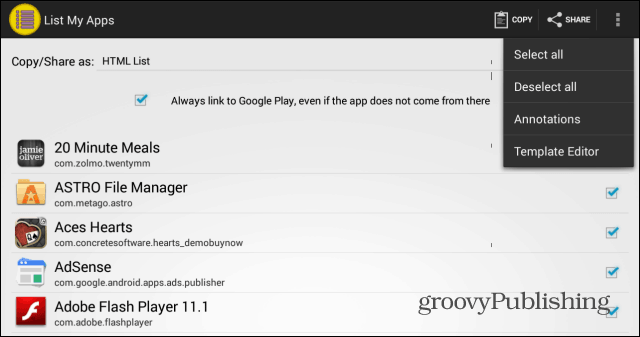
                    <li>Create a new template in '<a href="https://play.google.com/store/apps/details?id=de.onyxbits.listmyapps">List My Apps</a>' -app's Template Editor by clicking Options (three dots) → Template Editor → Add. [<a href="http://groovyandroid.com/wp-content/uploads/2013/10/List-My-Apps-select-all.png">Screenshot</a>]</li>
                </p>
                <p>
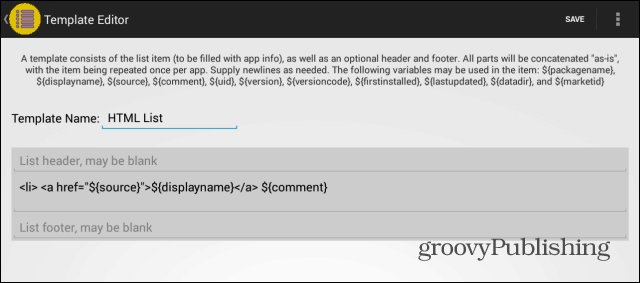
                    <li>Type in a name for the template. [<a href="http://groovyandroid.com/wp-content/uploads/2013/10/List-My-Apps-Template-Editor.png">Screenshot</a>]</li>
                </p>
                <p>
                    <li>Paste all the appropriate template data to 'List My Apps' and save the template. The most convenient template source is a separate file (such as <a href="https://github.com/auberginehill/list-my-apps-template-table">https://github.com/auberginehill/list-my-apps-template-table</a>),
                        but a fairly working version of the template (without the template that would reside inside the template footer) can be found at the end of this file.
                        <ul>
                            <p>
                                <li>The template code below is in three parts as described below:
                                    <table style="border:0; margin-left:3em; margin-top:2em; margin-bottom:2em; text-align:left">
                                        <tr>
                                            <th style="padding:12px">Template File Header:</th>
                                            <td style="padding:12px">"List header, may be blank"</td>
                                        </tr>
                                        <tr>
                                            <th style="padding:12px">Template Body:</th>
                                            <td style="padding:12px">"Item format, may not be blank"</td>
                                        </tr>
                                        <tr>
                                            <th style="padding:12px">Template File Footer:</th>
                                            <td style="padding:12px">"List footer, may be blank"</td>
                                        </tr>
                                    </table>
                                </li>
                            </p>
                            <p>
                                <li>The footer section (under the header 'Template File Footer:') includes only a truncated version of the real footer section, which was used to create the underlying HTML-page.</li>
                            </p>
                            <p>
                                <li>In the header and footer sections of the template (under 'Template File Header:' and 'Template File Footer:' -headers below) every instance of [dollar_sign] has to be replaced with a single $ character (to repair the timestamp and count
                                    -variables to their correct form).</li>
                            </p>
                        </ul>
                    </li>
                </p>
                <p>
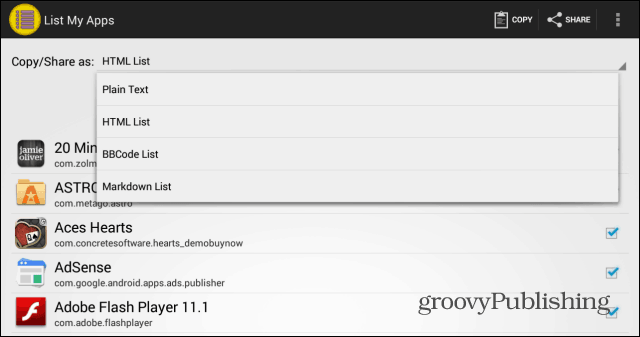
                    <li>After saving the template go back to the 'List My Apps' -app's home screen and select the name that was created in Step 2 from the 'Copy/Share as:' -dropdown menu. Please also select the apps that you'd like to be included in the list. [<a href="http://groovyandroid.com/wp-content/uploads/2013/10/List-My-App-HTML-list.png">Screenshot</a>]</li>
                </p>
                <p>
                    <li>'Run' the 'List My Apps' -app with the new template by copying the app data to Clipboard [Copy] (since direct sharing may not work, if a lot of applications has been installed).
                        <ul>
                            <li>There seems to be some kind of a limit, how much data the Android Clipboard can contain. With verbose templates ~200 apps might be the upper limit, but with a simple template, the Android Clipboard clearly is capable of containing considerably more app data.</li>
                        </ul>
                    </li>
                </p>
                <p>
                    <li>Open a HTML editor, such as <a href="https://play.google.com/store/apps/details?id=com.aor.droidedit">DroidEdit Free</a>.</li>
                </p>
                <p>
                    <li>Paste the app data (source code generated by 'List My Apps' in Step 5) from Clipboard to the HTML editor.
                        <ul>
                            <li>If nothing happens (no data is pasted to a HTML editor after a few seconds), try selecting fewer apps in 'List My Apps' and go back to Step 5.</li>
                                <ul>
                                    <li>Depending on the device some lagging may occur when trying to paste, say ~10000 lines of code.</li>
                                </ul>
                            <li>If "old data" gets pasted to a HTML editor (i.e. "the data that was in the Clipboard before List My Apps' 'Copy to Clipboard' -button was clicked"), try selecting fewer apps in 'List My Apps' and go back to Step 5.</li>
                        </ul>
                    </li>
                </p>
                <p>
                    <li>Save the file as a HTML file, for example as 'Installed_Apps.html', for example in 'Home/Documents' folder (a filename without any spaces is recommended).</li>
                </p>
                <p>
                    <li>Open the HTML-file with an appropriate app, such as a browser by surfing directly to the file location, which could, for instance, be: <a href="file:///storage/emulated/0/Documents/Installed_Apps.html">file:///storage/emulated/0/Documents/Installed_Apps.html</a>
                        <ul>
                            <li>In a browser the spaces in the filename can be replaced with %20 to make the link work. For more exotic filename characters, see <a href="http://www.w3schools.com/tags/ref_urlencode.asp">HTML URL Encoding Reference</a>.</li>
                        </ul>
                    </li>
                </p>
                <p>
                    <li>Conversion from HTML to PDF might work with <a href="https://play.google.com/store/apps/details?id=org.mozilla.firefox">Firefox (for Android)</a> (Options (three dots) → Page → Save as PDF) or perhaps with the printing option in the default Android File Manager.</li>
                </p>
        </ol>
    </div>

    <!-- End Instructions (INSTRUCTIONS), can be selected over when pasting -->

    <div style="margin-left:3em"><br />
        <h4>www</h4>
        <ul>
            <li>Template: <a href="https://github.com/auberginehill/list-my-apps-template-table/">https://github.com/auberginehill/list-my-apps-template-table/</a></li>
            <li><a href="https://play.google.com/store/apps/details?id=de.onyxbits.listmyapps">List My Apps</a> (Google Play)</li>
            <li><a href="http://www.onyxbits.de/listmyapps">List My Apps' homepage</a></li>
            <li><a href="http://forum.xda-developers.com/showthread.php?t=2460266">List My Apps' application thread</a> at xda-developers.com</li>
            <li><a href="https://play.google.com/store/apps/details?id=com.aor.droidedit">DroidEdit Free</a> (free code editor)</li>
            <li><a href="https://play.google.com/store/apps/details?id=jp.ne.shira.html.viewer">Local HTML Viewer</a></li>
            <li><a href="https://play.google.com/store/apps/details?id=org.mozilla.firefox">Firefox for Android</a></li>
        </ul>
        <br />
        <h4>Related scripts</h4>
        <ul>
            <li>List My Apps Template - List: <a href="https://github.com/auberginehill/list-my-apps-template-list">https://github.com/auberginehill/list-my-apps-template-list</a></li>
            <li>List My Apps Template - Pro: <a href="https://github.com/auberginehill/list-my-apps-template-pro">https://github.com/auberginehill/list-my-apps-template-pro</a></li>
            <li>List My Apps Template - Data: <a href="https://github.com/auberginehill/list-my-apps-template-data">https://github.com/auberginehill/list-my-apps-template-data</a></li>
            <li>List My Apps Template - XML plain: <a href="https://github.com/auberginehill/list-my-apps-template-xml-plain">https://github.com/auberginehill/list-my-apps-template-xml-plain</a></li>
            <li>List My Apps Template - XML style: <a href="https://github.com/auberginehill/list-my-apps-template-xml-style">https://github.com/auberginehill/list-my-apps-template-xml-style</a></li>
            <li>List My Apps Template - JSON: <a href="https://github.com/auberginehill/list-my-apps-template-json">https://github.com/auberginehill/list-my-apps-template-json</a></li>
        </ul>
    </div>
    <br />
    <br />
    <br />
    <br />
    <br />
    <br />
    <br />
    <br />
    <br />
    <p class="right_pane"><a href="#top">↑ Top ↑</a></p>
    <p>[End of Line]</p>
    <table id="bottom" class="stats">
        <tr>
            <th>Generated:</th>
            <td>[dollar_sign]{now}</td>
        </tr>
        <tr>
            <th>Total:</th>
            <td>[dollar_sign]{count} apps</td>
        </tr>
    </table>
</body>

<!-- End content -->

</html>
[End of Line]
| Generated: | ${now} |
|---|---|
| Total: | ${count} apps |