# Microsoft Fabric MCP
[](https://badge.fury.io/py/microsoft-fabric-mcp)
A Model Context Protocol server that provides read-only access to Microsoft Fabric resources. Query workspaces, examine table schemas, monitor jobs, and analyze dependencies using natural language.
## Features
- **25 tools** covering workspaces, lakehouses, tables, jobs, and dependencies
- **Read-only operations** - uses only GET requests, no risk of data modification
- **Smart caching** for fast responses
- **Works with** Cursor, Claude, and other MCP-compatible AI tools
## Available MCP Tools
> **Parameter Note**: `workspace` parameters accept either workspace names (e.g., "DWH-PROD") or workspace IDs. Names are recommended for ease of use.
### 🏢 Core Fabric Management
| Tool | Description | Inputs |
|------|-------------|---------|
| `list_workspaces` | List all accessible Fabric workspaces | None |
| `get_workspace` | Get detailed workspace info including workspace identity status | `workspace` (name/ID) |
| `list_items` | List all items in workspace with optional type filtering | `workspace` (name/ID), `item_type` (optional) |
| `get_item` | Get detailed properties and metadata for specific item | `workspace` (name/ID), `item_name` (name/ID) |
| `list_connections` | List all connections user has access to across entire tenant | None |
| `list_lakehouses` | List all lakehouses in specified workspace | `workspace` (name/ID) |
| `list_capacities` | List all Fabric capacities user has access to | None |
| `get_workspace_identity` | Get workspace identity details for a specific workspace | `workspace` (name/ID) |
| `list_workspaces_with_identity` | List workspaces that have workspace identities configured | None |
### 📊 Data & Schema Management
| Tool | Description | Inputs |
|------|-------------|---------|
| `get_all_schemas` | Get schemas for all Delta tables in lakehouse | `workspace` (name/ID), `lakehouse` (name/ID) |
| `get_table_schema` | Get detailed schema for specific table | `workspace` (name/ID), `lakehouse` (name/ID), `table_name` |
| `list_tables` | List all tables in lakehouse with format/type info | `workspace` (name/ID), `lakehouse` (name/ID) |
| `list_shortcuts` | List OneLake shortcuts for specific item | `workspace` (name/ID), `item_name` (name/ID), `parent_path` (optional) |
| `get_shortcut` | Get detailed shortcut configuration and target | `workspace` (name/ID), `item_name` (name/ID), `shortcut_name`, `parent_path` (optional) |
| `list_workspace_shortcuts` | Aggregate all shortcuts across workspace items | `workspace` (name/ID) |
### ⚡ Job Monitoring & Scheduling
| Tool | Description | Inputs |
|------|-------------|---------|
| `list_job_instances` | List job instances with status/item filtering for monitoring | `workspace` (name/ID), `item_name` (optional), `status` (optional) |
| `get_job_instance` | Get detailed job info including errors and timing | `workspace` (name/ID), `item_name` (name/ID), `job_instance_id` |
| `list_item_schedules` | List all schedules for specific item | `workspace` (name/ID), `item_name` (name/ID) |
| `list_workspace_schedules` | Aggregate all schedules across workspace - complete scheduling overview | `workspace` (name/ID) |
### 🎯 Operational Intelligence
| Tool | Description | Inputs |
|------|-------------|---------|
| `list_compute_usage` | Monitor active jobs and estimate resource consumption | `workspace` (optional), `time_range_hours` (default: 24) |
| `get_item_lineage` | Analyze data flow dependencies upstream/downstream | `workspace` (name/ID), `item_name` (name/ID) |
| `list_item_dependencies` | Map all item dependencies in workspace | `workspace` (name/ID), `item_type` (optional) |
| `get_data_source_usage` | Analyze connection usage patterns across items | `workspace` (optional), `connection_name` (optional) |
| `list_environments` | List Fabric environments for compute/library management | `workspace` (optional) |
| `get_environment_details` | Get detailed environment config including Spark settings and libraries | `workspace` (name/ID), `environment_name` (name/ID) |
## Caching
The server caches responses for performance. Use `clear_fabric_data_cache` to refresh resource lists or `clear_name_resolution_cache` after renaming workspaces/lakehouses.
## Getting Started
1. Install UV and Azure CLI (see sections below)
2. Set up Azure CLI authentication: `az login`
3. Configure MCP in Cursor (see "Setting up MCP" section below)
## Installation
### UV
```bash
# macOS/Linux
curl -LsSf https://astral.sh/uv/install.sh | sh
# Windows
powershell -ExecutionPolicy ByPass -c "irm https://astral.sh/uv/install.ps1 | iex"
```
## Azure CLI Authentication
This toolkit requires Azure CLI to be installed and properly configured for authentication with Microsoft Fabric services.
### Azure CLI Setup
1. Install Azure CLI (if not already installed):
```bash
# For macOS
brew install azure-cli
# For Windows
# Last ned installasjonen fra: https://aka.ms/installazurecliwindows
# Eller bruk winget:
winget install -e --id Microsoft.AzureCLI
# For other platforms, see the official Azure CLI documentation
```
2. Log in to Azure with CLI:
```bash
az login
```
3. Verify the login works:
```bash
az account show
```
4. If you have multiple subscriptions, select the one you want to use:
```bash
az account set --subscription "Name-or-ID-of-subscription"
```
When this is done, the `DefaultAzureCredential` in our code will automatically find and use your Azure CLI authentication.
## Setting up MCP
To use the MCP (Module Context Protocol) with this toolkit, follow these steps:
1. Make sure you have completed the Azure CLI authentication steps above.
2. **Choose your installation method:**
### Option A: UVX Installation (Recommended)
Add to Cursor MCP settings:
```json
"mcp_fabric": {
"command": "uvx",
"args": ["microsoft-fabric-mcp"]
}
```
### Option B: Local Development
**Clone and install:**
```bash
git clone https://github.com/Augustab/microsoft_fabric_mcp
cd microsoft_fabric_mcp
uv pip install -e .
```
**Add to Cursor MCP settings:**
```json
"mcp_fabric": {
"command": "uv",
"args": [
"--directory",
"/Users/username/Documents/microsoft_fabric_mcp",
"run",
"fabric_mcp.py"
]
}
```
Replace `/Users/username/Documents/microsoft_fabric_mcp` with your actual path.
> **💡 Note**: Both methods run the MCP server locally on your machine. The UVX method just makes installation much easier!
3. Once the MCP is configured, you can interact with Microsoft Fabric resources directly from your tools and applications.
4. You can use the provided MCP tools to list workspaces, lakehouses, and tables, as well as extract schema information as documented in the tools section.
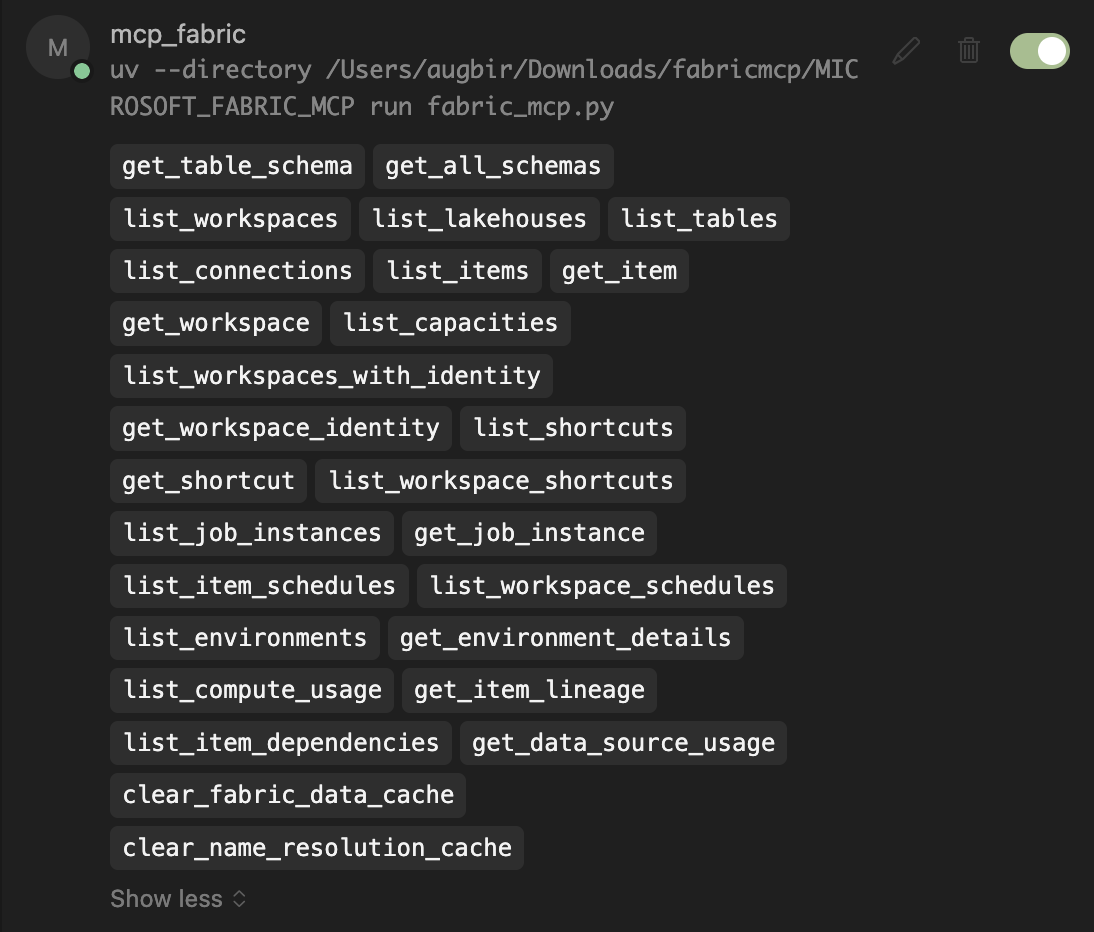
5. When successfully configured, your MCP will appear in Cursor settings like this:
## Windows Setup
### Setting up the MCP Command
On Windows, you can create a batch file to easily run the MCP command:
1. Create a file named `run_mcp.bat` with the following content:
```
@echo off
SET PATH=C:\Users\YourUsername\.local\bin;%PATH%
cd C:\path\to\your\microsoft_fabric_mcp\
C:\Users\YourUsername\.local\bin\uv.exe run fabric_mcp.py
```
Example with real paths:
```
@echo off
SET PATH=C:\Users\YourUsername\.local\bin;%PATH%
cd C:\Users\YourUsername\source\repos\microsoft_fabric_mcp\
C:\Users\YourUsername\.local\bin\uv.exe run fabric_mcp.py
```
2. You can then run the MCP command by executing:
```
cmd /c C:\path\to\your\microsoft_fabric_mcp\run_mcp.bat
```
Example:
```
cmd /c C:\Users\YourUsername\source\repos\microsoft_fabric_mcp\run_mcp.bat
```
### Virtual Environment Permissions
When activating the virtual environment using `.venv\Scripts\activate` on Windows, you might encounter permission issues. To resolve this, run the following command in PowerShell before activation:
```powershell
Set-ExecutionPolicy -ExecutionPolicy Bypass -Scope Process
```
This temporarily changes the execution policy for the current PowerShell session only, allowing scripts to run.
## Example Usage
After setup, you can query your Fabric resources through your AI assistant:
### Listing Workspaces in Fabric
Ask your AI assistant natural language questions:
```
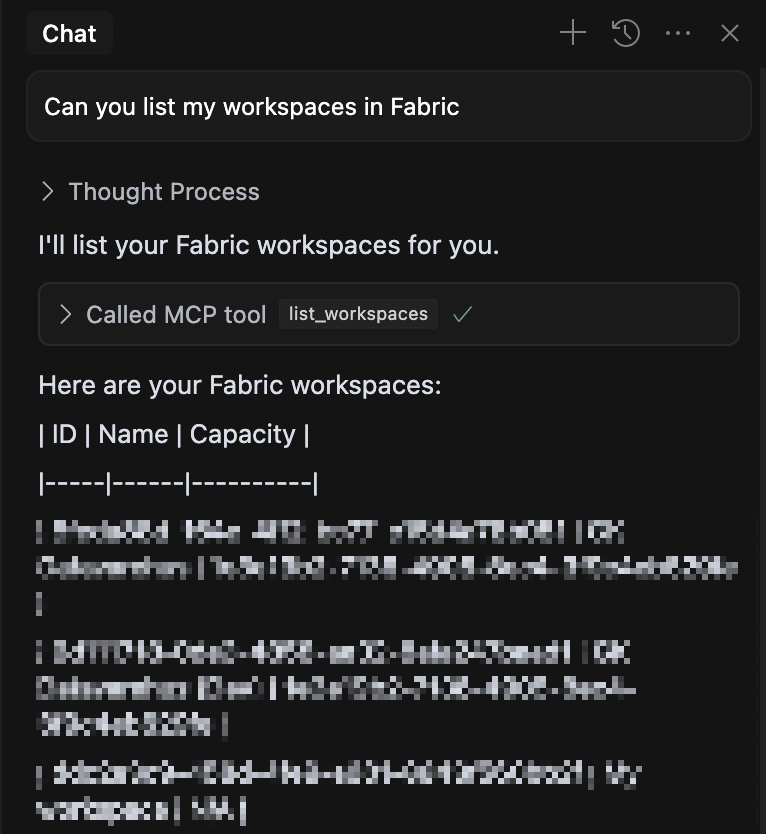
Can you list my workspaces in Fabric?
Can you show me all the lakehouses in the "DWH-PROD" workspace?
Can you get the schema for the "sales" table in the "GK_Bronze" lakehouse?
```
The AI will automatically select the appropriate MCP tool and display results:
### Advanced Use Cases
For complex tasks, the AI can access multiple resources to generate accurate code:
```
Create a notebook that reads from the 'sales' table in Bronze lakehouse and upserts to 'sales_processed' in Silver lakehouse, considering both schemas.
```
The AI will:
1. Get schemas for both tables
2. Generate code with correct data types
3. Create an efficient upsert operation
### Permission Handling
The AI will ask permission before running MCP tools. In Cursor, you can enable YOLO mode for automatic execution without prompts.
## About Model Context Protocol
Model Context Protocol (MCP) is an open standard that enables AI assistants to securely connect to external data sources and tools. This server implements MCP to provide AI assistants with direct access to your Microsoft Fabric resources.
Learn more: [Model Context Protocol Documentation](https://www.anthropic.com/news/model-context-protocol)
## Contributing
Feel free to contribute additional tools, utilities, or improvements to existing code. Please follow the existing code structure and include appropriate documentation.