# Pønskelisten
[](https://github.com/aunefyren/poenskelisten/actions/workflows/go.yml)
[](https://github.com/aunefyren/poenskelisten/actions/workflows/go.yml)
[](https://github.com/aunefyren/poenskelisten)
[](https://github.com/aunefyren/poenskelisten)
[](https://hub.docker.com/r/aunefyren/poenskelisten)
[](https://github.com/aunefyren/poenskelisten/releases)
[](https://go.dev/dl/)
[](https://www.paypal.com/donate/?hosted_button_id=YRKMNM4S8VNBS)
Like the project? Have too much money? Buy me a coffee or something! ☕️
---
## What is Pønskelisten? 🎁
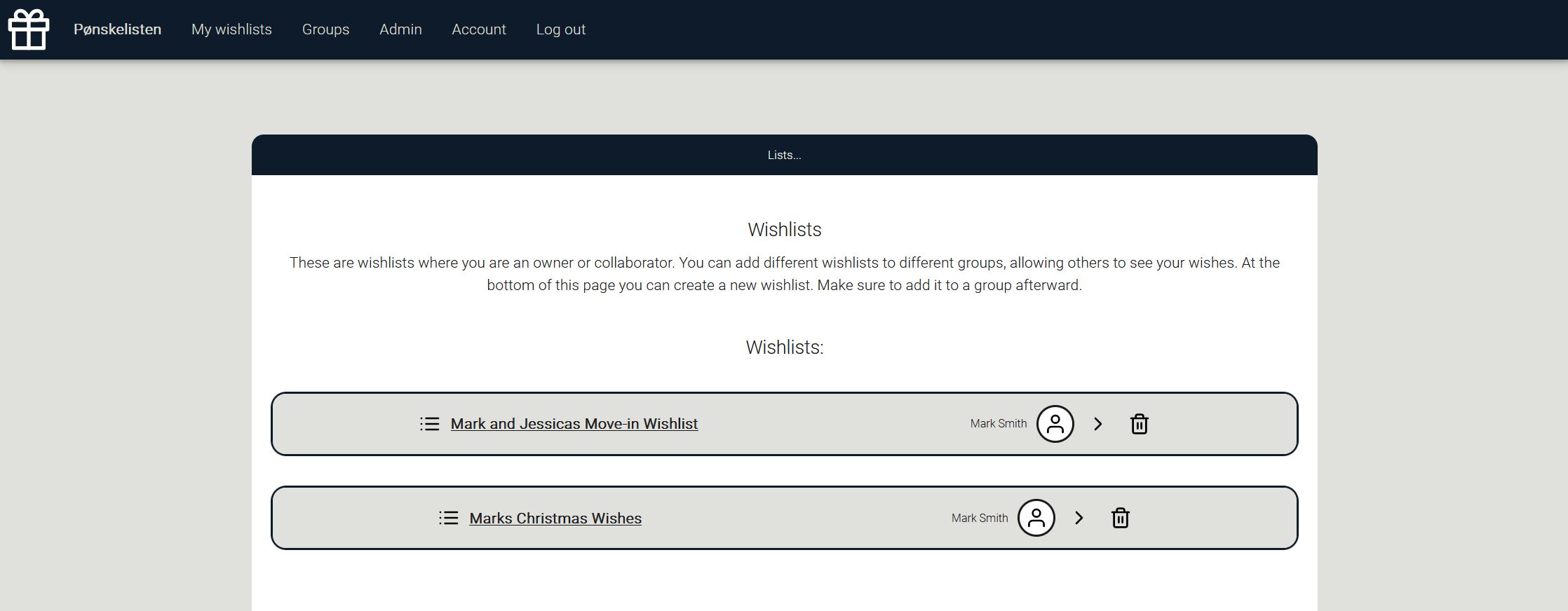
A self-hosted web app for creating, sharing and collaborating on wishlists - *without ruining the surprise*.
Share gift ideas, see which ones are already taken, and avoid the awkward “oh… you also bought that…” moment.
### Main Features
- Create wishlists and add wishes
- Collaborate with friends & family on the shared wishlists
- Create groups to share wishlists with multiple people
- Claim wishes anonymously (others see it's taken - owner does not)
### Known Limitations
- UI is not yet fully optimized for small screens
---
## 🚀 Installation
Pønskelisten is flexible to host. Choose your path:
### **Step 1: Choose how to run it**
| Method | Difficulty | Notes |
|--------|-------------|------------------|
| **⭐Docker** | Easiest | You need to run your instance in a Docker container |
| Download executable | Easy | Choose the correct executable for your system |
| Build from source | Medium | You need to have Go installed |
### **Step 2: Choose your Database**
Pønskelisten currently supports:
| Database | Status | Notes |
|----------|--------|--------|
| **⭐SQLite** | ✅ Fully supported | DB file is handled by Pønskelisten |
| PostgreSQL | ✅ Fully supported | Requires a running PostgreSQL instance |
| MySQL | ✅ Fully supported | Requires a running MySQL instance |
---
## 🧩 Configuration (Recommended: Environment Variables)
You can configure Pønskelisten in **three different ways**:
| Method | Ideal for | Notes |
|--------|------------|--------|
| **⭐Environment variables** | Docker | Add the environment variables to your Dockerfile or docker-compose.yaml |
| Startup flags | Executables | Adding a flags to the startup command alters something in the configuration file |
| config.json | Access to file system | Pønskelisten generates the file on the first run. Can be altered in a text editor afterward |
---
### 📍 Available Configuration Options
| Config file entry | Startup flag | Environment variable |Type | Description |
|-----|-----|-----|-------|--------------|
| poenskelisten_port | port | port | int | Port to run on (default: `8080`) |
| poenskelisten_external_url | externalurl | externalurl | string | Public URL of the instance |
| poenskelisten_environment | environment | environment | string | `production` or `test` |
| poenskelisten_test_email | testemail | testemail | string | E-mail destination when in `test` |
| poenskelisten_name | name | name | string | Display name of the app |
| poenskelisten_description | description | description | string | Description of the app |
| poenskelisten_log_level | loglevel | loglevel | string | How detailed the logs are. `info`, `debug` or `trace`
| timezone | timezone | timezone | string | E.g. `Europe/Oslo` |
| `N/A` | generateinvite | generateinvite | bool | Generate an invite code on startup. Do `generateinvite true` |
| db_type | dbtype | dbtype | string | `sqlite`, `postgres` or `mysql` |
| db_ip | dbip | dbip | string | DB host |
| db_port | dbport | dbport | int | DB port |
| db_username | dbusername | dbusername | string | DB username |
| db_password | dbpassword | dbpassword | string | DB password |
| db_name | dbname | dbname | string | Database name |
| db_ssl | dbssl | dbssl | bool | Use SSL for DB |
| smtp_enabled | disablesmtp | disablesmtp | bool | Disable/enable email functions |
| smtp_host | smtphost | smtphost | string | SMTP host |
| smtp_port | smtpport | smtpport | int | SMTP port |
| smtp_username | smtpusername | smtpusername | string | SMTP user |
| smtp_password | smtppassword | smtppassword | string | SMTP password |
| smtp_from | smtpfrom | smtpfrom | string | Sender email address |
| mfa_enforced | mfaenforced | mfaenforced | bool | Require all local users to enroll in MFA (TOTP) |
| mfa_recovery_codes_enabled | mfarecoverycodes | mfarecoverycodes | bool | Issue single-use recovery codes on MFA enrollment (default off; when off, an admin must remove MFA for locked-out users) |
| oidc_enabled | oidcenabled | oidcenabled | bool | Enable OpenID Connect single sign-on |
| oidc_provider_name | oidcprovidername | oidcprovidername | string | Display name on the SSO login button (e.g. "Authelia") |
| oidc_issuer_url | oidcissuerurl | oidcissuerurl | string | OIDC issuer URL used for discovery (e.g. https://auth.example.com) |
| oidc_client_id | oidcclientid | oidcclientid | string | OIDC client ID |
| oidc_client_secret | oidcclientsecret | oidcclientsecret | string | OIDC client secret |
| oidc_redirect_url | oidcredirecturl | oidcredirecturl | string | OIDC callback URL; defaults to `/api/open/oidc/callback` |
| oidc_auto_create_users | oidcautocreateusers | oidcautocreateusers | bool | Auto-provision unknown OIDC users (default off) |
| mcp_enabled | mcpenabled | mcpenabled | bool | Enable the MCP resource server (the OAuth authorization server is always on) |
| oauth_signing_key | `N/A` | `N/A` | string | PEM signing key; auto-generated + persisted on first run (config.json only) |
---
## 🔐 Single sign-on (OpenID Connect)
Pønskelisten can act as an OpenID Connect **relying party**, letting users log in
through an external identity provider (Authelia, Keycloak, Authentik, Google, …).
A successful SSO login mints a normal Pønskelisten session, so everything else
works the same afterwards.
**How accounts are resolved on SSO login:**
1. If the IdP subject (`sub`) is already linked to a user, that user logs in.
2. Otherwise, if the IdP asserts a **verified** email that matches an existing
local account, the OIDC identity is linked to it. An **unverified** email is
refused.
3. Otherwise a new account is created **only if** `oidc_auto_create_users` is on
(default off); the account is created pre-verified with no local password.
**Example with Authelia**: register Pønskelisten as an OIDC client in your
Authelia configuration:
```yaml
identity_providers:
oidc:
clients:
- client_id: poenskelisten
client_secret: ''
redirect_uris:
- https://wishlist.example.com/api/open/oidc/callback
scopes: [openid, profile, email]
```
Then configure Pønskelisten (env vars shown; flags/config.json equivalents exist):
```yaml
environment:
externalurl: https://wishlist.example.com
oidcenabled: true
oidcprovidername: Authelia
oidcissuerurl: https://auth.example.com
oidcclientid: poenskelisten
oidcclientsecret:
# oidcredirecturl defaults to /api/open/oidc/callback
oidcautocreateusers: false
```
The redirect URL registered with the IdP must match
`/api/open/oidc/callback`.
## 🤖 MCP server (AI assistants)
Pønskelisten can expose an authenticated **MCP (Model Context Protocol)** endpoint
so an AI client (e.g. Claude) can read your wishlists on your behalf. It is a full
OAuth 2.1 setup: the app is its own authorization server, and the MCP endpoint is a
resource server that only accepts audience-scoped tokens.
Enable it with `mcp_enabled: true` (it's off by default). The endpoint lives at
`/mcp`; the client discovers everything else via
`/.well-known/oauth-protected-resource`, self-registers
(`/oauth/register`), and runs the browser login + consent flow — no manual client
setup. HTTPS (a real `external_url`) is required for the token cookies to work.
Current tools are **read-only**: `list_wishlists`, `list_wishes`, `list_groups`
(gated by the `mcp:wishlists.read` / `mcp:groups.read` scopes you approve on the
consent screen). You can revoke a connected app any time from the admin panel.
## 🐳 Docker Setup
### **Minimal docker-compose.yml for SQLite (recommended)**
```yaml
services:
poenskelisten-app:
container_name: poenskelisten-app
image: ghcr.io/aunefyren/poenskelisten:latest
restart: unless-stopped
ports:
- "8080:8080"
environment:
PUID: 1000
PGID: 1000
dbtype: sqlite
timezone: Europe/Oslo
generateinvite: true
volumes:
- ./files/:/app/files/:rw
- ./images/:/app/images/:rw
```
Remove `generateinvite` after first run to stop generating codes on start up.
### **Minimal docker-compose.yml for postgres**
```yaml
services:
db:
container_name: poenskelisten-db
image: postgres:16
restart: unless-stopped
environment:
POSTGRES_DB: poenskelisten
POSTGRES_USER: myuser
POSTGRES_PASSWORD: mypassword
volumes:
- ./db/:/var/lib/postgresql/data/:rw
poenskelisten-app:
container_name: poenskelisten-app
image: ghcr.io/aunefyren/poenskelisten:latest
restart: unless-stopped
ports:
- "8080:8080"
environment:
PUID: 1000
PGID: 1000
dbtype: postgres
dbip: db
dbport: 5432
dbname: poenskelisten
dbusername: myuser
dbpassword: mypassword
timezone: Europe/Oslo
generateinvite: true
depends_on:
- db
volumes:
- ./files/:/app/files/:rw
- ./images/:/app/images/:rw
```
Remove `generateinvite` after first run to stop generating codes on start up.
### Optional Add-ons
- Reverse proxy for access outside of home network (Caddy, Traefik, Nginx)
- Adminer or phpMyAdmin (if you like UI DB tools, but not required anymore)
## 🔑 Admin Access
- First registered user becomes admin
- Additional invite codes can be created in the admin panel
- If you lose access: restart with generateinvite=true
## 🔧 Building from Source
Requires Go installed:
```bash
go build
./poenskelisten
```
Add flags to configure:
```bash
./poenskelisten -port 9000 -dbtype postgres -generateinvite true
```
## ❓ FAQ
### What does “Pønskelisten” mean?
A Norwegian wordplay. “Ønskeliste” = wishlist, “pønske” = plot/plan.
So… “The plotting list”.
### Is a demo available?
Not at the moment.
### Is mobile UI coming?
Yes - improvements planned.
## 🙌 Contributing
Contributions, issues and feature requests are welcome.
Feel free to open a Pull Request or Issue.
## ☕️ Donate
If you enjoy using Pønskelisten and want to support development:
[Buy me a coffee](https://www.paypal.com/donate/?hosted_button_id=YRKMNM4S8VNBS)