# Frequently Asked Questions
1. [How can I have separate Auth0 domains for each environment on Android?](#1-how-can-i-have-separate-auth0-domains-for-each-environment-on-android)
2. [How can I disable the iOS _login_ alert box?](#2-how-can-i-disable-the-ios-login-alert-box)
3. [How can I disable the iOS _logout_ alert box?](#3-how-can-i-disable-the-ios-logout-alert-box)
4. [Is there a way to disable the iOS _login_ alert box without `ephemeralSession`?](#4-is-there-a-way-to-disable-the-ios-login-alert-box-without-ephemeralsession)
5. [How can I change the message in the iOS alert box?](#5-how-can-i-change-the-message-in-the-ios-alert-box)
6. [How can I programmatically close the iOS alert box?](#6-how-can-i-programmatically-close-the-ios-alert-box)
7. [Auth0 web browser gets killed when going to the background on Android](#7-auth0-web-browser-gets-killed-when-going-to-the-background-on-android)
8. [How to resolve the _Failed to start this transaction, as there is an active transaction at the moment_ error?](#8-how-to-resolve-the-failed-to-start-this-transaction-as-there-is-an-active-transaction-at-the-moment-error)
9. [Why doesn't `await authorize()` work on the web? How do I handle login?](#9-why-doesnt-await-authorize-work-on-the-web-how-do-i-handle-login)
10. [Why do my users get logged out frequently? How do I keep them logged in?](#10-why-do-my-users-get-logged-out-frequently-how-do-i-keep-them-logged-in)
11. [How can I prompt users to the login page versus signup page?](#11-how-can-i-prompt-users-to-the-login-page-versus-signup-page)
12. [Why does `getCredentials()` return an opaque access token on web instead of a JWT?](#12-why-does-getcredentials-return-an-opaque-access-token-on-web-instead-of-a-jwt)
13. [What is DPoP and should I enable it?](#13-what-is-dpop-and-should-i-enable-it)
14. [How do I migrate existing users to DPoP?](#14-how-do-i-migrate-existing-users-to-dpop)
15. [How do I know if my tokens are using DPoP?](#15-how-do-i-know-if-my-tokens-are-using-dpop)
16. [What happens if I disable DPoP after enabling it?](#16-what-happens-if-i-disable-dpop-after-enabling-it)
17. [Why does the app hang or freeze during Social Login (Google, Facebook, etc.)?](#17-why-does-the-app-hang-or-freeze-during-social-login-google-facebook-etc)
18. [How do I refresh the user profile (e.g. `emailVerified`) after it changes on the server?](#18-how-do-i-refresh-the-user-profile-eg-emailverified-after-it-changes-on-the-server)
## 1. How can I have separate Auth0 domains for each environment on Android?
This library internally declares a `RedirectActivity` along with an **intent-filter** in its Android Manifest file to handle the Web Auth callback and logout URLs. While this approach prevents the developer from adding an activity declaration to their apps's Android Manifest file, it requires the use of [Manifest Placeholders](https://developer.android.com/studio/build/manage-manifests#inject_build_variables_into_the_manifest).
Alternatively, you can re-declare the `RedirectActivity` in the `AndroidManifest.xml` file with your own **intent-filter** so it overrides the library's default one. If you do this then the `manifestPlaceholders` don't need to be set as long as the activity contains `tools:node="replace"` like in the snippet below.
```xml
```
## 2. How can I disable the iOS _login_ alert box?
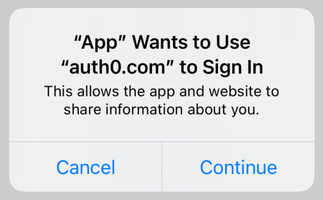
Under the hood, react-native-auth0 uses `ASWebAuthenticationSession` by default to perform web-based authentication, which is the [API provided by Apple](https://developer.apple.com/documentation/authenticationservices/aswebauthenticationsession) for such purpose.
That alert box is displayed and managed by `ASWebAuthenticationSession`, not by react-native-auth0, because by default this API will store the session cookie in the shared Safari cookie jar. This makes single sign-on (SSO) possible. According to Apple, that requires user consent.
> **Note**
> See [this blog post](https://developer.okta.com/blog/2022/01/13/mobile-sso) for a detailed overview of SSO on iOS.
### Use ephemeral sessions
If you don't need SSO, you can disable this behavior by adding `ephemeralSession: true` to the login call. This will configure `ASWebAuthenticationSession` to not store the session cookie in the shared cookie jar, as if using an incognito browser window. With no shared cookie, `ASWebAuthenticationSession` will not prompt the user for consent.
```js
auth0.webAuth
.authorize(
{ scope: 'openid profile email' },
{ ephemeralSession: true } // No SSO, therefore no alert box
)
.then((credentials) => console.log(credentials))
.catch((error) => console.log(error));
```
Note that with `ephemeralSession: true` you don't need to call `clearSession` at all. Just clearing the credentials from the app will suffice. What `clearSession` does is clear the shared session cookie, so that in the next login call the user gets asked to log in again. But with `ephemeralSession: true` there will be no shared cookie to remove.
You still need to call `clearSession` on Android, though, as `ephemeralSession` is iOS-only.
### Use `SFSafariViewController`
An alternative is to use `SFSafariViewController` instead of `ASWebAuthenticationSession`. You can do so with the built-in `SFSafariViewController` Web Auth provider:
```js
auth0.webAuth
.authorize(
{ scope: 'openid profile email' },
{ useSFSafariViewController: true } // Use SFSafariViewController
)
.then((credentials) => console.log(credentials))
.catch((error) => console.log(error));
```
> **Note**
> Since `SFSafariViewController` does not share cookies with the Safari app, SSO will not work either. But it will keep its own cookies, so you can use it to perform SSO between your app and your website as long as you open it inside your app using `SFSafariViewController`. This also means that any feature that relies on the persistence of cookies will work as expected.
## 3. How can I disable the iOS _logout_ alert box?

Since `clearSession` needs to use `ASWebAuthenticationSession` as well to clear the shared session cookie, the same alert box will be displayed.
If you need SSO and/or are willing to tolerate the alert box on the login call, but would prefer to get rid of it when calling `clearSession`, you can simply not call `clearSession` and just clear the credentials from the app. This means that the shared session cookie will not be removed, so to get the user to log in again you need to add the `prompt: 'login'` parameter to the _login_ call.
```js
auth0.webAuth
.authorize(
{ additionalParameters: { prompt: 'login' } }, // Ignore the cookie (if present) and show the login page
{ ephemeralSession: true }
)
.then((credentials) => console.log(credentials))
.catch((error) => console.log(error));
```
Otherwise, the browser modal will close right away and the user will be automatically logged in again, as the cookie will still be there.
> **Warning**
> Keeping the shared session cookie may not be an option if you have strong privacy and/or security requirements, for example in the case of a banking app.
## 4. Is there a way to disable the iOS _login_ alert box without `ephemeralSession`?
No. According to Apple, storing the session cookie in the shared Safari cookie jar requires user consent. The only way to not have a shared cookie is to configure `ASWebAuthenticationSession` with `prefersEphemeralWebBrowserSession` set to `true`, which is what `ephemeralSession: true` does.
## 5. How can I change the message in the iOS alert box?
This library has no control whatsoever over the alert box. Its contents cannot be changed. Unfortunately, that's a limitation of `ASWebAuthenticationSession`.
## 6. How can I programmatically close the iOS alert box?
This library has no control whatsoever over the alert box. It cannot be closed programmatically. Unfortunately, that's a limitation of `ASWebAuthenticationSession`.
## 7. Auth0 web browser gets killed when going to the background on Android
### The problem
When opening the Auth0 web browser to perform authentication, the Android system may kill the browser when the app goes to the background and you re-launch the app by pressing the app icon. This is a common behaviour if a user has MFA enabled for example and the user switches to another app to get the MFA code.
You may have seen other issues where the usage of `singleTop` fixes this issue. However, other different libraries may be using `singleTask` and this can cause other issues if you change it.
See these issues for more information:
- [Android: OTP auth browser closes when minimising app](https://github.com/auth0/react-native-auth0/issues/921)
- [Fixed authentication restart when the app is minimized ](https://github.com/auth0/react-native-auth0/pull/350)
- [possibility to run with launchMode:singleTop?](https://github.com/auth0/react-native-auth0/issues/170)
- [Android singleTask launch mode is required for react-native deep links](https://github.com/auth0/react-native-auth0/issues/556)
### Recovering the login (recommended)
If the OS kills your app's process entirely while the browser is open (rather than just pausing the activity), the SDK can still complete the login on restart. Call `resumeSession()` once on cold start to recover it:
```js
// With the Auth0 class
const credentials = await auth0.webAuth.resumeSession();
// Or with hooks
const { resumeSession } = useAuth0();
useEffect(() => {
resumeSession();
}, [resumeSession]);
```
If a login was interrupted by process death, `resumeSession()` returns the recovered `Credentials`; otherwise it returns `null`. It is Android-only (a no-op resolving `null` on iOS/web) and requires no `MainActivity` changes, so it works in both bare React Native and Expo. See [Recovering Login After Process Death (Android)](EXAMPLES.md#recovering-login-after-process-death-android) for full examples.
### The solution (for `singleTask` launch mode)
If your Android `launchMode` is set to `singleTask` (check your `AndroidManifest.xml`), that's why this is occurring. Unfortunately, this is not addressable by the react-native-auth0 library.
This is [the same solution for the stripe-react-native library](https://github.com/stripe/stripe-react-native/issues/355#issuecomment-1701323254), but it also help other libraries that have the same issue.
1. Modify your `MainApplication`:
```diff
public class MainApplication extends Application {
+ private ArrayList runningActivities = new ArrayList<>();
+ public void addActivityToStack (Class cls) {
+ if (!runningActivities.contains(cls)) runningActivities.add(cls);
+ }
+ public void removeActivityFromStack (Class cls) {
+ if (runningActivities.contains(cls)) runningActivities.remove(cls);
+ }
+ public boolean isActivityInBackStack (Class cls) {
+ return runningActivities.contains(cls);
+ }
}
```
2. create `LaunchActivity`
```diff
+ public class LaunchActivity extends Activity {
+ @Override
+ protected void onCreate(Bundle savedInstanceState) {
+ super.onCreate(savedInstanceState);
+ BaseApplication application = (BaseApplication) getApplication();
+ // check that MainActivity is not started yet
+ if (!application.isActivityInBackStack(MainActivity.class)) {
+ Intent intent = new Intent(this, MainActivity.class);
+ startActivity(intent);
+ }
+ finish();
+ }
+ }
```
3. Modify `AndroidManifest.xml` and move `android.intent.action.MAIN` and `android.intent.category.LAUNCHER` from your `.MainActivity` to `.LaunchActivity`
```diff
+
+
+
+
+
+
...
-
-
-
-
...
```
4. Modify `MainActivity` to look _something_ like the following (you likely already have an `onCreate` method that you need to modify):
```java
@Override
protected void onCreate(Bundle savedInstanceState) {
super.onCreate(null);
((BaseApplication) getApplication()).addActivityToStack(this.getClass());
}
@Override
protected void onDestroy() {
super.onDestroy();
((BaseApplication) getApplication()).removeActivityFromStack(this.getClass());
}
```
## 8. How to resolve the _Failed to start this transaction, as there is an active transaction at the moment_ error?
Users might encounter this error when the app moves to the background and then back to the foreground while the login/logout alert box is displayed, for example by locking and unlocking the device. The alert box would get dismissed but when the user tries to log in again, the Web Auth operation fails with the `transactionActiveAlready` error.
This is a known issue with `ASWebAuthenticationSession` and it is not specific to react-native-auth0. We have already filed a bug report with Apple and are awaiting for a response from them.
### Workarounds
#### Clear the login transaction when handling the `transactionActiveAlready` error
You can invoke `cancelWebAuth()` to manually clear the current login transaction upon encountering this error. Then, you can retry login. For example:
```js
auth0.webAuth.authorize({}).catch((error) => {
if (
error.cause ==
'Failed to start this transaction, as there is an active transaction at the moment '
)
auth0.webAuth.cancelWebAuth();
// retry auth logic
});
```
#### Clear the login transaction when the app moves to the background/foreground
You can invoke `cancelWebAuth()` to manually clear the current login transaction when the app moves to the background or back to the foreground. However, you need to make sure to not cancel valid login attempts –for example, when the user switches briefly to another app while the login page is open.
#### Avoid the login/logout alert box
If you don't need SSO, consider using `ephemeral sessions` or `SFSafariViewController` instead of `ASWebAuthenticationSession`. See [2. How can I disable the iOS _login_ alert box?](#2-how-can-i-disable-the-ios-login-alert-box) for more information.
## 9. Why doesn't `await authorize()` work on the web? How do I handle login?
This is a key difference between native and web platforms.
- **On Native (iOS/Android):** `authorize()` opens an in-app browser overlay. Your app continues running in the background. When the user authenticates, the browser dismisses and the `authorize()` promise resolves with the credentials. `await` works as expected.
- **On Web:** `authorize()` triggers a **full-page browser redirect** to the Auth0 Universal Login page. Your application's current state is lost. After authentication, the user is redirected back to your app, which causes your entire React application to reload and re-initialize from scratch. Because of this, the original `authorize()` promise is never able to resolve.
**The Solution: Use the `useAuth0` Hook**
The recommended way to handle this is by using the `Auth0Provider` and `useAuth0` hook. They are designed to manage this flow automatically:
1. **On initial load:** The provider checks if the user is returning from a login redirect. If so, it processes the credentials in the URL and establishes a session.
2. **State Management:** The `user` and `isLoading` properties from the `useAuth0` hook will automatically update to reflect the authenticated state after the redirect is handled.
Your UI should be reactive to the `user` and `isLoading` state, rather than trying to `await` the result of `authorize()`.
```jsx
import { useAuth0 } from 'react-native-auth0';
const MyComponent = () => {
const { authorize, user, isLoading } = useAuth0();
// This component will re-render after the redirect,
// and `user` will be populated.
if (isLoading) {
return Loading...;
}
return (
{user ? (
Welcome, {user.name}!
) : (
);
};
```
## 10. Why do my users get logged out frequently? How do I keep them logged in?
If your users are being asked to log in again after a short period (e.g., when they close and reopen the app), it's likely because the SDK cannot silently refresh their tokens.
The `getCredentials()` method is responsible for retrieving tokens. If the `accessToken` is expired, it will attempt to get a new one using a `refreshToken`. This process happens silently without requiring user interaction.
To enable this, you **must** request the `offline_access` scope during the initial login. This scope is what signals to Auth0 that you want to receive a `refreshToken`.
**The Solution: Add the `offline_access` Scope**
When calling `authorize`, ensure you include `offline_access` in the scope string.
```javascript
import { useAuth0 } from 'react-native-auth0';
const { authorize } = useAuth0();
const handleLogin = async () => {
await authorize({
scope: 'openid profile email offline_access', // <-- Add this scope
});
};
```
By including this scope, the SDK will receive and securely store a `refreshToken`. This token will then be used by `getCredentials()` to maintain the user's session across app launches, providing a much smoother user experience.
## 11. How can I prompt users to the login page versus signup page?
If your application has one button for logging in and one button for signing up, you can prompt Auth0 to direct the user to the appropriate authentication page as such:
```js
const login = async () => {
await authorize({
scope: ...,
audience: ...,
additionalParameters: {
screen_hint: 'login'
}
});
// continue with login process!
}
const signup = async () => {
await authorize({
scope: ...,
audience: ...,
additionalParameters: {
screen_hint: 'signup'
}
});
// continue with signup process!
}
```
## 12. Why does `getCredentials()` return an opaque access token on web instead of a JWT?
When calling `getCredentials()` on the **web platform**, you may receive an opaque access token (a token with ".." in the middle that doesn't parse as a JWT) instead of a JWT, even though you specified an `audience` during the initial `authorize()` call.
**Root Cause:**
On web, credentials are stored in browser storage (sessionStorage/localStorage). When you call `getCredentials()` without specifying the `audience` parameter, the SDK returns the default opaque token instead of the API-specific JWT access token.
**Solution:**
You must pass the `audience` parameter to **both** `authorize()` and `getCredentials()`:
```javascript
import { useAuth0 } from 'react-native-auth0';
const AUDIENCE = 'https://your-api.example.com';
function App() {
const { authorize, getCredentials } = useAuth0();
// ✅ CORRECT: Specify audience during login
const onLogin = async () => {
await authorize({
audience: AUDIENCE,
scope: 'openid profile email offline_access',
});
};
// ✅ CORRECT: Specify audience when retrieving credentials
const onGetCredentials = async () => {
const credentials = await getCredentials(
'openid profile email offline_access',
0,
{ audience: AUDIENCE } // ← Must include audience here!
);
console.log('JWT Access Token:', credentials.accessToken);
};
return (
);
}
```
**Why this happens:**
- **During `authorize()`**: The `audience` tells Auth0 to issue a JWT for your API
- **During `getCredentials()`**: On web, the audience must be re-specified to retrieve the correct token type
- **Platform difference**: Native platforms (iOS/Android) store credentials with all parameters and retrieve as-is, but web may need to refresh tokens
**Best Practice:**
Define your auth configuration once and reuse it:
```javascript
const AUTH_CONFIG = {
audience: 'https://your-api.example.com',
scope: 'openid profile email offline_access',
};
// Login
await authorize(AUTH_CONFIG);
// Get credentials later (include audience in parameters)
await getCredentials(AUTH_CONFIG.scope, 0, {
audience: AUTH_CONFIG.audience,
});
```
**Using the class-based API:**
```javascript
const auth0 = new Auth0({
domain: 'YOUR_DOMAIN',
clientId: 'YOUR_CLIENT_ID',
});
// Login
await auth0.webAuth.authorize({
audience: 'https://your-api.example.com',
scope: 'openid profile email offline_access',
});
// Get credentials (must include audience)
const credentials = await auth0.credentialsManager.getCredentials(
'openid profile email offline_access',
0,
{ audience: 'https://your-api.example.com' }
);
```
> **Note**: This behavior is specific to the web platform. On iOS and Android, the `audience` parameter is automatically preserved from the initial `authorize()` call.
## 13. What is DPoP and should I enable it?
**DPoP** (Demonstrating Proof-of-Possession) is an OAuth 2.0 security extension ([RFC 9449](https://datatracker.ietf.org/doc/html/rfc9449)) that cryptographically binds access and refresh tokens to a specific device using public/private key pairs. This means that even if an access token is stolen (e.g., through XSS or network interception), it cannot be used from a different device because the attacker won't have the private key needed to generate valid DPoP proofs.
**Benefits:**
- **Enhanced Security**: Prevents token theft and replay attacks
- **Device Binding**: Tokens only work on the device that requested them
- **Compliance**: Helps meet security requirements for sensitive applications
- **Zero-Knowledge Security**: The private key never leaves the device
**Should you enable it?**
DPoP is **enabled by default** (`useDPoP: true`) in this SDK because it provides significant security benefits with minimal impact on the developer experience. However, you should consider:
- ✅ Enable if you handle sensitive data or financial transactions
- ✅ Enable if you want best-in-class security practices
- ✅ Enable if your users access the app from multiple devices (DPoP helps prevent cross-device token abuse)
- ⚠️ **Note**: Existing users with Bearer tokens will need to log in again to get DPoP tokens (see [FAQ #13](#13-how-do-i-migrate-existing-users-to-dpop))
**How to disable it (if needed):**
```javascript
const auth0 = new Auth0({
domain: 'YOUR_AUTH0_DOMAIN',
clientId: 'YOUR_AUTH0_CLIENT_ID',
useDPoP: false, // Disable DPoP
});
```
## 14. How do I migrate existing users to DPoP?
When you enable DPoP in your app, existing users will still have Bearer tokens from their previous sessions. DPoP only applies to **new sessions** created after it's enabled. Here's how to handle the migration:
### Option 1: Automatic Detection and Re-authentication
Check the token type when your app starts and automatically prompt users to log in again if they have old Bearer tokens:
```javascript
import { useAuth0 } from 'react-native-auth0';
import { useEffect, useState } from 'react';
function App() {
const { authorize, getCredentials, clearSession, hasValidCredentials } =
useAuth0();
const [isReady, setIsReady] = useState(false);
const [needsMigration, setNeedsMigration] = useState(false);
useEffect(() => {
checkTokenType();
}, []);
const checkTokenType = async () => {
try {
const hasValid = await hasValidCredentials();
if (!hasValid) {
// No credentials, user needs to log in
setIsReady(true);
return;
}
const credentials = await getCredentials();
// Check if user has old Bearer token
if (credentials.tokenType !== 'DPoP') {
console.log('User has old Bearer token, migration needed');
setNeedsMigration(true);
}
setIsReady(true);
} catch (error) {
console.error('Token check failed:', error);
setIsReady(true);
}
};
const handleMigration = async () => {
try {
// Clear old credentials
await clearSession();
// Re-authenticate to get DPoP tokens
await authorize();
setNeedsMigration(false);
} catch (error) {
console.error('Migration failed:', error);
}
};
if (!isReady) {
return ;
}
if (needsMigration) {
return (
Security Update Required
We've enhanced our security. Please log in again to continue.
);
}
return ;
}
```
### Option 2: Gradual Migration with User Choice
Allow users to continue using the app but encourage migration:
```javascript
function App() {
const { authorize, getCredentials, clearSession } = useAuth0();
const [showMigrationBanner, setShowMigrationBanner] = useState(false);
useEffect(() => {
checkAndShowMigrationBanner();
}, []);
const checkAndShowMigrationBanner = async () => {
try {
const credentials = await getCredentials();
if (credentials.tokenType !== 'DPoP') {
setShowMigrationBanner(true);
}
} catch (error) {
console.error('Failed to check token type:', error);
}
};
const handleOptionalMigration = async () => {
try {
await clearSession();
await authorize();
setShowMigrationBanner(false);
} catch (error) {
console.error('Migration failed:', error);
}
};
return (
{showMigrationBanner && (
Enhanced security available! Log in again to enable.
)}
);
}
```
### Option 3: Silent Migration on Next API Call
Migrate users transparently when they make an API call:
```javascript
async function callApiWithMigration(url, method = 'GET') {
try {
let credentials = await auth0.credentialsManager.getCredentials();
// Check if migration is needed
if (credentials.tokenType !== 'DPoP') {
console.log('Migrating to DPoP tokens...');
// Clear old credentials
await auth0.credentialsManager.clearCredentials();
// Re-authenticate silently (will get DPoP tokens)
await auth0.webAuth.authorize();
// Get new DPoP credentials
credentials = await auth0.credentialsManager.getCredentials();
}
// Generate headers (DPoP or Bearer)
const headers = await auth0.getDPoPHeaders({
url,
method,
accessToken: credentials.accessToken,
tokenType: credentials.tokenType,
});
return await fetch(url, { method, headers });
} catch (error) {
console.error('API call failed:', error);
throw error;
}
}
```
### Important Notes:
1. **Only check if DPoP is enabled**: The migration check should only run if you've initialized the SDK with `useDPoP: true`
```javascript
const auth0 = new Auth0({
domain: 'YOUR_AUTH0_DOMAIN',
clientId: 'YOUR_AUTH0_CLIENT_ID',
useDPoP: true, // Ensure DPoP is enabled
});
// Then check token type
const credentials = await auth0.credentialsManager.getCredentials();
if (credentials.tokenType !== 'DPoP') {
// Migration needed
}
```
2. **Preserve user experience**: Consider the timing of migration (e.g., during app launch vs. during API calls)
3. **Communicate with users**: Explain why re-authentication is necessary
4. **Handle errors gracefully**: Network issues or user cancellation should be handled appropriately
## 15. How do I know if my tokens are using DPoP?
You can check the `tokenType` property of the credentials returned by `getCredentials()`:
```javascript
import { useAuth0 } from 'react-native-auth0';
function TokenInfo() {
const { getCredentials } = useAuth0();
const [tokenInfo, setTokenInfo] = useState(null);
const checkTokenType = async () => {
try {
const credentials = await getCredentials();
setTokenInfo({
type: credentials.tokenType,
isDPoP: credentials.tokenType === 'DPoP',
isBearer: credentials.tokenType === 'Bearer',
});
console.log('Token Type:', credentials.tokenType); // 'DPoP' or 'Bearer'
if (credentials.tokenType === 'DPoP') {
console.log('✅ Using DPoP - Enhanced security enabled');
} else {
console.log('⚠️ Using Bearer token - Consider migrating to DPoP');
}
} catch (error) {
console.error('Failed to get credentials:', error);
}
};
return (
{tokenInfo && (
Token Type: {tokenInfo.type}
Security:{' '}
{tokenInfo.isDPoP ? '🔒 DPoP (High)' : '⚠️ Bearer (Standard)'}
)}
);
}
```
**When making API calls**, you can also check the headers to see if DPoP is being used:
```javascript
const credentials = await auth0.credentialsManager.getCredentials();
const headers = await auth0.getDPoPHeaders({
url: 'https://api.example.com/data',
method: 'GET',
accessToken: credentials.accessToken,
tokenType: credentials.tokenType,
});
console.log('Headers:', headers);
// DPoP tokens will have:
// {
// 'Authorization': 'DPoP ',
// 'DPoP': ''
// }
// Bearer tokens will have:
// {
// 'Authorization': 'Bearer '
// }
if (headers.DPoP) {
console.log('✅ Using DPoP headers');
} else {
console.log('⚠️ Using Bearer headers');
}
```
## 16. What happens if I disable DPoP after enabling it?
If you disable DPoP after enabling it (by setting `useDPoP: false`), here's what happens:
### Immediate Effects:
1. **New logins will use Bearer tokens** instead of DPoP tokens
2. **Existing DPoP tokens remain valid** until they expire
3. **The SDK will handle both token types** automatically during the transition
### Handling the transition:
```javascript
// Disable DPoP
const auth0 = new Auth0({
domain: 'YOUR_AUTH0_DOMAIN',
clientId: 'YOUR_AUTH0_CLIENT_ID',
useDPoP: false, // Disabled
});
// The SDK will automatically handle existing DPoP tokens
try {
const credentials = await auth0.credentialsManager.getCredentials();
// Token type will be 'DPoP' for existing sessions
// or 'Bearer' for new sessions
console.log('Current token type:', credentials.tokenType);
// getDPoPHeaders() will still work with both types
const headers = await auth0.getDPoPHeaders({
url: 'https://api.example.com/data',
method: 'GET',
accessToken: credentials.accessToken,
tokenType: credentials.tokenType,
});
// Headers will be appropriate for the token type:
// DPoP tokens: { Authorization: 'DPoP ', DPoP: '' }
// Bearer tokens: { Authorization: 'Bearer ' }
} catch (error) {
console.error('Failed to get credentials:', error);
}
```
### Best Practices:
1. **Don't disable DPoP without a good reason**: DPoP provides enhanced security with minimal overhead
2. **If you must disable it**, consider forcing users to re-authenticate to get Bearer tokens:
```javascript
// Force migration from DPoP to Bearer
async function migrateFromDPoP() {
try {
const credentials = await auth0.credentialsManager.getCredentials();
if (credentials.tokenType === 'DPoP') {
console.log('Migrating from DPoP to Bearer...');
// Clear DPoP credentials
await auth0.credentialsManager.clearCredentials();
// Re-authenticate to get Bearer tokens
await auth0.webAuth.authorize();
}
} catch (error) {
console.error('Migration from DPoP failed:', error);
}
}
```
3. **Communicate with your team**: Disabling DPoP is a **security downgrade**, so ensure all stakeholders are aware
4. **Monitor your application**: Watch for any API errors during the transition period
### What stays the same:
- Your API calls will continue to work
- The `getDPoPHeaders()` method gracefully handles both token types
- User sessions remain active (no forced logout)
- All other SDK functionality remains unchanged
## 17. Why does the app hang or freeze during Social Login (Google, Facebook, etc.)?
If your app gets stuck during social authentication (Google, Facebook, etc.) but Auth0 logs show success, the cause is almost always an **incorrectly formatted callback URL**.
### Step 1: Upgrade to the Latest SDK Version
Before troubleshooting, ensure you're on the latest version:
```bash
# Check current version
npm list react-native-auth0
# Upgrade to latest
npm install react-native-auth0@latest
# For iOS, reinstall pods
cd ios && pod install && cd ..
```
See the [Migration Guide](https://github.com/auth0/react-native-auth0/blob/master/MIGRATION_GUIDE.md) for breaking changes between major versions.
### Step 2: Verify Callback URL Format
#### Android
```
{YOUR_APP_PACKAGE_NAME}.auth0://{YOUR_AUTH0_DOMAIN}/android/{YOUR_APP_PACKAGE_NAME}/callback
```
**Example:** `com.example.myapp.auth0://example.us.auth0.com/android/com.example.myapp/callback`
#### iOS
```
{PRODUCT_BUNDLE_IDENTIFIER}.auth0://{YOUR_AUTH0_DOMAIN}/ios/{PRODUCT_BUNDLE_IDENTIFIER}/callback
```
**Example:** `com.example.myapp.auth0://example.us.auth0.com/ios/com.example.myapp/callback`
### Common Mistakes
| ❌ Wrong | ✅ Correct | Platform |
| ------------------------------- | ------------------------------------------------ | -------- |
| `com.example.MyApp.auth0://...` | `com.example.myapp.auth0://...` (lowercase) | Both |
| `.../callback/` | `.../callback` (no trailing slash) | Both |
| `/android/` in iOS URL | `/ios/` for iOS, `/android/` for Android | Both |
| Mismatched domain | Domain must match exactly (e.g., `us.auth0.com`) | Both |
### Quick Checklist
- [ ] Using the **latest SDK version**
- [ ] Package/Bundle ID is **all lowercase** in callback URL
- [ ] **No trailing slash** at the end
- [ ] Correct platform path (`/ios/` or `/android/`)
- [ ] Domain matches exactly (e.g., `us.auth0.com` vs `auth0.com`)
- [ ] URL added to **both** Allowed Callback URLs and Allowed Logout URLs in Auth0 Dashboard
#### Android-specific
- [ ] `manifestPlaceholders` in `build.gradle` match the dashboard configuration
#### iOS-specific
- [ ] `CFBundleURLSchemes` in `Info.plist` matches the callback URL scheme
- [ ] `AppDelegate` has the URL handling code (see README)
### Debugging
**Both platforms:**
1. Check **Auth0 Dashboard → Monitoring → Logs** for success/failure events
2. Test with database connection first—if that works but social doesn't, check the social provider configuration
**Android:**
```bash
adb shell dumpsys package your.package.name | grep -A 20 "auth0"
```
**iOS:**
```bash
# Check URL schemes registered
plutil -p ios/YourApp/Info.plist | grep -A 5 "CFBundleURLSchemes"
```
> **Note**: The SDK automatically lowercases your package/bundle identifier. If it's `com.example.MyApp`, the callback URL uses `com.example.myapp`.
## 18. How do I refresh the user profile (e.g. `emailVerified`) after it changes on the server?
A common scenario is email verification: a user signs up, receives a verification email, clicks the link, and returns to the app. However, the `user` object from `useAuth0()` still shows `emailVerified: false` because the user state is derived from the ID token claims, which are cached locally.
To get the updated user profile, you need to force-refresh the credentials so the SDK fetches a new ID token with the latest claims from Auth0.
### Prerequisites
1. **Include `offline_access` in the scope during the initial login.** This is required because `forceRefresh` uses the refresh token to obtain new credentials. Without it, calling `getCredentials` with `forceRefresh: true` will fail with a `NO_REFRESH_TOKEN` error.
2. **Use `forceRefresh: true` when calling `getCredentials`.** This forces the SDK to call the `/oauth/token` endpoint and fetch a new ID token with up-to-date claims.
### Step-by-Step Example
**Step 1: Log in with `offline_access` scope**
```tsx
import { useAuth0 } from 'react-native-auth0';
function LoginScreen() {
const { authorize } = useAuth0();
const handleLogin = async () => {
await authorize({
scope: 'openid profile email offline_access', // offline_access is required
});
};
// ...
}
```
**Step 2: After the user verifies their email (or any server-side profile change), force-refresh credentials**
```tsx
import { useAuth0 } from 'react-native-auth0';
function VerifyEmailScreen() {
const { user, getCredentials } = useAuth0();
const refreshUserProfile = async () => {
try {
await getCredentials(
'openid profile email offline_access',
undefined, // minTtl
undefined, // parameters
true // forceRefresh — forces a new token request
);
// After this call, the `user` object from useAuth0() will be updated
// with the latest claims (e.g., emailVerified: true)
} catch (error) {
console.error('Failed to refresh credentials:', error);
}
};
if (user?.emailVerified) {
return Email verified! You're all set.;
}
return (
Please verify your email, then tap the button below.
);
}
```
### How It Works
1. `getCredentials` with `forceRefresh: true` uses the stored refresh token to call the Auth0 `/oauth/token` endpoint.
2. Auth0 returns a new ID token whose claims reflect the current server-side user profile.
3. The SDK parses the new ID token and updates the `user` object in the `Auth0Provider` context.
4. Any component consuming `useAuth0()` will re-render with the updated user data.
### Common Errors
| Error | Cause | Fix |
| --------------------------------------- | ------------------------------------------------------------ | ----------------------------------------------------------------------------------------------------------------------- |
| `NO_REFRESH_TOKEN` | `offline_access` was not included in the `authorize()` scope | Add `offline_access` to the scope in the **initial** `authorize()` call. The user may need to log out and log in again. |
| `getCredentials` promise never resolves | Missing refresh token or network issue | Ensure `offline_access` is included during login, and check network connectivity. |
> **Note**: This behavior differs from the web SDK (`@auth0/auth0-spa-js`), where token refresh is handled automatically via silent authentication using iframes. On native platforms (iOS/Android), a refresh token is explicitly required.