Autorun
Play Windows PC games on your Nintendo Switch.
Previously called Wine-NX.
Autorun is a homebrew app that runs Windows games and programs on the Switch.
It brings [Wine](https://www.winehq.org) - the layer that lets Windows software
run outside Windows - to the Switch's own operating system, and translates the
games' PC (x86) code for the Switch's ARM processor with
[Box64](https://github.com/ptitSeb/box64). You bring the games: copy your own PC
copies to the SD card and start them from Autorun's library.
> **Autorun is experimental.** Some games run well, many start and then stop on
> something that isn't done yet. Every run writes a log that says where.
## What runs
Tested on a real Switch:
| Game | How it runs |
|---|---|
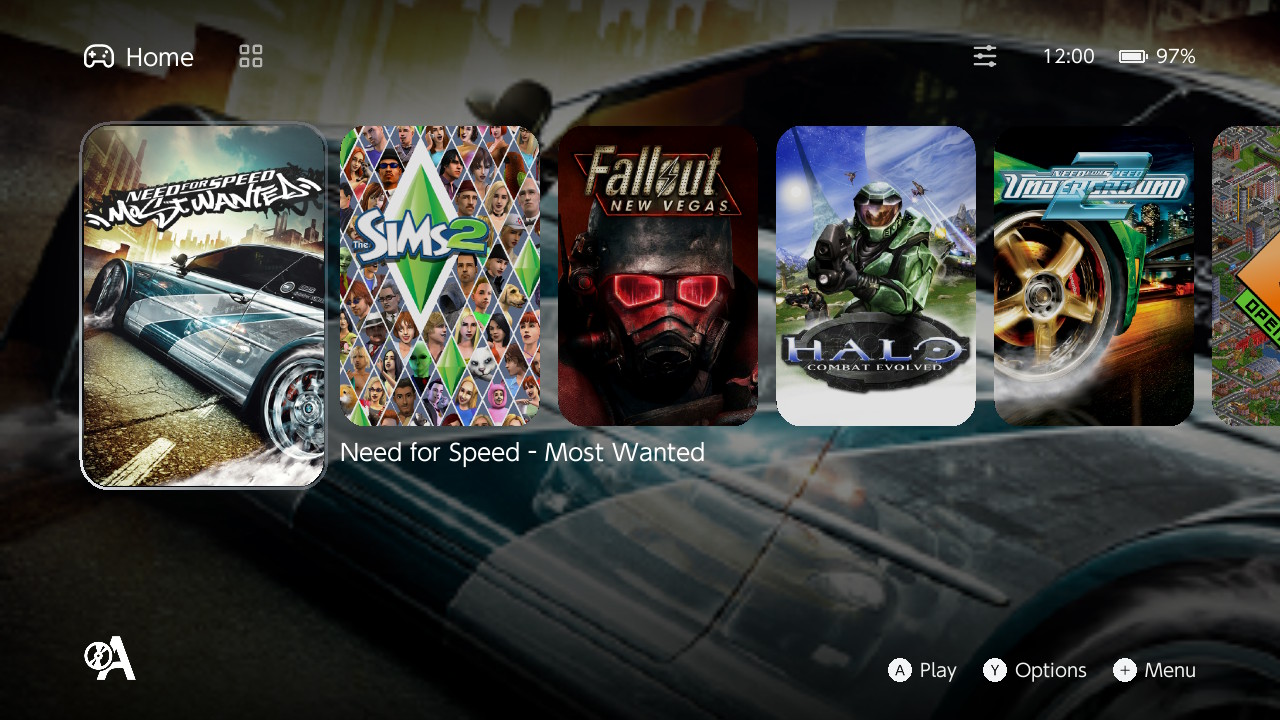
| Halo: Combat Evolved | Plays, at about 30 fps. Needs the [32-bit forwarder](#games-that-need-the-32-bit-forwarder). Max graphics even without overclock. |
| WarCraft III | In game at 24-34 fps, menus at about 50 fps; the intro movie plays. Run its setup once first. |
| Need for Speed Underground 2 | Races with sound and the controller, about 20-45 fps. Needs the 32-bit forwarder. Playable low settings without overclock, max settings with overclock. Requires xinput mod: https://github.com/xan1242/NFSU-XtendedInput |
| Need for Speed: Most Wanted | Playable low settings without overclock, max settings with overclock. Requires xinput mod: https://github.com/xan1242/NFS-XtendedInput |
| Left 4 Dead 2 | Reaches in game, heavy, maybe can be improved. Needs Goldberg Steam emulator since Autorun is single process and won't have Steam, use your original game copy. |
| Fallout: New Vegas | Reaches in game, heavy, maybe can be improved. |
| OpenTTD | Up to 60 fps, with sound. |
| Quake III Arena (Quake3e) | About 37 fps at 720p. |
In progress: **The Sims 2 Legacy Collection** doesn't work yet - it starts and
then closes while loading its title screen. The **Ultimate Collection** hasn't
been tested yet.
Programs such as 7-Zip and Notepad work too. Anything not listed may or may not
run - try it, and if it stops, the log tells what it was missing.
## What you need
- A Nintendo Switch with custom firmware (Atmosphère) that can run homebrew.
- A microSD card with room for Autorun and your games.
- Your games, as installed PC folders. Autorun runs **32-bit** Windows games,
which covers most PC games up to the early 2010s; games that exist only as
64-bit don't run yet.
## Installing
1. Download the Autorun package (a `.zip`).
2. Unzip it to the **root** of your SD card. Everything goes into
`switch/wine`.
3. Start **Autorun** from the Homebrew Menu.
Games need a lot of memory. Open the Homebrew Menu from a game (hold **R**
while starting it) rather than from the Album, or put Autorun on the HOME menu
with **Settings -> System -> Make an Autorun forwarder** and start it from there.
## Adding games
1. Copy the game's folder into `switch/wine/drive_c` on the SD card. That
folder is the game's `C:` drive.
2. In Autorun, press **+** -> **Add game** and choose the game's `.exe`.
3. Press **A** to play.
Adding a game enables DXVK, which draws Direct3D games through the Switch's
Vulkan driver. To keep new games on WineD3D, turn off **Settings -> Give a new
game DXVK**.
Before the first program on a card, Autorun sets up the Windows components a
PC's Windows installation would have registered: DirectShow and the MP3 decoder,
which game movies and music play through (Fallout: New Vegas, Fable, WarCraft
III and others). It runs by itself, once, and the game starts right after it.
**WarCraft III** also has a one-time settings program: run
`C:\WarCraft III Setup\war3-setup.exe` once before playing (**+** -> **Run a
program once** works). Its folder has a `README.txt` with the details.
### Settings a game expects to already have
Some games read a settings file that their own installer or launcher normally
writes, and refuse to start without it. Autorun ships those files, in the same
place Windows keeps them: `switch/wine/drive_c/users/steamuser/Documents` on the
card, which a game sees as its Documents folder.
**Fallout: New Vegas** is one. With no settings of its own it decides it does
not know the graphics card, hands itself over to `FalloutNVLauncher.exe` and
closes. The included
`My Games\FalloutNV\FalloutPrefs.ini` names the Switch's GPU and asks for 720p,
so the game starts instead. Leave it where it is. The game rewrites that file
once you change its options in game, so if you edit it yourself keep the
`sD3DDevice` line under `[Display]`.
### Games that need the 32-bit forwarder
A few older games only work when loaded at fixed low memory addresses - Need for
Speed Underground 2 and Halo are two. Autorun notices when a game needs this and
offers to set it up: **Settings -> System -> Make a 32-bit forwarder** adds an
"Autorun 32-bit" icon to the HOME menu. Start those games from that icon.
It works the other way too: a game that does not need it is sent from "Autorun
32-bit" to the Autorun icon (made with **Make an Autorun forwarder**), since in
32 bits large games run out of memory and close. To keep a game in "Autorun
32-bit" anyway, set **Address space** to 32-bit in its options.
## Using the launcher
| Button | What it does |
|---|---|
| **A** | Play the selected game |
| **Y** | The game's options |
| **L / R** | Switch between Home (recently played) and the Library |
| **−** | Settings (on Home), filter and sort (in the Library) |
| **+** | Add a game, run a program once without adding it (a setup, a patch), or exit Autorun |
The touchscreen works everywhere too.
**A game's options (Y)** - mark it as a favorite or hide it, change its title,
give it command-line arguments, download its artwork, pick how its graphics are
drawn (Direct3D 9 through Wine or DXVK), how a picture smaller than the screen is
enlarged (FSR 1.0, or whole-pixel steps for pixel art), and give it its own
controls.
**Settings (−)** - show hidden games, the controls every game uses by default,
a [SteamGridDB](https://www.steamgriddb.com) API key for artwork, returning to
Autorun when a game ends, making forwarders, and the credits.
## Playing
Out of the box the controller works as a mouse and keyboard:
| Control | Sends |
|---|---|
| Right stick, or a finger on the screen | Moves the mouse pointer |
| **A** / **B** | Left / right mouse button |
| D-pad, left stick | Arrow keys |
| **+** | Esc |
| **X**, **Y** | Space, F |
| **L**, **R** | Tab, Shift |
Every button can be changed: **Settings -> Game defaults -> Controls** for all
games, or a game's options (**Y**) -> **Controls** for that game alone. Each
stick, the d-pad and the touchscreen can move the mouse or send the arrow keys
or W A S D. Games with controller support see an Xbox 360 controller.
**Hold + and − together for a second** to close a game.
**Minus + right stick click** opens the on-screen keyboard over the game (it
also opens by itself when a text field is selected; **Settings -> On-screen
keyboard** turns that off). It types like a real keyboard, one key at a time,
so names and chat boxes can be edited:
| On the keyboard | Does |
|---|---|
| D-pad, left stick | Move between keys |
| **A**, or tap a key | Press it |
| **B** | Backspace |
| **Y** / **X** | Space / Shift for the next key |
| **L**, **R** | Cursor left, right |
| **+** | Enter |
| **ZL**, **ZR** | Keyboard to the top, back to the bottom |
| **−** | Close it |
While it is open, the game gets no controller input.
## If something goes wrong
Every run leaves its logs in `switch/wine/logs` on the SD card:
- `autorun_runtime.log` - the last run, whatever it was.
- `NAME.log` - the last run of that game, kept per game. A run with verbose
traces or the profiler on gets its own file, such as `NAME_verbose.log` or
`NAME_verbose_profiler.log`, so it doesn't replace the plain one.
- `stdout.txt`, `stderr.txt` and `stdin.txt` - the program's standard output,
error and input. What a program writes to them is also in its log.
When reporting a problem, include the game's log and say what you saw. Turning
on **Verbose traces** in the game's options gives more detail, at some speed
cost.
## Limits
- Speed: demanding 3D games are limited by translating the game's code on the
fly, more than by the graphics chip.
- Memory: a game gets at most about 2 GB.
- One game at a time, one controller.
- A game may need Windows files the card doesn't have yet; the log names them.
## For developers
How Autorun works, how to build it, its tests and its file layout are in
[documentation/technical.md](documentation/technical.md).
## Credits
Autorun is built from these projects; each keeps its own copyright and license.
| Project | License | Used for |
|---|---|---|
| [Wine](https://www.winehq.org) | LGPL-2.1-or-later | The Windows API, loader and graphics layers; this repository is a Wine fork |
| [Box64](https://github.com/ptitSeb/box64) (ptitSeb and contributors) | MIT | Running 32-bit x86 code |
| [DXVK](https://github.com/doitsujin/dxvk) | zlib/libpng | Direct3D 9 over Vulkan |
| [Mesa](https://mesa3d.org) and [mesa-switch](https://github.com/danfromtico/mesa-switch) | MIT (mostly) | OpenGL and Vulkan on the Switch's GPU |
| [libnx](https://github.com/switchbrew/libnx) and [devkitPro](https://devkitpro.org) | ISC, per component | The Switch system library and toolchain |
| [SDL2, SDL2_ttf](https://www.libsdl.org), [FreeType](https://freetype.org), [HarfBuzz](https://harfbuzz.github.io), [libpng](http://www.libpng.org), [zlib](https://zlib.net) | zlib, FTL, MIT, libpng | The launcher |
| [dolphin-nx](https://github.com/NaGaa95/dolphin-nx) (NaGaa95) | GPL-2.0-or-later | The look of the launcher, which is Autorun's own code |
The full list, with authors and the projects used as reference, is in
[documentation/technical.md](documentation/technical.md#credits).