The stealth-first browser automation library for Python.
No WebDriver, no navigator.webdriver flag, built to look human.




Documentation ·
Getting Started ·
Features ·
Support
**Pydoll is a stealth-first browser automation library for Python.** It talks straight to the Chrome DevTools Protocol over WebSocket, so there's no WebDriver binary and no `navigator.webdriver` flag to give you away. It clicks, types, and scrolls like a real person, which is often enough to sail through the bot-protection that stops ordinary automation cold. All of it behind a clean, async-native, fully typed API.
Be a good human, give it a star ⭐
No star, no bug fixes. Just kidding. Or not.
### Why Pydoll?
- **Native fingerprint injection**: Make the browser report a fully consistent identity with [`tab.apply_fingerprint()`](#2-fingerprint-injection): User-Agent, Client Hints, `navigator`, WebGL, canvas, screen, fonts, timezone and locale, all aligned. The injected overrides survive `toString` and prototype introspection and propagate into Web Workers, with **zero detections** across CreepJS, SannySoft, BrowserScan and BrowserLeaks.
- **Looks human, not like a bot**: Human-like [mouse movement](https://pydoll.tech/docs/features/automation/mouse-control/) (Bezier curves), realistic typing, and scroll physics. Enough to pass behavioral challenges like Cloudflare Turnstile or reCAPTCHA v3, depending on your browser and IP reputation.
- **Zero WebDrivers**: A direct CDP connection over WebSocket. No driver binary, no `navigator.webdriver` flag, no version-matching headaches.
- **Stealth built in**: Realistic interactions plus granular [browser preference](https://pydoll.tech/docs/features/configuration/browser-preferences/) control for fingerprint management.
- **Async and typed**: Built on `asyncio` from the ground up, 100% type-checked with `mypy`. Full IDE autocompletion and static error checking.
- **Network control**: [Intercept](https://pydoll.tech/docs/features/network/interception/) requests to block ads/trackers, [monitor](https://pydoll.tech/docs/features/network/monitoring/) traffic for API discovery, and make [authenticated HTTP requests](https://pydoll.tech/docs/features/network/http-requests/) that inherit the browser session.
- **Shadow DOM and iframes**: Full support for [shadow roots](https://pydoll.tech/docs/deep-dive/architecture/shadow-dom/) (including closed) and cross-origin iframes. Discover, query, and interact with elements inside them using the same API.
- **Structured extraction**: Define a [Pydantic](https://docs.pydantic.dev/) model, call `tab.extract()`, and get typed, validated data back. No manual element-by-element querying.
> [!NOTE]
> **A word from the maintainer.** Pydoll is currently maintained by a single person, and I'm a bit stretched at the moment, so new releases and replies to issues may take a little longer than usual. To be clear: **the project is not dead, and it is not going anywhere.** Development continues; it's just moving at a calmer pace for now.
>
> **A goal to aim for:** once the project reaches **10k stars**, I plan to ship **Firefox support**, a big step that opens up a whole new range of possibilities for the library. Momentum like that is exactly the kind of incentive that makes a feature this large worth taking on, so if you'd like to see it happen, that's the push it needs.
### Top Sponsors
 Read a full review of Pydoll on The Web Scraping Club, the #1 newsletter dedicated to web scraping.
 The most reliable proxy provider with the Highest Quality IP on the market. Best solution for automation, web scraping, SEO research, and social media management.
### Sponsors
[Learn more about our sponsors](SPONSORS.md) · [Become a sponsor](https://github.com/sponsors/thalissonvs)
## Installation
```bash
pip install pydoll-python
```
No WebDriver binaries or external dependencies required.
## Getting Started
### 1. Stealthy Automation
The imperative API handles the basics: start a browser, navigate, find elements, and interact with them. Pass `humanize=True` to add human-like timing for anti-bot evasion.
```python
import asyncio
from pydoll.browser import Chrome
from pydoll.constants import Key
async def google_search(query: str):
async with Chrome() as browser:
tab = await browser.start()
await browser.set_window_maximized()
tab.mouse.debug = True
await tab.go_to('https://www.google.com')
# Find elements and interact with human-like timing
search_box = await tab.find(tag_name='textarea', name='q')
await search_box.type_text(query, humanize=True)
await tab.keyboard.press(Key.ENTER)
first_result = await tab.find(
tag_name='h3',
text='autoscrape-labs/pydoll',
timeout=10,
)
await first_result.click(humanize=True)
await asyncio.sleep(5)
print(f"Page loaded: {await tab.title}")
asyncio.run(google_search('pydoll site:github.com'))
```
The most reliable proxy provider with the Highest Quality IP on the market. Best solution for automation, web scraping, SEO research, and social media management.
### Sponsors
[Learn more about our sponsors](SPONSORS.md) · [Become a sponsor](https://github.com/sponsors/thalissonvs)
## Installation
```bash
pip install pydoll-python
```
No WebDriver binaries or external dependencies required.
## Getting Started
### 1. Stealthy Automation
The imperative API handles the basics: start a browser, navigate, find elements, and interact with them. Pass `humanize=True` to add human-like timing for anti-bot evasion.
```python
import asyncio
from pydoll.browser import Chrome
from pydoll.constants import Key
async def google_search(query: str):
async with Chrome() as browser:
tab = await browser.start()
await browser.set_window_maximized()
tab.mouse.debug = True
await tab.go_to('https://www.google.com')
# Find elements and interact with human-like timing
search_box = await tab.find(tag_name='textarea', name='q')
await search_box.type_text(query, humanize=True)
await tab.keyboard.press(Key.ENTER)
first_result = await tab.find(
tag_name='h3',
text='autoscrape-labs/pydoll',
timeout=10,
)
await first_result.click(humanize=True)
await asyncio.sleep(5)
print(f"Page loaded: {await tab.title}")
asyncio.run(google_search('pydoll site:github.com'))
```

### 2. Fingerprint Injection
Beyond acting human, Pydoll can make the browser *report* a different, fully consistent identity. `tab.apply_fingerprint()` overrides the whole surface fingerprinting scripts read (User-Agent and Client Hints, `navigator`, WebGL, canvas, screen, fonts, timezone and locale) and aligns every layer so the browser tells one coherent story.
The hard part of spoofing a fingerprint is not changing the values, it is not getting caught changing them. Modern anti-bot scripts inspect *how* a property was defined: a naive `Object.defineProperty` leaves a fake `toString`, an own-property where a prototype getter should be, or an override that a phantom `iframe` or a Web Worker can see straight through. Pydoll resolves all of this: injected getters are indistinguishable from native ones under `toString` and prototype introspection, and the same identity is replayed inside dedicated, shared and service workers.
It also neutralizes the classic **headless** tells (most importantly the SwiftShader WebGL renderer that gives away a GPU-less browser), so `headless=True` automation is no longer flagged as headless. That is what lets a plain Google search run in headless mode without being blocked. (Cloudflare Turnstile in headless is still under study.)
```python
import asyncio
from pydoll.browser.chromium import Chrome
from examples.fingerprints import FINGERPRINTS
async def spoof_fingerprint():
async with Chrome() as browser:
tab = await browser.start()
# Apply before navigating: the JS overrides register on every new document.
await tab.apply_fingerprint(FINGERPRINTS['windows11_rtx3060_nyc'])
await tab.go_to('https://abrahamjuliot.github.io/creepjs/')
print('Fingerprint applied.')
await asyncio.sleep(5)
asyncio.run(spoof_fingerprint())
```
Verified with **zero detections** across the major fingerprint and bot-detection suites:
| Test site | What it checks | Result |
| --- | --- | --- |
| [CreepJS](https://abrahamjuliot.github.io/creepjs/) | Lie detection, prototype / `toString` tampering, workers, fonts | No detection |
| [SannySoft](https://bot.sannysoft.com/) | Headless and bot signals | No detection |
| [BrowserScan](https://www.browserscan.net/bot-detection) | Bot-detection suite | No detection |
| [BrowserLeaks WebGL](https://browserleaks.com/webgl) | WebGL vendor / renderer / hash | No detection |
| [BrowserLeaks JavaScript](https://browserleaks.com/javascript) | `navigator` / JS environment | No detection |
| [BrowserLeaks Canvas](https://browserleaks.com/canvas) | Canvas fingerprint | No detection |
| [BrowserLeaks WebRTC](https://browserleaks.com/webrtc) | WebRTC IP leak | No detection |
**Consistency is the whole game.** A fingerprint is only as strong as its weakest layer, and anti-bot systems correlate signals across all of them. A browser that renders as macOS while its `Accept-Language` says Brazilian Portuguese, its timezone says Tokyo, and its IP geolocates to Germany is *more* suspicious than a browser you never touched. Every layer has to tell the same story. `apply_fingerprint()` keeps the layers it controls internally consistent, but you own the rest: the profile must match the real Chrome binary you drive (the network-layer TLS / HTTP2 fingerprint is authentic and cannot be spoofed) and the geography of your egress IP or proxy. The deep dive on [browser fingerprinting](https://pydoll.tech/docs/deep-dive/fingerprinting/) (see "The Golden Rule": *every layer must tell the same story*) and the [Timezone and Locale Consistency](https://pydoll.tech/docs/deep-dive/fingerprinting/evasion-techniques/) section spell out why a locale that contradicts the IP gets you blocked.
> [!IMPORTANT]
> **Pydoll does not generate or ship fingerprints.** The profiles in [`examples/fingerprints.py`](examples/fingerprints.py) exist only as a reference for how coherent a profile has to be and the shape of the [`FingerprintConfig`](pydoll/protocol/fingerprint/types.py) you inject. Bring your own.
[Fingerprint Injection Docs](https://pydoll.tech/docs/features/advanced/fingerprint-injection/)
### 3. Solving Cloudflare Turnstile
Pydoll gets you past Cloudflare Turnstile the same way a person does: by placing a realistic, humanized click on the widget. It simulates a real user (humanized clicks and movements) and works to make the browser look genuine, so Turnstile assigns a high enough trust score to accept the click. Whether it succeeds depends on your browser and IP reputation.
```python
import asyncio
from pydoll.browser.chromium import Chrome
async def solve_turnstile():
async with Chrome() as browser:
tab = await browser.start()
# Waits for the Turnstile widget, performs a realistic click,
# and continues once it settles.
async with tab.expect_and_bypass_cloudflare_captcha():
await tab.go_to('https://site-with-turnstile.com')
print('Turnstile handled, continuing...')
asyncio.run(solve_turnstile())
```
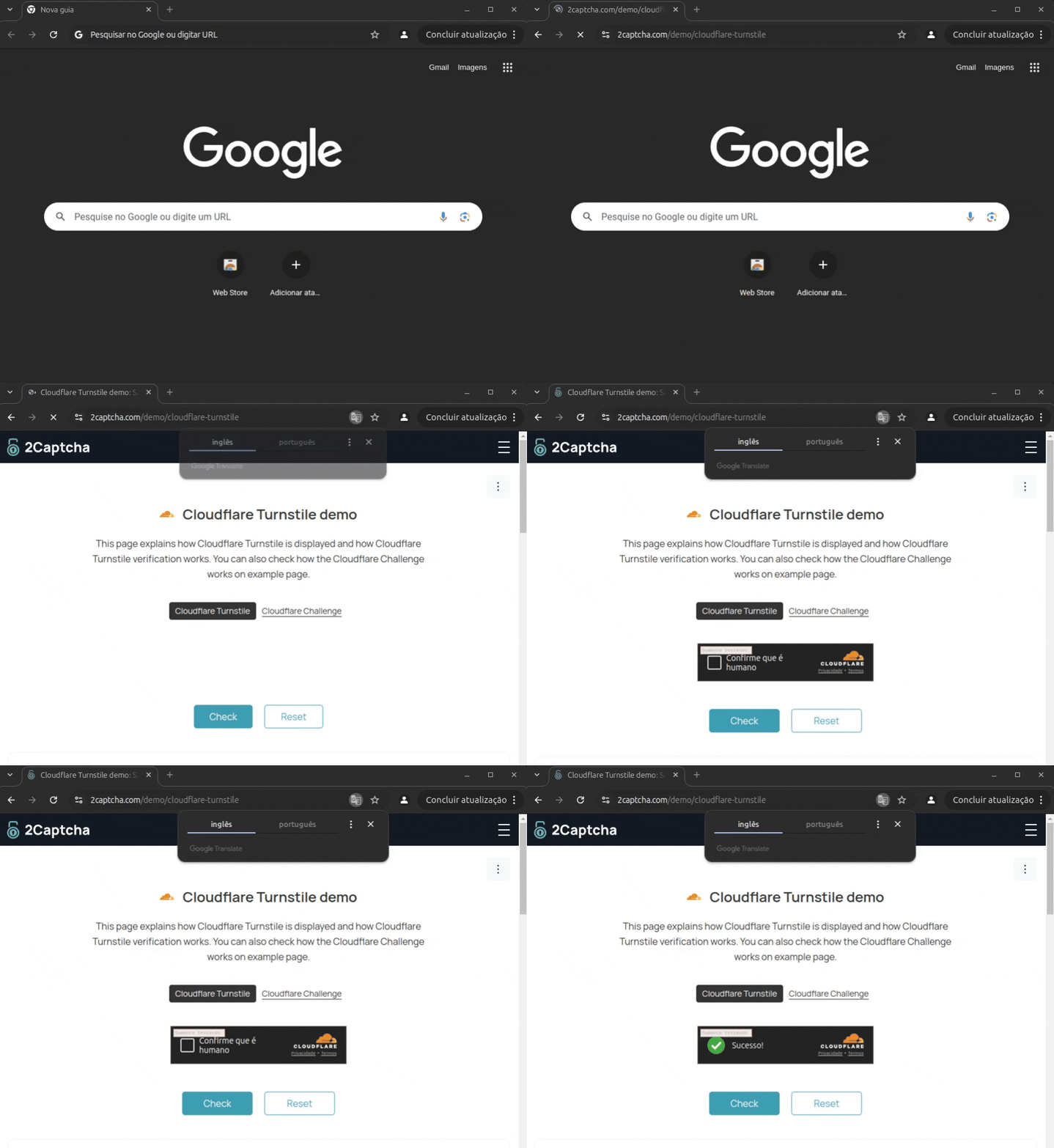
Pydoll getting past a Cloudflare Turnstile challenge with a realistic, humanized click.
> [!NOTE]
> Despite the method name, this isn't a magic bypass. Pydoll performs the same click a real user would; whether it passes depends on your environment (browser fingerprint and IP reputation). See the [Turnstile docs](https://pydoll.tech/docs/features/advanced/behavioral-captcha-bypass/) for details.
## Features
Structured Data Extraction (Pydantic)
Define what you want with a [Pydantic](https://docs.pydantic.dev/) model and Pydoll maps the DOM straight into typed, validated Python objects, no manual element-by-element querying. Models support CSS/XPath auto-detection, HTML attribute targeting, custom transforms, and nested models.
```python
import asyncio
from pydoll.browser.chromium import Chrome
from pydoll.extractor import ExtractionModel, Field
class Quote(ExtractionModel):
text: str = Field(selector='.text', description='The quote text')
author: str = Field(selector='.author', description='Who said it')
tags: list[str] = Field(selector='.tag', description='Tags')
async def extract_quotes():
async with Chrome() as browser:
tab = await browser.start()
await tab.go_to('https://quotes.toscrape.com')
quotes = await tab.extract_all(Quote, scope='.quote', timeout=5)
for q in quotes:
print(f'{q.author}: {q.text}') # fully typed, IDE autocomplete works
print(q.model_dump_json()) # pydantic serialization built-in
asyncio.run(extract_quotes())
```
Humanized Mouse Movement
Mouse operations can produce human-like cursor movement when you pass `humanize=True`:
- **Bezier curve paths** with asymmetric control points
- **Fitts's Law timing**: duration scales with distance
- **Minimum-jerk velocity**: bell-shaped speed profile
- **Physiological tremor**: Gaussian noise scaled with velocity
- **Overshoot correction**: ~70% chance on fast movements, then corrects back
```python
await tab.mouse.move(500, 300, humanize=True)
await tab.mouse.click(500, 300, humanize=True)
await tab.mouse.drag(100, 200, 500, 400, humanize=True)
button = await tab.find(id='submit')
await button.click(humanize=True)
# Default is fast, non-humanized movement
await tab.mouse.click(500, 300)
```
[Mouse Control Docs](https://pydoll.tech/docs/features/automation/mouse-control/)
Shadow DOM Support
Full Shadow DOM support, including closed shadow roots. Because Pydoll operates at the CDP level (below JavaScript), the `closed` mode restriction doesn't apply.
```python
shadow = await element.get_shadow_root()
button = await shadow.query('.internal-btn')
await button.click()
# Discover all shadow roots on the page
shadow_roots = await tab.find_shadow_roots()
for sr in shadow_roots:
checkbox = await sr.query('input[type="checkbox"]', raise_exc=False)
if checkbox:
await checkbox.click()
```
Highlights:
- Closed shadow roots work without workarounds
- `find_shadow_roots()` discovers every shadow root on the page
- `timeout` parameter for polling until shadow roots appear
- `deep=True` traverses cross-origin iframes (OOPIFs)
- Standard `find()`, `query()`, `click()` API inside shadow roots
[Shadow DOM Docs](https://pydoll.tech/docs/deep-dive/architecture/shadow-dom/)
HAR Network Recording
Record network activity during a browser session and export as HAR 1.2. Replay recorded requests to reproduce exact API sequences.
```python
from pydoll.browser.chromium import Chrome
async with Chrome() as browser:
tab = await browser.start()
async with tab.request.record() as capture:
await tab.go_to('https://example.com')
capture.save('flow.har')
print(f'Captured {len(capture.entries)} requests')
responses = await tab.request.replay('flow.har')
```
[HAR Recording Docs](https://pydoll.tech/docs/features/network/network-recording/)
Page Bundles
Save the current page and all its assets (CSS, JS, images, fonts) as a `.zip` bundle for offline viewing. Optionally inline everything into a single HTML file.
```python
await tab.save_bundle('page.zip')
await tab.save_bundle('page-inline.zip', inline_assets=True)
```
[Screenshots, PDFs & Bundles Docs](https://pydoll.tech/docs/features/automation/screenshots-and-pdfs/)
Hybrid Automation (UI + API)
Use UI automation to pass login flows (CAPTCHAs, JS challenges), then switch to `tab.request` for fast API calls that inherit the full browser session: cookies, headers, and all.
```python
# Log in via UI
await tab.go_to('https://my-site.com/login')
await (await tab.find(id='username')).type_text('user')
await (await tab.find(id='password')).type_text('pass123')
await (await tab.find(id='login-btn')).click()
# Make authenticated API calls using the browser session
response = await tab.request.get('https://my-site.com/api/user/profile')
user_data = response.json()
```
[Hybrid Automation Docs](https://pydoll.tech/docs/features/network/http-requests/)
Network Interception and Monitoring
Monitor traffic for API discovery or intercept requests to block ads, trackers, and unnecessary resources.
```python
import asyncio
from pydoll.browser.chromium import Chrome
from pydoll.protocol.fetch.events import FetchEvent, RequestPausedEvent
from pydoll.protocol.network.types import ErrorReason
async def block_images():
async with Chrome() as browser:
tab = await browser.start()
async def block_resource(event: RequestPausedEvent):
request_id = event['params']['requestId']
resource_type = event['params']['resourceType']
if resource_type in ['Image', 'Stylesheet']:
await tab.fail_request(request_id, ErrorReason.BLOCKED_BY_CLIENT)
else:
await tab.continue_request(request_id)
await tab.enable_fetch_events()
await tab.on(FetchEvent.REQUEST_PAUSED, block_resource)
await tab.go_to('https://example.com')
await asyncio.sleep(3)
await tab.disable_fetch_events()
asyncio.run(block_images())
```
[Network Monitoring](https://pydoll.tech/docs/features/network/monitoring/) | [Request Interception](https://pydoll.tech/docs/features/network/interception/)
Browser Fingerprint Control
Granular control over [browser preferences](https://pydoll.tech/docs/features/configuration/browser-preferences/): hundreds of internal Chrome settings for building consistent fingerprints.
```python
options = ChromiumOptions()
options.browser_preferences = {
'profile': {
'default_content_setting_values': {
'notifications': 2,
'geolocation': 2,
},
'password_manager_enabled': False
},
'intl': {
'accept_languages': 'en-US,en',
},
'browser': {
'check_default_browser': False,
}
}
```
[Browser Preferences Guide](https://pydoll.tech/docs/features/configuration/browser-preferences/)
Concurrency, Contexts and Remote Connections
Manage [multiple tabs](https://pydoll.tech/docs/features/browser-management/tabs/) and [browser contexts](https://pydoll.tech/docs/features/browser-management/contexts/) (isolated sessions) concurrently. Connect to browsers running in Docker or remote servers.
```python
async def scrape_page(url, tab):
await tab.go_to(url)
return await tab.title
async def concurrent_scraping():
async with Chrome() as browser:
tab_google = await browser.start()
tab_ddg = await browser.new_tab()
results = await asyncio.gather(
scrape_page('https://google.com/', tab_google),
scrape_page('https://duckduckgo.com/', tab_ddg)
)
print(results)
```
[Multi-Tab Management](https://pydoll.tech/docs/features/browser-management/tabs/) | [Remote Connections](https://pydoll.tech/docs/features/advanced/remote-connections/)
Retry Decorator
The `@retry` decorator supports custom recovery logic between attempts (e.g., refreshing the page, rotating proxies) and exponential backoff.
```python
from pydoll.decorators import retry
from pydoll.exceptions import ElementNotFound, NetworkError
@retry(
max_retries=3,
exceptions=[ElementNotFound, NetworkError],
on_retry=my_recovery_function,
exponential_backoff=True
)
async def scrape_product(self, url: str):
# scraping logic
...
```
[Retry Decorator Docs](https://pydoll.tech/docs/features/advanced/decorators/)
---
## Contributing
Contributions are welcome. See [CONTRIBUTING.md](CONTRIBUTING.md) for guidelines.
## Support
If you find Pydoll useful, consider [sponsoring the project on GitHub](https://github.com/sponsors/thalissonvs).
## License
[MIT License](LICENSE)