WebDuck

A self-hosted DuckDB-as-a-Service server with REST API and Web UI. WebDuck is designed for web hosting providers who want to offer their customers a ready-to-use administration interface for DuckDB databases and data analytics — out of the box, just like the database admin tools that come with any hosting package.

Website · Issues · License
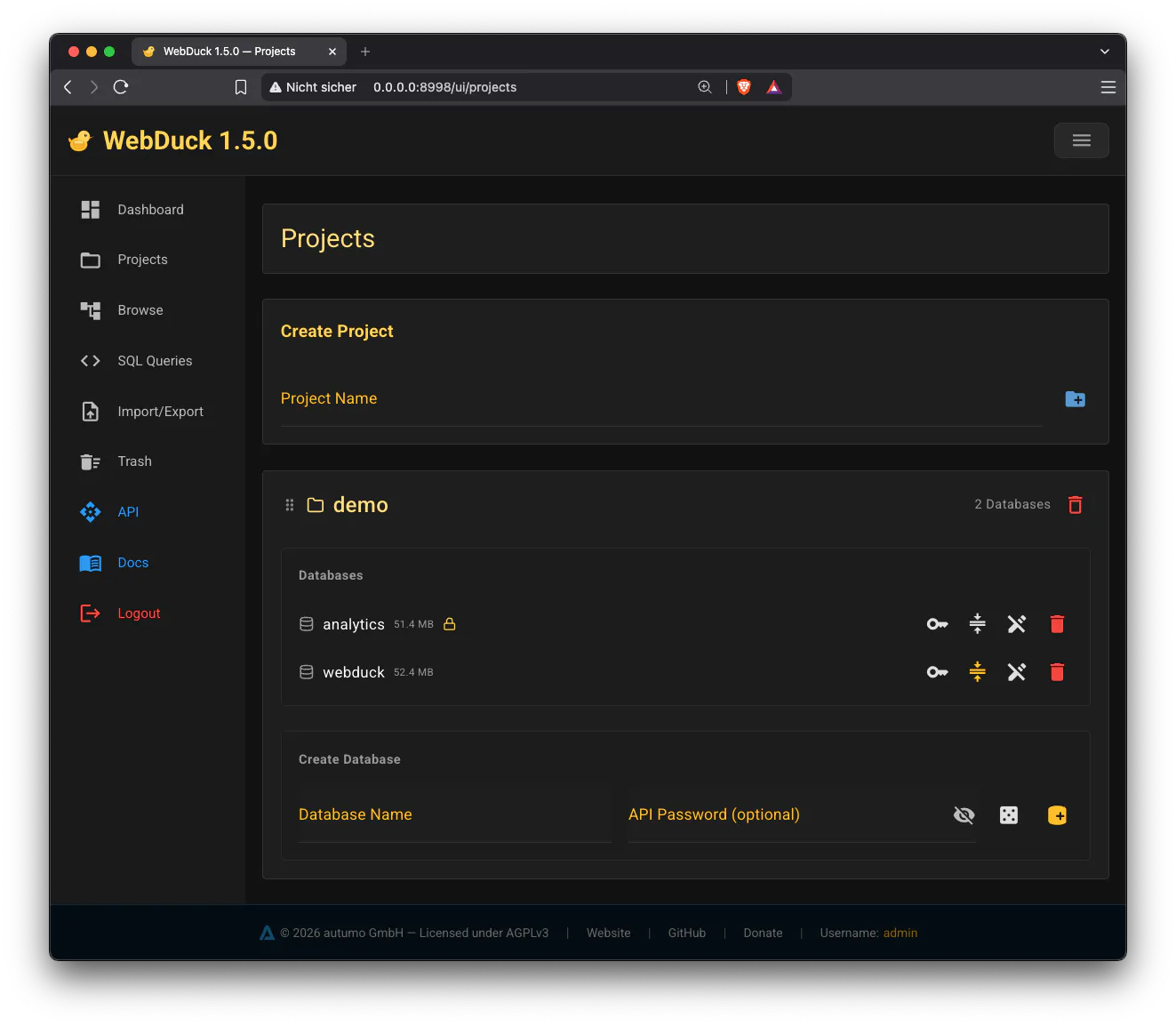
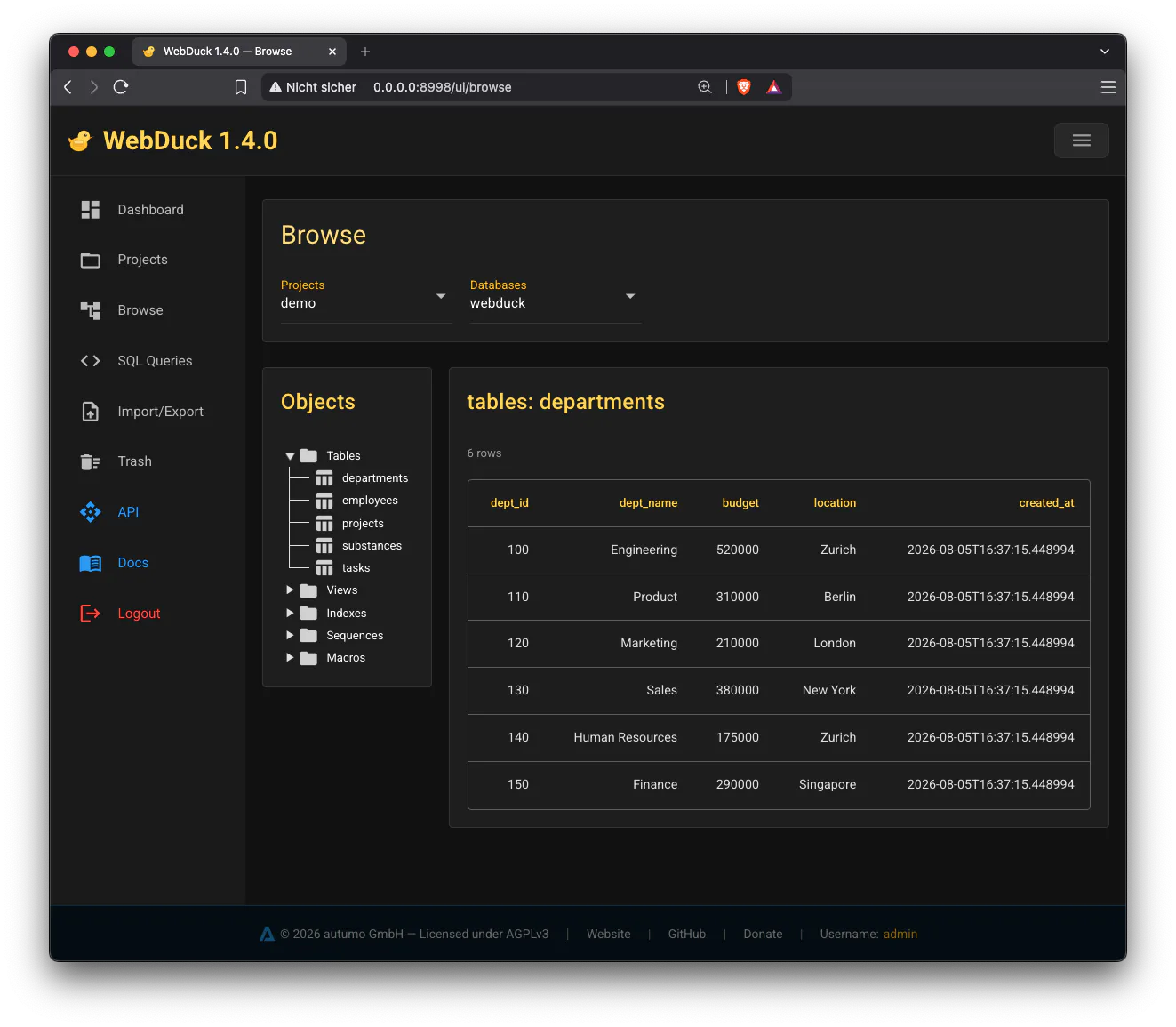
## Features - **DuckDB storage engine** with file-locking for safe concurrent access - **REST API** — admin endpoints (project/DB management) + database endpoints (SQL queries) - **Web UI** (NiceGUI) — dark mode with yellow/amber theme - **Dashboard** — server status cards, live REST traffic monitor (queries/min, active sessions), storage overview with per-project sizes and trash totals - **Trash** — soft-delete projects/databases with restore, permanent delete per entry, empty trash - **JWT authentication** for admin API, optional project-key auth for database access - **Per-database write protection** — lock a database to read-only, independent of passwords: passwords control *who* may access, write protection controls *what* may be done to the data. It protects the data only — compacting, deleting and managing passwords in the web UI keep working at any time - **bcrypt password hashing** (never plaintext) - **SQL editor** — multi-statement support with sequential execution, query history (Alt+Up/Alt+Down, Alt+Enter) - **SQL upload** — execute multi-statement SQL scripts from files - **Database compression** — reclaims space DuckDB leaves behind after updates/deletes; a hint highlights databases with high fragmentation - **Browse view** — tree-based navigation of databases/tables/views with infinite scroll and cell editing - **Import/Export** — CSV, Parquet and JSON import via drag & drop, export with browser download - **Project ordering** — drag & drop reordering, persisted in `.projects.json` - **i18n** — English (default), German, extensible via PO/Gettext - **Configurable logging** — file rotation + console output, independently configurable - **Configurable upload size** — max file size for uploads - **FK dependency hints** — DROP errors include referenced tables and constraint info - **Docker** support out of the box - **YAML configuration** ## Web UI
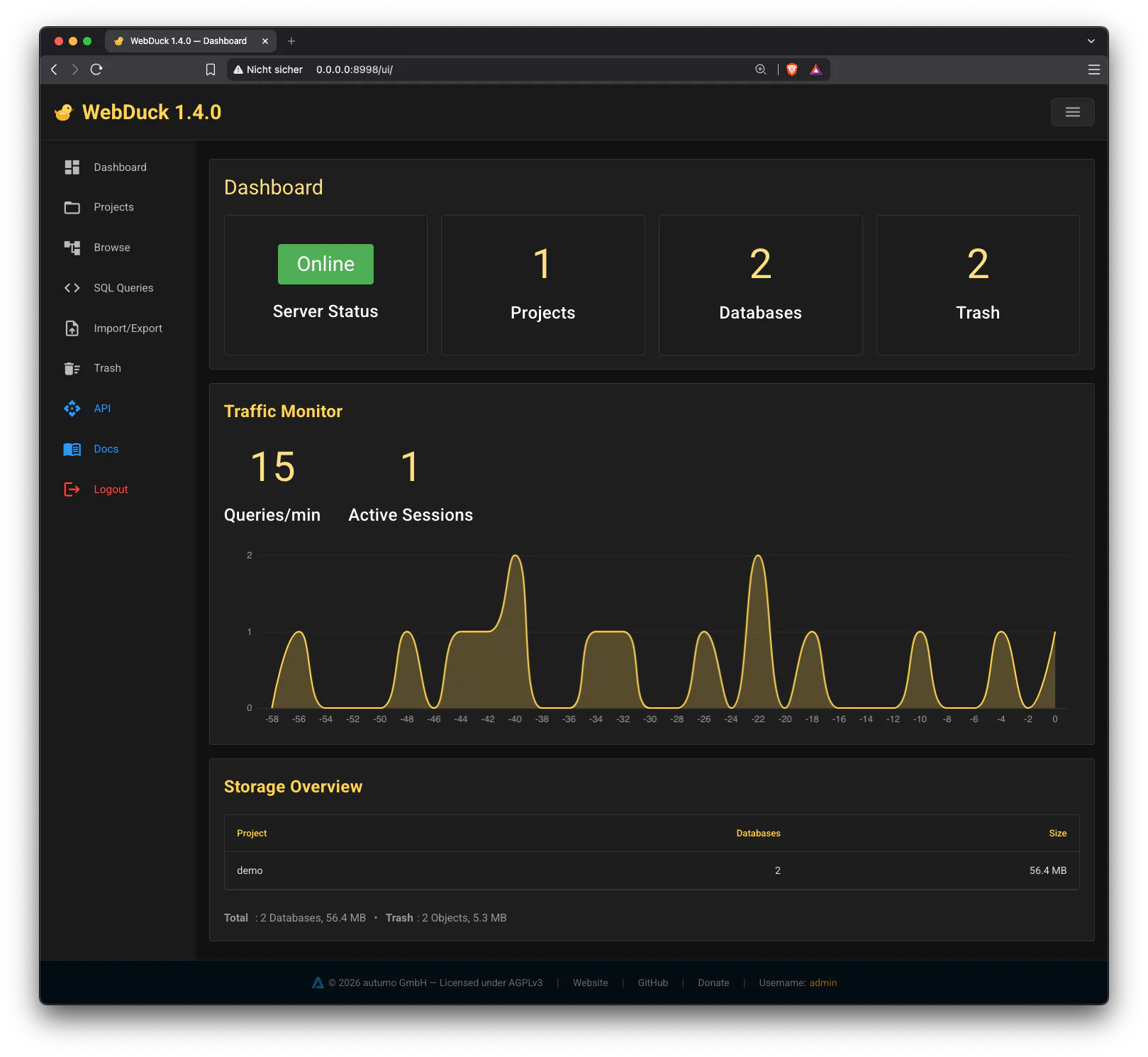
Dashboard
Projects
Browse View
## Installation ### pip (Python) ```bash pip install webduck ``` ### Docker ```bash # Download docker-compose.yml curl -O https://raw.githubusercontent.com/autumoswitzerland/Webduck/master/docker-compose.yml # Set password export WEBDUCK_ADMIN_PASS=mypassword # Start - An admin user is created automatically docker compose up -d ``` ## Quick Start ### pip ```bash # Initialize - Create an admin user webduck init # Create additional admin users (optional) webduck user add anna secret # Start server webduck start ``` ### Docker Docker starts automatically — UI at `http://localhost:8998/ui/login`. Log in with `admin` and the password you set. ## CLI Commands | Command | Description | |---------|-------------| | `webduck init` | Create admin user + default config | | `webduck user add ` | Create an additional admin user | | `webduck user list` | List all admin users | | `webduck user delete ` | Delete an admin user (removes prefs + query history) | | `webduck start` | Start the server | | `webduck status` | Show projects and databases | Options: ```bash webduck start --host 127.0.0.1 --port 8080 --config /path/to/webduck.yaml webduck user add anna secret webduck user add anna secret --config /path/to/webduck.yaml ``` ## Configuration `webduck.yaml` (generated by `webduck init`): ```yaml icon: "icon.svg" auth: jwt_algorithm: HS256 jwt_expire_minutes: 60 jwt_secret: CHANGE-ME-TO-A-SECRET-KEY-IN-PRODUCTION logging: file: enabled: true level: error max_files: 5 max_size_mb: 10 query_log: false log_dir: log console: enabled: false access_log: false level: warning server: data_dir: data host: 0.0.0.0 port: 8998 max_upload_mb: 256 ``` > **Security note:** Before deploying WebDuck in production, replace > `jwt_secret` in `webduck.yaml` with a long, random secret (e.g. generated > with `openssl rand -base64 48`). The placeholder value > `CHANGE-ME-TO-A-SECRET-KEY-IN-PRODUCTION` must never be used in > production — anyone who knows the secret can forge admin tokens. ## Web UI Pages | Page | URL | Description | |------|-----|-------------| | Login | `/ui/login` | Admin login with language selection | | Dashboard | `/ui/dashboard` | Server status, live traffic monitor (queries/min, active sessions), storage overview | | Projects | `/ui/projects` | Create/delete projects, manage databases, set passwords, write protection, drag & drop reorder, database sizes + compression hint | | Queries | `/ui/query` | SQL editor (multi-statement) + SQL file upload, query history (Alt+Up/Alt+Down) | | Browse | `/ui/browse` | Tree navigation, table/view browsing with infinite scroll, cell editing | | Import/Export | `/ui/import` | CSV, Parquet and JSON import (drag & drop) and export (browser download) | | Trash | `/ui/trash` | Restore soft-deleted projects/databases, empty the trash | ## REST API Reference ### Admin API (JWT protected) All admin endpoints require `Authorization: Bearer `. Tokens are signed with the `jwt_secret` from `webduck.yaml` — make sure you replaced the placeholder before going to production (see the security note above). | Method | Endpoint | Description | |--------|----------|-------------| | `POST` | `/admin/login` | Login, returns JWT token | | `GET` | `/admin/projects` | List all projects (ordered) | | `POST` | `/admin/projects` | Create project | | `DELETE` | `/admin/projects/{project}` | Delete project + all databases | | `POST` | `/admin/reorder-projects` | Reorder projects | | `GET` | `/admin/projects/{project}/databases` | List databases in project | | `POST` | `/admin/projects/{project}/databases` | Create database | | `DELETE` | `/admin/projects/{project}/databases/{db}` | Delete database | | `PUT` | `/admin/projects/{project}/databases/{db}/password` | Set database password | | `PUT` | `/admin/projects/{project}/databases/{db}/write-protection` | Enable/disable write protection (read-only) | | `GET` | `/admin/users` | List admin users | | `POST` | `/admin/users` | Create admin user | | `DELETE` | `/admin/users/{username}` | Delete admin user | ### Database API (project-key protected) All database endpoints require `X-Project-Key: :`. Databases without a password set are publicly accessible. | Method | Endpoint | Description | |--------|----------|-------------| | `GET` | `/db/projects` | List all projects (public) | | `GET` | `/db/projects/{project}/databases` | List databases (public) | | `POST` | `/db/projects/{project}/databases/{db}/query` | Execute SQL (read-only) | | `POST` | `/db/projects/{project}/databases/{db}/write` | Execute SQL (read-write) | | `GET` | `/db/projects/{project}/databases/{db}/tables` | List tables + columns | | `POST` | `/db/projects/{project}/databases/{db}/import/{tbl}` | Import CSV/Parquet/JSON | | `GET` | `/db/projects/{project}/databases/{db}/export/{tbl}` | Export table to CSV/Parquet/JSON | ### Example: Login + Query ```bash # Login TOKEN=$(curl -s -X POST http://localhost:8998/admin/login \ -H "Content-Type: application/json" \ -d '{"username":"admin","password":"secret"}' | jq -r '.token') # Create project + database curl -X POST http://localhost:8998/admin/projects \ -H "Authorization: Bearer $TOKEN" \ -d '{"name":"myapp"}' curl -X POST http://localhost:8998/admin/projects/myapp/databases \ -H "Authorization: Bearer $TOKEN" \ -d '{"name":"main"}' # Execute a query via the Database API (no password yet = open) curl -X POST http://localhost:8998/db/projects/myapp/databases/main/write \ -H "Content-Type: application/json" \ -d '{"sql":"CREATE TABLE users (id INT, name VARCHAR); INSERT INTO users VALUES (1, '\''Alice'\'');"}' # Read (without password — no header needed) curl -X POST http://localhost:8998/db/projects/myapp/databases/main/query \ -d '{"sql":"SELECT * FROM users"}' # Set database password (optional — without password, API is open) curl -X PUT http://localhost:8998/admin/projects/myapp/databases/main/password \ -H "Authorization: Bearer $TOKEN" \ -d '{"password":"dbpass","access_level":"write"}' # Read (with password) curl -X POST http://localhost:8998/db/projects/myapp/databases/main/query \ -H "X-Project-Key: myapp:dbpass" \ -d '{"sql":"SELECT * FROM users"}' ``` ## Docker Run WebDuck with Docker Compose: ```bash docker compose up -d ``` WebDuck stores its data in `/app/data` inside the container. The provided Docker Compose configuration persists this data using the `webduck_data` volume. Initialize with: ```bash docker compose exec webduck webduck init ``` ## Architecture ``` FastAPI ──┬── /admin/* (JWT auth) → Project/DB management ├── /db/* (project key) → SQL queries + CSV/Parquet/JSON import/export ├── /ui/* (cookie) → NiceGUI Web UI ├── /api/* (session) → Internal UI endpoints └── /health → Health check ``` - **Storage:** DuckDB files in `data//.duckdb` - **Project order:** Persisted in `data/.projects.json` - **Reserved name:** `trash` is reserved for the soft-delete trash directory — a project directory named `trash` is not listed as a project - **Auth:** Admin passwords in `data/.users.json` (bcrypt), DB passwords in `data//.project.json` - **Write protection:** Per-database read-only flag in `data//.project.json`; a protected database is always opened read-only by the engine - **User preferences:** Stored in `data/.user_preferences.json` - **Logging:** Rotated log files in `log/` (configurable), independent console logging - **Concurrency:** Per-file reader-writer locks — parallel reads, exclusive writes (DuckDB single-writer model) ## Development ```bash git clone https://github.com/autumoswitzerland/Webduck.git cd webduck python3.13 -m venv .venv source .venv/bin/activate pip install -e ".[dev]" # Run tests pytest tests/ # Run linter ruff check src/ tests/ ``` ## Donate WebDuck is free and open-source. If you find it useful, consider supporting the development: [![Donate via PayPal](https://img.shields.io/badge/Donate-PayPal-blue)](https://www.paypal.com/ncp/payment/NZ4CC6SVF9HN8) ## License WebDuck is licensed under the GNU Affero General Public License v3.0 (AGPLv3) — see [LICENSE](LICENSE) for details.

Copyright © 2026 autumo GmbH