### [Flowise](https://github.com/FlowiseAI/Flowise)
> Handle: `flowise`
> URL: [http://localhost:34231](http://localhost:34231)
 [](https://github.com/FlowiseAI/Flowise/releases)
[](https://discord.gg/jbaHfsRVBW)
[](https://twitter.com/FlowiseAI)
[](https://star-history.com/#FlowiseAI/Flowise)
[](https://github.com/FlowiseAI/Flowise/fork)
Open source low-code tool for developers to build customized LLM orchestration flow & AI agents.
#### Starting
```bash
# [Optional] Pre-pull the image
harbor pull flowise
# Start the service [--open is optional, to auto open in browser]
harbor up flowise --open
```
#### Usage
Flowise connections are mostly configured specifically for a given workflow right within the nodes.
When running alongside other services in Harbor - use their internal URLs. For example:
```bash
# Ollama URL for the Flowise
harbor url -i ollama
```
Here's the most basic chat workflow:
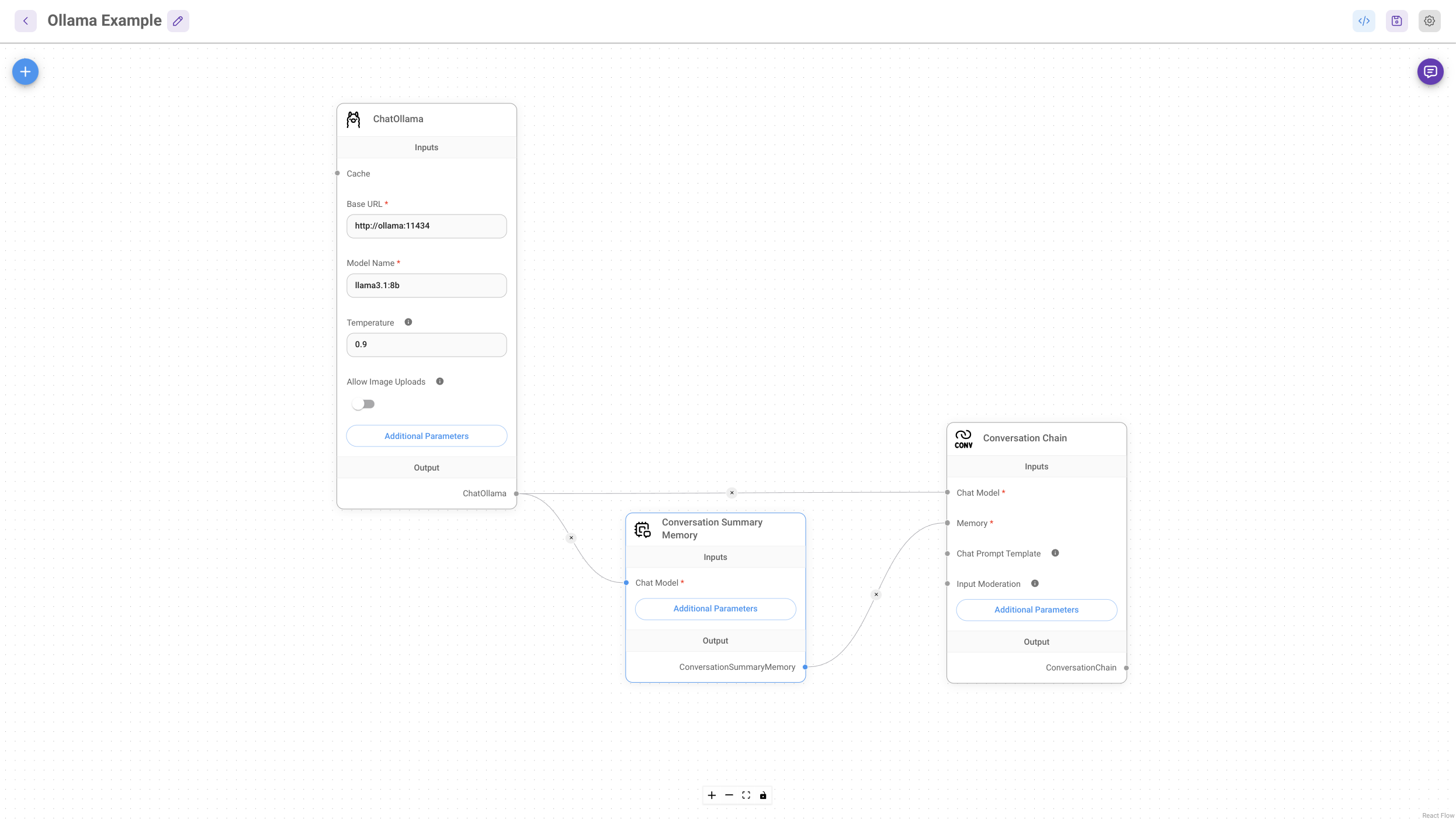
Other than that, Flowise is an extremely feature-rich tool with a lot of capabilities, please see the [official documentation](https://docs.flowiseai.com/integrations) and [tutorials](https://docs.flowiseai.com/using-flowise/agentflows/sequential-agents/video-tutorials) to get started.
#### Configuration
[Official environment variables reference](https://github.com/FlowiseAI/Flowise/blob/main/CONTRIBUTING.md#-env-variables). To set them, see Harbor's [environment configuration guide](./1.-Harbor-User-Guide#environment-variables).
Apart from that, you can configure the following via [`harbor config`](./3.-Harbor-CLI-Reference#harbor-config) with the following options supported:
```bash
# The port on the host machine to access
# the Flowise service API and UI
FLOWISE_HOST_PORT 34281
# The Docker image to use
FLOWISE_IMAGE flowiseai/flowise
# The tag of the Docker image to use
FLOWISE_VERSION latest
# Location of the workspace directory on the host machine
# relative to $(harbor home), but can be global as well
FLOWISE_WORKSPACE ./flowise/data
```
[](https://github.com/FlowiseAI/Flowise/releases)
[](https://discord.gg/jbaHfsRVBW)
[](https://twitter.com/FlowiseAI)
[](https://star-history.com/#FlowiseAI/Flowise)
[](https://github.com/FlowiseAI/Flowise/fork)
Open source low-code tool for developers to build customized LLM orchestration flow & AI agents.
#### Starting
```bash
# [Optional] Pre-pull the image
harbor pull flowise
# Start the service [--open is optional, to auto open in browser]
harbor up flowise --open
```
#### Usage
Flowise connections are mostly configured specifically for a given workflow right within the nodes.
When running alongside other services in Harbor - use their internal URLs. For example:
```bash
# Ollama URL for the Flowise
harbor url -i ollama
```
Here's the most basic chat workflow:

Other than that, Flowise is an extremely feature-rich tool with a lot of capabilities, please see the [official documentation](https://docs.flowiseai.com/integrations) and [tutorials](https://docs.flowiseai.com/using-flowise/agentflows/sequential-agents/video-tutorials) to get started.
#### Configuration
[Official environment variables reference](https://github.com/FlowiseAI/Flowise/blob/main/CONTRIBUTING.md#-env-variables). To set them, see Harbor's [environment configuration guide](./1.-Harbor-User-Guide#environment-variables).
Apart from that, you can configure the following via [`harbor config`](./3.-Harbor-CLI-Reference#harbor-config) with the following options supported:
```bash
# The port on the host machine to access
# the Flowise service API and UI
FLOWISE_HOST_PORT 34281
# The Docker image to use
FLOWISE_IMAGE flowiseai/flowise
# The tag of the Docker image to use
FLOWISE_VERSION latest
# Location of the workspace directory on the host machine
# relative to $(harbor home), but can be global as well
FLOWISE_WORKSPACE ./flowise/data
```