### [Dify](https://github.com/langgenius/dify)
> Handle: `dify`
> URL: [http://localhost:33961/](http://localhost:33961/)

Dify Cloud ·
Self-hosting ·
Documentation ·
Enterprise inquiry








Dify is an open-source LLM app development platform. Dify's intuitive interface combines AI workflow, RAG pipeline, agent capabilities, model management, observability features and more, letting you quickly go from prototype to production.
#### Starting
```bash
# [Optional] Pull the dify images
# ahead of starting the service
harbor pull dify
# Start the service
harbor up dify
harbor open dify
```
When started for the first time - you'll be asked to create an admin account.
Dify enables implementing some quite advanced workflows with high degree of specialization. For example:
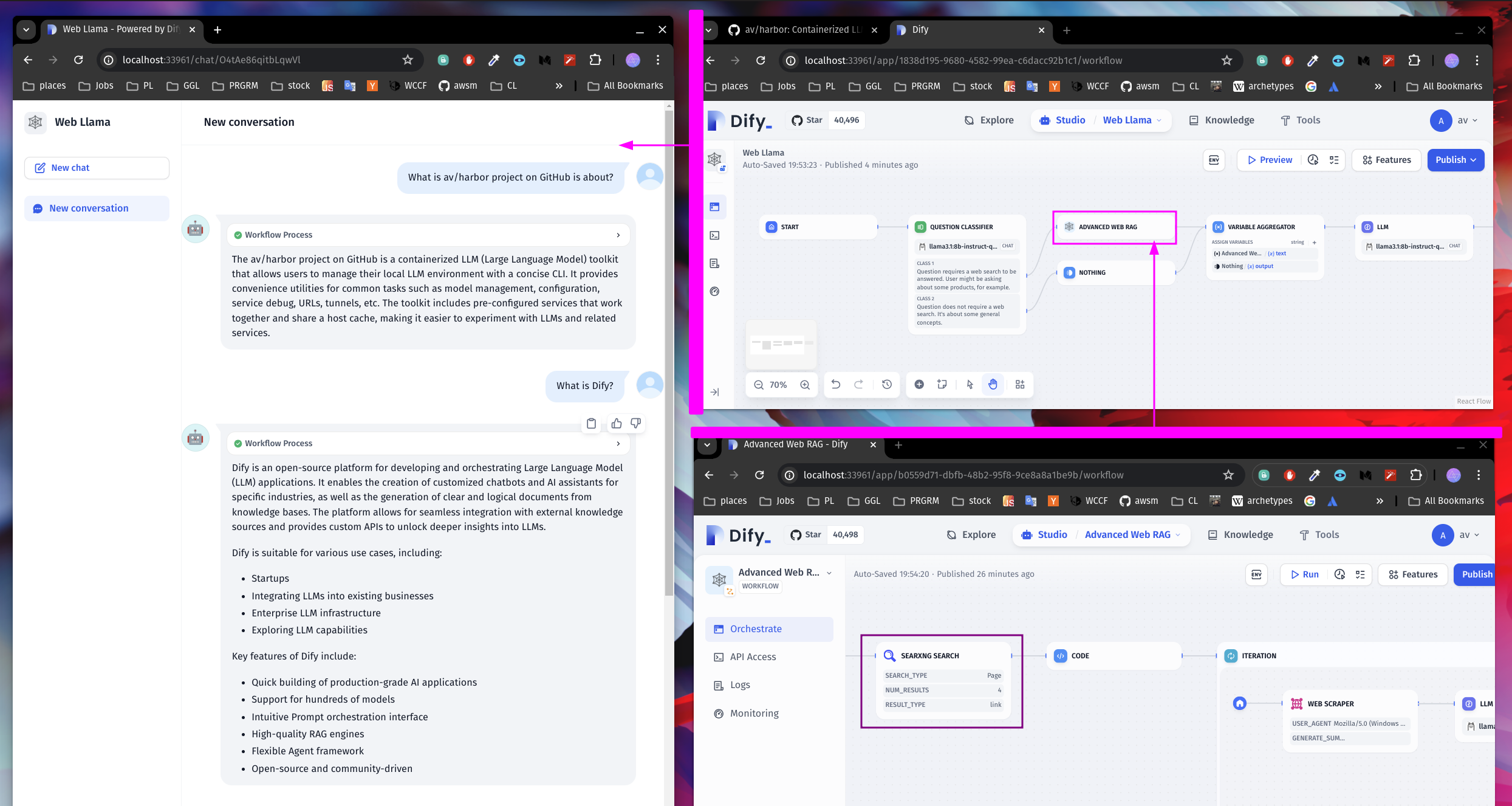
On this screenshot, we have two Dify workflows:
- Web Llama . [download](./dify-sample-webllama.yml)
- Advanced Web RAG . [download](./dify-sample-webrag.yml)
Web Llama classifies User input to detect if a Web Search is needed, or if the input can be answered directly. If a search is needed, it launches the "Advanced Web RAG" workflow.
Advanced Web RAG workflow transforms the User input into a query for SearXNG, then uses code to scrape the links from the search results. The links are then passed to the Web Scraper and a summarization model to generate a response.
Then, Web Llama generates a final response based on the Web RAG.
Neat!
#### Integrations
`dify` is a complete LLM application platform (API, worker, web UI, Postgres, Redis, Weaviate vector store, sandbox, SSRF proxy, nginx front door, and the `dify-openai` shim) that integrates deeply with the Harbor ecosystem in both directions.
**Frontends and tools that auto-configure for dify**
When you run `harbor up` with `dify` plus a consumer, Harbor's cross-compose files (`services/compose.x.*.dify.yml`) inject the OpenAI-compatible endpoint exposed by the local `dify-openai` container (`http://dify-openai:3000/v1`, authenticated with the workflow key stored in `HARBOR_DIFY_OPENAI_WORKFLOW` and `HARBOR_DIFY_BOT_TYPE`):
- `webui` — mounts `config.dify.json` to register the provider.
- `chatui` — mounts endpoint config under `MODELS`.
- `boost` — sets `HARBOR_BOOST_OPENAI_URL_DIFY` + key for the dify backend.
- `aider` — mounts `aider.dify.yml` (respects `HARBOR_AIDER_MODEL`).
- `optillm` — points `OPTILLM_BASE_URL` at the proxy.
- `aichat` — supplies a ready `aichat.dify.yml` (volume mount can be added manually or via profile).
**Dify consuming other Harbor LLM backends**
Dify's model providers are configured in the Dify UI (Settings → Model Providers). All Harbor services live on the shared `harbor-network`, so you configure them with simple internal addresses:
- Ollama → `http://ollama:11434`
- llama.cpp → `http://llamacpp:8080/v1`
- vLLM, LiteLLM, TabbyAPI, etc. → their standard OpenAI-compatible ports
- Any other inference engine you have started with `harbor up`
See the "Ollama" and "SearXNG" sections below for concrete examples; the pattern works for every backend Harbor ships.
**Vector / RAG storage**
- Ships with its own `dify-weaviate` (pinned by `HARBOR_DIFY_WEAVIATE_VERSION`), data persisted under `${HARBOR_DIFY_WORKSPACE}/weaviate`.
- `override.env` lets you switch `VECTOR_STORE` to `qdrant`, `pgvector`, `milvus`, etc. Bring up the corresponding Harbor service and update the endpoint (e.g. `http://qdrant:6333`) — Dify will use it for knowledge bases.
- User uploads, file processing artifacts and app data live in `${HARBOR_DIFY_WORKSPACE}/app/storage` (mounted for both api and worker).
**Tool and platform integrations**
- SearXNG is a first-class tool source inside Dify workflows (configure via the internal URL obtained from `harbor url -i searxng`).
- Code execution and SSRF protection are provided by the bundled `dify-sandbox` and `dify-ssrf` containers.
**Reverse proxy / external access**
- When `traefik` is active, `compose.x.traefik.dify.yml` adds labels so Dify is reachable at `https://dify.${HARBOR_TRAEFIK_DOMAIN}` (websecure entrypoint).
**Host / volume interactions**
- Primary persistence root: `${HARBOR_DIFY_WORKSPACE}` (host `./dify/volumes` by default) — covers the Postgres DB, Redis, Weaviate, API storage, Certbot certificates, and sandbox Python dependencies. Set via `harbor config set dify.workspace `.
- `HARBOR_DIFY_VOLUMES` is reserved for Harbor's generic custom-volumes system and is unrelated to Dify data paths (do not use it for workspace storage).
- Numerous bind mounts from `./services/dify/...` supply custom nginx configs, squid templates, certbot entrypoints, and the source for the `dify-openai` proxy (which is built locally rather than pulled).
- The top-level `dify` nginx container depends on `dify-api` + `dify-web`; health of the DB and Redis is enforced before startup.
All of the above is driven by the cross-compose layer and the common Docker network. After changing any `HARBOR_DIFY_*` variable, run `harbor config update` (if needed) and restart the affected services.
#### Configuration
Unfortunately, there's no direct way to configure Dify via Harbor CLI. So, all the configuration should be done via Dify UI.
However, Dify provides good integration guides for relevant services.
Use the command below to list all Harbor configuration options specific to Dify:
```bash
user@os:~$ ▼ harbor config list | grep DIFY
HARBOR_DIFY_HOST_PORT 33961
HARBOR_DIFY_DB_HOST_PORT 33962
HARBOR_DIFY_D2O_HOST_PORT 33963
HARBOR_DIFY_VERSION 0.6.16
HARBOR_DIFY_SANDBOX_VERSION 0.2.1
HARBOR_DIFY_WEAVIATE_VERSION 1.19.0
HARBOR_DIFY_WORKSPACE ./dify/volumes
HARBOR_DIFY_VOLUMES (empty; custom-volumes system only)
HARBOR_DIFY_BOT_TYPE Chat
HARBOR_DIFY_OPENAI_WORKFLOW
```
##### Updating Dify
Due to the way Dify is setup, its versions are pinned in Harbor. You can use `dify.version` config option to set the desired version.
```bash
# Set the version to a different one
harbor config set dify.version 0.6.16
# Re-pull the images
harbor pull dify
# Restart the service
harbor restart dify
```
##### Ollama
[Dify + Ollama](https://docs.dify.ai/guides/model-configuration/ollama)
```bash
# Get your ollama URL for dify
# Note the "-i" flag - the URL is internal to Docker
harbor url -i ollama
# See which models are available
harbor ollama list
```
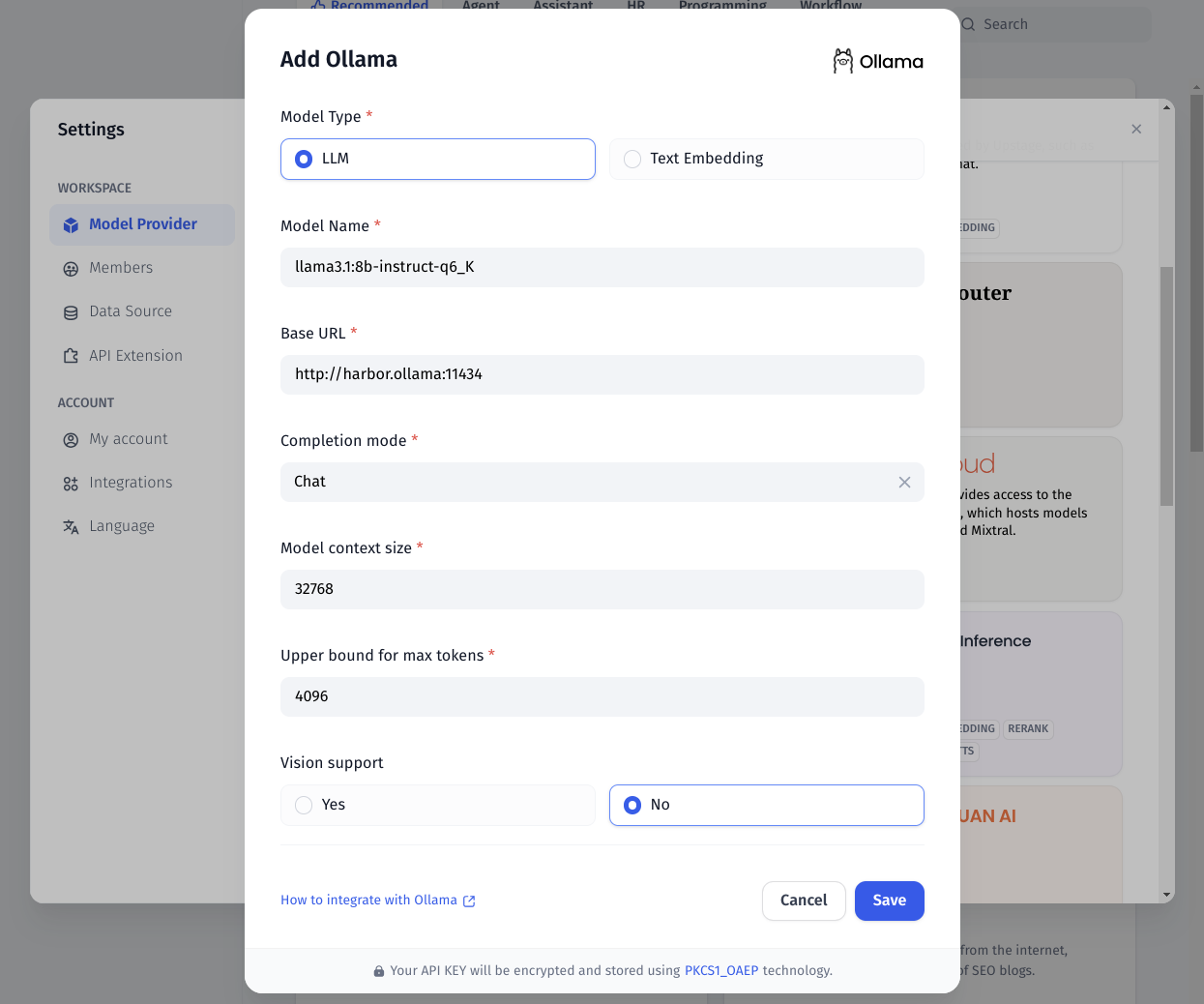
Ensure to also setup the Embedding model to be better equipped for Dify's RAG pipeline.
##### SearXNG
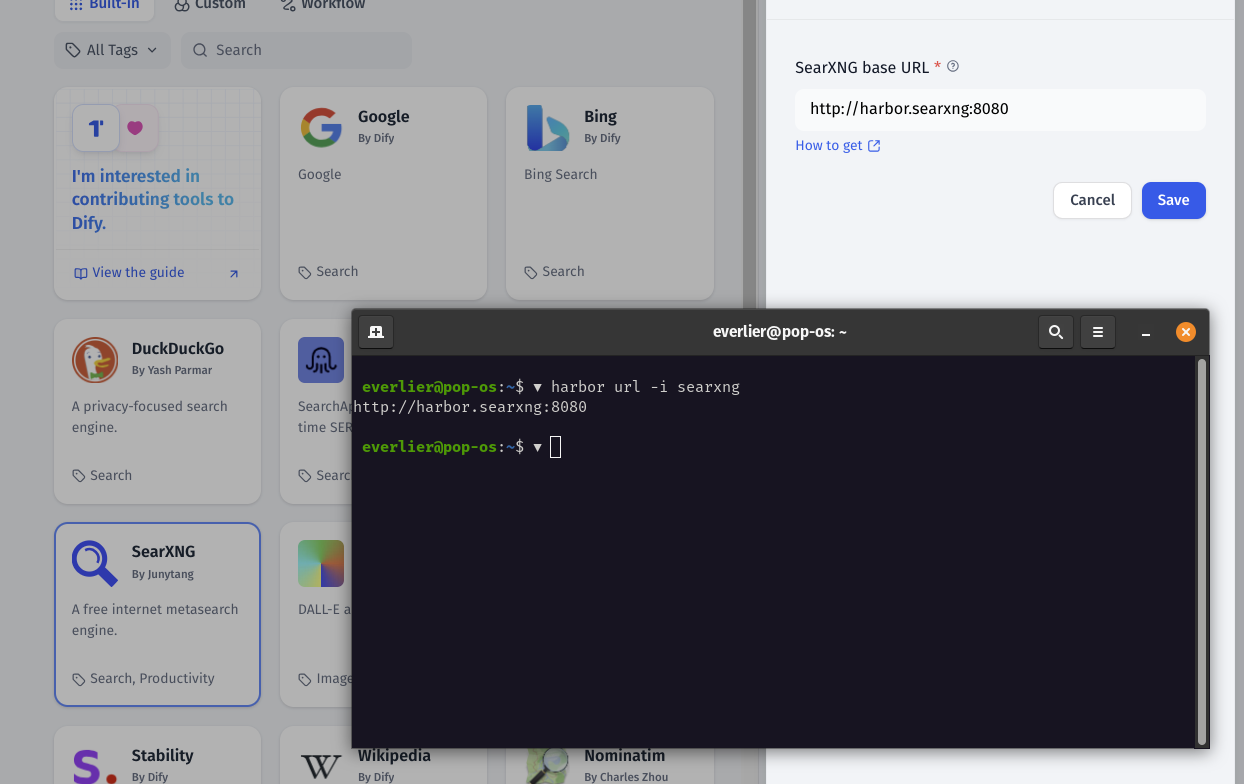
Dify can use SearXNG in a similar way to what Open WebUI does, however you can be much more specific with what LLM will search for when conifugring the workflow.
[Dify + SearXNG](https://docs.dify.ai/guides/tools)
```bash
# SearXNG should be running to be
# available for Dify
harbor up searxng
# Get the URL for the SearXNG
harbor url -i searxng
# Open the Dify UI
harbor open dify
```
#### Integration
Once you've configured one or more interesting workflows - they can be integrated back with the rest of the Harbor via an OpenAI-compatible (-ish) API.
Harbor runs an custom `dify-openai` proxy that can translate requests from OpenAI API to Dify API.
In order to use it, for example:
- Configure the Workflow/Agent/Chatbot in Dify
- Create the API key for your workflow, copy it
- Point Dify OpenAI proxy to the workflow
```bash
harbor config set dify.openai.workflow
# Remember to restart the stack
harbor restart dify webui
```
Done!
Here's a cool example based on the sample workflows from above:

- WebUI uses Dify "Web Llama" workflow as a chat backend
- Dify runs the whole workflow as outlined in the "Starting" section of this guide