# AICC Builder
**Turn a ~1-hour AI conversation into a fully customized Amazon Connect PoC** · powered by Amazon Bedrock and Strands SDK
[](https://aws.amazon.com/cdk/)
[](https://reactjs.org/)
[](https://python.org/)
[](https://strandsagents.com/)
[](skills/aicc-builder-skill/)
[English](#english) · [한국어](#한국어) · [日本語](#日本語)
---
## Demo
**Part 1 — Build an Amazon Connect AI agent in ~1 hour**
https://github.com/user-attachments/assets/074983eb-43ed-4b04-a873-720795db847f
**Part 2 — Live call with the generated agent**
https://github.com/user-attachments/assets/64b4cd24-4653-4fed-86f9-4cd62866e1e2
---
## What's New in v2.4
**Build on the database you already have.** Point AICC Builder at an existing
database — **any RDS or Aurora engine**, or DynamoDB — or just hand it your
schema document, and it generates Lambdas, infrastructure and prompts against
your real tables, columns and business rules instead of inventing new ones.
- **Every RDS and Aurora engine.** PostgreSQL, MySQL, MariaDB, SQL Server,
Oracle and Db2 — on Aurora or on plain RDS. The connection method is chosen
for you: Aurora with the Data API (HTTP endpoint) goes over the Data API with
no network path needed, everything else connects with a bundled driver
(`psycopg2`, `pymysql`, `pytds`, `oracledb`).
- **One argument is enough.** Give it a DB instance or Aurora cluster
identifier and the engine, endpoint, port, master-user secret and connection
method are all resolved from RDS. Name the wrong engine and RDS is trusted
over the guess.
- **Full relational detail.** Tables, exact column names and SQL types, single
**and composite** primary keys, secondary indexes, **foreign keys (plus reverse
relationships)**, enum/allowed values, check constraints, generated columns,
table/column comments, real row counts and sample rows. DynamoDB introspection
gained **local secondary indexes**, projection details, nested map/list/set
typing and non-key attribute discovery.
- **Scan a whole schema, a few tables, or one.** `tables_only=True` returns a
cheap inventory (names, row counts, comments) of an unfamiliar database so you
can pick what matters; then pass `table_name="a,b,c"` for full detail on just
those. Names match case-insensitively, so `orders` finds Oracle's `ORDERS`.
- **Column comments become business rules.** A comment like *"Auto-approve under
500,000 KRW; above needs manager approval"* is carried into the OperationSpec,
so the generated Lambda enforces the threshold your DBA already documented.
- **Sampled values become data conventions.** A phone stored as `821012345678`
stays in that format all the way through to the Contact Flow, instead of being
"helpfully" rewritten to `+8210...`.
- **Observed values instead of invented enums.** SQL Server, Oracle and Db2 have
no ENUM type, so the scan reports the distinct values actually present in
status-like columns — no more a handler validating against `LOST` when the
column really holds `LOSS`.
- **No database to connect to? Paste or upload the schema.** A
*schema-as-document* path accepts a DDL dump, ERD, or data dictionary, parses
it into the same contract, echoes back every table and column it read for your
confirmation, and never invents an identifier the document did not state.
- **Generated Lambdas read columns by name.** The RDS Data API pattern now sends
`includeResultMetadata=True` and maps rows to dicts, replacing positional
access that silently returned the wrong column whenever the schema changed. On
the driver path the generated stack emits the `VpcConfig`, security-group
ingress and Secrets Manager VPC endpoint the function needs to reach both the
database and its credentials.
- **Five new deterministic gates** catch the mistakes an LLM makes even with a
correct schema in context, before anything is deployed:
- **SQL identifier check** — a column written onto the wrong table
(`order_items.product_name` when `product_name` lives on `products`).
- **SQL type-cast check** — a cast to a type that does not exist
(`::approval_status` on a plain `VARCHAR`).
- **Required-column check** — an `INSERT` omitting a `NOT NULL` column that
has no default.
- **Parameter type-binding check** — a `bigint` key bound as a string, which
PostgreSQL rejects with `operator does not exist: bigint = text`.
- **RDS Data API contract check** — env var drift, a missing
`includeResultMetadata`, positional row access, or SQL built by string
interpolation.
- **Merge-time normalization** keeps the cross-asset contract intact when
fragments disagree: RDS environment variables are unified on
`DB_CLUSTER_ARN` / `DB_SECRET_ARN` / `DB_NAME` (the names the handlers
actually read), and an inline Lambda whose `Handler` names a function its code
does not define gets the alias it needs.
- **Actionable failures instead of empty results.** A scan that finds nothing now
returns an error naming the tables that *do* exist and the schema it searched,
and distinguishes target-not-found, Data-API-off, connection-failed,
driver-missing, access-denied and unreadable-secret — with the remediation for
each. The ECS task role gained the read-only `rds:Describe*` and
`dynamodb:DescribeTable` / `Scan` permissions introspection actually needs.
> 📖 Details, per-engine notes and the verification runs:
> [docs/existing-database.md](./docs/existing-database.md)
---
## What's New in v2.3
A fully-automated workshop deploy script, live-QA permission hardening, a new
deterministic IAM validation gate, and a model *effort* control — all verified
against live AWS accounts (including a customer workshop account).
- **`deploy.sh` in the downloaded bundle now automates the entire workshop
(chapters 3–6) from the CLI** — 13 idempotent phases: CloudFormation,
Lambda/OpenAPI/FAQ upload, Connect instance create/select (+ required
instance attributes incl. `BOT_MANAGEMENT`), Q in Connect Assistant + KB,
AgentCore Gateway (MCP) with JWT-audience auto-fix, MCP registration,
Lex bot with the Connect-assistant link (`AMAZON.QInConnectIntent` bound to
the assistant ARN, backfilled on existing bots), Contact Flow import with
placeholder auto-resolution, AI Prompt + AI Agent + security profile, and
optional phone-number claim. Every decision point is a multiple-choice menu
populated live from the account via the AWS CLI; `status` / `cleanup`
subcommands and a full session transcript (`aicc_deploy_*.log`) included.
- **Voice provider choice — Amazon Connect agentic voice or Polly.** The flow
always ships a working Polly Set Voice block (agentic voice has no public
API); choosing agentic prints a required ~1-min console step to switch the
block's Voice Provider, and the language attribute is set for correct ASR
routing either way. Speech model is a separate choice: Nova Sonic S2S /
Advanced ASR / standard.
- **Security-profile attachment is now verified, not assumed** — after
associating the MCP-tool security profile to the AI Agent, the script
confirms it via `list-entity-security-profiles` and prints exact console
steps if verification fails (the cause of "Tool is not allowed" MCP -32001).
- **update-q-session runtime permissions fixed at three layers** (found in a
live workshop: `AccessDeniedException` on `connect:DescribeContact` left the
AI agent unable to see the caller's phone number): deploy.sh grants the role
scoped runtime permissions at deploy time, the infrastructure merge injects
the inline policy whenever the LLM omits it, and…
- **New deterministic validation gate: Lambda IAM permission check** —
`validate_parameter_consistency` now derives required IAM actions from each
handler's SDK calls (Python boto3 + JS SDK v3, `qconnect:`→`wisdom:`
namespace mapping) and cross-checks them against the merged CloudFormation
roles, so missing runtime permissions are caught at review time.
- **Model effort control** — pick Anthropic `effort` (max / high / medium /
low, or model default) next to the model selector; applied to the
orchestrator and every sub-agent via `output_config.effort`, persisted per
session, switchable mid-session.
---
What's New in v2.2 — model choice, segment-scoped generation, import-and-improve, UI redesign (click to expand)
Model choice, segment-scoped generation, import-and-improve, a UI redesign, and a
contact-flow correctness pass re-verified against the live Amazon Connect
`CreateContactFlow` API.
- **Pick your Claude model** — header/start-screen selector for **Opus 4.8** (default), **4.7**, or **4.6**, applied to the orchestrator *and* every sub-agent; switchable mid-session and persisted per session. A central `build_model_kwargs` sends `temperature` only to models that accept it (4.6 yes; 4.7/4.8 reject it as a 400).
- **Generate one segment, not the whole bundle** — a mode-first start screen: *Full Build*, *Single Segment* (just a Contact Flow, AI Prompt, or FAQ), or *Improve Existing*. Scoped runs trim both the orchestrator's tool list and its system prompt, and the progress UI shows only the in-scope steps.
- **Improve an asset the tool didn't generate** — upload an external Contact Flow JSON or AI Prompt YAML; it's validated/auto-repaired, seeded into the workspace, and dropped straight into patch-only edit mode — no full interview required.
- **UI/UX redesign** — first-class dark mode across the whole timeline, a resizable split-view asset workspace (tab switcher + fullscreen) that opens as assets stream, a Progress tab grouped by the 4 phases, and broad a11y + localization passes.
- **Interactive Contact Flow diagram** — the flow is now an interactive React Flow graph (pan/zoom/minimap, dark-mode aware) derived *deterministically* from the validated Connect JSON — every Action becomes a node, transitions become edges. This replaces the LLM-authored mermaid diagram that periodically failed to render and drifted from the actual flow; the `mermaid` dependency is gone.
- **Contact Flow correctness** — live-API validation (create → inspect `problems` → delete) fixed linter defects it previously had wrong (`UpdateContactCallbackNumber` error set; `TransferContactToQueue` takes no queue param). RAG is now resolved from SSM in addition to the deploy-time output, so it stays on regardless of deploy ordering; with RAG on, fresh flows import with zero structural fixes across Opus 4.6/4.7/4.8, and the linter fixes are the deterministic backstop when RAG is unavailable (e.g. local dev).
Verified end-to-end against the real backend + live Connect API: a Full Build to
completion (all 6 asset families), single-segment Prompt-only / FAQ-only runs, and
the Improve-Existing import→repair→edit cycle.
What's New in v2.1 — validation gates, Contact Flow import-safety, spec fidelity (click to expand)
Reliability & quality hardening from live workshop QA rounds — including a
deep Contact Flow import-safety pass verified against the real Amazon Connect
`CreateContactFlow` API:
**Validation gates (deterministic, fault-tolerant)**
- **CloudFormation lint gate** — `cfn-lint` runs after the merge and auto-fixes recurring syntax issues (e.g. `!Sub` in a string-only `Description`); remaining errors are surfaced for patching. Lint runs *after* streaming the asset so the live preview is never delayed.
- **OpenAPI 3.0 lint gate** — generated specs are validated against the OpenAPI 3.0 schema with auto-fix for `null` fields and missing operation responses (both chunked and full-mode paths).
- **Lambda + Contact Flow lint** — generated Python handlers are compile-checked (no execution) and Contact Flow JSON is validated for structural integrity (dangling transitions, orphan actions, missing terminal block) — catching import-time failures deterministically.
- **qconnect → wisdom** — the invalid `qconnect:` IAM namespace is rewritten to `wisdom:` at merge time (was a frequent AccessDenied cause).
- **Merge robustness** — infrastructure/OpenAPI merges detect and report dropped fragments and degraded merge strategies instead of failing silently.
**Contact Flow import-safety (API-verified against `CreateContactFlow`)**
- **Block-type whitelist from ground truth** — the valid Amazon Connect flow block `Type` set was rebuilt from a real console export of every block plus per-type `CreateContactFlow` probes. Hallucinated/guessed types (`Trigger`, `InvokeAgentAction`, `CheckCondition`, `TransferToAgent`, `TransferToPhoneNumber`, `CheckStaffing`, `Distribute`, …) are deterministically rejected and auto-mapped to the real type (e.g. `TransferToPhoneNumber` → `TransferParticipantToThirdParty`, `CheckStaffing` → `CheckMetricData`).
- **Per-block parameter normalization** — the linter rewrites each block to the exact shape the API accepts: recording (`RecordingBehavior`/`AnalyticsBehavior`, no `RealTime`), TTS (`TextToSpeechVoice`/`Engine`), logging (`FlowLoggingBehavior`), queue (`UpdateContactTargetQueue` string `QueueId`; `TransferContactToQueue` carries none), Lex (`LexV2Bot.AliasArn` + one message, no `AgentError`), Lambda (`LambdaInvocationAttributes`), `CheckHoursOfOperation` (True/False branches), terminal blocks (no transitions), and **`GetParticipantInput`'s two modes** (menu: `StoreInput=False`, no `DTMFConfiguration`; store: `StoreInput=True` + `InputValidation`).
- **Loop operands** corrected to `ContinueLooping`/`DoneLooping`; **`Trigger` entry-wrappers** removed with `StartAction` repointed to the first real action.
- **Canonical AI-bot ↔ flow contract** — the bot returns exactly `Complete` (end) / `Escalate` (human) via `$.Lex.SessionAttributes.Tool`; the linter normalizes synonyms (`END_CALL`, `END_CONVERSATION`, …) so the flow's `Compare` branch always matches.
- **RAG corrected & re-ingested** — the KB docs that taught wrong block schemas (and the new verified block-type reference) were corrected and re-indexed; the KB role gained `s3vectors:DeleteVectors` so re-ingestion actually replaces stale vectors.
- Net effect: freshly-generated flows — even complex ones (multi-step DTMF auth, business-hours, grade routing, amount thresholds, escalation) — **import into Amazon Connect cleanly**, verified end-to-end via the real API.
**Spec fidelity ("everything is a spec")**
- **Constraint mapping** — customer-stated rules (length, digit count, format masks like `010-XXXX-XXXX`, enums, ranges, date formats) are placed in the correct FieldSpec key, and applied to **every** occurrence of a field — input, output, and nested array/object properties.
- **Dedicated Contact Flow Spec** — a flow-behavior contract (callback / queue transfer / business-hours / escalation, with block dependency order) the Contact Flow agent builds from, so requested behaviors actually land in the flow.
- **Existing-DB fidelity** — when a customer supplies an existing DynamoDB *or* RDS/Aurora schema (keys, sort key, GSIs, columns, Secret/Cluster ARNs), the spec preserves it faithfully and the generated Lambdas call it correctly (RDS via the Data API with the exact column names).
**Generation correctness & UX**
- **Native Connect capabilities respected** — FAQ retrieval (Retrieve) and agent escalation / end-call (Return to Control) are no longer generated as redundant Lambdas/APIs; the Contact Flow generator auto-uses its built-in RAG (no opt-in), and "research" wording no longer mis-routes to the web research agent.
- **Reviewer coverage & fidelity** — added sample-data GSI-null, requested-behavior, native-tool-misuse, customer-lookup, and lint cross-check dimensions; findings are relayed verbatim and the orchestrator never auto-fixes (or spuriously re-reviews) without user confirmation.
- **Scope clarity** — states what it cannot build (the scheduling/dialer logic itself) while still building outbound agents/flows, and asks real-vs-mock for external integrations.
- **Sample data** — the seeder skips records missing GSI/key attributes (no more NULL-key stack failures), uses current-relative dates, and seeds a record for the tester's phone number.
- **deploy.sh function-name resolution** — Lambda updates resolve real function names from CloudFormation outputs/stack resources instead of a brittle naming convention.
- **Customer-lookup Lambda** is generated by the Lambda generator (placeholder-only in CloudFormation) and personalization is an explicit interview question.
- **Cancel / Stop button** — in-flight generation can be interrupted from the chat input.
- **Interview anti-loop** — confirmations are remembered so the interview doesn't re-ask and loop.
- **Fault tolerance** — hardened spec parsing eliminates the `'str' object has no attribute 'get'` crash.
**Web search & uploads**
- **Web search via Amazon Bedrock AgentCore Gateway** — web search runs through a managed AgentCore Gateway Web Search connector, authenticated by the ECS task role (SigV4); `./deploy.sh` auto-provisions the gateway in us-east-1, so there's no key to manage and queries stay inside AWS.
- **Attach in any mode, then prompt** — the start screen lets you attach files (a Contact Flow JSON, an AI Prompt YAML, a whiteboard/draw.io flow image, or docs) in **all** modes — Full Build, Single Segment, and Improve Existing — and attach multiple. Attaching never auto-starts; you type a prompt and send, so it's a normal conversation.
- **Conversational import** — upload a Contact Flow JSON/YAML or a flow-diagram photo and the agent acknowledges it, narrates what it parsed, and (for images) **asks before converting** it into an importable Amazon Connect Contact Flow. Imports are lint-validated and land in patch-only modification mode — edits patch the asset rather than regenerating it.
**Infrastructure & assets**
- **Knowledge Base on Amazon S3 Vectors** — the Contact Flow RAG store moved from OpenSearch Serverless to S3 Vectors (substantially lower idle cost); ingestion uses non-filterable metadata keys so chunks index correctly.
- **FAQ without research** — FAQ generation also works from user-uploaded documents or as a clearly-marked mock starter set.
- **`copy_workspace_file`** workspace tool added; uniquely-timestamped download filenames.
---
## What is AICC Builder?
AICC Builder is an **open-source Agentic AI sample application** that generates a
customized Amazon Connect asset bundle (Lambda, OpenAPI, AI prompt,
Contact Flow, CDK infrastructure, FAQ) from a ~1 hour conversation
with a customer. A single Orchestrator agent interviews the user,
distills the conversation into a structured `OperationSpec`, and calls
specialized sub-agents to produce each asset — with deterministic
cross-asset validation between phases so the bundle is internally
consistent before it is delivered.
**Who is it for?** Anyone who wants to build Amazon Connect AI Agent
fast in order to end with a deployable PoC for the customer's actual
business.
> 📖 **How it enforces customer requirements end-to-end:** see
> [docs/agentic-ai.md](./docs/agentic-ai.md) for the full methodology
> — OperationSpec-as-contract, 9-check deterministic validation,
> patch-only modification, and the NFS-backed workspace that keeps
> requirements durable across container restarts.
---
## Input → Output
```
┌─────────────────┐ ┌──────────────────┐ ┌─────────────────────────┐
│ │ │ │ │ │
│ 💬 INPUT │ │ 🤖 AICC Builder │ │ 📦 OUTPUT │
│ │ ────▶ │ │ ────▶ │ │
│ AI Conversation │ │ 9 Specialized │ │ 6 Production-Ready │
│ (~1 hour) │ │ Agents (Opus │ │ Asset Packages │
│ │ │ 4.8 on Bedrock) │ │ │
│ │ │ │ │ │
└─────────────────┘ └──────────────────┘ └─────────────────────────┘
• Industry & company Orchestrator ✅ Lambda Functions
• Business operations Research Agent ✅ OpenAPI Spec (MCP Gateway)
• Rules & policies FAQ Generator ✅ AI Prompt
• Conversation scenarios Lambda Generator ✅ Contact Flows
• Tone & language OpenAPI Generator ✅ CDK Infrastructure
• Edge cases Prompt Generator ✅ FAQ / Knowledge Base
Contact Flow Generator
Infrastructure Generator
Reviewer Agent
```
---
## Why?
| | Before (Standard Workshop) | After (With AICC Builder) |
|---|---|---|
| **Scenario** | Fixed hotel reservation demo | Customer's own business |
| **Assets** | Generic, pre-built | Auto-generated, customized |
| **Workshop outcome** | Educational knowledge | Deployable PoC |
| **Post-workshop value** | "That was interesting" | "We can pilot this next week" |
| **Time to PoC** | Weeks of hand-coding | ~1-hour conversation |
---
## How It Works
### Step 1 — Deploy (~10 min)
```bash
git clone https://github.com/aws-samples/sample-aicc-builder-for-amazon-connect-ai-agent.git && cd aicc-builder
./deploy.sh
```
### Step 2 — Conversation (~1 hour)
The customer chats with the AI agent through a web interface:
```
🤖 What industry is your company in?
👤 E-commerce — we sell electronics online.
🤖 What operations should your AI assistant handle?
👤 Order tracking, returns, and warranty claims.
🤖 What are your return policies?
👤 Auto-approve under $500, manager approval above. 30-day window.
🤖 Generating your customized assets...
```
### Step 3 — Generated Assets
The system produces a complete set of workshop-ready artifacts:
| Generated Asset | What It Is | Used In Workshop Module |
|---|---|---|
| **Lambda Functions** | Python handlers for each business operation (e.g., `process_return`, `track_order`) | Module 2: MCP Server Setup |
| **OpenAPI Spec** | API definitions for Amazon Connect MCP Gateway integration | Module 2: MCP Gateway |
| **AI Prompt** | Customized personality, tone, business rules, and guardrails | Module 2: AI Agent Prompt |
| **Contact Flows** | Amazon Connect flow configurations with an interactive visual diagram (rendered from the JSON) | Module 2: Flow Builder |
| **CDK Infrastructure** | Complete AWS CDK project (Lambda, API Gateway, DynamoDB) | Module 2: Deploy |
| **FAQ Documents** | Knowledge base articles for common customer questions | Module 3: Knowledge Base |
### Step 4 — Workshop
Customers use their generated assets throughout the workshop, ending with a **deployable PoC for their actual business**.
---
## Use it as a CLI Skill (no deployment)
Don't want to deploy the webapp? The same interview → 6-asset pipeline ships as a
**Claude Code / Kiro Skill** under [`skills/aicc-builder-skill/`](skills/aicc-builder-skill/) —
same prompts, same sub-agents, same generated bundle, but it runs directly in your
terminal/editor and writes the assets to local disk. It mirrors the webapp's modes
(full build / single segment / improve an existing flow or prompt), attachments,
progress, and validation.
```bash
# Claude Code (personal) — promotes SKILL.md and installs to ~/.claude/skills/
skills/aicc-builder-skill/scripts/install.sh claude user
# Kiro
skills/aicc-builder-skill/scripts/install.sh kiro user
```
Then trigger with `/aicc-builder`. Full install + usage details:
**[skills/aicc-builder-skill/README.md](skills/aicc-builder-skill/README.md)**.
---
## Architecture
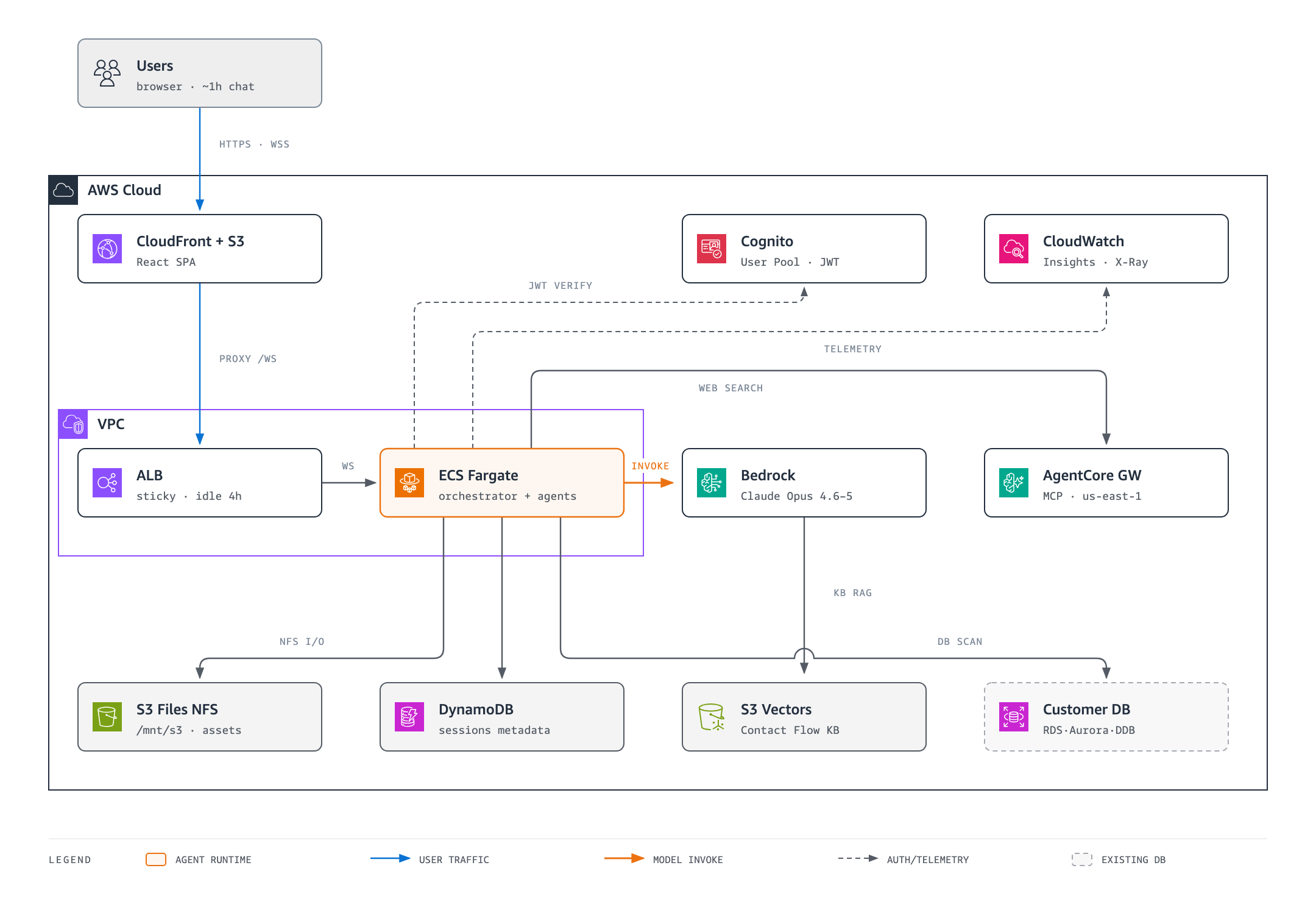
Runtime highlights:
- Runtime: ECS Fargate (ARM64 Graviton) running FastAPI + Uvicorn
- Model: **Claude Opus** on Amazon Bedrock — selectable per session: **Opus 5** (`global.anthropic.claude-opus-5`), **4.8** (default, `global.anthropic.claude-opus-4-8`), **4.7** (`global.anthropic.claude-opus-4-7`), or **4.6** (`global.anthropic.claude-opus-4-6-v1`) — applied to the orchestrator and every sub-agent, with cross-region inference + prompt caching
- WebSocket: ALB with Cognito JWT (sticky sessions, 4h idle timeout), proxied same-origin through CloudFront
- Session storage: 3-tier — in-memory → S3 Files NFS (`/mnt/s3/`) → DynamoDB
- Contact Flow RAG: Bedrock Knowledge Base backed by **Amazon S3 Vectors** (replaced OpenSearch Serverless in v2.1 — far lower idle cost for a small, infrequently-queried corpus). The ECS task gets `CONTACT_FLOW_KB_ID` two ways: `deploy.sh` injects it from the KB stack output, and (v2.2) the KB stack also publishes it to SSM for the task to resolve at startup — so RAG stays on even when the deploy-time output isn't resolvable (e.g. KB stack deployed separately)
- File I/O: Direct NFS access via `/mnt/s3/` — agents read/write/patch files like a local filesystem
- Scaling: Auto-scaling (1–10 tasks) on the `ActiveWebSocketConnections` CloudWatch metric
**S3 Files NFS** (`/mnt/s3/`) provides direct file system access to S3, enabling:
- 3-tier session storage (in-memory → NFS → DynamoDB metadata)
- NFS-backed operation specs and fragment registries (survives container restarts)
- Asset versioning (v1/, v2/ on regeneration)
- System prompt hot-reload
- Workspace file tools for agents (read/write/patch files directly)
> For detailed architecture documentation, see [docs/architecture.md](./docs/architecture.md)
---
## Quick Start
### Prerequisites
AWS CLI 2.x (>= 2.34.27 for `s3files` support) · Node.js 18+ · Python 3.11+ · Docker · AWS CDK 2.x
> **Web search** for the Research & Contact Flow agents runs through an **Amazon Bedrock AgentCore Gateway** (managed Web Search connector), authenticated by the ECS task role via SigV4 — **no API key**. `./deploy.sh` provisions the gateway automatically (idempotently) in **us-east-1**, the only region the Web Search connector is GA, regardless of your app's deploy region. Skip it with `ENABLE_WEB_SEARCH=false`; point at an existing gateway with `AGENTCORE_GATEWAY_URL=...`.
### Deploy
```bash
git clone https://github.com/aws-samples/sample-aicc-builder-for-amazon-connect-ai-agent.git
cd aicc-builder
# Full deployment (default: Seoul ap-northeast-2)
./deploy.sh
# Deploy to a different region
AWS_DEFAULT_REGION=us-east-1 ./deploy.sh
# Named stage (separate stacks, e.g. for staging alongside prod)
./deploy.sh --stage prod
AWS_DEFAULT_REGION=ap-northeast-2 ./deploy.sh --stage prod # deploy prod stack to Seoul
```
**Selective deployment:**
```bash
./deploy.sh --backend-only # Redeploy backend (ECS) only
./deploy.sh --frontend-only # Rebuild + deploy frontend only
./deploy.sh --infra-only # Redeploy CDK infrastructure only
./deploy.sh --force # Force full rebuild (bypass hash checks)
```
> Full deploy.sh reference: [docs/development.md](./docs/development.md#deploysh-reference)
### Local Development
```bash
mkdir -p /tmp/s3files/sessions /tmp/s3files/prompts
export S3FILES_MOUNT_PATH=/tmp/s3files SESSION_STORE_BACKEND=s3files
cd backend/ecs && uvicorn app:app --port 8080
# wscat -c "ws://localhost:8080/ws?sessionId=test-1"
```
### Create Admin User
```bash
# UserPoolId is printed by deploy.sh
#
# NOTE: the pool uses email as an ALIAS, so `--username` must NOT be an email
# address (Cognito rejects it with InvalidParameterException). Use a plain
# username and attach the email as an attribute — `email_verified=true` is what
# makes sign-in by email (and the "Forgot password?" flow) work.
aws cognito-idp admin-create-user \
--user-pool-id \
--username \
--user-attributes Name=email,Value= Name=email_verified,Value=true \
--temporary-password "TempPass123!" \
--message-action SUPPRESS \
--region ap-northeast-2
```
The user signs in with `` and is prompted to set a new password on first
login. Password policy: 8+ characters with an uppercase letter, a lowercase
letter, and a number (no symbol required).
---
## Cost
| | Approximate Cost |
|---|---|
| **Per conversation session** | ~$1.55 (Bedrock tokens) |
| **Monthly infrastructure (idle)** | ~$45 (Fargate ~$25, ALB ~$10, DynamoDB ~$5, S3+CloudFront ~$5) |
> 📊 A detailed, real-world per-session cost breakdown (one full ~1.5h build on
> Bedrock **Claude Opus 4.6** + ALB + ECS Fargate + S3 Files) is at the very
> bottom of this README: **[Real-world Cost per Full Build →](#full-build-cost)**.
---
## Tech Stack
| Layer | Technologies |
|---|---|
| **AI** | Strands Agents SDK · **Claude Opus 5, 4.8 (default), 4.7, 4.6** on Amazon Bedrock (`global.anthropic.claude-opus-4-8`, cross-region inference) · Context Engineering (CLUES format) |
| **Frontend** | React 18 · TypeScript · Vite · Tailwind CSS · Zustand · React Flow |
| **Backend** | Python 3.11 · FastAPI · Uvicorn · S3 Files NFS · DynamoDB |
| **Infra** | AWS CDK · CloudFront · Cognito · ECS Fargate · ALB · X-Ray |
---
## Project Structure
```
├── backend/
│ └── ecs/ # ECS Fargate entry point (source of truth)
│ ├── app.py # FastAPI (WebSocket + HTTP, Cognito JWT, SIGTERM)
│ ├── Dockerfile # ARM64 Python 3.11, uvicorn
│ ├── requirements.txt
│ ├── healthcheck.py # ALB health check
│ └── src/
│ ├── agents/ # 9 specialized sub-agents
│ │ ├── research_agent/ # Web search (AgentCore Gateway)
│ │ ├── faq_generator/ # Knowledge base documents
│ │ ├── lambda_generator/ # Python Lambda handlers
│ │ ├── openapi_generator/ # OpenAPI 3.0 specs (chunked)
│ │ ├── prompt_generator/ # AI agent prompts
│ │ ├── contact_flow_generator/ # Connect flows (diagram from JSON)
│ │ ├── infrastructure_generator/ # CloudFormation YAML (chunked)
│ │ └── reviewer_agent/ # Asset consistency validation
│ ├── tools/ # Utility tools
│ │ ├── project_workspace.py # NFS-backed state persistence
│ │ ├── spec_manager.py # OperationSpec CRUD + NFS sync
│ │ ├── workspace_file_tools.py # NFS file read/write/patch for agents
│ │ ├── workspace_tools_for_subagent.py # Patch-mode tools for modification requests
│ │ ├── s3_asset_storage.py # S3 + NFS dual-write asset storage
│ │ ├── clues_format.py # CLUES response format (context engineering)
│ │ ├── validate_consistency.py # Cross-asset validation (9 checks)
│ │ └── ...
│ ├── context/ # Session context (3-tier s3files store)
│ │ ├── __init__.py
│ │ ├── s3files_store.py # memory → NFS → DynamoDB
│ │ ├── shared_state.py # Cross-agent shared state
│ │ └── structured_notes.py # Structured note-taking
│ └── prompts/
│ ├── system_prompt.py # Orchestrator system prompt (~60KB)
│ └── prompt_loader.py # Hot-reload from NFS
├── frontend/ # React 18 chat interface
│ └── src/
│ ├── components/ # UI components (mobile-responsive)
│ ├── hooks/ # useWebSocket (ALB + CloudFront same-origin)
│ ├── stores/ # authStore, builderStore, sessionStore
│ └── services/ # auth, sessions API
├── infrastructure/ # AWS CDK
│ └── lib/
│ ├── aicc-builder-stack.ts # Main stack (Cognito, S3, CloudFront, DynamoDB)
│ ├── ecs-stack.ts # ECS Fargate stack (VPC, ALB, Fargate, auto-scaling)
│ ├── knowledge-base-stack.ts # Bedrock Knowledge Base on Amazon S3 Vectors (Contact Flow RAG; optional — default FAQ path is S3 + Connect AI agents domain)
│ └── app.ts # CDK entry point
├── docs/ # Detailed documentation
└── deploy.sh # Full deployment pipeline
```
---
## Runtime Details
### S3 Files NFS Mount Layout
```
/mnt/s3/
sessions/{session_id}/
state/ # project.json, progress.json, specs/*.json, schemas/
assets/v1/ # lambda/, openapi/, prompt/, contact_flow/, infrastructure/, faq/
assets/v2/ # On regeneration
context/ # conversation_history.json, shared_state.json, all_results.txt
workspace/ # requirements/, fragments/
prompts/ # Hot-reloadable system prompts
config/ # Hot-reloadable model config
```
### Key Capabilities
- **Graceful Shutdown**: SIGTERM flushes active sessions to S3 Files, closes WebSocket with 1001
- **Auto-scaling**: Step scaling on `ActiveWebSocketConnections` CloudWatch metric (1–10 tasks)
- **Observability**: Container Insights + X-Ray sidecar
- **Workspace File Tools**: Agents can directly read/write/patch files on NFS (like a local file system)
- **Patch-only Modifications**: When an asset is regenerated via `modification_request`, sub-agents must use workspace tools (`read_current_file`, `patch_file`) to make minimal edits — full-file regeneration is refused
- **Fragment Registry**: NFS-backed for infrastructure and OpenAPI generators — survives container restarts
- **Context Engineering**: CLUES response format reduces sub-agent token consumption; SummarizingConversationManager for long-running agents
---
## Documentation
| Doc | Description |
|---|---|
| [docs/agentic-ai.md](./docs/agentic-ai.md) | **How the multi-agent system keeps customer requirements intact end-to-end** — OperationSpec contract, deterministic validation, patch-only modification |
| [docs/existing-database.md](./docs/existing-database.md) | **Building on a database you already have** — live scan vs schema-as-document, schema fidelity, and the deterministic SQL gates |
| [docs/architecture.md](./docs/architecture.md) | Runtime architecture, WebSocket protocol, data flow |
| [docs/architecture-asset-flow.md](./docs/architecture-asset-flow.md) | Asset read/write/stream paths, dual-write to NFS + S3 |
| [docs/agents.md](./docs/agents.md) | 9 agents: roles, tools, model configs, generation sequence |
| [docs/development.md](./docs/development.md) | Local setup, adding agents, deploy.sh reference, debugging |
| [backend/README.md](./backend/README.md) | Backend overview and directory structure |
| [frontend/README.md](./frontend/README.md) | Frontend components and state management |
| [infrastructure/README.md](./infrastructure/README.md) | CDK stacks, resources, and deployment |
---
## Security
> ⚠️ **Disclaimer — workshop / demo tool, not production**
>
> AICC Builder is intended as a **workshop and proof-of-concept generator**
> for anyone who wants to build a self-service AI agent on Amazon Connect fast
> — in about an hour. The assets it produces (Lambda code, CloudFormation
> templates, prompts, Contact Flows, FAQ docs) are **starting points**, not
> hardened production artifacts, and are generated by a large language model —
> you must review them before deploying to any environment that handles real
> customer data.
>
> Specifically, before using generated output in production you should, at a
> minimum:
> - Review and tighten IAM roles, security groups, and resource policies
> produced by the Infrastructure Generator.
> - Rotate/scope the API Gateway API Key (workshop templates deliberately set
> `ApiKeyRequired: false` on methods for simplicity).
> - Enable server-side access logging, object versioning, and lifecycle rules
> on any S3 buckets that store customer data (the app's own buckets are
> configured with `blockPublicAccess: BLOCK_ALL` and `enforceSSL: true`;
> S3 server access logging is **not** enabled by default and should be
> turned on for production).
> - Validate generated Lambda code against your organization's secure coding
> standards (input validation, secrets handling, dependency scanning).
> - Enable AWS WAF / throttling on the public ALB + CloudFront distribution.
> - Review the generated AI prompt for prompt-injection resistance against
> your specific threat model.
>
> The app itself stores conversation transcripts and generated assets in S3
> (via S3 Files NFS) and DynamoDB within the deploying AWS account. Do not
> enter real PII or confidential data during a workshop session.
To report a security issue in **AICC Builder itself**, see
[CONTRIBUTING](CONTRIBUTING.md#security-issue-notifications).
## License
This library is licensed under the MIT-0 License. See the [LICENSE](LICENSE) file.
## Contributing
See [CONTRIBUTING](CONTRIBUTING.md) for more information.
---
# 한국어
## AICC Builder란?
AICC Builder는 **오픈소스 Agentic AI 애플리케이션**으로, 고객과의 약 1시간
대화만으로 Amazon Connect 맞춤형 자산 번들(Lambda, OpenAPI, AI 프롬프트,
Contact Flow, CDK 인프라, FAQ)을 자동 생성합니다. 단일 오케스트레이터
에이전트가 고객을 인터뷰하고, 대화를 구조화된 `OperationSpec`으로 증류한 뒤,
각 자산을 담당하는 전문 서브 에이전트를 호출합니다. 단계 사이마다 **결정론적
교차 자산 검증**이 실행되어, 전달 전 번들의 내부 일관성이 보장됩니다.
**대상**: Amazon Connect의 셀프 서비스 AI Agent를 빠르게 만들어보고자 하는 사람 누구나.
데모가 아닌 **고객 실제 비즈니스에 배포 가능한 PoC**로 만들고 싶은 경우.
> 📖 **고객 요구사항을 끝까지 지키는 메커니즘**은
> [docs/agentic-ai.md](./docs/agentic-ai.md)를 참조하세요. OperationSpec을
> 계약으로 삼는 방식, 9개 결정론적 검증, 패치 전용 수정, 컨테이너 재시작을
> 견디는 NFS workspace 구조를 자세히 설명합니다.
---
## 입력 → 출력
```
┌─────────────────┐ ┌──────────────────┐ ┌─────────────────────────┐
│ │ │ │ │ │
│ 💬 입력 │ │ 🤖 AICC Builder │ │ 📦 출력 │
│ │ ────▶ │ │ ────▶ │ │
│ AI 대화 │ │ 9개 전문 에이전트 │ │ 6종 프로덕션 에셋 │
│ (~1시간) │ │ (Bedrock Opus 4.6)│ │ │
│ │ │ │ │ │
└─────────────────┘ └──────────────────┘ └─────────────────────────┘
• 업종 및 회사 정보 오케스트레이터 ✅ Lambda 함수
• 업무 프로세스 리서치 에이전트 ✅ OpenAPI 스펙 (MCP Gateway)
• 비즈니스 룰/정책 FAQ 생성기 ✅ AI 프롬프트
• 대화 시나리오 Lambda 생성기 ✅ Contact Flow
• 톤앤매너/언어 OpenAPI 생성기 ✅ CDK 인프라
• 예외 케이스 프롬프트 생성기 ✅ FAQ / 지식 베이스
Contact Flow 생성기
인프라 생성기
리뷰어 에이전트
```
---
## 왜 필요한가?
| | 기존 워크숍 | AICC Builder 적용 후 |
|---|---|---|
| **시나리오** | 고정된 호텔 예약 데모 | 고객 실제 비즈니스 |
| **에셋** | 범용, 사전 제작 | 자동 생성, 맞춤형 |
| **워크숍 결과** | 교육적 이해 | 배포 가능한 PoC |
| **워크숍 후 반응** | "재미있었네요" | "다음 주에 파일럿 해봅시다" |
| **PoC까지 소요 시간** | 수 주 수작업 | 약 1시간 대화 |
---
## CLI Skill로 사용하기 (배포 불필요)
webapp을 배포하지 않아도 됩니다. 동일한 인터뷰 → 6종 에셋 파이프라인이
[`skills/aicc-builder-skill/`](skills/aicc-builder-skill/) 아래에 **Claude Code / Kiro
Skill**로 패키징되어 있습니다 — 같은 프롬프트, 같은 서브에이전트, 같은 결과물이지만
터미널/에디터에서 바로 실행되고 에셋을 로컬 디스크에 저장합니다. webapp의 모드
(풀 빌드 / 단일 세그먼트 / 기존 플로우·프롬프트 개선), 첨부파일, 진행 표시, 검증을
그대로 재현합니다.
```bash
# Claude Code (개인) — SKILL.md를 승격해 ~/.claude/skills/ 에 설치
skills/aicc-builder-skill/scripts/install.sh claude user
# Kiro
skills/aicc-builder-skill/scripts/install.sh kiro user
```
이후 `/aicc-builder`로 실행합니다. 설치·사용 상세:
**[skills/aicc-builder-skill/README.md](skills/aicc-builder-skill/README.md)**.
---
## 빠른 시작
### 사전 요구사항
AWS CLI 2.x (>= 2.34.27, `s3files` 지원) · Node.js 18+ · Python 3.11+ · Docker · AWS CDK 2.x
### 배포
```bash
git clone https://github.com/aws-samples/sample-aicc-builder-for-amazon-connect-ai-agent.git
cd aicc-builder
# 전체 배포 (기본: 서울 ap-northeast-2)
./deploy.sh
# 다른 리전에 배포 (예: 도쿄)
AWS_DEFAULT_REGION=ap-northeast-1 ./deploy.sh
# 이름이 있는 스테이지로 배포 (prod, staging 등)
./deploy.sh --stage prod
```
**부분 배포:**
```bash
./deploy.sh --backend-only # ECS 백엔드만 재배포
./deploy.sh --frontend-only # 프론트엔드만 빌드/배포
./deploy.sh --infra-only # CDK 인프라만 재배포
./deploy.sh --force # 해시 무시하고 강제 전체 재빌드
```
**리전 선택:** 모든 스택이 동일 리전에 배포됩니다. 기본 리전은 서울(`ap-northeast-2`)이며, `AWS_DEFAULT_REGION`으로 변경 가능합니다.
### 로컬 개발
```bash
mkdir -p /tmp/s3files/sessions /tmp/s3files/prompts
export S3FILES_MOUNT_PATH=/tmp/s3files SESSION_STORE_BACKEND=s3files
cd backend/ecs && uvicorn app:app --port 8080
# wscat -c "ws://localhost:8080/ws?sessionId=test-1"
```
### 관리자 사용자 생성
```bash
# UserPoolId는 deploy.sh 출력에 표시됩니다
#
# 주의: 이 유저풀은 이메일을 ALIAS로 사용하므로 `--username`에 이메일 주소를
# 넣을 수 없습니다(InvalidParameterException으로 거부됩니다). username은 일반
# 문자열로 두고 이메일은 속성으로 넣으세요. 이메일 로그인과 "비밀번호를
# 잊으셨나요?" 플로우는 `email_verified=true`가 있어야 동작합니다.
aws cognito-idp admin-create-user \
--user-pool-id \
--username \
--user-attributes Name=email,Value= Name=email_verified,Value=true \
--temporary-password "TempPass123!" \
--message-action SUPPRESS \
--region ap-northeast-2
```
사용자는 ``로 로그인하며 첫 로그인 시 새 비밀번호를 설정하게 됩니다.
비밀번호 정책: 8자 이상, 대문자·소문자·숫자 각 1자 이상(특수문자 불필요).
---
## 비용
| | 대략적인 비용 |
|---|---|
| **대화 세션당** | ~$1.55 (Bedrock 토큰) |
| **월 인프라 (유휴)** | ~$45 (Fargate ~$25, ALB ~$10, DynamoDB ~$5, S3+CF ~$5) |
> 📊 한 번의 채팅으로 **약 1.5시간** 풀 빌드(Bedrock **Claude Opus 4.6** + ALB +
> ECS Fargate + S3 Files)를 돌렸을 때의 실제 비용 내역은 README 맨 하단의
> **[풀 빌드 1회 실제 비용 →](#full-build-cost)** 를 참고하세요. (한국어 빌드는
> 토큰이 더 무거워 영어보다 약간 높지만, Opus 4.6 기준 **1회 ~$25 미만**입니다.)
---
## 기술 스택
| 레이어 | 기술 |
|---|---|
| **AI** | Strands Agents SDK · **Claude Opus 4.6** (Amazon Bedrock, `global.anthropic.claude-opus-4-6-v1`, 크로스 리전 추론) · Context Engineering (CLUES 형식) |
| **프론트엔드** | React 18 · TypeScript · Vite · Tailwind CSS · Zustand · React Flow |
| **백엔드** | Python 3.11 · FastAPI · Uvicorn · S3 Files NFS · DynamoDB |
| **인프라** | AWS CDK · CloudFront · Cognito · ECS Fargate · ALB · X-Ray |
---
## 런타임 상세
### S3 Files NFS 마운트 구조
```
/mnt/s3/
sessions/{session_id}/
state/ # project.json, progress.json, specs/*.json, schemas/
assets/v1/ # lambda/, openapi/, prompt/, contact_flow/, infrastructure/, faq/
assets/v2/ # 재생성 시
context/ # conversation_history.json, shared_state.json, all_results.txt
workspace/ # requirements/, fragments/
prompts/ # 핫리로드 가능한 시스템 프롬프트
config/ # 핫리로드 가능한 모델 설정
```
### 주요 기능
- **Graceful Shutdown**: SIGTERM 시 활성 세션을 S3 Files에 플러시, WebSocket 1001 코드로 종료
- **오토스케일링**: `ActiveWebSocketConnections` CloudWatch 메트릭 기반 (1–10 태스크)
- **관측성**: Container Insights + X-Ray 사이드카
- **워크스페이스 파일 도구**: 에이전트가 NFS 파일을 직접 읽기/쓰기/패치 가능
- **Patch-only 수정**: `modification_request`로 에셋 재생성 시, 서브 에이전트는 workspace 도구(`read_current_file`, `patch_file`)로 최소한의 변경만 수행합니다. 전체 파일 재생성은 거부됩니다.
- **Fragment Registry**: 인프라/OpenAPI 생성기의 프래그먼트를 NFS에 백업 — 컨테이너 재시작 시 복원
- **Context Engineering**: CLUES 응답 형식으로 서브에이전트 토큰 소모 절감; SummarizingConversationManager로 장기 실행 에이전트 보호
---
## 보안
> ⚠️ **고지 — 워크숍/데모 도구이며 프로덕션용이 아닙니다**
>
> AICC Builder는 Amazon Connect 위에 셀프서비스 AI 에이전트를 빠르게
> (약 1시간 안에) 만들고자 하는 누구나 사용할 수 있는 **워크숍 및 PoC 생성기**
> 입니다. 생성되는 에셋(Lambda 코드, CloudFormation 템플릿, 프롬프트,
> Contact Flow, FAQ)은 **시작점**일 뿐 프로덕션 수준의 아티팩트가 아니며,
> LLM으로 생성되므로 실제 고객 데이터가 있는 환경에 배포하기 전에 반드시
> 검토해야 합니다.
>
> 생성된 산출물을 프로덕션에 사용하기 전 최소한 다음을 수행하십시오:
> - 인프라 제너레이터가 만든 IAM 역할, 보안 그룹, 리소스 정책을 검토·축소
> - API Gateway API Key 로테이션 및 범위 재조정 (워크숍 템플릿은 단순화를 위해
> 의도적으로 `ApiKeyRequired: false`로 설정됨)
> - 고객 데이터를 담는 S3 버킷에 서버 액세스 로깅, 오브젝트 버저닝, 수명주기
> 정책을 활성화 (앱 자체 버킷은 `blockPublicAccess: BLOCK_ALL`,
> `enforceSSL: true`로 설정되어 있으나 **S3 server access logging은
> 기본값으로 비활성화**되어 있으며 프로덕션에서는 켜야 합니다)
> - 생성된 Lambda 코드를 조직의 보안 코딩 표준(입력 검증, 시크릿 처리,
> 의존성 스캔)에 맞춰 검증
> - 공개 ALB + CloudFront에 AWS WAF / 스로틀링 적용
> - 생성된 AI 프롬프트를 조직의 위협 모델에 맞춰 프롬프트 인젝션 저항성 검토
>
> 앱 자체는 대화 기록과 생성 에셋을 배포 대상 AWS 계정의 S3 (S3 Files NFS) 및
> DynamoDB에 저장합니다. 워크숍 세션 중 실제 PII/기밀 데이터를 입력하지 마십시오.
**AICC Builder 자체**의 보안 이슈 신고는
[CONTRIBUTING](CONTRIBUTING.md#security-issue-notifications)을 참조하세요.
## 라이선스
이 라이브러리는 MIT-0 라이선스를 따릅니다. [LICENSE](LICENSE) 파일을 참조하세요.
## 기여
자세한 내용은 [CONTRIBUTING](CONTRIBUTING.md)을 참조하세요.
---
# 日本語
## AICC Builder とは?
AICC Builder は、約 1 時間の対話で、Amazon Connect 用のカスタムアセット一式(Lambda、OpenAPI、AI プロンプト、Contact Flow、CDK インフラ、FAQ)を自動生成する**オープンソースの Agentic AI サンプルアプリケーション**です。
オーケストレーターエージェントがお客様への聞き取りを進め、対話の内容を構造化された `OperationSpec` に集約します。そこから各アセット担当の専門サブエージェントを呼び出してビルドを進めますが、各フェーズの間に整合性チェックが走るため、最終的に出力されるアセット一式は内部的に整合性の取れた状態で揃います。
**こんな方におすすめ:** Amazon Connect の AI エージェントをすばやく立ち上げ、お客様の実ビジネスでそのまま動かせる PoC を構築したい方。
> 📖 **要件をエンドツーエンドで守る仕組みについて:**
> 詳細は [docs/agentic-ai.md](./docs/agentic-ai.md) を参照してください。
> OperationSpec を「契約」と見立てる考え方、9 項目の決定論的バリデーション、
> 差分のみで反映するパッチ方式の修正、コンテナを再起動しても要件が消えない
> NFS ベースのワークスペース構造などを解説しています。
---
## 入力 → 出力
```
┌─────────────────┐ ┌──────────────────┐ ┌─────────────────────────┐
│ │ │ │ │ │
│ 💬 入力 │ │ 🤖 AICC Builder │ │ 📦 出力 │
│ │ ────▶ │ │ ────▶ │ │
│ AI との対話 │ │ 9 個の専門 │ │ そのまま使える 6 種の │
│ (約 1 時間) │ │ エージェント │ │ アセットパッケージ │
│ │ │(Bedrock Opus 4.6)│ │ │
│ │ │ │ │ │
└─────────────────┘ └──────────────────┘ └─────────────────────────┘
• 業種・会社情報 オーケストレーター ✅ Lambda 関数
• 業務オペレーション リサーチエージェント ✅ OpenAPI スペック (MCP Gateway)
• ルール・ポリシー FAQ ジェネレーター ✅ AI プロンプト
• 会話シナリオ Lambda ジェネレーター ✅ Contact Flow
• トーン・言語 OpenAPI ジェネレーター ✅ CDK インフラ
• 例外パターン プロンプトジェネレーター ✅ FAQ / ナレッジベース
Contact Flow ジェネレーター
インフラジェネレーター
レビューエージェント
```
---
## なぜ必要か?
| | 従来のワークショップ | AICC Builder 適用後 |
|---|---|---|
| **シナリオ** | 定型化されたホテル予約デモ | お客様の運用フローに即したデモ |
| **アセット** | 汎用的 | お客様向けに自動生成 |
| **ワークショップの成果物** | 一般的な知見 | 現場で使える PoC |
| **終了後の反応** | 「勉強になりました」 | 「来週 PoC を始めましょう」 |
| **PoC 完成までの期間** | 数週間の作業 | 約 1 時間の対話 |
---
## 仕組み
### Step 1 — デプロイ(約 10 分)
```bash
git clone https://github.com/aws-samples/sample-aicc-builder-for-amazon-connect-ai-agent.git && cd aicc-builder
./deploy.sh
```
### Step 2 — 対話(約 1 時間)
Web 画面から AI エージェントとチャット形式でやり取りをします。
```
🤖 御社の業種を教えてください。
👤 E コマースです。電子製品をオンラインで販売しています。
🤖 AI アシスタントには、どのような業務を任せたいですか?
👤 注文状況の確認、返品対応、保証請求の 3 つです。
🤖 返品ポリシーを教えてください。
👤 500 ドル未満は自動承認、それ以上はマネージャー承認です。期間は 30 日。
🤖 カスタマイズ済みのアセットを生成しています...
```
### Step 3 — 生成されるアセット
ワークショップですぐに使える成果物一式が出力されます。
| 生成アセット | 内容 | 利用ワークショップモジュール |
|---|---|---|
| **Lambda 関数** | 業務ごとの Python ハンドラー(例: `process_return`、`track_order`) | Module 2: MCP Server Setup |
| **OpenAPI スペック** | Amazon Connect MCP Gateway 連携用の API 定義 | Module 2: MCP Gateway |
| **AI プロンプト** | 業種に合わせたペルソナ、トーン、業務ルール、ガードレール | Module 2: AI Agent Prompt |
| **Contact Flow** | Amazon Connect のフロー設定とインタラクティブなビジュアル図 (JSON から描画) | Module 2: Flow Builder |
| **CDK インフラ** | Lambda、API Gateway、DynamoDB を含む AWS CDK プロジェクト一式 | Module 2: Deploy |
| **FAQ ドキュメント** | よくある問い合わせ向けのナレッジベース記事 | Module 3: Knowledge Base |
### Step 4 — ワークショップ
生成されたアセットをワークショップを通じて触りながら、最終的に**自社のビジネスで動かせる PoC** を持ち帰ることができます。
---
## CLI スキルとして使う(デプロイ不要)
webapp をデプロイしたくない場合でも大丈夫です。同じインタビュー → 6 種アセットの
パイプラインが [`skills/aicc-builder-skill/`](skills/aicc-builder-skill/) 配下に
**Claude Code / Kiro スキル**としてパッケージされています — 同じプロンプト、同じ
サブエージェント、同じ生成物で、ターミナル/エディタ上で直接実行し、アセットを
ローカルディスクに書き出します。webapp のモード(フルビルド / 単一セグメント /
既存フロー・プロンプトの改善)、添付ファイル、進捗表示、検証をそのまま再現します。
```bash
# Claude Code(個人)— SKILL.md を昇格して ~/.claude/skills/ にインストール
skills/aicc-builder-skill/scripts/install.sh claude user
# Kiro
skills/aicc-builder-skill/scripts/install.sh kiro user
```
その後 `/aicc-builder` で起動します。インストール・利用の詳細:
**[skills/aicc-builder-skill/README.md](skills/aicc-builder-skill/README.md)**。
---
## デプロイガイド
### リージョンとサービスの対応状況
| サービス | ソウルリージョン (ap-northeast-2) | 備考 |
|---------|-------------------------------|------|
| **Amazon Bedrock (Claude)** | ✅ 利用可能 | `global.anthropic.claude-opus-4-6-v1` をクロスリージョン推論で利用 |
| **Amazon Connect** | ✅ 利用可能 | 東京リージョンでインスタンスを作成可能 |
| **Amazon Polly (日本語)** | ✅ 利用可能 | Takumi(男性)、Kazuha(女性)、Tomoko(女性) |
| **ECS Fargate (Graviton)** | ✅ 利用可能 | ARM64 でコストパフォーマンスよく運用 |
| **S3 Files** | ✅ 利用可能 | NFS マウントでセッションを永続化 |
| **Bedrock Knowledge Base** | ✅ 利用可能 | Contact Flow の RAG 用途 |
---
## アーキテクチャ
```
┌──────────────────────────┐
│ CloudFront + S3 │
│ React Web アプリ │
└────────────┬─────────────┘
│ WebSocket (Cognito JWT)
┌────────────▼─────────────┐
│ ALB (idle 4h, sticky) │
└────────────┬─────────────┘
┌────────────▼─────────────┐
│ ECS Fargate (ARM64) │
│ FastAPI + Uvicorn │
│ │
│ ┌───────────────────┐ │
│ │ オーケストレーター │ │
│ │ (Claude Opus 4.8)│ │
│ └───────┬───────────┘ │
│ │ Agent-as-Tool │
│ ┌───────▼───────────┐ │
│ │ 9 個のサブエージェント │ │
│ │ (専門分業) │ │
│ └───────────────────┘ │
│ │ │
│ ┌───────▼───────────┐ │
│ │ /mnt/s3 (NFS) │ │
│ │ S3 Files マウント │ │
│ └───────────────────┘ │
└────────────┬─────────────┘
│
┌───────────┬───────┼───────┬──────────┐
│ │ │ │ │
DynamoDB Bedrock S3 Cognito CloudWatch
│ (X-Ray)
┌──────┴──────┐
│ S3 Files │
│ (NFS) │
└─────────────┘
```
ランタイムのポイント:
- ランタイム: ECS Fargate(ARM64 Graviton)上で FastAPI + Uvicorn を実行
- WebSocket: Cognito JWT で認証する ALB(スティッキーセッション、アイドルタイムアウト 4 時間)CloudFront 経由で同一オリジンに見せる
- セッションストア: 3 段構成(インメモリ → S3 Files NFS(`/mnt/s3/`)→ DynamoDB)
- ファイル I/O: `/mnt/s3/` への直接 NFS アクセス。エージェントはローカルファイルシステムと同じ感覚で読み書きやパッチ適用が可能
- スケーリング: `ActiveWebSocketConnections` という CloudWatch メトリクスに連動するオートスケーリング(1〜10 タスク)
**S3 Files NFS**(`/mnt/s3/`)は S3 をファイルシステムのように扱える仕組みで、次のような用途を支えています。
- 3 段構成のセッションストア(インメモリ → NFS → DynamoDB のメタデータ)
- NFS に保存される OperationSpec とフラグメントレジストリ(コンテナ再起動後も残る)
- アセットのバージョン管理(再生成時の `v1/`、`v2/`)
- システムプロンプトのホットリロード
- エージェント向けのワークスペースファイルツール(読み書きとパッチ適用)
> アーキテクチャの詳しい解説は [docs/architecture.md](./docs/architecture.md) を参照してください。
---
## クイックスタート
### 前提条件
AWS CLI 2.x(`s3files` を使うには 2.34.27 以上) · Node.js 18+ · Python 3.11+ · Docker · AWS CDK 2.x
### デプロイ
```bash
git clone https://github.com/aws-samples/sample-aicc-builder-for-amazon-connect-ai-agent.git
cd aicc-builder
# フルデプロイ(デフォルト: ソウル ap-northeast-2)
./deploy.sh
# 別リージョンへデプロイ
AWS_DEFAULT_REGION=us-east-1 ./deploy.sh
# ステージ名を付けて分離(例: 本番と並行して staging を立てる)
./deploy.sh --stage prod
AWS_DEFAULT_REGION=ap-northeast-2 ./deploy.sh --stage prod # prod スタックをソウルにデプロイ
```
**部分デプロイ:**
```bash
./deploy.sh --backend-only # バックエンド(ECS)のみ再デプロイ
./deploy.sh --frontend-only # フロントエンドのビルドとデプロイのみ
./deploy.sh --infra-only # CDK インフラのみ再デプロイ
./deploy.sh --force # ハッシュチェックを無視して全体を再ビルド
```
> deploy.sh の全オプション: [docs/development.md](./docs/development.md#deploysh-reference)
### ローカル開発
```bash
mkdir -p /tmp/s3files/sessions /tmp/s3files/prompts
export S3FILES_MOUNT_PATH=/tmp/s3files SESSION_STORE_BACKEND=s3files
cd backend/ecs && uvicorn app:app --port 8080
# wscat -c "ws://localhost:8080/ws?sessionId=test-1"
```
### 管理者ユーザーの作成
```bash
# UserPoolId は deploy.sh の出力に表示されます
#
# 注意: このユーザープールはメールを ALIAS として使うため、`--username` に
# メールアドレスは指定できません(InvalidParameterException になります)。
# username は通常の文字列にし、メールは属性として付与してください。
# `email_verified=true` があって初めてメールでのサインイン(および
# 「パスワードをお忘れですか?」)が機能します。
aws cognito-idp admin-create-user \
--user-pool-id \
--username \
--user-attributes Name=email,Value= Name=email_verified,Value=true \
--temporary-password "TempPass123!" \
--message-action SUPPRESS \
--region ap-northeast-2
```
ユーザーは `` でサインインし、初回ログイン時に新しいパスワードの設定を
求められます。パスワードポリシー: 8 文字以上、大文字・小文字・数字を各 1 つ以上
(記号は不要)。
---
## コスト
| | 目安 |
|---|---|
| **対話セッション 1 回あたり** | 約 $1.55(Bedrock のトークン課金) |
| **インフラの月額(アイドル時)** | 約 $45(Fargate ~$25、ALB ~$10、DynamoDB ~$5、S3+CloudFront ~$5) |
> 📊 1 回のチャットで **約 1.5 時間** のフルビルド(Bedrock **Claude Opus 4.6** +
> ALB + ECS Fargate + S3 Files)を実行した場合の実コスト内訳は、README 最下部の
> **[フルビルド 1 回あたりの実コスト →](#full-build-cost)** を参照してください。
> (日本語ビルドはトークンが多めですが、Opus 4.6 で **1 回あたり ~$25 未満** です。)
---
## 技術スタック
| レイヤー | 技術 |
|---|---|
| **AI** | Strands Agents SDK · **Claude Opus 4.6**(Amazon Bedrock、`global.anthropic.claude-opus-4-6-v1`、クロスリージョン推論)· Context Engineering(CLUES形式) |
| **フロントエンド** | React 18 · TypeScript · Vite · Tailwind CSS · Zustand · React Flow |
| **バックエンド** | Python 3.11 · FastAPI · Uvicorn · S3 Files NFS · DynamoDB |
| **インフラ** | AWS CDK · CloudFront · Cognito · ECS Fargate · ALB · X-Ray |
---
## プロジェクト構成
```
├── backend/
│ └── ecs/ # ECS Fargate のエントリポイント(正本)
│ ├── app.py # FastAPI(WebSocket + HTTP、Cognito JWT、SIGTERM 対応)
│ ├── Dockerfile # ARM64 Python 3.11、uvicorn
│ ├── requirements.txt
│ ├── healthcheck.py # ALB ヘルスチェック
│ └── src/
│ ├── agents/ # 9 個の専門サブエージェント
│ │ ├── research_agent/ # Web 検索(AgentCore Gateway)
│ │ ├── faq_generator/ # ナレッジベース用ドキュメント
│ │ ├── lambda_generator/ # Python の Lambda ハンドラー
│ │ ├── openapi_generator/ # OpenAPI 3.0 スペック(チャンク生成)
│ │ ├── prompt_generator/ # AI エージェント用プロンプト
│ │ ├── contact_flow_generator/ # Connect フロー (JSON から図を描画)
│ │ ├── infrastructure_generator/ # CloudFormation YAML(チャンク生成)
│ │ └── reviewer_agent/ # アセット間の整合性チェック
│ ├── tools/ # ユーティリティツール
│ │ ├── project_workspace.py # NFS 上での状態永続化
│ │ ├── spec_manager.py # OperationSpec の CRUD と NFS 同期
│ │ ├── workspace_file_tools.py # エージェントが NFS ファイルを読み書きするツール
│ │ ├── workspace_tools_for_subagent.py # 修正リクエスト用のパッチモードツール
│ │ ├── s3_asset_storage.py # S3 と NFS への二重書き込み
│ │ ├── clues_format.py # CLUES レスポンス形式(コンテキストエンジニアリング)
│ │ ├── validate_consistency.py # アセット間の整合性チェック(9 項目)
│ │ └── ...
│ ├── context/ # セッションコンテキスト(3 段構成 s3files ストア)
│ │ ├── __init__.py
│ │ ├── s3files_store.py # メモリ → NFS → DynamoDB
│ │ ├── shared_state.py # エージェント間の共有ステート
│ │ └── structured_notes.py # 構造化ノート
│ └── prompts/
│ ├── system_prompt.py # オーケストレーター用システムプロンプト(約 60KB)
│ └── prompt_loader.py # NFS からホットリロード
├── frontend/ # React 18 のチャット UI
│ └── src/
│ ├── components/ # UI コンポーネント(モバイル対応)
│ ├── hooks/ # useWebSocket(ALB と CloudFront を同一オリジンに)
│ ├── stores/ # authStore、builderStore、sessionStore
│ └── services/ # 認証、セッション API
├── infrastructure/ # AWS CDK
│ └── lib/
│ ├── aicc-builder-stack.ts # メインスタック(Cognito、S3、CloudFront、DynamoDB)
│ ├── ecs-stack.ts # ECS Fargate スタック(VPC、ALB、Fargate、オートスケーリング)
│ ├── knowledge-base-stack.ts # Amazon S3 Vectors 上の Bedrock Knowledge Base(Contact Flow RAG。任意。FAQ のデフォルト経路は S3 + Connect AI agents domain)
│ └── app.ts # CDK のエントリポイント
├── docs/ # 詳細ドキュメント
└── deploy.sh # デプロイ全体のパイプライン
```
---
## ランタイム詳細
### S3 Files NFS マウントのレイアウト
```
/mnt/s3/
sessions/{session_id}/
state/ # project.json, progress.json, specs/*.json, schemas/
assets/v1/ # lambda/, openapi/, prompt/, contact_flow/, infrastructure/, faq/
assets/v2/ # 再生成時に追加
context/ # conversation_history.json, shared_state.json, all_results.txt
workspace/ # requirements/, fragments/
prompts/ # ホットリロード対応のシステムプロンプト
config/ # ホットリロード対応のモデル設定
```
### 主な機能
- **グレースフルシャットダウン**: SIGTERM を受け取るとアクティブセッションを S3 Files に書き出し、WebSocket をクローズコード 1001 で切断
- **オートスケーリング**: `ActiveWebSocketConnections` の CloudWatch メトリクスに連動するステップスケーリング(1〜10 タスク)
- **オブザーバビリティ**: Container Insights と X-Ray サイドカー
- **ワークスペースファイルツール**: エージェントは NFS 上のファイルをローカル感覚で直接読み書き・パッチ適用できる
- **パッチモードでの修正**: `modification_request` でアセットを再生成する際は、サブエージェントは `read_current_file` と `patch_file` を使って必要最小限の変更のみ行う。ファイル丸ごとの再生成は受け付けない
- **フラグメントレジストリ**: インフラと OpenAPI ジェネレーターのフラグメントを NFS に保持し、コンテナ再起動後も復元可能
- **コンテキストエンジニアリング**: CLUES レスポンス形式でサブエージェントのトークン消費を抑制。長時間動くエージェントには SummarizingConversationManager を併用
---
## ドキュメント
| ドキュメント | 内容 |
|---|---|
| [docs/agentic-ai.md](./docs/agentic-ai.md) | **マルチエージェントがお客様の要件を最後まで保ち続ける仕組み** — OperationSpec を契約と見立てる方式、決定論的なバリデーション、パッチモードでの修正 |
| [docs/architecture.md](./docs/architecture.md) | ランタイムのアーキテクチャ、WebSocket プロトコル、データフロー |
| [docs/architecture-asset-flow.md](./docs/architecture-asset-flow.md) | アセットの読み書きとストリーミング経路、NFS と S3 への二重書き込み |
| [docs/agents.md](./docs/agents.md) | 9 個のエージェントの役割、ツール、モデル設定、生成順 |
| [docs/development.md](./docs/development.md) | ローカルセットアップ、エージェントの追加方法、deploy.sh の詳細、デバッグ |
| [backend/README.md](./backend/README.md) | バックエンドの概要とディレクトリ構成 |
| [frontend/README.md](./frontend/README.md) | フロントエンドのコンポーネントと状態管理 |
| [infrastructure/README.md](./infrastructure/README.md) | CDK スタック、リソース、デプロイ |
---
## セキュリティ
> ⚠️ **ご注意 — ワークショップ/デモ用ツールであり、本番運用向けではありません**
>
> AICC Builder は、Amazon Connect 上のセルフサービス AI エージェントを 1 時間ほどで
> 立ち上げたい方に向けた **ワークショップおよび PoC 生成ツール** です。
> 出力されるアセット(Lambda コード、CloudFormation テンプレート、プロンプト、
> Contact Flow、FAQ ドキュメント)は **あくまで出発点** であって、本番運用に堪える
> 形までチューニングされた成果物ではありません。LLM が生成しているため、実際の
> 顧客データが流れる環境にデプロイする前には必ずレビューしてください。
>
> 生成物を本番で使う前に、最低でも次の点を確認・対応することをおすすめします。
>
> - インフラジェネレーターが生成した IAM ロール、セキュリティグループ、リソース
> ポリシーを見直し、最小権限に絞り込む。
> - API Gateway の API キーをローテーションし、利用範囲を絞る(ワークショップ
> テンプレートでは簡略化のため、各メソッドを意図的に `ApiKeyRequired: false`
> にしています)。
> - 顧客データを保存する S3 バケットでは、サーバーアクセスログ、オブジェクト
> バージョニング、ライフサイクルルールを有効化する(このアプリ自体のバケットは
> `blockPublicAccess: BLOCK_ALL` と `enforceSSL: true` を設定済みですが、
> **S3 のサーバーアクセスログはデフォルトで無効** のため、本番では有効化が
> 必要です)。
> - 生成された Lambda コードを、自社のセキュアコーディング基準(入力検証、
> シークレット管理、依存関係スキャンなど)に照らして検証する。
> - 公開 ALB と CloudFront ディストリビューションに、AWS WAF やスロットリングを
> 設定する。
> - 生成された AI プロンプトについて、自社の脅威モデルに沿ってプロンプト
> インジェクション耐性をレビューする。
>
> このアプリは、対話のトランスクリプトと生成アセットを、デプロイ先 AWS アカウントの
> S3(S3 Files NFS 経由)と DynamoDB に保存します。ワークショップ中に実在の PII や
> 機密データを入力しないようご注意ください。
**AICC Builder 自体** のセキュリティ問題の報告については、
[CONTRIBUTING](CONTRIBUTING.md#security-issue-notifications) を参照してください。
## ライセンス
本ライブラリは MIT-0 ライセンスのもとで提供されます。詳細は [LICENSE](LICENSE) を参照してください。
## コントリビューション
詳細は [CONTRIBUTING](CONTRIBUTING.md) を参照してください。
---
## Real-world Cost per Full Build (~1.5h, one chat)
This is our measured/estimated cost for running AICC Builder **end-to-end in a
single chat** — a full ~1.5-hour build (interview → all 6 asset packages →
review) for a typical scenario of **~8–10 business operations**. The model is
Bedrock **Claude Opus 4.6**; prompt caching is enabled across turns.
The cost is **dominated by Bedrock tokens** — the AWS infrastructure consumed
during the 1.5h window (ALB + ECS Fargate ARM + S3 Files/S3 + DynamoDB) is a
rounding error by comparison.
### Per full build (one ~1.5h session, ~8–10 operations)
| Component | What it covers | Approx. cost (1 build) |
|---|---|---|
| **Bedrock — Claude Opus 4.6** | Orchestrator + all sub-agents (infra, ~10 Lambdas, OpenAPI, prompt, contact flow, reviewer). Heavy prompt-cache reuse; output dominated by generated YAML/code. | **~$12–22** |
| **ECS Fargate (ARM, 1 task)** | ~1.5h of 1 vCPU / 2 GB | ~$0.08 |
| **ALB** | ~1.5h hourly + a few LCUs | ~$0.05 |
| **S3 Files (NFS) + S3 + CloudFront** | session workspace I/O for 1.5h | < $0.05 |
| **DynamoDB (on-demand)** | session metadata writes | < $0.02 |
| **Total per full build** | | **≈ under ~$25** |
### By interview language
CJK languages tokenize to more tokens per character than English, so the same
conversation costs a bit more in Korean/Japanese. Same ~8–10-operation build:
| Language | Relative tokens | Approx. Bedrock cost / build |
|---|---|---|
| 🇺🇸 English | 1.0× (baseline) | **~$12–18** |
| 🇰🇷 한국어 (Korean) | ~1.3–1.6× | **~$16–24** |
| 🇯🇵 日本語 (Japanese) | ~1.3–1.6× | **~$16–24** |
**Bottom line: one full build stays under ~$25 even in Korean/Japanese with
Opus 4.6.** Cost scales with the number of operations (each operation adds a
Lambda + OpenAPI path + infra fragment); a small 3–4 operation PoC is typically
**~$6–10**. The persistent monthly infrastructure (whether or not anyone is
building) is the separate ~$45/mo idle figure in the [Cost](#cost) section above.
> These are **estimates** at public on-demand AWS/Bedrock pricing (us-east-1
> class rates) and will vary with region, scenario complexity, retries, and how
> much the user iterates. Treat them as a planning ceiling, not a quote.
---
**Built with [Strands Agents SDK](https://strandsagents.com/)**