# Transport across ownership zones
In this exercise, a team of AI agents moves a parcel across a simulated
factory floor. The floor has two areas, and a different robot team works in
each area. You start the simulator and the agents on your laptop. Then you
watch the agents plan the job and divide the work. The agents pass the parcel
from one team to the other, and they check the result.
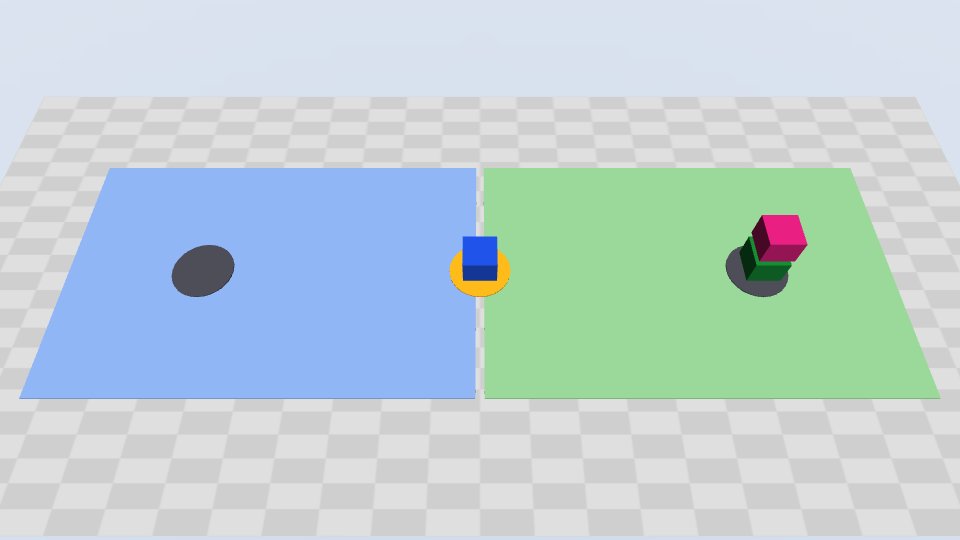
Play the animation of the demo (13 seconds, repeats)
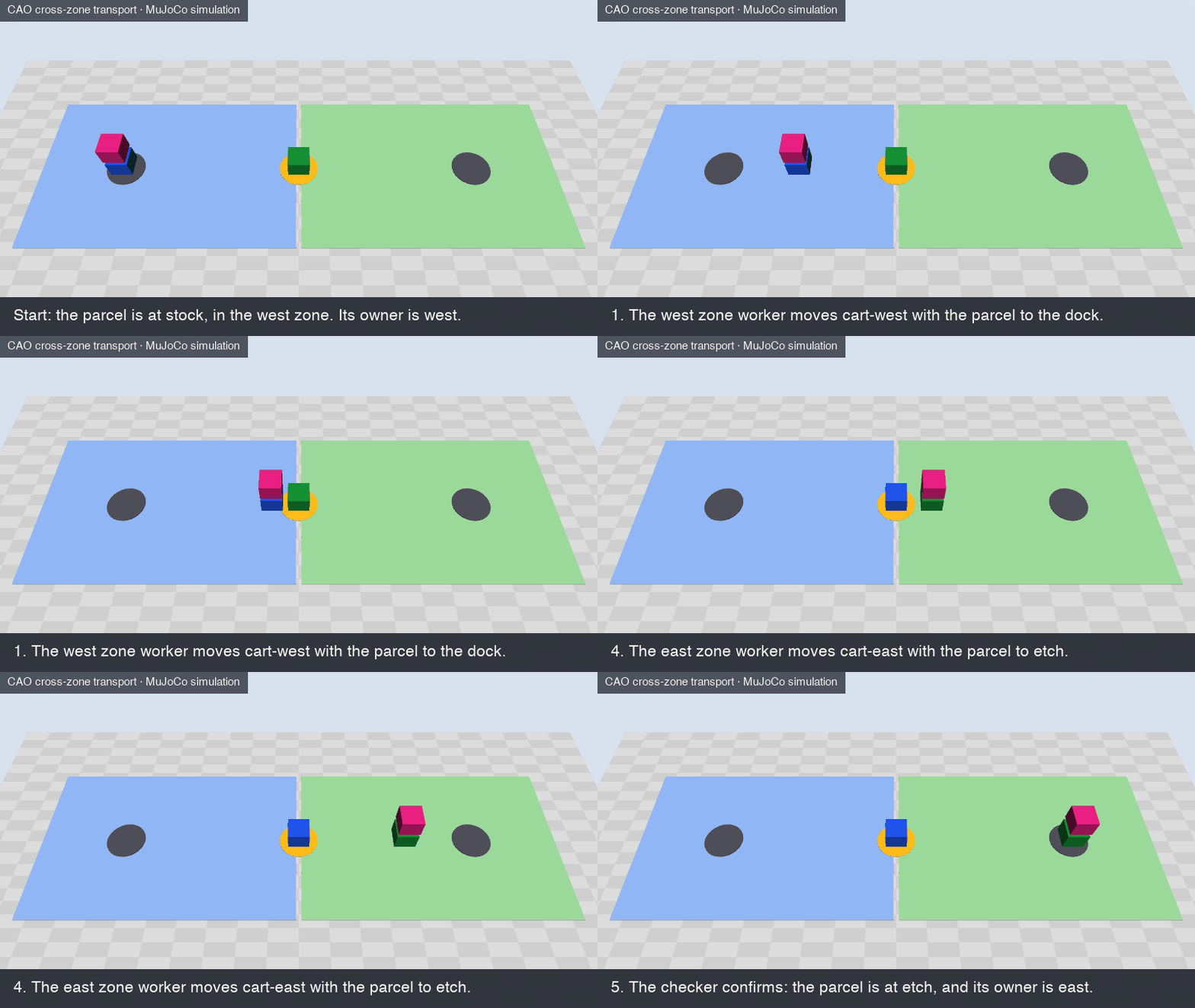
**The demo: two zones.** This is the delivery that [Run the demo](#run-the-demo)
runs. The animation replays the commands of a live run of this guide in the
MuJoCo world of the example: the same robots, commands, and order. It leaves out
the time that the agents use between the steps. An extended demo with three
zones is in [Demo scenarios](#demo-scenarios).
## What the exercise is about
### Areas, owners, and the job
In a large factory, warehouse, or laboratory, different robot teams often work
in different areas of the floor. In this example, each area is a **zone**.
Each zone has one **owner**. The owner is the robot team of that zone. Two
rules apply:
- Only the robots of a zone can move items in that zone.
- The owner of a zone is responsible for each item in that zone.
The example calls these zones **ownership zones**. The term is not a standard
industry term. It is the name of the example. It comes from an example of
[Strands Robots](https://github.com/strands-labs/robots). See
[Background](#background).
The job of the agents is a **transport across ownership zones**. A transport
across ownership zones is one transport job. It is not a zone. In this job,
the parcel must go from a location in one zone to a location in a different
zone. No robot can do the full trip, because each robot stays in its own zone.
So the job has four parts:
1. A robot of the first zone moves the parcel to a **shared dock**. The shared
dock is a location in the two zones.
2. The first zone offers **custody** of the parcel to the second zone. Custody
is the responsibility for the parcel. The first zone keeps custody until
the second zone accepts it.
3. The second zone accepts custody. It can accept only when its robot and the
parcel are at the dock.
4. A robot of the second zone moves the parcel to the destination.
Steps 2 and 3 are the **custody handoff**. Do not confuse it with the CAO tool
`handoff`, which gives a task to an agent. The simulator tools of the custody
handoff are `offer_handoff` and `accept_handoff`.
In the default scene, the parcel goes from `stock` to `etch`. `stock` is in the
`west` zone, and `etch` is in the `east` zone. The parcel goes through the
shared `dock`:
```mermaid
flowchart LR
stock["stock west zone"] -->|"1. cart-west carries the parcel"| dock["dock shared by west and east 2. custody goes from west to east"]
dock -->|"3. cart-east carries the parcel"| etch["etch east zone"]
```
### The agents
Four CAO agents do the work. Each agent is a provider CLI, for example GitHub
Copilot CLI or Claude Code, in its own CAO terminal:
- A **supervisor** reads your request, plans the job, and delegates each step
with the CAO `handoff` tool. It cannot move a robot.
- One **zone worker** for each zone controls only the robots of its zone. The
west zone worker carries the parcel to the dock and offers custody. The east
zone worker accepts custody and carries the parcel to `etch`.
- An independent **checker** reads the final state and verifies the result.
It cannot move a robot.
Each agent has a credential. The credential gives access only to the
simulator tools of the role and the zone of the agent. The simulator, not a
prompt, enforces these limits.
### The simulator: MuJoCo
[MuJoCo](https://mujoco.readthedocs.io/en/stable/overview.html) means
Multi-Joint dynamics with Contact. It is a free, open-source physics engine.
Google DeepMind maintains it. Robotics research and development use it to
simulate robots and their environment. Step 1 installs it as a Python package.
No robot hardware is necessary.
This exercise uses MuJoCo in a simple way. The robots are carts that move
along straight lines. The parcel moves with its cart. The simulator measures the
positions of the carts and the parcel. A zone can change custody only when the
measured positions show the cart and the parcel at the dock.
A local process, the **controller** (`demo.py serve`), runs the MuJoCo world.
The agents use the world only through the MCP tools of the controller.
### What you get from the exercise
- You see a CAO supervisor delegate sequential steps to workers with
`handoff`, and get evidence back from each worker.
- You see the agents make decisions. The controller does no planning. The
CAO supervisor finds the parcel, selects the route, and selects the zone
worker for each leg. Two [demo scenarios](#demo-scenarios) show this: a
parcel that starts in the east zone, and a route through three zones.
- You see how CAO agent profiles, tool allowlists, and credentials keep each
agent in its role.
- You see a custody handoff between two agents. It depends on a measured state,
not on the text of a message.
- You see the robots move, in pictures from the simulator. See
[See the robots move](#see-the-robots-move).
The agents need approximately 3 to 5 minutes for a run. The exercise needs
no GPU, no display, and no robot hardware. See
[Compute and GPU](#compute-and-gpu).
## Background
This is the first physical AI example of CAO. Physical AI is AI that controls
machines in the physical world, for example robots.
The idea of the example comes from
[Strands Robots](https://github.com/strands-labs/robots). Strands Robots is an
open-source project with the Apache-2.0 license. It is a project of
[Strands Labs](https://aws.amazon.com/blogs/opensource/introducing-strands-labs-get-hands-on-today-with-state-of-the-art-experimental-approaches-to-agentic-development/),
the GitHub organization of AWS for experimental AI agent projects. With
Strands Robots, a [Strands Agents](https://aws.amazon.com/blogs/opensource/introducing-strands-agents-an-open-source-ai-agents-sdk/)
agent can control, simulate, and train robots with natural language. Strands
Agents is the open-source AI agent SDK of AWS.
This example follows the Strands Robots example
[Transport across ownership zones](https://github.com/strands-labs/robots/blob/5180ecc43eb478d84aabf9451bec742b4c2febc6/examples/fleet/02_cross_zone_transport.py).
The two examples have the same job. Each zone has an owner, and the zones have
a shared dock. The receiving zone must accept the custody handoff. The two
examples do the job in different ways:
| | Strands Robots example | This example |
| --- | --- | --- |
| Who plans the job | Python code. A coordinator function splits the request into legs with fixed rules. | A CAO agent. The CAO supervisor reads the request and the scene, and it plans the legs. |
| Who does each leg | A zone orchestrator in the same Python process, over a Zenoh mesh | A separate provider CLI agent for each zone, in its own CAO terminal |
| How each leg goes to its worker | `mesh.send`, after a person approves each leg | CAO `handoff`. Each worker returns its evidence to the CAO supervisor. |
| Who checks the result | The coordinator code. It sends a leg only after the success reply of the leg before it. | A separate checker agent. It reads the measured state after the last leg. |
This example uses CAO, a multi-agent orchestration system, to do the job.
It does not import Strands, LangGraph, Zenoh, or a robot policy. The code and
the scene are original. The example contains no robot assets or code from
Strands Robots.
## Agents
Each agent has a profile in this directory, as in
[examples/assign](../../assign/README.md). A profile has YAML frontmatter and
then the instructions of the agent:
| Agent | Profile | CAO delegation grant | Simulator access |
| --- | --- | --- | --- |
| Supervisor | [`transport_supervisor.md`](transport_supervisor.md) | `@cao-mcp-server`. The instructions use `handoff`. | Read-only: `observe` |
| Zone worker, one for each zone | [`transport_zone_worker.md`](transport_zone_worker.md) | None. CAO refuses its `assign` and `handoff` calls. | Own zone only: `observe`, `move`, `offer_handoff`, `accept_handoff` |
| Checker | [`transport_checker.md`](transport_checker.md) | None. CAO refuses its `assign` and `handoff` calls. | Read-only: `observe` |
The instructions of each profile have the same sections as the profiles of
the assign example:
| Section | Contents |
| --- | --- |
| Role and Identity | What the agent is, and what it cannot do |
| Core Responsibilities | The tasks of the agent |
| Available MCP Tools | Each tool that the credential of the agent can call, with its parameters |
| Run Bindings | The run identifiers that `demo.py prepare` adds |
| Workflow | The numbered steps of the agent, with the tool calls |
| Critical Rules | The rules for proof, retries, and safety |
| Example | One worked example, with placeholders instead of scene names |
| Final Report Format or Result Format | The items of the final response of the agent |
The supervisor profile also has a section for failures and uncertain results.
The zone worker profile also has a table of the rejection reasons of the
controller.
Do not install these files directly. Their `transport-sim` entry is a
placeholder, and the files contain no credential. `demo.py prepare` makes a
run copy of each profile for each run. See [Run copies](#run-copies).
With `site.json`, a run has four agents: the supervisor, the `west` zone
worker, the `east` zone worker, and the checker. With `return-site.json`, the
zone workers are `stores` and `assembly`.
What each agent does:
- **Supervisor.** Reads the request and the scene. Plans the legs. Sends each
leg to the zone worker that owns it. Sends the final check to the checker.
Reports the evidence of each worker. It cannot move a robot.
- **Zone worker.** Operates only its own zone. Selects a capable robot. Moves
the payload and measures the arrival. Offers custody at the dock, or accepts
an offer. A provider that enforces the allowlist blocks its shell and file
tools. CAO refuses its `assign` and `handoff` calls.
- **Checker.** Reads fresh state. Compares the measured positions, the owner, and
the command records with the original request. Its credential cannot move a
robot, change custody, or stop the run. CAO refuses its `assign` and
`handoff` calls.
All zone workers use the same profile. Each run copy adds run bindings that set
`your_zone`. The credential of the worker also sets its zone in the
controller. A prompt or a tool argument cannot give a worker access to another
zone.
You are the **operator**, not a CAO agent. You start the controller, approve
motion, read the state, and stop the run with `demo.py`.
Only a credential with the correct scope can call a simulator tool:
| Tool | Scope | Used by | Effect |
| --- | --- | --- | --- |
| `observe` | `observe` | All agents, and `demo.py status` | Returns positions, custody, capabilities, and command records. Changes nothing. |
| `move` | `act` | Zone workers | Starts one bounded leg in the zone of the caller. Returns `accepted`, not arrival. |
| `offer_handoff` | `act` | Zone workers | Offers custody at a shared dock. The sender keeps custody until the receiver accepts. |
| `accept_handoff` | `act` | Zone workers | Accepts one exact offer. The receiving robot and the payload must be at the dock. |
| `stop_simulation` | `operate` | `demo.py stop` | Stops all motion and locks the run. |
### Agent profiles
This is the frontmatter of [`transport_supervisor.md`](transport_supervisor.md):
```yaml
---
name: transport_supervisor
description: "Simulation-only cross-zone transport supervisor: plans the legs and delegates each leg with CAO handoff"
skills: [] # No CAO skill catalog in the prompt. Copilot CLI and Kiro CLI load skills in their own way.
allowedTools:
- "@transport-sim" # Simulator tools. The supervisor credential permits only observe.
- "@cao-mcp-server" # CAO handoff. Only the supervisor can delegate.
mcpServers:
# Placeholder. demo.py prepare sets the Python and the credential file of the run.
transport-sim:
type: stdio
command: python
args: ["demo.py", "connect", "/credentials/supervisor.json"]
cao-mcp-server:
type: stdio
command: cao-mcp-server
args: []
---
```
The zone worker and checker profiles are different in these ways:
- `allowedTools` contains only `@transport-sim`.
- `mcpServers` contains only `transport-sim`.
- The credential file is `zone_.json` or `checker.json`.
The zone worker profile does not grant `@cao-mcp-server`. So CAO refuses
its `assign` and `handoff` calls, with this result:
`'assign' is not permitted: the calling terminal's allowed tools do not include '@cao-mcp-server'`.
The checker profile also does not grant `@cao-mcp-server`.
The instructions of the zone workers and the checker tell them to return their
evidence to the `handoff` caller. They do not need any CAO tool for this.
### Run copies
`demo.py prepare` writes one run copy of a profile for each agent of the run.
For `site.json`, it writes four copies: one supervisor, two zone workers, and
one checker. A run copy is the profile with these changes:
| Field | Profile in this directory | Run copy |
| --- | --- | --- |
| `name` | `transport_supervisor` | `transport_supervisor_`, where `` is random |
| `description` | The text in the profile | The same text. For a zone worker, `prepare` adds the zone, for example `(zone west)`. |
| `provider` | Not set | `copilot_cli`, or the value of `--provider` |
| `transport-sim` | A placeholder | The Python of the example `.venv`, `demo.py connect`, and the credential file of the agent |
| Instructions | The instructions of the agent | The same instructions, and then the run bindings |
The random `` gives each run its own installed profile names. `handoff`
starts each worker from its installed profile when the supervisor calls it.
So a later run must not replace the profiles of a run that is not complete.
This is the frontmatter of the run copy for the `west` zone worker, with
shortened IDs and paths:
```yaml
---
name: transport_zone_worker_
description: 'Simulation-only cross-zone transport zone worker: moves the payload in one zone and offers or accepts custody (zone west)'
provider: copilot_cli
skills: []
allowedTools:
- '@transport-sim'
mcpServers:
transport-sim:
type: stdio
command: /.venv/bin/python3
args:
- /demo.py
- connect
- /credentials/zone_west.json
---
```
These are the run bindings of the `west` zone worker:
```json
{
"run_id": "",
"your_zone": "west",
"zone_profiles": {
"west": "transport_zone_worker_",
"east": "transport_zone_worker_"
},
"checker_profile": "transport_checker_"
}
```
The supervisor and the checker have `"your_zone": null`. To see the run
copies, run `ls "$RUN_DIR/profiles"` after Step 2 of
[Run the demo](#run-the-demo).
## Orchestration
The supervisor delegates every step with `handoff`. The workflow is sequential:
each `handoff` blocks until the worker returns its evidence. Between steps, the
supervisor reads the state with `observe`. In the diagram, the solid arrows from
the supervisor are CAO handoffs. The dotted arrows are calls to the simulator.
The operator is not an agent. It is you: you start the controller, approve
motion, read the state, and stop the run with `demo.py`.
```mermaid
flowchart TD
U(["User request"]) --> S[["Supervisor agent"]]
S -->|"handoff 1"| W[["West zone worker agent"]]
S -->|"handoff 2"| E[["East zone worker agent"]]
S -->|"handoff 3"| C[["Checker agent"]]
S -.->|"observe"| M[("MuJoCo controller demo.py serve")]
W -.->|"observe, move, offer_handoff"| M
E -.->|"observe, accept_handoff, move"| M
C -.->|"observe"| M
O(["Operator: you, not an agent"]) -.->|"status, stop"| M
```
```mermaid
sequenceDiagram
actor User
participant S as Supervisor agent
participant W as West zone worker agent
participant E as East zone worker agent
participant C as Checker agent
participant M as MuJoCo controller
User->>S: Move parcel from stock to etch
S->>M: observe
S->>+W: handoff 1: carry the parcel to the dock, then offer custody to east
W->>M: move cart-west with parcel to dock
W->>M: observe until the move is finished at the dock
W->>M: offer_handoff parcel to east
W-->>-S: command ID, offer ID, measured position, owner west
S->>M: observe
S->>+E: handoff 2: accept the offer, then carry the parcel to etch
E->>M: observe the parcel and cart-east at the dock
E->>M: accept_handoff, owner becomes east
E->>M: move cart-east with parcel to etch
E->>M: observe until the move is finished at etch
E-->>-S: command IDs, measured position, owner east
S->>+C: handoff 3: check the original request
C->>M: observe
C-->>-S: parcel at [2, 0] m, owner east, no pending offer
S->>User: Final report with the evidence of each worker
```
For `site.json`, a successful run has this sequence:
1. The west zone worker selects `cart-west`. It moves `parcel` from `stock` to
`dock`. It confirms the finished command and the measured dock position.
2. The west zone worker offers custody to `east`. West stays the owner until
east accepts.
3. The east zone worker confirms that the parcel and `cart-east` are at the dock.
It accepts the exact offer. Then it moves the parcel to `etch`.
4. The checker reads fresh state and compares it with the original request.
### Why handoff and not assign
The [assign example](../../assign/README.md) uses `assign` and `handoff`
together. The two tools return the result of a worker in different ways:
| Tool | Return of the result |
| --- | --- |
| `handoff` | The call blocks until the worker finishes. CAO reads the last response of the worker from its terminal and returns it as the result of the call. The worker needs no CAO tool. |
| `assign` | The call returns immediately. CAO adds this line to the task: `[Assigned by terminal . When done, send results back to terminal using send_message]`. The worker must call `send_message`. CAO queues the message in the inbox of the supervisor and delivers it when the supervisor is idle. |
This example uses only `handoff`, for these reasons:
- Each step needs the result of the step before it. The east zone worker can
accept custody only after the west zone worker offers it at the dock. The
checker can check only after the last leg. Parallel work gives no benefit.
- With `handoff`, the zone workers and the checker need no CAO tool. Their
profiles grant only `@transport-sim`.
To use `assign`, make these changes:
1. In `transport_zone_worker.md` and `transport_checker.md`, add
`cao-mcp-server` to `mcpServers`. CAO does not gate `send_message`, so a
Claude Code worker can then send its result. CAO still refuses `assign` and
`handoff` from the worker. The other providers are different:
- Copilot CLI already gives `cao-mcp-server` to every agent. It needs no
change to `mcpServers`.
- Kiro CLI and Grok Build CLI hide the tools of a server that
`allowedTools` does not grant. On them, the worker cannot call
`send_message`, so use `handoff`.
2. Do not add `@cao-mcp-server` to `allowedTools`. That grant also lets the
worker call `assign` and `handoff`.
3. Change the instructions in the three profiles. The supervisor must use
`assign`, and the workers must send their results with `send_message`.
4. Prepare a new run. `prepare` reads the profiles when it makes the run
copies.
See [Tool restrictions](../../../docs/tool-restrictions.md).
`assign` is useful for independent work, for example two payloads that never
share a dock. This example has one payload, so it uses only `handoff`.
## Requirements
### Software
| Requirement | Version | How to check |
| --- | --- | --- |
| CAO | 2.5.3 or later. The latest `main` is better. | `cao --version` |
| tmux | 3.3 or later | `tmux -V` |
| uv | A recent release | `uv --version` |
| Python | 3.11 or later | Step 1 finds or installs it with `uv` |
| MuJoCo | The version in `uv.lock` | Step 1 installs it as the Python package `mujoco`. You do not install it separately. |
| OpenGL | Only for the pictures of `--record`. No separate GPU is necessary. | On macOS, OpenGL is part of the system. On Linux without a display, see [See the robots move](#see-the-robots-move). |
| Provider CLI | A CAO provider that `prepare` accepts. GitHub Copilot CLI is the default. See [Providers](#providers). | Start the CLI one time in this repository, sign in, and accept its first-run prompts |
CAO 2.5.3 is the first release with the permission fix for workflow delegation
that this example uses. The latest `main` also has later fixes for Copilot CLI
and for `cao session status`. To install or update CAO from the latest `main`:
```bash
uv tool install git+https://github.com/awslabs/cli-agent-orchestrator.git@main --upgrade
```
Expected output
An update of an existing installation. The packages, versions, and the commit
can be different. The last line is the important one.
```text
Resolved 91 packages in 496ms
Updating https://github.com/awslabs/cli-agent-orchestrator.git (main)
Updated https://github.com/awslabs/cli-agent-orchestrator.git ()
Building cli-agent-orchestrator @ git+https://github.com/awslabs/cli-agent-orchestrator.git@
Built cli-agent-orchestrator @ git+https://github.com/awslabs/cli-agent-orchestrator.git@
Prepared 3 packages in 4.97s
Uninstalled 3 packages in 474ms
Installed 3 packages in 395ms
- cli-agent-orchestrator== (from git+https://github.com/awslabs/cli-agent-orchestrator.git@)
+ cli-agent-orchestrator== (from git+https://github.com/awslabs/cli-agent-orchestrator.git@)
...
Installed 4 executables: cao, cao-mcp-server, cao-ops-mcp-server, cao-server
```
For other installation methods, see [Install CAO](../../../README.md#install-cao).
The example has its own Python project and lockfile. It does not change the CAO
installation.
### Providers
Select the provider with `--provider` in Step 2. `prepare` writes it into each
run copy, so `cao install` and `cao launch` use the same provider for all the
agents.
Each agent must get the `transport-sim` server of its own run copy, with its
own credential. `prepare` refuses a provider that cannot do this:
| Provider | Reason |
| --- | --- |
| `cursor_cli` | CAO starts Cursor CLI without the instructions of the agent profile. The CAO supervisor would get neither its workflow nor its run bindings. |
| `opencode_cli` | OpenCode keeps the MCP servers of all agents in one shared configuration. All the agents would then use the same credential. |
| `hermes` | Hermes reads MCP servers only from its own Hermes profile, not from the CAO agent profile. The agents would get no simulator server. |
| `antigravity_cli` | Antigravity CLI reads the MCP servers of all CAO terminals from one shared file. An agent could then use the simulator credential and the CAO tools of another agent. |
The isolation of the zones needs a provider that enforces the tool allowlist
of each profile. CAO shows this in the `Enforcement:` line of `cao launch`. For
the enforcement of each provider, see
[Tool restrictions](../../../docs/tool-restrictions.md).
> [!WARNING]
> If the provider does not enforce the allowlist, every agent, the supervisor
> included, can use a shell. Then it can read every credential file of the run,
> act for another zone, or use the operator credential to stop the run.
> `prepare` prints a warning for these providers. Use them only for a trusted
> local demo.
For the setup of each provider, see its guide in the
[CAO documentation](../../../README.md#prerequisites).
### Compute and GPU
You do not need a GPU. A laptop is enough:
- The controller sets the positions of the carts and the parcel directly, along
straight lines. The world has no gravity and no contacts.
- With `--record`, MuJoCo renders small pictures with OpenGL. This needs no
separate GPU. See [See the robots move](#see-the-robots-move).
- The agents are provider CLIs. The language models run on the service of the
provider, not on your computer.
- The example needs no display and no download of a robot model.
If you change the example to do more than move carts, a GPU can be necessary. Use this table:
| Change to the example | GPU necessary | Why |
| --- | --- | --- |
| Simulate a robot arm that picks up an item. The arm moves its hand above the item, closes its gripper, lifts the item, and puts it down again. A grasp assist holds the item: the example says that this is not a physical grasp. [Strands Robots example 18](https://github.com/strands-labs/robots/blob/ed1544d73e3bf2c7ebc599987df759e14193c96d/examples/18_so101_pick_and_lift.py) does this with a small arm. | No | The arm does not look for the item. The script puts the item at a known position, and it reads the position of the item from the simulator. So the arm needs no camera. The example uses a camera only to record an optional video. The CPU calculates the arm motion to that position. Example 18 reports a run time of approximately 3 seconds on a CPU. Strands Robots needs Python 3.12 or later. On a real robot, a camera or another sensor must find the item first. |
| Use a trained robot model on your computer. A trained robot model is a neural network. It reads camera images and an instruction. Then it sends motor commands to the robot many times each second. This example has no such model. | Yes | The model needs an NVIDIA GPU. For example, the AWS instance type `g6e.2xlarge` has 1 NVIDIA L40S GPU with 48 GB of memory. The model card of the model gives the GPU memory that it needs. |
| Plan arm motions that do not hit objects, with the NVIDIA library cuRobo. | Yes | cuRobo uses CUDA, so it needs an NVIDIA GPU. |
## Run the demo
Use three terminals:
| Terminal | Use |
| --- | --- |
| Terminal 1 | Prepare the run, install the profiles, launch the supervisor, and check the result |
| Terminal 2 | Run the MuJoCo controller, `demo.py serve` |
| Terminal 3 | Run `cao-server` |
Each step has an **Expected output** section that you can expand. The outputs
come from a run of this guide. In them, `` is a random ID, and ``
is the run ID. `` is the path of the repository, `~` is your home
directory, and `