# A robot factory run by a team of agents
In this exercise, a team of four AI agents in two layers runs a simulated
factory floor. A supervisor agent takes the order. Three team manager agents
run three robot teams. Nine simulated robots, which are not agents, make,
assemble, and ship the parts. You start the simulator and the agents on your laptop. Then you watch
the parts flow from west to east, a team block, and the supervisor balance the
line.
Play the animation of the demo (47 seconds, repeats)
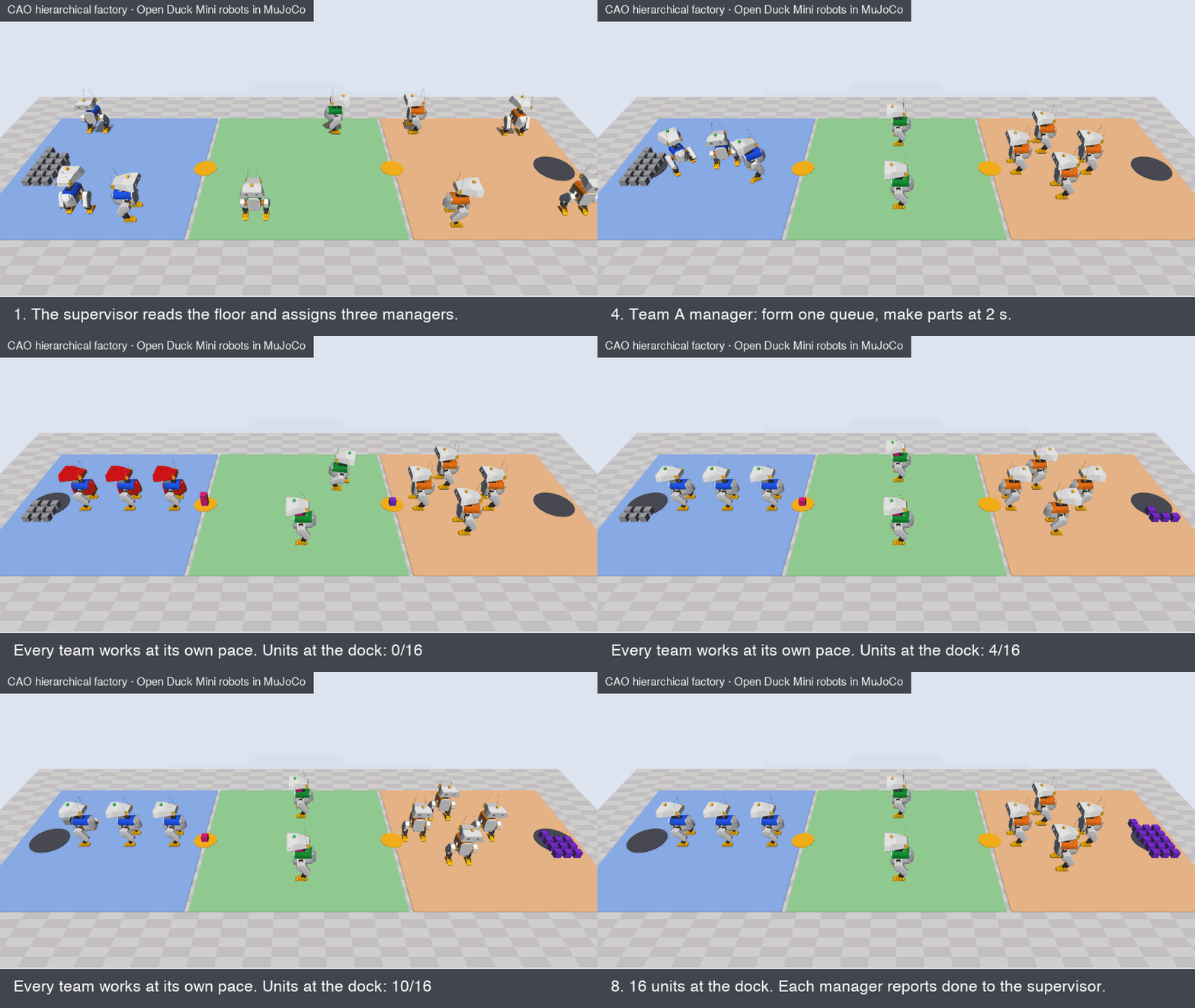
**The demo.** This is the order that [Run the demo](#run-the-demo) runs. The
animation replays the commands of a live run of this guide in the MuJoCo world
of the example: the same robots, commands, and order. It leaves out the time
that the agents use between the steps.
## What the exercise is about
### Two agent layers and the robots
Real factories are organizations in layers. A plant manager plans the order
and the targets. A team lead runs one line or one area. The machines do the
work. This example builds the same layers: two layers of CAO agents, and the
robots below them:
```mermaid
flowchart TB
S["Agents, layer 1: strategy Factory supervisor agent plans the order, balances the line"]
A["Agents, layer 2: tactics Team A manager agent manufacturing, zone west"]
B["Agents, layer 2: tactics Team B manager agent assembly, zone middle"]
C["Agents, layer 2: tactics Team C manager agent shipping, zone east"]
RA["Robots (not agents): execution robots a1, a2, a3 one queue"]
RB["Robots (not agents): execution robots b1, b2 two parallel lines"]
RC["Robots (not agents): execution robots c1, c2, c3, c4 one diamond formation"]
S -->|"CAO assign"| A & B & C
A & B & C -.->|"CAO send_message: done, or blocked"| S
A -->|"MCP: form_team, start_line, set_pace"| RA
B -->|"MCP: form_team, start_line, set_pace"| RB
C -->|"MCP: form_team, start_shipping"| RC
```
- **Agent layer 1, the supervisor.** One CAO agent. It reads the order, plans the
pace of each team, and assigns one task to each manager. It can only read
the floor. It talks only to the managers.
- **Agent layer 2, the managers.** Three CAO agents, one for each team. A manager
forms its team, starts the program of its team, and watches it. It reports
to the supervisor. Its credential reaches only its own robots.
- **The robots.** Nine simulated robots. They are not agents. Each
team runs the program that its manager started, without an LLM in the loop.
### The floor and the teams
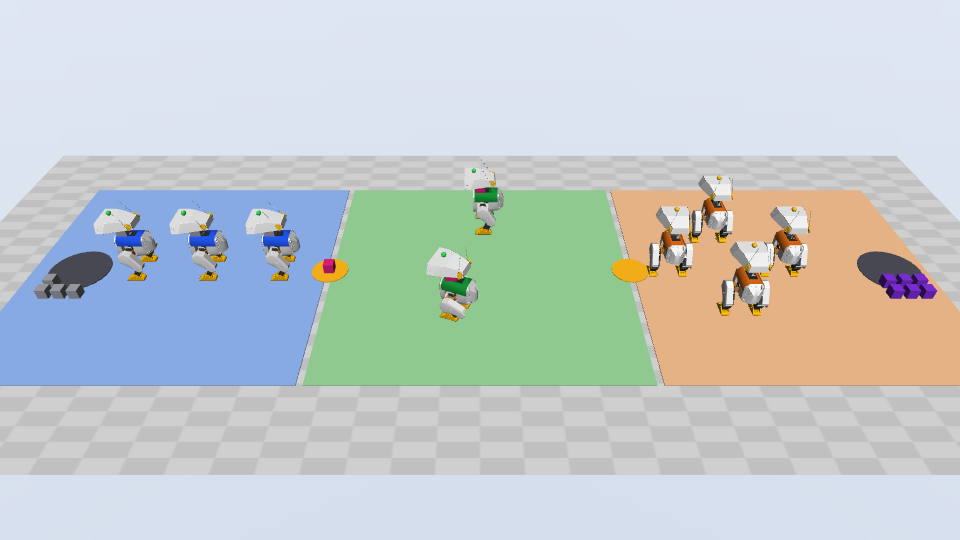
The floor has three zones. Parts flow from west to east. A **buffer** with a
small capacity joins two zones:
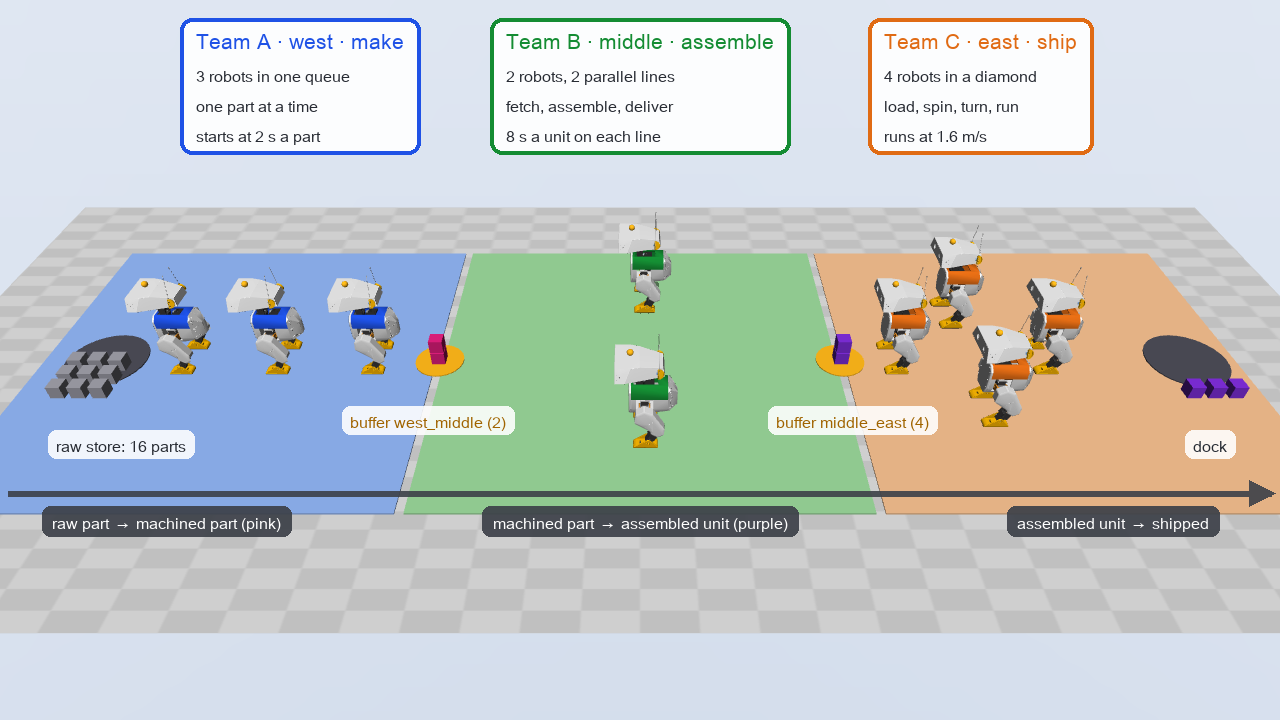
| Team | Zone | Robots | Kind | What the robots do |
| --- | --- | --- | --- | --- |
| Team A, manufacturing | `west` | 3: `a1`, `a2`, `a3` | `serial` | The robots stand in one queue from the raw store to the buffer `west_middle`. A part goes from robot to robot, one part at a time. Each robot works on each part for the same cycle time, the pace of the line. The part leaves the queue as a machined part (pink). |
| Team B, assembly | `middle` | 2: `b1`, `b2` | `parallel` | The robots stand in a vertical column. Each robot is its own assembly line: it fetches a part from `west_middle`, assembles it for its cycle time, and delivers the unit (purple) to `middle_east`. |
| Team C, shipping | `east` | 4: `c1` to `c4` | `formation` | The robots move as one diamond. For each shipment, the diamond loads a batch of units, one unit on each robot. Then it does its routine: `spin` (each robot turns 360 degrees in place), `turn` (the diamond turns 90 degrees about its centre), and `run` (the diamond runs to the dock at 1.6 m/s, unloads, and runs back). |
The teams work at different speeds. Team A is fast, Team B is slow, and Team
C runs in bursts. So the order has a **bottleneck**: Team B.
### The job of the agents
The order of the demo is: make, assemble, and ship 16 units. Team A starts at
a cycle time of 2 s, and Team B at 8 s. Team C ships in batches of 2 with the
routine spin, turn, run.
1. The supervisor assigns the three managers with the CAO `assign` tool,
downstream team first: Team C, Team B, then Team A. `assign` returns at
once, so the three teams work at the same time.
2. Each manager forms its team and starts the program of its team.
3. Team A makes a part every 2 s, but Team B takes about 7 s for each unit.
The buffer `west_middle` holds only 2 parts, so it fills, and Team A
**blocks**: its robots hold finished parts that cannot move on.
4. The Team A manager reports the block to the supervisor with
`send_message`, and waits.
5. The supervisor reads the floor and **balances the line**. It sets the pace
of Team A to the pace of Team B, here 8 s, and sends that pace to the Team A
manager. This is takt-time balancing: a fast team in front of a slow team
only fills the buffer and waits.
6. Each manager reports done. The supervisor checks the floor: 16 assembled
units at the dock. It writes the final report.
The controller does no planning. It runs the programs that the managers
start. The supervisor finds the bottleneck and selects the new pace. The
managers select the commands for their teams.
### The simulator: MuJoCo
[MuJoCo](https://mujoco.readthedocs.io/en/stable/overview.html) (Multi-Joint
dynamics with Contact) is a free, open-source physics engine. Step 1 installs
it as a Python package. No robot hardware is necessary.
This exercise uses MuJoCo in a simple way, like the
[cross-zone transport example](../cross-zone-transport/README.md). Each robot
is an [Open Duck Mini v2](https://github.com/apirrone/Open_Duck_Mini), the
small open-source biped that [Strands Robots](https://github.com/strands-labs/robots)
drives in its demos. Step 1 downloads its MuJoCo model (Apache-2.0, about
18 MB) from one pinned commit, and checks the SHA-256 of each file. In the
simulator:
- the battery lid and the top panel of a robot have the color of its team,
- a lamp above the head shows the state of the robot: green when it works or
moves, amber when it waits, and red when it is blocked. The shell of a
blocked robot also turns red,
- the legs step when the robot walks, turns, spins, or runs. A working robot
nods over its part and moves its antennas.
The robots and the parts are kinematic: the root of each robot is a mocap body
that moves at a set speed, and the controller sets the leg, neck, and antenna
angles from that motion. Nothing has contact or gravity. The simulator measures
the positions. The robots stand 1.6 times the size of the real robot, so that
they show in the overview camera. Without the download, the controller uses
simple bipeds of the same size, and the example works the same.
A local process, the **controller** (`demo.py serve`), runs the MuJoCo world.
The agents use the world only through the MCP tools of the controller.
### What you get from the exercise
- You see a team of agents in two layers drive a physical-AI floor: a CAO
supervisor delegates to CAO managers, and each manager drives a robot team.
- You see `assign` and `send_message` work together: parallel work, and
reports that come back up the hierarchy.
- You see a decision that needs the whole floor. Only the supervisor sees all
three teams, so only the supervisor can find the bottleneck and balance the
line.
- You see three robot teams do different things: a queue, parallel lines, and
a formation that spins, turns, and runs.
- You see how agent profiles, tool allowlists, and scoped credentials keep each
agent in its layer.
The agents need approximately 4 to 6 minutes for a run. The exercise needs no
GPU, no display, and no robot hardware.
## Agents
### Agent profiles
The directory has one committed profile for each role:
| Profile | Agent | `factory-sim` tools | CAO tools |
| --- | --- | --- | --- |
| `factory_supervisor.md` | The supervisor | `observe` | `assign`, `send_message` |
| `factory_line_manager.md` | The Team A manager (kind `serial`) | `observe`, `form_team`, `start_line`, `set_pace`, `wait_team` | `send_message` only |
| `factory_assembly_manager.md` | The Team B manager (kind `parallel`) | `observe`, `form_team`, `start_line`, `set_pace`, `wait_team` | `send_message` only |
| `factory_shipping_manager.md` | The Team C manager (kind `formation`) | `observe`, `form_team`, `start_shipping`, `wait_team` | `send_message` only |
`demo.py prepare` gives each team the manager profile of its kind. Each
profile has the sections Role and Identity, Core Responsibilities, Available
MCP Tools, Run Bindings, Workflow, Critical Rules, Failures and Uncertain
Results, Example, and Final Report Format.
### Run copies
`prepare` does not install the committed profiles. It writes one **run copy**
for each agent to `profiles/` in the run directory:
- The name gets a random suffix, for example
`factory_supervisor_`. So a later run cannot replace the profiles of a
running run.
- The `factory-sim` server starts the Python of `.venv` with
`demo.py connect `. Each agent gets its own credential file.
- `provider` is the `--provider` of `prepare`.
- The end of the instructions gets the **run bindings**: the `run_id`, and the
zone and team of the agent. The supervisor also gets the manager profile of
each team. A manager gets only its own team, so its bindings do not name the
profile of another manager. They are identifiers, not instructions.
### Credentials and scopes
The controller checks a credential on each tool call. The credential, not a
prompt, sets what an agent can do:
| Credential | Scopes | Tools |
| --- | --- | --- |
| `supervisor` | `observe` | `observe` |
| `manager_west`, `manager_middle` | `observe`, `act`, `line` | `observe`, `form_team`, `wait_team`, `start_line`, `set_pace` |
| `manager_east` | `observe`, `act`, `ship` | `observe`, `form_team`, `wait_team`, `start_shipping` |
| `operator` | `observe`, `operate` | `observe`, `stop_simulation` |
The CAO allowlist of each profile limits the CAO tools in the same way:
| Profile | CAO grant | CAO tools |
| --- | --- | --- |
| Supervisor | `@cao-mcp-server` | `assign`, `send_message`, and the other CAO tools |
| Managers | `@cao-mcp-server/send_message` | `send_message` only. CAO refuses `assign`, `handoff`, `find_profiles`, and `delete_terminal`, so a manager cannot start another agent, for example the manager of another team with that team's credential. |
A manager credential also holds its zone. The controller takes the team of a
call from the credential, not from a tool argument. No tool has a team or a
robot argument, so a manager cannot name the robots of another team.
## Orchestration
### Why assign and send_message
The three teams must work at the same time, so the supervisor uses `assign`,
not `handoff`. `handoff` waits until one worker finishes before it returns.
CAO delivers a message to a terminal only when that terminal is idle. The
protocol uses this rule:
- After the three assigns, the supervisor ends its turn. Each manager report
arrives as a new message and starts a new turn of the supervisor.
- A manager watches its team with `wait_team`, which waits up to 45 s in one
tool call. While it waits, the manager is busy and gets no messages.
- When its team blocks, a manager reports once and ends its turn. Now it is
idle, so the answer of the supervisor reaches it. It sets the new pace and
watches its team until done, without a second block report.
```mermaid
sequenceDiagram
participant S as Supervisor
participant A as Team A manager
participant B as Team B manager
participant C as Team C manager
participant F as Factory controller
S->>F: observe
S->>C: assign: form diamond, ship 16 units
S->>B: assign: form columns, assemble 16 units at 8 s
S->>A: assign: form queue, make 16 parts at 2 s
C->>F: form_team, start_shipping, wait_team
B->>F: form_team, start_line, wait_team
A->>F: form_team, start_line, wait_team
F-->>A: event blocked: buffer west_middle full
A->>S: send_message: Team A blocked
S->>F: observe
S->>A: send_message: set your pace to 8 s
A->>F: set_pace 8, wait_team until done
A->>S: send_message: done
B->>S: send_message: done
C->>S: send_message: done
S->>F: observe: 16 units at the dock
```
### Why one agent for each zone, not one for each robot
The example has four LLM agents: the supervisor, and one manager for each zone.
The west manager drives all three robots of Team A. The robots are not agents.
These are the reasons:
- **The time scales are different.** An LLM turn takes seconds, and often tens of
seconds. The robots of Team A pass a part every 2 s, and the controller moves
the robots every 20 ms. An agent for each robot could not react in time. So
the agents decide what is slow to change (the formation, the pace, the batch,
the routine), and the team program does the fast work. Real sites use the same
layers: a planning system, a cell controller or fleet manager for each area
(for example, a VDA 5050 master control), and the robot controllers.
- **The work is coupled inside a team.** The robots of Team A hand each part to
the next robot in the queue, and the four robots of Team C must move as one
formation. With one manager, one decision changes the whole team at the same
time. With one agent for each robot, the agents must agree with messages
before each move, and a late or lost message breaks the queue or the
formation.
- **The authority follows the boundary of the area.** A zone owns its robots,
its side of each buffer, and its safety. One credential for each zone gives
each manager exactly the robots of its area, and no tool takes a robot
argument. The supervisor needs to talk only to three managers.
- **One report for each problem.** When the buffer in front of Team B is full,
the three robots of Team A are blocked for the same reason. One manager sends
one report. Three robot agents would send three reports of one problem.
- **The cost grows with the agents.** Four agents use four CAO terminals and four
model sessions. One agent for each robot would add nine more, for robots that
have no decision of their own to make.
One agent for each robot is the better design when each robot has its own
judgment to make: for example, an inspection robot that interprets camera
images, a mobile manipulator with open-ended tasks, or a fleet of different
robots with no cell controller. To do that with this example, give each robot
its own profile and credential (a `robot` claim next to `zone`), and let the
team manager delegate to its robot agents with `assign`: a third layer of agents.
## Requirements
### Software
| Requirement | Version | How to check |
| --- | --- | --- |
| CAO | `main` from 2026-10-23 or later, or the first release after 2.5.4. The managers need #972 (a worker can always reach `send_message`) and #948 (per-tool grants such as `@cao-mcp-server/send_message` in the delegation ceiling). | `cao --version`, and the date of the installed commit |
| tmux | 3.3 or later | `tmux -V` |
| uv | A recent release | `uv --version` |
| Python | 3.11 or later | Step 1 finds or installs it with `uv`. The example needs 3.11 because the fixed `dnspython` (2.9.0, GHSA-45c3-73f7-pv4m) needs it. |
| MuJoCo | The version in `uv.lock` | Step 1 installs it as the Python package `mujoco`. You do not install it separately. |
| OpenGL | Only for the pictures of `--record`. No separate GPU is necessary. | On macOS, OpenGL is part of the system. On Linux without a display, see [See the robots move](#see-the-robots-move). |
| Provider CLI | A CAO provider that `prepare` accepts. GitHub Copilot CLI is the default. See [Providers](#providers). | Start the CLI one time in this repository, sign in, and accept its first-run prompts |
To install or update CAO from the latest `main`:
```bash
uv tool install git+https://github.com/awslabs/cli-agent-orchestrator.git@main --upgrade
```
For other installation methods, see [Install CAO](../../../README.md#install-cao).
The example has its own Python project and lockfile. It does not change the
CAO installation.
### Providers
`demo.py prepare --provider ` sets the provider of all four agents.
The default is `copilot_cli`. These providers are not supported, for the
reasons that `demo.py` prints:
| Provider | Why it is not supported |
| --- | --- |
| `antigravity_cli` | It reads the MCP servers of all CAO terminals from one shared file. An agent could use the simulator credential of another agent. |
| `cursor_cli` | CAO launches it without the instructions of the agent profile. |
| `grok_cli` | It grants MCP servers only as a whole. A manager that can call `send_message` could then also call `assign`, and start the manager of another team with that team's credential. |
| `hermes` | It reads MCP servers only from its own Hermes profile. |
| `opencode_cli` | It keeps the MCP servers of all agents in one shared configuration. |
With `claude_code`, `copilot_cli`, or `kiro_cli`, the provider refuses the
tools that a profile does not allow. CAO shows this in the
`Enforcement:` line of `cao launch`. With the other providers, the allowlist is
only an instruction, and `prepare` prints a warning. Use those providers only
for a trusted local demo. See [Tool restrictions](../../../docs/tool-restrictions.md).
### Compute and GPU
The controller and the agents need no GPU. The pictures of `--record` need
OpenGL, but no separate GPU. See [See the robots move](#see-the-robots-move).
## Run the demo
Use three terminals:
| Terminal | Use |
| --- | --- |
| Terminal 1 | Prepare the run, install the profiles, launch the supervisor, and check the result |
| Terminal 2 | Run the MuJoCo controller, `demo.py serve` |
| Terminal 3 | Run `cao-server` |
Each step has an **Expected output** section that you can expand. The outputs
come from a run of this guide with `--provider claude_code`. In them, `` is
a random ID, and `` is the run ID. `` is the path of the
repository, `~` is your home directory, and `