# Diagram-as-code
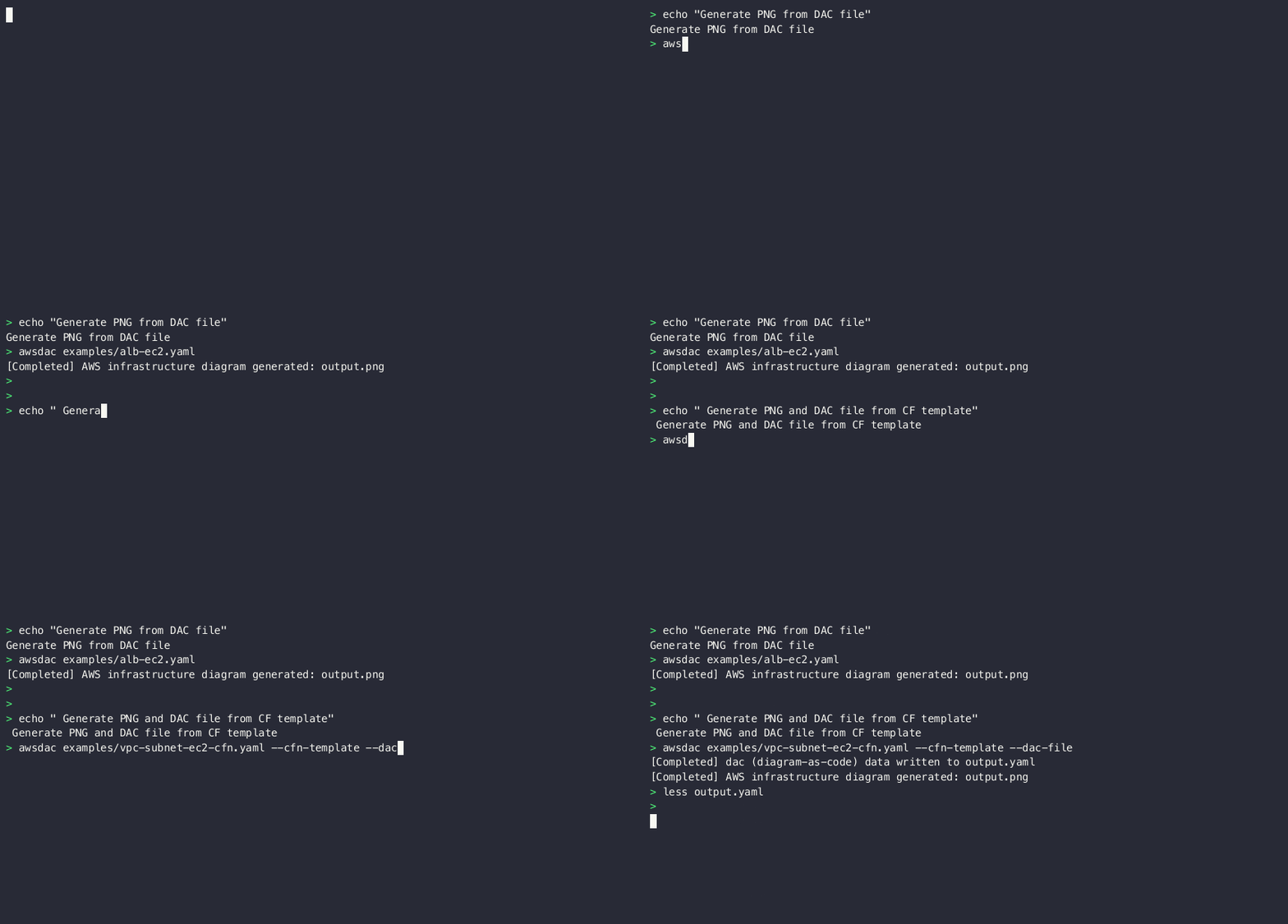
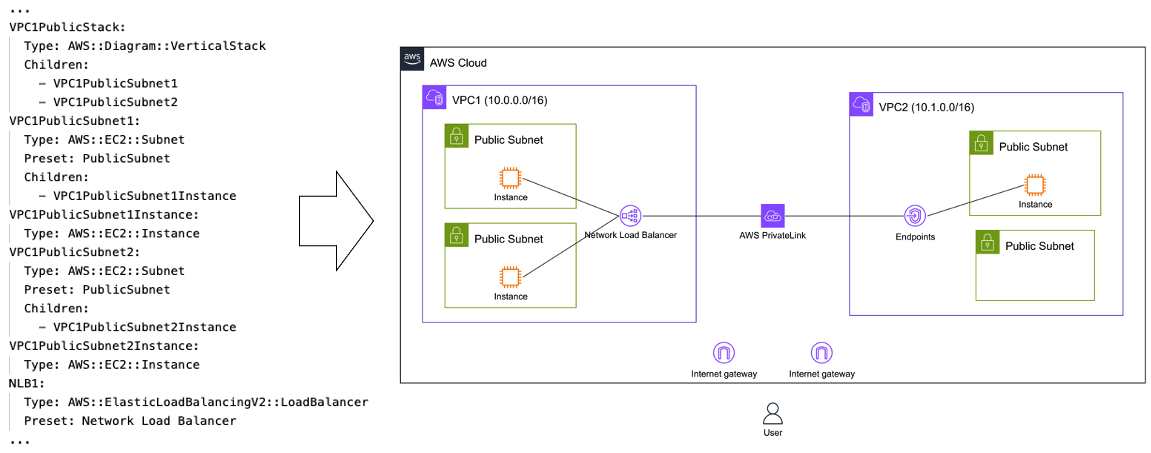
This command line interface (CLI) tool enables drawing infrastructure diagrams for Amazon Web Services through YAML code. It facilitates diagram-as-code without relying on image libraries.
The CLI tool promotes code reuse, testing, integration, and automating the diagramming process. It allows managing diagrams with Git by writing human-readable YAML.
Example templates are [here](examples).
Check out the [Introduction Guide](doc/introduction.md) as well for additional information.
## Features
- **Compliant with AWS architecture guidelines**
Easily generate diagrams that follow [AWS diagram guidelines](https://aws.amazon.com/architecture/icons).
- **Flexible**
Automatically adjust the position and size of groups.
- **Lightweight & CI/CD-friendly**
Start quickly on a container; no dependency on headless browser or GUI.
- **Integrate with your Infrastructure as Code**
Generate diagrams to align with your IaC code without managing diagrams manually.
- **As a drawing library**
Use as Golang Library and integrate with other IaC tools, AI, or drawing GUI tools.
- **Extensible**
Add definition files to create non-AWS diagrams as well.
## Getting started
### for Gopher (go 1.21 or higher)
```
$ go install github.com/awslabs/diagram-as-code/cmd/awsdac@latest
```
### for macOS user
```
$ brew install awsdac
```
## Usage
```
Usage:
awsdac [flags]
Flags:
-c, --cfn-template [beta] Create diagram from CloudFormation template
-d, --dac-file [beta] Generate YAML file in dac (diagram-as-code) format from CloudFormation template
-h, --help help for awsdac
-o, --output string Output file name (default "output.png")
--override-def-file string For testing purpose, override DefinitionFiles to another url/local file
-t, --template Processes the input file as a template according to text/template.
-v, --verbose Enable verbose logging
--version version for awsdac
```
### Example
```
$ awsdac examples/alb-ec2.yaml
```
```
$ awsdac privatelink.yaml -o custom-output.png
```
## Documentation
### Getting Started
- **[Introduction Guide](doc/introduction.md)** - Quick start (10 minutes) and core concepts
- **[Troubleshooting](doc/troubleshooting.md)** - Common issues and solutions
### Core Features
- **[Resource Types](doc/resource-types.md)** - Available AWS resources and diagram elements
- **[Links](doc/links.md)** - Connecting resources with arrows and lines
### Tools & Integration
- **[MCP Server](doc/mcp-server.md)** - AI assistant integration
- **[CloudFormation Conversion](doc/cloudformation.md)** [Beta] - Convert CloudFormation templates to diagrams
### Advanced Features
- **[Templates](doc/template.md)** - Using Go templates for dynamic diagrams
- **[UnorderedChildren](doc/advanced/unordered-children.md)** - Automatic child reordering for optimal layouts
- **[Auto-positioning](doc/advanced/auto-positioning.md)** - Smart link positioning
- **[Link Grouping Offset](doc/advanced/link-grouping.md)** - Prevent link overlap
- **[BorderChildren](doc/advanced/border-children.md)** - Place resources on borders
### Guides
- **[Best Practices](doc/best-practices.md)** - Design patterns and diagram standards
### Contributing
- **[Documentation Guidelines](doc/contributing-docs.md)** - How to contribute to documentation
---
## Development Guide
For contributing guidelines, please see [CONTRIBUTING.md](CONTRIBUTING.md).
### Project Structure
- `cmd/` - CLI tools (awsdac, awsdac-mcp-server)
- `internal/` - Core implementation
- `cache/` - Caching logic
- `ctl/` - Core control logic
- `definition/` - Definition file handling
- `font/` - Font management
- `types/` - Core types and structures
- `vector/` - Vector operations
- `test/` - Integration tests
- `tools/` - Development tools
- `examples/` - Example YAML files
- `doc/` - Documentation
## Security
See [CONTRIBUTING](CONTRIBUTING.md#security-issue-notifications) for more information.
## License
This project is licensed under the Apache-2.0 License.
## Features
- **Compliant with AWS architecture guidelines**
Easily generate diagrams that follow [AWS diagram guidelines](https://aws.amazon.com/architecture/icons).
- **Flexible**
Automatically adjust the position and size of groups.
- **Lightweight & CI/CD-friendly**
Start quickly on a container; no dependency on headless browser or GUI.
- **Integrate with your Infrastructure as Code**
Generate diagrams to align with your IaC code without managing diagrams manually.
- **As a drawing library**
Use as Golang Library and integrate with other IaC tools, AI, or drawing GUI tools.
- **Extensible**
Add definition files to create non-AWS diagrams as well.
## Getting started
### for Gopher (go 1.21 or higher)
```
$ go install github.com/awslabs/diagram-as-code/cmd/awsdac@latest
```
### for macOS user
```
$ brew install awsdac
```
## Usage
```
Usage:
awsdac [flags]
Flags:
-c, --cfn-template [beta] Create diagram from CloudFormation template
-d, --dac-file [beta] Generate YAML file in dac (diagram-as-code) format from CloudFormation template
-h, --help help for awsdac
-o, --output string Output file name (default "output.png")
--override-def-file string For testing purpose, override DefinitionFiles to another url/local file
-t, --template Processes the input file as a template according to text/template.
-v, --verbose Enable verbose logging
--version version for awsdac
```
### Example
```
$ awsdac examples/alb-ec2.yaml
```
```
$ awsdac privatelink.yaml -o custom-output.png
```
## Documentation
### Getting Started
- **[Introduction Guide](doc/introduction.md)** - Quick start (10 minutes) and core concepts
- **[Troubleshooting](doc/troubleshooting.md)** - Common issues and solutions
### Core Features
- **[Resource Types](doc/resource-types.md)** - Available AWS resources and diagram elements
- **[Links](doc/links.md)** - Connecting resources with arrows and lines
### Tools & Integration
- **[MCP Server](doc/mcp-server.md)** - AI assistant integration
- **[CloudFormation Conversion](doc/cloudformation.md)** [Beta] - Convert CloudFormation templates to diagrams
### Advanced Features
- **[Templates](doc/template.md)** - Using Go templates for dynamic diagrams
- **[UnorderedChildren](doc/advanced/unordered-children.md)** - Automatic child reordering for optimal layouts
- **[Auto-positioning](doc/advanced/auto-positioning.md)** - Smart link positioning
- **[Link Grouping Offset](doc/advanced/link-grouping.md)** - Prevent link overlap
- **[BorderChildren](doc/advanced/border-children.md)** - Place resources on borders
### Guides
- **[Best Practices](doc/best-practices.md)** - Design patterns and diagram standards
### Contributing
- **[Documentation Guidelines](doc/contributing-docs.md)** - How to contribute to documentation
---
## Development Guide
For contributing guidelines, please see [CONTRIBUTING.md](CONTRIBUTING.md).
### Project Structure
- `cmd/` - CLI tools (awsdac, awsdac-mcp-server)
- `internal/` - Core implementation
- `cache/` - Caching logic
- `ctl/` - Core control logic
- `definition/` - Definition file handling
- `font/` - Font management
- `types/` - Core types and structures
- `vector/` - Vector operations
- `test/` - Integration tests
- `tools/` - Development tools
- `examples/` - Example YAML files
- `doc/` - Documentation
## Security
See [CONTRIBUTING](CONTRIBUTING.md#security-issue-notifications) for more information.
## License
This project is licensed under the Apache-2.0 License.

## Features
- **Compliant with AWS architecture guidelines**
Easily generate diagrams that follow [AWS diagram guidelines](https://aws.amazon.com/architecture/icons).
- **Flexible**
Automatically adjust the position and size of groups.
- **Lightweight & CI/CD-friendly**
Start quickly on a container; no dependency on headless browser or GUI.
- **Integrate with your Infrastructure as Code**
Generate diagrams to align with your IaC code without managing diagrams manually.
- **As a drawing library**
Use as Golang Library and integrate with other IaC tools, AI, or drawing GUI tools.
- **Extensible**
Add definition files to create non-AWS diagrams as well.
## Getting started
### for Gopher (go 1.21 or higher)
```
$ go install github.com/awslabs/diagram-as-code/cmd/awsdac@latest
```
### for macOS user
```
$ brew install awsdac
```
## Usage
```
Usage:
awsdac [flags]
Flags:
-c, --cfn-template [beta] Create diagram from CloudFormation template
-d, --dac-file [beta] Generate YAML file in dac (diagram-as-code) format from CloudFormation template
-h, --help help for awsdac
-o, --output string Output file name (default "output.png")
--override-def-file string For testing purpose, override DefinitionFiles to another url/local file
-t, --template Processes the input file as a template according to text/template.
-v, --verbose Enable verbose logging
--version version for awsdac
```
### Example
```
$ awsdac examples/alb-ec2.yaml
```
```
$ awsdac privatelink.yaml -o custom-output.png
```
## Documentation
### Getting Started
- **[Introduction Guide](doc/introduction.md)** - Quick start (10 minutes) and core concepts
- **[Troubleshooting](doc/troubleshooting.md)** - Common issues and solutions
### Core Features
- **[Resource Types](doc/resource-types.md)** - Available AWS resources and diagram elements
- **[Links](doc/links.md)** - Connecting resources with arrows and lines
### Tools & Integration
- **[MCP Server](doc/mcp-server.md)** - AI assistant integration
- **[CloudFormation Conversion](doc/cloudformation.md)** [Beta] - Convert CloudFormation templates to diagrams
### Advanced Features
- **[Templates](doc/template.md)** - Using Go templates for dynamic diagrams
- **[UnorderedChildren](doc/advanced/unordered-children.md)** - Automatic child reordering for optimal layouts
- **[Auto-positioning](doc/advanced/auto-positioning.md)** - Smart link positioning
- **[Link Grouping Offset](doc/advanced/link-grouping.md)** - Prevent link overlap
- **[BorderChildren](doc/advanced/border-children.md)** - Place resources on borders
### Guides
- **[Best Practices](doc/best-practices.md)** - Design patterns and diagram standards
### Contributing
- **[Documentation Guidelines](doc/contributing-docs.md)** - How to contribute to documentation
---
## Development Guide
For contributing guidelines, please see [CONTRIBUTING.md](CONTRIBUTING.md).
### Project Structure
- `cmd/` - CLI tools (awsdac, awsdac-mcp-server)
- `internal/` - Core implementation
- `cache/` - Caching logic
- `ctl/` - Core control logic
- `definition/` - Definition file handling
- `font/` - Font management
- `types/` - Core types and structures
- `vector/` - Vector operations
- `test/` - Integration tests
- `tools/` - Development tools
- `examples/` - Example YAML files
- `doc/` - Documentation
## Security
See [CONTRIBUTING](CONTRIBUTING.md#security-issue-notifications) for more information.
## License
This project is licensed under the Apache-2.0 License.