# Portfolio MCP Server **An MCP server that turns my AI project portfolio into something you can *query*, not just read.** Point any MCP client (Claude Desktop, Cursor, custom agents) at it and ask *"What has Ayush built with LangGraph?"* or *"What's his flagship project?"* — it answers from live structured data, not a static PDF. [![License: MIT](https://img.shields.io/badge/License-MIT-yellow.svg)](LICENSE) [![Python 3.10+](https://img.shields.io/badge/python-3.10%2B-blue.svg)](https://www.python.org/downloads/) [![PyPI](https://img.shields.io/pypi/v/portfolio-mcp-server?color=blue)](https://pypi.org/project/portfolio-mcp-server/) [![MCP](https://img.shields.io/badge/protocol-MCP-5A67D8.svg)](https://modelcontextprotocol.io) [![CI](https://github.com/ayush-s-tomar/portfolio-mcp-server/actions/workflows/ci.yml/badge.svg)](https://github.com/ayush-s-tomar/portfolio-mcp-server/actions/workflows/ci.yml) [![Code style: ruff](https://img.shields.io/badge/code%20style-ruff-261230.svg)](https://github.com/astral-sh/ruff) [![PRs Welcome](https://img.shields.io/badge/PRs-welcome-brightgreen.svg)](CONTRIBUTING.md) **TL;DR** - 📦 **Published, not just built** — live on PyPI and the official MCP registry; `pip install portfolio-mcp-server` gets it running in any MCP client in under a minute, no repo clone required. - 🔧 **5 real tools** — list, detail-lookup, stack search, flagship pick, and resume summary, all backed by structured data instead of a static README scroll. - ✅ **CI-tested on every push** — lint, type-check, and a real stdio smoke test that calls all 5 tools and validates the JSON schema of each response. Portfolio MCP Server demo
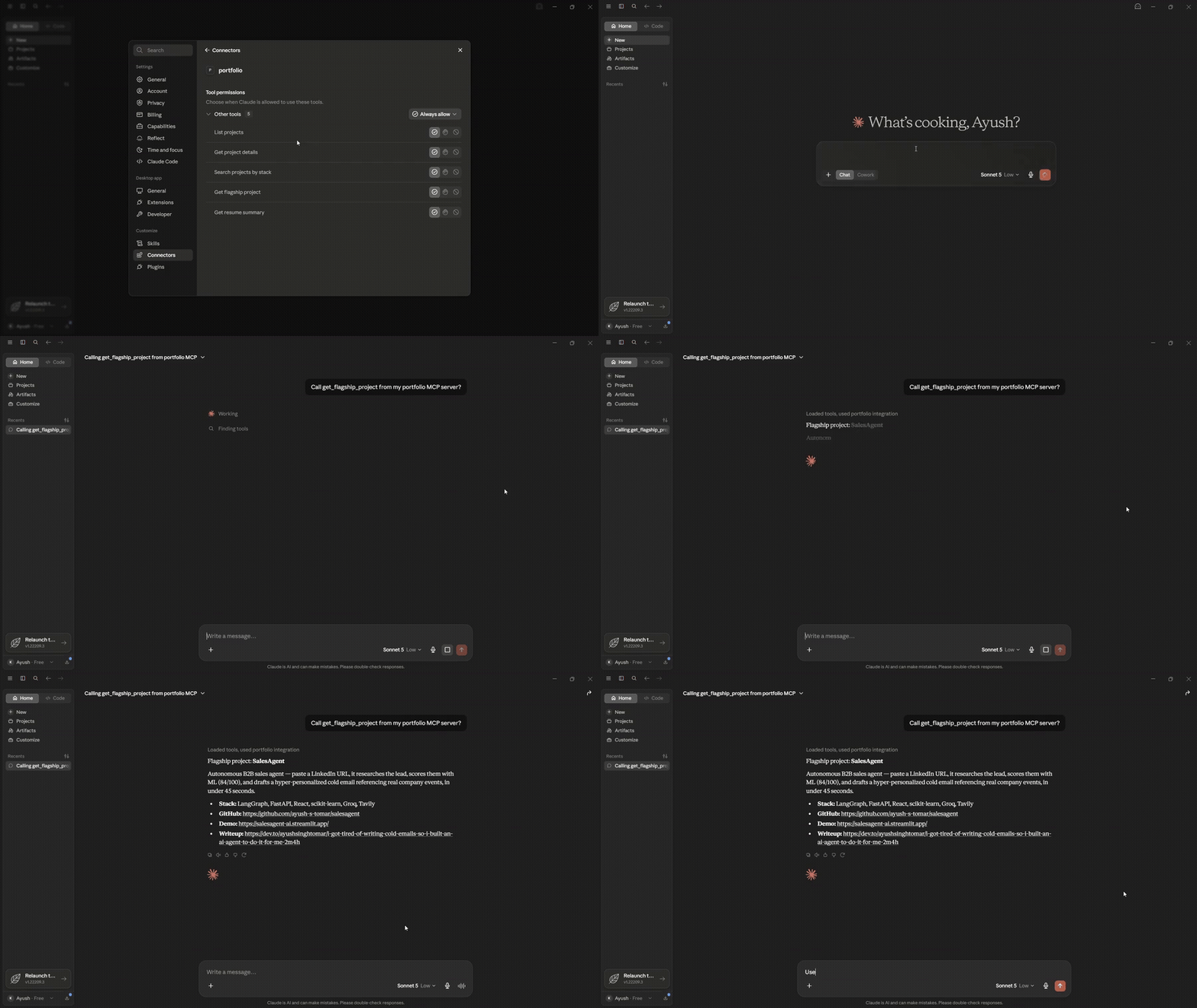
--- ## Table of contents - [Why this exists](#why-this-exists) - [Demo](#demo) - [Tools exposed](#tools-exposed) - [Quickstart](#quickstart) - [Connect to Claude Desktop](#connect-to-claude-desktop) - [Stack](#stack) - [Testing & CI](#testing--ci) - [Project structure](#project-structure) - [Roadmap](#roadmap) - [License](#license) - [Author](#author) ## Why this exists Most AI-developer portfolios are a list of links. This is a working MCP server — the same protocol agentic products use to connect to tools — built around my own portfolio. It's both a real implementation of the spec and an answer to *"show me you've actually built with MCP,"* not just talked about it. ## Demo | MCP Inspector — tool discovery | Live chat demo | |---|---| | ![MCP Inspector Demo](assets/MCP_Inspector_Demo.png) | ![MCP Chat Demo](assets/MCP_Chat_Demo.png) |
🎥 Full video walkthrough
https://github.com/user-attachments/assets/4c1b844a-087f-48a6-b156-bdef27282acc *Setup → tool calls → live answers, end to end.*
## Tools exposed | Tool | Description | |---|---| | `list_projects` | Short summary of all 9 projects | | `get_project_details(project_name)` | Full details for one project | | `search_projects_by_stack(technology)` | Find projects using a given technology | | `get_flagship_project` | The single best project to look at first | | `get_resume_summary` | Background, target role, and core stack | ## Quickstart **Option A — install from PyPI (fastest):** ```bash pip install portfolio-mcp-server ``` **Option B — clone and run from source (for local edits/testing):** ```bash git clone https://github.com/ayush-s-tomar/portfolio-mcp-server.git cd portfolio-mcp-server python -m venv venv source venv/bin/activate # Windows: venv\Scripts\activate pip install -r requirements.txt ``` Test it interactively with the MCP Inspector before wiring it into a client: ```bash mcp dev server.py ``` This opens a browser UI where you can call each tool manually and inspect raw request/response payloads. ## Connect to Claude Desktop Open your Claude Desktop config file: | OS | Path | |---|---| | macOS | `~/Library/Application Support/Claude/claude_desktop_config.json` | | Windows | `%APPDATA%\Claude\claude_desktop_config.json` | If the file already has an `mcpServers` key with other servers in it, add the `"portfolio"` entry inside the existing object rather than overwriting the file. **If you installed via PyPI (Option A above):** ```json { "mcpServers": { "portfolio": { "command": "portfolio-mcp-server" } } } ``` **If you're running from a cloned source checkout (Option B above):** use the **absolute path** to `server.py` on your machine: ```json { "mcpServers": { "portfolio": { "command": "python", "args": ["/absolute/path/to/portfolio-mcp-server/server.py"] } } } ``` Restart Claude Desktop, then ask it something like: > "What projects has Ayush built with FastAPI?" Claude will call `search_projects_by_stack` and answer from the live data. ## Stack - **Python 3.10+** - **[MCP Python SDK](https://github.com/modelcontextprotocol/python-sdk)** (`FastMCP`) - **stdio transport** - **Packaged for PyPI** and registered on the official [MCP server registry](https://modelcontextprotocol.io) (`io.github.ayush-s-tomar/portfolio-mcp-server`) ## Testing & CI Every push and pull request runs through GitHub Actions: - **Lint** — `ruff check .` - **Type check** — `mypy server.py` - **Smoke test** — spins up the server and calls each of the 5 tools over stdio to confirm they return valid, schema-matching JSON See [`.github/workflows/ci.yml`](.github/workflows/ci.yml). Run the same checks locally before opening a PR: ```bash pip install -r requirements-dev.txt ruff check . mypy server.py pytest ``` ## Project structure portfolio-mcp-server/ ├── server.py # FastMCP server + tool definitions ├── data/ │ └── projects.json # Project data the tools read from ├── tests/ │ └── test_tools.py # Smoke tests for each tool ├── requirements.txt ├── requirements-dev.txt ├── pyproject.toml # PyPI packaging config ├── server.json # MCP registry manifest └── .github/workflows/ci.yml ## Roadmap - [x] Publish to PyPI as an installable package - [x] Publish to the official MCP server registry - [ ] `search_projects_by_stack` — support matching on multiple technologies at once - [ ] Add an HTTP/SSE transport option alongside stdio for remote clients - [ ] Cache resume/project data with a lightweight refresh endpoint instead of static JSON ## License Released under the [MIT License](LICENSE). ## Author **Ayush Tomar** — [GitHub](https://github.com/ayush-s-tomar) If this was useful as a reference for building your own MCP server, a ⭐ on the repo is appreciated. mcp-name: io.github.ayush-s-tomar/portfolio-mcp-server