Azimutt is a **full-stack database exploration tool**.
From modern ERD made for real world databases (big & messy), to fast data navigation, but also documentation everywhere and whole database analysis.
[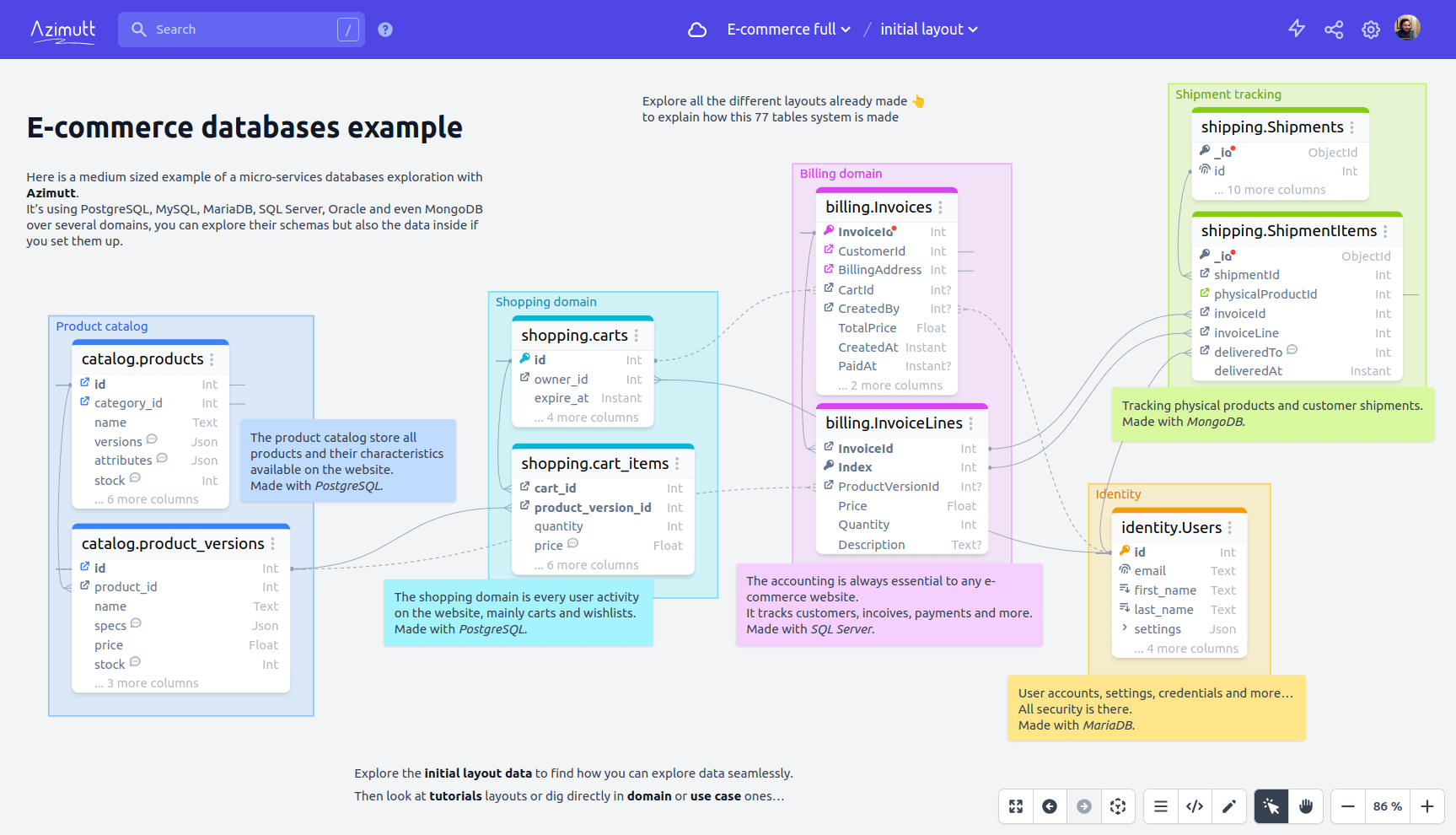](https://azimutt.app/45f571a6-d9b8-4752-8a13-93ac0d2b7984/c00d0c45-8db2-46b7-9b51-eba661640c3c?token=59166798-32de-4f46-a1b4-0f7327a91336)
**Why building Azimutt?**
Databases existed for more than 40 years and despite a lot of tool around them, we couldn't find any providing a great exploration experience.
- **ERDs** have a great diagram UI, but fall short when schema is growing (real-world use cases)
- **Data catalogs** are focused on data governance and lineage, missing relational db knowledge
- **Database clients** focus on querying with auto-completion and table/column lists, but no visual help
So we decided to build the missing tool 💪
We started with schema exploration for databases with hundreds of tables, but now, it has grown a lot:
- **Design** your schema using [AML](https://azimutt.app/aml) for a fast diagramming
- **Explore** your schema using search everywhere, display only useful tables/columns and follow relations
- **Query** your data like never before, follow foreign keys and display entities in diagram
- **Document** using table/column notes and tags, layouts and memos for use cases, features or team scopes
- **Analyze** it to discover inconsistencies and best practices to apply
Azimutt goal is to be your **ultimate tool to understand your database**.
## Azimutt badge
You can load any public SQL file in Azimutt with just an url parameter.
So if you have a SQL file in your repo, like [structure.sql](./backend/priv/repo/structure.sql), you can add a badge allowing your visitors to easily explore it:
```markdown
[](https://azimutt.app/create?sql=https://raw.githubusercontent.com/azimuttapp/azimutt/refs/heads/main/backend/priv/repo/structure.sql&name=Azimutt)
```
Here are some examples:
[](https://azimutt.app/create?sql=https://raw.githubusercontent.com/azimuttapp/azimutt/refs/heads/main/backend/priv/repo/structure.sql&name=Azimutt)
[](https://azimutt.app/create?sql=https://raw.githubusercontent.com/azimuttapp/azimutt/refs/heads/main/backend/priv/repo/structure.sql&name=Azimutt)
[](https://azimutt.app/create?sql=https://raw.githubusercontent.com/azimuttapp/azimutt/refs/heads/main/backend/priv/repo/structure.sql&name=Azimutt)
[](https://azimutt.app/create?sql=https://raw.githubusercontent.com/azimuttapp/azimutt/refs/heads/main/backend/priv/repo/structure.sql&name=Azimutt)
[](https://azimutt.app/create?sql=https://raw.githubusercontent.com/azimuttapp/azimutt/refs/heads/main/backend/priv/repo/structure.sql&name=Azimutt)
[](https://azimutt.app/create?sql=https://raw.githubusercontent.com/azimuttapp/azimutt/refs/heads/main/backend/priv/repo/structure.sql&name=Azimutt)
[](https://azimutt.app/create?sql=https://raw.githubusercontent.com/azimuttapp/azimutt/refs/heads/main/backend/priv/repo/structure.sql&name=Azimutt)
[](https://azimutt.app/create?sql=https://raw.githubusercontent.com/azimuttapp/azimutt/refs/heads/main/backend/priv/repo/structure.sql&name=Azimutt)
[](https://azimutt.app/create?sql=https://raw.githubusercontent.com/azimuttapp/azimutt/refs/heads/main/backend/priv/repo/structure.sql&name=Azimutt)
[](https://azimutt.app/create?sql=https://raw.githubusercontent.com/azimuttapp/azimutt/refs/heads/main/backend/priv/repo/structure.sql&name=Azimutt)
[](https://azimutt.app/create?sql=https://raw.githubusercontent.com/azimuttapp/azimutt/refs/heads/main/backend/priv/repo/structure.sql&name=Azimutt)
Use [Simple Icons](https://simpleicons.org) to find other icon/color if needed or use our custom button image:
[](https://azimutt.app/create?sql=https://raw.githubusercontent.com/azimuttapp/azimutt/refs/heads/main/backend/priv/repo/structure.sql&name=Azimutt)
More details on [Azimutt documentation](https://azimutt.app/docs/badge)
## Self-hosted
You can use our [Docker image](https://github.com/azimuttapp/azimutt/pkgs/container/azimutt) to easily deploy it. Here is the [full guide](INSTALL.md).
## Deploy on Heroku
You can use our Heroku template which includes Azimutt web app, a Postgres database, Stackhero S3 storage and Mailgun.
[](https://www.heroku.com/deploy)
After succeed deployment, you will need to configure config vars
```bash
# Replace with your app-name
HEROKU_APP=
# Set PHX_HOST with the URL of the app
heroku config:set PHX_HOST=$(heroku info -s | grep "web_url" | sed 's|web_url=https://||; s|/$||')
# Copy Stackhero access key to S3_KEY_ID
heroku config:set S3_KEY_ID=$(heroku config:get S3_ROOT_ACCESS_KEY)
# Copy Stackhero secret key to S3_KEY_SECRET
heroku config:set S3_KEY_SECRET=$(heroku config:get S3_ROOT_SECRET_KEY)
```
Finally, you will need to create the `azimutt` bucket on Stackhero:
- connect to Stackhero from your Heroku dashboard
- use values of `S3_ROOT_ACCESS_KEY` and `S3_ROOT_SECRET_KEY` to log in
- create a bucket named `azimutt`
## Deploy on Kubernetes
Please read this [guide](./charts/azimutt/README.md)
## Local development
Azimutt is built with [Elixir](https://elixir-lang.org)/[Phoenix](https://www.phoenixframework.org) (backend & admin) and [Elm](https://elm-lang.org)/[elm-spa](https://www.elm-spa.dev) (editor).
For local development you will need to set up the environment:
- install `pnpm`, [Elm](https://guide.elm-lang.org/install/elm.html) & [elm-spa](https://www.elm-spa.dev)
- install [Phoenix](https://hexdocs.pm/phoenix/installation.html) and [Elixir](https://elixir-lang.org/install.html) if needed (use [asdf](https://asdf-vm.com))
- install [PostgreSQL](https://www.postgresql.org/download), create a user `postgres` with password `postgres` and a database `azimutt_dev` (see `DATABASE_URL` in `.env` later)
- install [pre-commit](https://pre-commit.com) and run `pre-commit install` before committing
- copy `.env.example` to `.env` and adapt values
- source your environment and install dependencies: `source .env && npm run setup`
- you can now start the Azimutt server: `source .env && npm start`
- and finally navigate to [localhost:4000](http://localhost:4000) 🎉
- you can login with `admin@azimutt.app` email & `admin` password
Other things:
- API documentation is accessible at [`/api/v1/swagger`](http://localhost:4000/api/v1/swagger)
- You can use `pnpm --filter "azimutt-editor" run book` to start Elm design system & components, and access it with [localhost:4002](http://localhost:4002)
### command semantics
We have a lot of projects with a lot of commands, here is how they are structured:
- each project has its own commands (mostly npm but also elixir), the root project has global commands to launch them using a prefix
- `setup` is a one time command to install what is required
- `install` download dependencies, should be run when new ones are added
- `start` launch project in dev mode
- `test` allows to run tests
- `format` allows to run execute code formatting
- `lint` allows to run execute linters
- `build` generate compilation output
- `build:docker` same as `build` but in the docker image (paths are different 😕)
- `update` bumps library versions
### Development commands
- `pnpm --filter "azimutt-editor" run book` to launch the Elm design system
### Setup Stripe
#### Config
- Install [Stripe CLI](https://stripe.com/docs/stripe-cli) and login with `stripe login`
- Run `stripe listen --forward-to localhost:4000/webhook/stripe`
- Copy your webhook signing secret to `STRIPE_WEBHOOK_SIGNING_SECRET` variable in your `.env` file (looks like `whsec_...`)
- Go to [your Stripe dashboard](https://dashboard.stripe.com/test/apikeys) to obtain your API Key and copy it into `STRIPE_API_KEY` in your `.env` file (looks like: `sk_test_...`)
#### Payments
When testing interactively, use a card number, such as `4242 4242 4242 4242`. Enter the card number in the Dashboard or in any payment form.
Use a valid future date, such as `12/34`.
Use any three-digit CVC like `123` (four digits for American Express cards).
Use any value you like for other form fields.
See more in the [stripe testing documentation](https://stripe.com/docs/testing)
## Stack
- [Production](https://azimutt.app) & [Staging](https://azimutt.dev)
- [Error logs](https://sentry.io/organizations/azimuttapp/issues/?project=6635088) with [Sentry](https://sentry.io)
- Design using [TailwindCSS Framework](https://tailwindcss.com)
- [Credo](http://credo-ci.org) for static code analysis (automatically run with pre-commit)
## License
The tool is available as open source under the terms of the [MIT License](https://opensource.org/licenses/MIT).