# Glass
*as in transparent and smooth*
A fast, native, **mobile-app first** interactive disassembler. Spiritual successor to IDA Pro for the Android / iOS reverse engineering workflow, built around:
- `smali` for APK / DEX / smali handling
- `armv8-encode` for AArch64 and ARMv7 (A32 / Thumb) — native `.so`, iOS Mach-O
- `gpui` (Zed) for GPU-accelerated native UI
- `redb` for content-addressed persistence
- An in-built MCP server so any MCP-aware host (Claude Desktop, Cursor, Zed) can drive Glass directly
- `rquickjs` for scriptable plugins (planned)
License: GPL-3.0-only (inherited from `smali`).
## Why?
We’ve all used IDA Pro — it’s the industry standard for reversing and has years of plugins behind it, but it’s slow, expensive, and dated. Glass is 100% Rust native with a GPU-accelerated UI for fluid interaction. It’s also 100% free and open source — please contribute.
## Features
* Buttery smooth 120fps GPU accelerated rendering
* Lightning fast analysis: 1-2 seconds for most larger binaries compared with minutes on IDA Pro
* AArch64 **and** ARMv7 (ARM mode + Thumb) disassembly — covers iOS arm64 / arm64e and both common Android ABIs.
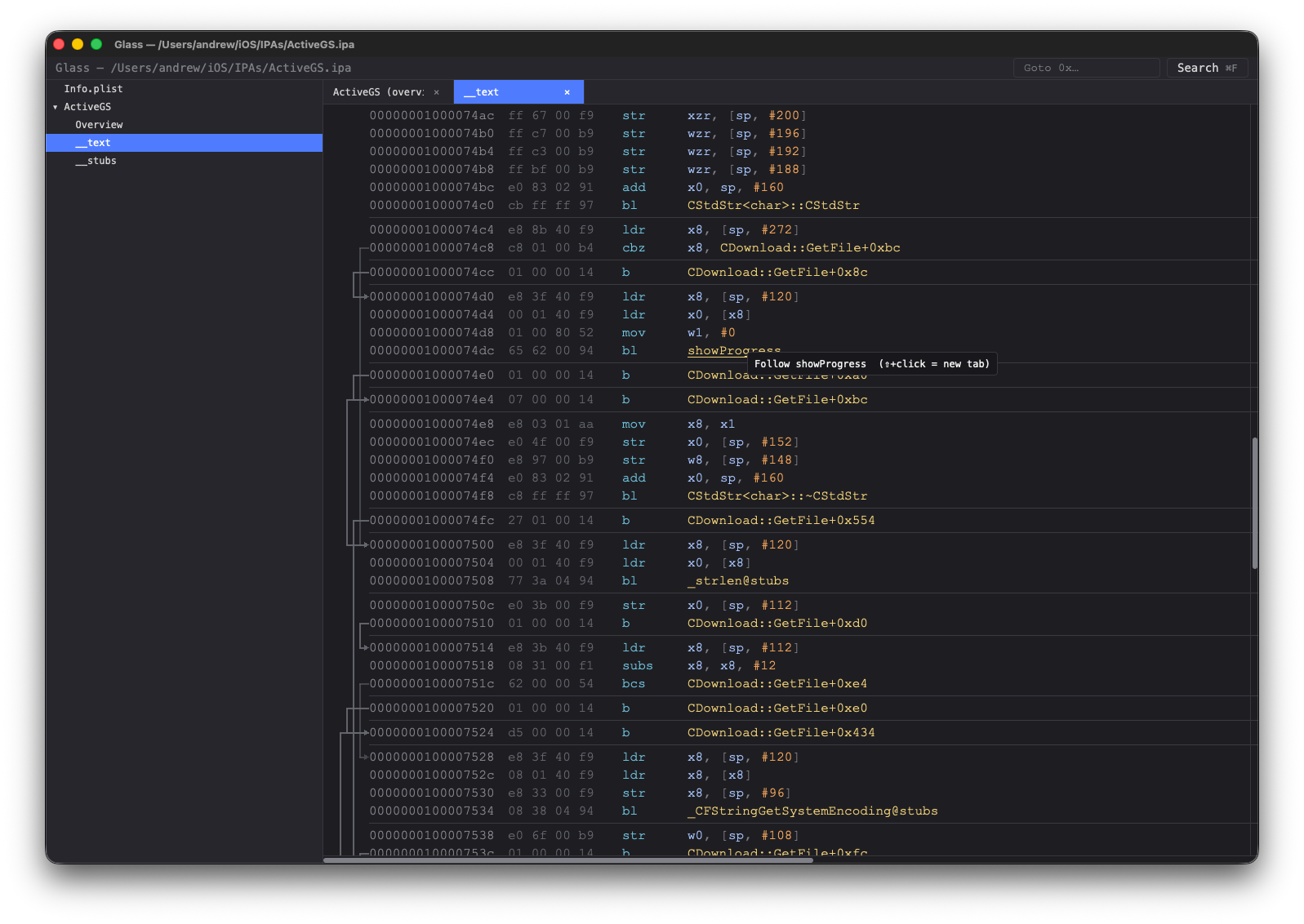
* Fully linked and annotated disassemblies with control flow lines, data literals in comments, clickable links to other functions. All coloured for easy visibility.
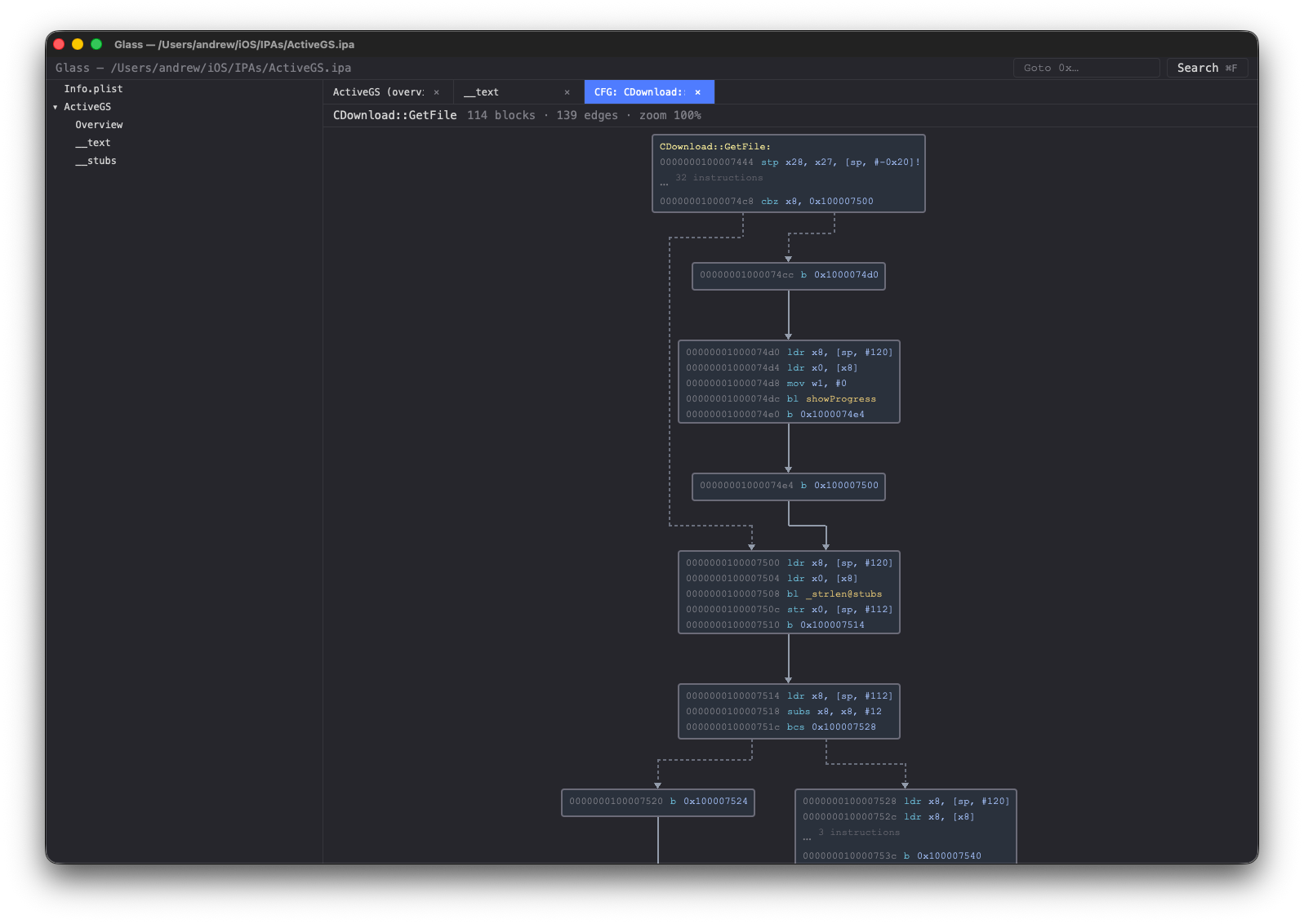
* Control flow graphs showing basic blocks and clickable links to other functions
* Full project search for symbols or string literals across DEX, code and data sections
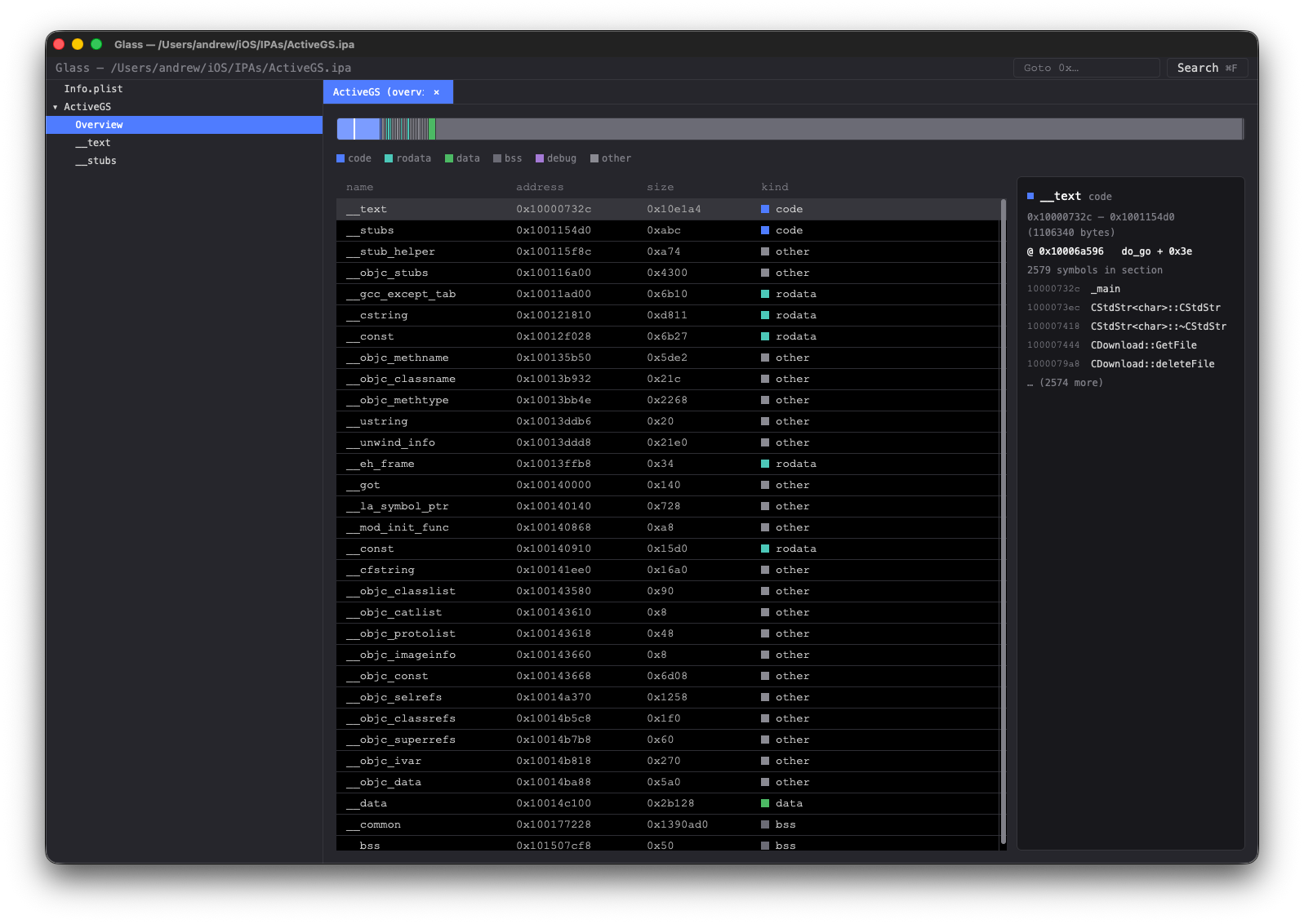
* Native binary layout overview with section data
* Xref search of callers, references to data
* Binary and instruction search across **every** native artifact in the bundle (so both `arm64-v8a` and `armeabi-v7a` copies of a library are searched in one query). Byte-pattern grammar with masking + gaps; typed-assembly grammar for AArch64 and ARMv7, with an ISA-aware autocomplete dropdown.
* Annotate any line (code or data) with a colour and/or comment so you can easily find it again later.
* In-place editing of instructions and data (double-click an item). Smali class editor + AArch64 / ARMv7 instruction editor; right-click any listing row to open a byte-level hex view at the same address as an escape hatch.
* MCP server exposes every analysis verb as a tool for any MCP-aware host — Claude Desktop, Cursor, Zed.
* Themes for Glass and also selectable background colours for each workspace.
## Screenshots
A walk through the main views — click any thumbnail to see it full size.
Disassembly listing colour-coded operands, control-flow arrows, resolved string literals inline
|
Control flow graph per-function CFG with dotted conditional edges and routed multi-rank lanes
|
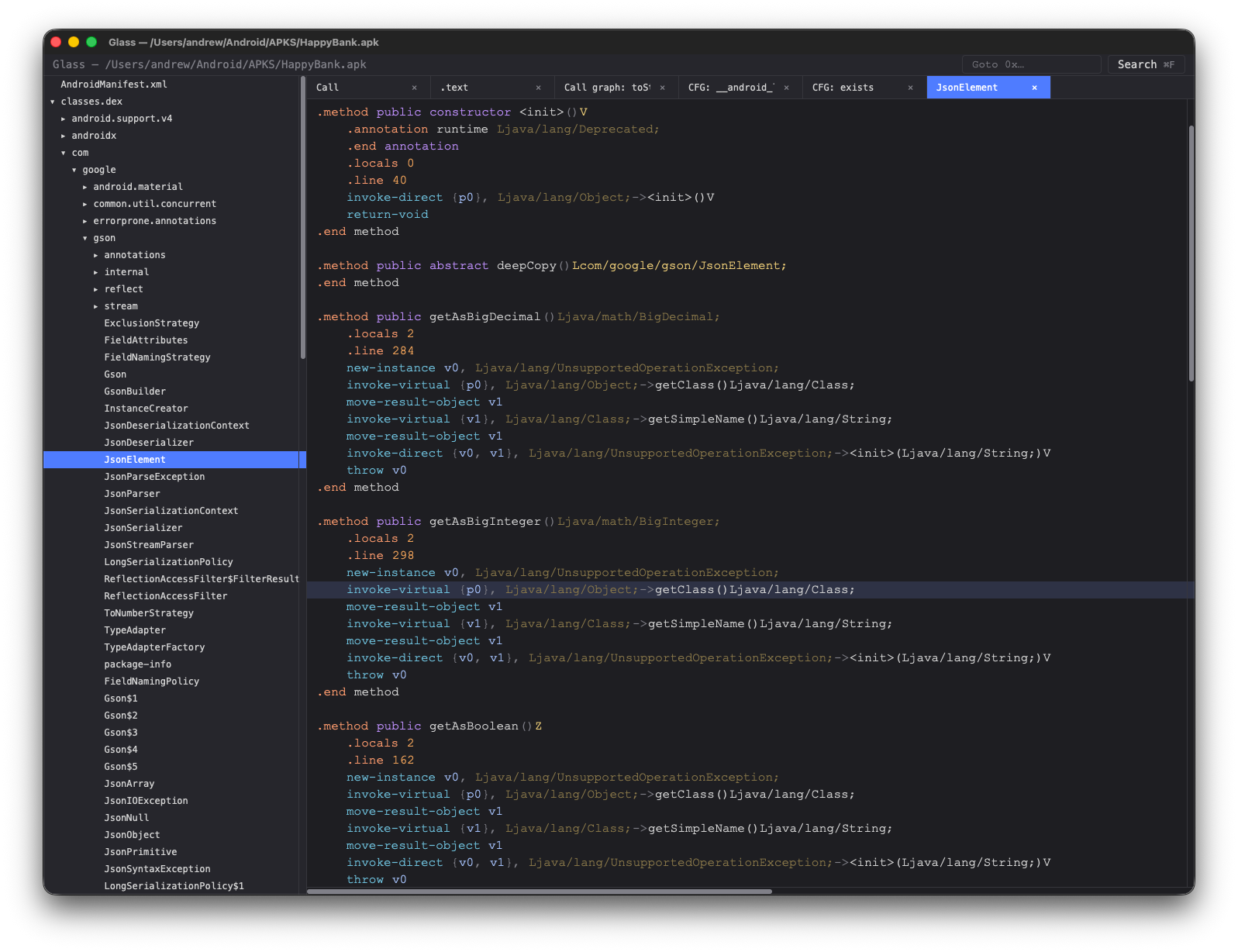
DEX call graph hover-to-expand callees, click to jump to the method's smali
|
Section-map overview proportional bar by section size, click to jump to listing / hex view
|
## Scripting
Every analysis Glass does in the GUI is also exposed as a CLI verb that emits structured JSON. The same `glass` binary is the automation entry point — pick a subcommand and you get a one-shot, scriptable result, perfect for `jq` pipelines and CI.
```sh
# What classes ship in this APK?
glass classes ./app.apk --package com.example. --text
# Who calls glass::main, by address?
glass callers ./libfoo.so --artifact libfoo.so --symbol "glass::main"
# Every `onCreate` across DEX, machine-readable:
glass search ./app.apk onCreate | jq '.data.hits[] | select(.kind=="method")'
# All ObjC + Swift types in an iOS bundle (filter by kind if you like):
glass types ./app.ipa --kind swift-class --text
# Drill into one type — methods, ivars, properties for ObjC;
# fields + vtable for Swift:
glass type ./app.ipa --artifact app --name blackjack.ContentView
```
Pass `--text` for a human-readable rendering, omit it for JSON.
Full reference: **[docs/cli-api.md](docs/cli-api.md)**.
This means you can script and automate common operations.
## Skills and MCP
Every CLI verb is also exposed as a tool through an inbuilt MCP (Model Context Protocol) server, so any MCP-aware host — Claude Desktop, Cursor, Zed, your own client — can drive Glass directly to help with reversing tasks.
```sh
# Print the machine-readable skill catalog (one JSON object listing
# every verb with its schema and an example invocation).
glass skills
# Run as an MCP stdio server. Plug into any MCP host's tool list.
glass mcp
```
To register with **Claude Desktop**, add Glass to `~/Library/Application Support/Claude/claude_desktop_config.json`:
```json
{
"mcpServers": {
"glass": { "command": "/usr/local/bin/glass", "args": ["mcp"] }
}
}
```
The model can then call `inspect`, `symbols`, `disasm`, `cfg-of`, `dex-callers`, `search` and every other verb on any bundle you point it at. Tool results come back as the same JSON envelope you'd get from the CLI.
## Searching
Three complementary engines, all available from the same ⌘F palette in the GUI and as CLI / MCP verbs.
### Full text search
Bundle-wide fuzzy match across native symbols, DEX classes / methods / fields, and string literals in code and data sections. Live-filtered as you type; results dispatch to the right view (listing for native addresses, smali viewer for DEX targets, hex view for data hits). Indices build on a background thread after load — a progress chip shows while in flight.
```sh
glass search ./app.apk onCreate # all things named like "onCreate"
glass search ./libfoo.so init --limit 20
```
CLI reference: [`search` verb in `docs/cli-api.md`](docs/cli-api.md#search--path-p---query-q---limit-n).
### Binary search
Byte-level pattern engine. Each atom is a 2-character hex mask (`c0`, `e?`, `?f`, `??`) or a gap (`*` = 0..=32 bytes, `*(min..max)` for explicit bounds). Matches don't span sections. In the GUI palette, ⌘2 switches to Binary mode; the **Code only** checkbox (default on) restricts the scan to text sections so you aren't drowning in data hits when looking for an instruction shape.
```sh
# returning-true stub finder — `mov w0, #1 ; ret`
glass bin-search ./libfoo.so --artifact libfoo.so --pattern '20 00 80 52 c0 03 5f d6'
# any ADRP+ADD pair with no intervening bytes
glass bin-search ./libfoo.so --artifact libfoo.so --pattern '?? ?? ?? 9? ?? ?? 4? 91'
# raw data: find embedded magic
glass bin-search ./libfoo.so --artifact libfoo.so --pattern 'de ad be ef'
```
Full grammar + worked examples: [`docs/BinSearch.md`](docs/BinSearch.md).
### Instruction search
Write the assembly, Glass compiles it to bytes. A `;`-separated sequence is encoded via [armv8-encode](https://github.com/azw413/armv8-encode) — **AArch64** (`mov w0, #1`, `adrp x1, *`) and **ARMv7** in both modes (Thumb `mov r1, r7` / `bxeq lr` / `push {r4-r7, lr}` and A32). Any wildcards are translated to operand-bit masks before the byte engine takes over. The scan is global — every native artifact in the bundle gets the right ISA's atoms (Android apps with both `arm64-v8a` and `armeabi-v7a` libraries are searched in a single query).
Inside Binary mode in the GUI, ⌘B toggles between **Bytes** and **Asm** grammars; an ISA-aware autocomplete dropdown shows variants that still match what you've typed — `r1` filters out AArch64 candidates, `w0` filters out ARMv7 ones.
Wildcards:
| Token | Meaning |
|---|---|
| `*` | any operand (kind inferred from the chosen opcode) |
| `#*` | any immediate (hints the opcode picker) |
| `x`, `w` | any AArch64 X- or W-class register |
| `r` | any ARMv7 GPR (`r0..r15`, `sp`, `lr`, `pc`) |
| `<*>`, ``, ``, ``, `` | bracketed equivalents, useful nested in other syntax (`[x, #*]`, `[r, #*]`) |
```sh
# AArch64 — every `mov w0, #N` (any N)
glass insn-search ./libfoo.so --artifact libfoo.so --pattern 'mov w0, #*'
# AArch64 — any ADRP into x1 followed immediately by ADD into the same reg
glass insn-search ./libfoo.so --artifact libfoo.so --pattern 'adrp x1, * ; add x1, x1, #*'
# ARMv7 (Thumb) — `mov r1, r*` followed by a return
glass insn-search ./libfoo.so --artifact libfoo.so --pattern 'mov r1, r* ; bx lr'
# ARMv7 (any cond) — conditional bx in literal-pool callers
glass insn-search ./libfoo.so --artifact libfoo.so --pattern 'bxeq lr'
# every `ret x30` — concrete, no wildcards
glass insn-search ./libfoo.so --artifact libfoo.so --pattern 'ret'
```
The response carries `bytes_hex` showing the compiled mask (e.g. `01/1f ?? ?? 90/9f` for `adrp x1, *`) so you can see exactly which bits are pinned vs wildcarded. Captures (`` cross-referencing the same operand later in the pattern) are designed but not yet implemented.
Full design + phasing: [`docs/InsnPattern.md`](docs/InsnPattern.md). CLI/MCP reference: [`insn-search` in `docs/cli-api.md`](docs/cli-api.md#insn-search--path-p---artifact-a---pattern----section-s---limit-n).
## Current Status
Glass is usable today for reversing Android (APK / DEX / native `.so`) and iOS (IPA / Mach-O) apps targeting AArch64 **and** 32-bit ARMv7 (`armeabi-v7a` libraries, A32 + Thumb).
### What works
**File loading**
- Open Android bundles (`.apk`, `.aab`), iOS bundles (`.ipa`), or any standalone ELF / Mach-O binary (`.so`, `.dylib`, raw executables) directly — Glass auto-detects the format.
- Fat / universal Mach-O is handled transparently: `arm64e` is preferred, plain `arm64` is the fallback. Works on bundles and on standalone files alike (e.g. `glass gui /usr/lib/dyld`).
- Loader pipeline reports progress (Reading archive → Parsing DEX / Disassembling native → Building symbols).
- Per-artifact content-addressed IDs (blake3, rayon-parallel for large libs). Annotations follow the artifact, not the container — the same `libfoo.so` shipped in two APKs (or the same `libswiftCore.dylib` across two IPAs) shares analysis state.
- AndroidManifest viewer (binary XML decoded via `smali`).
- Info.plist viewer for iOS bundles — bundle id, executable name, version, min OS, and the rest of the plist rendered as colour-coded XML.
**iOS — IPA / Mach-O**
- Unzip the IPA, locate `Payload/*.app/`, parse `Info.plist`, and pick the arm64 / arm64e slice from any fat binary inside.
- Main executable and every `Frameworks/*.framework` + `*.dylib` is loaded as its own native artifact, with the same Overview + per-section disassembly views used for Android `.so` files.
- Objective-C class browser sourced from `__objc_classlist` — classes, categories, methods, ivars, properties — with demangled names (legacy `_TtC...` Swift mangling included) and clickable jumps from method addresses into the listing.
- Swift type browser sourced from `__swift5_types` — classes, structs, enums with their fields and (for classes) vtables, also clickable into the listing.
- Symbol map enriched with ObjC method symbols and Swift type symbols, so listing rows that previously fell back to raw addresses now show resolved names.
**Android — APK / DEX / native**
- Class tree across all DEX files in the APK.
- Smali listing per class with syntax-aware tokenization (directives, types, method names, string literals, etc.).
- Method cross-references resolve to the right class + line.
- Native `.so` files under `lib//` loaded per ABI; AArch64 (`arm64-v8a`) and ARMv7 (`armeabi-v7a`) both get full disassembly views. Other ABIs (x86 / x86_64) route to the hex view until a decoder lands.
**Editing**
- Smali class editor (double-click a class header / field / method to open inline editors).
- AArch64 in-place instruction editing: type new assembly, Glass encodes it back to bytes; staged changes show as a green tint in the listing until you Export to a new APK / IPA.
- ARMv7 in-place editing: handles same-width swaps, 4-byte → 2-byte shrinks (auto-pads with a Thumb-1 NOP), and 2-byte → 4-byte grows that consume a following NOP. Refuses unsafe grows that would shift downstream code.
- ISA-aware autocomplete in the inline editor — typing `r1` shows ARMv7 variants only; `w0` shows AArch64 only.
- Right-click any listing row → **Open hex view here** to drop into a byte-level hex editor at the same address when the typed-assembly editor can't express what you need.
**AArch64 native (ELF + thin Mach-O)**
- Linear-sweep disassembly with virtualized rendering — large libraries open in seconds, not minutes.
- Symbol map merged from ELF symtab, dynsym, DWARF, `.eh_frame` FDEs, and synthesized `@plt` entries. C++/Rust/Swift demangling via `symbolic-demangle`.
- Branch operands rendered as clickable symbol references; `adrp` + `add`/`ldr` pairs resolved to data targets, including string literals shown inline as comments.
- Per-section views (code sections get disassembly; data sections get a hex view).
**ARMv7 native (ELF)**
- Recursive-descent disassembly from symbol entry points so literal pools, jump tables and inline data don't get mis-decoded as instructions. Per-symbol mode (ARM vs Thumb) honoured via the low-bit marker.
- Variable-width Thumb rendering: 16-bit Thumb-1 rows show 2 bytes (no phantom `00 00` padding), 32-bit Thumb-2 and A32 show 4.
- Symbol map: ELF symtab, DWARF, `.eh_frame`, and synthesized `@plt` entries (12-byte stubs).
- `movw + movt` fusion: `movw R, #lo16 ; movt R, #hi16` is detected across instruction pairs and the resolved 32-bit constant gets a `; "..."` rodata-string comment on the `movt` row.
- Thumb `ldr Rt, [pc, #imm]` literal-pool loads dereference one level into rodata for the same kind of inline string comment AArch64's ADRP+ADD path produces.
- Control-flow arrow gutter on conditional and unconditional branches (same lane assignment as AArch64).
**UI**
- Tabbed right pane with overflow-safe dropdown, close buttons, click-to-activate.
- Horizontal + vertical scrollbars on listing, hex, and manifest views.
- Cmd-F symbol palette with fuzzy filter. Multi-token queries are AND-matched in order (`change me` finds `changeMessage` and `change_me_count` but not `dispatchMenuVisibilityChanged`).
- Binary / instruction palette (⌘2 to switch into it) scans every native artifact globally — Android apps with `arm64-v8a` + `armeabi-v7a` get unified results with the artifact + section labelled per match.
- Right-click cross-references in every view: **References to address** / **Callers of function** / **Open hex view here** in the listing, hex and CFG; **Callers of method** / **References to field** in smali. Results show in the palette with a scope chip; Esc clears the scope back to bundle-wide search. Indices build on a background thread after load — a progress chip shows while in flight.
- Themes (View → Theme) with selectable per-window background tints.
- Cmd-O open, Cmd-N new window, Cmd-W close window, Cmd-⇧W close file (return window to launched-empty state) — on Linux / Windows the same shortcuts use **Ctrl** instead of **Cmd**. **File → Open Recent** (last 10 bundles, deduplicated by path) and **View → Theme**. On macOS these live in the native menu bar; on Linux / Windows (where gpui draws no native menu) Glass renders its own **Glass / File / View** menu bar in the window header.
- Window bounds + open tabs + tree expansion state persisted per-bundle in `redb`; relaunching reopens where you left off.
### What's missing
- x86 / x86_64 disassembly (those code sections currently route to the hex view).
- ARMv7 in-place edits that need to *grow without an adjacent NOP* — refused with a clear error today; would need section-level relayout + branch-target rebinding to support.
- iOS entitlements and `embedded.mobileprovision` parsing.
- Cross-references DEX ↔ native via JNI signatures.
- QuickJS scripting host.
- Drag-to-scroll on scrollbars (currently visual-only — use trackpad / wheel).
- Resource ID decoding in the manifest (would need `resources.arsc` parsing).
- ARMv7 typed-assembly editor: works for the common forms; shifted operands (`r0, lsl #2`) and pre/post-index memory (`[rN, #imm]!`, `[rN], #imm`) parse but only concretely — no wildcards inside brackets.
## Building
Glass runs on **macOS 13+** (the primary target, GPU-accelerated via Metal — no extra SDK needed, the Metal framework ships with the OS), **Linux** (X11 or Wayland via `gpui_linux`, Vulkan-backed), and **Windows 10/11** (Direct3D-backed via `gpui`, built with the MSVC toolchain).
There is a release prebuilt binary for macOS under Releases but if you need to build from source: the good news: it's two commands.
1. **Install Rust** (if you don't already have it):
```sh
curl --proto '=https' --tlsv1.2 -sSf https://sh.rustup.rs | sh
```
2. **Linux only — install gpui's native dependencies.** The easiest way is to run Zed's setup script, which knows about apt / dnf / pacman / etc:
```sh
curl -sSL https://raw.githubusercontent.com/zed-industries/zed/main/script/linux | bash
```
This pulls in `libxkbcommon-dev`, the Wayland and XCB headers, Vulkan, ALSA, and the rest of the toolchain `gpui_linux` needs to link. Without these the build fails at link time with missing `xkbcommon` / `wayland-client` symbols.
If you'd rather not run the script, the equivalent packages on **Debian / Ubuntu (amd64)** are:
```sh
sudo apt-get update && sudo apt-get install -y \
build-essential clang cmake pkg-config \
libfontconfig-dev libfreetype-dev \
libwayland-dev libxkbcommon-x11-dev \
libasound2-dev libvulkan-dev \
libzstd-dev libsqlite3-dev libssl-dev \
libglib2.0-dev
```
The build fails early in a dependency build script (`fontconfig was not found in the pkg-config search path`) if `libfontconfig-dev` is missing, and later at link time for the X11/Wayland/Vulkan libraries. `libglib2.0-dev` is needed because the Frida driver links GLib dynamically on Linux (on macOS the Frida devkit bundles it statically) — without it the link fails with `undefined symbol: g_object_unref`.
**Windows only — install the native build toolchain.** `gpui` requires the MSVC toolchain (the GNU/MinGW target is not supported). Using [winget](https://learn.microsoft.com/windows/package-manager/winget/):
```powershell
# 1. MSVC compiler, linker, and Windows SDK (the "Desktop development with C++" workload).
winget install --id Microsoft.VisualStudio.2022.BuildTools `
--override "--quiet --wait --add Microsoft.VisualStudio.Workload.VCTools --includeRecommended"
# 2. CMake — tree-sitter (via the Zed `language` crates) builds wasmtime's C API with it.
winget install --id Kitware.CMake
# 3. LLVM/Clang — `bindgen` (frida-sys, gpui, media) needs libclang.dll.
winget install --id LLVM.LLVM
```
The LLVM installer does **not** add itself to `PATH`, so point `bindgen` at `libclang.dll` before building (set it permanently via *System → Environment Variables*, or per-shell):
```powershell
$env:LIBCLANG_PATH = "C:\Program Files\LLVM\bin"
```
Without these the build fails in dependency build scripts: `linker 'link.exe' not found` (no MSVC), `failed to spawn 'cmake'` (no CMake), or `Unable to find libclang` (no `LIBCLANG_PATH`). The `glass` binary's stack reserve is bumped automatically on MSVC (see `crates/glass-cli/build.rs`) so the CLI doesn't overflow Windows' small default main-thread stack — no action needed.
3. **Clone and build**:
```sh
git clone https://github.com/azw413/Glass.git
cd glass
cargo build --release -p glass-cli
cp target/release/glass
```
The first build will compile `gpui` and friends and will take several minutes. Subsequent builds are fast.
4. **Run it**:
```sh
# Open the GUI on an Android APK or iOS IPA — no subcommand needed.
glass ~/path/to/app.apk
glass ~/path/to/app.ipa
# Or on a standalone binary — ELF .so, Mach-O .dylib, or raw
# executable. Fat / universal Mach-O is sliced automatically.
glass ~/path/to/libfoo.so
glass ~/path/to/libBar.dylib
glass /usr/lib/dyld
# No args → opens an empty Glass window; use File → Open.
glass
# Headless bundle inspect
glass bundle ~/path/to/app.apk
# Inspect persisted state for a bundle
glass db-dump ~/path/to/app.apk
```
Always use the release build — debug builds disassemble orders of magnitude slower.
### Packaging a `.app` bundle
To wrap the release binary in a Glass.app bundle for double-click launch from Finder:
```sh
cargo build --release -p glass-cli
./packaging/make-app.sh
open dist/Glass.app
```
The bundle is ad-hoc signed (not Developer-ID signed / notarized), so on first launch macOS will refuse to open it; right-click → **Open** to bypass Gatekeeper once.
Two ways to grab a prebuilt zip without building locally:
- **Latest `main`** — every push uploads a `Glass-app-.zip` as a 14-day workflow artifact. Pull it from the [Actions tab](https://github.com/azw413/Glass/actions).
- **Tagged release** — pushing a `v*` tag (e.g. `v0.1.0`) triggers the same workflow and additionally publishes a `Glass--macOS.zip` to the [Releases page](https://github.com/azw413/Glass/releases) with auto-generated release notes.
## Workspace
| Crate | Purpose |
|------------------|------------------------------------------------------------------|
| `glass-core` | Shared types (`CodeKind`, IDs) |
| `glass-arch-arm` | AArch64 + ARMv7 disassembly, symbol map, PLT synthesis, demangling |
| `glass-arch-dex` | DEX / smali facade over `smali` |
| `glass-mobile` | APK + IPA bundle loading, native-lib extraction, manifest |
| `glass-db` | Content-addressed persistence (redb): bundles, tabs, settings |
| `glass-device` | Android (adb) + iOS (usbmux) device discovery |
| `glass-api` | Analysis verbs (search, xrefs, CFG, edits) shared by CLI + MCP + GUI |
| `glass-ui` | `gpui` front-end: tree, listing, hex, manifest, palette |
| `glass-cli` | Headless inspector + GUI launcher |
| `glass-mcp` | MCP server exposing every CLI verb as a tool |
| `glass-script` | QuickJS plugin runtime (placeholder) |
## Roadmap
- **iOS deeper** — Entitlements and `embedded.mobileprovision` parsing. (ObjC `__objc_classlist` and the Swift `__swift5_types` metadata pass have landed — see `glass types` / `glass type`.)
- **x86 / x86_64** — Disassembly for emulator-builds of Android `.so` files.
- **Internal Scripting** — QuickJS plugin host with a stable API for analysis passes.
- **Advanced** — Signed APK rebuilding, downstream-shift on ARMv7 in-place edits (so 2→4-byte grows can splice past adjacent code instead of refusing).