[](https://github.com/backendsystems/nibble)
[](#install-apt)
[](#install-dnf)
[](#install-aur)
[](#install-brew)
[](#install-winget)
[](#install-npm)
[](#install-pip)
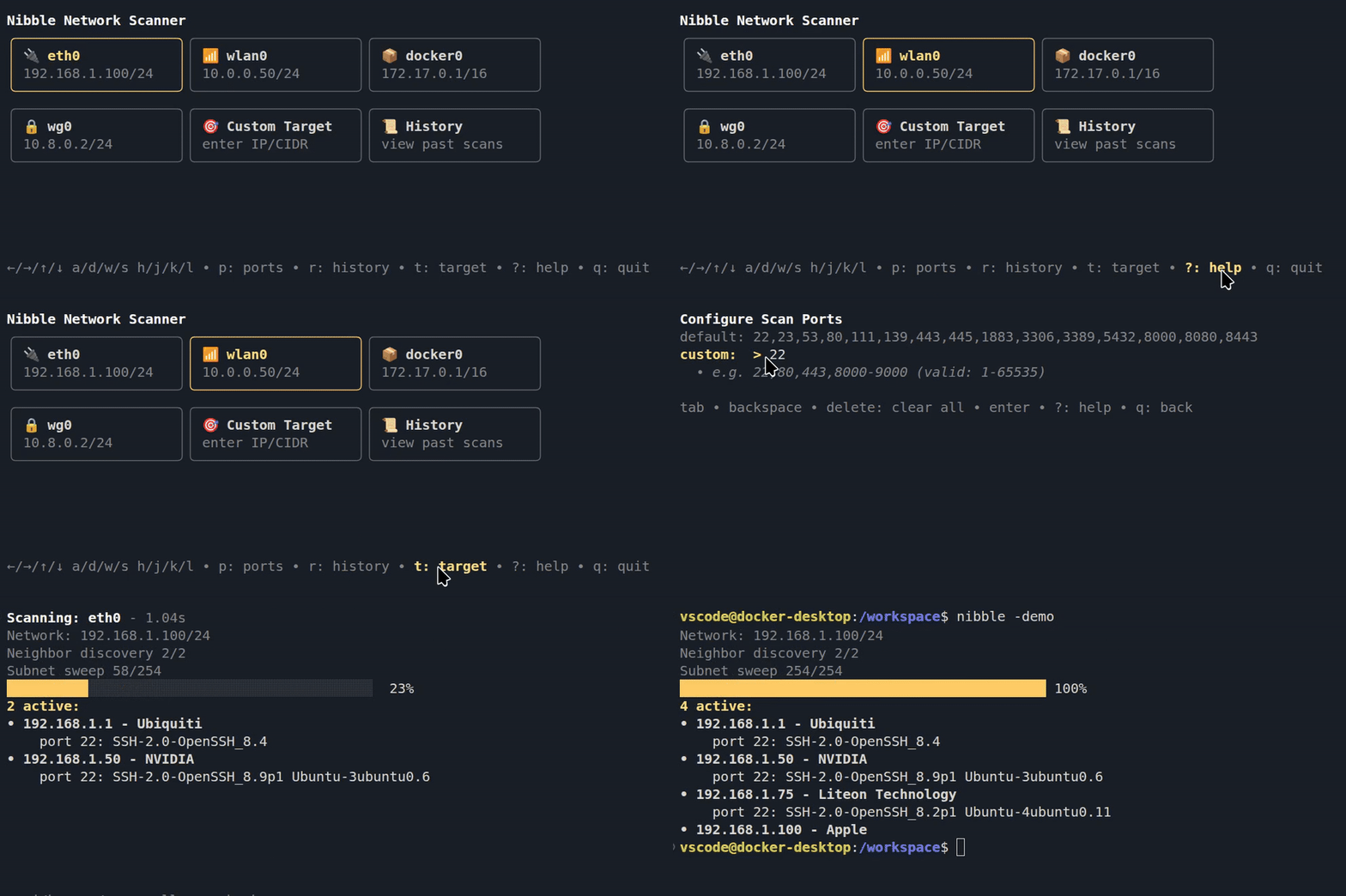
Nibble is a CLI tool for local network scanning that focuses on speed and ease of use.
Select a network interface, and it scans your local subnet.
Lists hosts, hardware manufacturer, open ports and their services.
[](click.gif)
- ⚡ Lightning fast, scans using lightweight threads
- 🔒 Safe, does not need admin access or special privileges
- 🥷 Stealthy, emits no network signals before a scan is started
- Clickable interface, use your mouse to navigate and scan 🖱️
- or navigate with `↑/↓/←/→`, `w/s/a/d` or `h/j/k/l`
- context aware help screens, hotkey: `?`
- Docker networks and WSL support 📦
- instant docker network scans when a docker socket is detected
- can scan windows interfaces from inside wsl
- Shows detected hardware makers: 📙
- Raspberry Pi, Ubiquiti, Apple and 40,000 other vendor ids
- Reads service banners on open ports (for example, ssh or nginx)
- Colors matches your terminal theme automatically 🌈
- Defaults to SSH, Telnet, HTTP, HTTPS, SMB, RDP, and more
- Can be set to a list of custom ports that are stored for future use
- Target mode for targeted network scans
- [History mode](#history) for past scans lookup 📜
- [Headless mode](#headless-mode) with JSON output for scripting and automation 🤖
## History
See past scans, the found hosts and re-scan all hosts ports. hotkey: `r`
History remembers your position between sessions, so jump right back in to your last viewed scan.

## Easy Installation
| Platform | Manager | Command |
|---|---|---|
|
 Ubuntu
*or* Mint, Pop!\_OS, Zorin, ... | apt | `sudo add-apt-repository ppa:backendsystems/ppa`
`sudo apt install nibble`
|
 Fedora
*or* RHEL, CentOS Stream, ... | dnf | `sudo dnf copr enable @backendsystems/nibble`
`sudo dnf install nibble`
|
 Arch Linux | aur | `yay -S nibble-bin` |
|
Arch Linux | aur | `yay -S nibble-bin` |
|
 macOS | brew | `brew install backendsystems/tap/nibble`
|
🪟 Windows | winget | `winget install backendsystems.nibble`
|
macOS | brew | `brew install backendsystems/tap/nibble`
|
🪟 Windows | winget | `winget install backendsystems.nibble`
|
 Any | npm | `npm install -g @backendsystems/nibble`
*or* `npx @backendsystems/nibble`
|
 Any | pip | `pipx install nibble-cli`
|
Any | pip | `pipx install nibble-cli`
|
 Any | go | `go install github.com/backendsystems/nibble@latest`
Pre-built binaries for Linux, macOS and Windows (amd64/arm64) are available on the [Releases](https://github.com/backendsystems/nibble/releases) page.
## Usage
Run the CLI with the `nibble` command, select a network interface.
Interface icons: `🔌`Ethernet, `📶`Wi-Fi, `📦`Container, `🔒`VPN.
## Headless Mode
Run scans without the TUI. Outputs JSON. Activated by the `-i` input flag.
Headless scans are not saved in history.
`-i` scan target(s), comma-separated or a file ([example_input](internal/parameters/example_input.txt))
`-p` custom ports (e.g. `22,80,8000-8100` or `-` for all)
`-o` write output to file instead of stdout ([example_output](internal/parameters/example_output.json))
```bash
nibble -i 192.168.0.0/24
nibble -i 192.168.1.223,10.0.0.12/32 -p - -o results.json
nibble -i targets.txt -p 22,80,443,8000-8100
```
Exit codes: `0` success, `1` error, `2` invalid usage.
## License
This project is MIT licensed. See the [LICENSE](LICENSE) file for details.
Note: The "nibble" name and branding assets are excluded from this license, see the separate [LICENSE](assets/LICENSE) for branding terms.
Built with [Bubble Tea](https://github.com/charmbracelet/bubbletea)
Any | go | `go install github.com/backendsystems/nibble@latest`
Pre-built binaries for Linux, macOS and Windows (amd64/arm64) are available on the [Releases](https://github.com/backendsystems/nibble/releases) page.
## Usage
Run the CLI with the `nibble` command, select a network interface.
Interface icons: `🔌`Ethernet, `📶`Wi-Fi, `📦`Container, `🔒`VPN.
## Headless Mode
Run scans without the TUI. Outputs JSON. Activated by the `-i` input flag.
Headless scans are not saved in history.
`-i` scan target(s), comma-separated or a file ([example_input](internal/parameters/example_input.txt))
`-p` custom ports (e.g. `22,80,8000-8100` or `-` for all)
`-o` write output to file instead of stdout ([example_output](internal/parameters/example_output.json))
```bash
nibble -i 192.168.0.0/24
nibble -i 192.168.1.223,10.0.0.12/32 -p - -o results.json
nibble -i targets.txt -p 22,80,443,8000-8100
```
Exit codes: `0` success, `1` error, `2` invalid usage.
## License
This project is MIT licensed. See the [LICENSE](LICENSE) file for details.
Note: The "nibble" name and branding assets are excluded from this license, see the separate [LICENSE](assets/LICENSE) for branding terms.
Built with [Bubble Tea](https://github.com/charmbracelet/bubbletea)
