# bzBond-js
## Table of Contents
- [Introduction](#introduction)
- [Features](#features)
- [Installation](#installation)
- [Requirements](#requirements)
- [Usage](#usage)
- [Performing Claris/FileMaker Scripts from JavaScript](#performing-clarisfilemaker-scripts-from-javascript)
- [PerformScript](#bzbondperformscriptscriptname-scriptparameter-options)
- [{Set/Get}WebViewerName](#bzbondsetwebviewernamewebviewername--bzbondgetwebviewername)
- [SetWebViewerNameFromClaris](#bzbondsetwebviewernamefromclaris)
- [{Set/Get}RelayScriptName](#bzbondsetrelayscriptnamerelayscriptname--bzbondgetrelayscriptname)
- [SyncConfig](#bzbondsyncconfig)
- [RegisterScript](#bzbondregisterscriptpluginoptions)
- [Promise rejection and Error Handling](#promise-rejection-and-error-handling)
- [Integrating JavaScript functions with Claris/FileMaker scripts](#integrating-javascript-functions-with-clarisfilemaker-scripts)
- [Contributors](#contributors)
## Introduction
bzBond-js is part of the [bzBond](/) toolset. It manages interactions between FileMaker scripts and FileMaker Web Viewers. It requires [bzBond-claris](../bzBond-claris/).
## Features
- Call Claris/FileMaker scripts from web viewers using `bzBond.PerformScript`. This function returns a **JavaScript Promise** including the script result.
- Use JavaScript functions in Claris/FileMaker scripts by calling the `bzBondRelay` script. Function results can be accessed in `Get ( ScriptResult )`
- Extensible through a built-in plugin registration system.
## Installation
1. Install bzBond-js
```
npm i @beezwax/bzbond-js
```
2. Download the [bzBond-claris.fmp12](https://github.com/beezwax/bzbond/blob/main/packages/bzBond-claris/bzBond-claris.fmp12?raw=true) Claris/FileMaker file, and copy the `bzBondRelay` script into the target Claris/FileMaker file.
## Requirements
- FileMaker >=19.3.
- Web Viewers that host the bzBond code must:
- Have an **object name** assigned in Layout inspector:
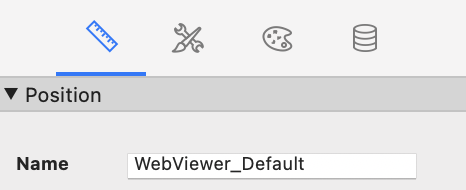 - Have the **'Allow JavaScript to perform FileMaker scripts'** option on in the Web Viewer Setup dialog checked:
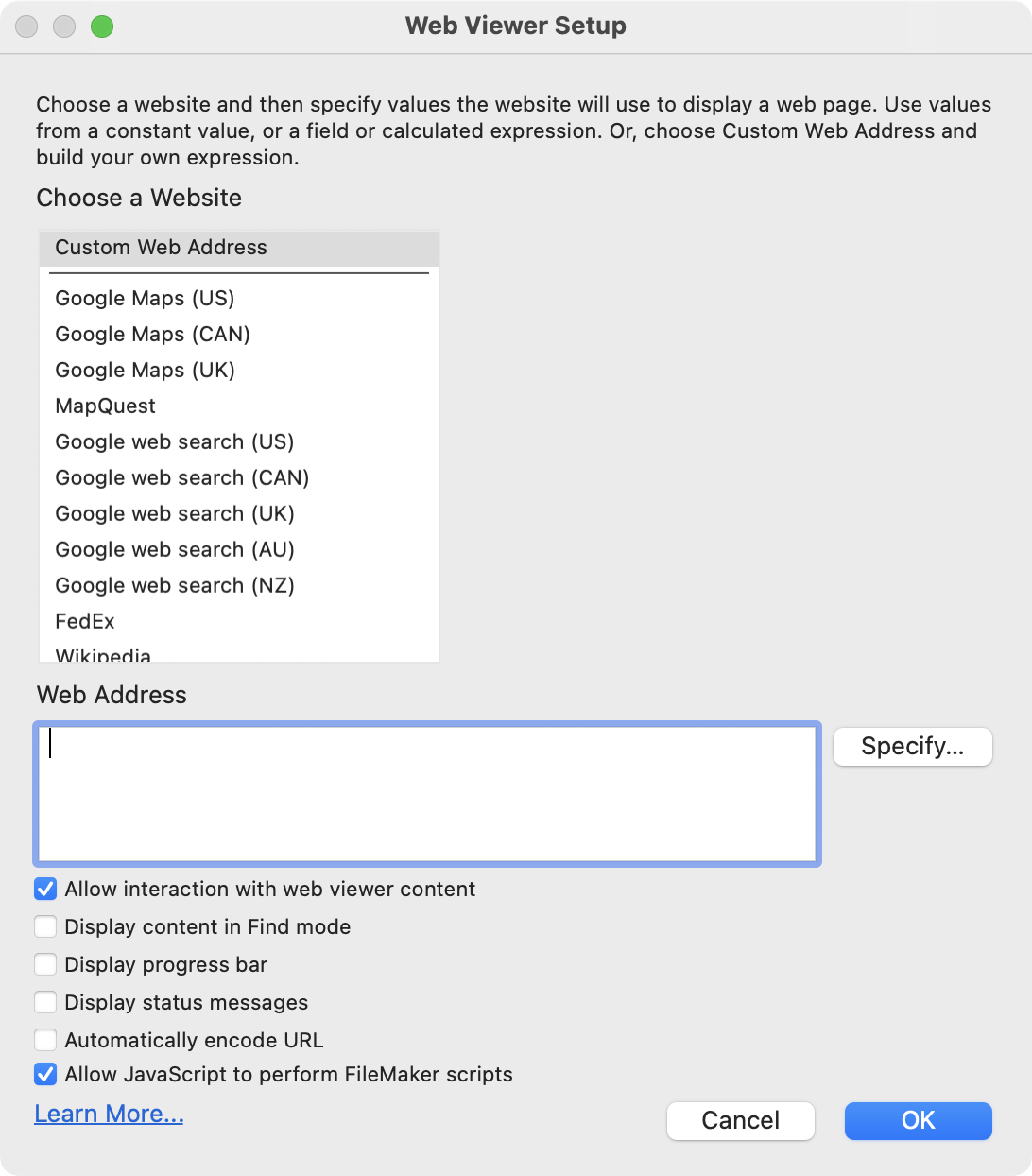 ---
## Usage
### Performing Claris/FileMaker Scripts from JavaScript
#### bzBond.PerformScript(scriptName, [scriptParameter, options])
```
bzBond.PerformScript("add two numbers", { firstNum: 1, secondNum: 2 })
.then((result) => console.log(result));
bzBond.PerformScript("Get User Data", "user-123", { timeout: 3000 })
.then((data) => console.log(data.firstName))
.catch((e) => console.log('request took too long', e));
```
The (optional) **options** parameter can contain any of the following (defaults shown):
```
{
webViewerName: "", // The name of the web viewer hosting the web code.
timeout: null, // Number of milliseconds to wait before a promise is rejected.
callType: 0 // The Claris/FileMaker 'call type'.
relayScript: "bzBondRelay" // The relay script as it is named in the Claris/FileMaker solution.
ignoreResult: false // When true, promise resolves immediately - does not wait for Claris/FileMaker script.
}
```
The **callType** can be any of the following values (when not provided it is "continue" by default). See the [Claris documentation](https://help.claris.com/en/pro-help/content/options-for-starting-scripts.html) for more details.
```
"continue" (or 0, "0")
"halt" (or 1, "1")
"exit" (or 2, "2")
"resume" (or 3, "3")
"pause" (or 4, "4")
"interrupt" (or 5, "5")
```
The **callType** can alternatively be provided as part of an object, or string.
```
bzBond.PerformScript("Get Data", "", { callType: "interrupt" });
// is equal to
bzBond.PerformScript("Get Data", "", "interrupt" );
```
#### bzBond.SetWebViewerName(webViewerName) | bzBond.GetWebViewerName()
This method manually associates bzBond with the name of the Web Viewer the code resides in.
- This step is optional when using the provided bzBondRelay script (it automatically determines the name of the web viewer).
- If you choose to write a custom relay script using the spec, you may need to set the name in your JS code.
```
bzBond.GetWebViewerName(); // "" (default)
bzBond.SetWebViewerName("myWebViewer");
bzBond.GetWebViewerName(); // "myWebViewer"
```
#### bzBond.SetWebViewerNameFromClaris()
Determines the name of the web viewer that bzBond is running in and stores it as part of the bzBond instance. This is useful for ensuring that subsequent `bzBond.PerformScript` calls do not invoke potentially expensive searches for the initiating web viewer.
Returns a **promise**
```
bzBond.GetWebViewerName(); // ""
bzBond.SetWebViewerNameFromClaris()
.then((result) => {
console.log(result) // "myWV"
console.log(bzBond.GetWebViewerName()) // "myWV"
});
```
#### bzBond.SetRelayScriptName(relayScriptName) | bzBond.GetRelayScriptName()
If you choose to change the name of the Relay Script in Claris/FileMaker Pro, use this step to ensure bzBond calls to Claris/FileMaker Pro perform the correct script.
```
bzBond.GetRelayScriptName(); // "bzBondRelay" (default)
bzBond.SetRelayScriptName("My Relay Script");
bzBond.GetRelayScriptName(); // "My Relay Script"
```
#### bzBond.SyncConfig()
To learn more about web viewer config see [bzBond-claris](../bzBond-claris/README.md#web-viewer-config)
- `SyncConfig` returns the Web Viewer JSON config as a **promise** result.
- `SetWebViewerConfigFromClaris` gets the current web viewer config state from Claris/FileMaker Pro and updates the config stored in bzBond-js.
- `SetWebViewerConfig(webViewerConfig)` allows manual overwrite of the configuration stored in bzBond-js.
- `GetConfig` returns the current configuration stored in bzBond-js.
#### bzBond.RegisterScript(pluginOptions)
It possible to extend bzBond-js by registering custom Claris/FileMaker scripts, which can then be can be called as methods.
1. Create a script in Claris/FileMaker Pro.
2. Perform `bzBond.RegisterScript` giving it the appropriate **pluginOptions**:
- `exec`: the method that becomes available to use on the `bzBond` class.
- `scriptName`: the Claris/FileMaker script that will be run when the method defined in `exec` is called.
- `throwIf`: (optional) callback function that takes the result of the script defined in `scriptName` as a parameter. If the function returns `true` an error will be thrown.
```
// In this example, we create a Claris/FileMaker script called 'Execute Data Api', and associate that with the method 'executeDataApi'
bzBond.RegisterScript({
exec: "executeDataApi",
scriptName: "Execute Data Api",
throwIf: (scriptResult) => {
return scriptResult.messages[0].code !== "0" ;
},
});
// Performing the script
const myQuery = {
layouts: "FAKE_DATA",
query: [{
SOME_DATA: "==definitely data here",
}],
};
bzBond.executeDataApi(myQuery)
.then((result) => {
console.log('my data', result);
})
.catch((e) => {
console.log('query failed', e.toString());
});
// The second parameter can also take advantage of bzBond options
bzBond.executeDataApi(myQuery, { timeout: 3000, callType: "interrupt" })
.then((result) => {
console.log('my data', result);
})
.catch((e) => {
console.log('query failed', e.toString());
});
```
### Promise rejection and Error Handling
The promises settled by the bzBond relay script will only reject when the specified Claris/FileMaker script is missing.
Otherwise, the result of the script's `Exit Script[]` step will be returned as the result of **resolved promise** and **not** a rejected promise. Because there is no standard way to indicate that a Claris/FileMaker script resulted in an error, the result of the promise will need to be inspected and an error thrown if required.
Note that when registering a plugin, the `throwIf` parameter can be used set the result state(s) that should throw errors.
### Integrating JavaScript functions with Claris/FileMaker scripts
bzBond-js works with bzBond-claris to allow Javascript functions defined in FileMaker scripts to run and return results in the regular FileMaker script flow. See the [bzBond-claris](../bzBond-claris/README.md#integrating-javascript-functions-with-filemaker-scripts) documentation for more details.
**Errors** are captured and returned for the following scenarios:
- function does not exist in JavaScript.
- function defined as a string in Claris/FileMaker has invalid syntax (eg: `"(a, b,,, => a + b"`).
- function executed in JavaScript throws an error.
- bzBond does not exist in the web viewer (in this case, the PerformJavascript step itself will surface an error - this situation must be manually handled).
```
{
"messages" :
[
{
"code" : "5",
"message" : "The function 'MyGlobalFunc' is missing from the global scope, or is not a valid function definition"
}
],
"response" : {}
}
```
## Contributors
Created by [Beezwax](https://www.beezwax.net/)
---
## Usage
### Performing Claris/FileMaker Scripts from JavaScript
#### bzBond.PerformScript(scriptName, [scriptParameter, options])
```
bzBond.PerformScript("add two numbers", { firstNum: 1, secondNum: 2 })
.then((result) => console.log(result));
bzBond.PerformScript("Get User Data", "user-123", { timeout: 3000 })
.then((data) => console.log(data.firstName))
.catch((e) => console.log('request took too long', e));
```
The (optional) **options** parameter can contain any of the following (defaults shown):
```
{
webViewerName: "", // The name of the web viewer hosting the web code.
timeout: null, // Number of milliseconds to wait before a promise is rejected.
callType: 0 // The Claris/FileMaker 'call type'.
relayScript: "bzBondRelay" // The relay script as it is named in the Claris/FileMaker solution.
ignoreResult: false // When true, promise resolves immediately - does not wait for Claris/FileMaker script.
}
```
The **callType** can be any of the following values (when not provided it is "continue" by default). See the [Claris documentation](https://help.claris.com/en/pro-help/content/options-for-starting-scripts.html) for more details.
```
"continue" (or 0, "0")
"halt" (or 1, "1")
"exit" (or 2, "2")
"resume" (or 3, "3")
"pause" (or 4, "4")
"interrupt" (or 5, "5")
```
The **callType** can alternatively be provided as part of an object, or string.
```
bzBond.PerformScript("Get Data", "", { callType: "interrupt" });
// is equal to
bzBond.PerformScript("Get Data", "", "interrupt" );
```
#### bzBond.SetWebViewerName(webViewerName) | bzBond.GetWebViewerName()
This method manually associates bzBond with the name of the Web Viewer the code resides in.
- This step is optional when using the provided bzBondRelay script (it automatically determines the name of the web viewer).
- If you choose to write a custom relay script using the spec, you may need to set the name in your JS code.
```
bzBond.GetWebViewerName(); // "" (default)
bzBond.SetWebViewerName("myWebViewer");
bzBond.GetWebViewerName(); // "myWebViewer"
```
#### bzBond.SetWebViewerNameFromClaris()
Determines the name of the web viewer that bzBond is running in and stores it as part of the bzBond instance. This is useful for ensuring that subsequent `bzBond.PerformScript` calls do not invoke potentially expensive searches for the initiating web viewer.
Returns a **promise**
```
bzBond.GetWebViewerName(); // ""
bzBond.SetWebViewerNameFromClaris()
.then((result) => {
console.log(result) // "myWV"
console.log(bzBond.GetWebViewerName()) // "myWV"
});
```
#### bzBond.SetRelayScriptName(relayScriptName) | bzBond.GetRelayScriptName()
If you choose to change the name of the Relay Script in Claris/FileMaker Pro, use this step to ensure bzBond calls to Claris/FileMaker Pro perform the correct script.
```
bzBond.GetRelayScriptName(); // "bzBondRelay" (default)
bzBond.SetRelayScriptName("My Relay Script");
bzBond.GetRelayScriptName(); // "My Relay Script"
```
#### bzBond.SyncConfig()
To learn more about web viewer config see [bzBond-claris](../bzBond-claris/README.md#web-viewer-config)
- `SyncConfig` returns the Web Viewer JSON config as a **promise** result.
- `SetWebViewerConfigFromClaris` gets the current web viewer config state from Claris/FileMaker Pro and updates the config stored in bzBond-js.
- `SetWebViewerConfig(webViewerConfig)` allows manual overwrite of the configuration stored in bzBond-js.
- `GetConfig` returns the current configuration stored in bzBond-js.
#### bzBond.RegisterScript(pluginOptions)
It possible to extend bzBond-js by registering custom Claris/FileMaker scripts, which can then be can be called as methods.
1. Create a script in Claris/FileMaker Pro.
2. Perform `bzBond.RegisterScript` giving it the appropriate **pluginOptions**:
- `exec`: the method that becomes available to use on the `bzBond` class.
- `scriptName`: the Claris/FileMaker script that will be run when the method defined in `exec` is called.
- `throwIf`: (optional) callback function that takes the result of the script defined in `scriptName` as a parameter. If the function returns `true` an error will be thrown.
```
// In this example, we create a Claris/FileMaker script called 'Execute Data Api', and associate that with the method 'executeDataApi'
bzBond.RegisterScript({
exec: "executeDataApi",
scriptName: "Execute Data Api",
throwIf: (scriptResult) => {
return scriptResult.messages[0].code !== "0" ;
},
});
// Performing the script
const myQuery = {
layouts: "FAKE_DATA",
query: [{
SOME_DATA: "==definitely data here",
}],
};
bzBond.executeDataApi(myQuery)
.then((result) => {
console.log('my data', result);
})
.catch((e) => {
console.log('query failed', e.toString());
});
// The second parameter can also take advantage of bzBond options
bzBond.executeDataApi(myQuery, { timeout: 3000, callType: "interrupt" })
.then((result) => {
console.log('my data', result);
})
.catch((e) => {
console.log('query failed', e.toString());
});
```
### Promise rejection and Error Handling
The promises settled by the bzBond relay script will only reject when the specified Claris/FileMaker script is missing.
Otherwise, the result of the script's `Exit Script[]` step will be returned as the result of **resolved promise** and **not** a rejected promise. Because there is no standard way to indicate that a Claris/FileMaker script resulted in an error, the result of the promise will need to be inspected and an error thrown if required.
Note that when registering a plugin, the `throwIf` parameter can be used set the result state(s) that should throw errors.
### Integrating JavaScript functions with Claris/FileMaker scripts
bzBond-js works with bzBond-claris to allow Javascript functions defined in FileMaker scripts to run and return results in the regular FileMaker script flow. See the [bzBond-claris](../bzBond-claris/README.md#integrating-javascript-functions-with-filemaker-scripts) documentation for more details.
**Errors** are captured and returned for the following scenarios:
- function does not exist in JavaScript.
- function defined as a string in Claris/FileMaker has invalid syntax (eg: `"(a, b,,, => a + b"`).
- function executed in JavaScript throws an error.
- bzBond does not exist in the web viewer (in this case, the PerformJavascript step itself will surface an error - this situation must be manually handled).
```
{
"messages" :
[
{
"code" : "5",
"message" : "The function 'MyGlobalFunc' is missing from the global scope, or is not a valid function definition"
}
],
"response" : {}
}
```
## Contributors
Created by [Beezwax](https://www.beezwax.net/)