
# Kwipu
[](https://www.python.org/downloads/)
[](LICENSE)
[](https://ollama.com/)
[](https://www.llamaindex.ai/)
[](https://obsidian.md/)
[](https://modelcontextprotocol.io/)
[](https://benmaster82.github.io/Kwipu/)
**English** | [简体中文](README.zh-CN.md) | [Tiếng Việt](README.vi.md)
Kwipu turns a folder of documents into a property-graph RAG index that you can explore and query from an interactive terminal, a 3D web interface, or an MCP client. It works with ordinary knowledge folders and Obsidian-style vaults.
> **About “fully local”:** Kwipu can run fully locally when you select a local Ollama LLM and embedding model. The intentional default LLM is `gpt-oss:20b-cloud`, which can send document chunks, retrieved context, and questions to its provider. [Choose cloud or local before indexing](#choose-cloud-or-local).
## Choose your path
| I want to… | Start here |
|---|---|
| Ask my notes directly in a terminal | [Terminal-only use](#terminal-only-use) |
| Explore the graph and ask from a browser | [Quick start: web UI](#quick-start-web-ui) |
| Use my own notes or Obsidian vault | [Use your own document folder](#use-your-own-document-folder) |
| Connect an AI client over MCP | [MCP server](#mcp-server) |
| Configure or deploy the system | [Configuration reference](#configuration-reference) |
| Run tests or contribute code | [Developer setup](#developer-setup) |
## What Kwipu does
- Builds a property graph from `.md`, `.txt`, `.pdf`, and `.docx` documents.
- Extracts semantic relations with an LLM and structural relations from wikilinks and YAML frontmatter.
- Combines vector similarity, BM25, temporal metadata, and optional synonym retrieval.
- Grounds answers in source chunks and returns citations.
- Visualizes entities, documents, and relations in an interactive 3D graph.
- Watches the source folder and updates persisted storage safely.
- Supports English, Italian, French, German, Spanish, and Portuguese patterns.
- Exposes the same knowledge through the terminal, web API, and MCP.
### From a note to the graph
Take `knowledge_base/examples/Alice.md`:
```markdown
---
tags: [person, team]
role: Frontend Lead
project: Project Alpha
---
# Alice
Frontend Lead on [[Project Alpha]].
- Collaborates with [[Bob]] on API integration
```
Kwipu reads the frontmatter and the wikilinks into structural relations, and asks the LLM for semantic relations in the text:
```mermaid
flowchart LR
alice(("Alice
note Alice.md"))
chunk["📄 text chunk of Alice.md"]
alice -- "Has role
(frontmatter · role · line 3)" --> fl["Frontend Lead"]
alice -- "Participates in
(frontmatter · project · line 4)" --> pa(("Project Alpha"))
alice -- "Has tag
(frontmatter · tags · line 2)" --> tag["person · team"]
alice -- "Collaborates with
(wikilink · line 13)" --> bob(("Bob"))
alice -- "Is related to
(wikilink · line 9)" --> pa
alice == "Specializes in
(LLM, illustrative)" ==> react["React"]
chunk -. "source" .-> react
```
- **Structural relations** come from frontmatter keys and from the words before each `[[wikilink]]` (here *collaborates with*). When no pattern matches, the relation falls back to *Is related to* in the line's language. Each one records where it came from: origin, file, frontmatter field, line, and a hash of the note's content.
- **Entities are notes, not strings.** `[[Bob]]`, `[[Bob#Role]]`, `[[People/Bob]]`, `[[Bob|B.]]`, and an `aliases:` entry of a renamed note all resolve to the same node. Two notes with the same file name in different folders get path-qualified names, such as `People/Alice` and `Archive/Alice`.
- **Semantic relations** (thick arrow) are extracted by the LLM from text chunks and keep a link to their source chunk (dotted arrow), so answers can cite it. The exact LLM relations depend on the model.
## Web interface
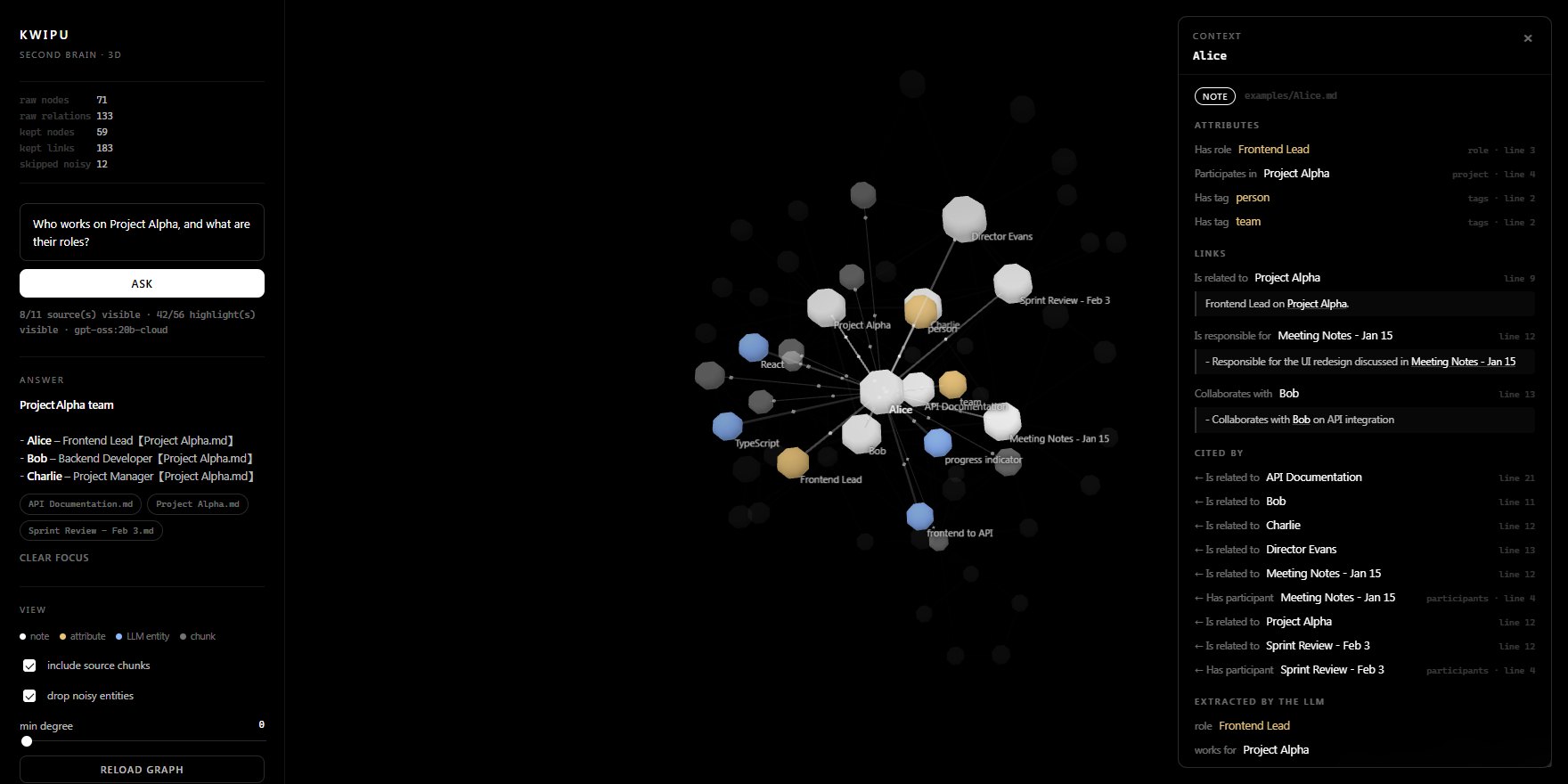
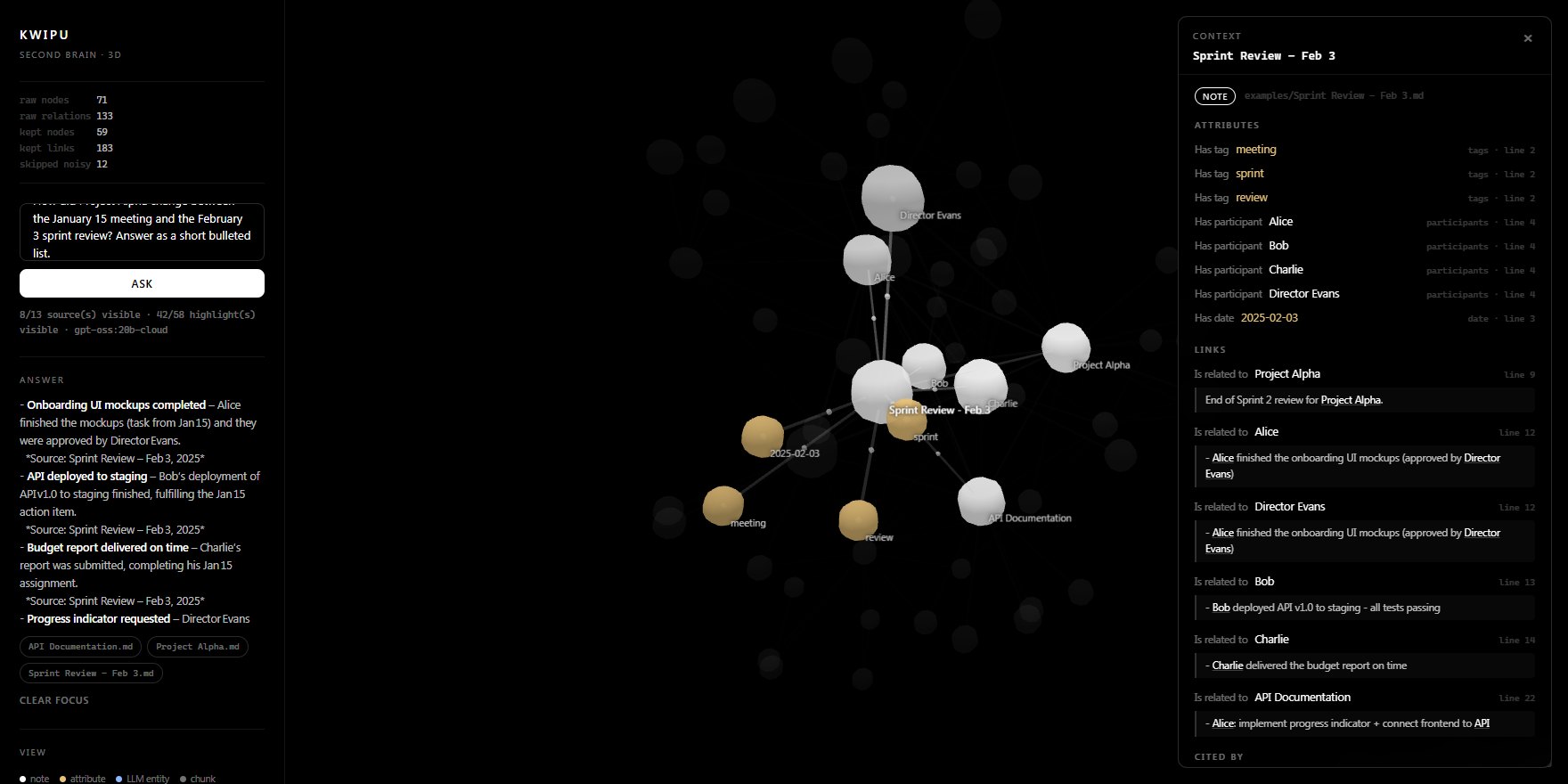
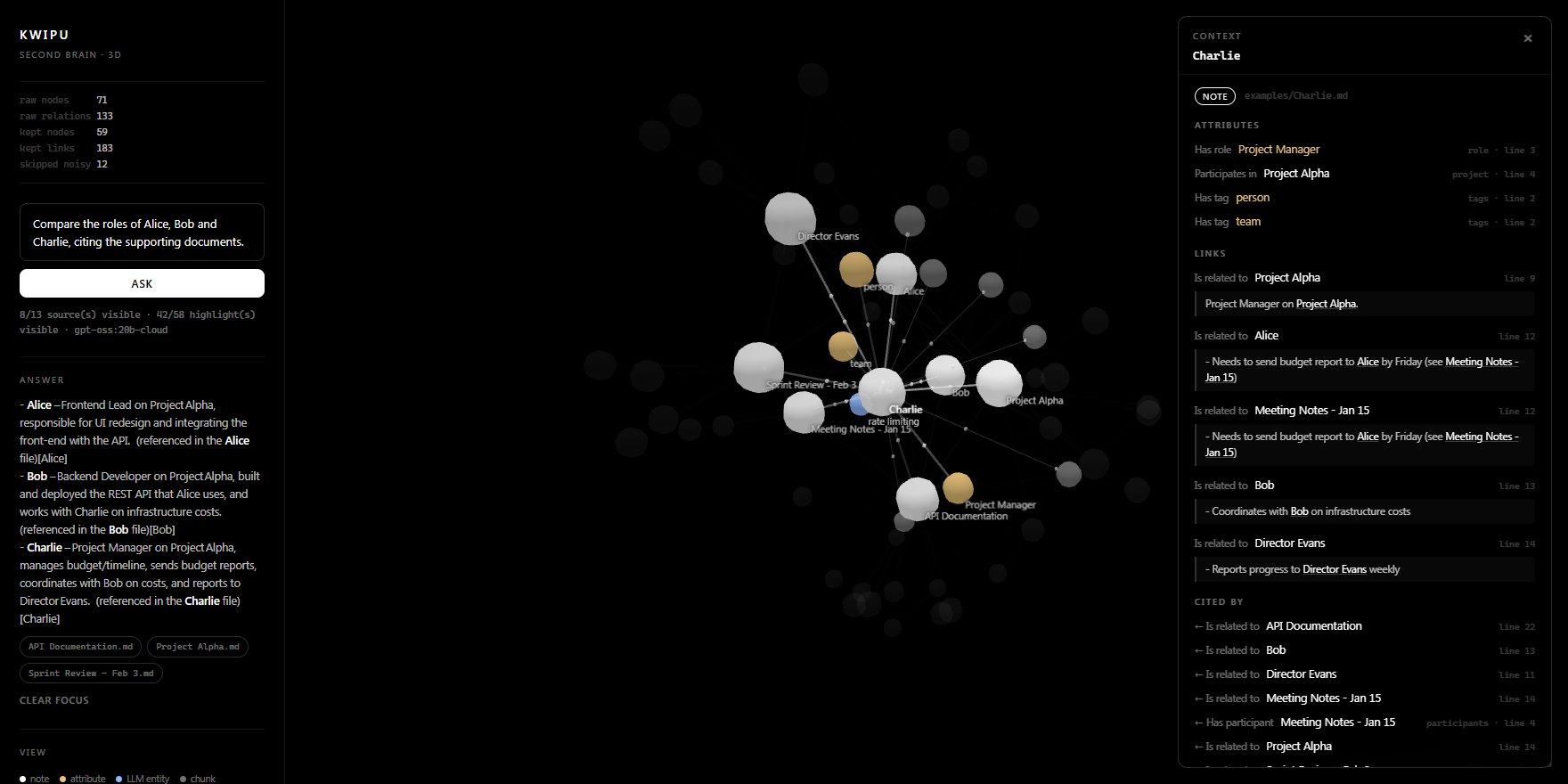
Click any node to open its context card: frontmatter attributes, links with the line they come from, backlinks, LLM-extracted relations, and source chunks. Clicking a name in the card flies to that node.
### 1. Ask a grounded question and open its sources
### 2. Reconstruct changes across meetings and reviews
### 3. Compare people, roles, and supporting documents
## Terminal interface
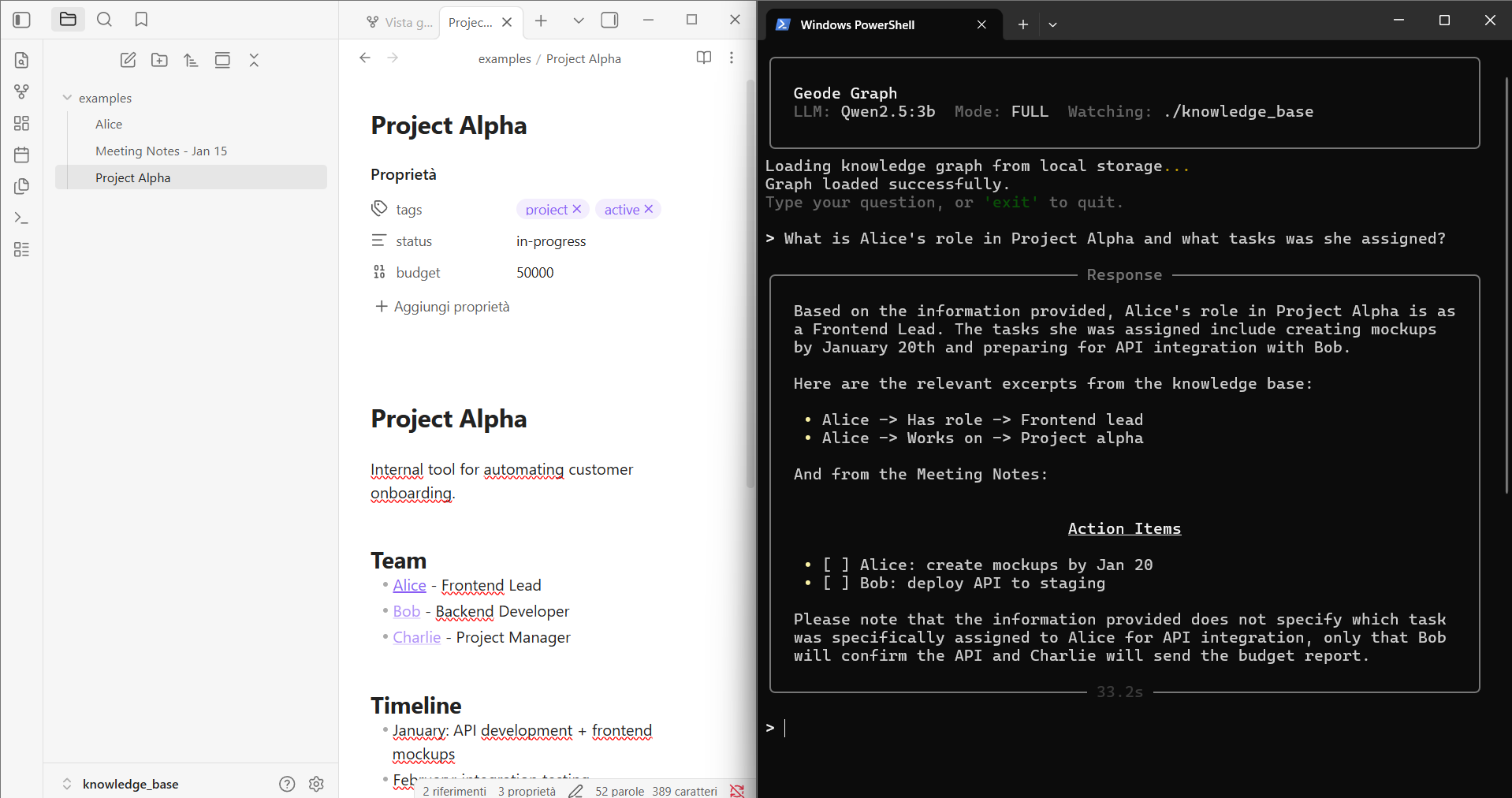
Use Kwipu directly from the command line while keeping your notes open in Obsidian. The terminal returns grounded answers from the graph and continues watching the knowledge folder for changes.
### Ask about roles, tasks, and project context
### Query meeting decisions and rebuild after note changes
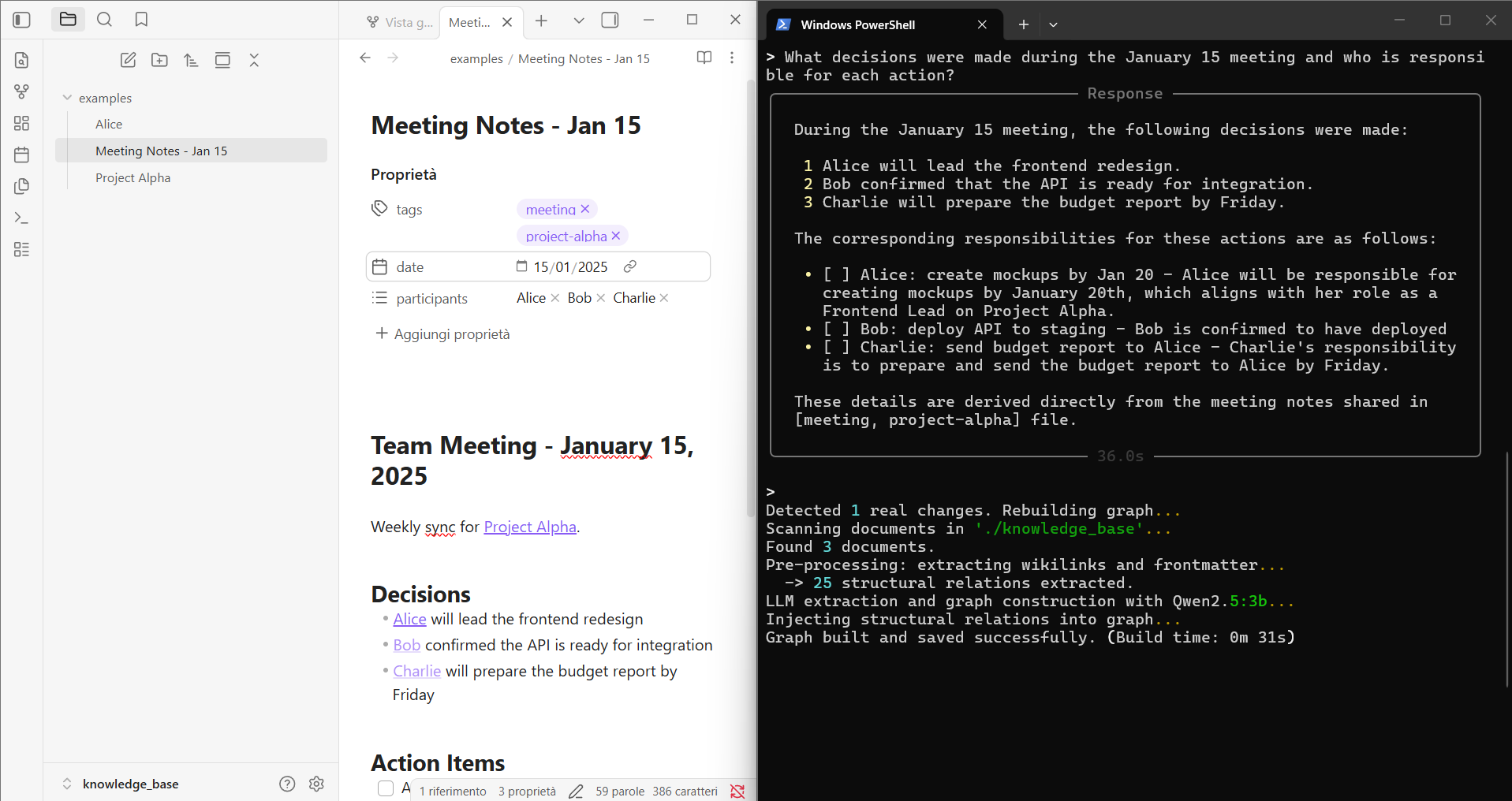
For installation and commands, see [Terminal-only use](#terminal-only-use).
## Choose cloud or local
Kwipu connects to an Ollama-compatible endpoint, which defaults to `http://localhost:11434`. A local endpoint does **not** by itself guarantee local model execution.
| Mode | LLM | Data behavior | Before first use |
|---|---|---|---|
| Cloud default | `gpt-oss:20b-cloud` | Ollama can forward context and questions to the model provider. Review that provider's privacy, retention, and data-location policies. | `ollama pull gpt-oss:20b-cloud` |
| Local example | `qwen2.5:7b` | Inference remains on the machine when both models and the Ollama endpoint are local. | `ollama pull qwen2.5:7b` |
Both modes use the local embedding model in the default configuration:
```powershell
ollama pull nomic-embed-text
```
A remote Ollama endpoint sends data to that host. Kwipu requires HTTPS for non-loopback endpoints unless insecure HTTP is explicitly enabled for a trusted network.
## Quick start: web UI
The guided setup below targets Windows PowerShell. [Linux and macOS equivalents](#linux-and-macos-command-equivalents) follow it. If you only want the terminal interface, follow steps 1–6 and stop before starting the bridge and frontend.
### 1. Install and verify the prerequisites
Install:
- [Git](https://git-scm.com/downloads) or download the repository as a ZIP.
- [Python 3.12 or later](https://www.python.org/downloads/).
- [Ollama](https://ollama.com/download).
- [Node.js with npm](https://nodejs.org/) only if you want the web interface.
Open PowerShell and verify the commands you need:
```powershell
git --version
py -3.12 --version
ollama --version
node --version
npm --version
```
If one command is not found, install that prerequisite, open a new PowerShell window, and run the check again. Terminal-only users do not need Node.js or npm.
### 2. Download Kwipu and install its runtime
```powershell
git clone https://github.com/benmaster82/Kwipu.git
Set-Location .\Kwipu
py -3.12 -m venv .venv
.\.venv\Scripts\Activate.ps1
python -m pip install --upgrade pip==25.1.1
python -m pip install -r .\bridge\requirements.txt
# Web interface only:
npm --prefix .\frontend ci
```
`bridge/requirements.txt` includes the core terminal dependencies, so one Python installation supports both interfaces. If you downloaded a ZIP, extract it and run the commands after `git clone` from the extracted `Kwipu` folder.
If PowerShell blocks virtual-environment activation, use this process-only policy and retry:
```powershell
Set-ExecutionPolicy -Scope Process -ExecutionPolicy Bypass
.\.venv\Scripts\Activate.ps1
```
### 3. Add documents
The repository already includes a small demo under `knowledge_base/examples`. To use your own files, copy `.md`, `.txt`, `.pdf`, or `.docx` files into `knowledge_base` before starting the indexer.
```text
Kwipu/
└── knowledge_base/
├── examples/
└── your-notes/
├── project.md
└── meeting-notes.pdf
```
Kwipu reads source documents but does not rewrite them.
### 4. Make the models available
Make sure Ollama is running. The Ollama desktop application may already run the service; otherwise keep this command open in **Terminal 1**:
```powershell
ollama serve
```
In another PowerShell window, pull the embedding model and exactly one LLM:
```powershell
ollama pull nomic-embed-text
# Cloud default:
ollama pull gpt-oss:20b-cloud
# OR local-only example:
# ollama pull qwen2.5:7b
```
A cloud model may ask you to complete Ollama account or sign-in steps. Do not index sensitive documents until you have selected the intended execution mode.
### 5. Use one consistent configuration
Settings are read when each process starts. PowerShell `$env:` values apply only to the current window, so paste the following block into both the **indexer terminal** and the **bridge terminal**.
```powershell
Set-Location "C:\path\to\Kwipu" # replace with your actual folder
.\.venv\Scripts\Activate.ps1
$env:KWIPU_ROOT_DIR = (Get-Location).Path
$env:KWIPU_KNOWLEDGE_DIR = "knowledge_base"
$env:KWIPU_STORAGE_DIR = "storage_graph"
$env:KWIPU_EMBED_MODEL = "nomic-embed-text"
$env:KWIPU_OLLAMA_BASE_URL = "http://localhost:11434"
$env:KWIPU_QUERY_MAX_LENGTH = "4000"
# Run exactly one of these two lines:
$env:KWIPU_LLM_MODEL = "gpt-oss:20b-cloud" # cloud default
# $env:KWIPU_LLM_MODEL = "qwen2.5:7b" # local example
```
If you choose the local model, comment out the cloud line and uncomment the local line in **both** terminals.
> For a shared terminal/web setup, prefer environment variables over `geode_graph.py --llm-model`. CLI flags configure only that terminal process; they do not configure the bridge.
### 6. Start the indexer and terminal interface — Terminal 2
After applying the configuration block:
```powershell
python .\geode_graph.py --fast
```
Keep this process running. On first use, wait for:
```text
Graph built and saved successfully.
```
When existing storage is reused, the equivalent message is:
```text
Graph loaded successfully.
```
The process then displays:
```text
Type your question, or 'exit' to quit.
>
```
You can already use Kwipu entirely from this terminal: type a question after `>`, press **Enter**, read the grounded answer, and enter `exit` when finished. For example:
```text
> Who works on Project Alpha, and what are their roles?
```
If you only need the terminal interface, setup is complete: you do not need the bridge, Node.js, or frontend. Keep the terminal open if you want Kwipu to watch the document folder for changes.
If the indexer prints `No files found. Waiting for documents...`, confirm that your files are under the configured `KWIPU_KNOWLEDGE_DIR`.
### 7. Start the API bridge — Terminal 3
To use the browser UI, open another PowerShell window, paste the same configuration block from step 5, then run:
```powershell
$env:BRIDGE_HOST = "127.0.0.1"
$env:BRIDGE_PORT = "8765"
python -m bridge
```
Keep the bridge running. A successful startup includes:
```text
Uvicorn running on http://127.0.0.1:8765
```
### 8. Check health and start the frontend — Terminal 4
From the repository root:
```powershell
$health = Invoke-RestMethod -Uri "http://127.0.0.1:8765/health"
$health | ConvertTo-Json -Depth 6
```
Before continuing, check that the top-level `status`, `property_graph.status`, and `ollama.status` are all `ok`. Then start the UI:
```powershell
npm --prefix .\frontend run dev
```
Open **http://localhost:5173** in your browser. Try this question with the included demo documents:
> **Who works on Project Alpha, and what are their roles?**
Use **Ctrl+C** in each terminal to stop its process. A normal web session keeps four processes running: Ollama (unless its desktop service is already running), the Kwipu indexer/terminal, the bridge, and Vite.
## Terminal-only use
The terminal is a complete Kwipu interface, not only a background indexer. It builds or loads the graph, watches documents, accepts questions, and prints answers directly. It needs Python and Ollama, but it does **not** need FastAPI, Node.js, or a browser.
After completing the common model and configuration steps above, run:
```powershell
.\.venv\Scripts\Activate.ps1
python .\geode_graph.py --fast
```
Then ask questions at the prompt:
```text
> What decisions were made in the January 15 meeting?
> How did Project Alpha change between the two meetings?
> Who is responsible for the API deployment?
```
Commands and behavior:
- Enter a question and press **Enter** to query the graph.
- Enter `exit`, `quit`, or `esci` to close Kwipu.
- Press **Ctrl+C** to stop it.
- Leave it running to detect newly created, modified, or deleted documents.
- Omit `--fast` to enable the additional LLM synonym retriever for terminal queries.
For a terminal-only installation, `python -m pip install -r .\requirements.txt` is sufficient. The broader bridge requirements used in the web quick start also include these core dependencies.
## Linux and macOS command equivalents
The process order is the same: Ollama → indexer/terminal → bridge → frontend. Replace the Windows setup and environment syntax with:
```bash
git clone https://github.com/benmaster82/Kwipu.git
cd Kwipu
python3.12 -m venv .venv
source .venv/bin/activate
python -m pip install --upgrade pip==25.1.1
python -m pip install -r bridge/requirements.txt
npm --prefix frontend ci # web interface only
export KWIPU_ROOT_DIR="$PWD"
export KWIPU_KNOWLEDGE_DIR="knowledge_base"
export KWIPU_STORAGE_DIR="storage_graph"
export KWIPU_EMBED_MODEL="nomic-embed-text"
export KWIPU_OLLAMA_BASE_URL="http://localhost:11434"
export KWIPU_QUERY_MAX_LENGTH="4000"
export KWIPU_LLM_MODEL="gpt-oss:20b-cloud" # or qwen2.5:7b
```
Repeat the `export` block in the indexer and bridge shells, then use only the processes you need:
```bash
# Complete terminal interface and watcher
python geode_graph.py --fast
# Web API, in another shell
python -m bridge
# Web frontend, in another shell
npm --prefix frontend run dev
```
Install and start Ollama using the instructions for your operating system. On macOS, the Ollama application can provide the service without a separate `ollama serve` terminal.
## Use your own document folder
You may keep notes outside the repository. Use an absolute source path and a separate generated-storage path, and repeat the same values for the terminal/indexer, bridge, and MCP server:
```powershell
$env:KWIPU_ROOT_DIR = "D:\KwipuData"
$env:KWIPU_KNOWLEDGE_DIR = "D:\Notes\MyVault"
$env:KWIPU_STORAGE_DIR = "graph-index"
$env:KWIPU_LLM_MODEL = "qwen2.5:7b"
$env:KWIPU_EMBED_MODEL = "nomic-embed-text"
python .\geode_graph.py --fast
```
Relative knowledge and storage paths resolve under `KWIPU_ROOT_DIR`. The source directory and generated storage must be separate; Kwipu rejects nested or overlapping layouts to protect source documents.
### Document updates
| Filesystem change | Index action |
|---|---|
| Initial startup without storage | Full build |
| Only newly created files | Incremental insertion |
| Any modified file | One full rebuild for the batch |
| Any deleted file | One full rebuild for the batch |
| Event without a content-hash change | Ignored |
An editor's atomic save can appear as delete plus create and therefore trigger a full rebuild. Run **one** core CLI watcher for each storage directory.
## Core CLI reference
Fast mode disables the per-query LLM synonym retriever:
```powershell
python .\geode_graph.py --fast
```
CLI-only model overrides are available for standalone use:
```powershell
python .\geode_graph.py --llm-model qwen2.5:7b --embed-model nomic-embed-text
```
These flags do not propagate to the bridge or MCP server. Use environment variables when multiple components share the same storage.
## How it works
```text
Documents (.md/.txt/.pdf/.docx)
│
▼
Structural preprocessing (wikilinks/frontmatter) + LLM path extraction
│
▼
Persisted property graph and vectors (shared storage + revision manifest)
│
▼
Synonym* + vector + BM25 + temporal retrieval
│
▼
LLM answer with source context and citations
* Synonym retrieval is disabled in --fast mode, MCP, and bridge queries.
```
### Components
- **Core CLI** builds and queries the graph, then watches the knowledge directory.
- **MCP server** exposes `query_graph` and `query_graph_detailed` over MCP stdio.
- **Bridge** exposes versioned JSON APIs for health, graph snapshots, read-only queries, and source expansion.
- **Frontend** renders the graph with `3d-force-graph` and calls the bridge through a configurable API base.
### Storage and process model
The CLI is the designated writer. The bridge is read-only and returns HTTP `503` until the CLI has published usable storage. MCP can build storage when it is absent, but it does not start a watcher.
All components use a shared inter-process lock and revision manifest. Queries compare `storage_revision` and reload a newly committed generation automatically. Persist operations prepare a sibling staging generation, retain the previous generation temporarily as backup, and atomically publish the new generation.
Do not run multiple watchers against one storage directory. Do not delete `storage_graph`, `.storage_graph.staging`, `.storage_graph.backup`, or the sibling lock while a process is using them.
## Configuration reference
Settings are read from environment variables when each process starts. Restart the affected process after changing a value.
### Core configuration
| Variable | Default | Meaning |
|---|---|---|
| `KWIPU_ROOT_DIR` | Repository directory | Base for default and relative data paths. |
| `KWIPU_LIVE_DIR` | — | Compatibility alias for `KWIPU_ROOT_DIR`; `KWIPU_ROOT_DIR` wins. |
| `KWIPU_KNOWLEDGE_DIR` | `knowledge_base` under root | Source document directory. |
| `KWIPU_STORAGE_DIR` | `storage_graph` under root | Generated persisted index directory. |
| `KWIPU_LLM_MODEL` | `gpt-oss:20b-cloud` | LLM used for extraction and answers; the default can execute in the cloud. |
| `KWIPU_MODEL_NAME` | — | Compatibility alias for `KWIPU_LLM_MODEL`; the latter wins. |
| `KWIPU_EMBED_MODEL` | `nomic-embed-text` | Embedding model used for stored vectors. |
| `KWIPU_OLLAMA_BASE_URL` | `http://localhost:11434` | Absolute HTTP(S) Ollama endpoint. |
| `KWIPU_OLLAMA_TIMEOUT` | `300` seconds | Positive model-request timeout. |
| `KWIPU_STORAGE_LOCK_TIMEOUT` | `30` seconds | Positive wait limit for the shared storage lock. |
| `KWIPU_QUERY_MAX_LENGTH` | `4000` characters | Maximum normalized question length. |
| `KWIPU_MAX_SOURCE_BYTES` | `10485760` bytes | Maximum source-file and extracted-text size for bridge expansion. |
| `KWIPU_ALLOW_INSECURE_REMOTE_OLLAMA` | disabled | Allows plaintext HTTP to a non-loopback host when set to `1`, `true`, `yes`, or `on`. |
Changing the embedding model requires a new storage index. Changing only the LLM permits loading existing vectors, although a later full rebuild can produce different extracted relations.
### Bridge configuration
| Variable | Default | Meaning |
|---|---|---|
| `BRIDGE_HOST` | `127.0.0.1` | Bind address used by `python -m bridge`. |
| `BRIDGE_PORT` | `8765` | Validated port from 1 through 65535. |
| `BRIDGE_CORS_ORIGINS` | `http://127.0.0.1:5173,http://localhost:5173` | Comma-separated browser origins; wildcards are rejected. |
| `BRIDGE_ALLOWED_HOSTS` | `localhost,127.0.0.1,testserver` | Accepted `Host` values; wildcards are rejected. |
| `BRIDGE_HEALTH_OLLAMA_TIMEOUT` | `2` seconds | Ollama timeout used by `/health`. |
The bridge also uses every core setting above. `python -m bridge` consumes `BRIDGE_HOST` and `BRIDGE_PORT`; when invoking Uvicorn directly, pass them as CLI values:
```powershell
uvicorn bridge.app:app --reload --host $env:BRIDGE_HOST --port $env:BRIDGE_PORT
```
See [bridge/README.md](bridge/README.md) for API contracts and deployment notes.
### Frontend configuration
| Variable | Default | Meaning |
|---|---|---|
| `VITE_API_BASE` | `/api` | Browser API base; relative values use the Vite proxy. |
| `VITE_BRIDGE_TARGET` | `http://127.0.0.1:8765` | Development proxy target. |
With the defaults, Vite rewrites `/api/health` to `/health` on the bridge. A production static deployment must provide an equivalent reverse proxy or use an absolute `VITE_API_BASE`; direct browser access must also match `BRIDGE_CORS_ORIGINS`.
## MCP server
Use an absolute Python interpreter and script path in the MCP client configuration. Environment variables configure the model and paths because CLI flags apply only to `geode_graph.py`.
```json
{
"mcpServers": {
"kwipu": {
"command": "C:/path/to/Kwipu/.venv/Scripts/python.exe",
"args": ["C:/path/to/Kwipu/kwipu_mcp_server.py"],
"env": {
"KWIPU_KNOWLEDGE_DIR": "C:/path/to/vault",
"KWIPU_LLM_MODEL": "qwen2.5:7b",
"KWIPU_EMBED_MODEL": "nomic-embed-text"
}
}
}
}
```
The MCP server runs in fast retrieval mode and starts no watcher. It exposes:
- `query_graph(question)` — returns the answer as text.
- `query_graph_detailed(question)` — returns `{"answer": "...", "citations": [...]}` with citations deduplicated by node ID.
Selecting `gpt-oss:20b-cloud` carries the cloud privacy implications described above. Use installed local models when local-only execution is required.
## Bridge API and source expansion
The main bridge endpoints are:
| Endpoint | Purpose |
|---|---|
| `GET /health` | Check storage, configured models, and Ollama connectivity. |
| `GET /graph/snapshot` | Return the graph used by the 3D interface. |
| `POST /query` | Ask a question and receive an answer plus citations. |
| `GET /expand?node_id=` | Read the cited source represented by a graph node. |
Source expansion reads UTF-8 Markdown/text directly and extracts PDF/DOCX text without invoking an LLM. Oversized input returns `413`; unsupported formats return `415`; invalid UTF-8 or failed structured extraction returns `422`; transient source I/O returns `503`.
## Troubleshooting
| Symptom | What to check |
|---|---|
| `python`, `ollama`, `node`, or `npm` is not recognized | Install the missing prerequisite, open a new terminal, and run its `--version` command. |
| `Activate.ps1` is blocked | Run `Set-ExecutionPolicy -Scope Process -ExecutionPolicy Bypass`, then activate the environment again. |
| `Ollama is not running` | Start the Ollama application or run `ollama serve`; verify `http://localhost:11434/api/tags`. |
| `Missing model(s)` | Run the exact `ollama pull ` commands printed by Kwipu. Make sure indexer and bridge use the same model names. |
| `No files found. Waiting for documents...` | Put supported files under `KWIPU_KNOWLEDGE_DIR` and confirm the path printed in the CLI header. |
| Browser does not open | Keep Vite running and open `http://localhost:5173` manually. |
| Health is `degraded` | Inspect `property_graph.detail`, `ollama.detail`, and the `models` list in `/health`. |
| Query returns `503` | Start the CLI/indexer first and wait for a successful graph build/load. Also check storage path, lock, and embedding compatibility. |
| Query returns `502` | Check bridge logs and Ollama availability; the query engine or model request failed. Retrying should not be used to hide a persistent error. |
| Query returns `400 Question is too long` | The backend reports the active limit. The default is `4000`; a different value, such as `99`, means `KWIPU_QUERY_MAX_LENGTH` was overridden. Set it before starting the bridge and restart the bridge. |
| Port `8765` or `5173` is already in use | Stop the existing process or change the bridge/Vite settings consistently. |
| Embedding-model mismatch | Stop all Kwipu processes, restore the model used to build storage, or move the generated storage aside and let the CLI rebuild it. Never remove your source document directory. |
Inspect a PowerShell override with:
```powershell
Get-ChildItem Env:KWIPU_QUERY_MAX_LENGTH
```
Set the documented default for the current terminal and restart the bridge with:
```powershell
$env:KWIPU_QUERY_MAX_LENGTH = "4000"
python -m bridge
```
## Project structure
```text
Kwipu/
├── geode_graph.py # Core engine, interactive CLI, and watcher
├── kwipu_config.py # Canonical environment configuration
├── kwipu_storage.py # Inter-process lock and atomic JSON helpers
├── kwipu_mcp_server.py # MCP stdio server
├── lang_config.py # Multilingual patterns and date/relation helpers
├── requirements.txt # Core/terminal and MCP dependencies
├── requirements-dev.txt # Bridge/runtime/test dependency inputs
├── requirements-dev.lock # Hashed Python 3.12 Linux CI lock
├── requirements-dev-windows.lock # Hashed Python 3.12 Windows CI lock
├── bridge/ # FastAPI app and read-only query adapter
├── frontend/ # TypeScript/Vite 3D client
├── knowledge_base/examples/ # Example source documents
├── img/ # Logo and screenshots
├── tests/ # Standard-library unittest suite
└── storage_graph/ # Generated active index, gitignored
```
Generated staging and backup siblings are also gitignored and managed automatically.
## Developer setup
Use the platform-specific hashed lock for the complete bridge/runtime/test environment.
### Windows, Python 3.12
```powershell
py -3.12 -m venv .venv
.\.venv\Scripts\Activate.ps1
python -m pip install --upgrade pip==25.1.1
python -m pip install --require-hashes -r .\requirements-dev-windows.lock
python -m unittest discover -s tests -p "test_*.py" -v
```
### Linux CI environment, Python 3.12
```bash
python3.12 -m venv .venv
source .venv/bin/activate
python -m pip install --upgrade pip==25.1.1
python -m pip install --require-hashes -r requirements-dev.lock
python -m unittest discover -s tests -p "test_*.py" -v
```
Frontend validation commands are:
```powershell
npm --prefix .\frontend ci
npm --prefix .\frontend run typecheck
npm --prefix .\frontend run build
npm --prefix .\frontend audit
```
Regenerate dependency locks only from `requirements-dev.txt` with the pinned workflow documented in [CONTRIBUTING.md](CONTRIBUTING.md), then review the complete diff. See that guide for all contribution and validation requirements.
## License
MIT