
# 虾说教材写作 (dsh-course-writer)
An **AI course-authoring workspace plugin** for [DeepSeek Harness](https://deepseek-harness.github.io/deepseek-harness/guide/quickstart) (DSH):
**three-pane workspace + nine-phase gated workflow + course/chapter/lorebook management + TXT/Word export + share & collaborate**.
- [中文](./README.md) | English

Let DSH work with you like a professional curriculum author: from topic selection, learner analysis and learning objectives to lesson plans, exercises and assessment — every step is methodical, gated, verifiable and exportable, with a lorebook and knowledge graph that solidify the knowledge structure.
---
## ✨ Features
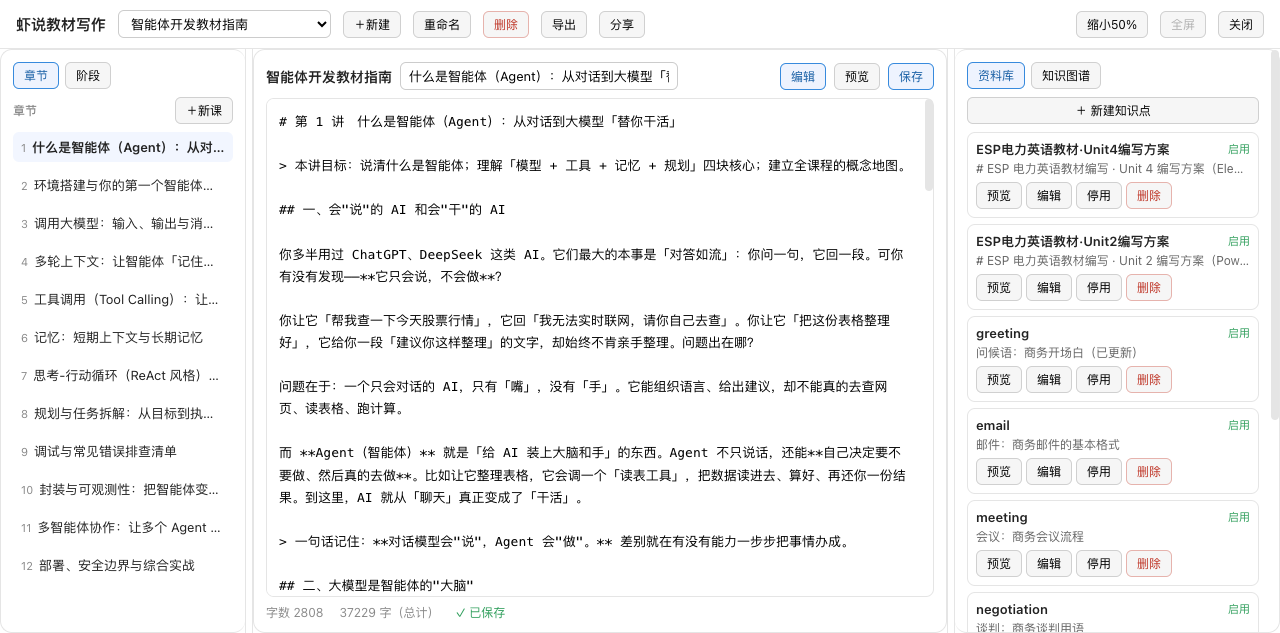
### Three-pane workspace
- **Left pane**: chapter list (**drag to reorder** + hover-to-delete + context menu) + nine-phase gated navigation (progress x/9, phase lock / in-progress / approved states)
- **Center pane**: Markdown editor + split preview + chapter title editing + manual save / auto-save (2s after typing stops)
- **Right pane**: lorebook (knowledge-point management) / knowledge graph (visualized knowledge structure)
### Course management
- **New course**: 23 course-type dropdown (general · subject · vocational · certification · hobbies)
- **Rename / delete**: one-click, with delete confirmation
### Lorebook (knowledge points)
- Knowledge-point **create / edit / enable-disable / delete / preview** (modal form: name, content, keywords)
- Comma-separated keywords, isolated per course
### Knowledge graph
- Visualizes course knowledge points and their relationships
- Labels spread radially around nodes (no overlap); long labels truncated with hover-to-view
### Export
- **TXT** text export
- **Word (.docx)** standard Office format (heading hierarchy + chapter styles)
### Share & collaborate
- Generate **read-only / editable** share links — others can open without logging in
- Editable collaboration has **version history** and **conflict detection** (prompt to overwrite or load latest)
### Nine-phase gated workflow
`topic → learner analysis → learning objectives → outline → units → lesson plans → exercises → assessment`
- **Phase gating**: cannot advance until the previous phase is approved
- **Artifact versioning**: every submission is archived and revertible
- **Audit log**: every operation is written to audit.jsonl
### Window controls
- Fullscreen / shrink to 50% (drag-resizable) / close
- Three-pane widths drag-adjustable
### 🎭 Course-authoring mode preset (agent preset)
The plugin ships a **「虾说教材写作」agent preset**, selectable in DSH's new-session mode picker — picking it enters "course-authoring mode" instantly.
**Three-channel coordination that constrains the model**:
1. **Mode anchoring (preset)** — anchors the "curriculum author" persona;
2. **Soft guidance (skill)** — the `course-writing-workflow` skill auto-registers on enabling and loads the full methodology;
3. **Hard rails (tools)** — host-registered `course_*` / `lorebook_*` tools are available throughout; phase advance, submission, validation and chapter writing all go through tools.
**Usage**: new session → preset picker → "虾说教材写作" → start creating; or it auto-syncs to `~/.dsh/.agent-presets/course-writer/` after install.
---
## 🎯 Use cases
| Scenario | How |
| --- | --- |
| Write a new course from scratch | Open the workspace → "+新建" → pick a course type → write chapter by chapter |
| Already have an outline / knowledge points | Create the course, enter knowledge points into the lorebook, reference them in the text |
| Team collaboration | "分享" generates an editable link; multi-author editing with conflict detection |
| Deliver a Word document | "导出" → Word(.docx) one-click download |
| Inspect the knowledge structure | Right pane "知识图谱" visualizes knowledge-point relationships |
---
## 📦 Install
> Requires DSH (Windows/macOS/Linux; runtime Node ≥18). **Install only the LATEST release** (currently v0.5.0).
### ① Let an AI install it (recommended)
Paste this to any command-capable AI:
> Install the DSH plugin "虾说教材写作" (dsh-course-writer), **LATEST version only**. From `https://github.com/bettermen/dsh-course-writer/releases/latest` download the newest `dsh-external-dsh-course-writer-*.tgz` (highest version) → run `dsh plugin --profile web add ` → confirm with `dsh plugin list` → tell me to refresh the DSH page (Ctrl+Shift+R) so the sidebar entry appears. Report any error first.
### ② Manual install
Download the newest `dsh-external-dsh-course-writer-*.tgz` from https://github.com/bettermen/dsh-course-writer/releases/latest, then:
```bash
dsh plugin --profile web add
dsh plugin list # dsh-course-writer listed = success
```
### ③ Build from source (advanced)
Requires Node ≥22 and Git:
```bash
git clone https://github.com/bettermen/dsh-course-writer.git && cd dsh-course-writer
npm install && npm run build && npm pack
dsh plugin --profile web add ./dsh-external-dsh-course-writer-0.5.0.tgz
```
**After install**: the sidebar "虾说教材写作" entry and the settings card appear; if not, refresh/restart DSH and check the plugin is enabled.
---
## 🚀 Quick start
1. Open the sidebar "虾说教材写作" → "+新建" → enter a course name + pick a course type
2. Click chapters in the left pane to switch; write in the center pane (Markdown); auto-saves 2s after typing stops
3. Right pane "资料库" to enter knowledge points (with keywords); "知识图谱" to view the structure
4. Top "导出" to download TXT or Word; "分享" to generate a collaboration link
Data lives in `~/.dsh/dsh-course-writer/` by default:
```
lorebook/ knowledge points (entries)
projects/ projects (book.json + chapters/ + audit.jsonl + ...)
```
---
## 📖 Feature usage guide
### 1️⃣ Create a course
- Top "+新建" → modal with course name + course-type dropdown (23 types, grouped) → create
### 2️⃣ Write chapters (CodeMirror editor)
- Left pane chapter list to switch; center pane is a **CodeMirror 6 Markdown editor**
- Markdown syntax highlighting: headings, bold, italic, strikethrough, quotes, lists, links, inline code, fenced code blocks
- Soft line wrapping; lists / block quotes auto-continue on Enter; auto-paired quotes/brackets
- Undo / redo, find & replace, optional line numbers
- Chapter title editable (top input)
- Save: click "保存", or auto-saves 2s after typing stops (status shows "● unsaved / ✓ saved")
- Search panel comes from CodeMirror (English UI); shortcuts ⌘F find, ⌘Z undo
### 2.5️⃣ Editor toolbar (manual formatting)
A **Apple-style toolbar** sits atop the center editor — format by hand without remembering Markdown. 16 buttons in 5 groups:
- **History**: undo / redo (⌘Z / ⇧⌘Z)
- **Paragraph style**: body / headings H1–H3 / quote / bullet list / ordered list / task list / code block
- **Inline**: bold / italic / strikethrough / inline code
- **Appearance**: font (default / serif / sans / mono / Kai) + text color (14 colors) + highlight (8 colors, "none" to remove)
- **Insert**: link / image / table (6×8 grid with hover preview) / divider
- **View**: find / line-number toggle
Notes:
- Every action is a **single undo step**, with caret position preserved
- Text color / highlight are stored as inline `` (the previewer **whitelist-restores** only safe CSS properties; `url()` / `expression` / `javascript:` are always blocked, so content stays safe to share)
- Re-applying the same color/highlight **removes** it; picking another font merges into the same span (no nesting)
### 2.6️⃣ Delete & drag reorder
- **Delete**: hover a chapter row → ✕ button fades in on the right; or **right-click → 删除课时** (confirms first)
- **Reorder**: drag a chapter row onto its target position; a blue insertion bar marks the drop point, release to save
- Context menu also offers: preview / new lesson / copy title
- Semantics:
- Delete **keeps sparse numbering** (deleting lesson 2 leaves 1, 3) so external references (share links, ledger, AI context) stay valid; a new lesson takes `max(no)+1` and never collides
- Reorder **renumbers everything to 1..N** and re-maps the consistency ledger, then replays course variables in the new order
- Both actions are written to the audit log (`action: delete` / `reorder`)
### 3️⃣ Lorebook (knowledge points)
- Right pane "资料库" → "+ 新建知识点" → name / content / keywords (comma-separated)
- Each point supports **preview / edit / enable-disable / delete**
- Isolated per course
### 4️⃣ Knowledge graph
- Right pane "知识图谱" → visualizes knowledge-point relationships
- Labels spread radially (no overlap); hover to view full name
### 5️⃣ Export
- Top "导出" → choose **TXT** or **Word(.docx)** → download
### 6️⃣ Share & collaborate
- Top "分享" → choose permission (read-only / editable) → generate link → copy to others
- Editable collaboration: saves carry a version number; conflicts prompt "overwrite or load latest"
- Any share link can be revoked
---
## ⚙️ Configuration
| Setting | Default | Description |
| --- | --- | --- |
| enabled | true | Plugin master switch (disable unregisters tools/skill; data kept) |
| dataDir | `~/.dsh/dsh-course-writer` | Data root directory |
| uiHidden | false | Hide the sidebar "虾说教材写作" entry |
---
## 🔌 Interaction with DSH
- **agent tools**: `course_*` (project/phase/write/validate/export…) + `lorebook_*` (lorebook CRUD)
- **skill**: `course-writing-workflow` (nine-phase methodology guidance)
- **GUI API**: `/api/course-writer/*` (projects/chapters/export/share/lorebook, fence-header protected)
---
## ❓ FAQ
**Q: Why doesn't saving jump back to chapter 1?**
A: By design — saving stays on the current chapter and only refreshes the chapter list, for uninterrupted writing.
**Q: Will I lose edits when switching chapters?**
A: No. With unsaved changes, switching chapter/course or closing prompts for confirmation first.
**Q: Are share links safe?**
A: Shares go through an independent `/share/` path with token auth — the admin password is never exposed; links can be revoked anytime.
**Q: Is the Word export a standard format?**
A: Yes, standard `.docx` (zero-dependency generator), openable in Word / WPS / Google Docs with heading and chapter styles preserved.
---
## 🧪 Development
```bash
npm run typecheck # host + client
npm test # vitest
npm run build # tsc host + tsdown client
npm pack # pack to tgz
```
---
## 🛡 Security model
- Local-only storage under `~/.dsh/dsh-course-writer/`, no network upload
- All writes audit-logged
- GUI routes carry a custom fence header (anti CSRF / DNS-rebinding)
- Share endpoints use token auth + separate nginx pass-through; admin credentials never exposed
## 📄 License
MIT