







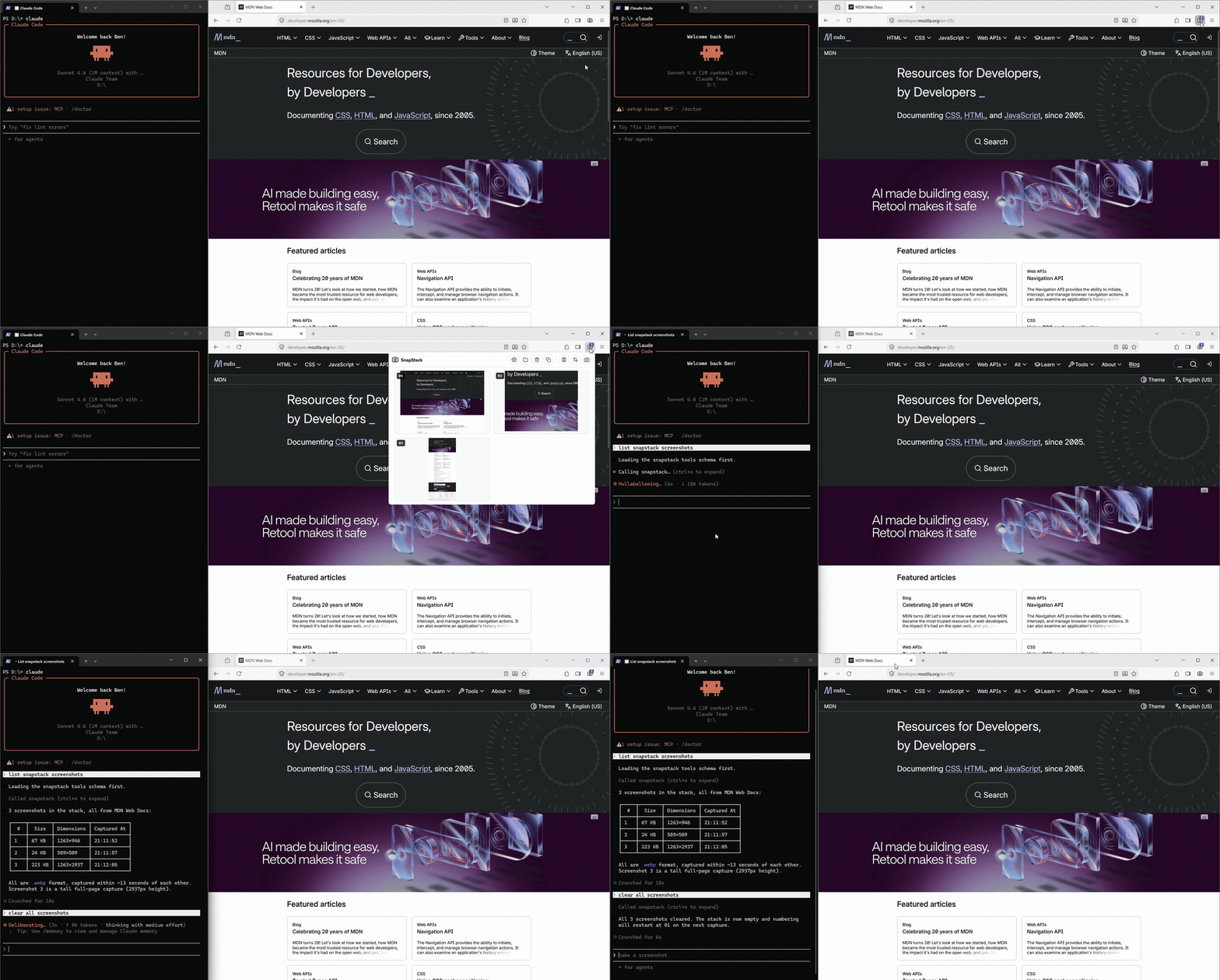
The **SnapStack server** is a single always-on Node process: it receives browser captures from the
[extension](https://github.com/bgaze/snapstack-extension), stacks them on disk, and serves them to any
MCP-capable LLM client over **Streamable HTTP**. It listens only on `127.0.0.1` — nothing ever leaves your machine.
> **New here?** The full install + usage guide lives in the **extension README**:
> **[snapstack-extension](https://github.com/bgaze/snapstack-extension)**. This page is the technical reference.
## Architecture
One always-on process serves both the extension (capture) and your MCP client, decoupled by a folder on disk.
```
[MV3 extension] --POST /push (bytes) ┐
▼
[SnapStack server - 127.0.0.1:4123]
├─ writes → stack on disk
└─ MCP /mcp (HTTP) ← MCP client
```
- **Capture** — the extension encodes the shot as WebP (PNG fallback), downscales it, and POSTs it here.
- **Stack** — one image file (`.webp`/`.png`) plus a twin `.json` (url, title, timestamp, dimensions) per capture,
named `NN `: a stable two-digit **number** (assigned in capture order, restarts at `01` when the stack
empties) plus a timestamp, under `~/.snapstack/`.
- **Retrieval** — `get_screenshots` returns a JSON **manifest** (number, absolute path, dimensions, metadata —
*no image bytes*); the client reads only the files it needs, by path. Deletion is a separate, explicit
`clear_screenshots` step. **Retrieval never deletes.**
## Requirements
- **Node.js ≥ 18** (tested on Node 20). No git needed at runtime.
- An **MCP-capable LLM client** speaking the **HTTP** (Streamable HTTP) or **stdio** transport.
- The **[snapstack-extension](https://github.com/bgaze/snapstack-extension)** loaded in your browser.
## Install & run
> On Windows, **use an Administrator terminal**, otherwise the global npm install and the scheduled-task registration
> may get rejected.
The server ships on npm and installation is straightforward on macOS, Linux and Windows:
1. Install globally: `npm i -g snapstack-server`
2. Enable background service: `snapstack enable`
SnapStack auto-starts on login, restarts on crash, and updates itself on each launch.
To check its status or if an update is available, simply run `snapstack` in your terminal.
Available commands:
```bash
snapstack # status report: service + server health, update check
snapstack start | stop | restart # control the running service (this session)
snapstack update # update the CLI (npm i -g) + restart the server on the latest
snapstack run # run the daemon in the foreground (no auto-start)
```
The **daemon** self-updates on each (re)start/login; the **global CLI** (the `snapstack` command) does not.
Run `snapstack update` to bring **both** to the latest in one go.
The full end-to-end walkthrough (idiomatic install paths, MCP client registration, the extension) is in the
**[extension README](https://github.com/bgaze/snapstack-extension)**.
## MCP
SnapStack speaks two MCP transports over the same on-disk stack — pick whichever your client supports:
```jsonc
// HTTP (server already running) — register http://127.0.0.1:4123/mcp; copy deploy/mcp.json
{ "type": "http", "url": "http://127.0.0.1:4123/mcp" }
```
```jsonc
// stdio (the client spawns the process)
{ "command": "npx", "args": ["-y", "-p", "snapstack-server", "snapstack", "mcp"] }
```
The HTTP `/mcp` endpoint is **stateless** (a fresh server + transport per request); the stdio front-end
(`snapstack mcp`) is spawned on demand and reads the same `~/.snapstack` stack.
Capture intake (`/push`) always stays in the running server, independent of either MCP front-end.
### Exposed tools
| Tool | Description |
|---------------------|-------------------------------------------------------------------------------------------------------------------------------------------------------------------------------------|
| `get_screenshots` | Lists pending captures as a JSON manifest (stable number, absolute path, dimensions, metadata) — **no image bytes, no deletion**. Pass `numbers` (e.g. `[1,3]`) to list only those. |
| `clear_screenshots` | Deletes captures. Pass `numbers` to delete specific ones; omit to clear the whole stack. Numbering restarts at `01` once empty. |
| `count_screenshots` | Number of pending captures, without retrieving them. |
`get_screenshots` and `count_screenshots` are **read-only**; only `clear_screenshots` is **destructive**.
## Configuration
### Environment variables (infrastructure)
| Variable | Default | Purpose |
|------------------|----------------|-----------------------------------------|
| `SNAPSTACK_DIR` | `~/.snapstack` | Stack folder. |
| `SNAPSTACK_PORT` | `4123` | Listening port (always on `127.0.0.1`). |
### Capture policy (shared across your browsers)
The encoding/capture settings are **owned by the server** and stored in `~/.snapstack/config.json`, so a single
edit applies to **every browser** running the extension. They are edited from the extension's **options page** — not
an environment variable — and fetched by the extension before each capture.
| Key | Default | Meaning |
|-------------|---------|---------------------------------------------------------------------------|
| `format` | `webp` | Image format: `webp`, `png` or `jpg`. |
| `quality` | `0.85` | Lossy quality (`0`–`1`; the extension UI shows it as a percentage). |
| `maxWidth` | `1568` | Downscale captures wider than this to this width in px (`0` = no resize). |
| `maxSlices` | `50` | Full-page capture: hard cap on stitched slices. |
Two endpoints back it: `GET /config` returns the effective policy; `POST /config` validates and replaces it (host- +
CORS-guarded like every capture route). The file is a non-image, so a stack clear never touches it; deleting it just
restores the defaults above.
## Troubleshooting
- **Capture server not started message in the extension:** run `snapstack start` (or `snapstack run` in the foreground),
or check the auto-start with `snapstack`. Test: `curl http://127.0.0.1:4123/health`.
- **Port already in use (`EADDRINUSE`):** set `SNAPSTACK_PORT` to another value.
- **`snapstack: command not found` after switching Node version** (nvm, fnm, volta, Laravel Herd, nvm-windows): `npm i -g`
drops the `snapstack` command in the global bin of the Node version that was active at install time only, so switching
versions hides it. This is how npm globals work, not a SnapStack bug — the **background service is unaffected and keeps
capturing**; only the CLI command disappears. Fix: re-run `npm i -g snapstack-server` under the current Node version (or
switch back to the one used at install).
- **The client doesn't see the tools:** the server must run **before** the MCP client starts; check the config
(`type: "http"`, correct URL). Direct test: `curl http://127.0.0.1:4123/count`.
- **Inspect the stack:** `ls ~/.snapstack` (image files + human-readable `.json`).
## Support
- **A question or an idea?** → [GitHub Discussions](https://github.com/bgaze/snapstack-server/discussions)
- **Found a bug?** → [open an issue](https://github.com/bgaze/snapstack-server/issues)
## License
MIT — see [LICENSE](./LICENSE).