# Nova
[English](README.md) · [简体中文](README.zh-CN.md)
**Let any MCP agent use your real Mac or Windows apps.** Nova is a single Rust
binary, with no Python runtime, that gives Claude Desktop, Cursor, Codex, Claude
Code and other MCP clients screenshots, native OCR, keyboard and mouse input,
clipboard access, window/app control and Accessibility/UIA actions on macOS and
Windows.
[Releases](https://github.com/bigduu/Nova/releases/latest) · Part of [Bodhi](https://github.com/bigduu/Zenith) · [Bodhi desktop app](https://github.com/bigduu/Bodhi-AI/releases/latest) · [MIT](LICENSE)
- **Your real desktop, not a VM:** macOS 14+ (Apple Silicon and Intel) and
Windows x64/ARM64.
- **Reads before it clicks:** Accessibility/UIA controls, Apple Vision or
Windows OCR, and per-window screenshots with zoom. Clicks are given in the
screenshot's pixel space and mapped back to the screen.
- **Types any text:** full Unicode keyboard input, including Chinese, Japanese,
Korean and emoji.
- **Accessibility-first control (v0.3.0):** AX-first `ax_read` / `ax_activate`
that reject stale snapshots, a 64-step `batch_actions` limit with structured
failure reports, the Nova.app permission owner (development preview) and an
optional Chrome DevTools sidecar. Latest release: **v0.3.0** —
[Releases](https://github.com/bigduu/Nova/releases/tag/v0.3.0).
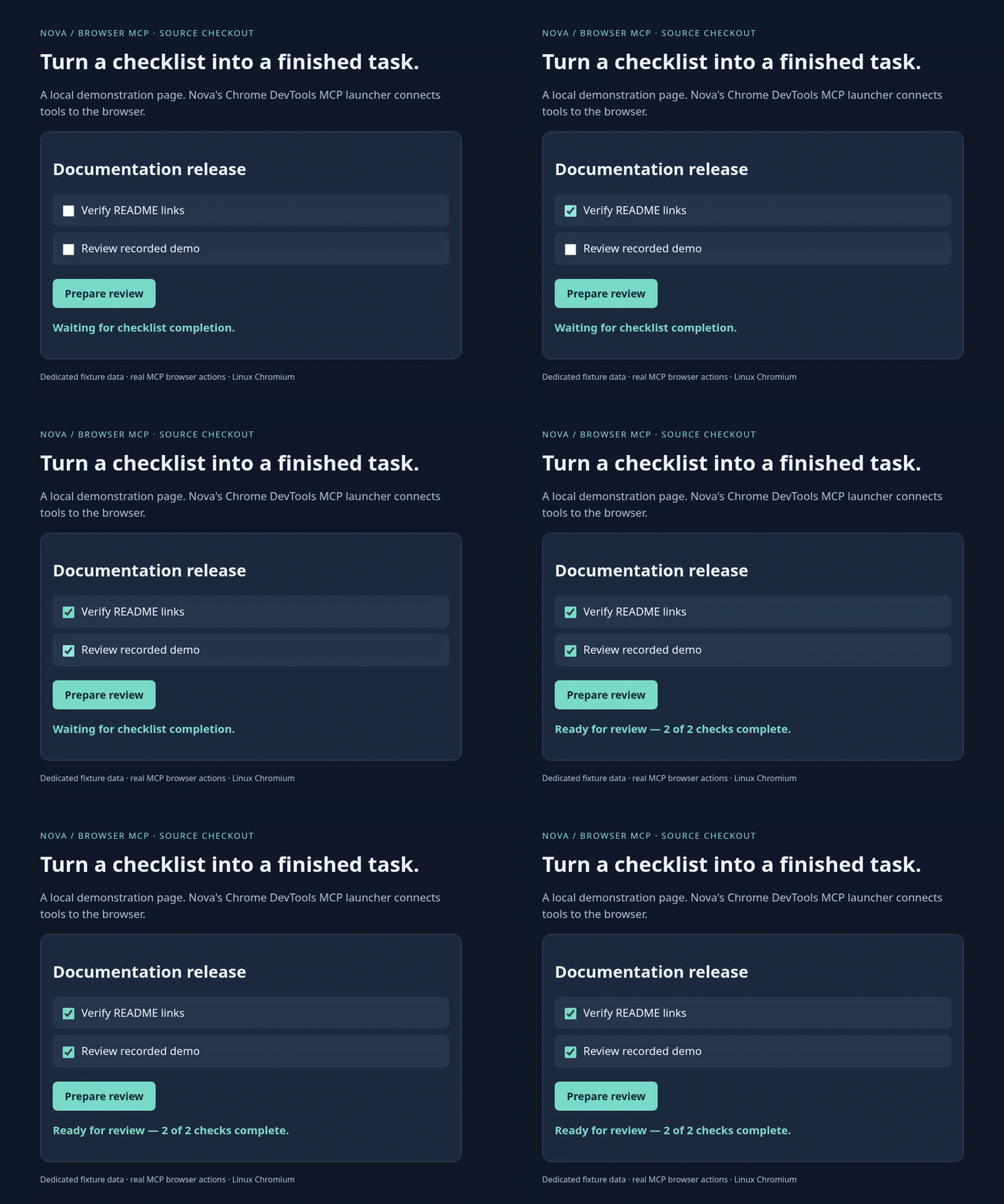
[Static image](docs/demos/browser-checklist.png) · [Reproduce and inspect MCP evidence](docs/demos/README.md)
This recording shows Nova's **browser tool path** (fixture page and real MCP
navigation/click calls). It was captured on Linux, so it does not show native
macOS/Windows desktop control or model reasoning. The reproduction notes explain
the `--npx` adapter and isolated browser.
## Install
| Platform | Published v0.3.0 |
| --- | --- |
| macOS 14+ (Homebrew) | `brew install bigduu/tap/nova` |
| macOS 14+ (manual) | `nova-v0.3.0-universal-apple-darwin.tar.gz` from [Releases](https://github.com/bigduu/Nova/releases/tag/v0.3.0) |
| Windows x86_64 | `nova-v0.3.0-x86_64-pc-windows-msvc.zip` |
| Windows ARM64 | `nova-v0.3.0-aarch64-pc-windows-msvc.zip` |
| Linux | Desktop control is not supported (headless protocol checks only) |
**Homebrew (macOS):**
```sh
brew tap bigduu/tap
brew install bigduu/tap/nova
nova --version
```
The formula installs the CLI from the release archive. It does not configure an
MCP client or grant macOS permissions. Run `which nova` to find the path to use
below: usually `/opt/homebrew/bin/nova` on Apple Silicon and
`/usr/local/bin/nova` on Intel Macs.
**npm (macOS and Windows):** Homebrew stays the recommended macOS install.
`@bigduu/nova` (package version 0.3.1) is a Node launcher that downloads the
matching [v0.3.1](https://github.com/bigduu/Nova/releases/tag/v0.3.1) GitHub
Release binary: universal macOS, or Windows x64 / ARM64. It does not install a
Linux desktop binary. The MCP Registry name is `io.github.bigduu/nova`.
```sh
npx @bigduu/nova --version
npm i -g @bigduu/nova
```
An MCP client that cannot answer an install prompt should call `npx` with `-y`:
```json
{
"mcpServers": {
"nova": { "command": "npx", "args": ["-y", "@bigduu/nova"] }
}
}
```
The launcher checks the release archive's `.sha256` before writing `nova` or
`nova.exe`. The macOS binary is ad-hoc signed, not notarized. Windows binaries
are not Authenticode-signed, so SmartScreen may warn on first run.
**Manual download:** download the matching `.sha256` file from the same release
and verify the archive before extracting it. On macOS:
```sh
tar -xzf nova-v*-universal-apple-darwin.tar.gz
xattr -dr com.apple.quarantine ./nova # only if Gatekeeper blocks the download
sudo install -m 0755 nova /usr/local/bin/nova
```
On Windows, extract the archive for the machine's architecture and invoke
`nova.exe` directly or place its directory on `PATH`. The Windows binaries are
not Authenticode-signed, so SmartScreen may warn on first run. The macOS binary
is ad-hoc signed, not notarized.
**Build from source:**
```sh
git clone https://github.com/bigduu/Nova.git
cd Nova
cargo build --release --locked
```
The result is `target/release/nova` on macOS or `target/release/nova.exe` on
Windows. Do not use `cargo install nova`: that crates.io name belongs to an
unrelated project. The npm package is `@bigduu/nova` (see above).
## Choose a version
| Path | What you get |
| --- | --- |
| [Published v0.3.0](https://github.com/bigduu/Nova/releases/tag/v0.3.0) (Homebrew and release archives) | Screenshots, `zoom_region`, OCR, numbered marks with `click_mark`, mouse/keyboard input, AX/UIA actions including `ax_read` / `read_ui` / `ax_activate`, `inspect_app`, managed `nova mcp`, Nova.app development preview, optional Chrome DevTools sidecar, consent-based [Chrome bridge](chrome/README.md), windows/apps, clipboard, `batch_actions` (64-step limit + structured failure), `wait`. |
| `master` (tip of development) | Whatever lands after v0.3.0 — build from source for unreleased work. |
Nova.app remains a **development preview** (ad-hoc signed, not notarized). Menu-bar status and virtual cursor are labelled **Preview** pending live-device acceptance ([#34](https://github.com/bigduu/Nova/issues/34), [#70](https://github.com/bigduu/Nova/issues/70)). [Audit evidence](docs/readme-audit.md).
## Use it from an MCP client
These snippets use **direct stdio** (no arguments). They work with the v0.3.0
release and with a `master` build. Replace the path with your own `which nova`
output, the extracted binary or `target/release/nova`. GUI clients do not
always inherit your shell `PATH`, so use an absolute path.
**Claude Desktop:** edit
`~/Library/Application Support/Claude/claude_desktop_config.json` on macOS or
`%APPDATA%\Claude\claude_desktop_config.json` on Windows.
**Cursor:** edit `~/.cursor/mcp.json` (all projects) or `.cursor/mcp.json` in
one project.
```json
{
"mcpServers": {
"nova": { "command": "/opt/homebrew/bin/nova", "args": [] }
}
}
```
**Claude Code:**
```sh
claude mcp add --scope user nova -- /opt/homebrew/bin/nova
```
**Codex:** add to `~/.codex/config.toml`, or run
`codex mcp add nova -- /opt/homebrew/bin/nova`:
```toml
[mcp_servers.nova]
command = "/opt/homebrew/bin/nova"
args = []
```
On Windows, use the full path to `nova.exe`, escaped in JSON
(`"C:\\Tools\\nova\\nova.exe"`) or as a TOML literal string
(`'C:\Tools\nova\nova.exe'`).
**macOS permissions:** in direct stdio mode, macOS usually attributes Nova to the
app that launches it. Grant **Accessibility** (input and UI control) and
**Screen Recording** (`screenshot`, `ocr`, `list_windows`) to Claude Desktop,
Cursor, or the terminal/IDE that runs Claude Code or Codex. If that does not
work, add the `nova` binary itself. Then restart or reconnect the MCP server.
You can instead let [Nova.app](#novaapp-development-preview) own the
permissions; see [Managed mode](#managed-mode-with-novaapp).
Try: *"Use Nova to list my open windows, take a screenshot of the frontmost one
and tell me which buttons you can see."*
### Managed mode with Nova.app
`nova mcp` is the cross-platform managed entrypoint used by the Bamboo plugin
(v0.3.0+):
```json
{
"mcpServers": {
"nova": { "command": "/absolute/path/to/nova", "args": ["mcp"] }
}
}
```
Windows and Linux headless builds serve ordinary stdio MCP. On macOS, `mcp`
only connects to the independent Nova.app, launching it through LaunchServices
when needed. Install the app separately, open it once, and grant
**Accessibility** to Nova; **Screen Recording** is needed for capture, OCR, and
`list_windows` (the app menu requests it only when you explicitly choose that
action). The bundled executable can also be used as the connector:
```json
{
"mcpServers": {
"nova": {
"command": "/Applications/Nova.app/Contents/MacOS/nova",
"args": ["mcp"]
}
}
}
```
The explicit `--connect` command remains supported and uses the same transport
as macOS `mcp`. It carries MCP bytes over a private per-user Unix socket. The
connector does not call desktop APIs or request macOS permissions;
the app process owns the MCP handlers and TCC responsibility. The socket lives
under `/tmp/nova-app-/` with a mode-0700 directory, mode-0600 socket, and a
same-UID peer check.
If Nova.app is unavailable, the managed command exits with installation and
reconnection guidance. It never falls back to desktop operations inside the MCP
host. `NOVA_APP_SOCKET` is for isolated development/tests; when set it disables
automatic app launch. Unset it for the normal installed-app setup. Unbundled
`nova` with no arguments still offers the legacy direct stdio mode.
When the app service closes its connection, the CLI connector finishes
forwarding responses and exits even if the host keeps its stdin pipe open.
Closing host stdin normally still half-closes the request stream and drains
the service's final response, including its last buffered bytes. Standard
stdout backpressure still applies: the host must keep reading responses.
Reconnect only the Nova MCP server after replacing/restarting the service;
Bodhi can stay open. No interrupted request is replayed and no replacement
MCP session is created automatically.
This exit behavior is specific to the terminating CLI connector process.
Its dedicated runtime is released after forwarding completes, and process
exit reclaims an outstanding blocking stdin read. It does not make the
`connect_stdio` library function's stdin cancellable inside a resident or
embedded runtime.
### Chrome DevTools MCP sidecar
For advanced Chrome page automation and debugging, Nova can launch the official
[Chrome DevTools MCP](https://github.com/ChromeDevTools/chrome-devtools-mcp)
next to the desktop server. This is a transparent stdio sidecar, not a second
browser implementation inside Nova. It requires npm/`npx`, Node.js
`^20.19.0`, `^22.12.0`, or `>=23`, and current stable Chrome (or newer). Nova
pins the reviewed upstream package to `chrome-devtools-mcp@1.8.0`.
Application-level integrations should accept an app selector (name or bundle ID)
and use `inspect_app` discovery internally. Discovery alone does not grant CDP
control; automatic app-to-provider routing remains a separate integration slice.
Endpoint copying and the separate MCP configuration below are advanced transport
compatibility. On macOS:
```json
{
"mcpServers": {
"nova": {
"command": "/Applications/Nova.app/Contents/MacOS/nova",
"args": ["--connect"]
},
"nova-chrome-devtools": {
"command": "/Applications/Nova.app/Contents/MacOS/nova",
"args": ["chrome-devtools"]
}
}
}
```
For a standalone binary from the v0.3.0 release or current source, use its absolute path and
`["chrome-devtools"]`. If a GUI client cannot find `npx`, add
`"--npx", "/absolute/path/to/npx"` after the subcommand.
The default launches a new temporary, isolated Chrome profile. Usage
statistics, package update checks, CrUX URL lookups, and sensitive network
headers are disabled/redacted by default. Requests made by attached DevTools
targets can be guarded by repeating `--allowed-url-pattern`, for example:
```json
"args": [
"chrome-devtools",
"--allowed-url-pattern", "https://example.com/*",
"--allowed-url-pattern", "https://*.example.net/*"
]
```
URL allow patterns require Chrome 149+. They apply only to DevTools targets
while the MCP server is attached and are not a complete network sandbox; use
an OS/VM sandbox when full network isolation is required, as described by the
[upstream security policy](https://github.com/ChromeDevTools/chrome-devtools-mcp/security/policy).
To work with an already running signed-in Chrome profile instead, first open
`chrome://inspect/#remote-debugging` in Chrome and enable remote debugging,
then configure:
```json
"args": ["chrome-devtools", "--profile", "existing"]
```
Automatic connection requires Chrome 144+. If several Chrome profiles are
active, Chrome chooses the profile it considers the default; select and verify
the connected pages before acting.
> [!WARNING]
> Existing-profile mode can inspect and control every open window in the
> selected Chrome profile, including authenticated pages. Enable it only for a
> trusted local MCP client, and disable remote debugging when finished.
An internal consumer or advanced caller can attach to an explicitly selected,
already-running browser instead of relying on stable Chrome's default profile:
```sh
nova chrome-devtools --browser-url http://127.0.0.1:9222
nova chrome-devtools --ws-endpoint 'ws://[::1]:9222/devtools/browser/'
```
Use one endpoint, without `--profile` (including explicit `isolated`) or
`--headless`. `--browser-url` accepts HTTP(S) at the browser root, with an optional
trailing `/`; `--ws-endpoint` accepts WS(S) at `/devtools/browser/`, where the
ID uses letters, digits, hyphen or underscore. Both require an original literal
loopback IP and explicit port 1–65535. Hostnames, abbreviated/integer/hex IPs,
credentials, query strings and fragments are rejected before starting npx.
Nova forwards the selected address literally and adds no Chrome launch flags
or automatic connection fallback. HTTPS/WSS use upstream's certificate checks.
These inputs are **trusted local endpoints**, not network confinement. Pinned
[Puppeteer HTTP discovery](https://github.com/puppeteer/puppeteer/blob/puppeteer-v25.8.0/packages/puppeteer-core/src/common/BrowserConnector.ts#L180-L195)
uses the returned `webSocketDebuggerUrl`, and its
[WebSocket transport follows redirects](https://github.com/puppeteer/puppeteer/blob/puppeteer-v25.8.0/packages/puppeteer-core/src/node/NodeWebSocketTransport.ts#L19-L29).
A local service can therefore lead the connection to another address. The
[pinned options](https://github.com/ChromeDevTools/chrome-devtools-mcp/blob/chrome-devtools-mcp-v1.8.0/src/config/mcp-options.ts)
and [ownership cleanup](https://github.com/ChromeDevTools/chrome-devtools-mcp/blob/chrome-devtools-mcp-v1.8.0/src/browser.ts#L276-L300)
distinguish attachment from launch: disconnect, stdin EOF or SIGTERM detach from
an attached browser, while upstream closes a browser it launched itself.
After connecting, call `list_pages` and choose by the expected title/URL. Use the
returned `pageId` explicitly on every page-scoped read/action. For two windows,
if the intended pages have IDs 7 and 12, first `take_snapshot({pageId: 7})` and
`fill({pageId: 7, uid: "", value: "example"})`; then
`take_snapshot({pageId: 12})` and `click({pageId: 12, uid: "