# Agent 007
[](https://github.com/bill10/agent-007/actions/workflows/test-ubuntu.yml)
[](https://github.com/bill10/agent-007/actions/workflows/test-windows.yml)
**Manage your coding agents by talking to them, from your phone.**
The operations layer for Claude Code and Codex: agents take work from a board, one manager agent reviews and merges what they ship, and you hear about it on a call.
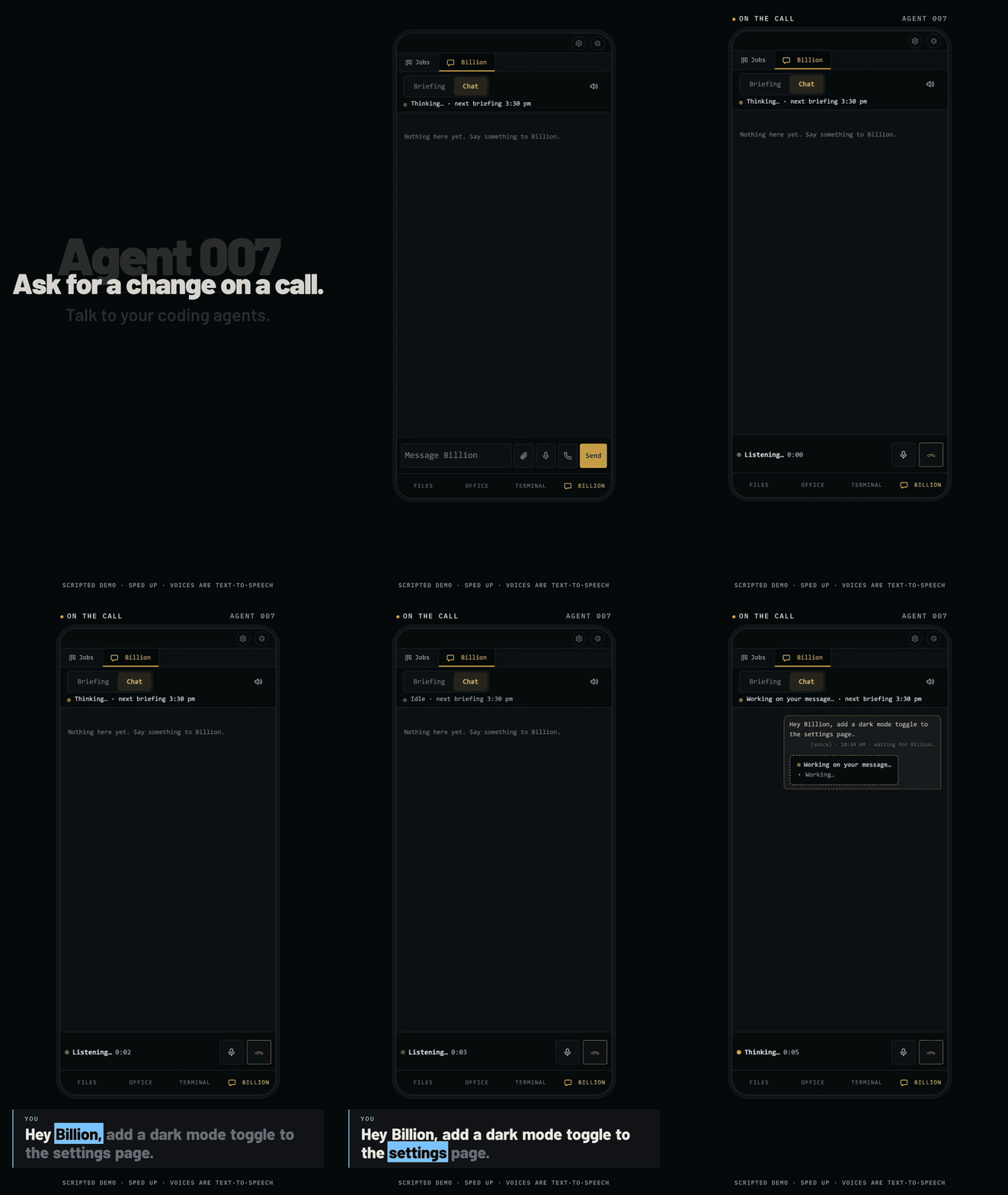
*A Talk to Billion call, from the request to the merged PR: [watch the 38s video with sound](https://github.com/bill10/agent-007/releases/download/v0.54.1.0/phone-call.mp4). Scripted demo with stand-in agents, sped up; voices are text-to-speech (`scripts/demo/phone-call.mjs`).*
- **A job board your agents work from.** Each card gets its own git worktree, a Claude Code or Codex worker and a real terminal you can type into, and ends as a pull request (or a summary, for work that isn't code).
- **One manager agent, Billion.** Give it a goal: it posts the cards, reviews the diffs, merges the PRs, and brings you only what needs a person (money, access, security, anything irreversible) in a briefing twice a day.
- **Agents that find the right skill.** Claude Code fits every installed skill's description into about 1% of its context window; past a hundred or so skills most show as a bare name and get missed. Agent 007 groups them into [skill families](#skill-families-every-agent-sees-a-short-index-and-a-card-picks-what-it-needs): its agents see one line per family, and each card lists in full the families its job needs.
- **Talk to it from your phone.** Open it in your phone's browser over Tailscale (`agent007 install --remote`), tap Talk to Billion, and hear progress spoken back. One command installs it as a service; Settings has an Update button, with a What's new window listing the changes first.
### The Billion tab

*Recorded from the running app, with stand-in agents so the run is repeatable (`scripts/demo/record.mjs`) -- [full 43s video](https://github.com/bill10/agent-007/releases/download/v0.29.0.0/billion-demo.mp4). If the capture does not load, there is a [still screenshot](docs/screenshot.png).*
From web terminals for your coding agents to a self-running agent company. Use it as far along as you need:
1. **One task: one agent in a web terminal.** Start Claude Code, Codex or any CLI agent in the browser. Add a repo once; every agent gets its own git worktree and branch, so you never set one up by hand.
2. **Many tasks across projects: many terminals, one window.** Every repo and every agent in one place, with live terminals, a file explorer, inline diffs, and a pixel office where each agent faces its screen while it works and turns to you when it needs you.
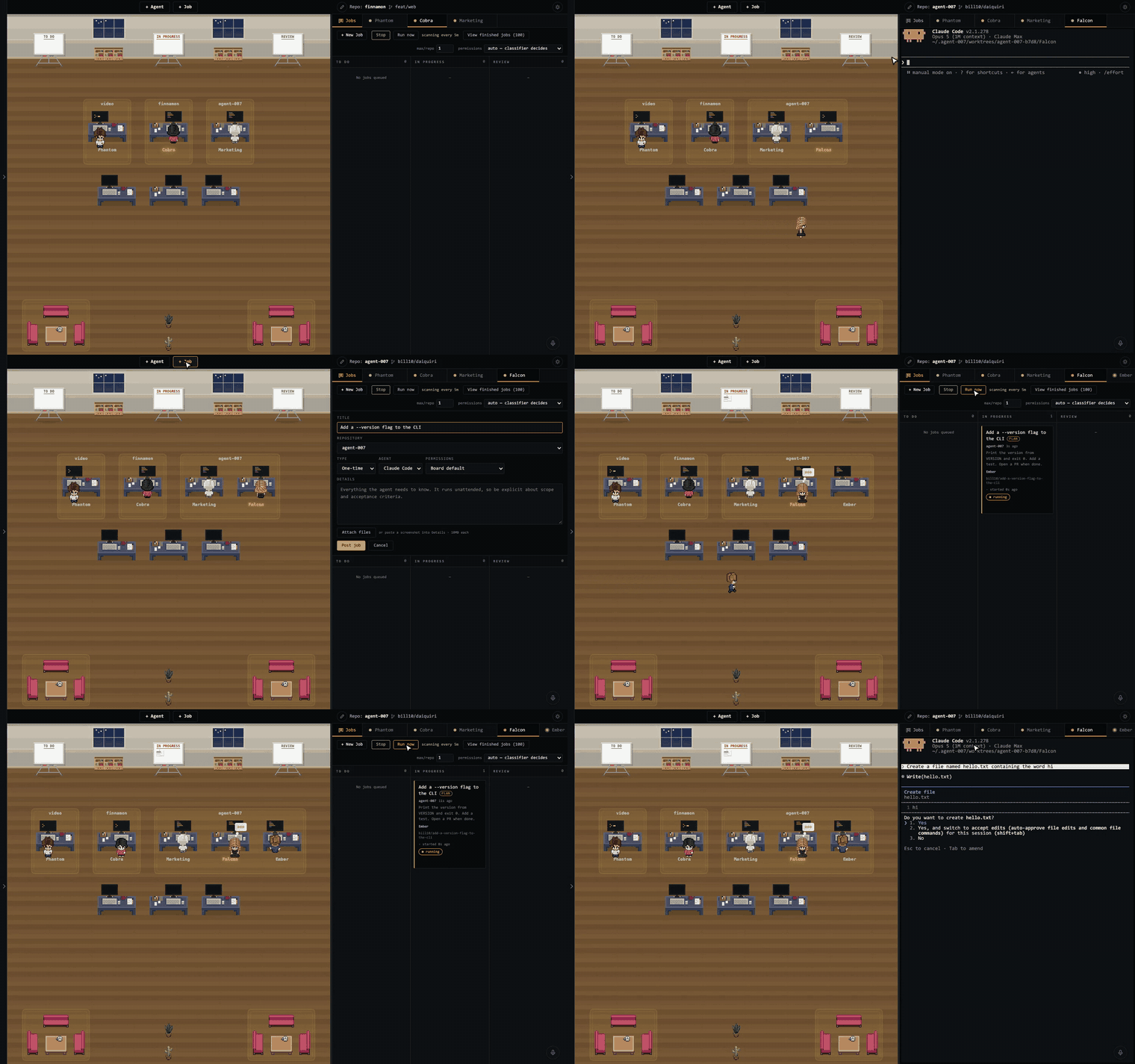
3. **Stop watching them: a job board.** Put tasks on the board and Claude Code or Codex workers pick them up, each in its own worktree, and move them To do -> In progress -> Review on their own, landing as a pull request (or a summary, for work that isn't code). Cards can run Now, be Scheduled for a chosen time, or be Recurring on a cron schedule, and pick their model (strong for hard code, fast for docs), from the models the board finds installed, and agents can post cards and message each other.
4. **Stop posting jobs: give Billion a goal.** Billion is one always-on agent that plans, posts the jobs, reviews what comes back and merges the PRs. It only asks you about money, access or anything irreversible. While you wait on a reply, a live step log under your message shows what it is doing and has found, step by step, with a timer on the current step.
Claude Code, Codex, any terminal agent is supported -- use your existing subscriptions, no extra charge.
It runs locally on your machine, so agents work while it is on and awake. Billion's plan and memory live in a git repo, so it picks up where it left off after a restart. Every worker is a real terminal you can open and type into, from your phone too ([remote access](docs/REMOTE.md)).
If you already run your agents this way with Claude Code and a few scripts, great: [tell us](https://github.com/bill10/agent-007/issues) what you'd do better. If you're tired of being the one who operates them, try this.
## Quick Start
To try it:
```bash
npx @bill10/agent-007
```
For daily use, install it and run it as a service, so it starts at login and keeps running after you close the terminal:
```bash
npm i -g @bill10/agent-007
agent007 install
```
Or run `agent007` in a terminal (`agent-007`, the older name, works too). See [Run it as a service](#run-it-as-a-service).
To reach it from your phone or another machine, with [Tailscale](https://tailscale.com/download) installed and logged in:
```bash
agent007 install --remote # then open https://..ts.net on any device in your tailnet
```
On a VM behind Cloudflare Tunnel + Access, caddy or nginx instead: `agent007 install --public-url https://agent.example.com`. See [remote access](docs/REMOTE.md).
Or run it from a clone:
```bash
git clone https://github.com/bill10/agent-007.git && cd agent-007
npm install
npm start
```
Open [http://localhost:7007](http://localhost:7007). It opens on the **Billion** tab's chat, where Billion, the agent that runs the board, introduces itself and asks for your mission and where new repos should go; answer in the chat. Billion runs on Claude Code, so install it and log in first (`claude auth login`); if it is missing or logged out, the chat says so. Its questions show as it asks them until its first round (08:30 or 15:30), then come twice a day.
Add a repo with the **+** in the left panel's Repos header (or ask Billion to), then click **+ Job** to queue work on the board, or **+ Agent** to start one by hand -- preset buttons (Claude Code, Codex, Gemini, Bash; PowerShell on a Windows server) fill in the command, or type your own under Advanced. A card that ends in a pull request needs a GitHub remote on the repo, `gh` signed in, and [gstack](https://github.com/garrytan/gstack)'s ship skill; the card says when one is missing. Needs Node.js 20.12+ and Git ([full requirements](#requirements)).
To check what it needs, at any time:
```bash
npx @bill10/agent-007 doctor # or agent007 doctor, or npm start -- doctor
```
One line per check (Node and node-pty, `claude` and `codex` installed and logged in, `gh` and which account reaches each repo on the board, each repo's path and remote, the port, the settings files and `config.json`, the version against npm, Telegram, stray local plugin registrations), ✓, ✗ or – (not needed), with a fix under each ✗. It changes nothing, and exits 1 when anything is ✗. Every start runs the quick, offline part of it and prints only what failed.
### Run it as a service
In a terminal, Agent 007 and every agent it runs stop when the terminal closes. On macOS and Linux, `agent007 install` (`npm start -- install` in a clone) registers a per-user service that starts it at login and brings it back if it stops: a LaunchAgent in `~/Library/LaunchAgents` on macOS, a systemd `--user` unit on Linux. It runs the copy you installed from, with the absolute path of your `node` and the `PATH` of your login shell captured at install time. `--dry-run` prints what it would write. In a terminal, `install` then asks whether to set up voice too, and remote access when Tailscale is installed.
```bash
agent007 install # the service, then asks: set up voice too? remote access? [y/N] (no question without a terminal)
agent007 install --voice # voice only: never touches the service; works on Windows too
agent007 install --remote # remote access over Tailscale only (see docs/REMOTE.md); --dry-run prints what it would do
agent007 install --public-url https://agent.example.com # the service behind your own reverse proxy or tunnel, no Tailscale
agent007 install --all # the service, voice and remote access (--yes also accepts the default model's download)
```
Voice is whisper.cpp, ffmpeg and a speech model, so Talk to Billion and Telegram voice notes are transcribed on your machine. `install --voice` runs `brew install whisper-cpp ffmpeg` on macOS (Linux and Windows: it prints the steps), asks which model (`ggml-base.en`, about 150 MB, or `ggml-small`, about 500 MB), downloads it to `~/.agent-007/whisper/` after you confirm, sets `WHISPER_MODEL` in `~/.agent-007/.env` and checks it by transcribing a test clip. Steps already done are skipped. From a clone, `npm start -- install --voice`.
```bash
agent007 status # running or not, as a service or in a terminal, pid, version, port, uptime, workers, remote access
agent007 restart # waits for board workers mid-step to finish it (--now: don't wait)
agent007 logs -f # ~/.agent-007/logs/server.log, kept to 5 MB plus one older copy
agent007 update # git pull --ff-only in a clone, npm install -g in an install; then restart
agent007 uninstall # removes the service; ~/.agent-007 is kept
```
`status`, `restart` and `update` work on a server started in a terminal too: `restart` asks it to restart itself in the same terminal. Workers come back after a restart, but lose the step they were on. Windows has no service yet; run it in a terminal there.
### Settings
It works with no configuration. To change something, create a settings file:
```bash
npx @bill10/agent-007 init # writes ~/.agent-007/.env, every line commented out
```
Uncomment what you want, then restart. The ones people change:
| Setting | What it does |
|---------|--------------|
| `BILLION=0` | Turns off Billion, the always-on agent. The Billion tab and the phone's Billion button go too, and the page opens on the Jobs board |
| `TELEGRAM_BOT_TOKEN` + `TELEGRAM_CHAT_ID` | Billion's questions and replies reach your phone as well as the Billion tab, and you answer from either, with a tap when it is a pick ([setup](docs/BILLION.md#telegram)) |
| `HOST=0.0.0.0` + `ALLOWED_ORIGINS=` | Reach it from your phone or another machine (behind Tailscale only, see [docs/REMOTE.md](docs/REMOTE.md)) |
| `CLAUDE_PERMISSION_MODE` | Mode Claude Code agents start in, e.g. `bypassPermissions` |
| `CODEX_PERMISSION_MODE` | The same for Codex |
| `TRUST_BOARD_WORKTREES=0` | Keeps Claude Code's and Codex's folder-trust prompt for job board workers |
| `PORT` | Port to listen on (default `7007`) |
Highest wins: command-line flags (`--port`), then environment variables, then
a `.env` in the directory you start it from, then `~/.agent-007/.env`. The full
list is in [Configuration](#configuration) and `--help`.
The service from `agent007 install` reads only `~/.agent-007/.env` (install
copies over what the current folder's `.env` has and that file lacks).
The details and caveats of every feature -- phone layout, voice input, themes and more -- are in [docs/FEATURES.md](docs/FEATURES.md).
Not technical? The [Solo Founder Field Guide](docs/SOLO-FOUNDER-GUIDE.md) covers what AI agents still leave to a one-person company, and just enough of the technical side to judge their work.
## Keyboard Shortcuts
| Key | Action |
|-----|--------|
| `Cmd+N` | Spawn a new agent |
| `Cmd+1..9` | Switch to agent by tab position |
| `Cmd+E` | Toggle the file explorer panel |
| `Cmd+D` | Toggle voice input (dictation): the terminal mic, or the text box mic while the Billion tab shows |
## How It Works
Each agent runs in its own [git worktree](https://git-scm.com/docs/git-worktree), so multiple agents can work on the same repo without stepping on each other. The server manages PTY processes via [node-pty](https://github.com/microsoft/node-pty) and communicates with the browser over WebSocket. The pixel office is rendered on an HTML canvas with a day/night cycle that follows your local time.
Every agent's branch starts from your repository's base branch as it exists on
the remote, fetched just before the worktree is created, so an agent never picks
up a stale local base or whatever unrelated branch you happen to have checked
out. Override it per agent with **Advanced -> Start from** when you want to
branch off work in progress.
The job board reuses that same machinery: a dispatched job is an ordinary agent, with a real terminal you can type into and take over at any point. Each job gets its own worktree and branch, so a job maps one-to-one onto a branch and a pull request. When the agent finishes it calls the board's `finish_job` tool (a card that requires a pull request hands over the PR it opened; one that does not hands over a summary), and the card moves to Review with the agent still running, so you can click straight into it to ask about the work. When the card reaches Done the board closes the agent and releases its worktree and local branch; the PR itself is untouched, and work that is on neither its remote branch nor the base branch is kept as an orphan rather than deleted (a squash-merged PR counts as on the base branch once every file it changed is there as the branch left it). **Restart** is the one way back for any agent that is not running: one whose CLI quit by itself (a crash, a stray `/exit`) shows it across the bottom of its terminal and on its left-panel row, and comes back in place, same tab, same card, resuming its own conversation (`codex resume ` or `claude --resume `, with the model and permission flags it was started with). Codex's own in-terminal update prompt, which installs and then exits, is turned off for every agent Agent 007 starts (`-c check_for_update_on_startup=false`, never written to your `~/.codex/config.toml`); Settings shows the installed and latest Claude Code and Codex instead, with an **Update** that runs the CLI's own `update`, which running agents pick up on their next Restart. **Restart** on an orphan picks that conversation back up with the CLI it ran, `codex resume ` (the newest Codex session recorded in that exact worktree) or `claude --continue`, under the permission mode its job card was dispatched with (a board agent whose card is already finished or deleted follows the board's current setting), or, for an agent you spawned by hand, under the permission flags you started it with. A board worker re-spawned after a restart is its card's worker again: it counts toward the cap, sends its approvals where the card says, is told once to carry on if its card is still In progress, and leaves like any other board worker when the card is filed. Workers on Billion's own cards still In progress come back by themselves after a restart, one every couple of seconds within the per-repo cap (`RESPAWN_BOARD_WORKERS=0` turns that off), and Billion can bring back an orphan on one of its cards with its `respawn_agent` tool. A card sent back to To do (from the board or by Billion) waits a minute before it is dispatched again, so its text can be edited first; **Dispatch now** on the card skips the wait. A Scheduled card is the same kind of card with a start time: it waits in To do showing its date and is dispatched when that time comes (**Run now** starts it early), one card from start to finish. When the PR merges the job is filed away as finished -- the record is kept, the card is not.
### Skill families: every agent sees a short index, and a card picks what it needs
Every Claude Code session lists every installed skill with its description, and Claude Code caps that listing at about 1% of the context window (`skillListingBudgetFraction`). With a hundred or more skills (gstack, a marketing pack, a video pack, your own) it goes over: most descriptions are cut, the agent sees bare names, and the skill that fits the job goes unused.
For the Claude Code agents it starts, Agent 007 groups the installed skills into families and lists one line per family instead:
- **Families are built for you.** At every spawn it reads `~/.claude/skills`: a skill installed with `npx skills` is grouped by the source recorded in `~/.agents/.skill-lock.json` (marketingskills is `marketing`, hyperframes is `hyperframes`), a gstack skill by gstack's folder, and the engineering ones (ship, review, investigate, qa, code-review, land-and-deploy, careful, guard, ...) are carved out into `engineering`. A skill that fits no family stays fully listed, and Billion gets a board notice so it can file it.
- **Built-in skills are a family too.** Claude Code's own skills (dataviz, claude-api, loop, schedule, update-config, the artifact ones, ...) and the ones synced from your claude.ai account (`anthropic-skills:pdf`, `docx`, `deep-research`, ...) form `built-in`, name-only unless a card asks for `["built-in"]`. There is no fixed list: at server start, and whenever `claude --version` changes, Agent 007 runs `claude -p` once against a stand-in API on `127.0.0.1` (a dummy key, request headers dropped, nothing reaches Anthropic and no usage is spent) and reads the skill listing out of the request, cached in `~/.agent-007/skill-listing.json`. Built-in is what that listing has minus your installed skills, plugin skills and the engineering ones. Skills Claude Code lists only in an interactive session (the artifact ones, claude-in-chrome) are taken from the newest session transcript of the same version. If the probe fails, there's no built-in family on that machine (those skills stay fully listed) and Billion is told why. `{"sources": {"anthropic-skills": null}}` or `{"sources": {"claude-code": null}}` keeps either kind fully listed.
- **One index skill per family.** `families:marketing` and the rest have a one-line description and a body that catalogs every member with a line on when to use it. Members are set to `name-only`: still invocable by name, full instructions loaded on use, just without their description in the listing.
- **Cards name the families they need.** The card form's **Skills** field, `post_job`'s and `edit_job`'s `skills` and `POST /api/jobs`' `skills` take family names (`["hyperframes"]`); those stay fully listed for that card's worker. A card that ends in a pull request always gets `engineering`; an agent you start in a repo does too. Billion gets `marketing` plus the review skills.
- **Marketplace plugins are switched per card.** A plugin named under `"plugins"` in the map (Vanta by default: `{"plugins": {"vanta": "vanta-mcp-plugin@claude-plugins-official"}}`) is off for every agent Agent 007 starts, and on only for a card whose `skills` names it (`["vanta"]`), through `enabledPlugins` in the spawn's `--settings`. Plugins not in the map stay as you set them. If the plugin isn't installed, the worker starts anyway and the card says so.
- **Nothing is locked.** Any agent can still run any skill by name.
- **Your own sessions are untouched.** It all goes in per spawn (`--settings` with `skillOverrides`, and the family skills as a session-only `--plugin-dir`), never in `~/.claude/settings.json`, and no skill file is moved. A skill you set in your own `skillOverrides` keeps your setting.
To change the grouping, write `~/.agent-007/skill-families.json` (Billion may edit it): `{"skills": {"my-skill": "data"}, "sources": {"owner/repo": "family"}, "summaries": {"data": "one line"}, "billion": ["marketing", "review"]}`. A skill or source mapped to `null` stays fully listed. Plugin skills from a marketplace are always listed in full: Claude Code applies no `skillOverrides` to them. Codex workers keep today's listing. `SKILL_FAMILIES=0` turns it all off.
Billion also gets one board notice per finding, per server run, for duplicate or superseded skills: the same name in `~/.claude/skills`, `~/.agents/skills`, a board repo's `.claude/skills` or a plugin; byte-identical folders under different names; or a skill whose description says it replaces, supersedes or deprecates another installed one. It names both paths and suggests the removal (a PR for a repo copy, the skills installer for a global one) but deletes nothing. gstack's `_gstack-command` and `connect-chrome` / `gstack-connect-chrome` aliases are left out.
On the machine this was built on (189 skills, a 30,000-character budget), a no-PR worker's listing went from over budget (75,831 characters wanted, 99 descriptions shown) to 22,977 characters with nothing cut; a pull-request worker fits too.
Families read `~/.claude/skills` and follow links, so a skill linked in from the [one skill store](#one-skill-store-every-skill-installed-once-for-both-clis) is grouped exactly like a real folder.
### One skill store: every skill installed once, for both CLIs
Claude Code reads `~/.claude/skills`; Codex reads `~/.codex/skills` and `~/.agents/skills`. A skill installed for one is invisible to the other, and installing it for both leaves two copies to drift apart. Turn on **Settings → One skill store** and every skill lives once, in `~/.agents/skills/`: Codex reads it there, and Claude Code gets a link `~/.claude/skills/` → `~/.agents/skills/`.
- **Off until you turn it on.** Only the owner sees the switch (it is hidden, and its routes refused, with user accounts on). Ticking **Keep every skill in one store** first shows a dry run of what it would do; **Turn on** runs it. `agent007 skills sync --dry-run` prints the same from a terminal, and `agent007 skills sync` runs it once whether the switch is on or not.
- **It keeps itself up to date.** While on, it runs at server start and before every agent starts, so a skill installed later, for either CLI, reaches both before the next agent. Settings shows the last sync that changed something.
- **What it does.** A real skill folder in `~/.claude/skills` or `~/.codex/skills` is moved into the store; in `~/.claude/skills` a link takes its place. `~/.codex/skills` gets no link back, because Codex already reads the store and would list the skill twice. A skill already in the store that Claude Code can't see gets its link.
- **Never deletes.** The first copy is renamed into the store and copied to `~/.agent-007/skill-backup/