# iRules for Sublime Text
Syntax highlighting, completions, snippets and a formatter for
[F5 BIG-IP iRules](https://clouddocs.f5.com/api/irules/) in Sublime Text 4.
## Features
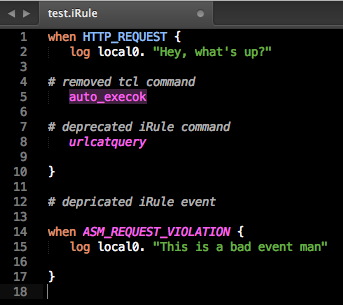
- **Highlighting for every documented command and event**, generated from
F5's iRules reference (current through BIG-IP 21.0). Deprecated commands
and events are marked deprecated; Tcl commands disabled in iRules are
marked illegal; an unknown event name after `when` is flagged without
breaking the rest of the file. (Your color scheme must style
`invalid.deprecated` and `invalid.illegal`; the built-in Monokai does.)
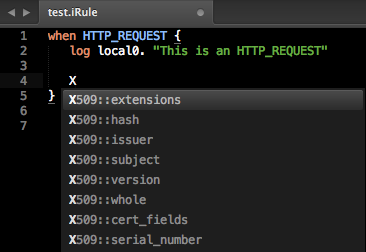
- **Completions** for about 1,000 commands. Each shows a one-line
description, the BIG-IP version that introduced it, and a link to F5's
reference page.
- **Event completions only where they belong**: right after `when`. Completing
`when` (or typing `when` and a space) opens the event list straight away.
Picking an event expands it to `when EVENT priority 500 {` with a body:
`500` is selected so you can type over it, and Tab moves into
the body.
- **Double-substitution warnings**: `expr`, `eval` and `if` without braces,
and `switch`, `regexp`, `regsub`, `class match` and similar without `--`.
- **Formatter**: *iRules: Format Code* re-indents the selection, or the whole
file, using your view's tab settings. Optional format on save. It never
changes the text of a multi-line `"..."` string, or of a braced payload
whose content starts on the same line as its `{`
(`HTTP::respond 200 content {...`). A payload whose `{` ends its
line looks like a code block and is re-indented, so start the content on
the brace's line or keep it in a variable.
- **Snippets**: `when` (opens the event list), `if`, `ife`, `ifei`, `for`,
`foreach`, `while`, `switch`, `proc`. A word with a snippet appears once in
the completion list, as the snippet.
## Install
Requires Sublime Text 4 (build 4107 or later).
1. Open the Command Palette (⌘⇧P on macOS,
CtrlShiftP elsewhere).
2. Run **Package Control: Install Package** and choose **iRules**.
Files ending in `.irul`, `.irule` or `.irules` open as iRules. For other
files use **View → Syntax → iRule**.
Sublime Text 3 users keep receiving version 0.9.10.
> **Installed from the GitHub URL?** Older instructions had you add this
> repository to Package Control by URL. Remove that repository
> (**Package Control: Remove Repository**) and the `sublime-iRules` package,
> then install **iRules** as above so you get updates.
## Settings
**Preferences → Package Settings → iRules → Settings**:
```json
{
// Re-indent the whole file every time an iRule is saved.
"format_on_save": false
}
```
## Want more? Try tcl-lsp
This package gives you highlighting, completions and a formatter. If you want
an editor that understands your iRules, have a look at
[**tcl-lsp**](https://github.com/bitwisecook/tcl-lsp) by James Deucker
([@bitwisecook](https://github.com/bitwisecook)).
James has done more for this package than almost anyone. He maintained it
through 2019, brought it up to date for TMOS 15.1, and wrote the formatter.
Before that he built the [vscode-iRule](https://github.com/bitwisecook/vscode-iRule)
extension for VS Code. tcl-lsp is his language server for Tcl 8.4–9.1,
F5 iRules, iApps and other Tcl dialects. It adds diagnostics, hover help,
go to definition and references, rename, signature help, code actions and
more, and it works in Sublime Text, VS Code, Neovim, Zed, Emacs, Helix and
JetBrains IDEs. Thank you, James.
To use it alongside this package in Sublime Text:
1. Install **LSP** and **LSP-Tcl** with Package Control.
2. Open **Preferences → Package Settings → LSP → Servers → LSP-Tcl** and
add `source.irule` to the selector, so the server also runs on files that
use this package's iRule syntax:
```json
{
"selector": "source.tcl | source.irule"
}
```
tcl-lsp chooses its iRules dialect from the `.irul`, `.irule` and `.irules`
extensions, so no other setting is needed. See the
[tcl-lsp Sublime Text guide](https://github.com/bitwisecook/tcl-lsp/blob/main/INSTALL-editors.md#sublime-text)
for details.
## Contributing
Bug reports and pull requests are welcome at
. See
[CONTRIBUTING.md](CONTRIBUTING.md) for running the tests and
[docs/maintaining-data.md](docs/maintaining-data.md) for refreshing the
command and event lists from F5.
## License
[MIT](LICENSE)
## Credits
Created by Bill Church in 2014. James Deucker
([@bitwisecook](https://github.com/bitwisecook)) maintained it through 2019
and rebuilt the syntax and the formatter. Thanks also to Shain Singh and
everyone who has filed issues.
Command and event descriptions come from F5's
[iRules reference](https://clouddocs.f5.com/api/irules/).