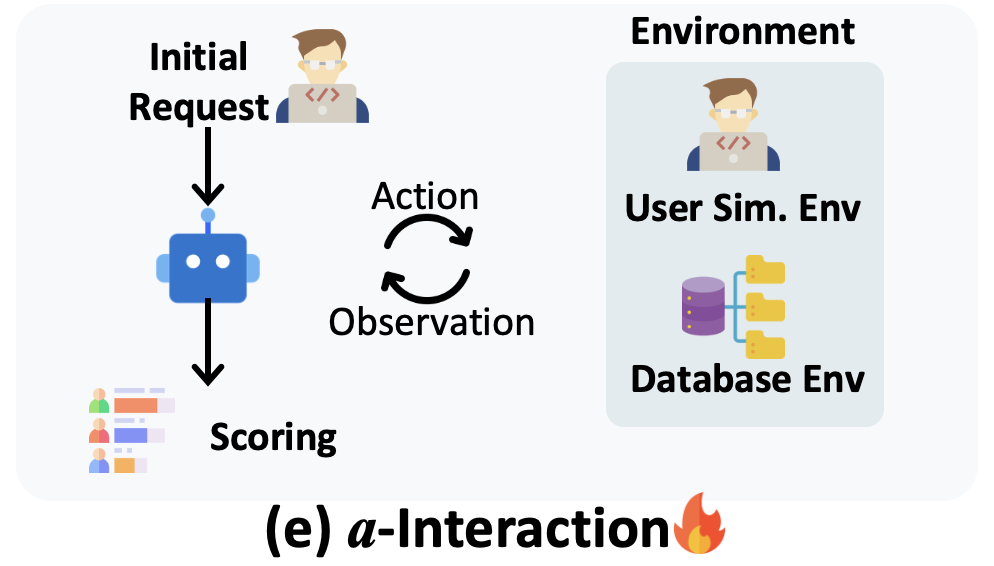
 , with different actions incurring varying *bird-coin*s . Only after phase-1 is completed, user will deliver the follow-up query. The rewards for phase-1 and phase-2 are 0.7 and 0.3 respectively.
> **Why set budget?**: Agent has the risk of unlimited exploration behaviors (e.g. ReAct Agent may fall into infinite loop). This setting also helps explore Interaction-time scaling (budget ↑) and stress testing (budget ↓) behavious of Agent. Additinoally, it could test the agent's planning and decision making ability.
, with different actions incurring varying *bird-coin*s . Only after phase-1 is completed, user will deliver the follow-up query. The rewards for phase-1 and phase-2 are 0.7 and 0.3 respectively.
> **Why set budget?**: Agent has the risk of unlimited exploration behaviors (e.g. ReAct Agent may fall into infinite loop). This setting also helps explore Interaction-time scaling (budget ↑) and stress testing (budget ↓) behavious of Agent. Additinoally, it could test the agent's planning and decision making ability.
are designed as follows:
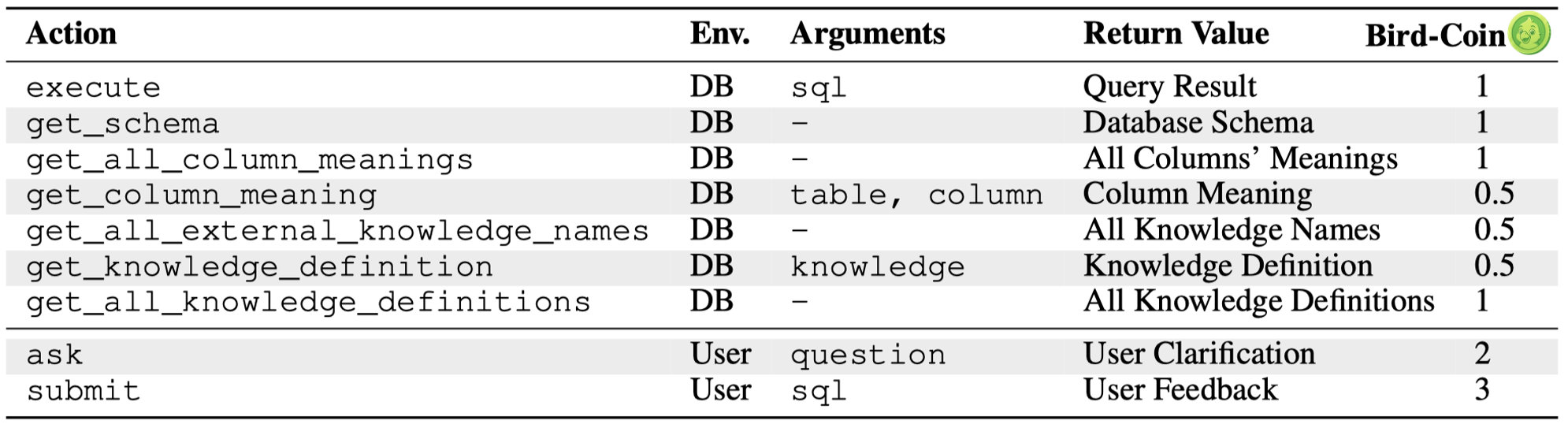
Heuristically, we set higher cost for those actions interacting with users, i.e. `ask` and `submit`.
### Budget Calculation
We set the budget case by case.
- **Starting Budget** (adjustable parameter): First, we assign a "starting budget", (default **6** *bird-coin*s) for each task.
- **Ambiguity Resolution Budget**: Then, for the task with many ambiguities, it may require more budget to finish the task. Thus, we assign **2** *bird-coin*s for each ambiguity of the user query.
- **User Patience Budget** (adjustable parameter): Also, we introduce a adjustable *bird-coin*s to indicate the user patience, including four basic levels, **0**, **6**, **10**, **14** *bird-coin*s.
The total budget = starting budget + ambiguity resolution budget + user patience budget. You could find the budget calculation in batch-running implemented in [batch_run_bird_interact/main.py](batch_run_bird_interact/main.py#L110).
Current basic experiments are conducted with **Starting Budget** = **6** *bird-coin*s, **User Patience Budget** = **6** *bird-coin*s. Feel free to adjust these parameters to test different settings.
## Repository Structure
```
.
├── batch_run_bird_interact/ # Code for batch-running experiments (primary results)
├── src/ # Core source code for single-run experiments
├── experiments/ # Main code for single-run experiments
├── data/ # Dataset storage
├── outputs/ # Experiment results: single-run and batch-run results
├── postgre_table_dumps/ # PostgreSQL database dumps
├── requirements.txt # Python dependencies
├── run_batch_experiments.sh # Batch experiment runner
└── run_experiment.sh # Single experiment runner
```
## Environment Setup
Please refer to [README.md](../README.md#environment-setup) for the environment setup for both `a-Interact` and `c-Interact`.
## Quick Start (BIRD-Interact-Lite)
### 1. Data Preparation
```bash
mkdir data && cd data
git clone https://huggingface.co/datasets/birdsql/bird-interact-lite
# Combine with GT fields (contact us for access) into bird_interact_data.jsonl
```
> To avoid data leakage by auto-crawling, we do not include GT solution sqls and test cases in `bird_interact_data.jsonl`. please email bird.bench25@gmail.com with the tag [bird-interact-lite GT&Test Cases] in title for full set, which will be sent automatically.
After getting the ground-truth fields by emailing us, use the following script to combine the public data with the ground truth and test cases:
Take the full version as an example:
(1) Run:
```bash
python combine_public_with_gt.py /path/to/bird-interact-full/bird_interact_data.jsonl /path/to/bird_interact_full_gt_kg_testcases_08022.jsonl /path/to/bird_interact_data.jsonl # bird_interact_full_gt_kg_testcases_08022.jsonl is the data file with ground-truth fields, which is obtained by emailing us.
```
This will create a new file at `/path/to/bird_interact_data.jsonl` with the combined data.
(2) Then replace the original public data with the combined data:
```bash
cp /path/to/bird_interact_data.jsonl /path/to/bird-interact-full/bird_interact_data.jsonl
```
Same for the other versions: bird-interact-lite, mini version, etc. Just set correct paths for the public data and the ground truth and test cases, and then replace the original public data with the combined data.
### 2. API Configuration
#### VertexAI Setup
> Current user simulator is based on gemini-2.0-flash-001, which is called by VertexAI. If you are new customer to google cloud, you will get [$300 in free credits](https://cloud.google.com/vertex-ai?hl=en), and could use it to call vertex API.
If you want to use VertexAI, you should configure in `src/llm_utils/call_api_batch.py` and `src/llm_utils/vertex_ai_simple.py`:
```python
GCP_PROJECT = "Your GCP Project ID"
GCP_REGION = "Your GCP Region"
GCP_CREDENTIALS_PATH = "Your GCP Credentials Path"
```
> If you find it hard to configure this, you could also try other API providers to use gemini-2.0-flash-001, or use other models.
#### OpenAI/Third-party API Setup
Configure in `src/llm_utils/config.py`:
- Set `base_url`
- Set `api_key`
### 3. Running Experiments
#### Start the Evaluation Environment
```bash
cd env/
docker compose exec bird_interact_eval bash
cd bird_interact_agent/
```
#### Batch Mode (Recommended)
Batch mode (`batch_run_bird_interact/`) is recommended for production runs
```bash
bash run_batch_experiments.sh --user_sim_prompt_version=v1 # v1 or v2. v1 is used in our paper experiments for BIRD-Interact-Lite. v2 is used in our paper experiments for BIRD-Interact-Full. You could also use v2 for BIRD-Interact-Lite experiments. v2 is more robust.
```
Output directory: `outputs/batch_runs/`
Default user patience is set to 6.
#### Single Sample Mode (Outdated)
Single sample mode (`src/` and `experiments/`) is useful for debugging and workflow understanding
```bash
bash run_experiment.sh
```
Output directory: `outputs/single_runs/`
> ‼️ Since we have been using batch mode code for running experiments, the code of single sample mode is not well maintained and may be outdated. You could refer to the batch mode code for reference. We will try our best to make the single running code up to date.
## Quick Start (BIRD-Interact-Full)
The process of running experiments on the **Full** set is similar to that for the **Lite** set, with the following differences:
1. **Dataset**
Use the Full dataset instead of the Lite one:
🔗 [birdsql/bird-interact-full](https://huggingface.co/datasets/birdsql/bird-interact-full)
2. **Run the experiments:**
```bash
bash run_batch_experiments.sh --db_host=bird_interact_postgresql_full --user_sim_prompt_version=v2
```