# Bitbybit Monorepo
Open-source 3D CAD algorithms for the web - MIT licensed. This monorepo contains all Bitbybit NPM packages plus example applications.
Written to be used by people and by AI coding agents alike: every function is published in a form an agent can look up while it writes - see [Build It With an AI Agent](#build-it-with-an-ai-agent).
## License
Source code in `packages/`, `languages/`, and `examples/` is [MIT licensed](./LICENSE). Documentation text in `docs/` is [CC BY 4.0](https://creativecommons.org/licenses/by/4.0/). Logos, trademarks, and media assets are **not** open-source - see [CONTENT-LICENSE.md](./CONTENT-LICENSE.md) for details.
# [FULL PLATFORM AT BITBYBIT.DEV](https://bitbybit.dev)
# [LEARN BITBYBIT](https://learn.bitbybit.dev)
# [TYPESCRIPT API REFERENCE](https://docs.bitbybit.dev)
 ## Quick Start
Scaffold a fully-configured 3D CAD project in seconds:
```bash
npx @bitbybit-dev/create-app my-project
```
The CLI first asks you to pick an **app type**:
- **Frontend** - Browser-based 3D/CAD app. Choose a game engine (Three.js, Babylon.js, or PlayCanvas) and OCCT architecture (32-bit, 64-bit, or 64-bit MT). You get a Vite + TypeScript project with all three CAD kernels (OCCT, JSCAD, Manifold) pre-configured.
- **CAD Cloud** - Full-stack project with server-side CAD via our [CAD Cloud API](https://learn.bitbybit.dev/api/cloud-api). Choose a backend template (Hono + SDK, Hono + REST, Node.js + SDK, Node.js + REST, or .NET + REST). You get a React + Three.js frontend that proxies requests through your backend - your API key never leaves the server.
```bash
cd my-project
npm install
npm run dev
```
## Build It With an AI Agent
Bitbybit has 1725 functions across three CAD kernels - more than any model remembers, so an agent working from memory invents plausible names that do not exist. Give it the **[Bitbybit CAD MCP](https://learn.bitbybit.dev/learn/using-ai-with-bitbybit/mcp/bitbybit-mcp)** instead and it looks up the exact signature, defaults, return type and examples for the version you have installed. It is free and needs no account:
```bash
claude mcp add --transport http bitbybit https://mcp.bitbybit.dev/mcp
```
Codex, Cursor, VS Code, Gemini CLI, Windsurf, Zed, the JetBrains IDEs, claude.ai, ChatGPT and the Claude API connect to the same endpoint, and [`npx -y @bitbybit-dev/mcp`](https://www.npmjs.com/package/@bitbybit-dev/mcp) runs it locally against the `@bitbybit-dev` packages in your project - [every configuration is here](https://learn.bitbybit.dev/learn/using-ai-with-bitbybit/mcp/bitbybit-mcp).
[](https://cursor.com/link/mcp/install?name=bitbybit&config=eyJ1cmwiOiJodHRwczovL21jcC5iaXRieWJpdC5kZXYvbWNwIn0=) [](https://insiders.vscode.dev/redirect/mcp/install?name=bitbybit&config=%7B%22type%22%3A%22http%22%2C%22url%22%3A%22https%3A%2F%2Fmcp.bitbybit.dev%2Fmcp%22%7D) [](https://insiders.vscode.dev/redirect/mcp/install?name=bitbybit&config=%7B%22type%22%3A%22http%22%2C%22url%22%3A%22https%3A%2F%2Fmcp.bitbybit.dev%2Fmcp%22%7D&quality=insiders)
| | What it gives an agent | Cost |
|---|---|---|
| **[Bitbybit CAD MCP](https://learn.bitbybit.dev/learn/using-ai-with-bitbybit/mcp/bitbybit-mcp)** | The exact API of the version you use: search, full signatures with defaults, examples, and the guide on where geometry should run. Read-only. | Free, no account |
| **[Bitbybit CAD Cloud MCP](https://learn.bitbybit.dev/learn/using-ai-with-bitbybit/mcp/cad-cloud-mcp)** | Hands as well as knowledge: the agent runs operations and pipelines on CAD Cloud, converts STEP to glTF, runs Pro algorithms, and returns the files. | A [CAD Cloud](https://bitbybit.dev/cad-cloud) key |
| **[Context files](https://learn.bitbybit.dev/learn/using-ai-with-bitbybit/prompt-contexts)** and **[Context7](https://learn.bitbybit.dev/learn/using-ai-with-bitbybit/mcp/context-7)** | The whole API as one file to attach, for assistants that cannot speak MCP. | Free |
Every answer carries a tier - `oss` runs in these MIT packages anywhere, `platform-pro` inside the bitbybit.dev editors, `cloud-pro` only on CAD Cloud - so an agent never sends you to a paid service for something the free packages already do. The [AI section of the documentation](https://learn.bitbybit.dev/learn/using-ai-with-bitbybit/intro) covers all of it.
## Support the Mission
⭐ **[Subscribe - Silver or Gold plan](https://bitbybit.dev/auth/pick-plan)** | **[Get API Key for CAD Cloud](https://bitbybit.dev/auth/pick-plan?api-keys=true)**
Check out [3D Bits app for Shopify](https://apps.shopify.com/3d-bits-1) - interactive 3D product configurators for e-commerce.
Your subscription directly funds continued open-source development of these packages.
## Important Topics
| Topic | Link |
|-------|------|
| Getting Started | https://learn.bitbybit.dev/learn/getting-started/overview |
| TypeScript API Reference | https://docs.bitbybit.dev |
| API Reference - OCCT kernel | https://docs.bitbybit.dev/classes/Bit.OCCT |
| API Reference - JSCAD kernel | https://docs.bitbybit.dev/classes/Bit.JSCAD |
| API Reference - Manifold kernel | https://docs.bitbybit.dev/classes/Bit.Manifold |
| NPM Packages Intro | https://learn.bitbybit.dev/learn/npm-packages/intro |
| Integrate with Three.js | https://learn.bitbybit.dev/learn/npm-packages/threejs/start-with-three-js |
| Integrate with BabylonJS | https://learn.bitbybit.dev/learn/npm-packages/babylonjs/start-with-babylon-js |
| Integrate with PlayCanvas | https://learn.bitbybit.dev/learn/npm-packages/playcanvas/start-with-playcanvas |
| CAD Cloud API | https://learn.bitbybit.dev/api/cloud-api |
| Script Runners | https://learn.bitbybit.dev/learn/runners/intro |
| 3D Bits for Shopify | https://learn.bitbybit.dev/learn/3d-bits/intro |
| AI Coding Agents - Overview | https://learn.bitbybit.dev/learn/using-ai-with-bitbybit/intro |
| Bitbybit CAD MCP - free, version-exact API lookups | https://learn.bitbybit.dev/learn/using-ai-with-bitbybit/mcp/bitbybit-mcp |
| Bitbybit CAD Cloud MCP - let an agent run the geometry | https://learn.bitbybit.dev/learn/using-ai-with-bitbybit/mcp/cad-cloud-mcp |
| Context Files for Assistants Without MCP | https://learn.bitbybit.dev/learn/using-ai-with-bitbybit/prompt-contexts |
| Unit Testing Approach | https://learn.bitbybit.dev/learn/github/unit-tests |
| Live Unit Test Coverage | https://github.com/bitbybit-dev/bitbybit/actions/workflows/verify.yml |
| Blog | https://learn.bitbybit.dev/blog |
## How Bitbybit Fits Into Your Stack
## Quick Start
Scaffold a fully-configured 3D CAD project in seconds:
```bash
npx @bitbybit-dev/create-app my-project
```
The CLI first asks you to pick an **app type**:
- **Frontend** - Browser-based 3D/CAD app. Choose a game engine (Three.js, Babylon.js, or PlayCanvas) and OCCT architecture (32-bit, 64-bit, or 64-bit MT). You get a Vite + TypeScript project with all three CAD kernels (OCCT, JSCAD, Manifold) pre-configured.
- **CAD Cloud** - Full-stack project with server-side CAD via our [CAD Cloud API](https://learn.bitbybit.dev/api/cloud-api). Choose a backend template (Hono + SDK, Hono + REST, Node.js + SDK, Node.js + REST, or .NET + REST). You get a React + Three.js frontend that proxies requests through your backend - your API key never leaves the server.
```bash
cd my-project
npm install
npm run dev
```
## Build It With an AI Agent
Bitbybit has 1725 functions across three CAD kernels - more than any model remembers, so an agent working from memory invents plausible names that do not exist. Give it the **[Bitbybit CAD MCP](https://learn.bitbybit.dev/learn/using-ai-with-bitbybit/mcp/bitbybit-mcp)** instead and it looks up the exact signature, defaults, return type and examples for the version you have installed. It is free and needs no account:
```bash
claude mcp add --transport http bitbybit https://mcp.bitbybit.dev/mcp
```
Codex, Cursor, VS Code, Gemini CLI, Windsurf, Zed, the JetBrains IDEs, claude.ai, ChatGPT and the Claude API connect to the same endpoint, and [`npx -y @bitbybit-dev/mcp`](https://www.npmjs.com/package/@bitbybit-dev/mcp) runs it locally against the `@bitbybit-dev` packages in your project - [every configuration is here](https://learn.bitbybit.dev/learn/using-ai-with-bitbybit/mcp/bitbybit-mcp).
[](https://cursor.com/link/mcp/install?name=bitbybit&config=eyJ1cmwiOiJodHRwczovL21jcC5iaXRieWJpdC5kZXYvbWNwIn0=) [](https://insiders.vscode.dev/redirect/mcp/install?name=bitbybit&config=%7B%22type%22%3A%22http%22%2C%22url%22%3A%22https%3A%2F%2Fmcp.bitbybit.dev%2Fmcp%22%7D) [](https://insiders.vscode.dev/redirect/mcp/install?name=bitbybit&config=%7B%22type%22%3A%22http%22%2C%22url%22%3A%22https%3A%2F%2Fmcp.bitbybit.dev%2Fmcp%22%7D&quality=insiders)
| | What it gives an agent | Cost |
|---|---|---|
| **[Bitbybit CAD MCP](https://learn.bitbybit.dev/learn/using-ai-with-bitbybit/mcp/bitbybit-mcp)** | The exact API of the version you use: search, full signatures with defaults, examples, and the guide on where geometry should run. Read-only. | Free, no account |
| **[Bitbybit CAD Cloud MCP](https://learn.bitbybit.dev/learn/using-ai-with-bitbybit/mcp/cad-cloud-mcp)** | Hands as well as knowledge: the agent runs operations and pipelines on CAD Cloud, converts STEP to glTF, runs Pro algorithms, and returns the files. | A [CAD Cloud](https://bitbybit.dev/cad-cloud) key |
| **[Context files](https://learn.bitbybit.dev/learn/using-ai-with-bitbybit/prompt-contexts)** and **[Context7](https://learn.bitbybit.dev/learn/using-ai-with-bitbybit/mcp/context-7)** | The whole API as one file to attach, for assistants that cannot speak MCP. | Free |
Every answer carries a tier - `oss` runs in these MIT packages anywhere, `platform-pro` inside the bitbybit.dev editors, `cloud-pro` only on CAD Cloud - so an agent never sends you to a paid service for something the free packages already do. The [AI section of the documentation](https://learn.bitbybit.dev/learn/using-ai-with-bitbybit/intro) covers all of it.
## Support the Mission
⭐ **[Subscribe - Silver or Gold plan](https://bitbybit.dev/auth/pick-plan)** | **[Get API Key for CAD Cloud](https://bitbybit.dev/auth/pick-plan?api-keys=true)**
Check out [3D Bits app for Shopify](https://apps.shopify.com/3d-bits-1) - interactive 3D product configurators for e-commerce.
Your subscription directly funds continued open-source development of these packages.
## Important Topics
| Topic | Link |
|-------|------|
| Getting Started | https://learn.bitbybit.dev/learn/getting-started/overview |
| TypeScript API Reference | https://docs.bitbybit.dev |
| API Reference - OCCT kernel | https://docs.bitbybit.dev/classes/Bit.OCCT |
| API Reference - JSCAD kernel | https://docs.bitbybit.dev/classes/Bit.JSCAD |
| API Reference - Manifold kernel | https://docs.bitbybit.dev/classes/Bit.Manifold |
| NPM Packages Intro | https://learn.bitbybit.dev/learn/npm-packages/intro |
| Integrate with Three.js | https://learn.bitbybit.dev/learn/npm-packages/threejs/start-with-three-js |
| Integrate with BabylonJS | https://learn.bitbybit.dev/learn/npm-packages/babylonjs/start-with-babylon-js |
| Integrate with PlayCanvas | https://learn.bitbybit.dev/learn/npm-packages/playcanvas/start-with-playcanvas |
| CAD Cloud API | https://learn.bitbybit.dev/api/cloud-api |
| Script Runners | https://learn.bitbybit.dev/learn/runners/intro |
| 3D Bits for Shopify | https://learn.bitbybit.dev/learn/3d-bits/intro |
| AI Coding Agents - Overview | https://learn.bitbybit.dev/learn/using-ai-with-bitbybit/intro |
| Bitbybit CAD MCP - free, version-exact API lookups | https://learn.bitbybit.dev/learn/using-ai-with-bitbybit/mcp/bitbybit-mcp |
| Bitbybit CAD Cloud MCP - let an agent run the geometry | https://learn.bitbybit.dev/learn/using-ai-with-bitbybit/mcp/cad-cloud-mcp |
| Context Files for Assistants Without MCP | https://learn.bitbybit.dev/learn/using-ai-with-bitbybit/prompt-contexts |
| Unit Testing Approach | https://learn.bitbybit.dev/learn/github/unit-tests |
| Live Unit Test Coverage | https://github.com/bitbybit-dev/bitbybit/actions/workflows/verify.yml |
| Blog | https://learn.bitbybit.dev/blog |
## How Bitbybit Fits Into Your Stack
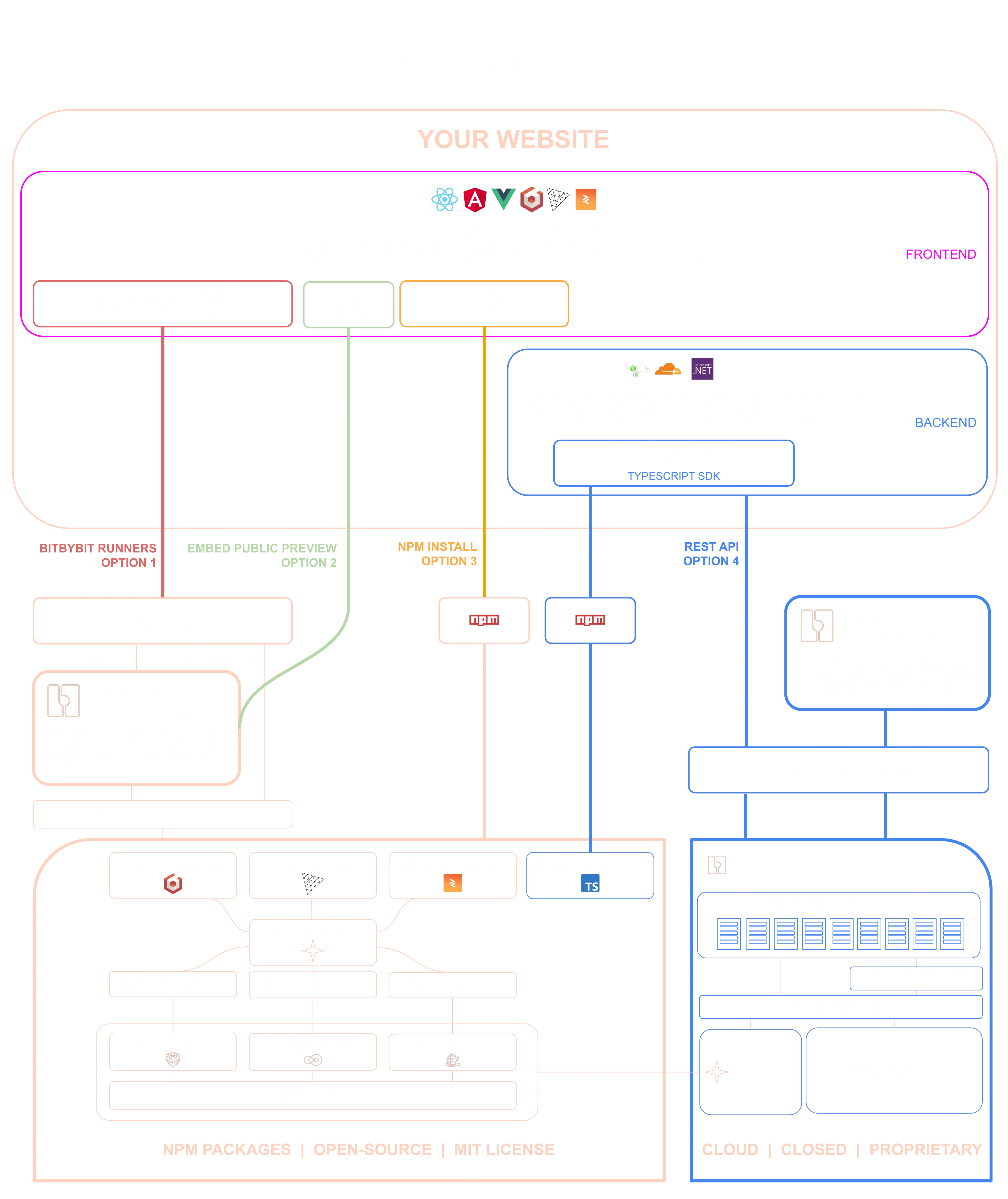 The diagram shows every way a website can reach Bitbybit geometry, and where the NPM packages below sit among them:
- **NPM packages** - this repository. The kernels compile to WebAssembly and run in your users' browsers or in your own Node process, inside your build, MIT licensed and free.
- **[Script runners](https://learn.bitbybit.dev/learn/runners/intro)** - one script file loads the same engine and executes scripts exported from the visual editors, with no build step.
- **Iframe embeds** - a project published on [bitbybit.dev](https://bitbybit.dev) dropped straight into a page.
- **[CAD Cloud REST API](https://learn.bitbybit.dev/api/cloud-api)** - your backend sends the work to our managed kernels and gets results back as files, for the Pro algorithms and for compute you would rather not host.
- **[AI agents](https://learn.bitbybit.dev/learn/using-ai-with-bitbybit/intro)** - the MCP servers above, writing code against any of these paths or running the geometry themselves.
The [full walkthrough of the diagram](https://learn.bitbybit.dev/learn/intro) is on learn.bitbybit.dev.
## NPM Packages
| Package | Description |
|---------|-------------|
| [@bitbybit-dev/babylonjs](https://www.npmjs.com/package/@bitbybit-dev/babylonjs) | BabylonJS engine integration for drawing CAD geometry |
| [@bitbybit-dev/threejs](https://www.npmjs.com/package/@bitbybit-dev/threejs) | Three.js engine integration for drawing CAD geometry |
| [@bitbybit-dev/playcanvas](https://www.npmjs.com/package/@bitbybit-dev/playcanvas) | PlayCanvas engine integration for drawing CAD geometry |
| [@bitbybit-dev/core](https://www.npmjs.com/package/@bitbybit-dev/core) | Core assembly layer combining all CAD kernels |
| [@bitbybit-dev/occt](https://www.npmjs.com/package/@bitbybit-dev/occt) | OpenCascade CAD kernel (works in Node.js & browser) |
| [@bitbybit-dev/occt-worker](https://www.npmjs.com/package/@bitbybit-dev/occt-worker) | OCCT via WebWorker (non-blocking, browser only) |
| [@bitbybit-dev/manifold](https://www.npmjs.com/package/@bitbybit-dev/manifold) | Manifold fast mesh booleans (works in Node.js & browser) |
| [@bitbybit-dev/manifold-worker](https://www.npmjs.com/package/@bitbybit-dev/manifold-worker) | Manifold via WebWorker (non-blocking, browser only) |
| [@bitbybit-dev/jscad](https://www.npmjs.com/package/@bitbybit-dev/jscad) | JSCAD solid modeling (works in Node.js & browser) |
| [@bitbybit-dev/jscad-worker](https://www.npmjs.com/package/@bitbybit-dev/jscad-worker) | JSCAD via WebWorker (non-blocking, browser only) |
| [@bitbybit-dev/base](https://www.npmjs.com/package/@bitbybit-dev/base) | Base math/vector/matrix algorithms used by all packages |
| [@bitbybit-dev/create-app](https://www.npmjs.com/package/@bitbybit-dev/create-app) | CLI tool to scaffold 3D/CAD projects |
| [@bitbybit-dev/cad-cloud-sdk](https://www.npmjs.com/package/@bitbybit-dev/cad-cloud-sdk) | TypeScript SDK for the CAD Cloud API |
| [@bitbybit-dev/mcp](https://www.npmjs.com/package/@bitbybit-dev/mcp) | MCP server that documents this API for AI coding agents |
## NPM Package Architecture
The diagram shows every way a website can reach Bitbybit geometry, and where the NPM packages below sit among them:
- **NPM packages** - this repository. The kernels compile to WebAssembly and run in your users' browsers or in your own Node process, inside your build, MIT licensed and free.
- **[Script runners](https://learn.bitbybit.dev/learn/runners/intro)** - one script file loads the same engine and executes scripts exported from the visual editors, with no build step.
- **Iframe embeds** - a project published on [bitbybit.dev](https://bitbybit.dev) dropped straight into a page.
- **[CAD Cloud REST API](https://learn.bitbybit.dev/api/cloud-api)** - your backend sends the work to our managed kernels and gets results back as files, for the Pro algorithms and for compute you would rather not host.
- **[AI agents](https://learn.bitbybit.dev/learn/using-ai-with-bitbybit/intro)** - the MCP servers above, writing code against any of these paths or running the geometry themselves.
The [full walkthrough of the diagram](https://learn.bitbybit.dev/learn/intro) is on learn.bitbybit.dev.
## NPM Packages
| Package | Description |
|---------|-------------|
| [@bitbybit-dev/babylonjs](https://www.npmjs.com/package/@bitbybit-dev/babylonjs) | BabylonJS engine integration for drawing CAD geometry |
| [@bitbybit-dev/threejs](https://www.npmjs.com/package/@bitbybit-dev/threejs) | Three.js engine integration for drawing CAD geometry |
| [@bitbybit-dev/playcanvas](https://www.npmjs.com/package/@bitbybit-dev/playcanvas) | PlayCanvas engine integration for drawing CAD geometry |
| [@bitbybit-dev/core](https://www.npmjs.com/package/@bitbybit-dev/core) | Core assembly layer combining all CAD kernels |
| [@bitbybit-dev/occt](https://www.npmjs.com/package/@bitbybit-dev/occt) | OpenCascade CAD kernel (works in Node.js & browser) |
| [@bitbybit-dev/occt-worker](https://www.npmjs.com/package/@bitbybit-dev/occt-worker) | OCCT via WebWorker (non-blocking, browser only) |
| [@bitbybit-dev/manifold](https://www.npmjs.com/package/@bitbybit-dev/manifold) | Manifold fast mesh booleans (works in Node.js & browser) |
| [@bitbybit-dev/manifold-worker](https://www.npmjs.com/package/@bitbybit-dev/manifold-worker) | Manifold via WebWorker (non-blocking, browser only) |
| [@bitbybit-dev/jscad](https://www.npmjs.com/package/@bitbybit-dev/jscad) | JSCAD solid modeling (works in Node.js & browser) |
| [@bitbybit-dev/jscad-worker](https://www.npmjs.com/package/@bitbybit-dev/jscad-worker) | JSCAD via WebWorker (non-blocking, browser only) |
| [@bitbybit-dev/base](https://www.npmjs.com/package/@bitbybit-dev/base) | Base math/vector/matrix algorithms used by all packages |
| [@bitbybit-dev/create-app](https://www.npmjs.com/package/@bitbybit-dev/create-app) | CLI tool to scaffold 3D/CAD projects |
| [@bitbybit-dev/cad-cloud-sdk](https://www.npmjs.com/package/@bitbybit-dev/cad-cloud-sdk) | TypeScript SDK for the CAD Cloud API |
| [@bitbybit-dev/mcp](https://www.npmjs.com/package/@bitbybit-dev/mcp) | MCP server that documents this API for AI coding agents |
## NPM Package Architecture
 ## Example Applications
All examples live in the [`examples/`](https://github.com/bitbybit-dev/bitbybit/tree/master/examples) directory of this monorepo:
| App | Engine | Source Code |
|-----|--------|-------------|
| [Hex Shell](https://learn.bitbybit.dev/learn/npm-packages/threejs/advanced-parametric-3d-model) | Three.js | [GitHub](https://github.com/bitbybit-dev/bitbybit/tree/master/examples/vite/threejs/hex-shell) |
| [Cup Configurator](https://app-store.bitbybit.dev/cup) | Three.js | [GitHub](https://github.com/bitbybit-dev/bitbybit/tree/master/examples/vite/threejs/cup) |
| [Hex House Concept](https://learn.bitbybit.dev/learn/npm-packages/threejs/hex-house-concept) | Three.js | [GitHub](https://github.com/bitbybit-dev/bitbybit/tree/master/examples/vite/threejs/hex-house-concept) |
| Starter Template | BabylonJS | [GitHub](https://github.com/bitbybit-dev/bitbybit/tree/master/examples/vite/babylonjs/starter-template) |
| Starter Template | Three.js | [GitHub](https://github.com/bitbybit-dev/bitbybit/tree/master/examples/vite/threejs/starter-template) |
| Starter Template | PlayCanvas | [GitHub](https://github.com/bitbybit-dev/bitbybit/tree/master/examples/vite/playcanvas/starter-template) |
| [Terrace Furniture](https://app-store.bitbybit.dev/terrace-furniture) | BabylonJS | Closed source |
## Bitbybit Platform
Beyond these open-source NPM packages, the Bitbybit platform includes:
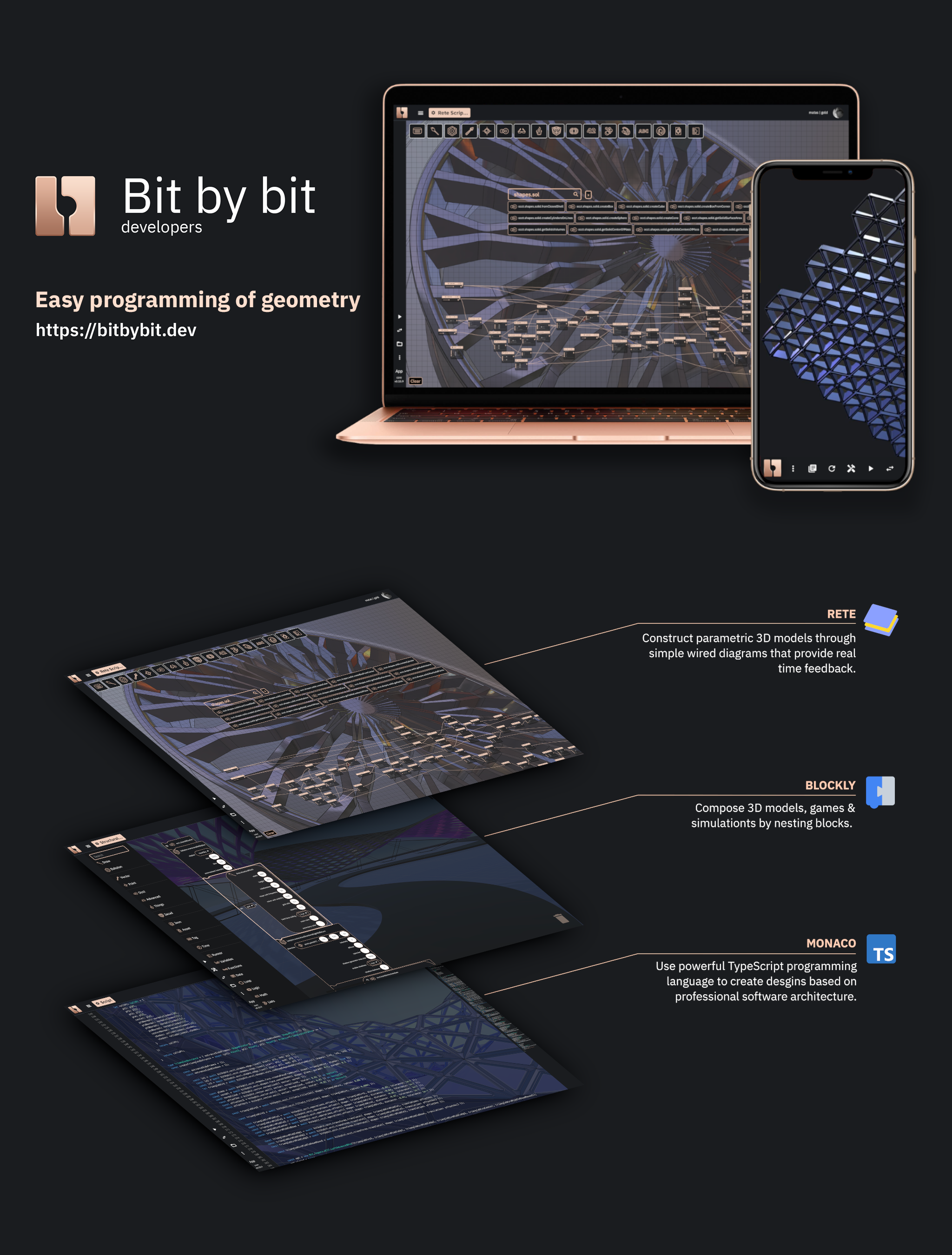
- **[Visual Programming Editors](https://bitbybit.dev)** - Rete & Blockly drag-and-drop 3D modeling, plus a Monaco TypeScript editor with full IntelliSense
- **[CAD Cloud API](https://learn.bitbybit.dev/api/cloud-api)** - Build full [pipelines](https://learn.bitbybit.dev/api/sdk/typescript/pipelines) that compose all Bitbybit algorithms, where each step can reference outputs of previous steps. Supports parametric model generation, STEP-to-glTF conversion, and complex CAD workflows via HTTP. [TypeScript SDK available](https://www.npmjs.com/package/@bitbybit-dev/cad-cloud-sdk).
- **[Bitbybit Studio](https://studio.bitbybit.dev)** - A growing visual dashboard where API Key users can generate models, convert files, build [pipelines with a GUI](https://learn.bitbybit.dev/api/studio/intro), inspect tasks, and preview 3D results
- **[3D Bits for Shopify](https://apps.shopify.com/3d-bits-1)** - Interactive 3D product configurators for your Shopify store. [Documentation](https://learn.bitbybit.dev/learn/3d-bits/intro).
- **[Script Runners](https://learn.bitbybit.dev/learn/runners/intro)** - Execute Rete/Blockly/TypeScript scripts directly on your website without writing code
- **[Built for AI Coding Agents](https://learn.bitbybit.dev/learn/using-ai-with-bitbybit/intro)** - The free [Bitbybit CAD MCP](https://learn.bitbybit.dev/learn/using-ai-with-bitbybit/mcp/bitbybit-mcp) gives Claude Code, Codex, Cursor, VS Code, claude.ai and ChatGPT the exact API of the version you use; the [Bitbybit CAD Cloud MCP](https://learn.bitbybit.dev/learn/using-ai-with-bitbybit/mcp/cad-cloud-mcp) lets an agent run geometry on CAD Cloud with a key. Context files cover assistants without MCP.
- **[Business & Enterprise](https://bitbybit.dev/b2b)** - We help businesses and enterprises develop custom applications and spin up optimized CAD tenant workflows on our managed servers
## Community
- [Discord](https://discord.gg/GSe3VMe)
- [YouTube](https://www.youtube.com/@bitbybitdev?sub_confirmation=1)
- [LinkedIn](https://www.linkedin.com/company/bitbybit-dev)
- [X (Twitter)](https://x.com/bitbybit_dev)
- [Instagram](https://www.instagram.com/bitbybit.dev)
- [Facebook](https://www.facebook.com/bitbybitdev)
- [Blog](https://learn.bitbybit.dev/blog)
## Watch the Introduction
Matas walks through the platform and the ideas behind it:
[](https://www.youtube.com/watch?v=noc6Rg6tMe0)
# Development Setup
## Contributions
If you're interested in contributing please check our [Contribution guidelines](https://github.com/bitbybit-dev/bitbybit/blob/master/CONTRIBUTING.md) & [code of conduct](https://github.com/bitbybit-dev/bitbybit/blob/master/CODE_OF_CONDUCT.md)
## First Time Setup and Testing
For first-time developers working on this project, follow these steps to set up the development environment and run all unit tests:
### Prerequisites
- Node.js 22 or newer (`.tool-versions` pins 22; the nightly workflow also runs 24)
- pnpm 11 (see step 2 below)
- Git
### Quick Start
1. Clone the repository:
```bash
git clone https://github.com/bitbybit-dev/bitbybit.git
cd bitbybit
```
2. Install pnpm 11 once (the packages are one pnpm workspace; the `packageManager` field pins the exact version):
```bash
npm install -g pnpm@11
```
3. Run the complete first-time setup (this will install all dependencies, build all packages, and run all unit tests):
```bash
npm run first-time-setup
```
### Available Commands
- `npm run first-time-setup` - Complete setup for new developers (installs dependencies, builds packages, runs tests)
- `npm run setup` - Install dependencies and build all packages without running tests
- `npm run setup-and-test` - Install dependencies, build packages, and run all unit tests
- `npm run test` - Run all unit tests (requires packages to be built first)
- `npm run test:report` - One report over every suite's last results (files, tests, failures, skipped, coverage); written to the job summary on GitHub Actions
- `npm run ci-packages` - Install dependencies for all packages (one `pnpm install --frozen-lockfile` for the workspace)
- `npm run refresh-lockfile` - Rewrite `pnpm-lock.yaml` after a dependency change, without touching node_modules
- `npm run build-packages` - Build and stage all packages (`tsc -b` over generated project references, run by pnpm in dependency order)
- `npm run rebuild-all-packages` - Empty every dist, then build all packages
- `npm run gen:references` - Regenerate the TypeScript project references from the package manifests after a dependency change
- `npm run check:references` - Fail if the project references and the manifests disagree (the first step of `npm test`)
- `npm run lint` - ESLint over the repository, green by the committed suppression baseline; a new finding fails
- `npm run typecheck:strict` - Every package's typecheck under the full strict set
- `npm run check:strict-baselines` - Fail if any package has grown a strict baseline; every package is fully strict, so the check holds the line at zero
- `npm run api:check` - Fail if any package's public API surface differs from the committed report in its `etc/` folder
- `npm run api:update` - Regenerate those API reports after a deliberate change to the public surface
- `npm run check:tarballs` - Pack every built package and install the tarballs together into an empty project, as a user would
### Running Individual Package Tests
You can also run tests for individual packages:
- `npm run test-base` - Test base package
- `npm run test-occt` - Test OCCT package
- `npm run test-core` - Test core package
- `npm run test-jscad` - Test JSCAD package
- `npm run test-manifold` - Test Manifold package
- `npm run test-threejs` - Test ThreeJS package
- `npm run test-playcanvas` - Test PlayCanvas package
- `npm run test-babylonjs` - Test BabylonJS package
### Troubleshooting
If you encounter issues during setup:
1. Make sure you have Node.js 22+ installed (`node --version`)
2. Clear the pnpm store: `pnpm store prune`
3. Delete `node_modules` at the root and under `packages/dev/*`, then run `pnpm install`
## Major Dependencies
BabylonJS, ThreeJS, PlayCanvas, OpenCascade, Manifold, JSCAD, and Verbnurbs - the last of these
deprecated, no longer maintained upstream, and removed in the next major version.
## Example Applications
All examples live in the [`examples/`](https://github.com/bitbybit-dev/bitbybit/tree/master/examples) directory of this monorepo:
| App | Engine | Source Code |
|-----|--------|-------------|
| [Hex Shell](https://learn.bitbybit.dev/learn/npm-packages/threejs/advanced-parametric-3d-model) | Three.js | [GitHub](https://github.com/bitbybit-dev/bitbybit/tree/master/examples/vite/threejs/hex-shell) |
| [Cup Configurator](https://app-store.bitbybit.dev/cup) | Three.js | [GitHub](https://github.com/bitbybit-dev/bitbybit/tree/master/examples/vite/threejs/cup) |
| [Hex House Concept](https://learn.bitbybit.dev/learn/npm-packages/threejs/hex-house-concept) | Three.js | [GitHub](https://github.com/bitbybit-dev/bitbybit/tree/master/examples/vite/threejs/hex-house-concept) |
| Starter Template | BabylonJS | [GitHub](https://github.com/bitbybit-dev/bitbybit/tree/master/examples/vite/babylonjs/starter-template) |
| Starter Template | Three.js | [GitHub](https://github.com/bitbybit-dev/bitbybit/tree/master/examples/vite/threejs/starter-template) |
| Starter Template | PlayCanvas | [GitHub](https://github.com/bitbybit-dev/bitbybit/tree/master/examples/vite/playcanvas/starter-template) |
| [Terrace Furniture](https://app-store.bitbybit.dev/terrace-furniture) | BabylonJS | Closed source |
## Bitbybit Platform
Beyond these open-source NPM packages, the Bitbybit platform includes:
- **[Visual Programming Editors](https://bitbybit.dev)** - Rete & Blockly drag-and-drop 3D modeling, plus a Monaco TypeScript editor with full IntelliSense
- **[CAD Cloud API](https://learn.bitbybit.dev/api/cloud-api)** - Build full [pipelines](https://learn.bitbybit.dev/api/sdk/typescript/pipelines) that compose all Bitbybit algorithms, where each step can reference outputs of previous steps. Supports parametric model generation, STEP-to-glTF conversion, and complex CAD workflows via HTTP. [TypeScript SDK available](https://www.npmjs.com/package/@bitbybit-dev/cad-cloud-sdk).
- **[Bitbybit Studio](https://studio.bitbybit.dev)** - A growing visual dashboard where API Key users can generate models, convert files, build [pipelines with a GUI](https://learn.bitbybit.dev/api/studio/intro), inspect tasks, and preview 3D results
- **[3D Bits for Shopify](https://apps.shopify.com/3d-bits-1)** - Interactive 3D product configurators for your Shopify store. [Documentation](https://learn.bitbybit.dev/learn/3d-bits/intro).
- **[Script Runners](https://learn.bitbybit.dev/learn/runners/intro)** - Execute Rete/Blockly/TypeScript scripts directly on your website without writing code
- **[Built for AI Coding Agents](https://learn.bitbybit.dev/learn/using-ai-with-bitbybit/intro)** - The free [Bitbybit CAD MCP](https://learn.bitbybit.dev/learn/using-ai-with-bitbybit/mcp/bitbybit-mcp) gives Claude Code, Codex, Cursor, VS Code, claude.ai and ChatGPT the exact API of the version you use; the [Bitbybit CAD Cloud MCP](https://learn.bitbybit.dev/learn/using-ai-with-bitbybit/mcp/cad-cloud-mcp) lets an agent run geometry on CAD Cloud with a key. Context files cover assistants without MCP.
- **[Business & Enterprise](https://bitbybit.dev/b2b)** - We help businesses and enterprises develop custom applications and spin up optimized CAD tenant workflows on our managed servers
## Community
- [Discord](https://discord.gg/GSe3VMe)
- [YouTube](https://www.youtube.com/@bitbybitdev?sub_confirmation=1)
- [LinkedIn](https://www.linkedin.com/company/bitbybit-dev)
- [X (Twitter)](https://x.com/bitbybit_dev)
- [Instagram](https://www.instagram.com/bitbybit.dev)
- [Facebook](https://www.facebook.com/bitbybitdev)
- [Blog](https://learn.bitbybit.dev/blog)
## Watch the Introduction
Matas walks through the platform and the ideas behind it:
[](https://www.youtube.com/watch?v=noc6Rg6tMe0)
# Development Setup
## Contributions
If you're interested in contributing please check our [Contribution guidelines](https://github.com/bitbybit-dev/bitbybit/blob/master/CONTRIBUTING.md) & [code of conduct](https://github.com/bitbybit-dev/bitbybit/blob/master/CODE_OF_CONDUCT.md)
## First Time Setup and Testing
For first-time developers working on this project, follow these steps to set up the development environment and run all unit tests:
### Prerequisites
- Node.js 22 or newer (`.tool-versions` pins 22; the nightly workflow also runs 24)
- pnpm 11 (see step 2 below)
- Git
### Quick Start
1. Clone the repository:
```bash
git clone https://github.com/bitbybit-dev/bitbybit.git
cd bitbybit
```
2. Install pnpm 11 once (the packages are one pnpm workspace; the `packageManager` field pins the exact version):
```bash
npm install -g pnpm@11
```
3. Run the complete first-time setup (this will install all dependencies, build all packages, and run all unit tests):
```bash
npm run first-time-setup
```
### Available Commands
- `npm run first-time-setup` - Complete setup for new developers (installs dependencies, builds packages, runs tests)
- `npm run setup` - Install dependencies and build all packages without running tests
- `npm run setup-and-test` - Install dependencies, build packages, and run all unit tests
- `npm run test` - Run all unit tests (requires packages to be built first)
- `npm run test:report` - One report over every suite's last results (files, tests, failures, skipped, coverage); written to the job summary on GitHub Actions
- `npm run ci-packages` - Install dependencies for all packages (one `pnpm install --frozen-lockfile` for the workspace)
- `npm run refresh-lockfile` - Rewrite `pnpm-lock.yaml` after a dependency change, without touching node_modules
- `npm run build-packages` - Build and stage all packages (`tsc -b` over generated project references, run by pnpm in dependency order)
- `npm run rebuild-all-packages` - Empty every dist, then build all packages
- `npm run gen:references` - Regenerate the TypeScript project references from the package manifests after a dependency change
- `npm run check:references` - Fail if the project references and the manifests disagree (the first step of `npm test`)
- `npm run lint` - ESLint over the repository, green by the committed suppression baseline; a new finding fails
- `npm run typecheck:strict` - Every package's typecheck under the full strict set
- `npm run check:strict-baselines` - Fail if any package has grown a strict baseline; every package is fully strict, so the check holds the line at zero
- `npm run api:check` - Fail if any package's public API surface differs from the committed report in its `etc/` folder
- `npm run api:update` - Regenerate those API reports after a deliberate change to the public surface
- `npm run check:tarballs` - Pack every built package and install the tarballs together into an empty project, as a user would
### Running Individual Package Tests
You can also run tests for individual packages:
- `npm run test-base` - Test base package
- `npm run test-occt` - Test OCCT package
- `npm run test-core` - Test core package
- `npm run test-jscad` - Test JSCAD package
- `npm run test-manifold` - Test Manifold package
- `npm run test-threejs` - Test ThreeJS package
- `npm run test-playcanvas` - Test PlayCanvas package
- `npm run test-babylonjs` - Test BabylonJS package
### Troubleshooting
If you encounter issues during setup:
1. Make sure you have Node.js 22+ installed (`node --version`)
2. Clear the pnpm store: `pnpm store prune`
3. Delete `node_modules` at the root and under `packages/dev/*`, then run `pnpm install`
## Major Dependencies
BabylonJS, ThreeJS, PlayCanvas, OpenCascade, Manifold, JSCAD, and Verbnurbs - the last of these
deprecated, no longer maintained upstream, and removed in the next major version.