# 🚀 Cosmonats
Background jobs + real-time event streaming for Ruby — unified, in one gem, backed by NATS.
**No Redis. No DB polling. Disk-backed, horizontally scalable — no message is ever silently dropped.**

[](https://rubygems.org/gems/cosmonats)
[](https://rubygems.org/gems/cosmonats)
[](https://www.ruby-lang.org)
[](LICENSE.txt)
[](https://github.com/bitsbeam/cosmonats/actions)
*Battle-tested in production. Tens of millions of jobs processed and counting.*
## ⚡ Taste it
```ruby
# Define a job with a familiar look
class SendEmailJob
include Cosmo::Job
options stream: :default, retry: 3, dead: true
def perform(user_id, template)
EmailService.send(user_id, template)
end
end
# Enqueue it
SendEmailJob.perform_async(123, "welcome")
SendEmailJob.perform_in(1.day, 123, "followup")
```
```ruby
# Process a continuous real-time event stream
class ClicksProcessor
include Cosmo::Stream
options stream: :clickstream, batch_size: 100,
consumer: { subjects: ["events.clicks.>"] }
def process_one
Analytics.track(message.data)
message.ack
end
end
ClicksProcessor.publish({ user_id: 123, page: "/home" }, subject: "events.clicks.homepage")
```
```bash
bundle exec cosmo -C config/cosmo.yml -c 20 # Run jobs + streams with 20 threads
bundle exec cosmo -C config/cosmo.yml -c 20 jobs # Jobs only
bundle exec cosmo -C config/cosmo.yml -c 20 streams # Streams only
```
## 📖 Index
- [Why?](#-why)
- [Features](#-features)
- [Installation](#-installation)
- [Quick Start](#-quick-start)
- [Core Concepts](#-core-concepts)
- [Jobs](#jobs)
- [Streams](#streams)
- [Configuration](#configuration)
- [Advanced Usage](#-advanced-usage)
- [Cron](#cron)
- [Priority Queues](#priority-queues)
- [Batches](#batches)
- [Concurrency Limiting](#concurrency-limiting)
- [Custom Serializers](#custom-serializers)
- [Error Handling](#error-handling)
- [Testing](#testing)
- [Integrations](#integrations)
- [CLI Reference](#-cli-reference)
- [Deployment](#-deployment)
- [Monitoring](#-monitoring)
- [Examples](#-examples)
## 🎯 Why?
Most background job libraries use Redis or Postgres — tools that were never designed for this. Think of NATS as Redis — but Redis is KV first then messaging;
NATS is messaging first, then KV. What NATS is:
- **~20 MB binary, ~10 MB RAM at idle** Trivial to run anywhere.
- **Disk-backed persistent streams** Messages survive restarts, don't require RAM to fit.
- **True horizontal clustering** Lose a node — other nodes take over, zero message loss.
- **Multilingual** Official clients for Ruby, Go, Python, Rust, Java, .NET, and more. Any service can publish or consume.
One NATS server replaces your message broker, job queue, and KV store — with lower operational overhead.
| | Redis/DB-backed | NATS/Cosmonats |
|-------------------|-------------------------------|----------------------------|
| Persistence | In-memory / DB bloat | Disk-backed, TB-scale |
| Scaling | Sentinel only / Vertical only | True horizontal clustering |
| Background jobs | Yes | Yes |
| Real-time stream | No | Yes |
| Zero message loss | No | Yes |
| Message replay | No | Yes |
| Backpressure | No, grow unbounded | Yes |
| Multi-DC | Complex setup | Native geo-distribution |
### Killer Features:
#### — Jobs + Streams, unified in one gem.
Most Ruby gems handle exactly that — background jobs. If you also need to consume a continuous event feed, that's a second system, second config, second set of
worker processes, second Dockerfile entry. Cosmonats is the only Ruby gem with a first-class `Job` primitive *and* a first-class `Stream` primitive, sharing
one server, one config, one CLI, one monitoring endpoint.
#### — Message replay and time-travel debugging.
NATS persists messages to disk and lets any consumer rewind to any point — beginning of time, a specific timestamp, or only new messages.
- **Incident recovery** — your pipeline crashed for 3 hours. Replay from the crash timestamp.
- **New consumer bootstrap** — a new service needs historical events. Start it from the beginning.
- **Bug reproduction** — replay the exact sequence of messages that caused a production issue.
#### — Multi-datacenter queues, natively.
NATS has a first-class cluster + leaf-node architecture for geo-distribution. Spanning multiple regions or datacenters is a config block — not a separate
product or a third-party replication tool. NATS was built for edge computing, IoT, and satellite communication — multi-DC is a first-class concern, not an
afterthought.
#### — Transport-level deduplication + built-in KV. No extra infrastructure.
NATS deduplicates messages at the **broker** — same-ID messages within the configured window are dropped before they ever reach a worker. No uniqueness gems,
no advisory locks, no extra round-trips. It also ships a built-in Key/Value store usable for distributed locks and rate limiting — no Redis, no Memcached,
nothing else to run.
## ✨ Features
### 🎪 Job Processing
- **Familiar API** — `perform_async`, `perform_in`, `perform_at`
- **Priority queues** — critical, high, default, low with weighted round-robin
- **Scheduled jobs** — execute at a specific time or after a delay
- **Automatic retries** — exponential backoff, configurable attempts
- **Dead letter queue** — capture permanently failed jobs
- **Job uniqueness** — prevent duplicate execution
- **Concurrency limits** — cap simultaneous executions per class or per key
- **Cron scheduling** — recurring jobs manageable live from the web UI
- **Batches** — group jobs and fire a callback once the whole group finishes, including nested batches
### 🌊 Stream Processing
- **Real-time event streams** — process continuous data feeds
- **Batch processing** — handle multiple messages in one go
- **Message replay** — reprocess from any point in time
- **Consumer groups** — load-balanced across workers
- **Custom serialization** — JSON, MessagePack, Protobuf
- **Pause / resume** — stop and restart a stream's processing without losing its position
## 📦 Installation
```ruby
# Gemfile
gem "cosmonats"
```
**Requirements:** Ruby ≥ 3.1, NATS Server ([install guide](https://docs.nats.io/running-a-nats-service/introduction/installation))
Spin up NATS instantly with Docker — one command, that's it:
```bash
docker run -p 4222:4222 -p 8222:8222 nats:alpine -js
```
Or add it to your existing `docker-compose.yml`:
```yaml
services:
nats:
image: nats:alpine
command: -js
ports:
- "4222:4222"
- "8222:8222"
```
Mount the monitoring UI in your Rack app:
```ruby
require "cosmo/web"
# Rails
mount Cosmo::Web => "/cosmo"
# Any Rack app (config.ru)
map "/cosmo" { run Cosmo::Web }
```
## 🚀 Quick Start
### 1. Create `config/cosmo.yml`
```yaml
concurrency: 5 # Number of worker threads
consumers: # Declare consumer groups for streams, things that pull messages and process them
jobs: # Consumer configs for jobs (or streams)
default: # Stream name
ack_policy: explicit # Acknowledgment required for each message can be explicit, none, or all
max_deliver: 30 # Max retry attempts before sending to a dead stream. Safety ceiling only, keep it above every job class's own retry
max_ack_pending: 10 # Max messages waiting for ack, if exceeded, the server will stop delivering new messages until some are acked
ack_wait: 15 # Seconds to wait for ack before redelivering
subject: jobs.%{name}.> # Subject pattern for this consumer, %{name} replaced with stream name, becomes `jobs.default.>`
setup: # Initial stream creation only `cosmo -S`
jobs: # Stream configs for jobs (or streams)
default: # Stream name
storage: file # Storage type (file or memory)
retention: workqueue # Retention policy (limits, interest, workqueue). workqueue - deletes acked/nacked, limits - append only
subjects: ["jobs.%{name}.>"] # Subject pattern for this stream, %{name} replaced with stream name
allow_direct: true # Allow direct messages to stream (required for web UI)
```
### 2. Create streams in NATS (one-time), grabs config from setup section of `config/cosmo.yml`
```bash
bundle exec cosmo -S
```
### 3. Define a job in `app/jobs/`
```ruby
class SendEmailJob
include Cosmo::Job
options stream: :default, retry: 3, dead: true
def perform(user_id, email_type)
UserMailer.send(email_type, user_id).deliver_now
end
end
```
### 4. Enqueue & run
```ruby
SendEmailJob.perform_async(42, "welcome")
```
```bash
bundle exec cosmo -C config/cosmo.yml -c 10 -r ./app/jobs jobs
```
## 💡 Core Concepts
### Jobs
```ruby
class ReportJob
include Cosmo::Job
options(
stream: :critical, # Stream name
retry: 5, # Retry attempts
dead: true # Send to dead letter queue on final failure
)
def perform(report_id)
logger.info "Processing report #{report_id}"
Report.find(report_id).generate!
rescue StandardError => e
logger.error "Failed: #{e.message}"
raise # Triggers retry with exponential backoff
end
end
ReportJob.perform_async(42) # Enqueue now
ReportJob.perform_in(30.minutes, 42) # Delayed
ReportJob.perform_at(Time.parse("2026-01-25 10:00"), 42) # Scheduled
ReportJob.perform_sync(42) # Inline, no NATS (great for tests)
```
### Streams
```ruby
class ClicksProcessor
include Cosmo::Stream
options(
stream: :clickstream,
batch_size: 100,
start_position: :last, # :first, :last, :new, or timestamp
consumer: {
ack_policy: "explicit",
max_deliver: 3,
max_ack_pending: 100,
subjects: ["events.clicks.>"]
}
)
# Process one message at a time
def process_one
Analytics.track_click(message.data)
message.ack
end
# OR process a batch
def process(messages)
Analytics.bulk_track(messages.map(&:data))
messages.each(&:ack)
end
end
# Publishing
ClicksProcessor.publish({ user_id: 123, page: "/home" }, subject: "events.clicks.homepage")
# Acknowledgment strategies
message.ack # Success
message.nack(delay: 5_000_000_000) # Retry in 5 seconds (nanoseconds)
message.term # Permanent failure, no retry
```
### Configuration
**NATS subjects** follow a dot-separated hierarchy (`events.clicks.homepage`).
The `>` wildcard matches everything after that prefix. Think of subjects as topic names — flexible routing with no extra configuration.
**Full `config/cosmo.yml` example:**
```yaml
timeout: 25 # Shutdown timeout in seconds
concurrency: &concurrency 1 # Number of worker threads
max_retries: &max_retries 3 # Default max retries
batch_expiry: 259200 # Seconds before a Batch's tracking data expires (default: 3 days)
stream_config: &stream_config
storage: file # storage type (file or memory)
retention: workqueue # retention policy (limits, interest, workqueue)
duplicate_window: 120 # time window for duplicate message detection in seconds
discard: old # discard new messages when stream is full (discard new or old)
allow_direct: true # allow direct messages to stream, required for web UI
subjects:
- jobs.%{name}.> # subject pattern for stream, %{name} will be replaced with stream name
consumer_config: &consumer_config
ack_policy: explicit # ack policy (explicit, none, all), each individual message must be acknowledged
max_deliver: 30 # maximum number of times a message will be delivered before it's considered failed. keep it above every job class's own retry; a job that still exceeds it is capped and dead-lettered early with a warning
max_ack_pending: 20 # maximum number of messages with pending ack for this consumer
ack_wait: 60 # time in seconds to wait for an ack before redelivering the message
subject: jobs.%{name}.> # subject pattern for consumer, %{name} will be replaced with stream name
consumers:
jobs:
critical:
<<: *consumer_config
priority: 50
high:
<<: *consumer_config
priority: 30
default:
<<: *consumer_config
priority: 15
low:
<<: *consumer_config
priority: 5
scheduled:
<<: *consumer_config
max_deliver: 5
max_ack_pending: 100
ack_wait: 10
setup:
jobs:
critical:
<<: *stream_config
description: Very critical priority jobs
high:
<<: *stream_config
description: Higher priority jobs
default:
<<: *stream_config
description: Default priority jobs
low:
<<: *stream_config
description: Lower priority jobs
scheduled:
<<: *stream_config
description: Scheduled jobs
dead:
<<: *stream_config
retention: limits
max_msgs: 10000
max_age: 604800 # 7d
description: Broken jobs (DLQ)
development:
verbose: false
concurrency: *concurrency
staging:
verbose: true
concurrency: 3
production:
concurrency: 3
```
**Programmatic:**
```ruby
Cosmo::Config.set(:concurrency, 20)
Cosmo::Config.set(:setup, :streams, :custom, { storage: "file", subjects: ["custom.>"] })
```
**Environment variables:**
```bash
export NATS_URL=nats://localhost:4222
export COSMO_JOBS_FETCH_TIMEOUT=0.1
export COSMO_STREAMS_FETCH_TIMEOUT=0.1
```
## 🔧 Advanced Usage
### Cron
Recurring jobs, without a separate scheduler process. A schedule is just a message parked in the
job's own NATS stream (requires NATS Server 2.14+) — NATS fires it on the cron expression, and it
lands back in the stream as a regular job. Deploy it once; whatever's in NATS is exactly what runs
and exactly what shows up in the web UI's **Crons** tab, where each entry can be inspected, run
immediately, or deleted.
Declare schedules right in `config/cosmo.yml`:
```yaml
setup:
cron:
daily_report:
class: ReportJob
schedule: "@daily" # @-shortcuts are passed straight through to NATS
stream: default
weekday_digest:
class: ReportJob
schedule: "0 9 * * 1-5" # 6-field NATS cron (seconds first); 5-field UNIX cron is auto-normalized
stream: default
args: ["daily"]
timezone: America/New_York # optional, cron expressions only
```
`cosmo -C config/cosmo.yml -S` syncs it — whatever's in the file is exactly what ends up scheduled in NATS, same as streams.
Prefer to manage schedules at runtime instead? The same operations are available from Ruby:
```ruby
Cosmo::API::Cron.instance.upsert!(
class_name: "ReportJob", stream: "default", schedule: "0 9 * * 1-5",
args: ["daily"], timezone: "America/New_York", name: "weekday_report"
)
Cosmo::API::Cron.instance.all # every schedule currently deployed
Cosmo::API::Cron.instance.run_now!("cosmo.cron.default.report_job.weekday_report") # bypass the timer
Cosmo::API::Cron.instance.delete!("cosmo.cron.default.report_job.weekday_report") # stop future firings
```
### Priority Queues
```ruby
class UrgentJob
include Cosmo::Job
options stream: :critical # priority: 50 in config — polled most frequently
end
```
### Batches
Group jobs together and fire a callback once every one of them has finished. The registered class
is plain Ruby — it implements `on_complete(status, opts)` / `on_success(status, opts)`, not
`perform` — and runs on the job worker pool, not inline on whichever thread finalized the batch.
`status` is `{ bid:, total:, succeeded:, failed: }` and `opts` is whatever you passed to `#on`.
```ruby
batch = Cosmo::Batch.new
batch.jobs do
ImportJob.perform_async(1)
ImportJob.perform_async(2)
end
batch.on(:complete, NotifyUser, user_id: 1) # fires once every job has finished, pass or fail
batch.on(:success, NotifyUser, user_id: 1) # fires only if none of them failed
class NotifyUser
def on_complete(status, opts)
UserMailer.batch_done(opts[:user_id], status[:succeeded], status[:total]).deliver_later
end
def on_success(status, opts)
UserMailer.batch_succeeded(opts[:user_id]).deliver_later
end
end
```
- `#jobs` is the only place membership is tracked — jobs enqueued outside the block aren't part of
the batch. Call it at least once (an empty block is fine) to close the batch.
- `:complete` always fires once every job is done. `:success` fires only if none were dead-lettered
or dropped after exhausting retries. Both can be registered before or after `#jobs` — a callback
registered after the batch has already finished still fires.
**Nested batches** — a running job can spawn its own sub-batch, which counts as one pending unit
of its parent and propagates any failure upward as a single failure unit:
```ruby
class ImportJob
include Cosmo::Job
def perform(account_id)
sub_batch = Cosmo::Batch.new(parent: batch_id) # batch_id is this job's own batch, if any
sub_batch.jobs { SyncRecordJob.perform_async(account_id) }
end
end
```
- Batch tracking data (pending counts, callbacks, results) expires automatically after
`Config[:batch_expiry]` seconds (default: 3 days).
- Open and finished batches — with pending/succeeded/failed counts — are listed live in the web UI's **Batches** tab.
- Only `Cosmo::Job`-based jobs are tracked; the ActiveJob adapter doesn't currently participate in
batches (see [`docs/active_job.md`](docs/active_job.md)).
### Concurrency Limiting
```ruby
class ThirdPartyApiJob
include Cosmo::Job
# At most 3 instances of this job run at once, cluster-wide.
# Jobs that lose the race are NAK'd with a delay equal to `duration`
# so they aren't redelivered until a slot is guaranteed free.
options limit: { duration: 30, concurrency: 3 }
end
class PerAccountSyncJob
include Cosmo::Job
# Scope the cap per key instead of class-wide — e.g. one concurrent sync per account.
options limit: { duration: 30, concurrency: { to: 1, key: ->(account_id) { account_id } } }
def perform(account_id)
Account.find(account_id).sync!
end
end
```
### Custom Serializers
```ruby
module MessagePackSerializer
def self.serialize(data) = MessagePack.pack(data)
def self.deserialize(payload) = MessagePack.unpack(payload)
end
class FastStream
include Cosmo::Stream
options publisher: { serializer: MessagePackSerializer }
end
```
### Error Handling
```ruby
class ResilientJob
include Cosmo::Job
options retry: 5, dead: true
def perform(data)
process_data(data)
rescue RetryableError => e
logger.warn "Retryable: #{e.message}"
raise # Will retry with exponential backoff
rescue FatalError => e
logger.error "Fatal: #{e.message}"
# Don't raise — won't retry, won't go to DLQ
end
end
```
By default, a failed job is redelivered after `attempt**4 + 15` seconds. Override that per job class
with `retry_in`, given the 1-based attempt count and the exception that was raised:
```ruby
class ThrottledApiJob
include Cosmo::Job
options retry: 5, retry_in: ->(count, exception) { exception.is_a?(RateLimitedError) ? 60 : count * 10 }
def perform(...)
# ...
end
end
```
If the proc returns something non-numeric/non-positive, or raises, the default backoff is used
instead. Note: if this job class also sets `limit: { concurrency: ... }` (see above), `count`
includes deliveries that were turned away for lack of a free slot, not just failed attempts.
### Testing
```ruby
# Synchronous — no NATS needed
SendEmailJob.perform_sync(123, "test")
# Async — returns a job ID
jid = SendEmailJob.perform_async(123, "welcome")
assert_kind_of String, jid
```
### Integrations
**ActiveJob:**
```ruby
# config/application.rb
config.active_job.queue_adapter = :cosmonats
```
The ActiveJob queue name maps directly to a Cosmo stream. Use `cosmo_options` for anything
Cosmo-specific — retries, DLQ behavior, overriding the target stream, or a custom retry delay:
```ruby
class ReportJob < ApplicationJob
cosmo_options retry: 5, dead: false, stream: :critical, retry_in: ->(count, exception) { count * 10 }
def perform(report_id)
Report.find(report_id).generate!
end
end
```
Inside a Rails app this is wired up automatically by the bundled Railtie — it registers the
adapter and loads `config/cosmo.yml` if present. Outside Rails:
```ruby
require "cosmo/active_job"
ActiveJob::Base.queue_adapter = Cosmo::ActiveJobAdapter::Adapter.new
```
**Sentry:**
```ruby
require "cosmo/sentry/auto"
```
Wraps every job execution in a Sentry transaction (`queue.cosmonats`) and captures unhandled
exceptions with the job's id, stream, subject, and retry count attached as context — no other
setup beyond having `sentry-ruby` initialized.
## 🖥️ CLI Reference
```bash
cosmo -C config/cosmo.yml --setup # Create streams in NATS (idempotent)
cosmo -C config/cosmo.yml -c 20 -r ./app/jobs jobs # Jobs only
cosmo -C config/cosmo.yml -c 20 streams # Streams only
cosmo -C config/cosmo.yml -c 20 # Both
```
| Flag | Description | Example |
|-------------------------|------------------------|-----------------------|
| `-C, --config PATH` | Config file path | `-C config/cosmo.yml` |
| `-c, --concurrency INT` | Worker threads | `-c 20` |
| `-r, --require PATH` | Auto-require directory | `-r ./app/jobs` |
| `-t, --timeout NUM` | Shutdown timeout (sec) | `-t 60` |
| `-S, --setup` | Setup streams & exit | `--setup` |
## 🚢 Deployment
**NATS Cluster config:**
```bash
# nats-server.conf
port: 4222
jetstream {
store_dir: /var/lib/nats
max_file: 10G
}
cluster {
name: cosmo-cluster
listen: 0.0.0.0:6222
routes: [nats://nats-2:6222, nats://nats-3:6222]
}
```
**Docker Compose:**
```yaml
services:
nats:
image: nats:latest
command: -js -c /etc/nats/nats-server.conf
volumes:
- ./nats.conf:/etc/nats/nats-server.conf
- nats-data:/var/lib/nats
worker:
build: .
environment:
NATS_URL: nats://nats:4222
command: bundle exec cosmo -C config/cosmo.yml -c 20 jobs
deploy:
replicas: 3
```
**Systemd Service:**
```ini
# /etc/systemd/system/cosmo.service
[Unit]
Description=Cosmo Background Processor
After=network.target
[Service]
Type=simple
User=deploy
WorkingDirectory=/var/www/myapp
Environment=RAILS_ENV=production
Environment=NATS_URL=nats://localhost:4222
ExecStart=/usr/local/bin/bundle exec cosmo -C config/cosmo.yml -c 20 jobs
Restart=always
RestartSec=10
StandardOutput=syslog
StandardError=syslog
SyslogIdentifier=cosmo
[Install]
WantedBy=multi-user.target
```
```bash
sudo systemctl enable cosmo && sudo systemctl start cosmo
```
## 📊 Monitoring
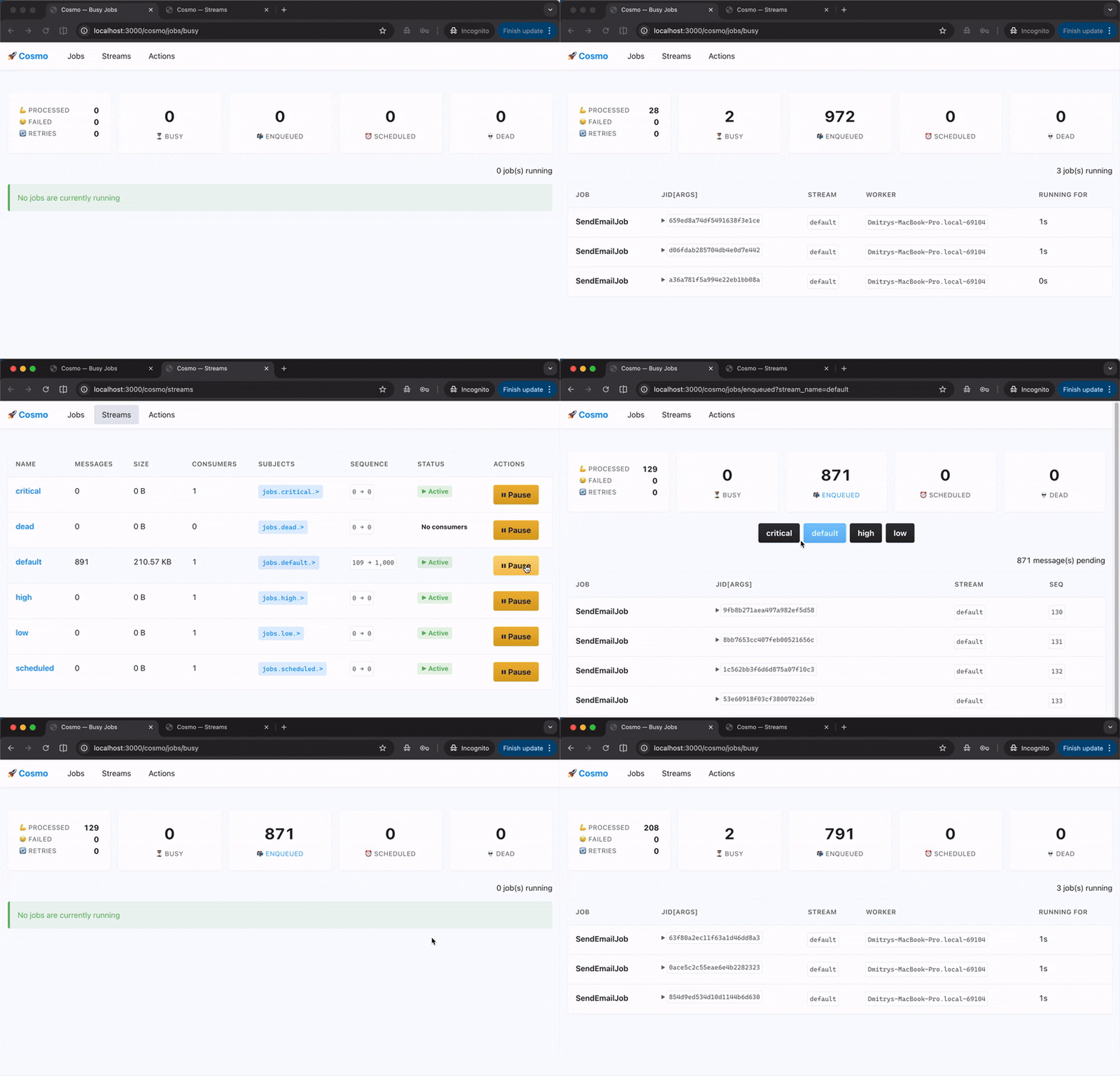
**Web UI** — mount `Cosmo::Web` (see [Installation](#-installation)) for a live, htmx-powered dashboard:
- **Jobs** — enqueued, scheduled, busy, and dead views, with per-job retry and delete
- **Streams** — per-stream state (messages, bytes, consumers) with pause/resume
- **Crons** — every schedule deployed in NATS, with run-now and delete
- **Batches** — open and finished batches with pending/succeeded/failed counts
- Summary counters (processed / failed / busy / enqueued / retries / scheduled / dead) backed by a NATS KV counter, no separate metrics store needed
**Structured logs:**
```
2026-01-23T10:15:30.123Z INFO pid=12345 tid=abc jid=def: start
2026-01-23T10:15:32.456Z INFO pid=12345 tid=abc jid=def elapsed=2.333: done
```
**Stream Metrics:**
```ruby
client = Cosmo::Client.instance
info = client.stream_info("default")
info.state.messages # Total messages
info.state.bytes # Total bytes
info.state.consumer_count # Number of consumers
```
**Prometheus** — NATS exposes metrics at `:8222/metrics`:
- `jetstream_server_store_msgs` — Messages in stream
- `jetstream_consumer_delivered_msgs` — Delivered messages
- `jetstream_consumer_ack_pending` — Pending acknowledgments
## 💼 Examples
**Email queue with scheduling:**
```ruby
class EmailJob
include Cosmo::Job
options stream: :default, retry: 3
def perform(user_id, template)
user = User.find(user_id)
EmailService.send(user.email, template)
end
end
EmailJob.perform_async(123, "welcome")
EmailJob.perform_in(1.day, 123, "followup")
```
**Image Processing Pipeline:**
```ruby
class ImageProcessor
include Cosmo::Stream
options(
stream: :images,
consumer: { subjects: ["images.uploaded.>"] }
)
def process_one
processed = ImageService.process(message.data["url"])
publish(processed, subject: "images.processed.optimized")
message.ack
rescue => e
logger.error "Processing failed: #{e.message}"
message.nack(delay: 30_000_000_000) # retry in 30s
end
end
ImageProcessor.publish({ url: "https://example.com/image.jpg" }, subject: "images.uploaded.user")
```
**Real-Time Analytics:**
```ruby
class AnalyticsAggregator
include Cosmo::Stream
options batch_size: 1000, consumer: { subjects: ["events.*.>"] }
def process(messages)
aggregates = messages.map(&:data).group_by { |e| e["type"] }.transform_values(&:count)
Analytics.bulk_insert(aggregates)
messages.each(&:ack)
end
end
```
---
**Made with ❤️ for Ruby**
*Blast off Cosmonats! 🚀*