# Mobix
**An Android pentest lab you can run by hand, or hand off to an AI agent.**
It covers the basics you'd expect from a Frida wrapper: SSL-pinning and
root-detection bypass, live traffic capture, a web dashboard. What's
different is the MCP side. The whole lab is exposed as a 36-tool control
plane, so a Claude Code session can run the loop itself: scan an app, watch
its traffic, flag likely IDORs, write up findings with evidence attached.
The unattended path is locked to a read-only allowlist, so it can't do
anything destructive on its own. Install is one line. Starting a scan is one
command.
> Synthetic demo app/traffic/findings throughout, no real target data. See
> [Screenshots](#screenshots) below for the full set, one per tab.
**If you find this useful, a star helps other pentesters find it too.**
Contents (click to expand)
- [Installing](#installing)
- [Starting a scan](#starting-a-scan)
- [Switching to Burp from the dashboard](#switching-to-burp-from-the-dashboard)
- [Web dashboard](#web-dashboard)
- [Screenshots](#screenshots)
- [Quick start: the `mp` command](#quick-start-the-mp-command)
- [Device](#device)
- [Layout](#layout)
- [Underlying scripts](#underlying-scripts)
- [Scripts](#scripts)
- [Interception: three layers](#interception-three-layers)
- [Using Burp instead of mitmproxy](#using-burp-instead-of-mitmproxy)
- [Feeding traffic to Claude Code](#feeding-traffic-to-claude-code)
- [Where the requests are](#where-the-requests-are)
- [Web pentest with Burp](#web-pentest-with-burp)
- [Inspecting one app's traffic](#inspecting-one-apps-traffic)
- [Claude Code engagements (`mp engage`)](#claude-code-engagements-mp-engage)
- [Mobile pentest skill](#mobile-pentest-skill)
- [Sessions & resuming](#sessions--resuming)
- [Logging in](#logging-in)
- [Site map & Repeater](#site-map--repeater)
- [Wiring traffic into Claude Code (lightweight)](#wiring-traffic-into-claude-code-lightweight)
- [Static analysis](#static-analysis)
- [Runtime exploration](#runtime-exploration)
- [Installing an app](#installing-an-app)
- [Switching apps](#switching-apps)
- [Apps that refuse to run on a rooted device](#apps-that-refuse-to-run-on-a-rooted-device)
- [Gotchas](#gotchas)
- [Scope discipline](#scope-discipline)
## Installing
One line on a fresh machine. It clones this repo to `~/mobile-pentest`
(override with `MP_ROOT=/some/path`), then runs the installer below:
```bash
curl -fsSL https://raw.githubusercontent.com/blackfoxxx/Mobix/master/scripts/bootstrap.sh | bash
```
Already cloned it yourself? Run the installer directly instead:
```bash
scripts/install.sh # installs everything this lab depends on
mp doctor # verifies it actually works (not just "present")
```
- **macOS**: fully supported, the only tested target. Installs Homebrew
(if missing), all formulae/casks (jadx, apktool, dex2jar, scrcpy, coreutils,
fzf, jq, openssl, android-platform-tools, mitmproxy, Docker), pins
`frida`/`frida-tools`/`objection` to the exact version this repo's bundled
`bin/frida-server-*-arm64` needs, installs `cryptography` (needed by any
target-specific request-signer you write; see
[Re-signing custom request-integrity fields](#re-signing-custom-request-integrity-fields)),
and symlinks `mp` onto `PATH`. It does **not** install MuMu Player Pro
itself, since that isn't distributed via Homebrew. Grab it from the vendor
and root it first. Safe to re-run any time; every step is install-if-missing.
- **Linux**: **partial install only.** The portable tooling (adb, frida,
jadx, apktool, mitmproxy, Docker) installs via apt/dnf/pacman, but MuMu
Player Pro is macOS-only, and so is this lab's automation layer (`mp engage`,
`creds.py front`, the LaunchAgent keepalive, all built on `osascript` and
`launchctl`). On Linux you drive some other adb-reachable rooted device or
emulator by hand with `adb`/`frida`/`objection`. `mp` itself runs, but
anything that shells out to MuMu-specific automation will fail.
- **Windows (native)**: not supported. The script exits with instructions to
use WSL2 and take the Linux path from inside it. A real device or emulator
is still needed, since MuMu won't run under WSL2 either.
`mp doctor` (`scripts/selftest.sh`) checks host tool versions, the frida
CLI-vs-device-server version match (and warns about shadow pipx installs that
could silently take over `PATH`), `cryptography` importability on whatever
`python3` resolves to, live device root and `/system` writability, an actual
frida handshake, Docker/MobSF health, and MCP registration. Being present
doesn't mean it's working. Use `mp doctor --quick` to skip the
device-dependent checks when no emulator is booted.
## Starting a scan
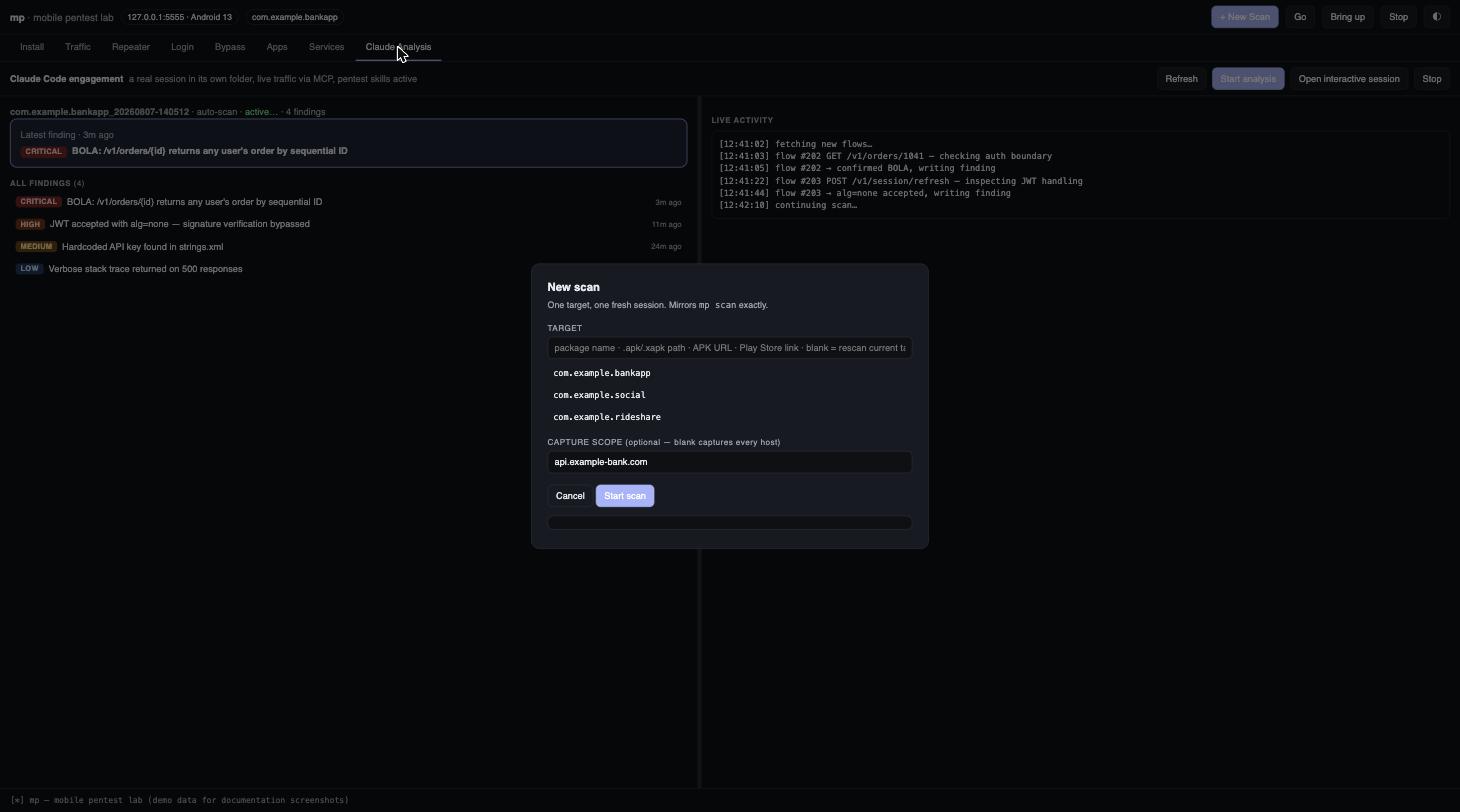
**`mp scan`** is the one command to reach for. CLI and dashboard both funnel
through it now, so it's the same flow no matter where you start from:
```bash
mp scan # no target chosen -> opens the app picker
mp scan com.target.app # an already-installed app (fuzzy name OK)
mp scan app.apk # or a .apk/.xapk/.apkm/.apks file
mp scan https://host/app.apk # or a direct APK URL
mp scan 'play.google.com/...id=pkg' # or a Play Store link
```
Every path converges on the same four numbered steps, always printed the same
way:
```
[1/4] environment emulator up, frida-server running, CA installed
[2/4] target resolved package (installed / fuzzy-matched / installed-then-set)
[3/4] capture FRESH session, scope printed explicitly (or a warning if empty)
[4/4] app launched hooked - root checks blocked, SSL unpinning active
```
It always starts clean: force-stops whatever was hooked before, never
silently reuses a stale capture. If the scope is empty it says so loudly
(`⚠ no scope set -> capturing ALL hosts`) instead of leaving that state
invisible. That ambiguity caused more than one mix-up early on. If a name
matches more than one installed app it lists every match and asks you to be
specific rather than guessing.
`mp scan` is a thin front door over lower-level building blocks (`mp go`,
`mp switch`, `mp install`, `mp launch`) that still exist for scripting or
finer control. See `mp help`, under **BUILDING BLOCKS**. You don't need them
for normal use.
**Note:** `mp scan` used to mean *static APK analysis*. That's now
**`mp static [apk]`**. The old name collided with what people actually meant
when they said "start a scan session," and untangling that collision is most
of what this redesign fixes.
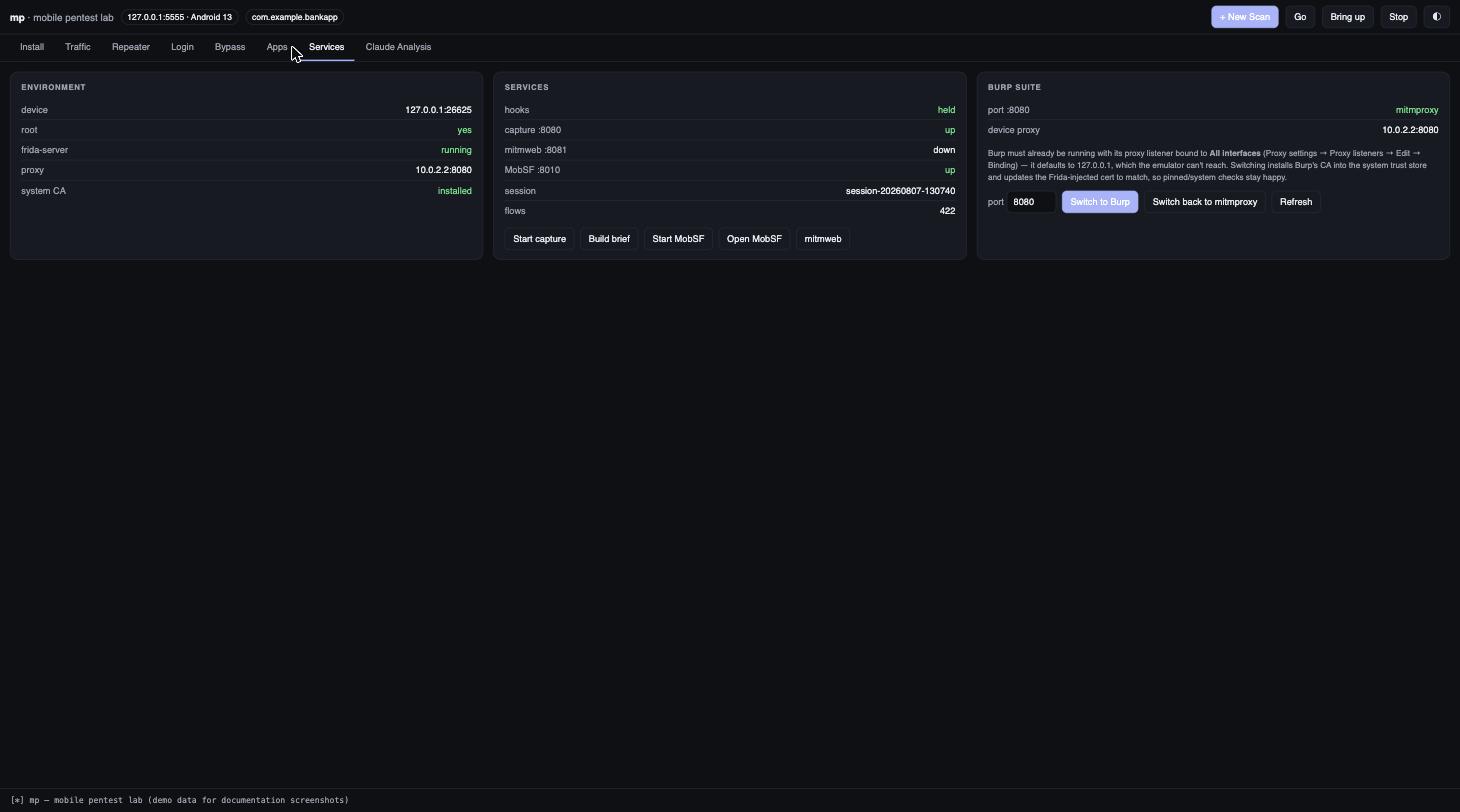
## Switching to Burp from the dashboard
The **Services** tab has a **Burp Suite** card mirroring `mp burp`/`mp burp
--mitm`: a live status line (which process actually owns the proxy port,
mitmproxy, Burp, or something else, plus what the device is currently
pointed at), a port field, and **Switch to Burp** / **Switch back to
mitmproxy** buttons. Same prerequisite as the CLI: Burp's listener has to be
bound to **All interfaces** first, or the emulator can't reach it.
**Switching to Burp stops whatever capture is currently running on that
port as its first step**, before it even checks whether Burp is up. Don't
click it mid-capture unless you mean to end that session. Switching back to
mitmproxy is safe to click anytime; it only updates the injected cert and
doesn't touch a running capture.
## Web dashboard
```bash
mp dash # http://127.0.0.1:8090
```
Nine tabs:
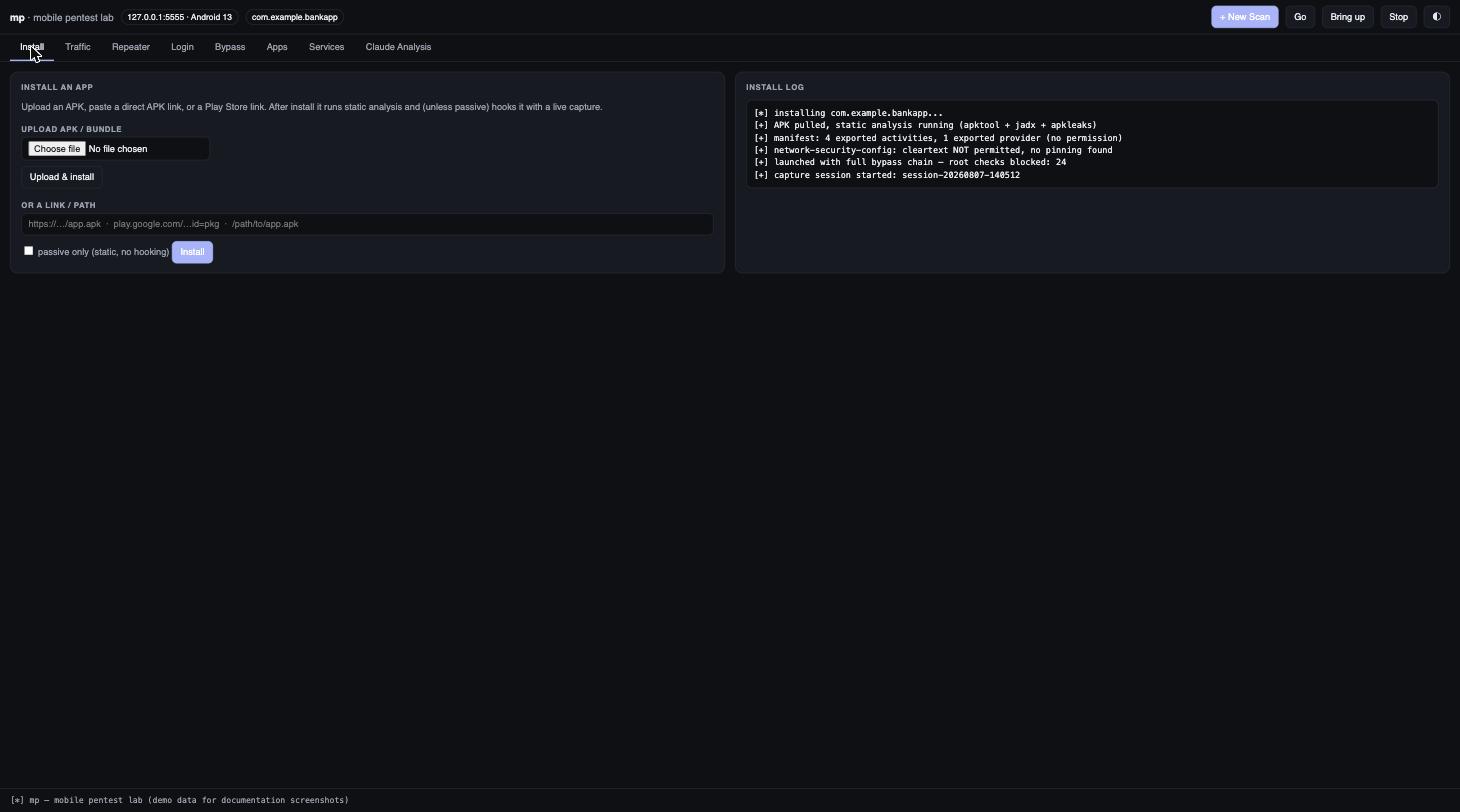
**Install**: upload an APK/bundle or paste a link/Play Store URL. Runs static
analysis and, unless passive, hooks it with a live capture. Log streams on the
right.
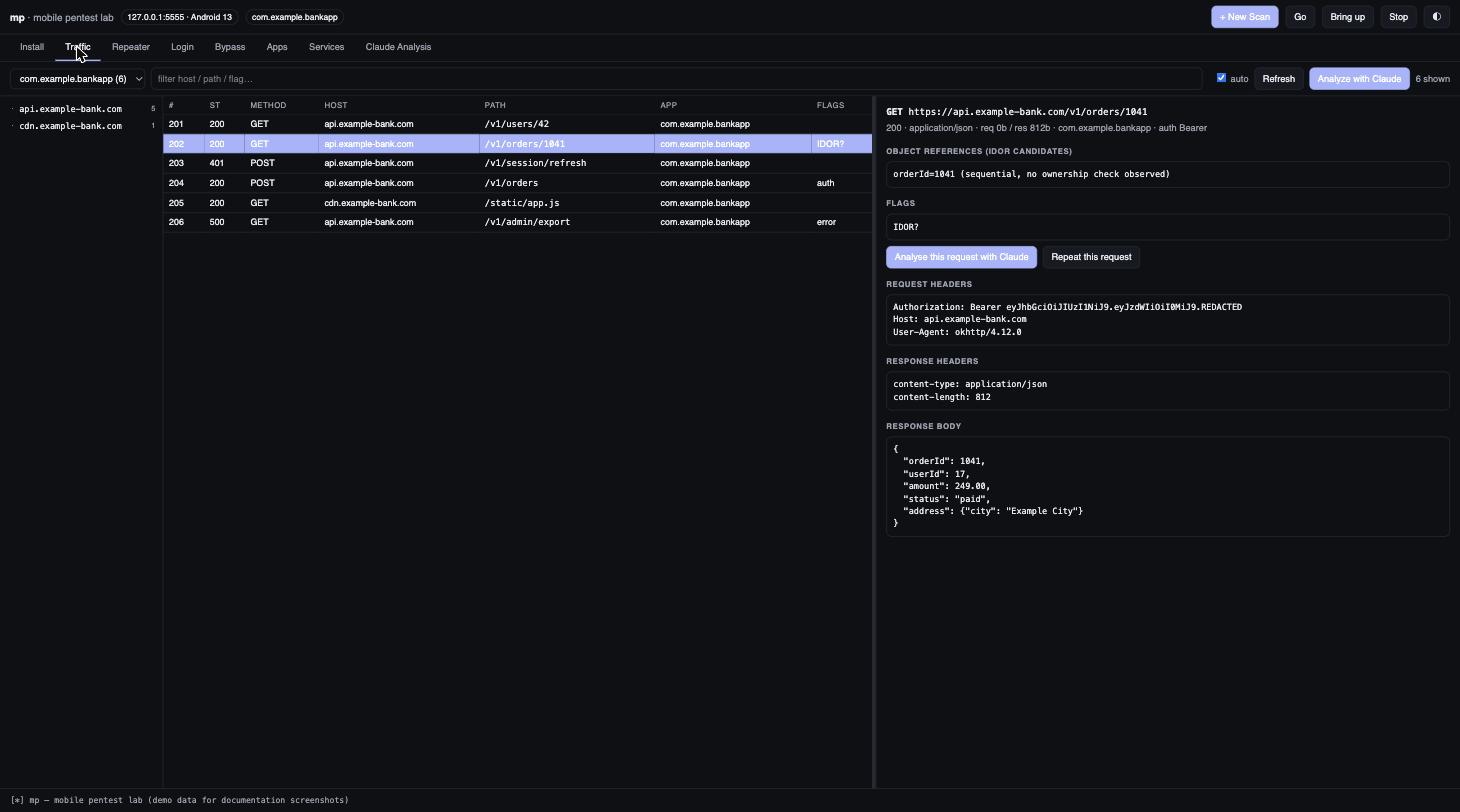
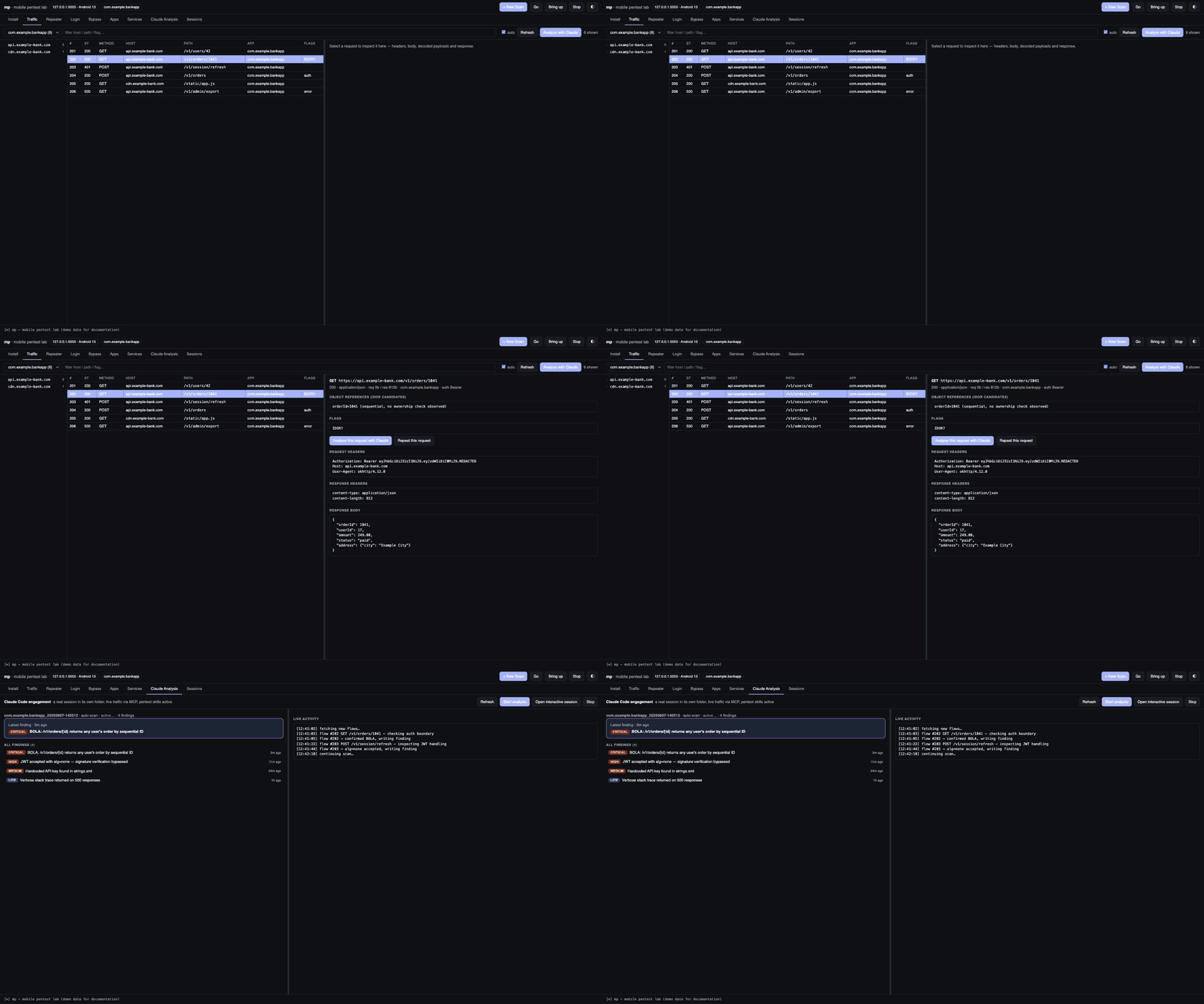
**Traffic**: a master/detail inspector with a draggable splitter, plus a
host/path tree on the left to filter by API surface. Click any request to see
its headers, pretty-printed request and response bodies, decoded base64
payloads (`requestBody` / `responseBody` are unwrapped automatically), flags
and IDOR candidates. Free-text filter plus a per-app dropdown. You do not need
to open mitmweb for normal inspection.
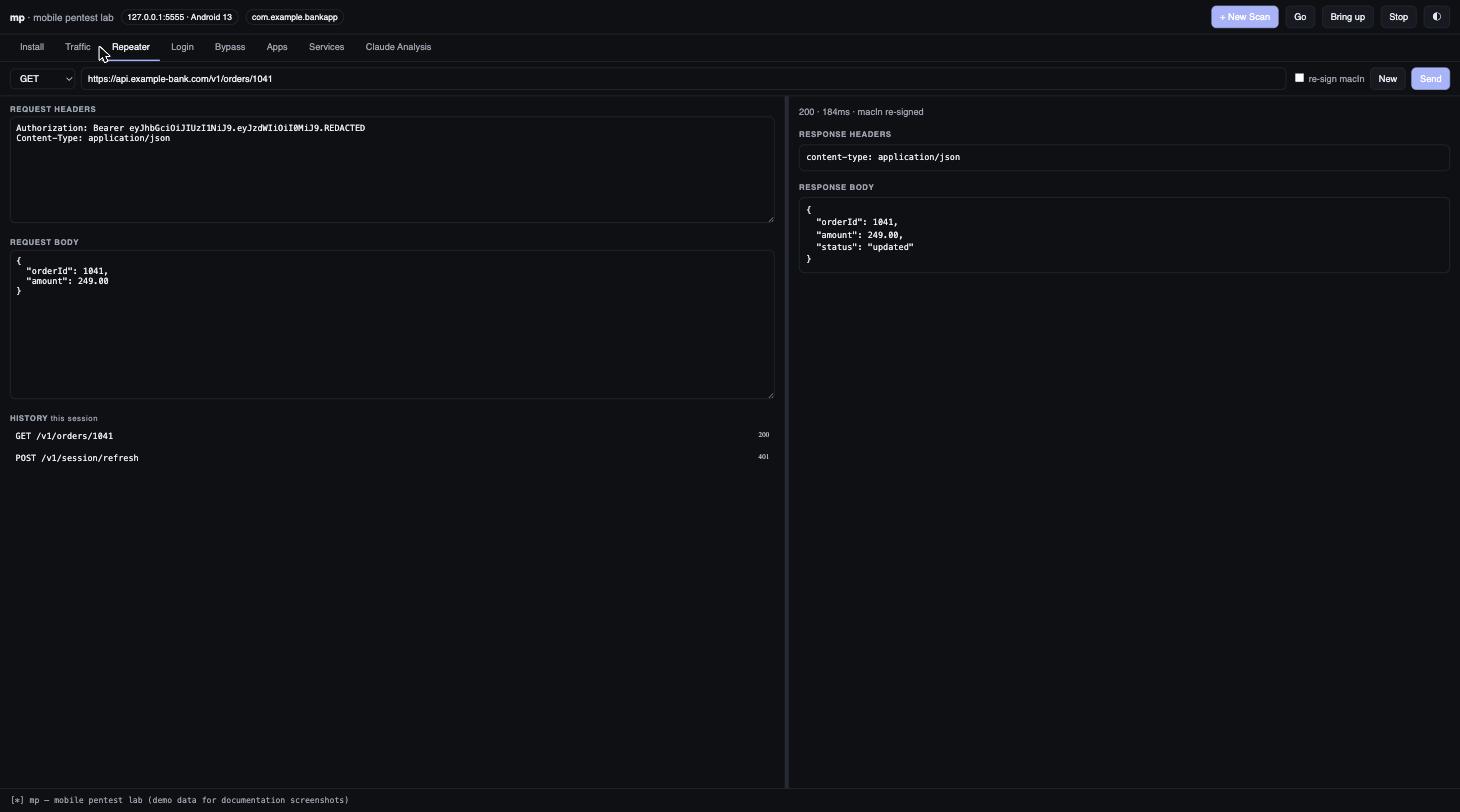
**Repeater**: edit method/URL/headers/body and resend directly from the Mac,
no device hop. Auto-detects a `macIn`-style integrity field and offers to
re-sign it. Keeps the last 25 sends this session.
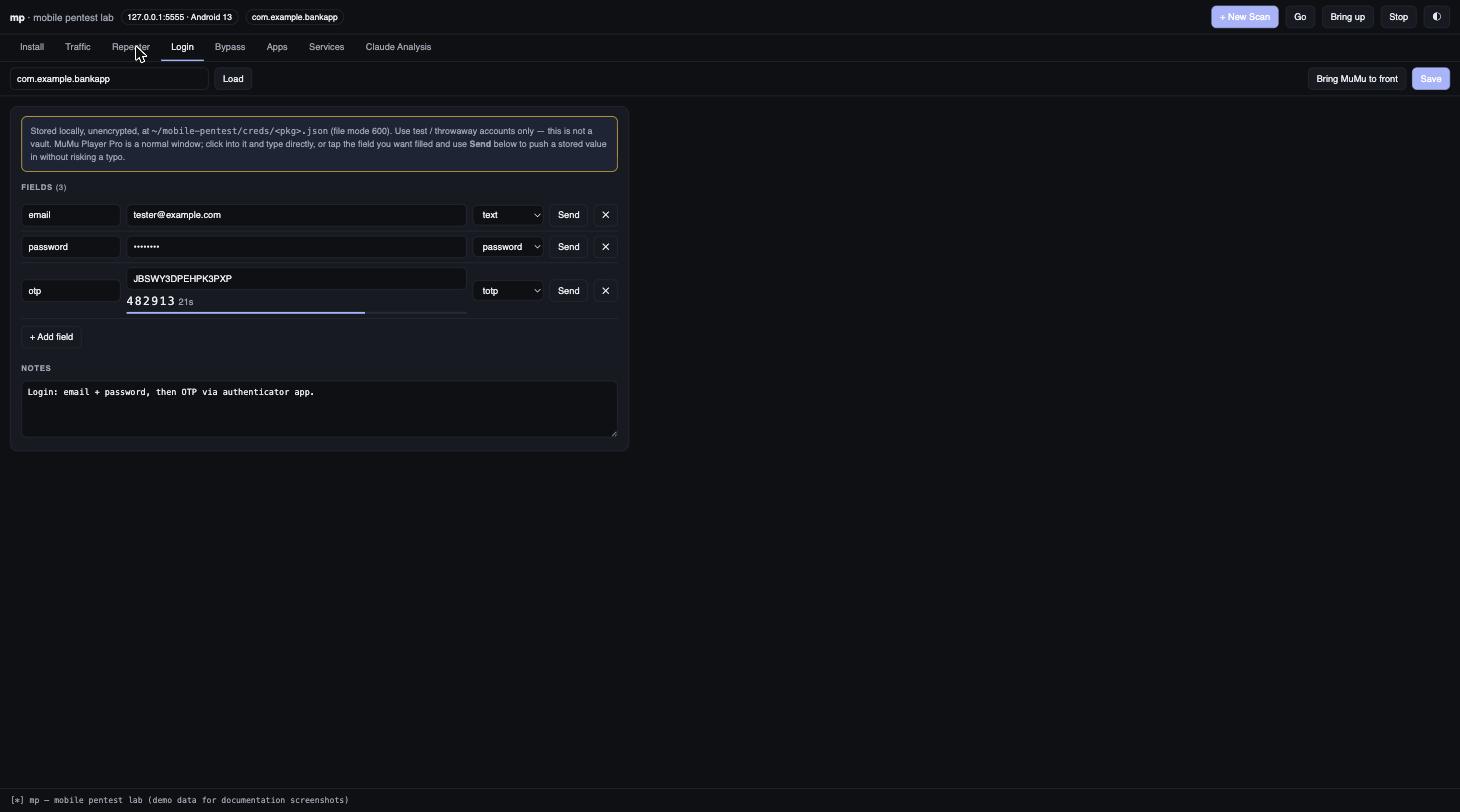
**Login**: stored per-app credential fields (text/password/TOTP with a live
code). "Send" pushes a value into whatever field is focused in MuMu.
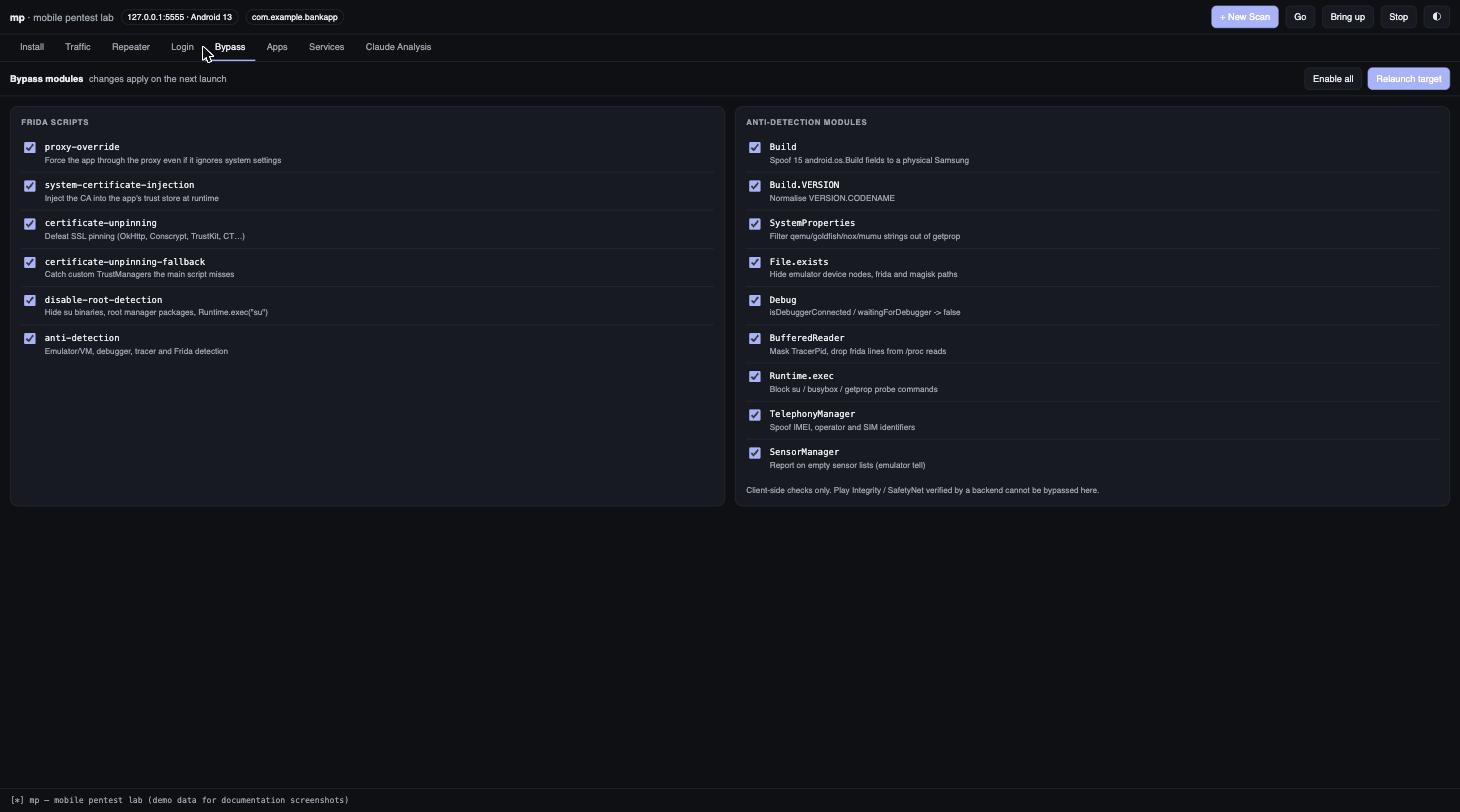
**Bypass**: a checkbox per module, with descriptions. Six Frida scripts
(proxy override, cert injection, unpinning, unpinning fallback, root detection,
anti-detection) and the nine anti-detection sub-modules (Build spoofing,
SystemProperties, File.exists, Debug, BufferedReader, Runtime.exec,
TelephonyManager, SensorManager). Toggles persist to `bypass.json` and apply on
the next launch; **Relaunch target** is right there. Turning a script off drops
its `-l` flag. Turning an anti-detection module off writes it into
`ANTI_DETECT_SKIP` in `config.js`.
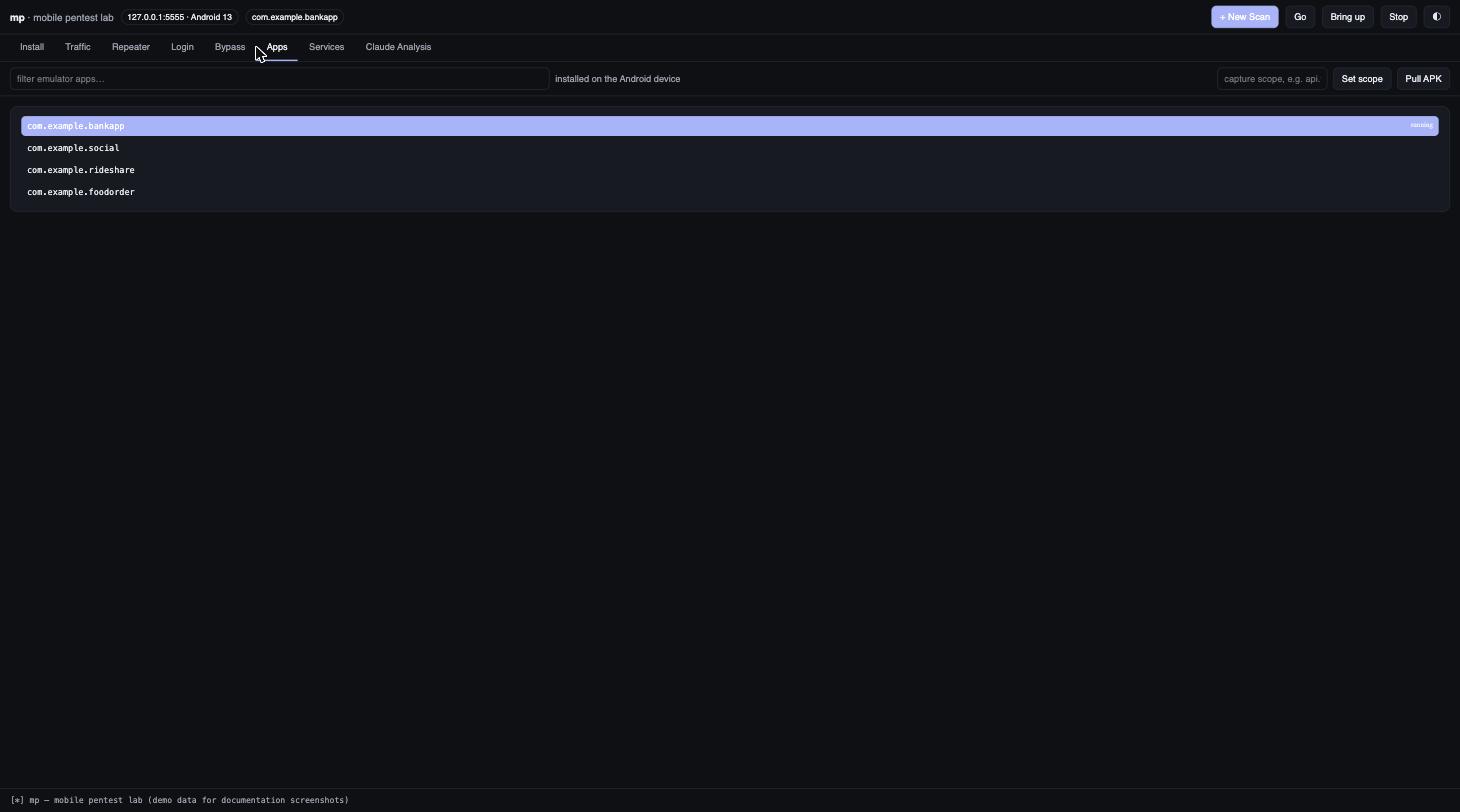
**Apps**: emulator packages with running markers, click to set the target,
plus scope entry and Pull APK.
**Services**: environment and service state, MobSF/Burp controls, and the
remaining actions.
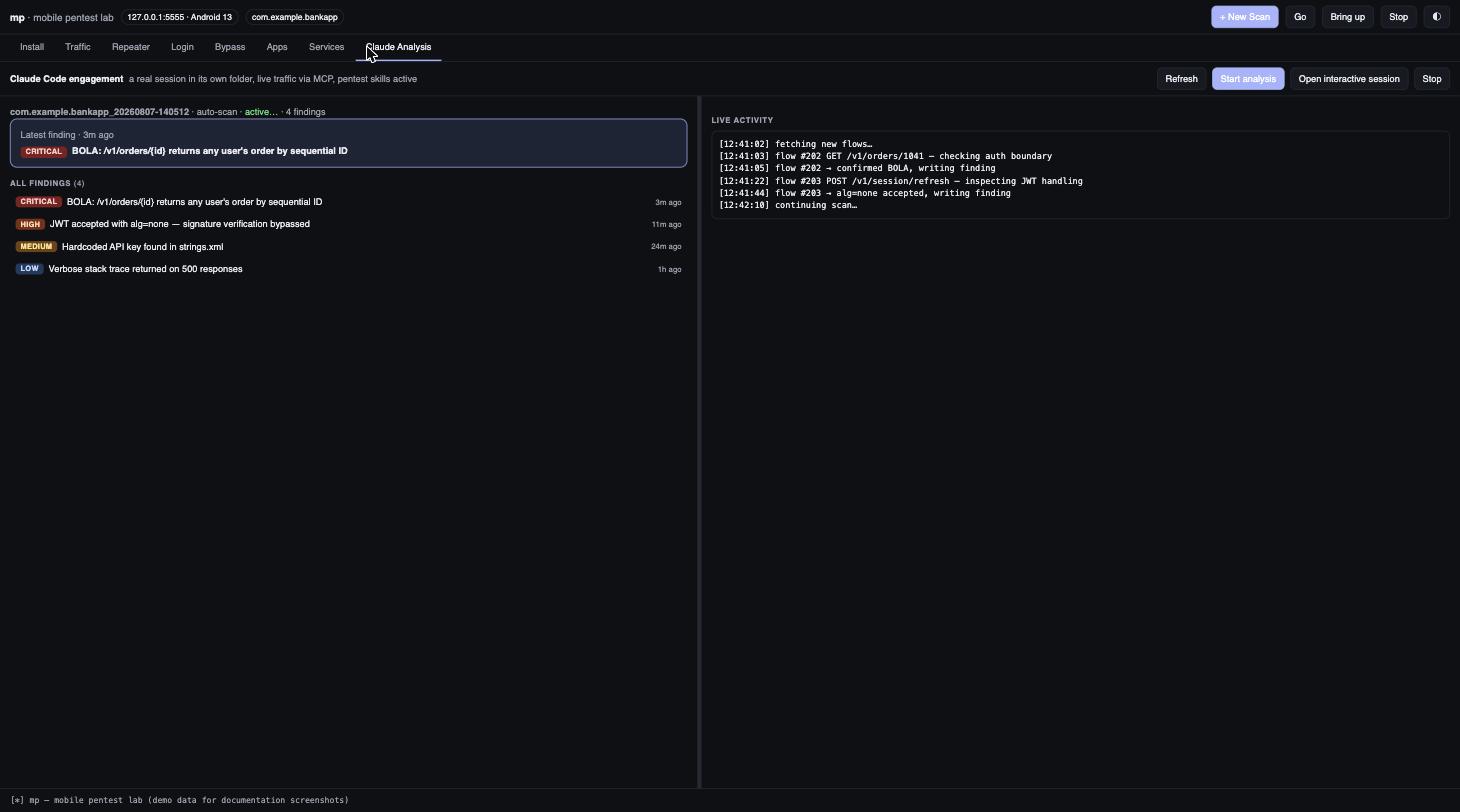
**Claude Analysis**: the live findings list from an `mp engage` run (interactive
or `--auto`), with a hero card for the latest finding and a live-activity feed.
See [Claude Code engagements](#claude-code-engagements-mp-engage).
**Sessions**: every past capture session and Claude Code engagement, browsable
read-only, forever. A new scan never deletes anything. See
[Sessions & resuming](#sessions--resuming) below.
The **Emulator apps** panel lists packages installed on the *Android device*
(`pm list packages -3`), marks which are running, and sets the target on click.
It never shows host/macOS applications; the lab only ever targets the emulator.
**Bound to `127.0.0.1` only, deliberately.** The dashboard can run `mp`
commands, so exposing it on a routable interface would hand the whole toolkit to
anyone who can reach it. Actions are a fixed whitelist and package/scope
arguments are regex-validated, but do not put it behind a tunnel or bind it to
`0.0.0.0`.
## Screenshots
All of the below use a synthetic demo app (`com.example.bankapp`) with fabricated
traffic and findings. None of this is real target data.
Install: upload/link an APK, static analysis and capture start automatically
Claude Analysis: live findings by severity, latest-finding hero card
New scan: one target, one fresh session, mirrors mp scan
## Quick start: the `mp` command
Everything runs through `mp` (on `PATH` via `/opt/homebrew/bin/mp`). Pick a
target app once; every other command then applies to it.
```bash
mp apps # fzf picker over installed apps -> sets the target
mp scope api.target.com # optional: limit capture to these hosts
mp go # everything: boot emulator, hook target, start capture
# ... drive the app by hand ...
mp analyze # build the Claude-readable feed from the newest session
mp stop # end hooks + capture
```
`mp go` needs **nothing** running beforehand. From a completely stopped
emulator it boots MuMu, waits for Android, starts frida-server, sets the proxy,
repairs the system CA if missing, launches the target with root + SSL bypasses,
and starts a scoped capture. About 40 seconds end to end. `mp up` does the same
without launching the app.
Optional extras with `mp auto mobsf-on` (starts MobSF as part of `mp up`).
`mp status` shows device, root, frida-server, proxy, CA, target, hooks, capture
and MobSF on one screen. `mp help` lists everything.
The target and scope persist in `~/mobile-pentest/config`, so they survive
reboots and you only choose once per engagement.
### Persistence
A LaunchAgent (`com.aj.mobilepentest.keepalive`) runs `bin/mp-keepalive` every
60 seconds. The CA lives on `/system` and survives on its own, but frida-server
and the device proxy setting do not survive an emulator restart. The agent
notices and restores both, logging to `loot/keepalive.log`. It deliberately does
**not** relaunch your target app; hooking an app is an explicit act.
To disable: `launchctl unload ~/Library/LaunchAgents/com.aj.mobilepentest.keepalive.plist`
## Device
| | |
|---|---|
| Serial | `emulator-5554` (ADB also on `localhost:5555`) |
| Model / OS | SM-S9180, Android 12 (SDK 32) |
| ABI | `arm64-v8a`, native ARM, so stock ARM tooling and ARM-only APKs run without translation |
| Root | `adbd` runs as **uid 0**; `/system/bin/su` present (no Magisk) |
| SELinux | **Permissive** |
| `/system` | mounted **read-write**, so system CA certs install directly |
| Device IP | `10.0.2.15/24`, gateway `10.0.2.2` |
**Host address from the device: `10.0.2.2`.** The Mac's LAN IP (`192.168.0.184`) also
works but changes with the network; `10.0.2.2` does not. Everything is configured
against `10.0.2.2`.
## Layout
```
~/mobile-pentest/
├── scripts/ operator scripts (below)
├── frida-scripts/ httptoolkit unpinning suite + config.js (CA + proxy baked in)
├── bin/ mp / mp-dashboard / mp-mcp + frida-server (fetched by install.sh, not committed)
├── apks/ pulled APKs, one dir per package (gitignored - not source)
└── loot/ captured flows, static-analysis output, MobSF data (gitignored - not source)
```
## Underlying scripts
`mp` is a thin front end over `scripts/`. Use these directly when you want
finer control; each is independently runnable.
Each capture creates `loot/session-/` containing both the raw flows
and an analysis feed built for Claude Code to read. See
[Feeding traffic to Claude Code](#feeding-traffic-to-claude-code).
## Scripts
| Script | Purpose |
|---|---|
| `start-env.sh` | Starts frida-server, sets the global proxy, verifies root + CA. Run after every emulator reboot. |
| `capture.sh [web\|dump\|proxy\|wg]` | Starts mitmproxy on `0.0.0.0:8080` **and the Claude analysis feed**. `web` = browser UI (default), `dump` = headless, `proxy` = TUI, `wg` = WireGuard VPN mode. |
| `analyze.sh [scope]` | Converts a saved flow file into the analysis feed offline. |
| `proxy.sh on\|off\|status` | Toggles the device-wide HTTP proxy. Turn **off** before using WireGuard mode. |
| `launch.sh ` | **Detached** launch with the full bypass chain, no terminal to keep open. Use this for apps with root detection. `--stop` / `--log` to manage. |
| `hook.sh [--attach]` | Same chain but an interactive Frida REPL, for when you want to poke at the runtime live. |
| `install-ca.sh ` | Installs any PEM/DER CA into the **system** trust store. |
| `install-burp-ca.sh [port]` | Pulls Burp's CA from a running Burp and installs it system-wide. |
| `pull-apk.sh ` | Pulls base + split APKs into `apks//`. |
| `static-scan.sh ` | apktool + jadx + apkleaks; reports manifest flags, exported components, network-security-config, pinning call sites, native libs. |
| `mobsf.sh start\|stop\|logs` | MobSF at http://127.0.0.1:8010 (creds `mobsf/mobsf`). Port 8010 because 8000 is used by your `tengu` container. |
| `install.sh` | Installs every host dependency: full on macOS, tooling-only on Linux, refuses on native Windows. Safe to re-run. |
| `selftest.sh` | `mp doctor`. Verifies every dependency actually *works* (versions match, device handshake succeeds, CA store writable), not just that it's installed. |
## Interception: three layers
The layers are cumulative. Each catches what the previous one misses.
**1. System CA (installed).** mitmproxy's CA is in `/system/etc/security/cacerts`,
so apps trust it even when they ignore user-installed certs, which every app
targeting API 24+ does by default. Verified working against Google's own
`play-fe.googleapis.com` and every target app tested so far: traffic decrypts
cleanly without any app-side pinning changes.
**1b. Detection bypasses.** Loaded with every launch:
`android-disable-root-detection.js` (su binaries, root manager packages,
`Runtime.exec("su")`) and `android-anti-detection.js`, which covers emulator/VM
tells (15 `android.os.Build` fields spoofed to a Samsung SM-S928B, `getprop`
filtered for qemu/goldfish/nox/mumu strings, emulator device nodes hidden from
`File.exists`), debugger and tracer checks (`Debug.isDebuggerConnected`,
`TracerPid` masked in `/proc` reads), Frida artefacts (agent lines dropped from
`/proc/self/maps` reads, `frida*` paths hidden), plus spoofed telephony
identifiers so an emulator's blank IMEI/operator does not give it away.
Each module reports `[anti-detect] ok: `. If a defensive app dies on
launch, bisect by setting `ANTI_DETECT_ONLY` or `ANTI_DETECT_SKIP` in
`frida-scripts/config.js`:
```js
var ANTI_DETECT_ONLY = ['Build','SystemProperties']; // enable only these
var ANTI_DETECT_SKIP = ['BufferedReader']; // or drop just one
```
**Honest limit:** these defeat *client-side* checks only. Play Integrity or
SafetyNet verified by a backend cannot be bypassed here. The verdict is signed
by Google and checked off-device.
**2. Frida unpinning (`launch.sh` / `hook.sh`).** Defeats apps that pin. The chain hooks
`HttpsURLConnection`, `SSLContext.init`, Conscrypt `CertPinManager`,
`NetworkSecurityConfig`, OkHttp `CertificatePinner` + `OkHostnameVerifier`,
TrustKit, and Cordova/Worklight/Netty/appmattus CT, plus a fallback auto-patcher
that catches custom `TrustManager`s at runtime, a proxy override for apps that
ignore system proxy settings, and root-detection bypass.
**3. WireGuard mode (`capture.sh wg`).** The fallback for apps that bypass the
HTTP proxy entirely (raw sockets, custom DNS, gRPC). mitmproxy prints a
WireGuard config; import it into a WireGuard client on the device. Turn the
global proxy **off** first. Don't stack layers 1 and 3.
## Using Burp instead of mitmproxy
1. In Burp: **Proxy → Proxy settings → Proxy listeners → Edit → Binding → All interfaces.**
Burp binds to `127.0.0.1` by default and the emulator cannot reach that.
2. Stop mitmproxy so port 8080 is free (or run Burp on another port and set
`MP_PROXY_PORT` to match).
3. `./scripts/install-burp-ca.sh 8080`
4. Re-run the `config.js` cert step if you want Frida's runtime cert injection to
use Burp's CA too. Replace `CERT_PEM` in `frida-scripts/config.js`.
## Feeding traffic to Claude Code
Raw flows are far too large and noisy to hand to an LLM: a single session is
megabytes of images, bundles and protobuf. `scripts/mpfeed.py` is a mitmproxy
addon that rides along with every capture and distils the traffic into something
readable. It runs automatically; you don't invoke it directly.
Every capture writes `loot/session-/`:
| File | What it's for |
|---|---|
| `index.md` | One line per request. **Skim this first.** |
| `surface.md` | Endpoints collapsed into templates (`/users/{id}`), with hit counts, status distribution, and authed-vs-unauthenticated split. This is the attack surface. |
| `flags.jsonl` | Auto-detected JWTs (with claims decoded), API keys, credentials, PII, card numbers. |
| `flows.jsonl` | Full detail, one JSON object per flow. `grep`/`jq` this. |
| `flows.mitm` | Raw flows, replay with `mitmweb -r`. |
Then just point me at it:
> "Analyse `~/mobile-pentest/loot/session-20260805-164934/`"
**Scope it to your target** so out-of-scope apps aren't captured or analysed:
```bash
MP_SCOPE=api.target.com,cdn.target.com ./scripts/capture.sh dump
```
**Already have a flow file?** Convert it offline:
```bash
./scripts/analyze.sh loot/session-*/flows.mitm api.target.com
```
What it does for you automatically:
- Drops images, fonts, CSS/JS, media and binary blobs, so only meaningful traffic survives.
- Truncates bodies to 4 KB (`MP_MAX_BODY` to change).
- Decodes JWT claims inline, so `role`, `sub` and `exp` are visible without you pasting tokens into a decoder.
- Collapses `/users/4821` and `/users/9930` into one `/users/{id}` endpoint, and lists the concrete IDs as **IDOR candidates**.
- Flags every endpoint that returned 2xx with **no** `Authorization` or `Cookie` header. That's the fastest route to a broken-access-control finding.
Detector accuracy was tuned against real traffic: millisecond epoch timestamps
are no longer mistaken for Luhn-valid card numbers, version strings are no
longer mistaken for emails, and noisy detectors (UUID, ObjectId, email, phone)
only fire when the match is properly delimited rather than sliced out of a
base64 blob. Each detector is capped at 3 hits per flow so one chatty request
can't flood the file.
## Where the requests are
`mp log` shows **Frida hook diagnostics** (`=> com.android.okhttp.Address $init …`).
That's the unpinning chain reporting each hooked call, not your traffic.
The HTTP requests live in the capture session:
```bash
mp req # last 25 requests, readable
mp req -f # follow live as you use the app
mp req 100 # last 100
mp web # open the flows in the mitmweb UI (browse / edit / replay)
```
`mp req` asks the running proxy where it is actually writing, rather than
assuming the newest directory. Those differ whenever a capture was reused.
Full detail per request is in `loot/session-*/flows.jsonl` (one JSON object per
flow: headers, bodies, IDOR candidates, flags). `index.md` is the skim view,
`surface.md` the endpoint rollup.
## Web pentest with Burp
For Repeater / Intruder / Scanner, hand the traffic to Burp:
1. Start Burp. **Proxy → Proxy settings → Proxy listeners → Edit → Binding →
All interfaces.** Burp binds to `127.0.0.1` by default and the emulator
cannot reach that.
2. `mp burp`: stops mitmproxy, pulls Burp's CA through the running listener,
installs it into the system store, updates `frida-scripts/config.js` so the
runtime injection uses Burp's CA too, and repoints the device.
3. `mp launch`: relaunch the app so the new CA is injected.
`mp burp --mitm` switches back.
### Re-signing custom request-integrity fields
Some APIs attach a custom integrity/MAC field to every request body (hashed
and signed with a key extracted from the app), so editing a body in Repeater
invalidates it. The pattern is generally: canonicalise the fields the app
signs, hash them, then encrypt/sign with the key pulled from the decompiled
APK or its native libs. This lab doesn't ship a target-specific signer, since
the exact fields and algorithm differ per app. Write a small
`scripts/-resign.py` following that shape and both `brief.py` and the
dashboard's Repeater will pick it up automatically if you wire it in next to
`zc-macin.py`'s loading pattern.
On one real target this turned out to be trivially bypassable: the MAC was
RSA-encrypted with a *public* key embedded in the app itself, so anyone could
mint a valid one. Worth checking for on any app that does this.
Worth trying first, before writing a signer at all: send a modified body
**without** touching the integrity field. Some apps compute the MAC over a
freshly generated request ID or timestamp that differs from what they
transmit, and the server still accepts the request anyway. That's strong
evidence the field isn't verified strictly, or at all, and which answer you
get is itself the finding.
## Inspecting one app's traffic
Every capture records **which app was hooked** when each flow was seen, so the
UI can be filtered down to a single app instead of the whole device.
```bash
mp seen # which apps produced traffic in this session
mp web # picker over those apps -> opens filtered mitmweb
mp web tv.app1001.android # skip the picker
mp web '*' # everything, unfiltered
```
`mp web` derives the app's hosts from the session and builds a mitmweb view
filter (`~d api\-gateway\.1001\.tv`). Note that mitmproxy treats `(`, `)` and
`|` as **filter-language operators**, not regex, so `~d (a|b)` is a syntax
error. The filter is emitted as `~d a | ~d b` with dots escaped instead.
**How attribution works, and its limit.** The emulator NATs every app behind one
address, so per-connection attribution is not available. Instead `launch.sh`
records the hooked package in `.active-app` and the capture feed tags each flow
with it. The honest unit is *"captured while app X was hooked"*, not "sent by
app X". Traffic from background OS services during that window is tagged the
same way. Combine with `mp scope ` when you need certainty about which
traffic is really the target's.
## Claude Code engagements (`mp engage`)
Beyond one-shot analysis, `mp engage` starts a **full Claude Code session** for a
target: its own folder, live traffic wired in via MCP, and the pentest
skills/plugins active exactly as in a hand-started session.
```bash
mp engage # interactive session in a new Terminal, in the target folder
mp engage --auto # headless agent: reviews the live capture, writes findings
mp engage --stop # stop running agents
```
Each run creates `engagements/_/` seeded with:
- `CLAUDE.md`: target, scope, authorisation, and how to reach the live traffic tools
- `traffic/`: symlink to the live capture session, plus a `BRIEF.md` snapshot
- `findings/`: where the agent writes one report per issue
The dashboard's **Claude Analysis** tab tracks BOTH modes live, including an
**interactive session you're driving by hand in Terminal**. It polls
`engagements//findings/` regardless of who's writing to it, sorts newest
first (not alphabetically, so a fresh Critical isn't buried under older Lows),
and shows a **Latest finding** card at the top with severity and age. A small
dot appears on the **Claude Scan** nav tab whenever a new finding lands while
you're looking elsewhere, and opening the tab jumps straight to it.
**Interactive mode** opens a real `claude` session in Terminal.app in that
folder, with full skills, plugins, permissions and MCP. **`--auto` mode** runs a
headless agent restricted to the 6 read-only `traffic_*` tools plus
Read/Write/Grep/Skill, **no Bash, no request sending**. That restriction is
enforced with an explicit `--disallowedTools` deny list, not just by leaving
everything else off an allow list: in headless mode a tool call outside
`--allowedTools` isn't automatically blocked, it can go through with no one
there to prompt for it. This was a real gap (Bash executed successfully in a
test run before the deny list was added), not a hypothetical one, which is
why the deny list names every non-traffic tool explicitly, Bash included,
rather than trusting the allow list alone. It streams events to `scan.log`
and writes findings as it goes.
Both modes are pointed at **`.claude/skills/mobile-pentest/`**, shipped with
this repo: the methodology (what's confirmable from traffic alone versus
what needs an interactive session), the finding write-up format, and a
severity rubric, all grounded in Mobix's actual tools rather than generic
advice. `mp engage` explicitly tells the agent to load it first. See
[Mobile pentest skill](#mobile-pentest-skill) below.
The **Claude Analysis** tab in the dashboard drives both: Start analysis, Open
interactive, Stop, a live findings list with a reader, and the agent's current
activity. The Traffic tab's **Scan with Claude** button starts an auto-scan on
the current session.
In a real engagement the auto agent produced 8 findings unattended: BOLA/IDOR
on ObjectId-addressed endpoints, an HS256 JWT carrying PII, mass assignment,
wildcard CORS, and an unauthenticated CodePush OTA channel, each with evidence
flow numbers and a read-only confirmation test.
Note: the agent's first message can trip the broad model safeguard on
cyber-security phrasing; it auto-falls-back to another model and continues. The
prompt is framed as a security review of already-captured data to minimise this.
## Mobile pentest skill
`.claude/skills/mobile-pentest/` ships with this repo, so a fresh clone gets a
genuinely knowledgeable pentest agent out of the box, not one that depends on
whatever security-review skills happen to already be installed on whoever's
machine is running it. Both `mp engage` modes load it explicitly as their
first action.
It's Android-only, matching what this lab actually does. No iOS guidance, no
jailbreak tooling. The main `SKILL.md` is a mode-aware workflow: it tells the
agent to check up front whether it's interactive (full tool access) or the
`--auto` agent (traffic-only, read-only), then walks through attack surface
mapping, authorization and IDOR, session/token handling, data exposure,
business logic, and, interactive-only, local storage, IPC/deep links, and
verifying the app's own client-side protections actually engaged.
Six reference files under `references/` go deeper on each category, and are
explicit throughout about what's **confirmed** straight from a captured flow
versus what's a **candidate** that needs an interactive Repeater test to
prove, the same confirmed/candidate discipline the finding write-up format
enforces. A few examples of what "grounded in this lab's actual tools" means
in practice rather than generic advice: `idor_candidates` and `authenticated`
are already computed per-flow by the capture feed, so the skill treats
*inconsistent* enforcement (same endpoint shape, auth present on some calls
and not others) as a stronger signal than uniform exposure; a `Set-Cookie`
missing `Secure`/`HttpOnly` is confirmable directly from response headers,
no active test needed; and a custom request-integrity field (the `macIn`
pattern) points back to this README's own section on it rather than
duplicating that guidance.
Verified against a real, previously-authorised production target in this
lab: the agent loaded the skill first, read every reference file before
writing anything, pulled full detail on every relevant flow individually
rather than skimming the brief, and correctly declined to write up an IDOR
candidate until it could point to the specific flow that would confirm it.
## Sessions & resuming
Every `mp scan`/`mp switch` starts a **fresh** capture session, but never
deletes the old one. `loot/session-/` directories accumulate
forever (clean them up by hand if disk space matters); nothing in this lab
ever removes a past session automatically.
**Dashboard.** The **Sessions** tab lists every capture session (target app,
flow count, age, with the live one marked) and every Claude Code engagement
(mode, finding count, running or not, a **resume** link when it has one). Click
a session to browse its requests read-only, the same detail view as Traffic
minus the live-only actions. There's no "Analyse with Claude", since that
targets the live session, but "Repeat this request" still works, fetching from
the archived one.
**CLI.** `mp sessions` lists the 15 most recent capture sessions with their
tagged target, flow count, and disk size, plus a count of Claude Code
engagements.
**Resuming an engagement.** Every `mp engage` run (interactive or `--auto`)
now pins a `claude --session-id` and saves it to `.session_id` in the
engagement folder. Pick it back up any time:
```bash
mp engage --resume # e.g. com.example.app_20260101-120000
```
opens a new Terminal window running `claude --resume ` in that folder,
with the full prior context restored. The dashboard's Sessions tab does the
same via its **resume** link. Engagements from before this feature existed
have no saved session id and show "not resumable".
**Every tab resets cleanly on a target change.** Switching target, whether via
`mp scan`/`mp switch`, the dashboard's New Scan, or the MCP `target_scan`/
`target_switch` tools, all go through the same `config` file the dashboard
polls. That clears the Traffic tab's tree filter and selected request, reloads
the Login tab for the new package, and refreshes the findings view.
Previously a stale tree filter or an already-open Login tab could keep
showing the *old* target's view even though capture had correctly moved to
the new one, which looked exactly like "still stuck on the old app". It's the
same class of bug as the automatic-scope-clearing gotcha (see
[Gotchas](#gotchas)), just on the dashboard's client side instead of the
capture backend. The Repeater's loaded request/history is deliberately
**not** reset, since it's for replaying any captured request regardless of
what's currently live.
## Logging in
MuMu Player Pro is already a normal window on your Mac. Click into it and
type, same as any app. That's "manual login" and it already works with no
extra tooling. What's actually useful to add is a place to keep track of
what to type between sessions, and a way to push a stored value into
whatever field is focused without risking a typo on a long password or
token.
```bash
mp login [pkg] bring MuMu to the front, show stored creds (masked)
mp login [pkg] --reveal same, unmasked
mp creds set