snipt
===
multiple remote platform snippet-code manager command.
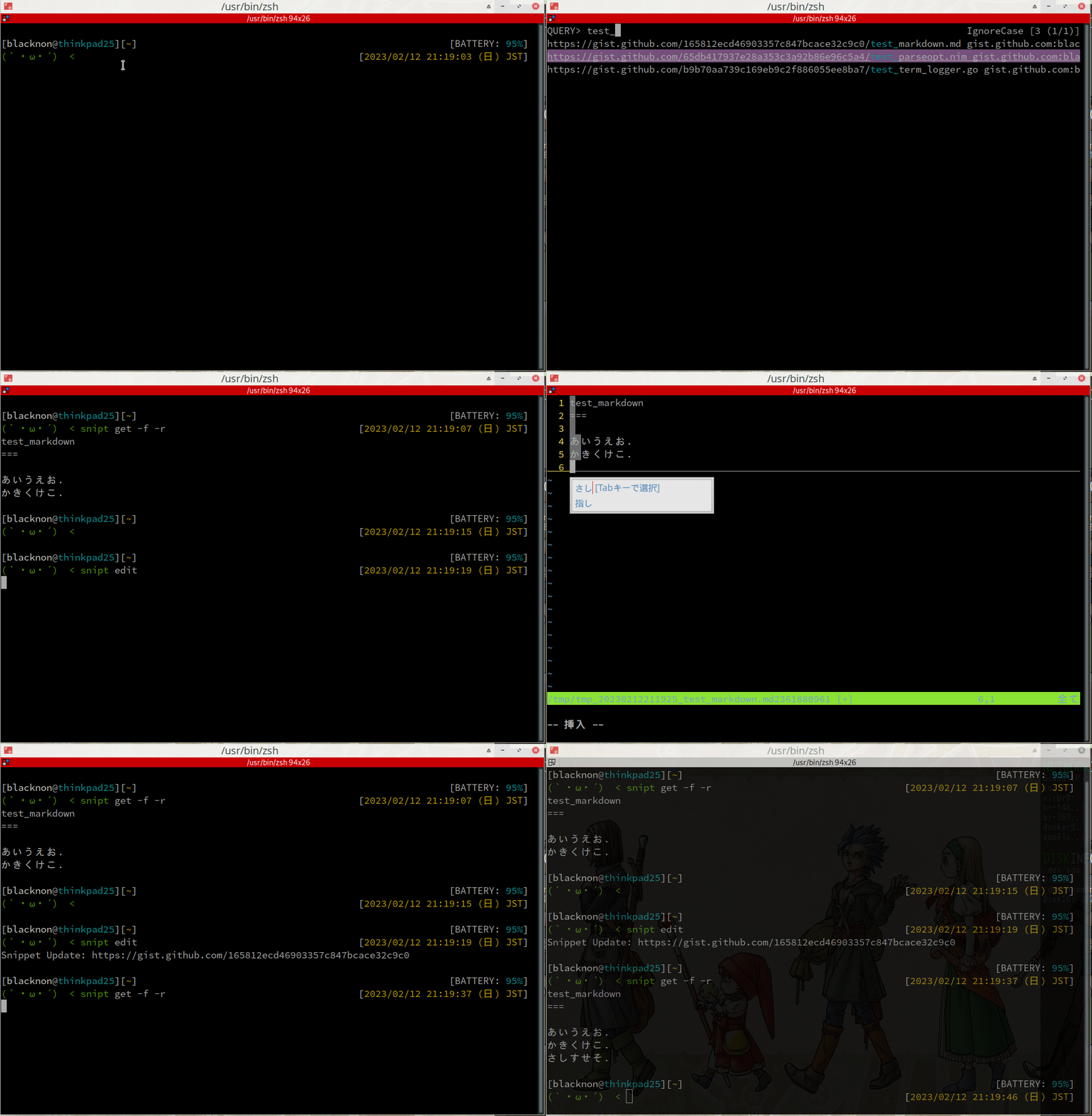
## Features
- Supported **Github Gist** and **Gitlab Snippets**.
- Can **Get**/**Update**/**Delete** `Remote Snippets`(**Gist**/**Gitlab Snippets**), and **Edit** them directly in your local editor.
- Supports group projects snippet creating at Gitlab Snippets.
- Like [pet](https://github.com/knqyf263/pet), you can choose Remote Snippets with [peco](https://github.com/peco/peco) or [fzf](https://github.com/junegunn/fzf).
## Install
```bash
go get github.com/blacknon/snipt
```
## Configuration
The configuration file is auto-generated in `$XDG_CONFIG_HOME/snipt/config.toml` or `$HOME/.snipt/config.toml` by default.
[General]
editor = "vim" # your favorite text editor
selectcmd = "peco" # elector command for edit command (fzf or peco)
[[Gist]]
access_token = "ghp_hogehogefugafuga" # gist access token
[[Gitlab]]
url = "https://gitlab.com/api/v4" # gitlab1 url
access_token = "glplat-hogehogefugafuga" # gitlab1 access token
[[Gitlab]]
url = "https://hogehoge.gitlab.local/api/v4" # gitlab2 url
access_token = "glplat-testtest123123" # gitlab2 access token
## Usage
NAME:
snipt - multiple remote platform snippet manager.
USAGE:
snipt [global options] command [command options] [arguments...]
VERSION:
0.1.0
COMMANDS:
list list all snippet.
get get remote snippet data.
create create remote snippet. default by github creates a secret gist, gitlab snippet creates a private snippet.
update update remote snippet data.
edit edit remote snippet file. use the command specified in `editor` in config.toml for editing.
delete delete remote snippet data.
help, h Shows a list of commands or help for one command
GLOBAL OPTIONS:
--config FILE, -c FILE load configuration from FILE
--help, -h show help
--version, -v print the version
### Edit snippet
use `edit` subcommand.
NAME:
snipt edit - edit remote snippet file. use the command specified in `editor` in config.toml for editing.
USAGE:
snipt edit [command options] [arguments...]
OPTIONS:
--visibility github gist, -v github gist specify visibility according to each github gist/`gitlab snippet`. (default: false)
--title value, -t value specify remote snippet title.
--secret, -s printout (default: false)
--help, -h show help
```bash
snipt edit
```
### Get snippet list
use `list` subcommand.
NAME:
snipt list - list all snippet.
USAGE:
snipt list [command options] [arguments...]
OPTIONS:
--file, -f output snippet by file (default: false)
--secret, -s printout (default: false)
--help, -h show help
```bash
snipt list
```
### Create snippet
use `create` subcommand.
NAME:
snipt create - create remote snippet. default by github creates a secret gist, gitlab snippet creates a private snippet.
USAGE:
snipt create [command options] FILE...
OPTIONS:
--visibility github gist, -v github gist specify visibility according to each github gist/`gitlab snippet`. (default: false)
--title value, -t value specify remote snippet title.
--project_snippet, -p output to a list so that it can also support the creation of Gitlab's Project Snippet. (default: false)
--help, -h show help
```bash
snipt create /path/to/file
```
### Get snippet
use `get` subcommand.
NAME:
snipt get - get remote snippet data.
USAGE:
snipt get [command options] [arguments...]
OPTIONS:
--output PATH, -o PATH output snippet to PATH
--file, -f output snippet by file (default: false)
--secret, -s printout (default: false)
--read, -r printout to stdout from snippet. (default: false)
--help, -h show help
```bash
snipt get
```
### Update snippet
NAME:
snipt update - update remote snippet data.
USAGE:
snipt update [command options] [arguments...]
OPTIONS:
--file, -f output snippet by file (default: false)
--visibility github gist, -v github gist specify visibility according to each github gist/`gitlab snippet`. (default: false)
--title value, -t value specify remote snippet title.
--secret, -s printout (default: false)
--help, -h show help
```bash
snipt update /path/to/file
```
### Delete snippet
NAME:
snipt delete - delete remote snippet data.
USAGE:
snipt delete [command options] [arguments...]
OPTIONS:
--secret, -s printout (default: false)
--help, -h show help
```bash
snipt delete
```