[English](../../README.md) · **简体中文** · [Русский](README.ru.md) · [हिन्दी](README.hi.md) · [العربية](README.ar.md)





**针对真实协议测试你的 MCP 服务器。无需 mock,无需导入,不锁定任何语言。**
mcp-assert 会像 Claude、Cursor 或任何 MCP 客户端那样连接到你的服务器:真实的 stdio/SSE/HTTP 传输、完整的 initialize 握手、实际的工具调用。它会根据你在 YAML 中定义的期望来检查响应。只要通过了 mcp-assert,它就能与每一个 MCP 客户端协同工作。
> [!WARNING]
> 我们扫描了 102 个 MCP 服务器,在包括 AWS、Serena 和 Grafana 在内的 55 个服务器中发现了 **4,794 个 schema 问题**(其中 2,239 个为错误)。最常见的失败是:参数缺少类型定义,导致 agent 发送错误的值类型。参见[评分卡](https://blackwell-systems.github.io/mcp-assert/scorecard/)。
```
Your YAML ──→ mcp-assert ──→ MCP Server
(inputs + assertions) (client) (any language)
│
Pass / Fail
```
### 你的服务器分辨不出区别
mcp-assert 讲的是完整的 MCP 协议:initialize 握手、`tools/list` 发现、带真实参数的 `tools/call`。它能发现单元测试遗漏的 bug,因为它是在链路上测试,而非在进程内测试。
### 已在生产环境中采用
- **[Wyre Technology](https://github.com/wyre-technology)**:通过共享基线工作流,使用 `mcp-assert-action` 测试了 25 个 MCP 服务器
- **[Ant Group (AntV)](https://github.com/antvis/mcp-server-chart)**:在发布后 3 天内集成进 CI
- **[Vera](https://github.com/aallan/vera)**:项目路线图上推荐的测试框架([#529](https://github.com/aallan/vera/issues/529))
- **已合并的修复 PR**:Google、Grafana、LangChain、官方 MCP SDK
MCP 的测试标准,就如同 Python 之于 pytest、JavaScript 之于 Jest。
一行代码即可将其添加到任何 MCP 服务器项目中:
```yaml
- uses: blackwell-systems/mcp-assert-action@v1
with:
suite: evals/
```
> [!NOTE]
> LLM 适用于主观输出。断言适用于确定性输出。大多数 MCP 工具都是确定性的。mcp-assert 覆盖它们。
## 安装
```bash
# npm (no Go required)
npx @blackwell-systems/mcp-assert
# pip (no Go required)
pip install mcp-assert
# Go
go install github.com/blackwell-systems/mcp-assert/cmd/mcp-assert@latest
# Homebrew
brew install blackwell-systems/tap/mcp-assert
# Docker
docker run blackwellsystems/mcp-assert audit --server "npx my-server"
# Snap (Linux)
sudo snap install mcp-assert --classic
# Scoop (Windows)
scoop bucket add blackwell-systems https://github.com/blackwell-systems/scoop-bucket
scoop install mcp-assert
# Winget (Windows)
winget install BlackwellSystems.mcp-assert
# curl | sh (macOS / Linux)
curl -fsSL https://raw.githubusercontent.com/blackwell-systems/mcp-assert/main/install.sh | sh
```
## 快速开始
### 数秒内审计任意 MCP 服务器。无需配置。
将其指向任意服务器:
```bash
mcp-assert audit --server "npx my-mcp-server"
```
```
Server: my-server
Transport: stdio
Score: 83%
✓ read_query 1ms [E000] responds, returns content
✗ create_table 0ms [E201] internal error: panic: nil pointer...
✓ list_tables 1ms [E000] responds, returns content
3 tools tested, 2 healthy, 1 crashed
```
结构化的错误码可即时对问题进行分类。全部 24 个错误码参见[错误参考](../../docs/ERROR_REFERENCE.md)。
> [!TIP]
> 审计会建立连接,通过 `tools/list` 发现每一个工具,用 schema 生成的输入调用每个工具,并报告哪些工具崩溃、哪些能妥善处理错误。无需 YAML。若要更深入,可生成断言文件并对其进行定制:
```bash
# Audit + generate starter YAML for CI
mcp-assert audit --server "npx my-mcp-server" --output evals/
# Edit the generated YAMLs: add expected content, setup steps, multi-step flows
# Run in CI with regression detection
mcp-assert ci --suite evals/ --threshold 95
```
### 从零编写断言
```bash
# Scaffold your first assertion
mcp-assert init evals # Or: init evals --server "my-server" for auto-generation
# Run it
mcp-assert run --suite evals/ --fixture evals/fixtures
```
完整演练参见[入门指南](https://blackwell-systems.github.io/mcp-assert/getting-started/)。
### 已经在使用 Vitest、Jest、Bun、PHPUnit 或 pytest?
```bash
# Vitest
npm install -D @blackwell-systems/vitest-mcp-assert
```
```ts
// mcp.test.ts
import { describeMcpSuite } from '@blackwell-systems/vitest-mcp-assert'
describeMcpSuite('mcp server', 'evals/')
```
```bash
# pytest
pip install pytest-mcp-assert
pytest --mcp-suite evals/
```
> [!IMPORTANT]
> 同一批 YAML 文件可在 CLI、Vitest、Jest、Bun、PHPUnit、pytest 和 Go test 之间通用。无需迁移。一次编写,随处运行。
## 你能做的一切
| 命令 | 作用 | 所需配置 |
|---------|-------------|----------------|
| `audit --server "..."` | 扫描任意服务器,将每个工具归类为健康/崩溃/超时 | 无 |
| `fuzz --server "..."` | 向每个工具投掷对抗性输入,发现崩溃与挂起 | 无 |
| `init --server "..."` | 依据 tools/list 生成完整测试套件,并捕获快照 | 无 |
| `run --suite evals/` | 运行 YAML 断言,报告通过/失败 | YAML 文件 |
| `ci --suite evals/` | 带阈值、基线、JUnit XML、GitHub Step Summary 运行 | YAML 文件 |
| `coverage --suite evals/ --server "..."` | 报告哪些工具有断言、哪些没有 | YAML 文件 |
| `snapshot --suite evals/ --update` | 将响应捕获为黄金文件用于回归检测 | YAML 文件 |
| `watch --suite evals/` | 在 YAML 变更时重新运行,状态翻转时显示差异 | YAML 文件 |
| `matrix --languages go:gopls,ts:tsserver` | 在多个语言服务器上运行同一套件 | YAML 文件 |
| `intercept --server "..." --trajectory t.yaml` | 在 agent 与服务器之间代理,捕获实时工具调用轨迹 | 轨迹 YAML |
| `lint --server "..."` | 24 条面向 agent 可用性的静态分析规则;`--fix` 自动生成 schema 改进 | 无 |
先从 `audit`(零配置)开始,接着是 `fuzz`(对抗性测试),然后是 `init`(生成一切),最后为你的特定断言定制 YAML。
## 零成本覆盖
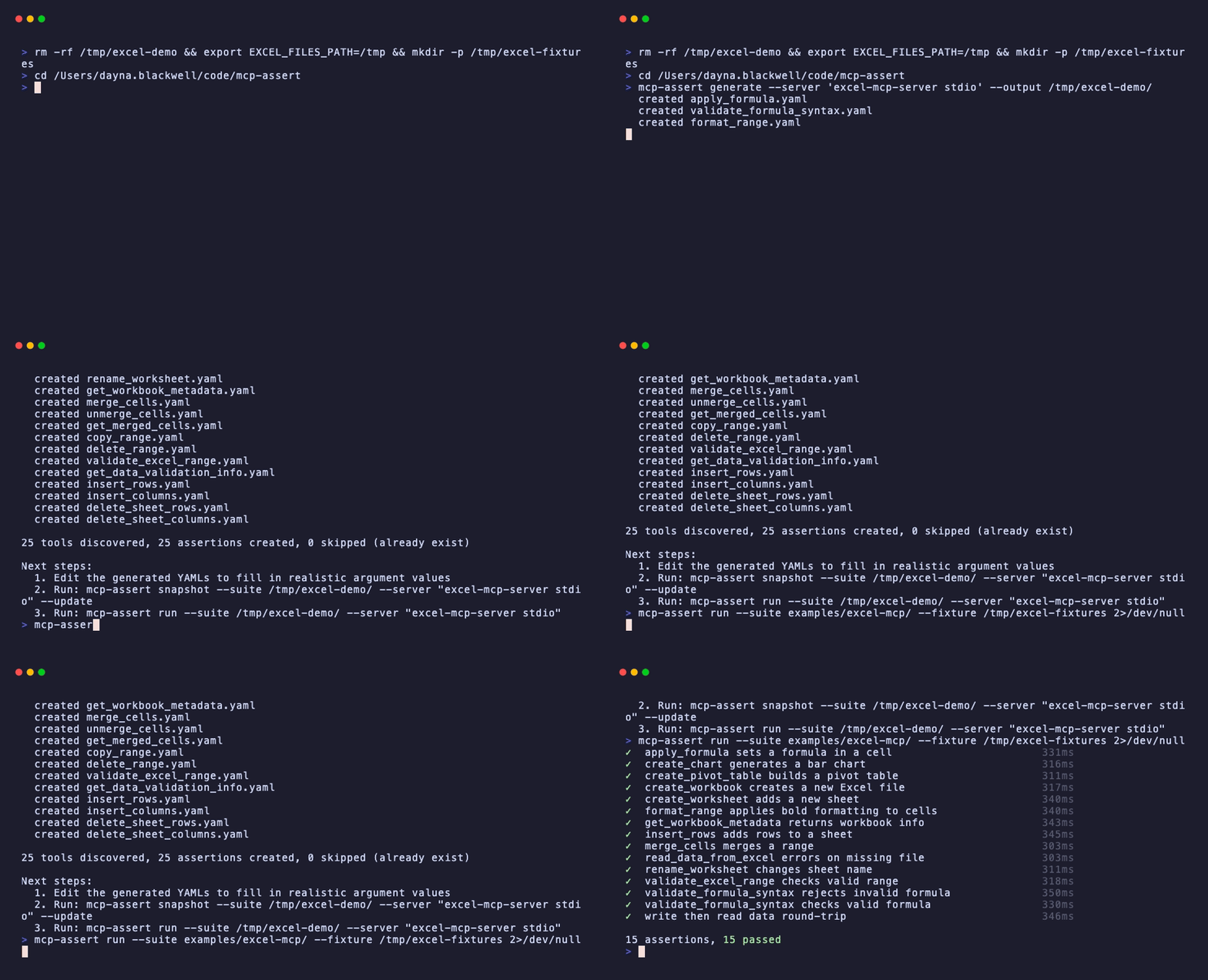
```bash
# Generate stub assertions for every tool the server exposes
mcp-assert generate --server "my-mcp-server" --output evals/ --fixture ./fixtures
# Capture actual outputs as snapshots
mcp-assert snapshot --suite evals/ --server "my-mcp-server" --update
# Assert nothing changed
mcp-assert run --suite evals/ --server "my-mcp-server"
```
## Lint + 自动修复
静态分析无需执行工具即可捕获 schema 问题。24 条规则可检测会导致 agent 失败的问题:
```bash
mcp-assert lint --server "npx my-mcp-server"
```
```
E E103 create_entities Required parameter "entities" has no description
W W114 generate_chart Input schema is 5 levels deep. LLMs struggle with nesting
W W112 (server) Server exposes 27 tools. LLM accuracy degrades beyond 20
5 error(s), 11 warning(s)
```
自动生成修复:
```bash
mcp-assert lint --server "npx my-mcp-server" --fix
```
```
memory-server: 9 tools, 25 findings, 23 auto-fixable
E103 create_entities Add description: "The entities value (array)"
W109 search_nodes Add examples to "query": [search term]
W116 read_graph Append: "Returns the graph data as JSON."
23 fixes generated.
```
在 CI 中使用 `--strict` 让警告也判为失败:
```bash
mcp-assert lint --server "..." --strict --threshold 0
```
## 与「LLM 作为评判者」框架有何不同
对于确定性工具,mcp-assert 是更好的选择。对于主观输出,「LLM 作为评判者」框架仍是正确之选。如果你的服务器混用了多种工具类型,两者可兼用。
| 维度 | LLM 作为评判者的 eval 框架 | mcp-assert |
|---|---|---|
| 最适合 | 主观输出(散文、创意内容) | 确定性输出(数据、状态、校验) |
| 评分 | 语言模型打分(灵活、昂贵) | 基于断言(精确、免费) |
| 速度 | 每次测试数秒(LLM 往返) | 每次测试毫秒级(无 LLM) |
| CI 成本 | 每次运行都要 API 调用 | 零外部依赖 |
| 可靠性 | 未度量 | 每条断言的 pass@k / pass^k |
| 回归 | 不支持 | 基线对比,倒退即失败 |
| 多语言 | 不支持 | 同一断言跨 N 个语言服务器 |
## 为什么不直接写测试?
你需要 MCP 协议引导、一个与服务器无关的运行器(你的 Go 测试无法测试你的 TypeScript 服务器),以及各种 eval 功能(回归检测、Docker 隔离、JUnit 输出)。mcp-assert 全部为你搞定。一个 YAML 文件,任意服务器,任意语言。
## CI 集成
使用 [mcp-assert GitHub Action](https://github.com/blackwell-systems/mcp-assert-action) 实现零配置 CI:
```yaml
- uses: blackwell-systems/mcp-assert-action@v1
with:
suite: evals/
threshold: 95
```
下载二进制文件,运行断言,上传 JUnit XML 结果,写入 GitHub Step Summary。你的 runner 上无需 Go 工具链。
或直接运行:
```bash
mcp-assert ci --suite evals/ --threshold 95 --junit results.xml
```
关于 JUnit XML、markdown 摘要、徽章和回归检测,参见 [CI 集成指南](https://blackwell-systems.github.io/mcp-assert/ci-integration/)。
## pytest 集成
将 mcp-assert 断言作为 pytest 测试项运行:
```bash
pip install pytest-mcp-assert
pytest --mcp-suite evals/
```
每个 YAML 文件都会成为一个带有 通过/失败/跳过 语义的 pytest Item。通过 `pyproject.toml` 配置:
```toml
[tool.pytest.ini_options]
mcp_suite = "evals/"
mcp_fixture = "fixtures/"
```
然后直接运行 `pytest`。全部选项参见 `pytest-plugin/README.md`。
## Vitest 集成
将 mcp-assert 断言作为 Vitest 测试运行:
```bash
npm install -D @blackwell-systems/vitest-mcp-assert
```
自动发现某个目录下的所有 YAML 文件:
```ts
// mcp.test.ts
import { describeMcpSuite } from '@blackwell-systems/vitest-mcp-assert'
describeMcpSuite('mcp server', 'evals/')
```
或运行单条断言:
```ts
import { test } from 'vitest'
import { runMcpAssert } from '@blackwell-systems/vitest-mcp-assert'
test('echo tool', () => runMcpAssert('evals/echo.yaml'))
```
同一批 YAML 文件可在 Vitest、pytest 和 CLI 之间通用。全部选项参见 `vitest-plugin/README.md`。
## 文档
完整文档见 [blackwell-systems.github.io/mcp-assert](https://blackwell-systems.github.io/mcp-assert):
- [入门](https://blackwell-systems.github.io/mcp-assert/getting-started/):安装、脚手架、首次运行
- [编写断言](https://blackwell-systems.github.io/mcp-assert/writing-assertions/):YAML 格式,全部 18 种断言类型 + 4 种轨迹类型、8 种块类型、6 种测试框架插件(pytest、Vitest、Jest、Bun、PHPUnit、Go test)、setup 步骤、capture、fixtures
- [CLI 参考](https://blackwell-systems.github.io/mcp-assert/cli/):带标志与示例的完整命令参考
- [示例](https://blackwell-systems.github.io/mcp-assert/examples/):跨 8 种语言的 65 个示例套件(606 条断言)
- [CI 集成](https://blackwell-systems.github.io/mcp-assert/ci-integration/):GitHub Action、JUnit XML、回归检测
- [徽章](https://blackwell-systems.github.io/mcp-assert/badge/):将「Works with mcp-assert」徽章添加到你的服务器 README
- [架构](https://blackwell-systems.github.io/mcp-assert/architecture/):内部实现与设计决策
- [路线图](https://blackwell-systems.github.io/mcp-assert/roadmap/):已交付与后续计划
- [评分卡](https://blackwell-systems.github.io/mcp-assert/scorecard/):在 13 个服务器中发现 32 个 bug,提交 9 个修复 PR,扫描 58 个服务器


## 许可证
MIT