# shelfctl
[](https://github.com/blackwell-systems)
[](https://github.com/blackwell-systems/shelfctl/actions/workflows/ci.yml)
[](https://goreportcard.com/report/github.com/blackwell-systems/shelfctl)
[](https://opensource.org/licenses/MIT)
[](https://buymeacoffee.com/blackwellsystems)

Meet Shelby, your friendly library assistant.

Your personal library, backed by GitHub. Free storage, per-book downloads, annotation sync across machines.
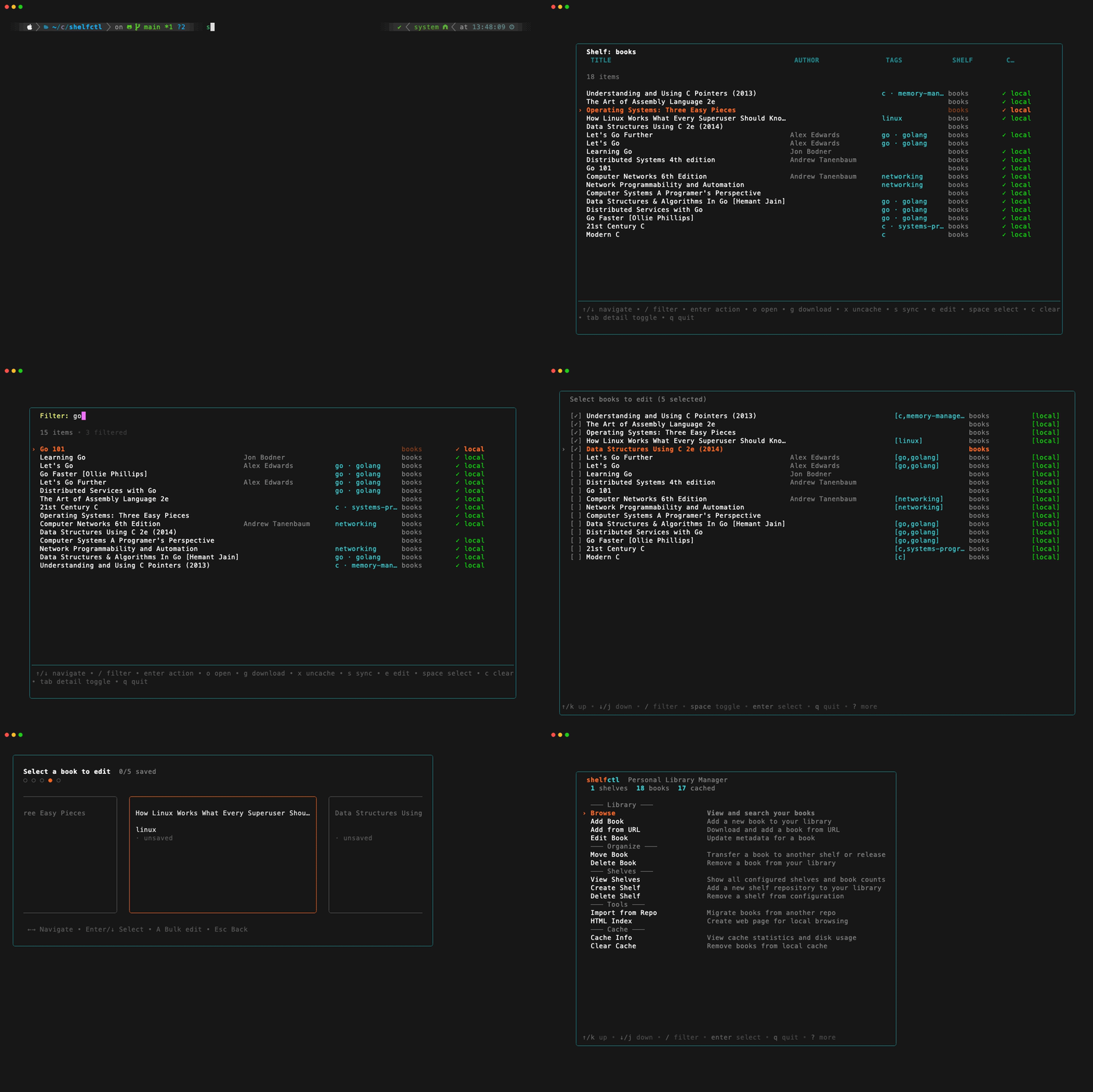
If you use GitHub, you've probably hit this: one monolithic "books" repo with hundreds of PDFs, or files scattered across random repos and gists. Eventually you hit GitHub's 100MB limit, or you bolt on Git LFS and discover it's expensive and annoying for a personal library.
Once PDFs land in git history, every clone stays heavy forever. Even after you delete the files, git history never forgets.
shelfctl solves this by storing files as GitHub Release assets (not git commits) and keeping only metadata in a simple `catalog.yml`. That means you can split a bloated repo into topic-based shelves, migrate books out of existing repos, and search + download on demand (without moving your library to a new service).
> [!WARNING]
> Deleting a PDF from a git repo doesn't remove it from git history. Clones still carry the weight. shelfctl avoids this entirely by storing documents as Release assets (only metadata is versioned).
Your GitHub account already gives you reliable distribution and storage primitives. shelfctl turns them into a library:
- Release assets for the PDFs/EPUBs
- `catalog.yml` for searchable metadata
- one repo per shelf (`shelf-programming`, `shelf-history`, …)
- Migration tools to split bloated repos and reorganize existing collections
> [!TIP]
> **Already have PDFs committed in git?** shelfctl can scan and migrate them into shelves without manual re-uploads:
> ```bash
> shelfctl migrate scan --source you/old-books-repo > queue.txt
> ```
**Three ways to browse your library:**
- **Interactive TUI** - visual browser with keyboard navigation and search
- **Static HTML index** - web-based viewer with tag filters and search (works offline)
- **Scriptable CLI** - pipe, filter, automate, and integrate with shell workflows
Your library stays portable, backed by normal git repos. Free by default (only pay if you choose Git LFS or exceed GitHub plan limits).
---
## 30-Second Quickstart
```bash
# 1. Set up authentication (create token at github.com/settings/tokens)
export SHELFCTL_GITHUB_TOKEN=ghp_your_token_here
# 2. Create your first shelf (auto-creates config on first run)
shelfctl init --repo shelf-books --name books --create-repo
# 3. Add a book
shelfctl shelve ~/Downloads/book.pdf --shelf books
# 4. Browse your library
shelfctl browse
```
That's it! Your book is now stored as a GitHub Release asset with searchable metadata.
---
## Why not commit PDFs?
**The tradeoff:**
| Approach | Git History | Clone Weight | Per-File Download | Cost |
|----------|-------------|--------------|-------------------|------|
| **Git commit** | Bloats forever | Heavy (even after deleting files) | Possible, but awkward | Free |
| **Git LFS** | Clean | Still heavier than needed | Possible, but awkward | Paid storage/bandwidth |
| **Release asset** | Clean | Light | Yes (native) | Free* |
*Free by default. You only pay if you choose LFS or exceed GitHub plan limits.
**Why Release assets:**
- Git history stays clean (only metadata is versioned)
- Documents live outside version control entirely
- Download individual files on-demand from GitHub's CDN
### On-demand downloads (no cloning)
Fetch a single book without cloning a repo or pulling a whole archive.
`shelfctl open ` downloads *only that file* from GitHub's CDN and opens it. Your library can be huge, but you only download what you actually read.
### Annotations and highlights sync
When you annotate or highlight PDFs in your reader, those changes are saved to your local cache. Use `shelfctl sync` to upload your annotated version back to GitHub (replaces the original, no versioning). From the TUI hub, select **Sync Modified** from the Cache menu (only appears when modified books are detected) to sync all at once. You can also press `s` in the browse view to sync the current or selected books. Your annotations stay with the book and sync across machines.
---

## Features
### Release assets backend (no git history bloat)
Files are stored as GitHub Release assets, not git commits. Your repository stays lightweight and git history never bloats.
### On-demand open (per-file download)
Download and open a single book without cloning the entire repository. Your library can be huge, but you only fetch what you need.
### Migration tools: scan → split → migrate
Built-in tools to scan existing repos, reorganize into topic-based shelves, and migrate files automatically. No manual re-uploads required.
### Static HTML index
Generate a web-based library viewer with cover thumbnails, tag filters, and live search. Works offline in any browser without running shelfctl.
### TUI + CLI
`shelfctl` (no arguments) launches an interactive visual hub. `shelfctl --help` lists all CLI commands. Every command supports `--json` output and `--no-interactive` for scripting and automation — the two modes share the same feature set.
### Reusable TUI components
shelfctl uses five production-ready [Bubble Tea](https://github.com/charmbracelet/bubbletea) components that have been extracted to standalone packages: **Base Picker** (eliminates picker boilerplate), **Multi-Select** (checkbox wrapper for any list), **Miller Columns** (hierarchical navigation layout), **Carousel** (peeking card layout), and **Command Palette** (fuzzy-search action overlay). Available as separate modules: [bubbletea-picker](https://github.com/blackwell-systems/bubbletea-picker), [bubbletea-multiselect](https://github.com/blackwell-systems/bubbletea-multiselect), [bubbletea-millercolumns](https://github.com/blackwell-systems/bubbletea-millercolumns), [bubbletea-carousel](https://github.com/blackwell-systems/bubbletea-carousel), [bubbletea-commandpalette](https://github.com/blackwell-systems/bubbletea-commandpalette). See [docs/development/components.md](docs/development/components.md) for details.
---
## How it works
- **One repo per topic shelf**
Create shelf repos like `shelf-programming`, `shelf-history`, etc.
- **Books live in Releases, not git history**
PDFs/EPUBs are uploaded as **GitHub Release assets** (not committed to the repo).
- **`catalog.yml` is the source of truth**
Each shelf repo contains a `catalog.yml` that stores searchable metadata and maps book IDs to release assets. Only metadata is versioned; the actual documents live outside git history.
- **On-demand, per-book downloads**
`shelfctl open ` downloads *only that one file* from GitHub's CDN and opens it.
- **Full lifecycle management**
shelfctl supports the workflow end-to-end: **add**, **get**, **open**, **migrate**, **split**, and more.
---
## Core Concepts
**Architecture**: Shelf → Repo → Release → catalog.yml + Assets
- **Shelf**: A GitHub repository (e.g. `shelf-programming`)
- **Release**: A storage container tag (default: "library", NOT a version release)
- **Assets**: Your PDF/EPUB files attached to the release
- **catalog.yml**: Searchable metadata file (tracked in Git) mapping book IDs to assets
Your books live as GitHub Release assets (outside Git history). Only metadata is versioned.
This keeps repos lightweight and enables per-file on-demand downloads.
---
## Prerequisites
- GitHub account with a personal access token
- Go 1.21+ (only if using `go install` or building from source)

## Install
**Homebrew (macOS/Linux):**
```bash
brew install blackwell-systems/tap/shelfctl
```
**Windows Package Manager (winget):**
```powershell
winget install BlackwellSystems.shelfctl
```
**Scoop (Windows):**
```powershell
scoop bucket add blackwell-systems https://github.com/blackwell-systems/scoop-bucket
scoop install shelfctl
```
**Install script (Linux/macOS):**
```bash
curl -fsSL https://raw.githubusercontent.com/blackwell-systems/shelfctl/main/install.sh | sh
```
Installs the latest release to `/usr/local/bin`. Override with `INSTALL_DIR=~/bin` or pin a version with `VERSION=v0.4.4`.
**Download pre-built binary:**
Download the appropriate binary for your platform from the [releases page](https://github.com/blackwell-systems/shelfctl/releases/latest), extract the archive, and run:
```bash
tar -xzf shelfctl_*_Darwin_arm64.tar.gz # or your platform
./shelfctl
```
Optionally move to your PATH: `mv shelfctl /usr/local/bin/`
**Using Go:**
```bash
go install github.com/blackwell-systems/shelfctl/cmd/shelfctl@latest
```
This downloads the module at the latest version, builds shelfctl, and places it in `$(go env GOPATH)/bin` (or `$GOBIN` if set).
**Build from source:**
```bash
git clone https://github.com/blackwell-systems/shelfctl
cd shelfctl
make build
```
## Authentication
shelfctl authenticates using a GitHub personal access token (PAT). Set `SHELFCTL_GITHUB_TOKEN` in your environment.
**Classic PAT scopes:**
- `repo` - for private shelves
- `public_repo` - for public-only shelves
**Fine-grained PAT permissions:**
Grant **BOTH** permissions on the shelf repos you manage:
- **Contents** (Read/Write) — for catalog.yml and README.md
- **Releases** (Read/Write) — for uploading/downloading book files
**Note**: GitHub CLI (`gh`) is not required - shelfctl uses the GitHub REST API directly.
### Setup Options
**Option A: Using gh CLI (optional convenience)**
If you already have [GitHub CLI](https://cli.github.com/) installed and authenticated:
```bash
gh auth login
export SHELFCTL_GITHUB_TOKEN=$(gh auth token)
```
**Option B: Manual token**
1. Visit https://github.com/settings/tokens
2. Generate new token (classic or fine-grained)
3. Select required scopes/permissions (see above)
4. Copy the token (starts with `ghp_` or `github_pat_`)
```bash
export SHELFCTL_GITHUB_TOKEN=ghp_your_token_here
```
Add to shell profile to persist (`~/.bashrc` or `~/.zshrc`).
**API Rate Limits**: GitHub's authenticated API allows 5,000 requests/hour. shelfctl caches downloaded book files locally; metadata is fetched from GitHub as needed. For typical personal library usage, you're unlikely to hit rate limits.
Optional: PDF Cover Thumbnails
For automatic cover extraction from PDFs, install poppler:
```bash
# macOS
brew install poppler
# Ubuntu/Debian
sudo apt-get install poppler-utils
# Fedora/RHEL
sudo dnf install poppler-utils
# Arch Linux
sudo pacman -S poppler
```
Not required - shelfctl works fine without it. Covers are extracted automatically when you download PDFs if poppler is installed.
---
## Usage
shelfctl has two entry points:
- **`shelfctl`** (no arguments) — launches the interactive TUI hub. Browse, add, edit, move, and delete books without typing any commands or flags.
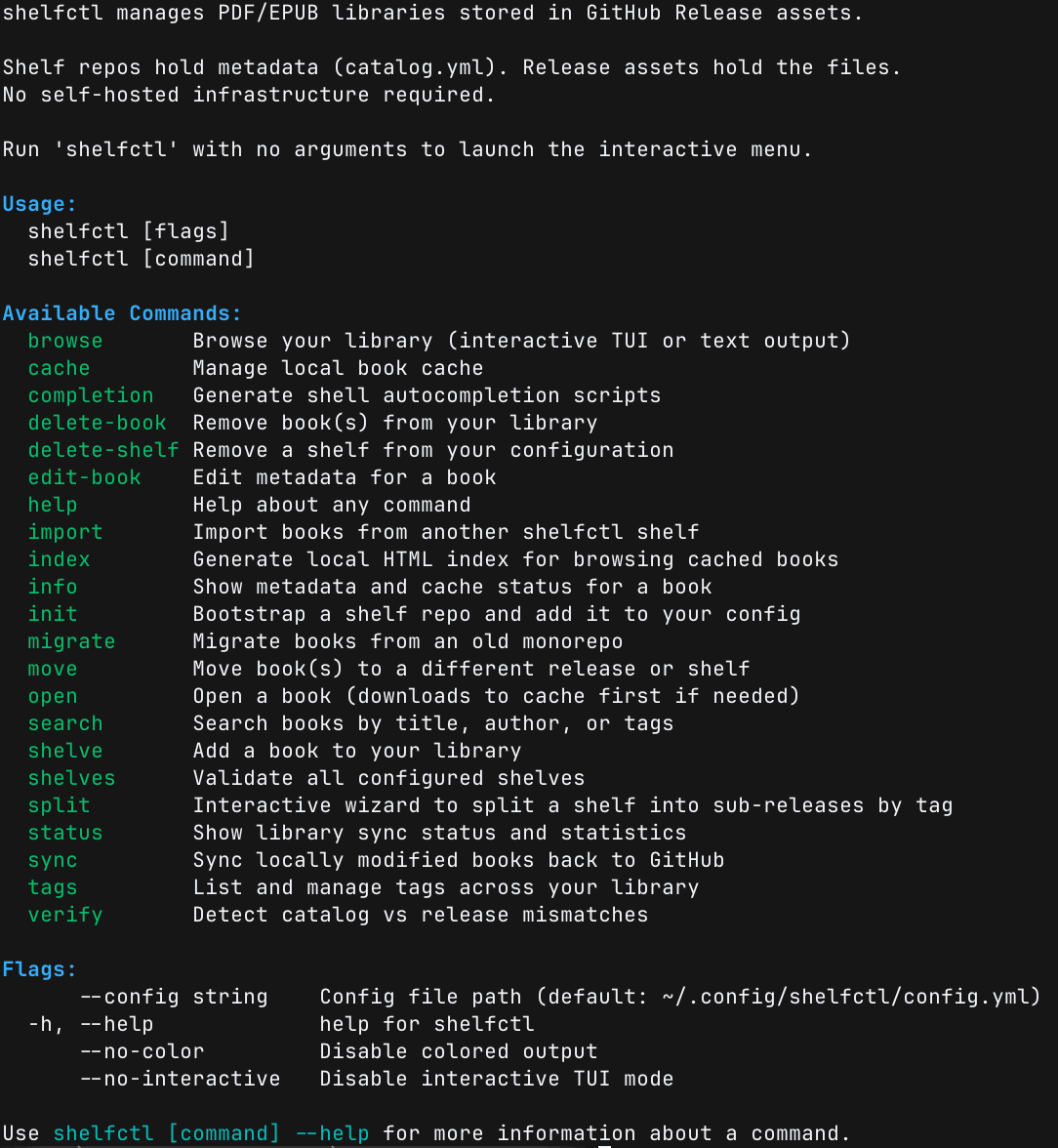
- **`shelfctl --help`** — shows all CLI commands. Every command works non-interactively, supports `--json` output, and can be piped or scripted.
Both entry points are full-featured. The TUI is not a wrapper around a subset — everything available in the CLI is also reachable from the hub.
### Interactive mode
```bash
shelfctl
```
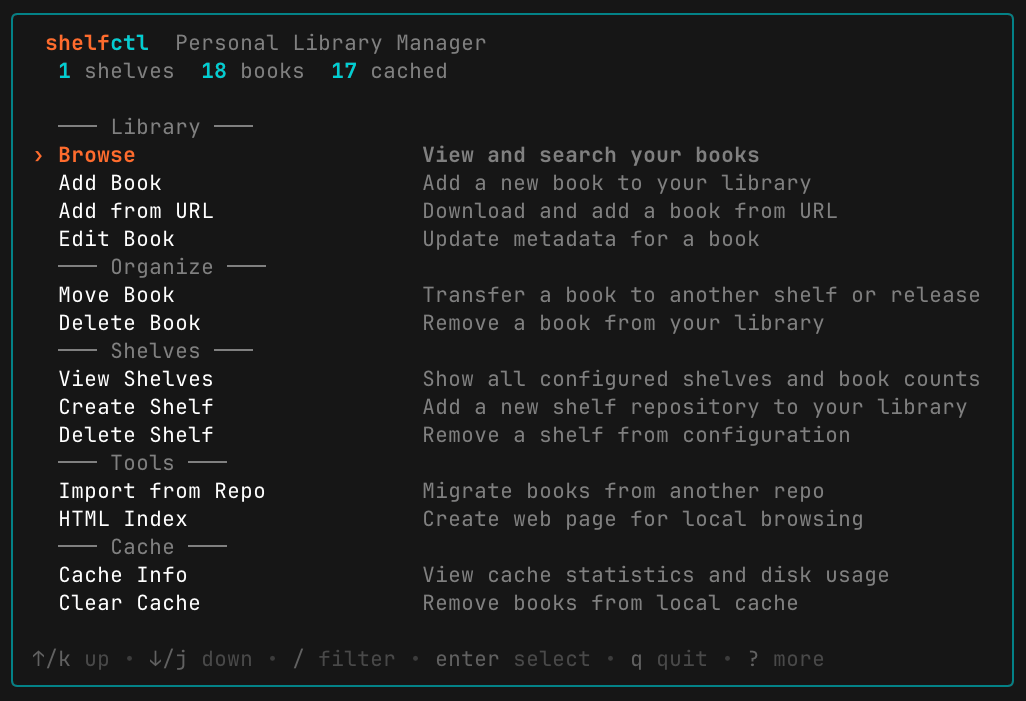
> **TUI Quick Reference**: ↑/↓ navigate, enter select, q quit, / search, ? help
See [docs/guides/hub.md](docs/guides/hub.md) for full details.
### Command-line mode
```bash
shelfctl --help
```
**Starting fresh?** Add books directly:
```bash
# Add a book (creates the shelf automatically if it doesn't exist)
shelfctl shelve ~/Downloads/sicp.pdf --shelf programming --title "SICP" --author "Abelson & Sussman" --tags lisp,cs
# List books across all shelves
shelfctl browse --shelf programming
# Open a book - downloads just this one file (6MB), not the entire release
shelfctl open sicp
# On another machine? Same command fetches it on-demand from GitHub
shelfctl open sicp
# Add annotations/highlights, then sync back to GitHub
open sicp # Annotate in your PDF reader
shelfctl sync sicp # Upload annotated version (replaces original, no versioning)
```
**Already have PDFs committed in a repo?** Reorganize them:
```bash
# (Ensure SHELFCTL_GITHUB_TOKEN is set - see Authentication section above)
# Scan your existing repos for files
shelfctl migrate scan --source you/old-books-repo > queue.txt
# Create organized shelves (private by default)
shelfctl init --repo shelf-programming --name programming --create-repo --create-release
shelfctl init --repo shelf-research --name research --create-repo --create-release
# Or make a shelf public
shelfctl init --repo shelf-public --name public --create-repo --create-release --private=false
# Edit queue.txt to map files to shelves, then migrate
shelfctl migrate batch queue.txt --n 10 --continue
```
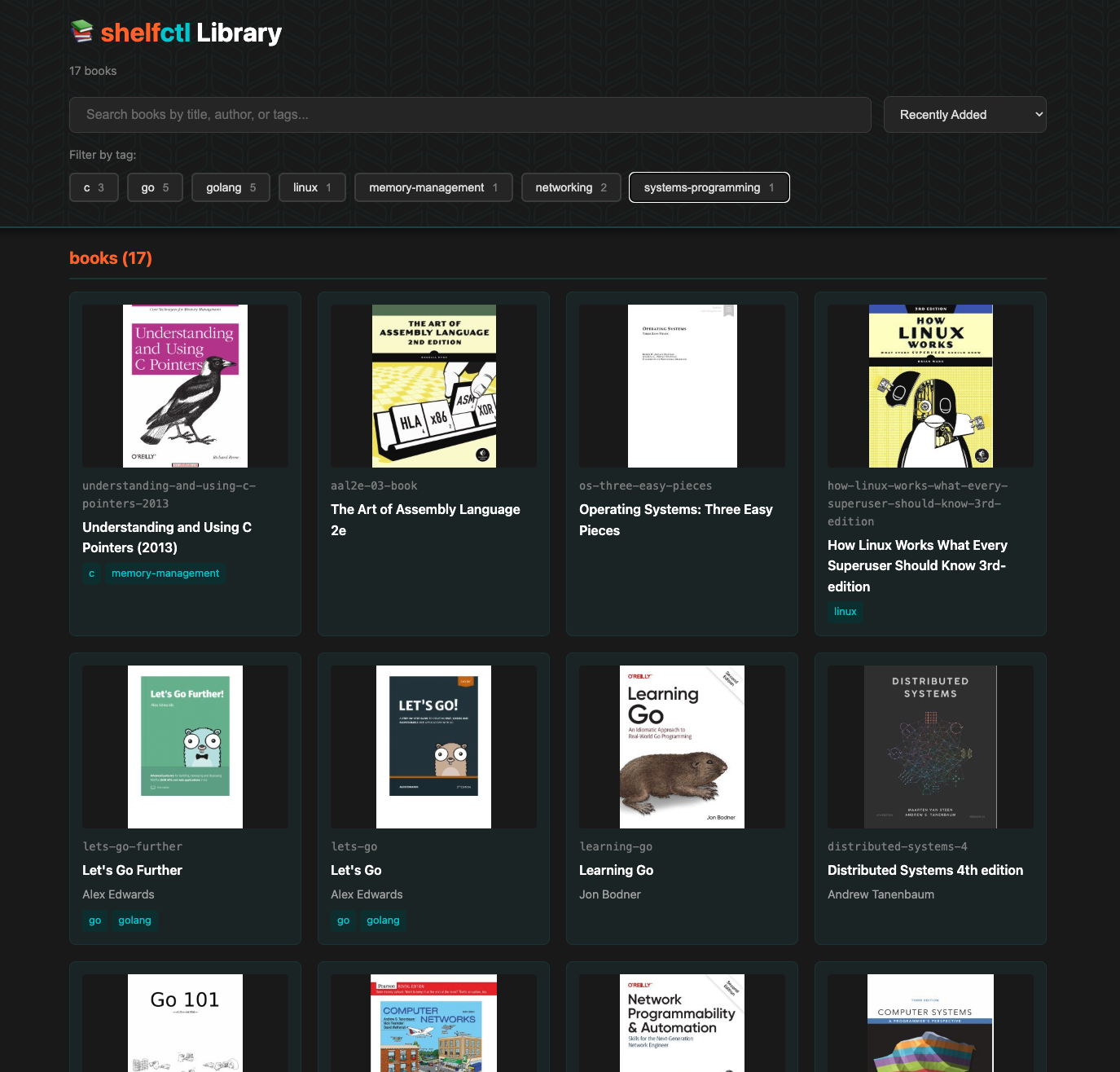
### HTML Library Index
Generate a static HTML page from your cached books — no server required. Open it in any browser for a visual, searchable view of your library that works completely offline.
```bash
shelfctl index --open
```
- Visual book grid with cover thumbnails
- Real-time search by title, author, or tags
- Clickable tag filters with book counts
- Sort by recently added, title, author, or year
- Organized by shelf — click any book to open it locally
---

## Commands
| Command | Description |
|---------|-------------|
| `init` | Bootstrap a shelf repo and release |
| `shelves` | Validate all configured shelves |
| `delete-shelf` | Remove a shelf from configuration |
| `browse` | Browse your library (interactive TUI or text) |
| `index` | Generate local HTML index for web browsing |
| `search` | Search books by title, author, or tags |
| `status` | Show library sync status and statistics |
| `tags` | List all tags with counts, rename tags in bulk |
| `verify` | Detect catalog vs release mismatches, auto-fix with `--fix` |
| `sync` | Upload locally modified books (annotations/highlights) to GitHub |
| `cache clear` | Remove books from local cache without deleting from shelves |
| `cache info` | Show cache statistics and disk usage |
| `info ` | Show metadata and cache status |
| `open ` | Open a book (auto-downloads if needed) |
| `shelve ` | Add a book to your library |
| `edit-book [id]` | Update metadata for one or multiple books (batch mode) |
| `delete-book ` | Remove a book from your library |
| `move ` | Move between releases or shelves |
| `split` | Interactive wizard to split a shelf |
| `migrate one` | Migrate a single file from an old repo |
| `migrate batch` | Migrate a queue of files |
| `migrate scan` | List files in a source repo |
| `import` | Import all books from another shelf |
| `completion` | Generate shell autocompletion scripts |
---
## Configuration
Default config path: `~/.config/shelfctl/config.yml`
```yaml
github:
owner: "you"
token_env: "SHELFCTL_GITHUB_TOKEN" # Environment variable to read token from
defaults:
release: "library"
shelves:
- name: "programming"
repo: "shelf-programming"
- name: "history"
repo: "shelf-history"
```
**Security**: The token itself is never stored in the config file - only the environment variable name. shelfctl reads the token from your environment at runtime.
See [`config.example.yml`](config.example.yml) for a complete example.
---

## Documentation
- **[Tutorial](docs/guides/tutorial.md)** - Step-by-step walkthrough from installation to advanced workflows
- **[Architecture Guide](docs/reference/architecture.md)** - How shelves work, organization strategies, schemas, and configuration
- **[Interactive Hub](docs/guides/hub.md)** - Guide to the interactive TUI menu
- **[Commands Reference](docs/reference/commands.md)** - Complete documentation for all commands
- **[Troubleshooting](docs/reference/troubleshooting.md)** - Common issues and solutions
- **[Contributing](docs/development/contributing.md)** - Development guidelines
### For Developers
- **[Reusable Bubble Tea Components](docs/development/components.md)** - Production-ready TUI components (picker, multi-select, miller columns)
- **[TUI Architecture](docs/development/tui-architecture.md)** - Technical deep dive into the unified TUI design
---
## Design Philosophy
shelfctl is domain-specific by design: it solves the PDF/EPUB library problem and nothing else. This narrow focus keeps it simple, maintainable, and excellent at what it does.
---
## ⚖️ Disclaimer
shelfctl is a specialized management tool designed to help developers organize their personal document libraries using the GitHub API. By using this software, you agree to the following:
**Platform Compliance**: You are solely responsible for ensuring that your use of GitHub as a storage backend complies with GitHub's Terms of Service and Acceptable Use Policies. The author(s) of shelfctl are not responsible for any account suspensions or data removal by GitHub.
**Content Responsibility**: shelfctl does not provide, host, or distribute any content. Users are responsible for ensuring they have the legal right to store and distribute any files they upload to their own GitHub repositories and releases.
---
## Support This Project

If you find shelfctl useful:
- ⭐ **Star the repo** on GitHub
- 🐛 **Report issues** or suggest features
- 🤝 **Contribute** improvements (see [contributing.md](docs/development/contributing.md))
- ☕ **Buy me a coffee** via the badge above
---
## Credits
Shelby the Shelf (our mascot) is a terminal wearing a bookshelf like a sweater, because why not.
---
## License
**Software:** MIT License - See [LICENSE](LICENSE) for details
**Shelby Mascot & Brand Assets:** You may redistribute unmodified brand assets with shelfctl. Brand assets are not licensed for reuse outside shelfctl. See [assets/LICENSE](assets/LICENSE) for details.
---