iPages📖
Quickly implement swipable page views in iOS. 📝
Get Started |
Examples |
Customize |
Install |
## Get Started
1. [Install](https://github.com/benjaminsage/iPages/blob/main/INSTALL.md) `iPages`
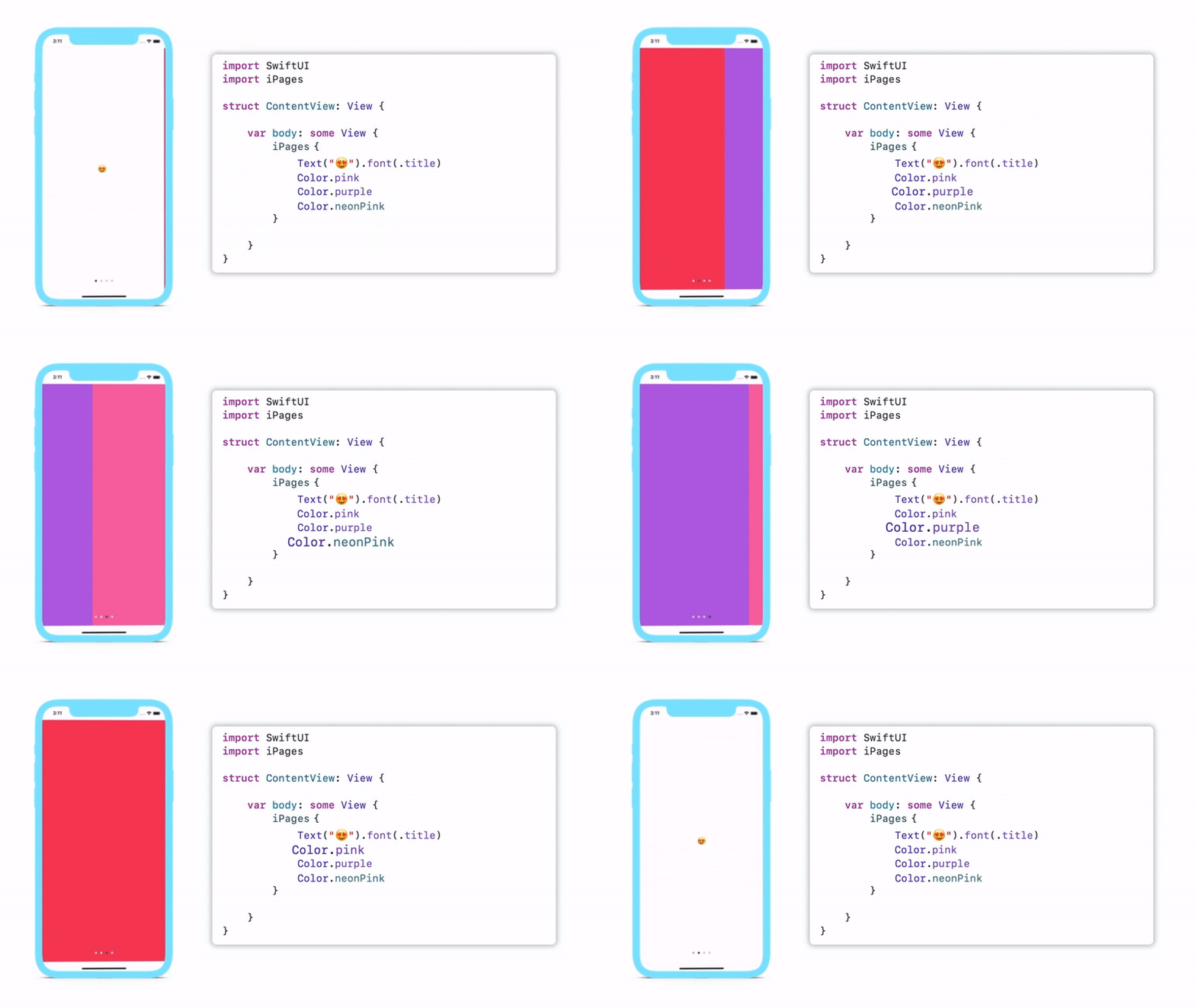
2. Add `iPages` to your project
```swift
import SwiftUI
import iPages
struct ContentView: View {
var body: some View {
iPages {
Text("iPages 🤑")
Color.pink
}
}
}
```
3. Customize your `iPages`
## Examples
### Marketing Materials 💸
 Use `iGraphicsView` to demo marketing slides.
```swift
import SwiftUI
import iPages
import iGraphics
struct ContentView: View {
var body: some View {
iPages {
iGraphicsView(.first)
iGraphicsView(.second)
iGraphicsView(.third)
}
}
}
```
Use `iGraphicsView` to demo marketing slides.
```swift
import SwiftUI
import iPages
import iGraphics
struct ContentView: View {
var body: some View {
iPages {
iGraphicsView(.first)
iGraphicsView(.second)
iGraphicsView(.third)
}
}
}
```
Shopping App 🛍
If you want, you can pass in your own optional selection binding to iPages. Hide the bottom dots & add infinite scroll to remove context.
 ```swift
import SwiftUI
import iPages
import iGraphics
struct ContentView: View {
@State var currentPage: Int = 0
var body: some View {
iPages(selection: $currentPage) {
iGraphicsBox(.photo)
.stack(3)
iGraphicsBox(.card)
.stack(2)
}
.hideDots(true)
.wraps(true)
}
}
```
```swift
import SwiftUI
import iPages
import iGraphics
struct ContentView: View {
@State var currentPage: Int = 0
var body: some View {
iPages(selection: $currentPage) {
iGraphicsBox(.photo)
.stack(3)
iGraphicsBox(.card)
.stack(2)
}
.hideDots(true)
.wraps(true)
}
}
```
## Customize 🎀
`iPages` takes a trailing view builder of ordered views. You can also optionally pass in your own page index binding called `selection:`, to let you build your own page control, or however you want to use it. `iPages` supports a variety of custom modifiers. All customizations are built into our modifiers.
**Example**: Change the dot colors, enable infinite wrap & hide dots for single page views with the following code block:
```swift
iPages(selection: $currentPage) {
Text("👏")
}
.dotsTintColors(currentPage: Color, otherPages: Color)
.wraps(true)
.dotsHideForSinglePage(true)
.navigationOrientation(.vertical)
```
Use our exhaustive input list to customize your views.
| | Modifier or Initializer | Description
| --- | --- | ---
👷♀️ | `.init(content:)` | Initializes the page 📃📖 view.
👷♂️ | `.init(selection:content:)` | Initializes the page 📃📖 view with a selection binding.
⏺ | `.hideDots(_:)` | Modifies whether or not the page view should include the standard page control dots. (••••)
🔄 | `.wraps(_:)` | Modifies whether or not the page view should restart at the beginning 🔁 when swiping past the end (and vise-versa)
1️⃣ | `.dotsHideForSinglePage(_:)` | Modifies whether the page dots are hidden when there is only one page. 1️⃣⤵️
🎨 | `.dotsTintColors(currentPage:otherPages:)` | Modifies tint colors 🟡🟢🔴🟣 to be used for the page dots.
🔘 | `.dotsBackgroundStyle(_:)` | Modifies the background style ⚪️🔘 of the page dots.
🔃 | `.dotsAllowContinuousInteraction(_:)` | Modifies the continuous interaction settings of the dots. 🔄
↔️ | `.dotsAlignment(_:)` | Modifies the **alignment of the page dots**. 👆 👇
↕️ | `.navigationOrientation(_:)` | Modifies the navigation **orientation** of the page view. ↔️ ↕️
🦿 | `.disableBounce(_:)` | Disables the **bounce** settings of the page view. This is especially useful for scroll views.
↔️ | `.interPageSpacing(_:)` | Modifies the spacing between the pages. ↔️
🎥 | `.animated(_:)` | Modifies whether the the pages animate the slide if the `selection` binding changes. 🎥
## Install
Use the Swift package manager to install. Find instructions [here](https://github.com/benjaminsage/iPages/blob/main/INSTALL.md)😀