Lumina Note Logo # Lumina Note **人类可编辑的笔记,以及能操作整个笔记库的 Agent** Lumina Note 首先是一个快速、本地、对人类友好的 Markdown 工作区:你可以直接阅读、编辑和整理自己的笔记。在这个基础上,它内置了一套基于 opencode SDK 的 Agent,让 AI 可以在你允许的范围内理解并操作整个笔记库。 [![GitHub Release](https://img.shields.io/github/v/release/blueberrycongee/Lumina-Note?style=flat-square)](https://github.com/blueberrycongee/Lumina-Note/releases) [![License](https://img.shields.io/badge/License-Apache_2.0-blue.svg?style=flat-square)](LICENSE) [![Electron](https://img.shields.io/badge/Electron-41-47848F?style=flat-square&logo=electron&logoColor=white)](https://www.electronjs.org/) [![CI](https://img.shields.io/github/actions/workflow/status/blueberrycongee/Lumina-Note/ci.yml?branch=main&style=flat-square&label=CI)](https://github.com/blueberrycongee/Lumina-Note/actions/workflows/ci.yml) [![Security Audit](https://img.shields.io/github/actions/workflow/status/blueberrycongee/Lumina-Note/security-audit.yml?branch=main&style=flat-square&label=Security%20Audit)](https://github.com/blueberrycongee/Lumina-Note/actions/workflows/security-audit.yml) [![Downloads](https://img.shields.io/github/downloads/blueberrycongee/Lumina-Note/total?style=flat-square)](https://github.com/blueberrycongee/Lumina-Note/releases) [![GitHub Stars](https://img.shields.io/github/stars/blueberrycongee/Lumina-Note?style=flat-square)](https://github.com/blueberrycongee/Lumina-Note/stargazers) ![Platform](https://img.shields.io/badge/platform-Windows%20%7C%20macOS%20%7C%20Linux-lightgrey?style=flat-square) **语言**: [English](./README.md) · 简体中文(维护版) · [繁體中文](./README.zh-TW.md) · [日本語](./README.ja.md) · [한국어](./README.ko.md) · [Español](./README.es.md) · [Français](./README.fr.md) · [Deutsch](./README.de.md) · [Italiano](./README.it.md) · [Português (Brasil)](./README.pt-BR.md) · [Русский](./README.ru.md)





--- ## 为什么选择 Lumina Note Lumina 的核心想法很简单:笔记应该始终属于人、方便人直接编辑;AI 则应该能在同一个工作区里帮你完成真正的知识工作。 - **人类优先的编辑体验**:你的 vault 是磁盘上的普通 Markdown 文件。即使不用 Lumina、不接任何模型,你也能打开、阅读、修改、移动和备份。 - **原生 Agent 辅助**:Lumina 内置基于 opencode 的 Agent。你可以让它读取、编辑、重组、总结、连接和研究整个笔记库。 - **知识结构保持可见**:WikiLinks、反向链接、图谱、PDF、批注、图片和闪卡都是人能直接使用的工作区界面,不是藏在 AI 里的黑盒状态。 - **模型路由自由**:你可以使用自己的模型服务商、本地 Ollama、OpenAI-compatible endpoint,或已持有许可证时使用 Lumina Cloud。 ## 界面预览
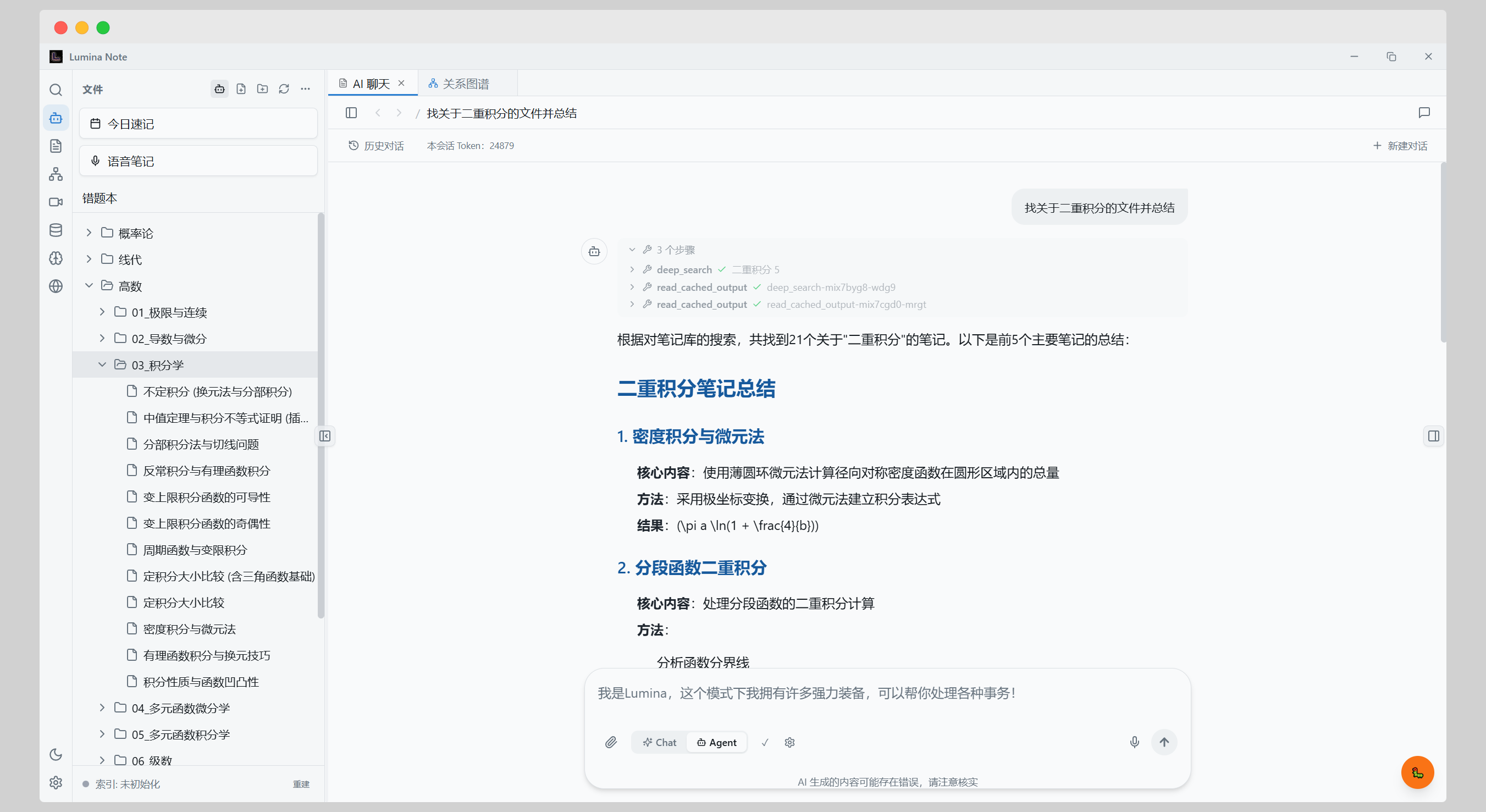
AI Agent

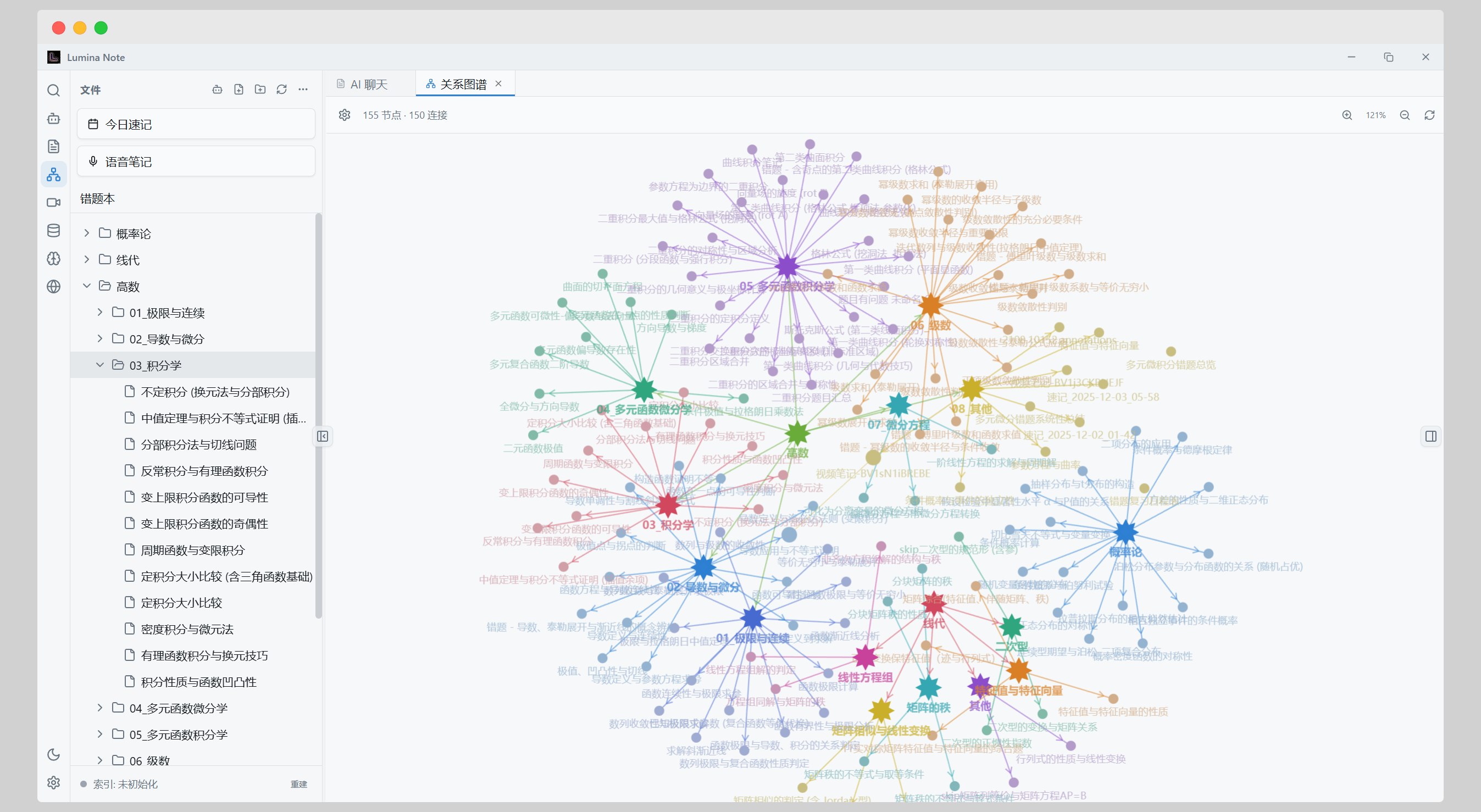
知识图谱

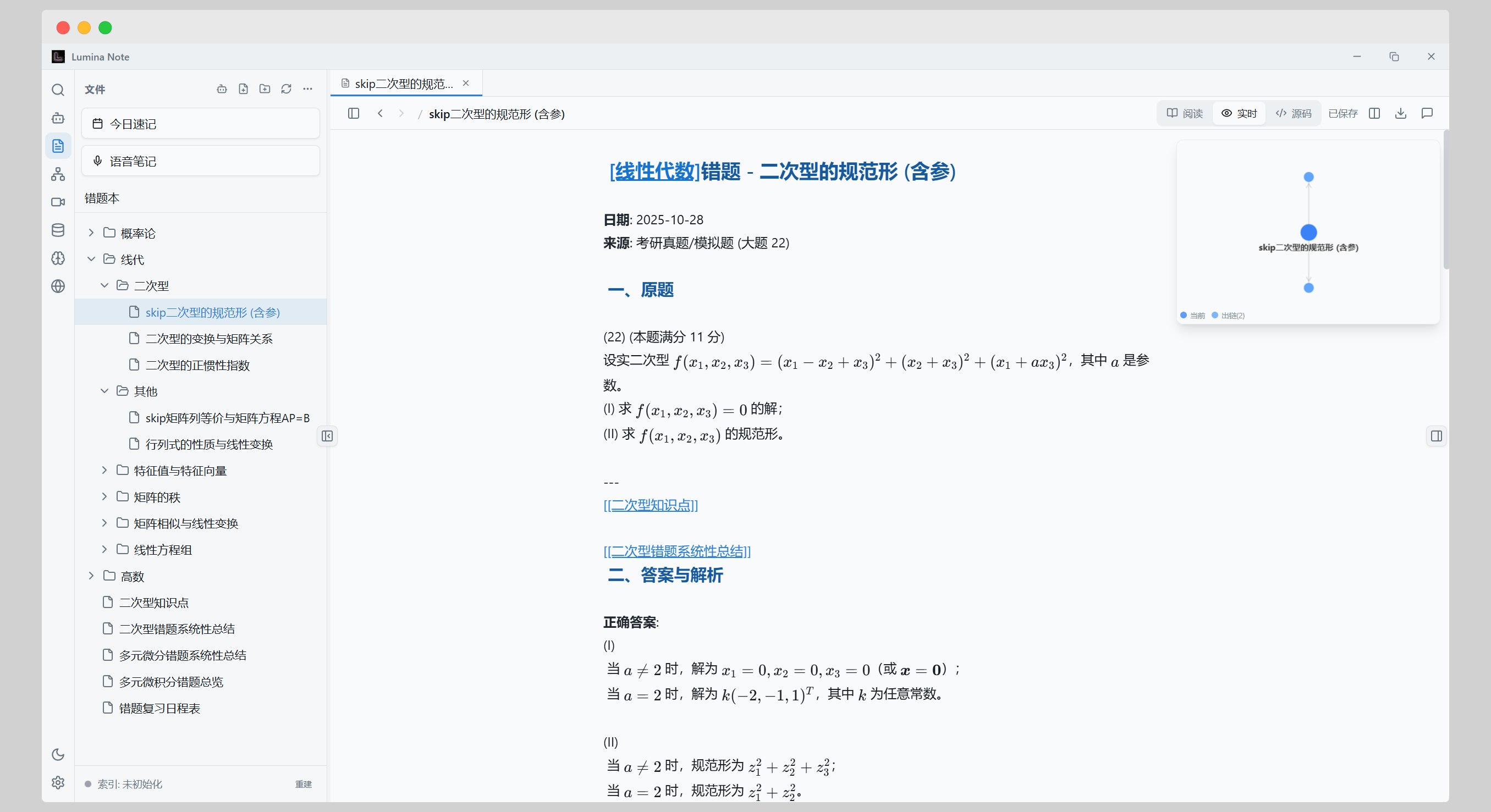
支持 LaTeX 的 Markdown 编辑器

## 它能做什么 - 直接编辑 Markdown 笔记,并使用实时预览、阅读模式、WikiLinks、反向链接和知识图谱。 - 让内置 Agent 操作笔记库:起草页面、整理文件夹、总结 PDF、连接相关笔记、生成闪卡,或清理混乱的知识材料。 - 自由选择模型路由:OpenAI、Anthropic Claude、Google Gemini、DeepSeek、Moonshot Kimi、智谱 GLM、MiMo、Groq、OpenRouter、Ollama、OpenAI-compatible endpoint,或可选的 Lumina Cloud。 - 在同一套 Agent 基础上开发更多用法:通过 Agent skills、自定义命令和开发者预览阶段的插件系统扩展 Lumina。 ## 下载 从 [Releases](https://github.com/blueberrycongee/Lumina-Note/releases) 获取最新版本。 | 平台 | 安装包 | | --- | --- | | Windows | `.exe` NSIS 安装包 | | macOS Apple Silicon / Intel | `.dmg` / `.zip` | | Linux x64 | `.AppImage` | ## 快速开始 1. 从 Releases 安装 Lumina Note。 2. 选择一个本地文件夹作为 vault。 3. 打开 **Settings -> AI** 配置模型服务商。你可以使用自己的 API key、Ollama、OpenAI-compatible endpoint,或已持有的 Lumina Cloud 许可证。 4. 创建笔记,用 `[[WikiLinks]]` 建立连接,然后打开图谱查看关系。 5. 打开 AI 面板,让 Agent 帮你处理某篇笔记、某个文件夹或具体写作任务。 ## 从源码构建 环境要求: - Node.js 22+ - npm - Bun,仅用于构建内置 opencode server bundle 新机器首次设置: ```bash git clone https://github.com/blueberrycongee/Lumina-Note.git cd Lumina-Note npm install # npm run dev 需要先让 virtual:opencode-server 能解析到本地 bundle。 git clone https://github.com/anomalyco/opencode thirdparty/opencode (cd thirdparty/opencode && bun install) npm run opencode:bundle npm run dev ``` 常用命令: ```bash npm run typecheck npm run test:run npm run build npm run stage:native npm run dist:mac npm run dist:win npm run dist:linux ``` Agent runtime 的详细设置见 [`docs/agent-runtime-setup.md`](docs/agent-runtime-setup.md)。 ## 面向开发者 Lumina 是 Electron 41 桌面应用,renderer 使用 React 18 / TypeScript,编辑器基于 CodeMirror。Agent 层基于内置 opencode server 和 opencode SDK,Lumina 负责把应用设置、笔记库访问和权限流程接入这套 runtime。 opencode 设置见 [`docs/agent-runtime-setup.md`](docs/agent-runtime-setup.md),插件开发见 [`docs/plugin-ecosystem.md`](docs/plugin-ecosystem.md),iOS / Android 原生伴侣应用见 [`mobile/README.md`](mobile/README.md)。 ## 文档 - 用户指南:[`docs/user-flow.md`](docs/user-flow.md) - 简体中文用户指南:[`docs/user-flow.zh-CN.md`](docs/user-flow.zh-CN.md) - Agent runtime 设置:[`docs/agent-runtime-setup.md`](docs/agent-runtime-setup.md) - 自部署中继:[`docs/self-host.md`](docs/self-host.md) - 插件生态:[`docs/plugin-ecosystem.md`](docs/plugin-ecosystem.md) - 外观插件指南:[`docs/appearance-plugin-guide.md`](docs/appearance-plugin-guide.md) - 移动端应用:[`mobile/README.md`](mobile/README.md) ## 开源组件 - 编辑器核心:[codemirror-live-markdown](https://github.com/blueberrycongee/codemirror-live-markdown) - Agent runtime 基础:[opencode](https://github.com/anomalyco/opencode) ## 贡献者 ## 许可证 [Apache License 2.0](LICENSE) ## Star History [![Star History Chart](https://api.star-history.com/svg?repos=blueberrycongee/Lumina-Note&type=Date)](https://star-history.com/#blueberrycongee/Lumina-Note&Date)